Page 180 of 573
179
uuAudio System Basic OperationuPlaying a USB Flash Drive
Continued
Features
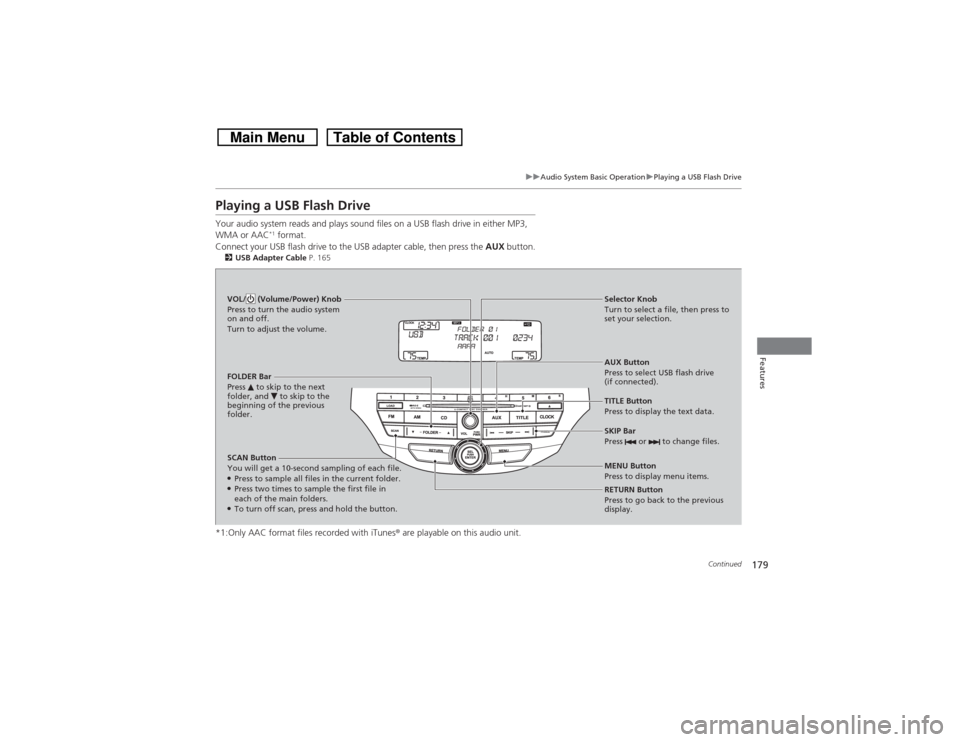
Playing a USB Flash DriveYour audio system reads and plays sound files on a USB flash drive in either MP3,
WMA or AAC
*1 format.
Connect your USB flash drive to the USB adapter cable, then press the AUX button.
2USB Adapter Cable P. 165*1:Only AAC format files recorded with iTunes® are playable on this audio unit.SCAN Button
You will get a 10-second sampling of each file.●Press to sample all files in the current folder.●Press two times to sample the first file in
each of the main folders.●To turn off scan, press and hold the button.RETURN Button
Press to go back to the previous
display. Selector Knob
Turn to select a file, then press to
set your selection.
AUX Button
Press to select USB flash drive
(if connected). VOL/ (Volume/Power) Knob
Press to turn the audio system
on and off.
Turn to adjust the volume.
SKIP Bar
Press or to change files.MENU Button
Press to display menu items. TITLE Button
Press to display the text data. FOLDER Bar
Press to skip to the next
folder, and to skip to the
beginning of the previous
folder.
Page 181 of 573
uuAudio System Basic OperationuPlaying a USB Flash Drive
180Features
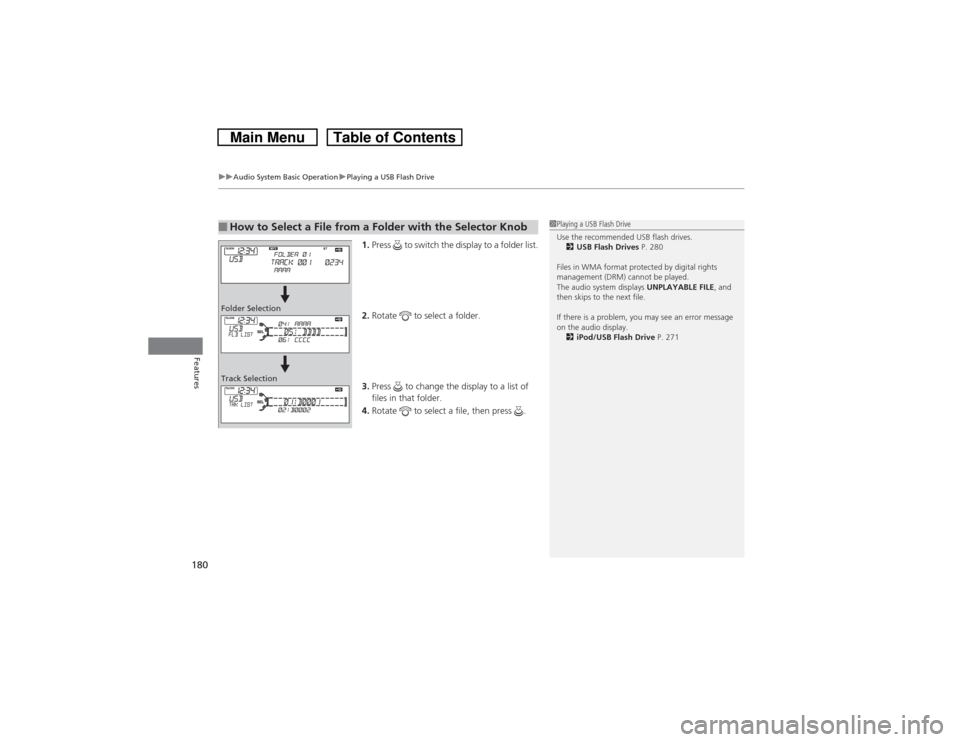
1.Press to switch the display to a folder list.
2.Rotate to select a folder.
3.Press to change the display to a list of
files in that folder.
4.Rotate to select a file, then press .
■How to Select a File from a Folder with the Selector Knob
1Playing a USB Flash Drive
Use the recommended USB flash drives.
2USB Flash Drives P. 280
Files in WMA format protected by digital rights
management (DRM) cannot be played.
The audio system displays UNPLAYABLE FILE, and
then skips to the next file.
If there is a problem, you may see an error message
on the audio display.
2iPod/USB Flash Drive P. 271
Folder Selection
Track Selection
Page 182 of 573
181
uuAudio System Basic OperationuPlaying a USB Flash Drive
Features
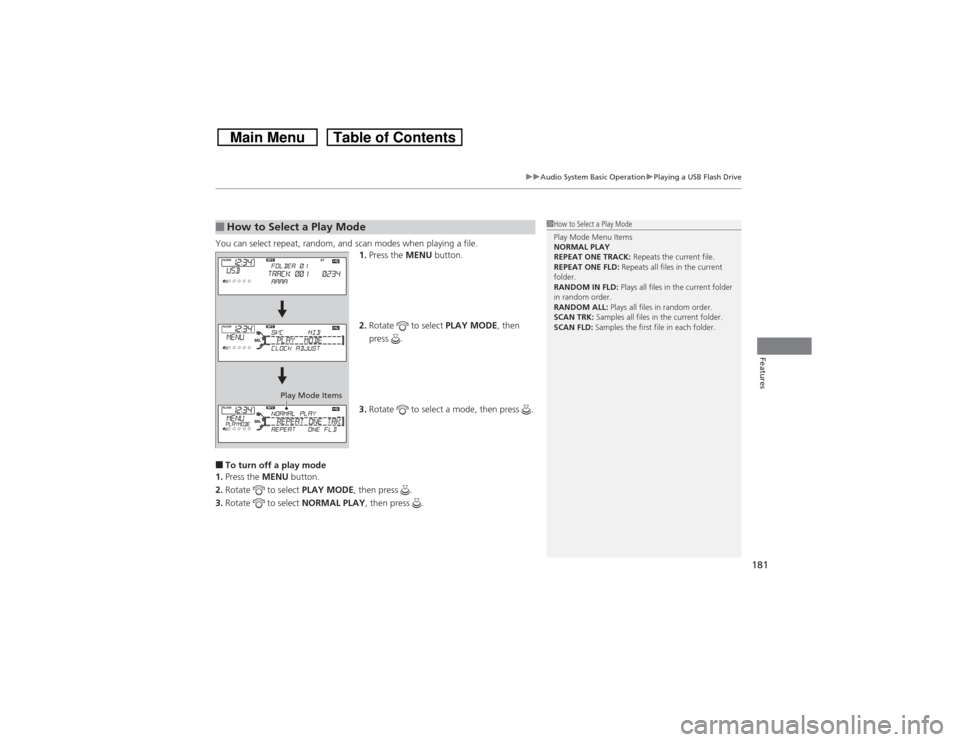
You can select repeat, random, and scan modes when playing a file.
1.Press the MENU button.
2.Rotate to select PLAY MODE, then
press .
3.Rotate to select a mode, then press .■To turn off a play mode
1.Press the MENU button.
2.Rotate to select PLAY MODE, then press .
3.Rotate to select NORMAL PLAY, then press .■How to Select a Play Mode
1How to Select a Play Mode
Play Mode Menu Items
NORMAL PLAY
REPEAT ONE TRACK: Repeats the current file.
REPEAT ONE FLD: Repeats all files in the current
folder.
RANDOM IN FLD: Plays all files in the current folder
in random order.
RANDOM ALL: Plays all files in random order.
SCAN TRK: Samples all files in the current folder.
SCAN FLD: Samples the first file in each folder.
Play Mode Items
Page 190 of 573
Continued
189
uuAudio System Basic OperationuAudio/Information Screen
Features
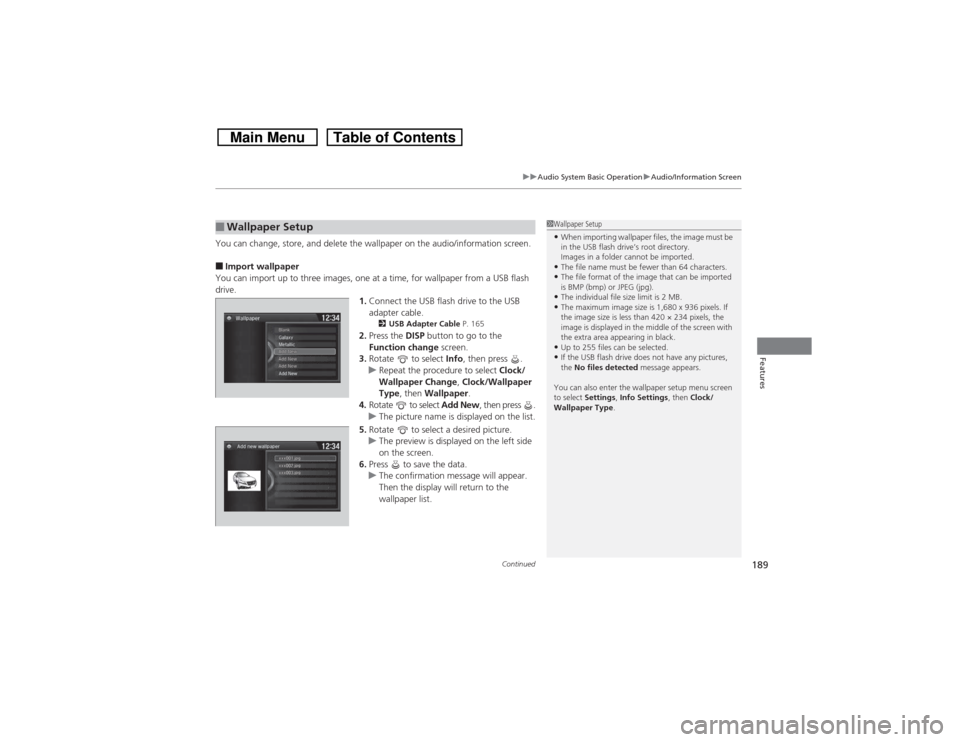
You can change, store, and delete the wallpaper on the audio/information screen.■Import wallpaper
You can import up to three images, one at a time, for wallpaper from a USB flash
drive.
1.Connect the USB flash drive to the USB
adapter cable.
2USB Adapter Cable P. 165
2.Press the DISP button to go to the
Function change screen.
3.Rotate to select Info, then press .
uRepeat the procedure to select Clock/
Wallpaper Change, Clock/Wallpaper
Type, then Wallpaper.
4.Rotate to select Add New, then press .
uThe picture name is displayed on the list.
5.Rotate to select a desired picture.
uThe preview is displayed on the left side
on the screen.
6.Press to save the data.
uThe confirmation message will appear.
Then the display will return to the
wallpaper list.
■Wallpaper Setup
1Wallpaper Setup•When importing wallpaper files, the image must be
in the USB flash drive’s root directory.
Images in a folder cannot be imported.•The file name must be fewer than 64 characters.•The file format of the image that can be imported
is BMP (bmp) or JPEG (jpg).•The individual file size limit is 2 MB.•The maximum image size is 1,680 x 936 pixels. If
the image size is less than 420 × 234 pixels, the
image is displayed in the middle of the screen with
the extra area appearing in black.•Up to 255 files can be selected.•If the USB flash drive does not have any pictures,
the No files detected message appears.
You can also enter the wallpaper setup menu screen
to select Settings, Info Settings, then Clock/
Wallpaper Type.
Page 204 of 573
203
uuAudio System Basic OperationuPlaying an iPod
Continued
Features
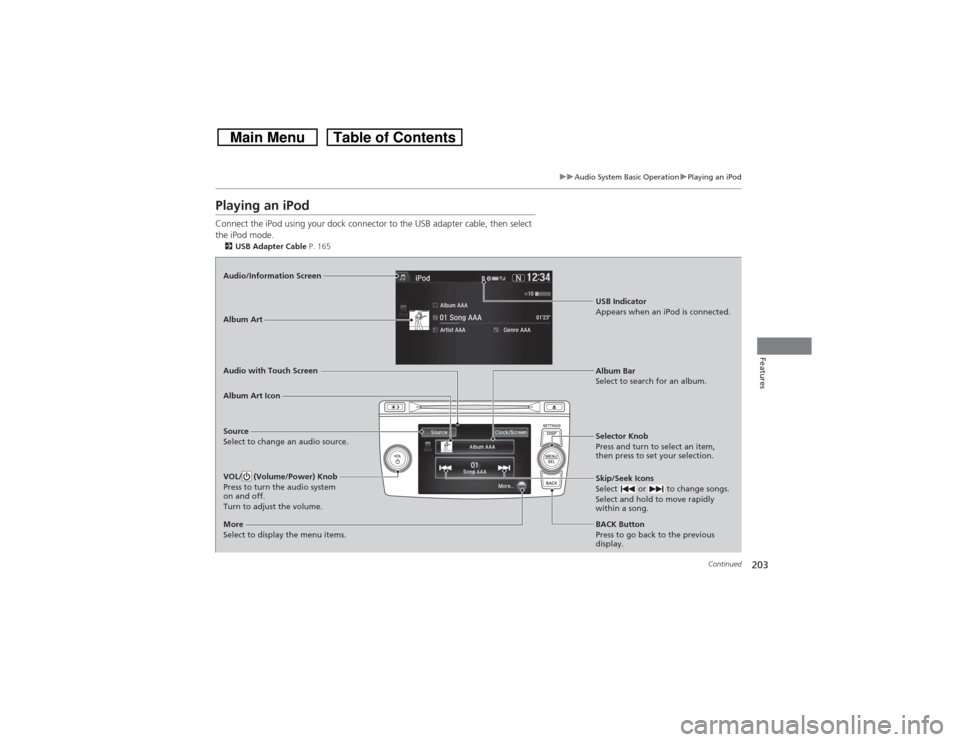
Playing an iPodConnect the iPod using your dock connector to the USB adapter cable, then select
the iPod mode.2USB Adapter Cable P. 165Audio/Information Screen
Audio with Touch Screen
BACK Button
Press to go back to the previous
display. Selector Knob
Press and turn to select an item,
then press to set your selection.VOL/ (Volume/Power) Knob
Press to turn the audio system
on and off.
Turn to adjust the volume.
Skip/Seek Icons
Select or to change songs.
Select and hold to move rapidly
within a song.
More
Select to display the menu items.Album Art Icon
Source
Select to change an audio source.Album Bar
Select to search for an album. Album Art
USB Indicator
Appears when an iPod is connected.
Page 206 of 573
Continued
205
uuAudio System Basic OperationuPlaying an iPod
Features
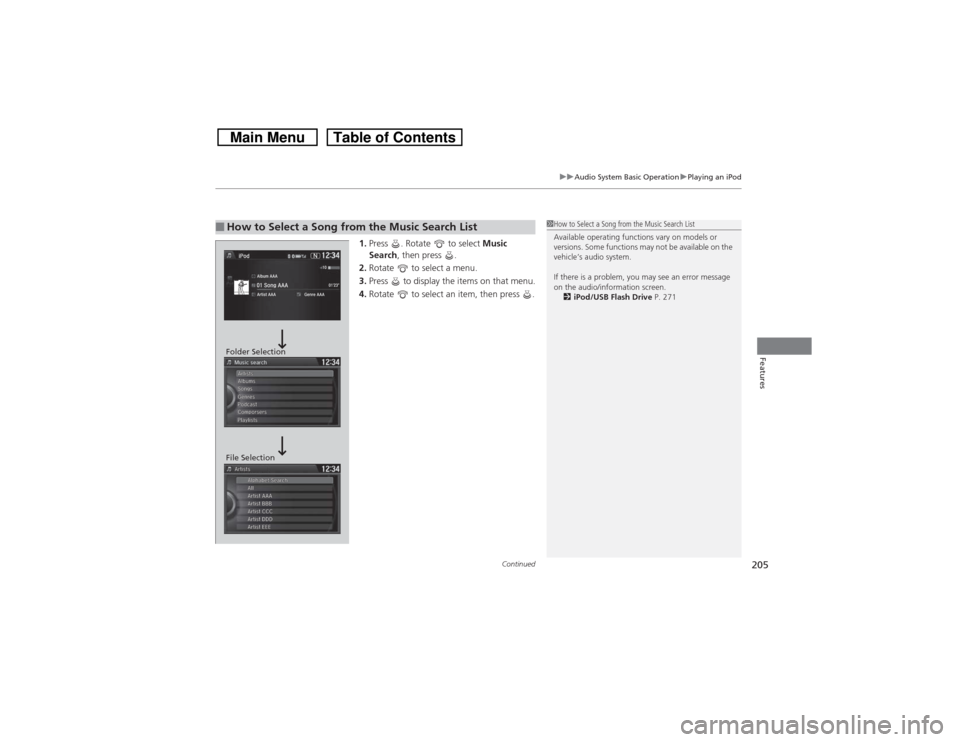
1.Press . Rotate to select Music
Search, then press .
2.Rotate to select a menu.
3.Press to display the items on that menu.
4.Rotate to select an item, then press .
■How to Select a Song from the Music Search List
1How to Select a Song from the Music Search List
Available operating functions vary on models or
versions. Some functions may not be available on the
vehicle’s audio system.
If there is a problem, you may see an error message
on the audio/information screen.
2iPod/USB Flash Drive P. 271
Folder Selection
File Selection
Page 208 of 573
207
uuAudio System Basic OperationuPlaying Internet Radio
Continued
Features
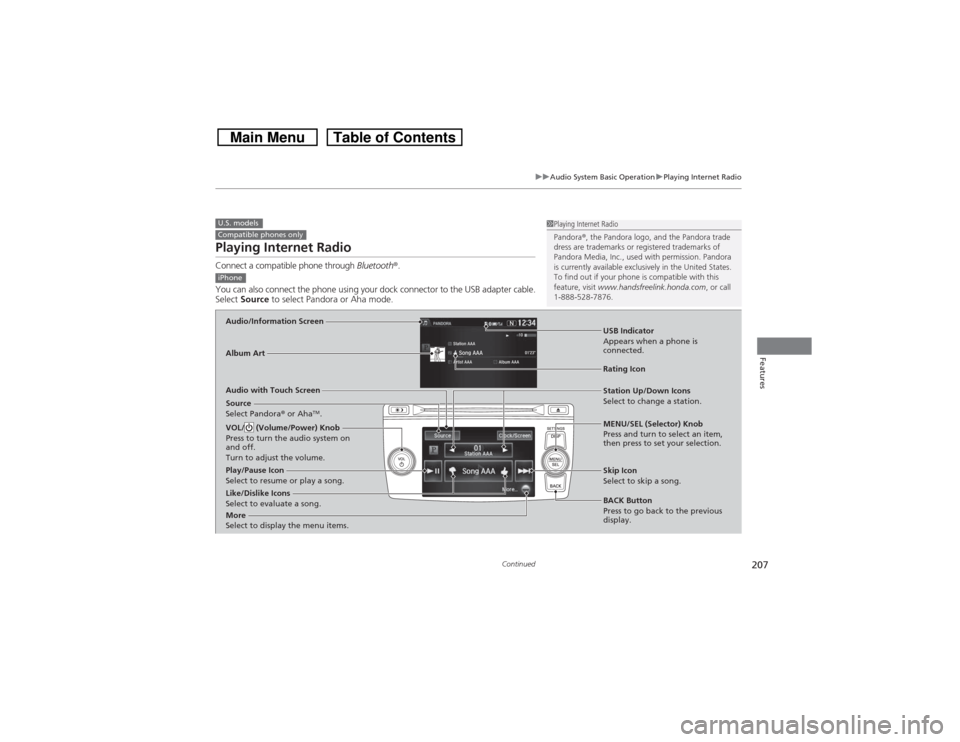
Playing Internet RadioConnect a compatible phone through Bluetooth®.
You can also connect the phone using your dock connector to the USB adapter cable.
Select Source to select Pandora or Aha mode.U.S. modelsCompatible phones only
1Playing Internet Radio
Pandora®, the Pandora logo, and the Pandora trade
dress are trademarks or registered trademarks of
Pandora Media, Inc., used with permission. Pandora
is currently available exclusively in the United States.
To find out if your phone is compatible with this
feature, visit www.handsfreelink.honda.com, or call
1-888-528-7876.
iPhoneAudio/Information ScreenAlbum Art
USB Indicator
Appears when a phone is
connected.Rating Icon
Audio with Touch Screen
BACK Button
Press to go back to the previous
display. MENU/SEL (Selector) Knob
Press and turn to select an item,
then press to set your selection. VOL/ (Volume/Power) Knob
Press to turn the audio system on
and off.
Turn to adjust the volume.
Skip Icon
Select to skip a song.
More
Select to display the menu items.
Station Up/Down Icons
Select to change a station.
Source
Select Pandora® or Aha
TM.
Like/Dislike Icons
Select to evaluate a song. Play/Pause Icon
Select to resume or play a song.
Page 211 of 573
210
uuAudio System Basic OperationuPlaying a USB Flash Drive
Features
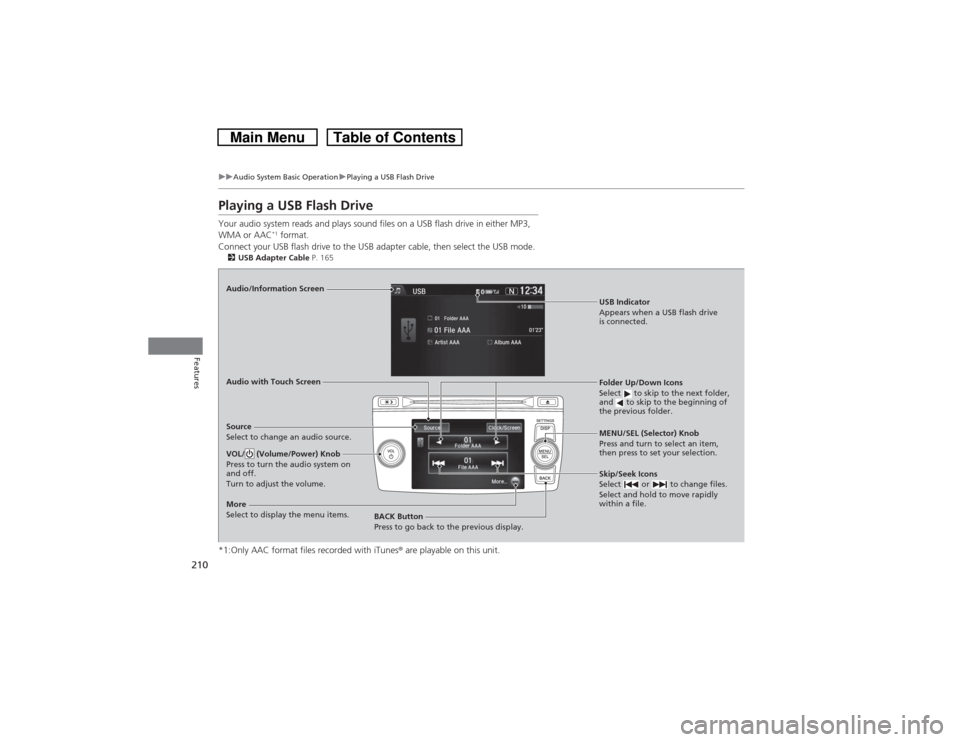
Playing a USB Flash DriveYour audio system reads and plays sound files on a USB flash drive in either MP3,
WMA or AAC
*1 format.
Connect your USB flash drive to the USB adapter cable, then select the USB mode.
2USB Adapter Cable P. 165*1:Only AAC format files recorded with iTunes® are playable on this unit.Audio/Information Screen
Audio with Touch Screen
BACK Button
Press to go back to the previous display.MENU/SEL (Selector) Knob
Press and turn to select an item,
then press to set your selection.VOL/ (Volume/Power) Knob
Press to turn the audio system on
and off.
Turn to adjust the volume.
Skip/Seek Icons
Select or to change files.
Select and hold to move rapidly
within a file.
More
Select to display the menu items.Source
Select to change an audio source.
USB Indicator
Appears when a USB flash drive
is connected.Folder Up/Down Icons
Select to skip to the next folder,
and to skip to the beginning of
the previous folder.