Page 79 of 365
78
uuGauges and Displays uInformation Display
Instrument Panel
Information Display
The information display shows the odome ter, trip meter, engine oil life and
maintenance service item codes, and other gauges.
Press the (Select/Reset) kn ob to change the display.
Shows the total number of miles or kilome ters that your vehicle has accumulated.
■Switching the Display
1Switching the Display
Each time you press the knob, the information
display changes as follows:
Some of the items on the information display also
appear on the i-MID. They also change along with the
information display ch anges while the fuel
consumption is shown.
Instant Fuel Economy,
Average Fuel A, Trip Meter
A, Outside Temperature
Engine Oil Life
Instant Fuel Economy,
Average Fuel B, Trip Meter
B, Outside Temperature
Instant Fuel Economy,
Odometer, Trip Meter A,
Outside Temperature
Instant Fuel Economy,
Range, Trip Meter A,
Outside Temperature
■Odometer
14 CR-V-31T0A6200.book 78 ページ 2014年2月10日 月曜日 午後7時1分
Page 80 of 365

Continued79
uuGauges and Displays uInformation Display
Instrument Panel
Shows the total number of miles or kilomete rs driven since the last reset. Meters A
and B can be used to measure two separate trips.
■Resetting a trip meter
To reset a trip meter, display it, then pr ess and hold the knob. The trip meter is
reset to 0.0.
Shows the estimated average fuel economy of each trip meter in mpg (U.S.) or l/100
km (Canada). The display is updated at set intervals. When a trip meter is reset, the
average fuel economy is also reset.
Shows the remaining oil life and Maintenance Minder
TM.
2 Maintenance MinderTM P. 271
Shows the estimated distance you can travel on the remaining fuel. This distance is
estimated from the fuel economy of your previous trips.
Appears when the fuel fill cap is loose or is not installed.
2Check/Tighten Fuel Cap Message P. 334
■Trip Meter
■Average Fuel Economy
■Engine Oil Life
■Range
■Check Fuel Cap
1Trip Meter
Switch between trip meter A and trip meter B by
pressing the knob.
14 CR-V-31T0A6200.book 79 ページ 2014年2月10日 月曜日 午後7時1分
Page 84 of 365
Continued83
uuGauges and Displays uintelligent Multi-Information Display (i-MID)
Instrument Panel
Shows the remaining oil life and Maintenance MinderTM.
2 Maintenance MinderTM P. 271
Shows the vehicle's traveling direction.
2Compass P. 223
Shows you turn-by-turn driv ing directions to your destination linked with the
navigation system.
2 See the Navigation System Manual
■Engine Oil Life and Maintenance Items
■Compass Direction
■Turn-by-Turn Directions*1Turn-by-Turn Directions*
You can select whether th e turn-by-turn display
comes on or not during the route guidance. 2 Customized Features P. 84
* Not available on all models
14 CR-V-31T0A6200.book 83 ページ 2014年2月10日 月曜日 午後7時1分
Page 88 of 365

87
uuGauges and Displays uintelligent Multi-Information Display (i-MID)
Continued
Instrument Panel
■List of customizable options
*1: Default Setting
*2: See the Navigation System Manual Setup Group Customizable Features
Description Selectable settings
Vehicle
InformationMaintenance infoReset the Maintenance MinderTM.No/Yes
Adjust
Clock
*Selects the 12 hour or 24 hour clock display, and
adjusts the time. 12h*1/
24h
Customize
SettingsDisplay
Setup
Select
WallpaperSelects the full-size analo gue clock or the wallpaper.Clock*1/Image 1/ Image 2/
Image 3
Import
WallpaperImports an image file for a new wallpaper.Three images can be stored.2 Importing wallpapers
from USB P. 90
Delete
WallpaperDeletes an image file for a wallpaper.Image 1/Image 2/Image 3
Trip Meter
Item to DisplaySelects an item to be di splayed along with average
fuel economy.Range*1/ Elapsed time /
Average speed
Welcome
ScreenSelects whether the welcome screen comes on or
not when you turn the ig nition switch to ON (w.On*1/Off
Color ThemeChanges the color of the screen.Blue*1/Red /Amber /Gray
Turn by Turn
Display *, *2Selects whether the turn-b y-turn display comes on
or not during the route guidance.On*1/ Off
Language
SelectionChanges the displayed language.English*1/Francais /Español
* Not available on all models
14 CR-V-31T0A6200.book 87 ページ 2014年2月10日 月曜日 午後7時1分
Page 189 of 365
188
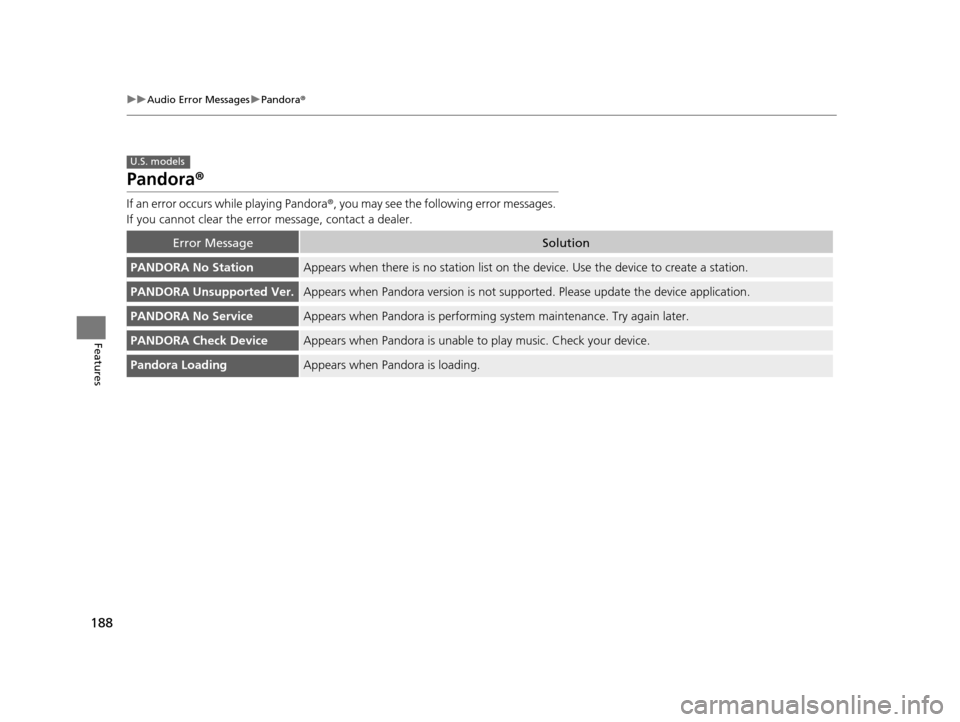
uuAudio Error Messages uPandora ®
Features
Pandora ®
If an error occurs while playing Pandora ®, you may see the following error messages.
If you cannot clear the error message, contact a dealer.
Error MessageSolution
PANDORA No StationAppears when there is no station list on th e device. Use the device to create a station.
PANDORA Unsupported Ver.Appears when Pandora version is not supporte d. Please update the device application.
PANDORA No ServiceAppears when Pandora is performing system maintenance. Try again later.
PANDORA Check DeviceAppears when Pandora is unable to play music. Check your device.
Pandora LoadingAppears when Pandora is loading.
U.S. models
14 CR-V-31T0A6200.book 188 ページ 2014年2月10日 月曜日 午後7時1分
Page 227 of 365

226
Driving
Before Driving
Driving Preparation
Check the following items before you start driving.
• Make sure there are no obstructions on the windows, door mirrors, exterior
lights, or other parts of the vehicle.
u Remove any frost, snow, or ice.
u Remove any snow on the roof, as this can slip down and obstruct your field of
vision while driving. If frozen solid , remove ice once it has softened.
u When removing ice from around the wheels, be sure not to damage the wheel
or wheel components.
• Make sure the hood is securely closed.
u If the hood opens while driving, your front view will be blocked.
• Make sure the tires are in good condition.
u Check air pressures, and check for damage and excessive wear.
2Checking and Maintaining Tires P. 300
•Make sure there are no people or ob jects behind or around the vehicle.
u There are blind spots from the inside.
■Exterior Checks1Exterior Checks
NOTICE
When doors are frozen s hut, use warm water around
the door edges to melt any ice. Do not try to force
them open, as this can damage the rubber trim
around the doors. When done, wipe dry to avoid
further freezing.
Do not pour warm water into the key cylinder.
You will be unable to insert key if the water freezes in
the hole.
Heat from the engine and exhaust can ignite
flammable material s left under the hood, causing a
fire. If you've parked y our vehicle for an extended
period, inspect and remove any debris that may have
collected, such as dried grass and leaves that have
fallen or have been carried in for use as a nest by a
small animal. Also check under the hood for leftover
flammable materials after you or someone else has
performed maintenance on your vehicle.
14 CR-V-31T0A6200.book 226 ページ 2014年2月10日 月曜日 午後7時1分
Page 239 of 365

238
uuOff-Highway Driving Guidelines uAvoiding Trouble
Driving
Avoiding Trouble
• Check Out Your Vehicle before you leave the pavement and make sure that all
scheduled maintenance has been comple ted. Pay special attention to the
condition of the tires, an d check the tire pressures.
• Remember the route you choose presents limits (too steep or bumpy), you have
limits (driving skill and comfort), and your vehicle has limits (traction, stability, and
power). Failing to recognize these limits will likely put you and your passengers in
a hazardous situation.
• Accelerating and Braking should be done slowly and gradually. Trying to start
or stop too fast can cause a loss of traction and you could lose control.
• Avoiding Obstacles and Debris in the road reduces the likelihood of a rollover
or damage to your suspension or other components.
• Driving on Slopes increases your risk of a rollover, particularly if you attempt to
drive across a slope that is too steep. Going straight or down a slope is usually the
safest. If you can’t clearly see all conditions or obstacles on a slope, walk it before
you drive it. If there is any doubt whethe r you can safely pass, don’t try it. Find
another route. If you get stuck when clim bing, do not try to turn around. Back
down slowly following the same route you took up the hill.
• Crossing a Stream - Avoid driving through deep water. If you encounter water
in your route (a small stream or large pu ddle, for example), evaluate it carefully
before going ahead. Make sure it is shallow, flowing slowly, and has firm ground
underneath. If you are not sure of the depth or the ground, turn around and find
another route. Driving through deep water can also damage your vehicle. The
water can get into the transmission and differential, diluting the lubricant and
causing an eventual failure. It can also wash the grease out of the wheel bearings.
• If You Get Stuck, carefully go in the direction that you think will get you
unstuck. Do not spin the tires as this will only make things worse and could
damage the transmission. If you are unable to free yourself, your vehicle will need
to be towed. Front and rear tow hooks are provided for this purpose.
14 CR-V-31T0A6200.book 238 ページ 2014年2月10日 月曜日 午後7時1分
Page 256 of 365

255
uuWhen Driving uTire Pressure Monitoring System (TPMS) - Required Federal Explanation
Driving
Please note that the TPMS is not a substitute for proper tire
maintenance, and it is the driver ’s responsibility to maintain
correct tire pressure, even if un der-inflation has not reached the
level to trigger illumination of th e TPMS low tire pressure telltale.
Your vehicle has also been equi pped with a TPMS malfunction
indicator to indicate when the system is not operating properly.
The TPMS malfunction indicator is combined with the low tire
pressure telltale. When the syst em detects a malfunction, the
telltale will flash fo r approximately one minute and then remain
continuously illumina ted. This sequence will continue upon
subsequent vehicle start-ups as long as the malfunction exists.
When the malfunction indicator is illuminated, the system may
not be able to detect or signal low tire pressure as intended.
TPMS malfunctions may occur for a variety of reasons, including
the installation of replacement or alternate tires or wheels on the
vehicle that prevent the TPMS from functioning properly.
Always check the TPMS malfunction telltale after replacing one or
more tires or wheels on your vehicle to ensure that the
replacement or alternate tires and wheels allow the TPMS to
continue to function properly.
14 CR-V-31T0A6200.book 255 ページ 2014年2月10日 月曜日 午後7時1分