Page 217 of 253
216
uu Error Messages u Pandora ®
Troubleshooting
Pandora ®
Error MessageCauseSolution
The connected USB device has
a problem.
See Owner’s Manual
The overcurrent protection
feature of the system stops
supplying power to USB because
an incompatible device is
connected.An incompatible device is connec ted. Disconnect the device, and
turn the audio system off and on. Do not reconnect the device that
caused the error.
Pandora App version is not
supportedThe Pandora version is not
supported.The Pandora version is not supported. Update to the latest version.
Unable to save bookmark.The bookmark operation is
failed.The commanded operation failed. Try again later.
Pandora system maintenance.The Pandora server is in
maintenance.The Pandora server is in maintenance. Try again later.
14 CIVIC 2D 4D IMA NAVI-31TR38200.book 216 ページ 2014年3月21日 金曜日 午後3時20分
Page 219 of 253
218
uu Error Messages u iPod/USB Flash Drive
Troubleshooting
iPod/USB Flash Drive
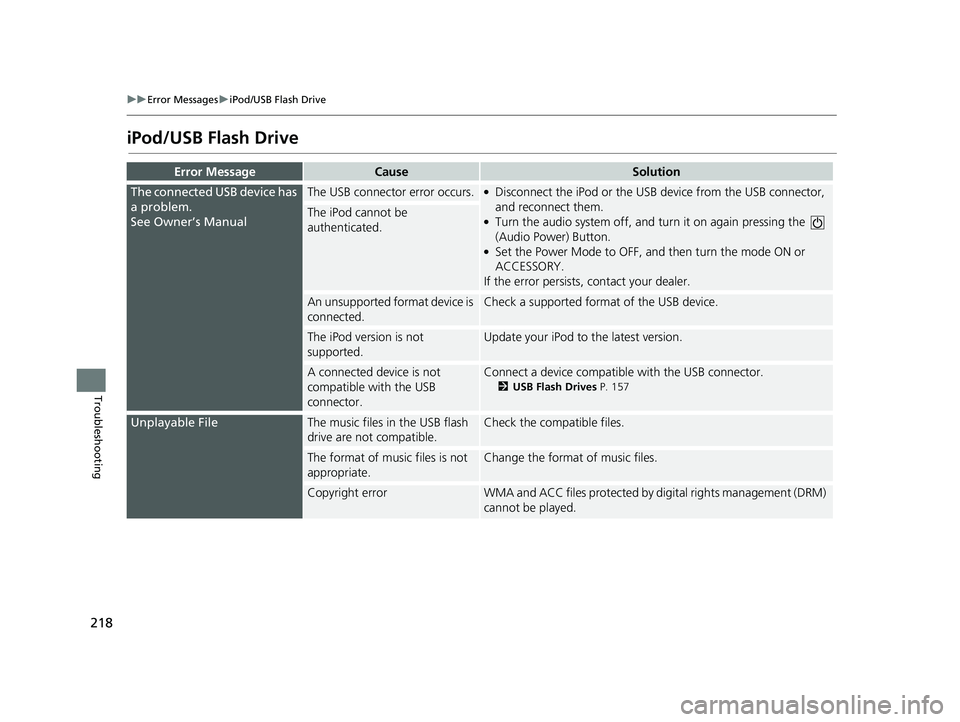
Error MessageCauseSolution
The connected USB device has
a problem.
See Owner’s Manual
The USB connector error occurs.●Disconnect the iPod or the USB device from the USB connector,
and reconnect them.
●Turn the audio system off, and turn it on again pressing the
(Audio Power) Button.●Set the Power Mode to OFF, and then turn the mode ON or
ACCESSORY.
If the error persists, contact your dealer.
The iPod cannot be
authenticated.
An unsupported format device is
connected.Check a supported format of the USB device.
The iPod version is not
supported.Update your iPod to the latest version.
A connected device is not
compatible with the USB
connector.Connect a device compatible with the USB connector.
2USB Flash Drives P. 157
Unplayable FileThe music files in the USB flash
drive are not compatible.Check the compatible files.
The format of music files is not
appropriate.Change the format of music files.
Copyright errorWMA and ACC files protected by di gital rights management (DRM)
cannot be played.
14 CIVIC 2D 4D IMA NAVI-31TR38200.book 218 ページ 2014年3月21日 金曜日 午後3時20分
Page 221 of 253
220
uu Error Messages u Smartphone Connection
Troubleshooting
Smartphone Connection
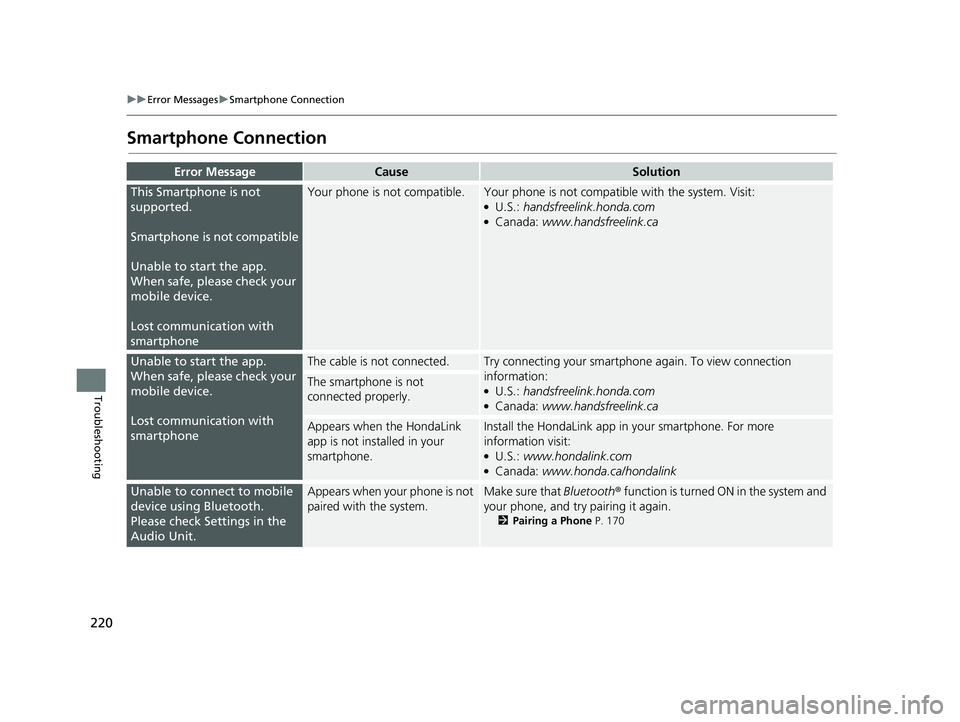
Error MessageCauseSolution
This Smartphone is not
supported.
Smartphone is not compatible
Unable to start the app.
Wh
en safe, please check your
mobile device.
Lost communication with
smartphone
Your phone is not compatible.Your phone is not compatib le with the system. Visit:●U.S.: handsfreelink.honda.com●Canada: www.handsfreelink.ca
Unable to start the app.
When safe, please check your
mobile device.
Lost communication with
smartphone
The cable is not connected.Try connecting your smartphone again. To view connection
information:
●U.S.: handsfreelink.honda.com●Canada: www.handsfreelink.ca
The smartphone is not
connected properly.
Appears when the HondaLink
app is not installed in your
smartphone.Install the HondaLin k app in your smartphone. For more
information visit:
●U.S.: www.hondalink.com●Canada: www.honda.ca/hondalink
Unable to connect to mobile
device using Bluetooth.
Please check Settings in the
Audio Unit.Appears when your phone is not
paired with the system.Make sure that Bluetooth ® function is turned ON in the system and
your phone, and try pairing it again.
2 Pairing a Phone P. 170
14 CIVIC 2D 4D IMA NAVI-31TR38200.book 220 ページ 2014年3月21日 金曜日 午後3時20分
Page 223 of 253
222
Reference Information
System Initialization
The navigation system must be initialized if
power to the navigation system is
interrupted for any reason (e.g., the battery
was disconnected).
Entering the Security Code
Find the navigation system’s security code
and serial number label in your Owner’s
Manual kit. Do not store the label in your
vehicle. If you lose the label, you must first
retrieve the serial number, and then obtain
the code. You can find out about your serial
number and security code from a dealer.
1.Set the power mode to ON, and turn on
the audio system.
2.Press and hold the audio system power
button for more than two seconds.
u The syst
em is reac tivated when the
system’s control unit recognizes that
the system is in your vehicle. If the
control unit fails to recognize, Enter
Code appears on the navigation
screen.
3. Enter
the security code.
u If you
do not enter the security code
correctly after 10 tries, leave the
system for one hour before trying
again, or visit a dealer to have the
system reset.
In the U.S., you can register the security
co
de on Honda Owners
( owners.honda.com ). To find information
on how to retrieve the serial number and
obtain the code, visit
radio-navicode.honda.com .
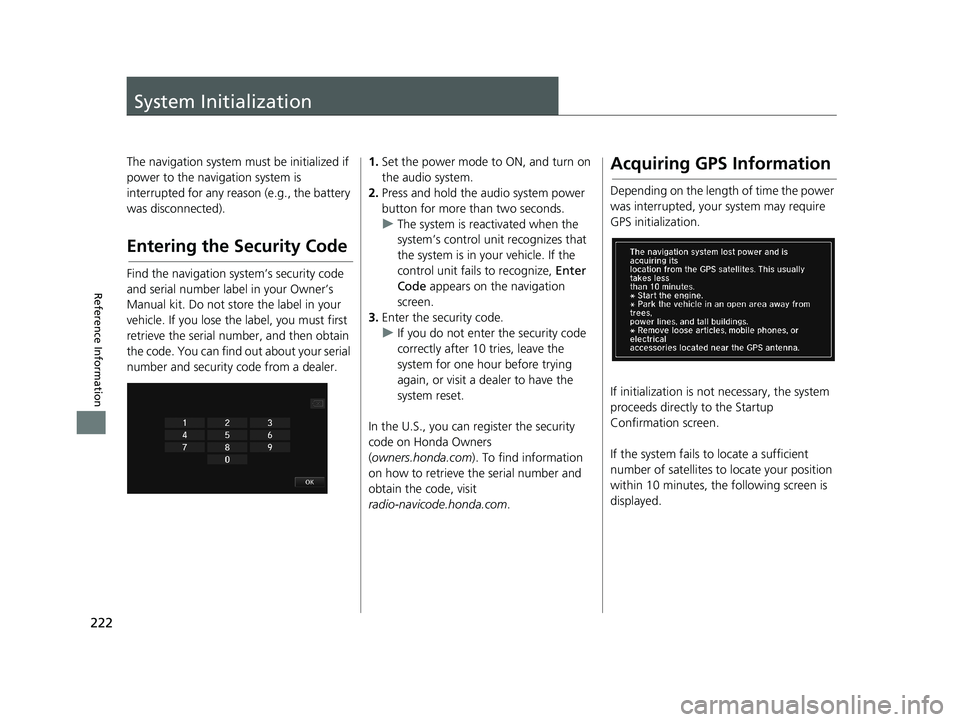
Acquiring GPS Information
Depending on the length of time the power
was interrupted, your system may require
GPS initialization.
If initialization is not necessary, the system
proceeds directly to the Startup
Confirmation screen.
If the system fails to locate
a sufficient
number of satellites to locate your position
within 10 minutes, th e following screen is
displayed.
14 CIVIC 2D 4D IMA NAVI-31TR38200.book 222 ページ 2014年3月21日 金曜日 午後3時20分
Page 225 of 253

224
Reference Information
System Limitations
GPS System
The signals received from the GPS satellites
are extremely weak (less than a millionth of
the strength of a local FM station) and
require an unobstructed view of the sky.
The GPS antenna is located in the
dashboard. The signal reception can easily
be interrupted or interfered with by the
following:
• Metallic window tint on the front or side
windows
• Cell phones, PDAs, or other electronic
devices docked in a cradle or lying loose
on the dashboard
• Remote starters or “hidden” vehicle
tracking systems mounted near the
navigation unit
• Audio electronic devices mounted near
the navigation unit
• Trees, tall buildings, freeway overpasses,
tunnels, or overhead electrical power
wires
The GPS is operated by the U.S. Department
of Defense. For security reasons, there are
certain inaccuracies built into the GPS for
which the navigation system must
constantly compensate. This can cause occasional positioning errors of up to
several hundred feet.
Address Calculation
The destination icon shows only the
approximate location of a destination
address. This occurs if the number of
possible addresses is different from the
number of actual addresses on a block. For
example, the address 1425 on a 1400 block
with 100 possible addresses (because it is
followed by the 1500 block) will be shown a
quarter of the way down the block by the
system. If there are only 25 actual addresses
on the block, the actual location of address
1425 would be at the end of the block.
Database
The digitized map database reflects
conditions as they existed at various points
in time before production. Accordingly,
your database may contain inaccurate or
incomplete data or information due to the
passage of time, road construction,
changing conditions, or other causes.
For example, some places/landmarks may
be missing when you search the database
because the name was misspelled, the place
was improperly categorized, or a place/
landmark is not yet in the database. This is
also true for police stations, hospitals, and
other public institutions. Do not rely on the
navigation system if you need law
enforcement or hospital services. Always
check with local information sources.
14 CIVIC 2D 4D IMA NAVI-31TR38200.book 224 ページ 2014年3月21日 金曜日 午後3時20分
Page 230 of 253
■Address and Place Entry
Screens
229
uu
Customer Assistance u Shipping a Vehicle to the U.S. Mainland
Reference Information
Entering a destination address or place/
landmark on another island may result in a
screen caution message. This is because
there are no ferry routes between islands in
the database.
Shipping a Vehicle to the
U.S. Mainland
To receive XM audio, you must call XM and
set up an account at (800) 852-9696.
14 CIVIC 2D 4D IMA NAVI-31TR38200.book 229 ページ 2014年3月21日 金曜日 午後3時20分
Page 234 of 253
233
Voice Commands
Voice Commands.................................. 234
Global Commands ............................... 234
Voice Portal Commands ....................... 234Navigation Commands ......................... 234
Information commands ........................ 236
Climate Control Commands ................. 237Audio Commands ................................ 237
Cellular Phone Commands ................... 240
On-Screen Commands ......................... 240Spelling Assistance ............................... 240
List of Categories.................................. 244
14 CIVIC 2D 4D IMA NAVI-31TR38200.book 233 ページ 2014年3月21日 金曜日 午後3時20分
Page 235 of 253

234
Voice Commands
Voice Commands
Global Commands
The system accepts these commands on any
screen.Voice Help *
Display navigation (equivalent
to Navi )
Display map
Display menu (equiv
alent to MENU)
Display information (equiva
lent to Info)
Display phone screen (equi
valent to
Phone )
Display audio screen (equi
valent to
Audio )
Display clock
Display wallpaper
Display Voice Portal
Display home (equiv
alent to HOME)
Display setting (equivale
nt to Settings )
Trip computer
Back (equi
valent to BACK)
What is today’s date?
What time is it?
* This command displays available commands for cur
rent screen.
Voice Portal Commands
The system accepts these commands on the
Voice Portal screen.
Phone Call
Music Search
Voice Help
Address
Place Name *
More Destination Methods
* This command is av ailable only when
you select English for the
system
language on U.S. models. In other case,
Find Nearest POI Category is displayed.
Navigation Commands
The system accepts these commands on a
map/guidance screen.
■Map Display Commands
Display current location
(shows current
latitude, longitude, and elevation)
Display/Hide
(specify icon type):
ATM
CNG station *
1
gas station
restaurant post office
grocery store
lodging (
hotel, motel)
parking garage
parking lot
school
hospital
freeway exit information
highway exit information
traffic
*
2
traffic speeds *2
traffic icons*2
Go home 1
Go home 2
Register the current location (s
tores
current location in the Address Book)
*1: This command is available only on Compressed
Natural Gas (CNG)
models.
*2: These commands are available only on U.S. models
.
14 CIVIC 2D 4D IMA NAVI-31TR38200.book 234 ページ 2014年3月21日 金曜日 午後3時20分


