Page 156 of 253
155
uu Playing Pandora ® u Audio Screen Control
Audio
Audio Screen Control
1 Audio Screen Control
The following functions ar e not available on this
navigation system:
•Buy from iTunes
•Email the Current Station•Check Song Detail
You can skip the song or select only a
predetermined num ber of times in an hour. If
exceeded, an error message is displayed and the
operation is not performed.
For details, please visit and check
www.pandora.com.
If you cannot operate Pandora ® through the audio
system, it may be streaming through Bluetooth®
Audio. Make sure Pand ora mode on your audio
system is selected.
H HOME u Audio u SOURCE u Pandora icon
Control the audio screen through the navigation system.
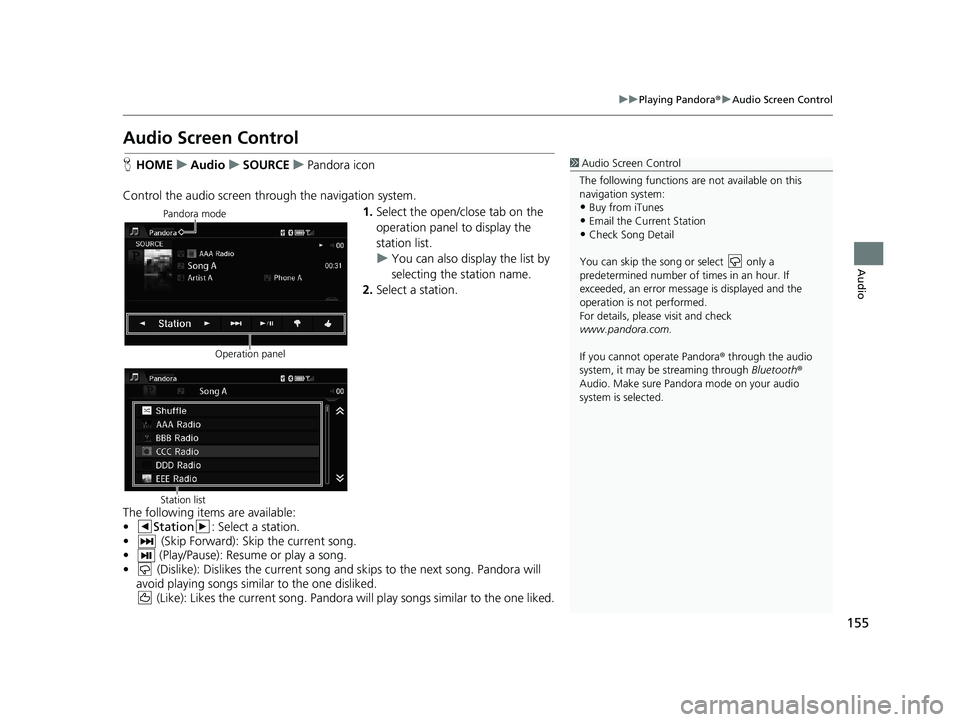
Pandora mode
Operation panel1.Select the open/close tab on the
operation panel to display the
station list.
u Yo
u can also display the list by
selecting the station name.
2. Select a
station.
Station listThe following items are available:
• Station : Select a station.
• (Skip Forward): Skip t he current song.
• (Play/Pause): Resume or play a song.
• (Dislike): Dislikes the current song and skips to the next song. Pandora will
avoid playing songs similar to the one disliked.
(Like): Likes the current song. Pandora will play songs similar to the one liked.
14 CIVIC 2D 4D IMA NAVI-31TR38200.book 155 ページ 2014年3月21日 金曜日 午後3時20分
Page 157 of 253
156
uu Playing Pandora ® u Audio Menu
Audio
Audio Menu
H HOME u Audio (in Pandora ® mode) u MENU
Select an item.
The following items are available:
• Bookma
rk: Bookmarks the current song or artist. Select Bookmark Track or
Bookmark Artist .
• Station L
ist: Displays the list of all your stored stations. Select a station from the
list to play. You can also select Shuffle to play all stations randomly.
• New Station : Crea
te a new station from genre, current track, or artist. Select
Genre , Current Track, or Current Artist .
• Ch
ange Source: Changes the audio source mode.
•Sound : Displa
ys the sound preferences screen.
2Adjusting the Sound P. 132
14 CIVIC 2D 4D IMA NAVI-31TR38200.book 156 ページ 2014年3月21日 金曜日 午後3時20分
Page 158 of 253
157
Audio
Playing a USB Flash Drive
■Connecting a USB Flash Drive1
Connecting a USB Flash Drive
•We recommend connecting the USB flash drive
with the USB adapter cable.
•Do not connect the USB flash drive using a hub.
•Do not use a device such as a card reader or hard
disk drive, as the device or your tracks may be
damaged.
•We recommend backing up yo ur data before using
the device in your vehicle.
•Up to two USB devices can be connected.
1. Open the USB cover.
2. Install the U
SB flash drive to the USB connector.
■USB Flash Drives
Use a recommended USB flash drive of 256 MB or higher.
Some digital audio players may not be compatible.
Some USB flash drives (e.g., a device
with securit
y lockout) may not work.
Some software files may not allow for aud
io play or text data display.
Some versions of MP3, WMA, or AAC formats may be unsupported.
14 CIVIC 2D 4D IMA NAVI-31TR38200.book 157 ページ 2014年3月21日 金曜日 午後3時20分
Page 159 of 253
158
uu Playing a USB Flash Drive u Selecting USB Mode
Audio
Selecting USB Mode
1 Playing a USB Flash Drive
“USB play ”
You can control the USB flash drive using voice
commands. 2 USB Commands P. 238
A visual guide helps you operate the audio system.
2 System Controls P. 4
2 Basic Operation P. 9
In some cases, the name of the artist, album, or track
may not appear correctly.
Tracks on the USB flash drive are played in their
stored order. This order may be different from the
order displayed on your PC or device.
The audio system displays Unplayable File, and then
skips to the next track when the following tracks are
played:
•Tracks in WMA or AAC form at protected by digital
rights management (DRM)
•Tracks in unsupported format
If there is a problem, you may see an error message
on the display. 2 Error Messages P. 214
1.Select Audio on the HOME screen.
2. Select SOURCE .
3. Select
the USB icon.
u The USB flash driv
e automatically begins playing.
14 CIVIC 2D 4D IMA NAVI-31TR38200.book 158 ページ 2014年3月21日 金曜日 午後3時20分
Page 160 of 253
159
uu Playing a USB Flash Drive u Audio Screen Control
Audio
Audio Screen Control
H HOME u Audio u SOURCE u USB icon
Control the audio system thro ugh t
he navigation screen.
USB mode
Operation panel1.Select the open/close tab on the
operation panel to display the
track list.
u Yo
u can also display the list by
selecting the track name.
2. Select a
track.
u Select the t
ab to change songs
in the track list.
Track list
The following items are available:
• Folder : Select the previous or next folder.
•Track : Select the previous or next track. Sel ect and hold to move rapidly
within a track.
14 CIVIC 2D 4D IMA NAVI-31TR38200.book 159 ページ 2014年3月21日 金曜日 午後3時20分
Page 161 of 253

160
uu Playing a USB Flash Drive u Audio Menu
Audio
Audio Menu
1 Audio Menu
To stop repeat- or random-play, select the current
play mode again.H HOME u Audio (in USB mode) u MENU
Select an item.
The following items are available:
• Scan : Scans
for track and plays a 10-second sample. Select Cancel to stop
scanning and play th e current selection.
– Scan Folders :
Scans the first track in each folder.
– Sca
n Tracks : Scans all tracks on the USB flash drive (or in the selected folder).
• Mu
sic Search : Selects a track from the Music Search list. You can switch the
display contents of the list by using the tab.
• Ch
ange Source: Changes the audio source mode.
•R
andom/Repeat :
– Re
peat Folder : Repeats all tracks in the current folder.
– Re
peat Track : Repeats the current track.
– Ra
ndom All Tracks : Plays all tracks on the USB flash drive in random order.
– Ra
ndom in Folder : Plays all tracks in the curr ent folder in random order.
• Sound : Displa
ys the sound preferences screen.
2Adjusting the Sound P. 132
•Switch USB Device : Change the USB device to play when two USB devices are
connected.
14 CIVIC 2D 4D IMA NAVI-31TR38200.book 160 ページ 2014年3月21日 金曜日 午後3時20分
Page 162 of 253
161
Audio
Playing Bluetooth ® Audio
1Playing Bluetooth ® Audio
“ BTA play ”, “Bluetooth audio play ”
You can control the Bluetooth Audio using voice
commands. 2 Bluetooth ® Audio Commands P. 239
Not all Bluetooth -enabled phones with streaming
audio capabilities are compatible. To check if your
phone is compatible:
•U.S.: Visit handsfreelink.honda.com.
•Canada: Visit www.handsfreelink.ca .
In some states, it may be il legal to perform some data
device functions while driving.
In some cases, the name of the artist, album, or track
may not appear correctly.
Only one phone can be used with HFL at a time.
When there are more than two paired phones in the
vehicle, the first paired phone the system finds is
automatically linked.
If more than one phone is paired to the HFL system,
there may be a delay before the system begins to
play.
Your audio system allows you to listen to music tracks stored on your Bluetooth-
compatible phone.
This function is available
when the phone is linked to the vehicle’s Bluetooth®
HandsFreeLink ® (HFL) system.
2Bluetooth ® H andsFreeLink® P. 167
Selecting Bluetooth ® Audio Mode
1. Make sure that your phone is on, paired, and linked to HFL.
2 Pairing a Phone P. 170
2. Select Audio on the HOME screen.
3. Select
SOURCE.
4. Select
the Bluetooth icon.
5.Select
the track with Group or Track , or open the tab and select
from the track list.
uThe cur
rent track name and artist name are displayed.
Check the following if the phone is not recognized:
• Another HFL-compatible phone, which is not compatible for Bl
uetooth Audio, is
already connected.
14 CIVIC 2D 4D IMA NAVI-31TR38200.book 161 ページ 2014年3月21日 金曜日 午後3時20分
Page 163 of 253
162
uu Playing Bluetooth ® Audio u Switching to HFL Mode
Audio
Switching to HFL Mode
1 Switching to HFL Mode
You can also select Answer or Hang Up on the
screen to receive or end a call. (Pick-Up) button
(Hang-Up/Back) button
1. If you receive a call when
Bluetooth Audio is playing, press
the
(Pick-Up) button on the
steering wheel to answer the call.
2 Bluetooth® Han dsFreeLink®
P. 168
2. Press the (Hang-Up/Back)
button to end the call, and
Bluetooth® Audio is resumed.
14 CIVIC 2D 4D IMA NAVI-31TR38200.book 162 ページ 2014年3月21日 金曜日 午後3時20分


