Page 115 of 469
114
uuLocking and Unlocking the Doors uLocking/Unlocking the Doors from the Inside
Controls
Locking/Unlocking the Doors from the Inside
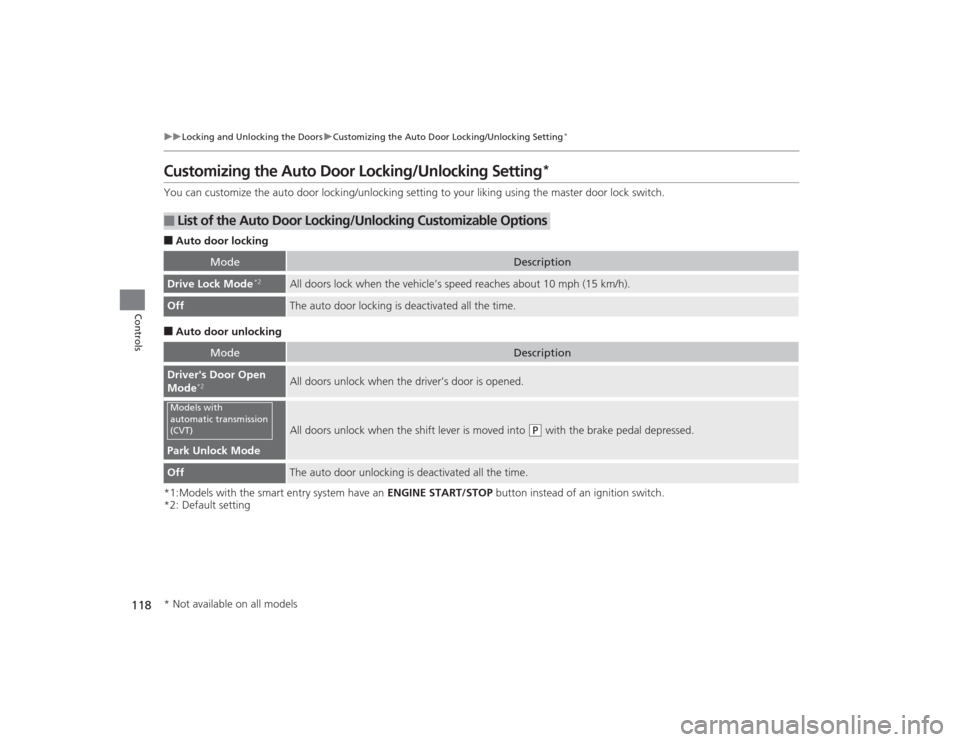
■Locking a door
Push the lock tab forward.■Unlocking a door
Pull the lock tab rearward.
■
Using the Lock Tab
1 Using the Lock Tab
When you lock the door using the lock tab on the
driver's door, all the other doors lock at the same
time.
When you unlock the door using the lock tab on the
driver's door, only the driver's door will unlock.Models with remote transmitter
To Unlock Lock TabTo Lock
Page 116 of 469
Continued
115
uuLocking and Unlocking the Doors uLocking/Unlocking the Doors from the Inside
Controls
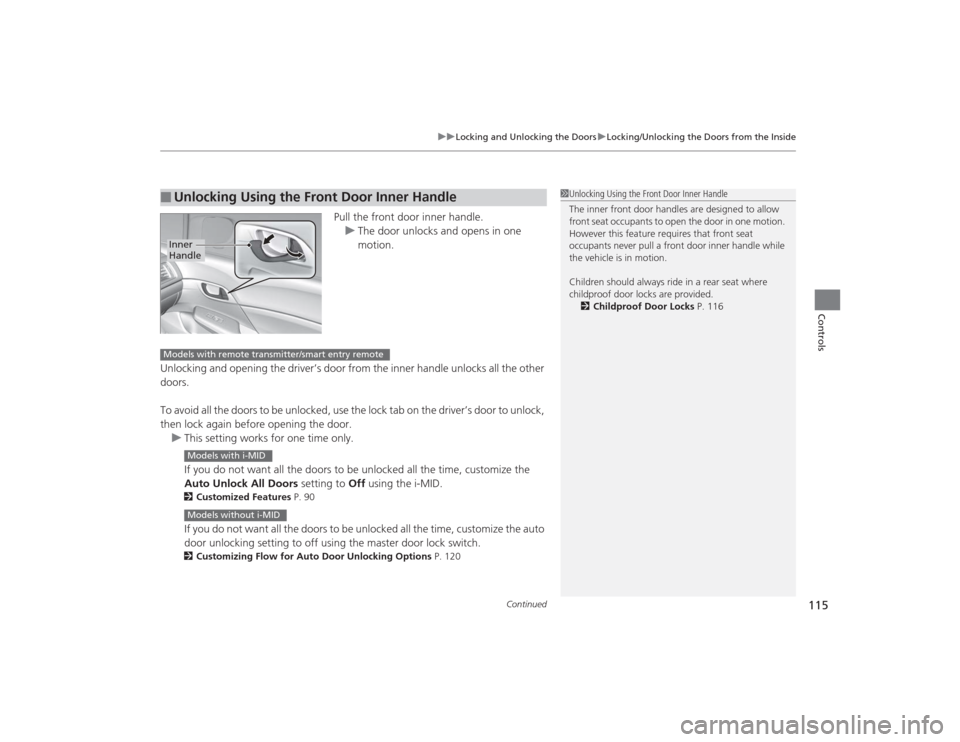
Pull the front door inner handle.
u The door unlocks and opens in one
motion.
Unlocking and opening the driver’s door from the inner handle unlocks all the other
doors.
To avoid all the doors to be unlocked, use the lock tab on the driver’s door to unlock,
then lock again before opening the door. u This setting works for one time only.
If you do not want all the doors to be unlocked all the time, customize the
Auto Unlock All Doors setting to Off using the i-MID.
2Customized Features P. 90If you do not want all the doors to be unlocked all the time, customize the auto
door unlocking setting to off using the master door lock switch.2Customizing Flow for Auto Door Unlocking Options P. 120
■
Unlocking Using the Front Door Inner Handle
1Unlocking Using the Front Door Inner Handle
The inner front door handles are designed to allow
front seat occupants to open the door in one motion.
However this feature requires that front seat
occupants never pull a front door inner handle while
the vehicle is in motion.
Children should always ride in a rear seat where
childproof door locks are provided.
2 Childproof Door Locks P. 116
Inner
HandleModels with remote transmitter/smart entry remote
Models with i-MIDModels without i-MID
Page 117 of 469
uuLocking and Unlocking the Doors uChildproof Door Locks
116Controls
Press the master door lock switch in as shown
to lock or unlock all doors.
Childproof Door LocksThe childproof door locks prevent the rear doors from being opened from the inside
regardless of the position of the lock tab.
Slide the lever in the rear door to the lock
position, and close the door.
■When opening the door
Open the door using the outside door handle.
■
Using the Master Door Lock Switch
*
1 Using the Master Door Lock Switch
*
When you lock/unlock the driver's door using the
master lock switch, all the other doors lock/unlock at
the same time.
To UnlockMaster Door
Lock Switch
To Lock
■
Setting the Childproof Door Locks
1Childproof Door Locks
To open the door from the inside when the
childproof door lock is on, put the lock tab in the
unlock position, lower the rear window, put your
hand out of the window, and pull the outside door
handle.
Lock
Unlock
* Not available on all models
Page 118 of 469
117
uuLocking and Unlocking the Doors uAuto Door Locking/Unlocking
*
Controls
Auto Door Locking/Unlocking
*
Your vehicle locks and unlocks all doors automatically when a certain condition is
met.■Drive lock mode
All doors lock when the vehicle’s speed reaches about 10 mph (15 km/h).■Driver’s door open mode
All doors unlock when the driver’s door is opened.■
Auto Door Locking
■
Auto Door Unlocking
1 Auto Door Locking/Unlocking
*
You can turn off or change to another auto door
locking/unlocking setting using the master door lock
switch.
2 Customizing the Auto Door Locking/
Unlocking Setting
* P. 118
You can turn off or change to another auto door
locking/unlocking setting using the i-MID. 2 Customized Features P. 90
Models without i-MIDModels with i-MID
* Not available on all models
Page 119 of 469
118
uuLocking and Unlocking the Doors uCustomizing the Auto Door Locking/Unlocking Setting
*
Controls
Customizing the Auto Door Locking/Unlocking Setting
*
You can customize the auto door locking/unlocking setting to your liking using the master door lock switch.■Auto door locking■Auto door unlocking
*1:Models with the smart entry system have an ENGINE START/STOP button instead of an ignition switch.
*2: Default setting■
List of the Auto Door Lockin g/Unlocking Customizable Options
Mode
Description
Drive Lock Mode
*2
All doors lock when the vehicle’s speed reaches about 10 mph (15 km/h).
Off
The auto door locking is deactivated all the time.
Mode
Description
Driver's Door Open
Mode
*2
All doors unlock when the driver’s door is opened.
Park Unlock Mode
All doors unlock when the shift lever is moved into
(P
with the brake pedal depressed.
Off
The auto door unlocking is deactivated all the time.
Models with
automatic transmission
(CVT)* Not available on all models
Page 120 of 469
119
uuLocking and Unlocking the Doors uCustomizing the Auto Door Locking/Unlocking Setting
*
Continued
Controls
*1:Models with the smart entry system have an ENGINE START/STOP button instead of an ignition switch.
*2: Default setting■
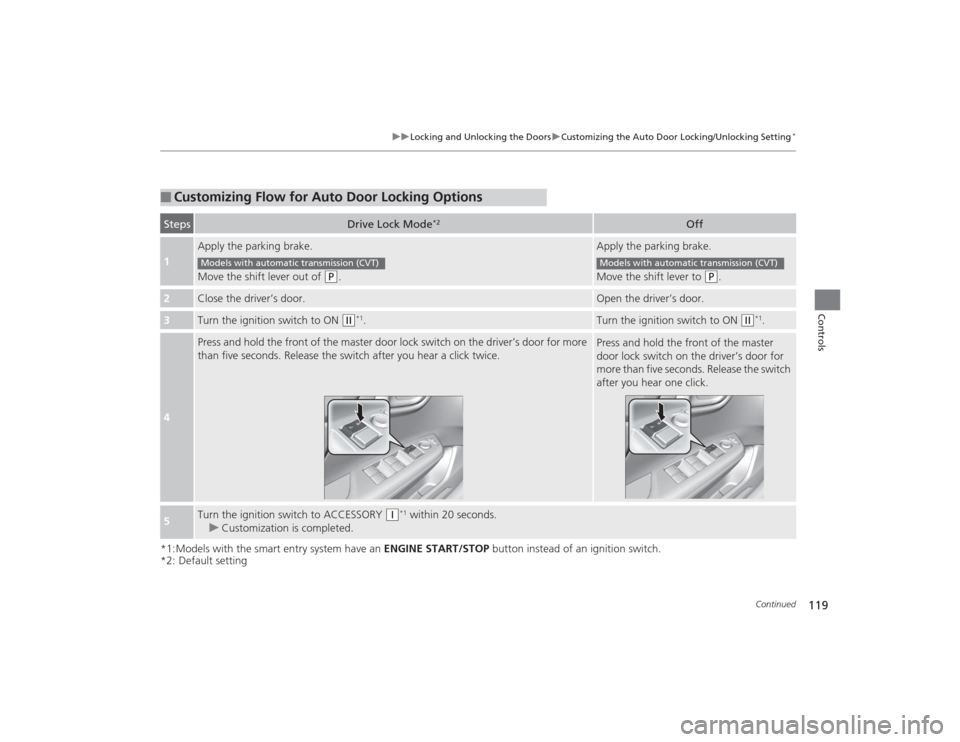
Customizing Flow for Auto Door Locking OptionsSteps
Drive Lock Mode
*2
Off
1
Apply the parking brake.
Move the shift lever out of
(P
.
Apply the parking brake.
Move the shift lever to
(P
.
2
Close the driver’s door.
Open the driver’s door.
3
Turn the ignition switch to ON
(w
*1.
Turn the ignition switch to ON
(w
*1.
4
Press and hold the front of the master door lock switch on the driver’s door for more
than five seconds. Release the switch after you hear a click twice.
Press and hold the front of the master
door lock switch on the driver’s door for
more than five seconds. Release the switch
after you hear one click.
5
Turn the ignition switch to ACCESSORY
(q
*1 within 20 seconds.
u Customization is completed.
Models with automatic transmission (CVT)
Models with automatic transmission (CVT)
Page 121 of 469
120
uuLocking and Unlocking the Doors uCustomizing the Auto Door Locking/Unlocking Setting
*
Controls
*1:Models with the smart entry system have an ENGINE START/STOP button instead of an ignition switch.
*2: Default setting■
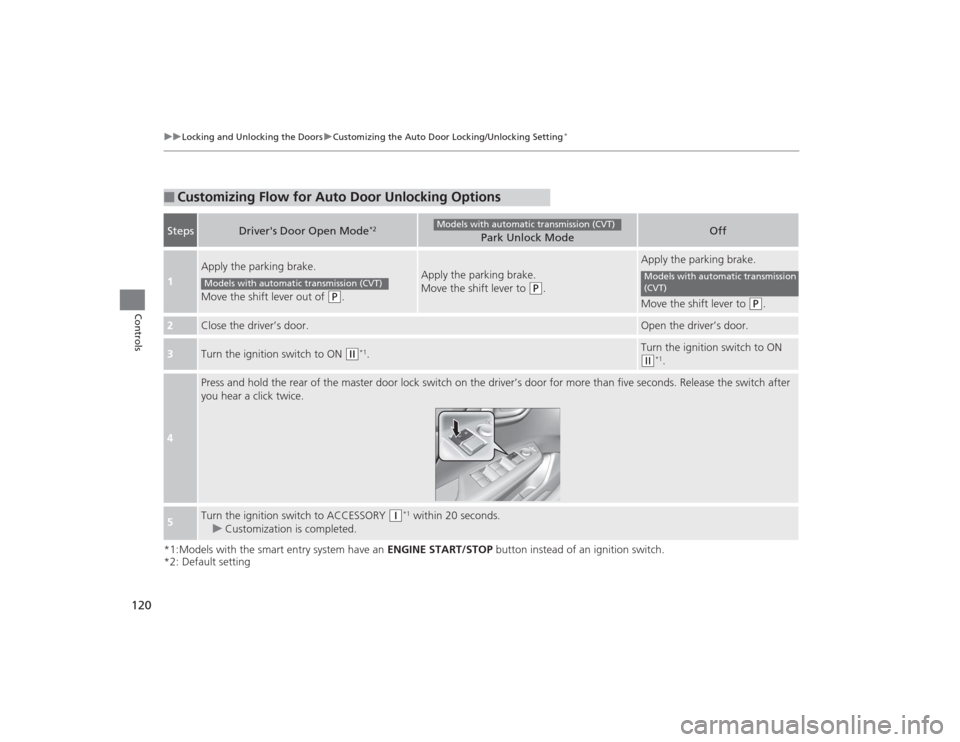
Customizing Flow for Auto Door Unlocking OptionsSteps
Driver's Door Open Mode
*2
Park Unlock Mode
Off
1
Apply the parking brake.
Move the shift lever out of
(P
.
Apply the parking brake.
Move the shift lever to
(P
.
Apply the parking brake.
Move the shift lever to
(P
.
2
Close the driver’s door.
Open the driver’s door.
3
Turn the ignition switch to ON
(w
*1.
Turn the ignition switch to ON (w
*1.
4
Press and hold the rear of the master door lock switch on the driver’s door for more than five seconds. Release the switch after
you hear a click twice.
5
Turn the ignition switch to ACCESSORY
(q
*1 within 20 seconds.
u Customization is completed.
Models with automatic transmission (CVT)
Models with automatic transmission (CVT)
Models with automatic transmission
(CVT)
Page 123 of 469
uuOpening and Closing the Trunk uUsing the Trunk Release Button
*
122Controls
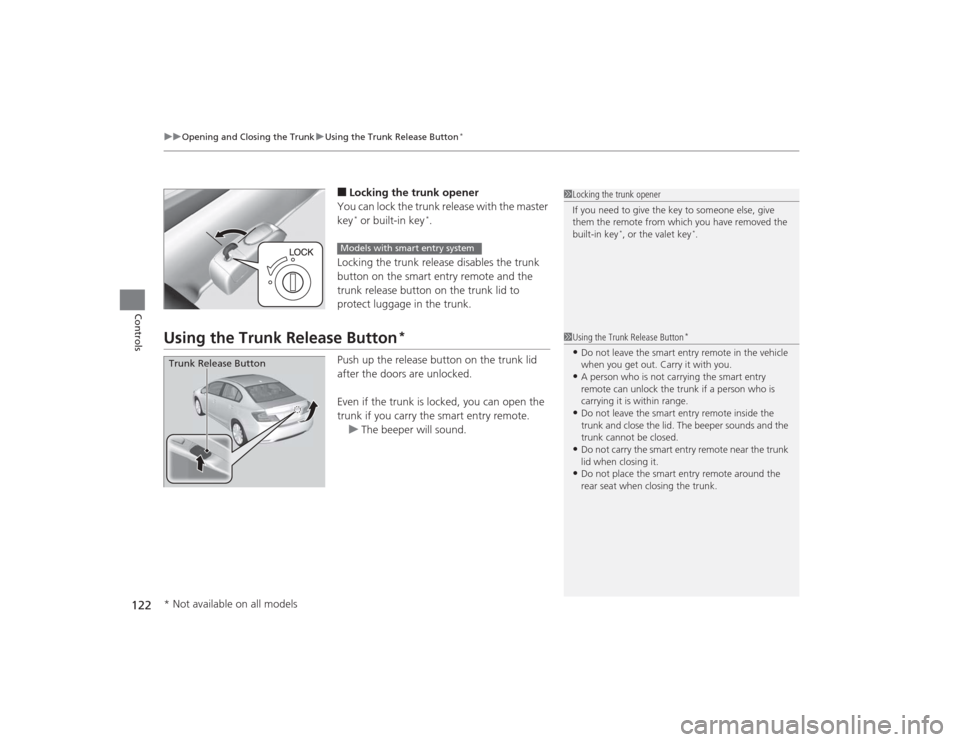
■Locking the trunk opener
You can lock the trunk release with the master
key* or built-in key
*.
Locking the trunk release disables the trunk
button on the smart entry remote and the
trunk release button on the trunk lid to
protect luggage in the trunk.
Using the Trunk Release Button
*
Push up the release button on the trunk lid
after the doors are unlocked.
Even if the trunk is locked, you can open the
trunk if you carry the smart entry remote. u The beeper will sound.
1Locking the trunk opener
If you need to give the key to someone else, give
them the remote from which you have removed the
built-in key
*, or the valet key
*.
Models with smart entry system
1Using the Trunk Release Button
*
•Do not leave the smart entry remote in the vehicle
when you get out. Carry it with you.•A person who is not carrying the smart entry
remote can unlock the trunk if a person who is
carrying it is within range.•Do not leave the smart entry remote inside the
trunk and close the lid. The beeper sounds and the
trunk cannot be closed.•Do not carry the smart entry remote near the trunk
lid when closing it.•Do not place the smart entry remote around the
rear seat when closing the trunk.
Trunk Release Button* Not available on all models