Page 173 of 469
172
uuAudio System uUSB Adapter Cable
*
Features
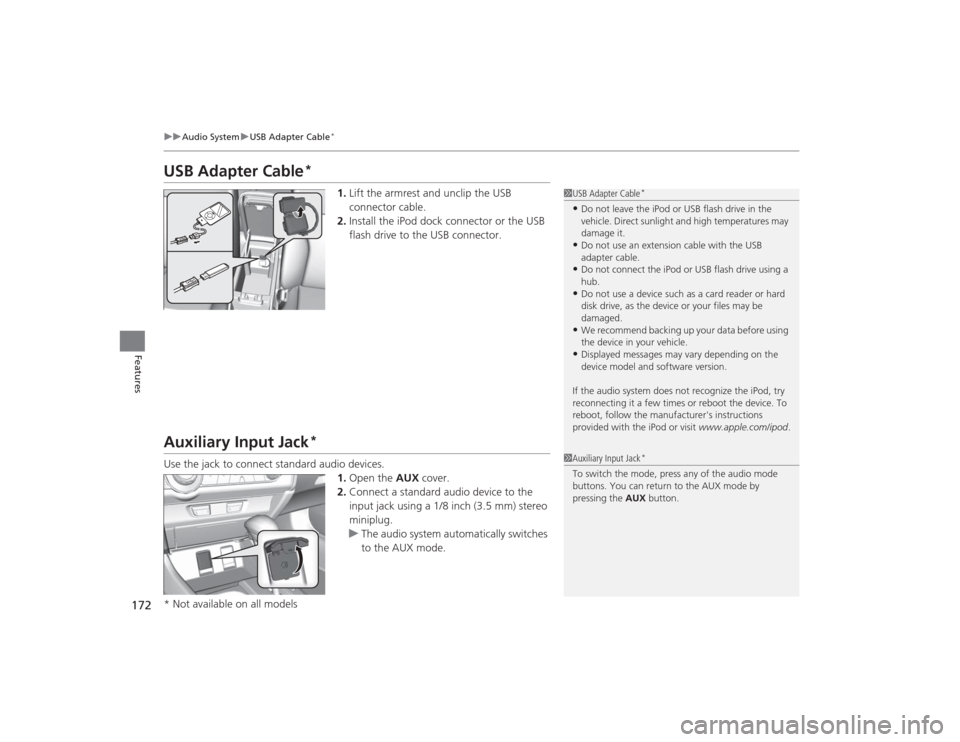
USB Adapter Cable
*
1. Lift the armrest and unclip the USB
connector cable.
2. Install the iPod dock connector or the USB
flash drive to the USB connector.
Auxiliary Input Jack
*
Use the jack to connect standard audio devices.
1.Open the AUX cover.
2. Connect a standard audio device to the
input jack using a 1/8 inch (3.5 mm) stereo
miniplug.
u The audio system automatically switches
to the AUX mode.
1USB Adapter Cable
*
•Do not leave the iPod or USB flash drive in the
vehicle. Direct sunlight and high temperatures may
damage it.•Do not use an extension cable with the USB
adapter cable.•Do not connect the iPod or USB flash drive using a
hub.•Do not use a device such as a card reader or hard
disk drive, as the device or your files may be
damaged.•We recommend backing up your data before using
the device in your vehicle.•Displayed messages may vary depending on the
device model and software version.
If the audio system does not recognize the iPod, try
reconnecting it a few times or reboot the device. To
reboot, follow the manufacturer's instructions
provided with the iPod or visit www.apple.com/ipod.
1Auxiliary Input Jack
*
To switch the mode, press any of the audio mode
buttons. You can return to the AUX mode by
pressing the AUX button.
* Not available on all models
Page 175 of 469
174
uuAudio System uAudio Remote Controls
*
Features
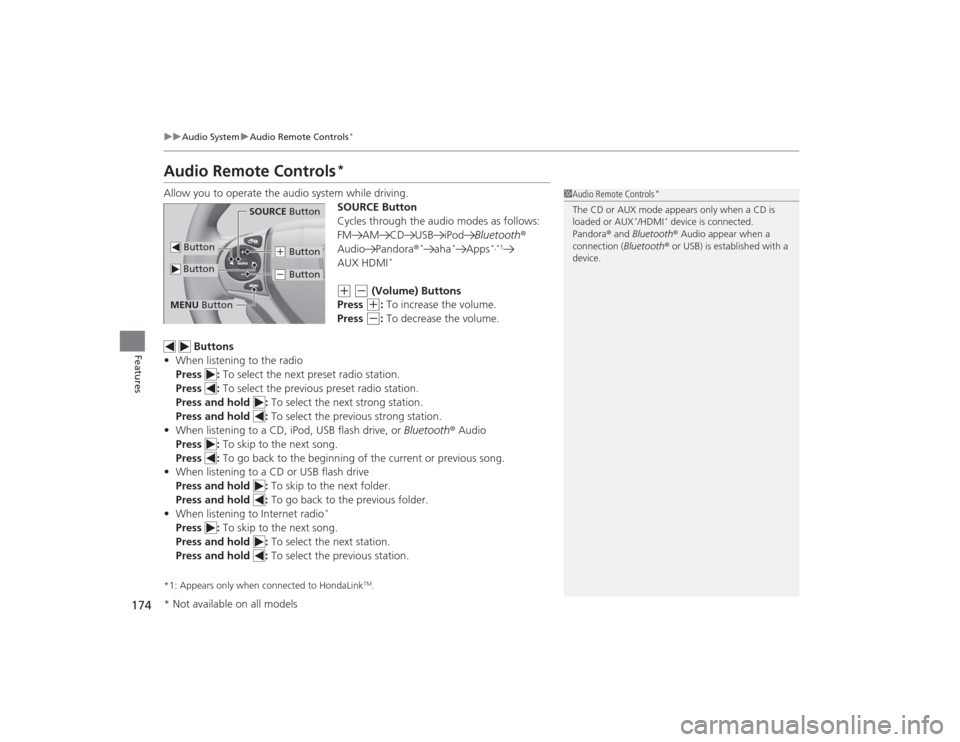
Audio Remote Controls
*
Allow you to operate the audio system while driving.
SOURCE Button
Cycles through the audio modes as follows:
FM AM CD USB iPodBluetooth®
Audio Pandora ®
*
aha
*
Apps
*,*1
AUX HDMI
*
(+
(-
(Volume) Buttons
Press (+
: To increase the volume.
Press
(-
: To decrease the volume.
Buttons
• When listening to the radio
Press : To select the next preset radio station.
Press : To select the previous preset radio station.
Press and hold : To select the next strong station.
Press and hold : To select the previous strong station.
• When listening to a CD, iPod, USB flash drive, or Bluetooth® Audio
Press : To skip to the next song.
Press : To go back to the beginning of the current or previous song.
• When listening to a CD or USB flash drive
Press and hold : To skip to the next folder.
Press and hold : To go back to the previous folder.
• When listening to Internet radio
*
Press : To skip to the next song.
Press and hold : To select the next station.
Press and hold : To select the previous station.*1: Appears only when connected to HondaLink
TM.
1Audio Remote Controls
*
The CD or AUX mode appears only when a CD is
loaded or AUX
*/HDMI
* device is connected.
Pandora ® and Bluetooth ® Audio appear when a
connection (Bluetooth ® or USB) is established with a
device.
Button
SOURCE Button
Button
(+ Button(- Button
MENU Button* Not available on all models
Page 176 of 469
175
uuAudio System uAudio Remote Controls
*
Features
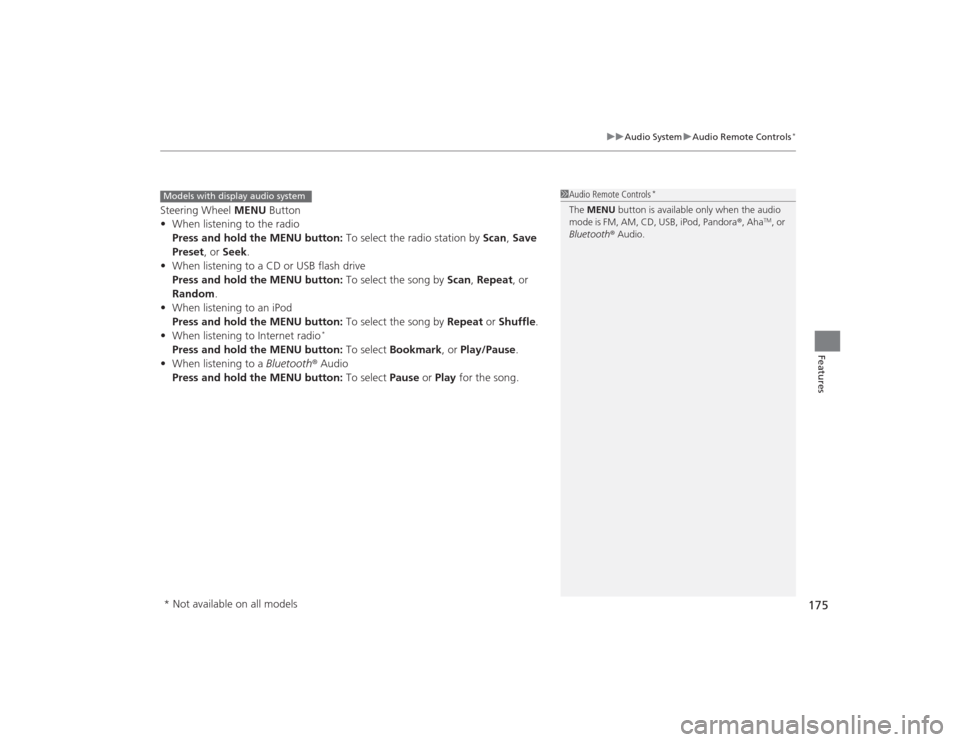
Steering Wheel MENU Button
• When listening to the radio
Press and hold the MENU button: To select the radio station by Scan, Save
Preset, or Seek.
• When listening to a CD or USB flash drive
Press and hold the MENU button: To select the song by Scan, Repeat , or
Random .
• When listening to an iPod
Press and hold the MENU button: To select the song by Repeat or Shuffle .
• When listening to Internet radio
*
Press and hold the MENU button: To select Bookmark , or Play/Pause .
• When listening to a Bluetooth® Audio
Press and hold the MENU button: To select Pause or Play for the song.
1Audio Remote Controls
*
The MENU button is available only when the audio
mode is FM, AM, CD, USB, iPod, Pandora ®, Aha
TM, or
Bluetooth ® Audio.
Models with display audio system* Not available on all models
Page 188 of 469
187
uuAudio System Basic Operation uPlaying an iPod
Continued
Features
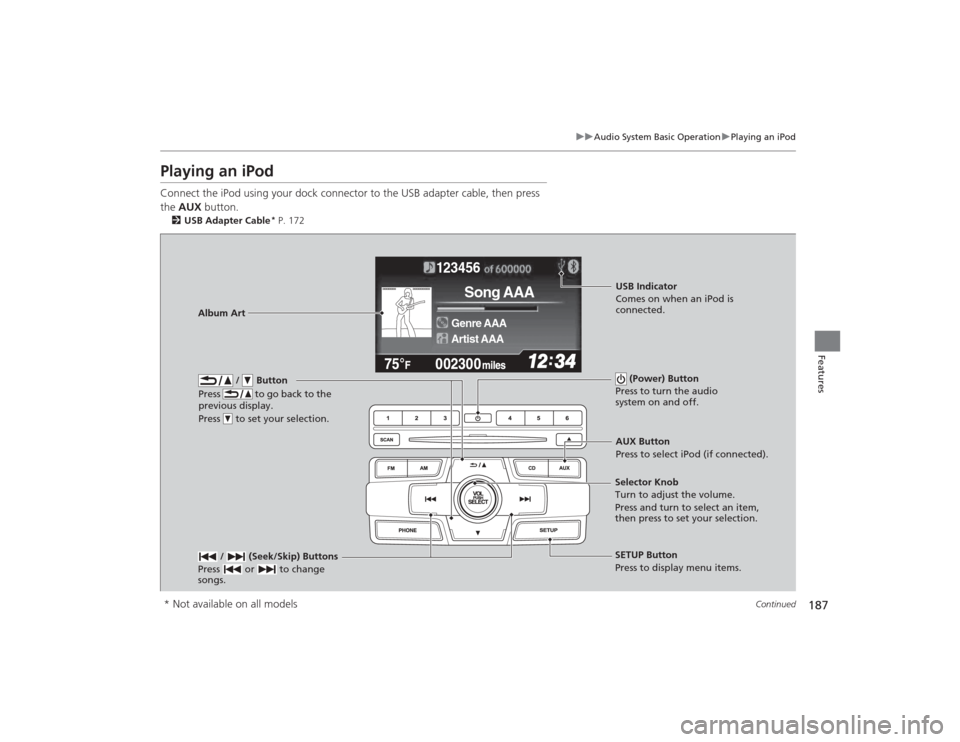
Playing an iPodConnect the iPod using your dock connector to the USB adapter cable, then press
the AUX button.2USB Adapter Cable
* P. 172
123456
Genre AAA
Song AAA
Artist AAA
/ Button
Press to go back to the
previous display.
Press to set your selection.
(Power) Button
Press to turn the audio
system on and off.
/ (Seek/Skip) Buttons
Press or to change
songs.
SETUP Button
Press to display menu items.
Selector Knob
Turn to adjust the volume.
Press and turn to select an item,
then press to set your selection.AUX Button
Press to select iPod (if connected).
Album Art
USB Indicator
Comes on when an iPod is
connected.
* Not available on all models
Page 189 of 469
uuAudio System Basic Operation uPlaying an iPod
188Features
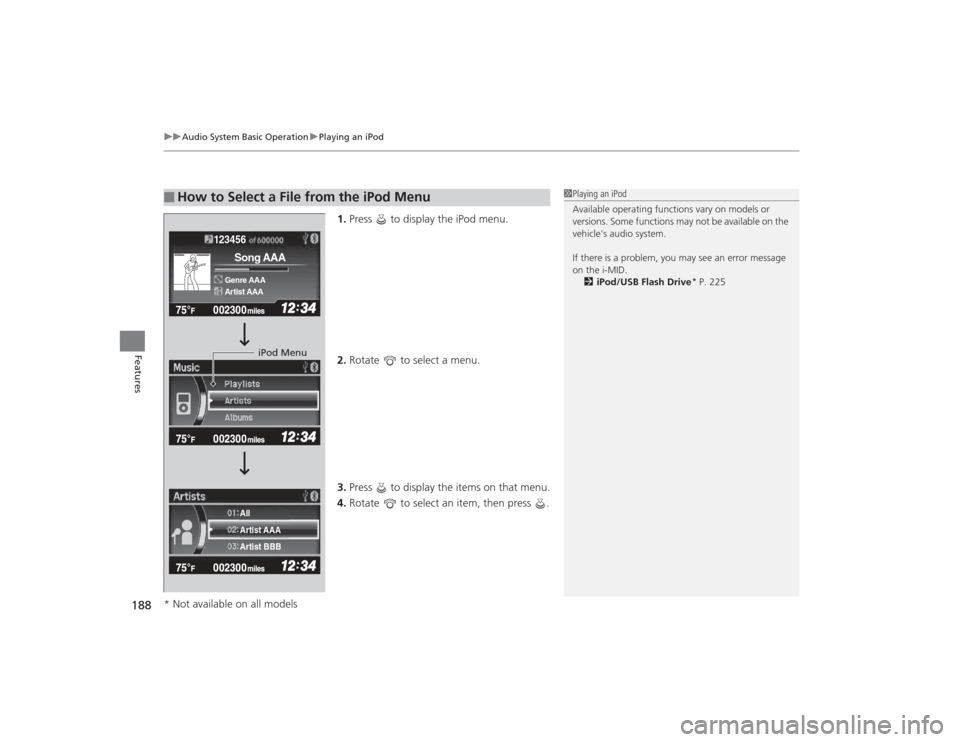
1. Press to display the iPod menu.
2. Rotate to select a menu.
3. Press to display the items on that menu.
4. Rotate to select an item, then press .
■
How to Select a File from the iPod Menu
1Playing an iPod
Available operating functions vary on models or
versions. Some functions may not be available on the
vehicle's audio system.
If there is a problem, you may see an error message
on the i-MID.
2 iPod/USB Flash Drive
* P. 225
123456Genre AAASong AAAArtist AAA
Artist AAA
Artist BBB All
iPod Menu
* Not available on all models
Page 191 of 469
190
uuAudio System Basic Operation uPlaying Internet Radio
Features
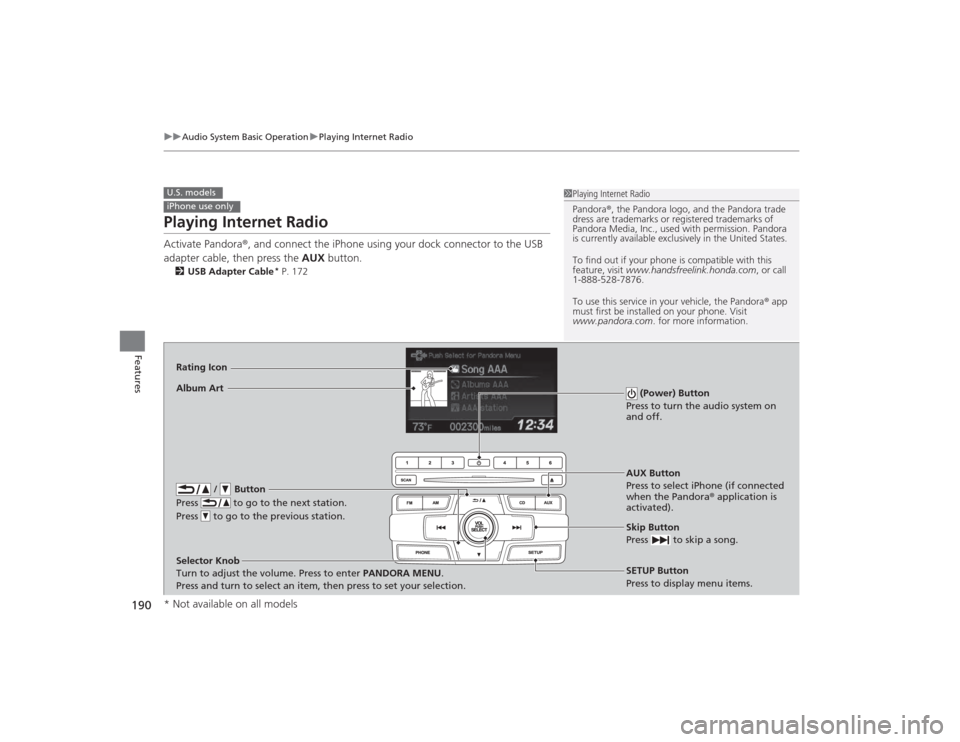
Playing Internet RadioActivate Pandora ®, and connect the iPhone using your dock connector to the USB
adapter cable, then press the AUX button.2USB Adapter Cable
* P. 172
U.S. modelsiPhone use only
1Playing Internet Radio
Pandora ®, the Pandora logo, and the Pandora trade
dress are trademarks or regi stered trademarks of
Pandora Media, Inc., used with permission. Pandora
is currently available exclusively in the United States.
To find out if your phone is compatible with this
feature, visit www.handsfreelink.honda.com , or call
1-888-528-7876.
To use this service in your vehicle, the Pandora ® app
must first be installed on your phone. Visit
www.pandora.com . for more information.
AUX Button
Press to select iPhone (if connected
when the Pandora ® application is
activated).
Skip Button
Press to skip a song.SETUP Button
Press to display menu items.
Selector Knob
Turn to adjust the volume. Press to enter PANDORA MENU
.
Press and turn to select an item, then press to set your selection.
Album ArtRating Icon
/ Button
Press to go to the next station.
Press to go to the previous station.
(Power) Button
Press to turn the audio system on
and off.
* Not available on all models
Page 193 of 469
192
uuAudio System Basic Operation uPlaying a USB Flash Drive
Features
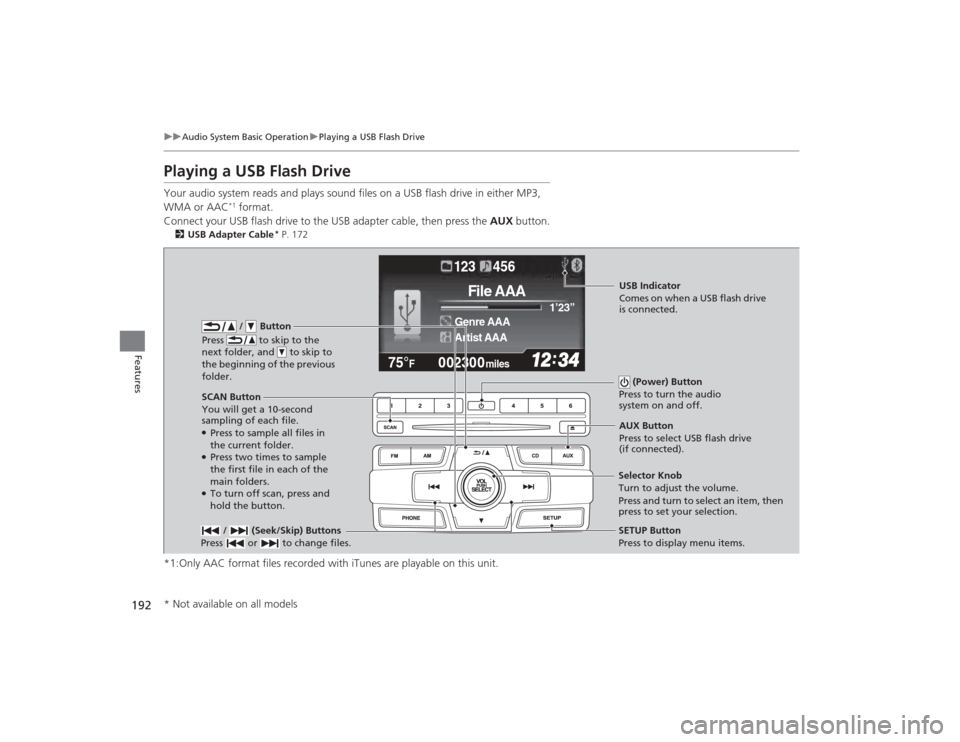
Playing a USB Flash DriveYour audio system reads and plays sound files on a USB flash drive in either MP3,
WMA or AAC
*1 format.
Connect your USB flash drive to the USB adapter cable, then press the AUX button.
2USB Adapter Cable
* P. 172
*1:Only AAC format files recorded with iTunes are playable on this unit.
002300
75°
F miles
Genre AAA 1’23’’
File AAA
Artist AAA123 456
/ Button
Press to skip to the
next folder, and to skip to
the beginning of the previous
folder.
SCAN Button
You will get a 10-second
sampling of each file.●Press to sample all files in
the current folder.●Press two times to sample
the first file in each of the
main folders.●To turn off scan, press and
hold the button. (Power) Button
Press to turn the audio
system on and off. / (Seek/Skip) Buttons
Press or to change files.
SETUP Button
Press to display menu items.
Selector Knob
Turn to adjust the volume.
Press and turn to select an item, then
press to set your selection. AUX Button
Press to select USB flash drive
(if connected).USB Indicator
Comes on when a USB flash drive
is connected.
* Not available on all models
Page 194 of 469
Continued
193
uuAudio System Basic Operation uPlaying a USB Flash Drive
Features
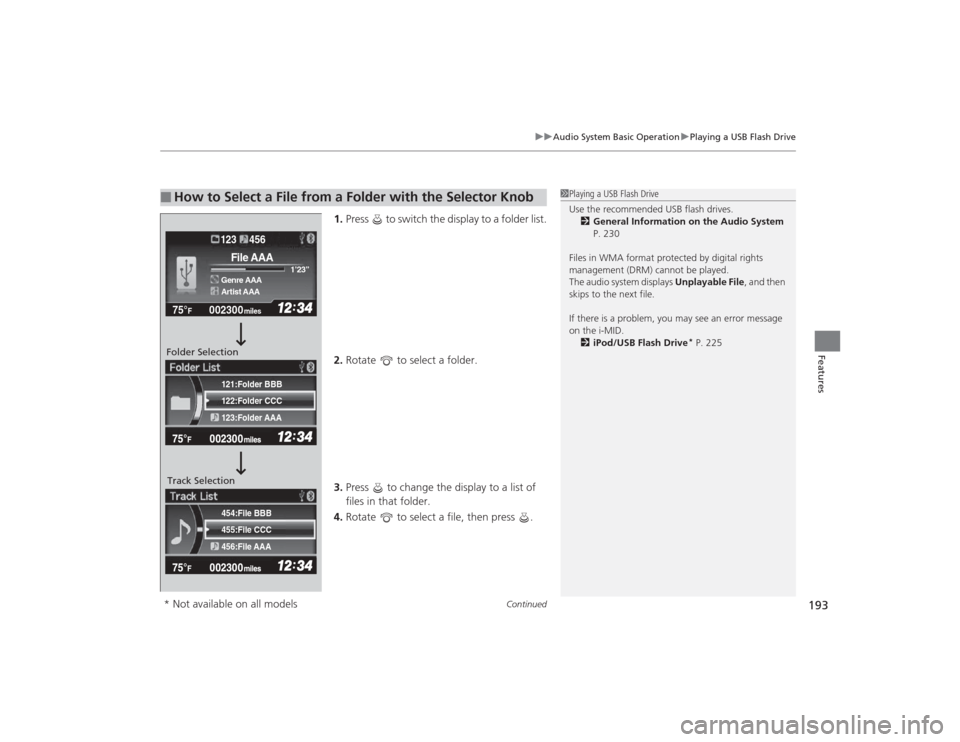
1. Press to switch the display to a folder list.
2. Rotate to select a folder.
3. Press to change the display to a list of
files in that folder.
4. Rotate to select a file, then press .
■
How to Select a File from a Folder with the Selector Knob
1Playing a USB Flash Drive
Use the recommended USB flash drives.
2 General Information on the Audio System
P. 230
Files in WMA format protected by digital rights
management (DRM) cannot be played.
The audio system displays Unplayable File, and then
skips to the next file.
If there is a problem, you may see an error message
on the i-MID.
2 iPod/USB Flash Drive
* P. 225
455:File CCC
456:File AAA 454:File BBB122:Folder CCC
123:Folder AAA 121:Folder BBB
002300
75°
F miles
Genre AAA 1’23’’File AAAArtist AAA123 456
Folder Selection
Track Selection* Not available on all models