2014 HONDA CIVIC language
[x] Cancel search: languagePage 93 of 469

92
uuGauges and Displays uintelligent Multi-Information Display (i-MID)
*
Instrument Panel
Display SetupTrip Computer Setup
Select Wallpaper
*
Import Wallpaper
*
Delete Wallpaper
*
Language SelectionAdjust Outside Temp. Display
Trip A reset triggerDisplay km/milesTrip Meter Item to DisplayWelcome ScreenColor Theme
Fuel Efficiency Backlight
*
Customize Settings
Turn by Turn Display
*
Trip B reset trigger
TPMS Calibration
*
Keyless Start Guidance Screens
*
Keyless Access Setup
*
Door Unlock ModeKeyless Access Beep
* Not available on all models
Page 96 of 469
95
uuGauges and Displays uintelligent Multi-Information Display (i-MID)
*
Continued
Instrument Panel
*1: Models with the smart entry system have an ENGINE START/STOP button instead of an ignition switch.
*2: Default Setting
*3: Default Setting for 1.8 ℓ engine models
*4: Default Setting for 2.4 ℓ engine models
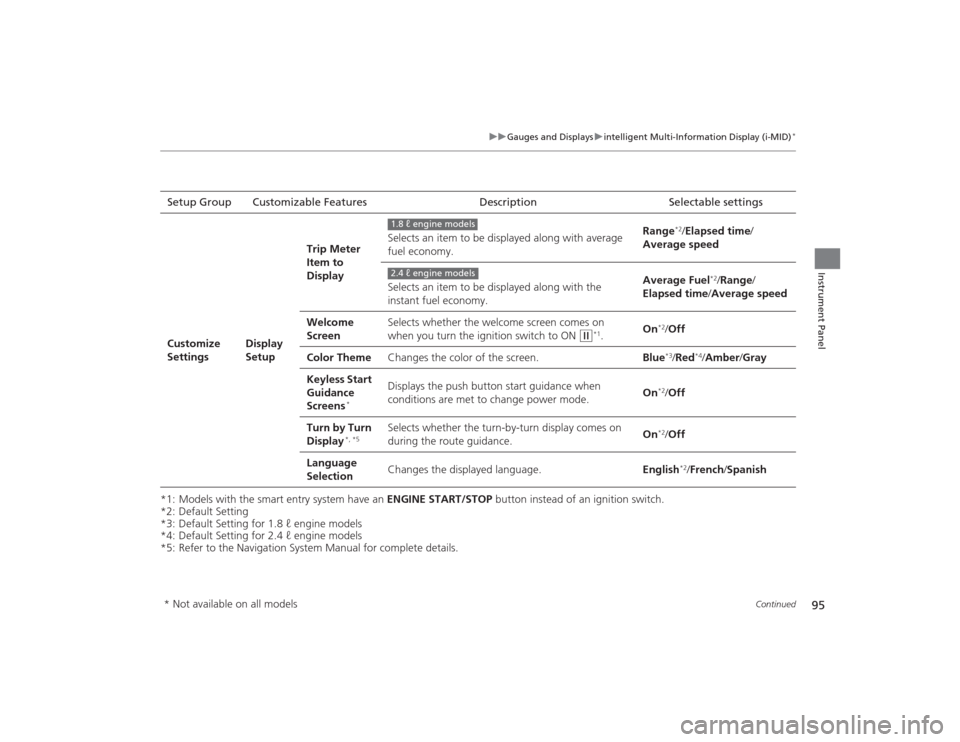
*5: Refer to the Navigation System Manual for complete details. Setup Group Customizable Features
DescriptionSelectable settingsCustomize
Settings
Display
SetupTrip Meter
Item to
Display
Selects an item to be displayed along with average
fuel economy.
Range
*2/
Elapsed time /
Average speed
Selects an item to be displayed along with the
instant fuel economy. Average Fuel
*2/
Range /
Elapsed time /Average speed
Welcome
Screen Selects whether the welcome screen comes on
when you turn the ignition switch to ON
(w
*1.
On
*2/
Off
Color Theme Changes the color of the screen. Blue*3/Red
*4/Amber /Gray
Keyless Start
Guidance
Screens
*
Displays the push button start guidance when
conditions are met to change power mode. On
*2/
Off
Turn by Turn
Display
*, *5
Selects whether the turn-by-turn display comes on
during the route guidance. On
*2/
Off
Language
Selection Changes the displayed language.
English
*2/French /Spanish
1.8 ℓ engine models2.4 ℓ engine models
* Not available on all models
Page 235 of 469
234
uuCustomized Features
*u
Features
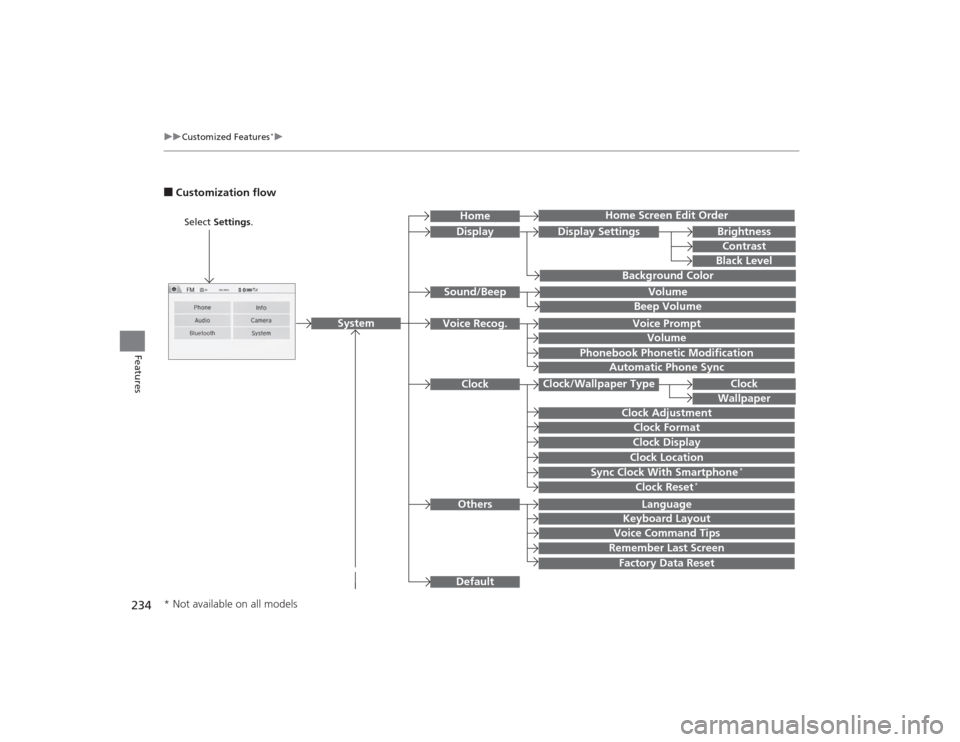
■Customization flow
Clock Format
Remember Last ScreenFactory Data ResetClock Adjustment
Select Settings .
Language
Default
BrightnessContrastBlack Level
Clock
Wallpaper
Display
Home Screen Edit Order
Background Color
Volume
Sync Clock With Smartphone
*
Clock LocationClock DisplayBeep VolumeKeyboard Layout
Home
Sound/Beep
Display Settings
Clock
Clock/Wallpaper Type
System
Clock Reset
*
Others
Phonebook Phonetic Modification
Automatic Phone Sync
Voice Prompt
Volume
Voice Recog.
Voice Command Tips
* Not available on all models
Page 240 of 469
239
uuCustomized Features
*u
Continued
Features
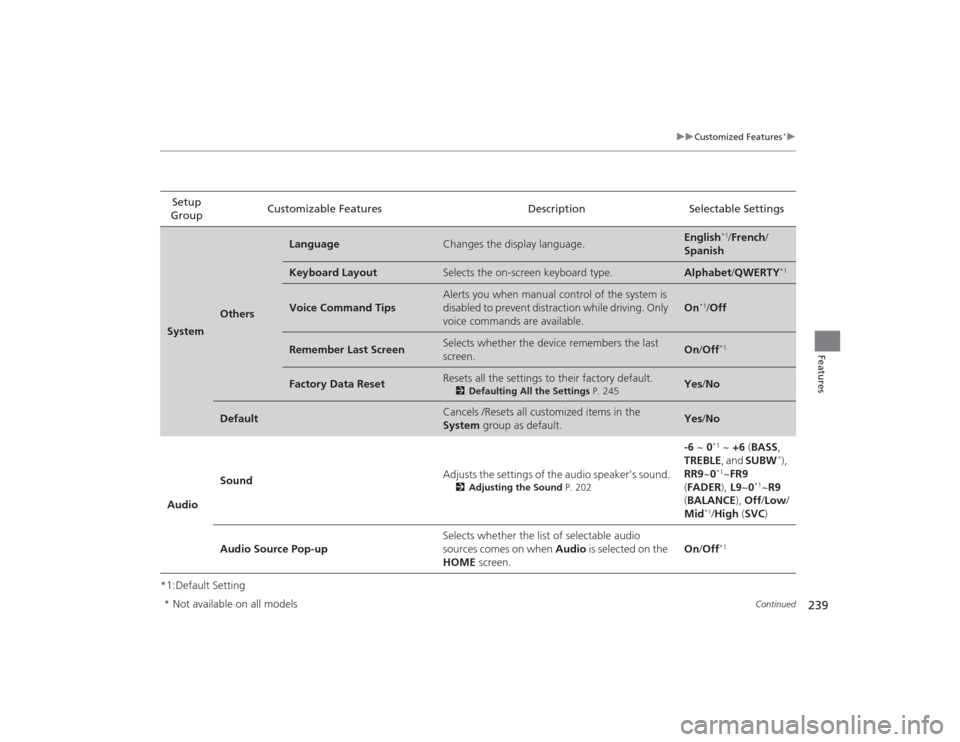
*1:Default SettingSetup
Group Customizable Features Description Selectable SettingsSystem
Others
Language
Changes the display language.
English
*1/
French /
Spanish
Keyboard Layout
Selects the on-screen keyboard type.
Alphabet /QWERTY
*1
Voice Command Tips
Alerts you when manual control of the system is
disabled to prevent distraction while driving. Only
voice commands are available.
On
*1/Off
Remember Last Screen
Selects whether the device remembers the last
screen.
On /Off
*1
Factory Data Reset
Resets all the settings to their factory default.
2 Defaulting All the Settings P. 245
Yes/No
Default
Cancels /Resets all customized items in the
System group as default.
Yes/No
Audio Sound
Adjusts the settings of the audio speaker’s sound.
2
Adjusting the Sound P. 202
-6 ~ 0
*1 ~ +6 (BASS,
TREBLE , and SUBW
*),
RR9 ~0
*1~FR9
( FADER ), L9~0
*1~R9
( BALANCE ), Off /Low /
Mid
*1/ High (SVC )
Audio Source Pop-up Selects whether the list of selectable audio
sources comes on when
Audio is selected on the
HOME screen. On
/Off*1
* Not available on all models
Page 248 of 469
247
uuBluetooth® HandsFreeLink ®
*uUsing HFL
Features
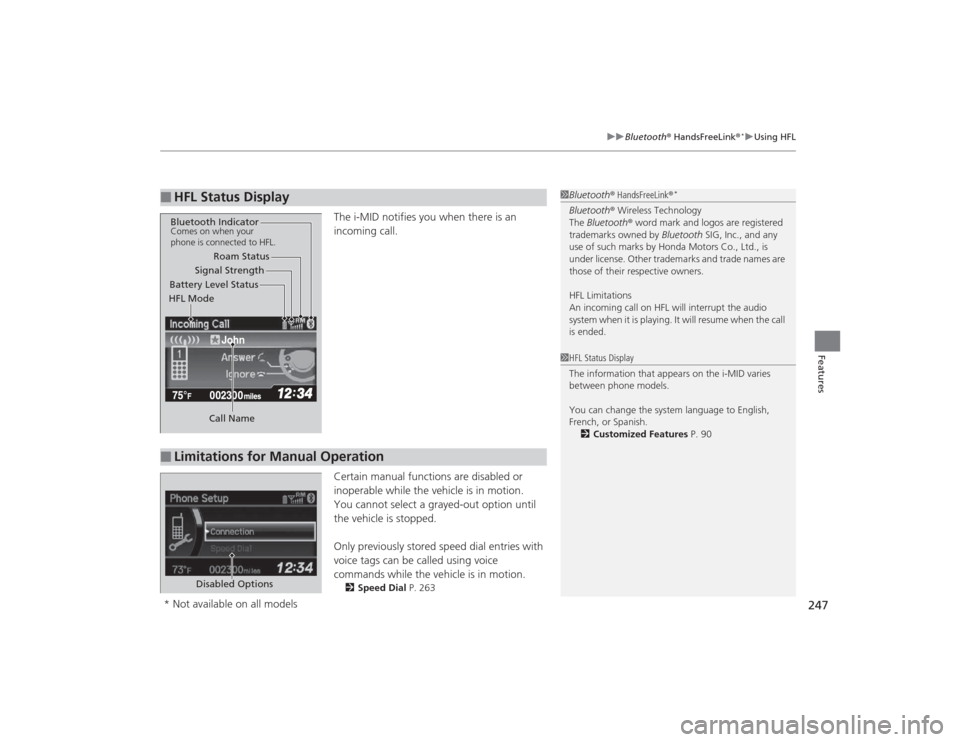
The i-MID notifies you when there is an
incoming call.
Certain manual functions are disabled or
inoperable while the vehicle is in motion.
You cannot select a grayed-out option until
the vehicle is stopped.
Only previously stored speed dial entries with
voice tags can be called using voice
commands while the vehicle is in motion.2 Speed Dial P. 263
■
HFL Status Display
1Bluetooth ® HandsFreeLink ®
*
Bluetooth® Wireless Technology
The Bluetooth® word mark and logos are registered
trademarks owned by Bluetooth SIG, Inc., and any
use of such marks by Honda Motors Co., Ltd., is
under license. Other trademarks and trade names are
those of their respective owners.
HFL Limitations
An incoming call on HFL will interrupt the audio
system when it is playing. It will resume when the call
is ended.
John
Signal Strength
HFL Mode Battery Level Status Roam Status
Call Name
Bluetooth IndicatorComes on when your
phone is connected to HFL.■
Limitations for Manual Operation
1 HFL Status Display
The information that appears on the i-MID varies
between phone models.
You can change the system language to English,
French, or Spanish.
2 Customized Features P. 90
Disabled Options
* Not available on all models
Page 279 of 469
uuBluetooth ® HandsFreeLink ®
*uUsing HFL
278Features
(Pick-up) button: Press to go directly to the Phone screen, or to answer an
incoming call.
(Hang-up/back) button: Press to end a call, go back to the previous
command, or cancel a command.
(Talk) button: Press to call a number with a stored voice tag.
MENU button: Press and hold to display Speed Dial, Call History , or Redial on
the Phone screen.
button: Press to select an item displayed on the Phone screen.
SOURCE button: Press to call a number listed in the selected item on the Phone
screen.
To go to the Phone menu screen:
1. Select Phone to switch the display to the Phone screen.
2. Select MENU .
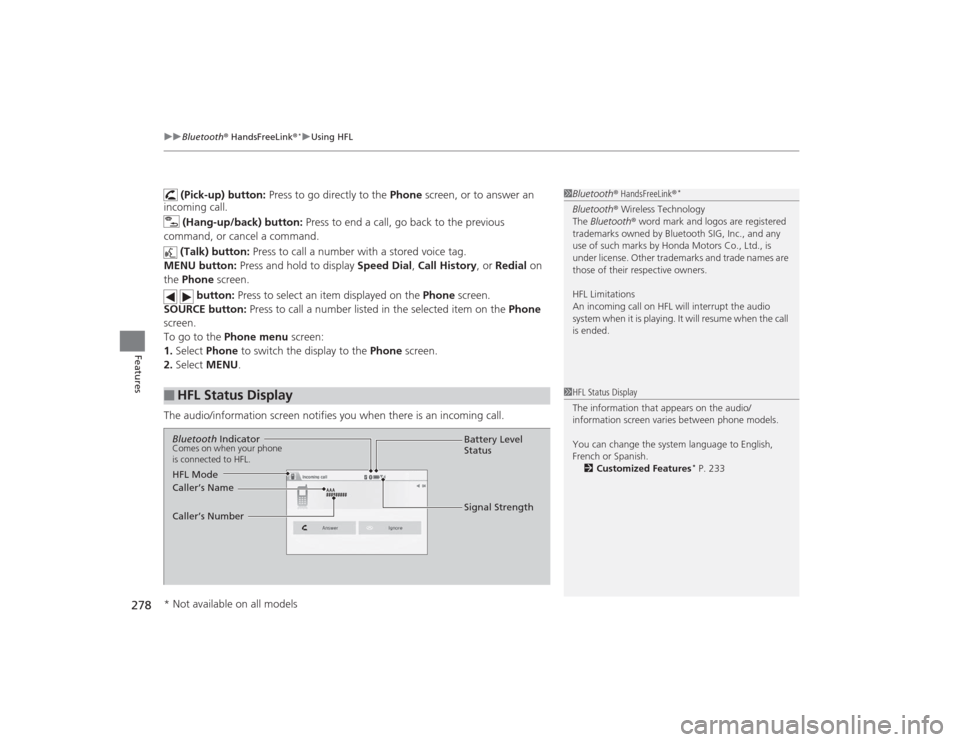
The audio/information screen notifies you when there is an incoming call.
■
HFL Status Display
1 Bluetooth ® HandsFreeLink ®
*
Bluetooth® Wireless Technology
The Bluetooth ® word mark and logos are registered
trademarks owned by Bluetooth SIG, Inc., and any
use of such marks by Honda Motors Co., Ltd., is
under license. Other trademarks and trade names are
those of their respective owners.
HFL Limitations
An incoming call on HFL will interrupt the audio
system when it is playing. It will resume when the call
is ended.1 HFL Status Display
The information that appears on the audio/
information screen varies between phone models.
You can change the system language to English,
French or Spanish.
2 Customized Features
* P. 233
Bluetooth IndicatorComes on when your phone
is connected to HFL.
Signal Strength
HFL Mode Battery Level
Status
Caller’s Name
Caller’s Number
* Not available on all models
Page 462 of 469
461Index
Lights On .................................................. 74
Low Fuel ................................................... 71
Low Oil Pressure ............................... 69, 435
Low Temperature...................................... 75
Low Tire Pressure/TPMS ............ 73, 333, 335
Maintenance Minder......................... 76, 353
Malfunction Indicator Lamp .............. 69, 436
Parking Brake and Brake System (Red) ............................................... 68, 437
REV..................................................... 76, 83
Seat Belt Reminder.............................. 33, 70
Security System Alarm............................... 75
Shift Lever Position.................................... 70
Smart Entry System ................................... 75
Supplemental Restraint System ........... 49, 71
System Message ....................................... 74
Transmission ............................................. 70
Trunk Open .............................................. 73
Turn Signal ............................................... 74
Vehicle Stability Assist (VSA ®)
System ............................................ 72, 329
VSA ® OFF.......................................... 72, 330
Washer Level ............................................ 76
Information .............................................. 443
Information Display ................................... 84
Instant Fuel Economy .......................... 82, 89
Instrument Panel ........................................ 67
Brightness Control .................................. 141
intelligent Multi-Information Display (i-MID) ....................................................... 86
Interior Lights ........................................... 154 Interior Rearview Mirror
.......................... 144
i-VTEC and REV Indicators .......................... 83
JJack (Wheel Nut Wrench)........................ 414
Jump Starting ........................................... 429KKey Number Tag ....................................... 107
Keyless Lockout Prevention ..................... 113
Keys ........................................................... 106
Lockout Prevention .................................. 113
Master Keys ............................................. 106
Number Tag ............................................ 107
Rear Door Won’t Open ............................ 116
Remote Transmitter ................................. 109
Types and Functions ................................ 106
Valet Key ................................................. 107
Won’t Turn ................................................ 21
Kickdown (Automatic Transmission) ....... 319LLaneWatch
TM............................................. 331
Language (HFL) ................................. 247, 278
LATCH (Child Seats) .................................... 57 Lights
................................................. 136, 376
Automatic ............................................... 137
Bulb Replacement ................................... 376
Daytime Running Lights........................... 139
Fog Lights ............................................... 139
High Beam Indicator .................................. 74
Interior .................................................... 154
Light Switches ......................................... 136
Lights On Indicator .................................... 74
Turn Signals ............................................ 136
Load Limits ................................................ 307
Locking/Unlocking .................................... 106
Auto Door Locking/Unlocking.................. 117
Childproof Door Locks............................. 116
From Inside ............................................. 114
From Outside .......................................... 109
Keys ........................................................ 106
Using a Key ............................................. 113
Lockout Prevention System ..................... 113
Low Battery Charge ................................. 435
Low Fuel Indicator ...................................... 71
Low Oil Pressure Indicator ................. 69, 435
Low Smart Entry Remote Signal Strength .................................................. 108
Lower Anchors ............................................ 57
Lubricant Specifications Chart ......... 444, 446
Luggage (Maximum Load Limit) ............. 307