2014 HONDA ACCORD HYBRID steering
[x] Cancel search: steeringPage 459 of 561

458
Driving
Rearview Camera
About Your Rearview Camera
The audio/information screen can display your vehicle’s rear view.
The display automatically changes to a rear view when the shift lever is moved to
(R.
The rearview camera has a unique lens that makes objects appear closer or further
than they actually are.
■Rearview Camera Display Area
Models with one display
1About Your Rearview Camera
The rear camera view is restricted. You cannot see
the corner ends of the bumper or what is underneath
the bumper. Its unique lens also makes objects
appear closer or farther than they actually are.
Visually confirm that it is safe to drive before backing
up. Certain conditions (such as weather, lighting, and
high temperatures) may also restrict the rear view. Do
not rely on the rearview display which does not give
you all information about conditions at the back of your vehicle.
If the camera lens is covered with dirt or moisture,
use a soft, moist cloth to keep the lens clean and free
of debris.
You can change the Fixed Guideline and Dynamic
Guideline settings.
2 Customized Features P. 293
Fixed Guideline On : Guidelines appear when you shift into
(R.
Off : Guidelines do not appear.
Dynamic Guideline On : Guidelines move according to the steering wheel
direction. Off : Guidelines do not move.
Bumper
Guidelines
Approx. 118 in (3 m)
Approx. 79 in (2 m) Approx. 39 in (1 m)
Approx. 20 in (0.5 m)
Approx. 118 in (3 m)
Approx. 79 in (2 m)
Approx. 39 in (1 m) Camera
Main MenuTable of Contents
Page 470 of 561

469
uuMaintenance MinderTMuTo Use Maintenance Minder TM
Continued
Maintenance
■Maintenance Service Items1Maintenance Service Items •
Independent of the Maintenance Minder
information, replace the brake fluid every 3 years.
• Inspect idle speed every 160,000 miles (256,000
km).
• Adjust the valves during services A, B, 1, 2, or 3 if
they are noisy.
Maintenance Minder
Message
System Message
Indicator
Sub Items
Main Item
*1: If a message Service does not appear more than 12 months after the display is reset, change the
engine oil every year.
# : See information on maintenance and emissions warranty.
CODEMaintenance Main Items
A ●
Replace engine oil *1
B●
Replace engine oil *1
and oil filter
● Inspect front and rear brakes/service as necessary
● Check parking brake adjustment
● Inspect tie rod ends, steering gearbox, and boots
● Inspect suspension components
● Inspect driveshaft boots
● Inspect brake hoses and lines (Including ABS/VSA)
● Inspect all fluid levels and condition of fluids
● Inspect exhaust system #
● Inspect fuel lines and connections #
● Check expiration date for TRK bottle
*2: If you drive in dusty conditions, replace the air cleaner element every 15,000 miles (24,000 km).
*3: If you drive primarily in urban areas that have high concentrations of soot in the air from industry and
from diesel-powered vehicles, replace the dust and pollen filter every 15,000 miles (24,000 km).
*4: Driving in mountainous areas at very low vehicle speeds results in higher transmission temperatures.
This requires transmission fluid changes more frequently than recommended by the Maintenance
Minder. If you regularly drive your vehicle under these conditions, have the transmission fluid changed
every 47,500 miles (75,000 km) or 3 years.
CODEMaintenance Sub Items
1 ●
Rotate tires
2●
Replace air cleaner element *2
● Replace dust and pollen filter *3
3 ●
Replace transmission fluid *4
4●
Replace spark plugs
● Inspect valve clearance
5 ●
Replace engine coolant
Main MenuTable of Contents
Page 487 of 561
uuReplacing Light BulbsuHeadlight Bulbs
486
Maintenance
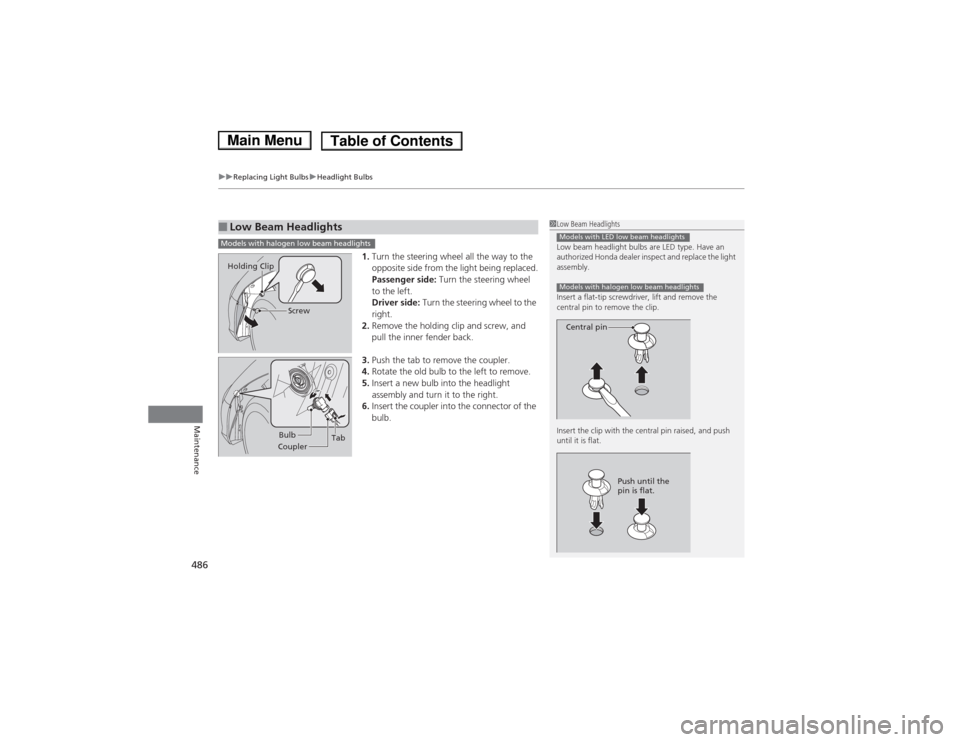
1. Turn the steering wheel all the way to the
opposite side from the light being replaced.
Passenger side: Turn the steering wheel
to the left.
Driver side: Turn the steering wheel to the
right.
2. Remove the holding clip and screw, and
pull the inner fender back.
3. Push the tab to remove the coupler.
4. Rotate the old bulb to the left to remove.
5. Insert a new bulb into the headlight
assembly and turn it to the right.
6. Insert the coupler into the connector of the
bulb.
■Low Beam Headlights1Low Beam Headlights
Low beam headlight bulbs are LED type. Have an
authorized Honda dealer inspect and replace the light
assembly.
Insert a flat-tip screwdriver, lift and remove the
central pin to remove the clip.
Insert the clip with the central pin raised, and push until it is flat.
Models with LED low beam headlights
Models with halogen low beam headlights
Central pin
Push until the
pin is flat.
Models with halogen low beam headlights
Screw
Holding Clip
Bulb
Coupler Tab
Main MenuTable of Contents
Page 488 of 561
487
uuReplacing Light BulbsuFront Turn Signal/Side Marker Light Bulbs
Maintenance
Front Turn Signal/Side Marker Light Bulbs
When replacing, use the following bulbs.
Turn the steering wheel and pull the inner fender back in the same way as when
replacing the halogen low beam headlight bulbs*
.
2 Low Beam Headlights P. 486
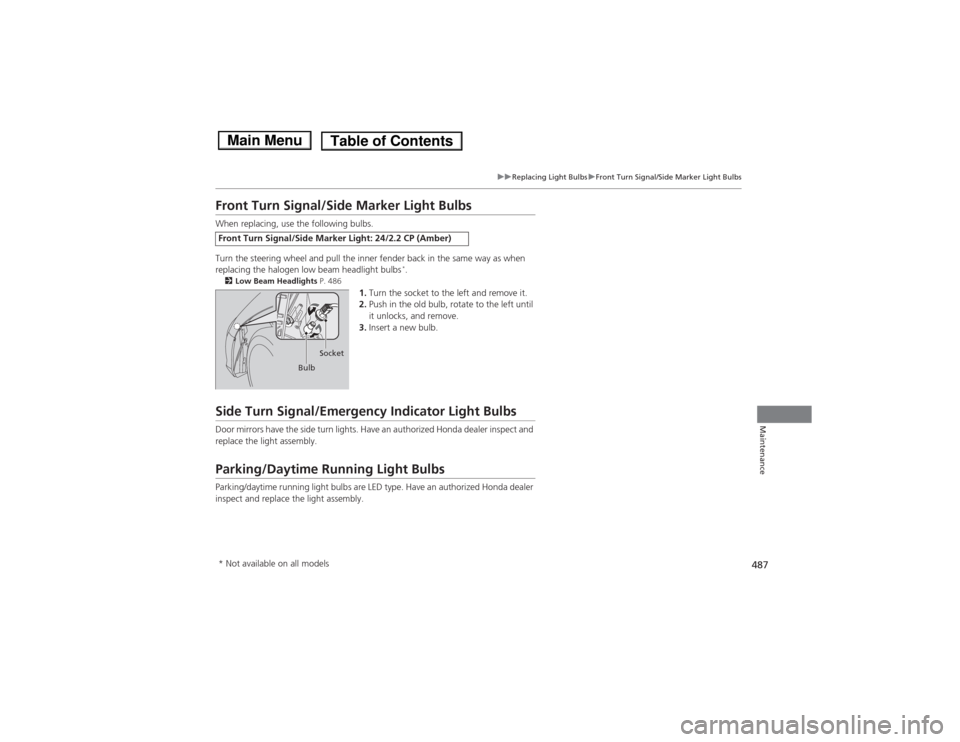
1.Turn the socket to the left and remove it.
2. Push in the old bulb, rotate to the left until
it unlocks, and remove.
3. Insert a new bulb.
Side Turn Signal/Emergency Indicator Light Bulbs
Door mirrors have the side turn lights. Have an authorized Honda dealer inspect and
replace the light assembly.
Parking/Daytime Running Light Bulbs
Parking/daytime running light bulbs are LED type. Have an authorized Honda dealer
inspect and replace the light assembly.
Front Turn Signal/Side Marker Light: 24/2.2 CP (Amber)
Bulb Socket
* Not available on all models
Main MenuTable of Contents
Page 502 of 561
501
uuChecking and Maintaining TiresuWinter Tires
Maintenance
Winter Tires
If driving on snowy or frozen roads, mount all season marked M+S tires, snow tires,
or tire chains; reduce speed; and maintain sufficient distance between vehicles when
driving.
Be particularly careful when operating the steering wheel or brakes to prevent
skidding.
Use tire chains, snow tires, or all season tires when necessary or according to the law.
When mounting, refer to the following points.
For winter tires: • Select the size and load ranges that are the same as the original tires.
• Mount the tires to all four wheels.
For tire chains:• Install them on the front tires only.
• Because your vehicle has limited tire clearance, we strongly recommend using the
chains listed below:
• Follow the chain manufacturer's instruction when installing. Mount them as
tightly as you can.
• Check that the chains do not touch the brake lines or suspension.
• Drive slowly.
Cable-type: SCC Radial Chain SC1036
1Winter Tires
NOTICETraction devices that are the wrong size or improperly
installed can damage your vehicle's brake lines,
suspension, body, and wheels. Stop driving if they are
hitting any part of the vehicle.
When tire chains are mounted, follow the chain
manufacturer's instructions regarding vehicle
operational limits.
If your vehicle is equipped with summer tires, be
aware that these tires are not designed for winter
driving conditions. For more information, contact a dealer.
3WARNING
Using the wrong chains, or not properly
installing chains, can damage the brake
lines and cause a crash in which you can be
seriously injured or killed.
Follow all instruction s in this owner's
manual regarding the selection and use of
tire chains.
Main MenuTable of Contents
Page 510 of 561
509
Handling the UnexpectedThis chapter explains how to h andle unexpected troubles.
If a Tire Goes Flat
Temporarily Repairing a Flat Tire....... 510
Power System Won’t Start Checking the Procedure ................... 519
If the Smart Entry Remote Battery is
Weak ..........................................520
Power System Off ............................ 521
Jump Starting .................................... 522
Shift Lever Does Not Move .............. 524Overheating
How to Handle Overheating............. 525
Indicator, Coming On/Blinking If the Low Oil Pressure Indicator Comes
On ............................................. 528
If the 12-Volt Battery Charging System Indicator Comes On ....................... 528
If the Malfunction Indicator Lamp Comes On or Blinks ................................... 529
If the Brake System Indicator (Red)
Comes On .................................. 530 If the Electric Power Steering (EPS) System
Indicator Comes On............................ 530
If the Low Tire Pressure/TPMS Indicator Comes On or Blinks ....................... 531
Fuses Fuse Locations ................................. 532
Inspecting and Changing Fuses ........ 534
Emergency Towing ........................... 535
Main Menu
Page 511 of 561
510
Handling the Unexpected
If a Tire Goes Flat
Temporarily Repairing a Flat Tire
This vehicle is not equipped with a spare tire. If the tire has a large cut or is otherwise
severely damaged, you will need to have the vehicle towed. If the tire only has a
small puncture, from a nail for instance, you can use the temporary tire repair kit so
that you can drive to the nearest service station for a more permanent repair.
If a tire goes flat while driving, grasp the steering wheel firmly, and brake gradually
to reduce speed. Then stop in a safe place. 1.Park the vehicle on firm, level, and non-slippery surface and apply the parking brake.
2. Put the shift lever in
(P .
3. Turn on the hazard warning lights and set the power mode to VEHICLE OFF
(LOCK).
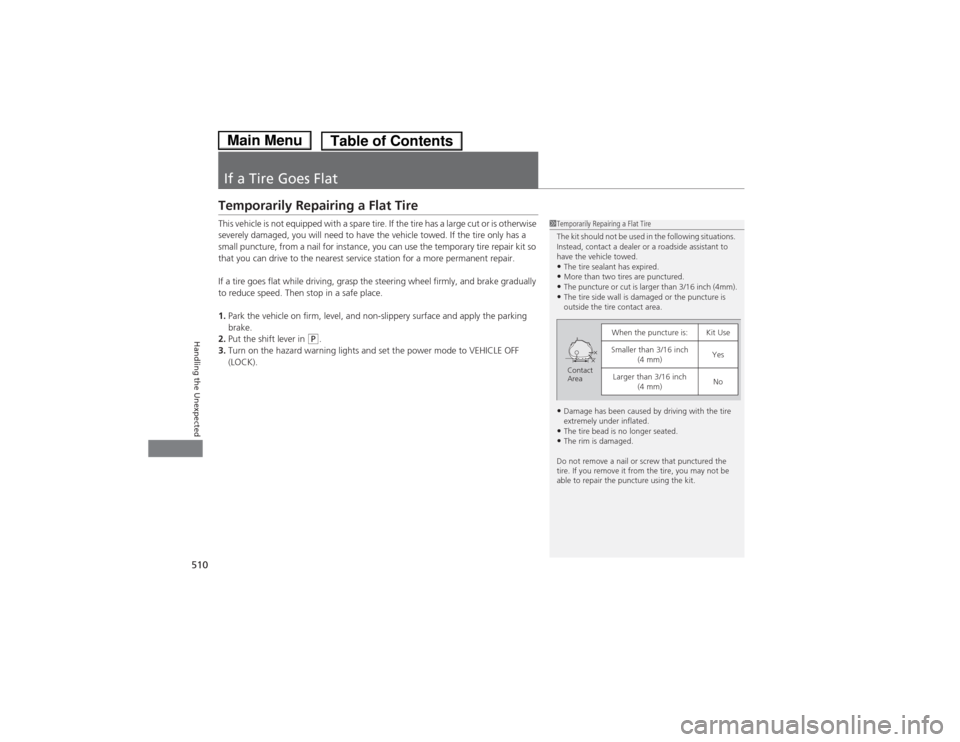
1Temporarily Repairing a Flat Tire
The kit should not be used in the following situations.
Instead, contact a dealer or a roadside assistant to
have the vehicle towed.•The tire sealant has expired.
• More than two tires are punctured.
• The puncture or cut is larger than 3/16 inch (4mm).
• The tire side wall is damaged or the puncture is
outside the tire contact area.
• Damage has been caused by driving with the tire
extremely under inflated.
• The tire bead is no longer seated.
• The rim is damaged.
Do not remove a nail or screw that punctured the
tire. If you remove it from the tire, you may not be
able to repair the puncture using the kit.
When the puncture is:Kit Use
Smaller than 3/16 inch (4 mm)Yes
Larger than 3/16 inch (4 mm)NoContact
Area
Main MenuTable of Contents
Page 522 of 561

521
uuPower System Won’t StartuPower System Off
Handling the Unexpected
Power System Off The POWER button may be used to turn the power system off due to an emergency
situation even while driving. If you must turn the power system off, do either of the
following operations: • Press and hold the POWER button for about two seconds.
• Firmly press the POWER button twice.
• The steering wheel will not lock. The power mode changes to VEHICLE OFF with
the shift lever in
(P , and to ACCESSORY with the shift lever in any position other
than (P .
• Because turning off the power system also disables the power assist the power
system provides to the steering and braking systems, it will require significantly
more physical effort and time to steer and slow the vehicle. Use both feet on the
brake pedal, if necessary, to slow the vehicle and stop immediately in a safe place.
1Power System Off
NOTICEDo not press the button while driving unless it is
absolutely necessary for the power system to be turned off.
Main MenuTable of Contents