2014 FORD SUPER DUTY lock
[x] Cancel search: lockPage 86 of 458
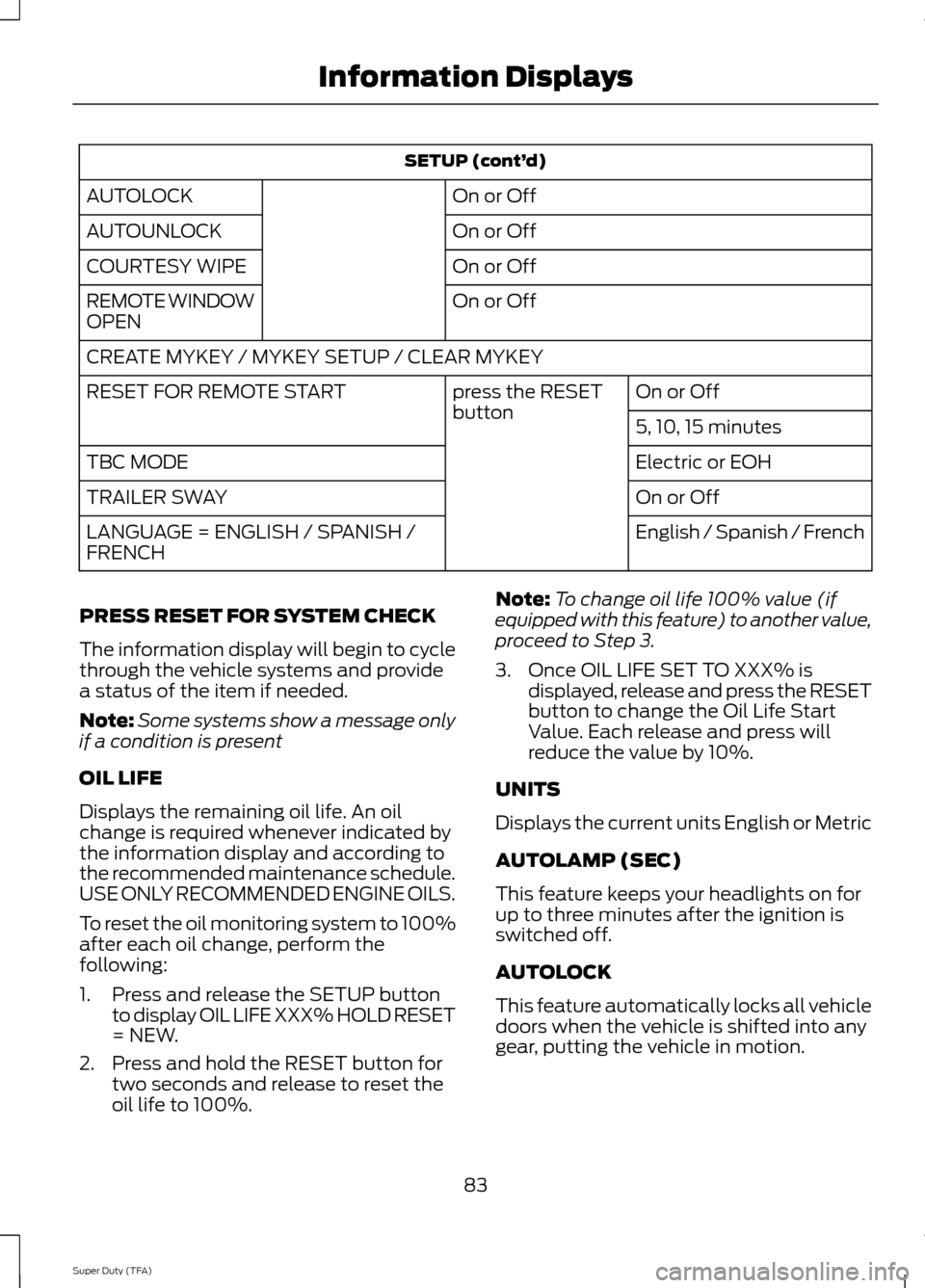
SETUP (cont’
d)
On or Off
AUTOLOCK
On or Off
AUTOUNLOCK
On or Off
COURTESY WIPE
On or Off
REMOTE WINDOW
OPEN
CREATE MYKEY / MYKEY SETUP / CLEAR MYKEY
On or Off
press the RESET
button
RESET FOR REMOTE START
5, 10, 15 minutes
Electric or EOH
TBC MODE
On or Off
TRAILER SWAY
English / Spanish / French
LANGUAGE = ENGLISH / SPANISH /
FRENCH
PRESS RESET FOR SYSTEM CHECK
The information display will begin to cycle
through the vehicle systems and provide
a status of the item if needed.
Note: Some systems show a message only
if a condition is present
OIL LIFE
Displays the remaining oil life. An oil
change is required whenever indicated by
the information display and according to
the recommended maintenance schedule.
USE ONLY RECOMMENDED ENGINE OILS.
To reset the oil monitoring system to 100%
after each oil change, perform the
following:
1. Press and release the SETUP button to display OIL LIFE XXX% HOLD RESET
= NEW.
2. Press and hold the RESET button for two seconds and release to reset the
oil life to 100%. Note:
To change oil life 100% value (if
equipped with this feature) to another value,
proceed to Step 3.
3. Once OIL LIFE SET TO XXX% is displayed, release and press the RESET
button to change the Oil Life Start
Value. Each release and press will
reduce the value by 10%.
UNITS
Displays the current units English or Metric
AUTOLAMP (SEC)
This feature keeps your headlights on for
up to three minutes after the ignition is
switched off.
AUTOLOCK
This feature automatically locks all vehicle
doors when the vehicle is shifted into any
gear, putting the vehicle in motion.
83
Super Duty (TFA) Information Displays
Page 87 of 458
AUTOUNLOCK
This feature automatically unlocks all
vehicle doors when the driver
’s door is
opened within 10 minutes of the ignition
being turned off.
COURTESY WIPE
This feature allows for an extra swipe of
the wipers after a wipe/wash cycle.
CREATE MYKEY / MYKEY SETUP /
CLEAR MYKEY
For more information, See Creating a
MyKey (page 49).
RESET FOR REMOTE START (if
equipped)
REAR PARK AID
This feature sounds a warning tone to warn
the driver of obstacles near the rear
bumper, and functions only when R
(Reverse) gear is selected.
TBC MODE (if equipped)
Allows you to choose the trailer brake
mode.
TRAILER SWAY (if equipped)
This feature uses the electronic stability
control to mitigate trailer sway.
LANGUAGE = ENGLISH / SPANISH /
FRENCH
Allows you to choose which language the
message center will display in.
Waiting four seconds or pressing the
RESET button cycles the message center
through each of the language choices.
Press the RESET button to set the
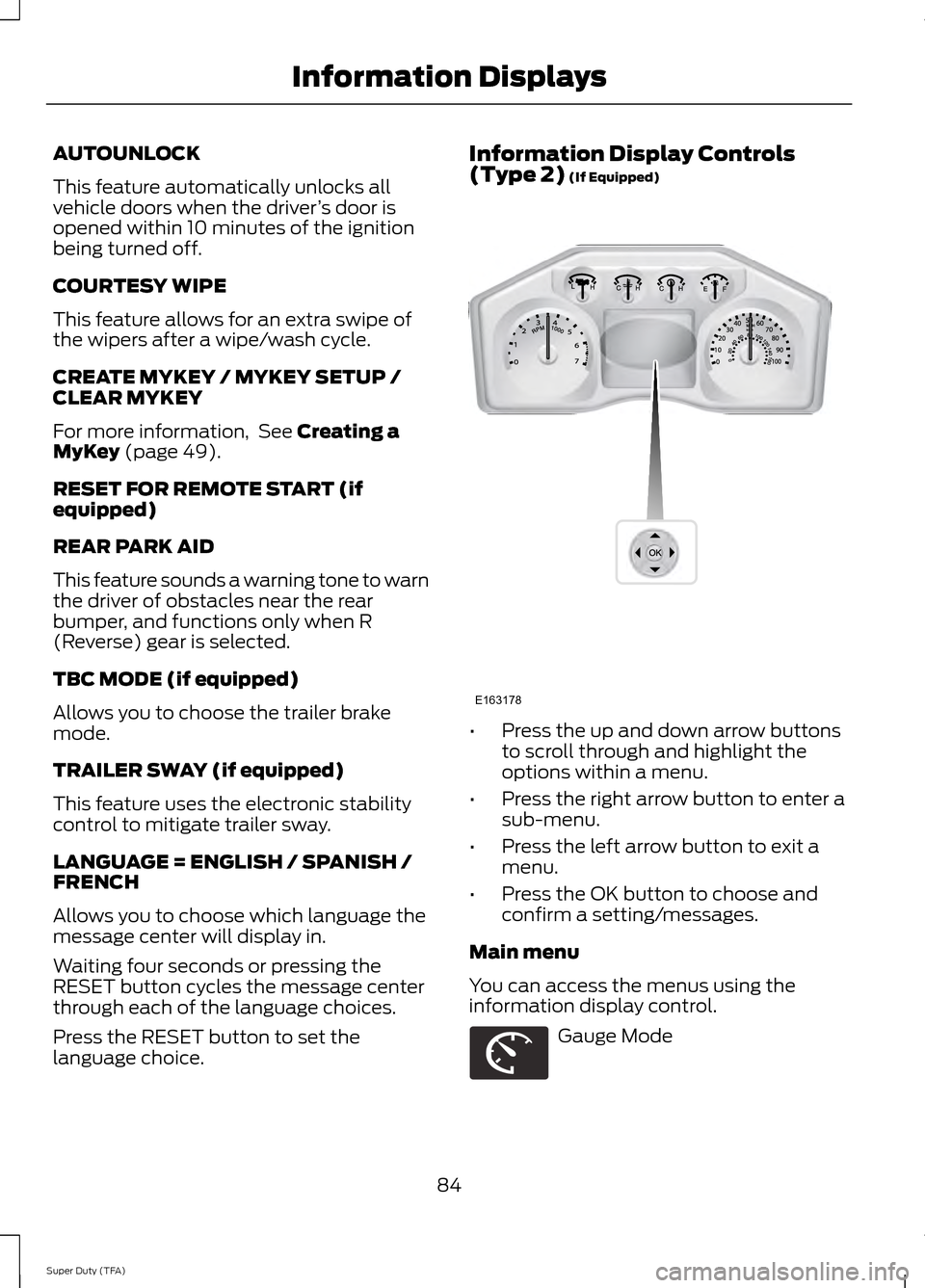
language choice. Information Display Controls
(Type 2)
(If Equipped)
•
Press the up and down arrow buttons
to scroll through and highlight the
options within a menu.
• Press the right arrow button to enter a
sub-menu.
• Press the left arrow button to exit a
menu.
• Press the OK button to choose and
confirm a setting/messages.
Main menu
You can access the menus using the
information display control. Gauge Mode
84
Super Duty (TFA) Information DisplaysE163178 E163179
Page 90 of 458
Fuel Hist.
Shows fuel usage as a bar graph based on
time. The graph is updated each minute
with the fuel economy that was achieved
during the prior 5, 10, 30 minutes of driving.
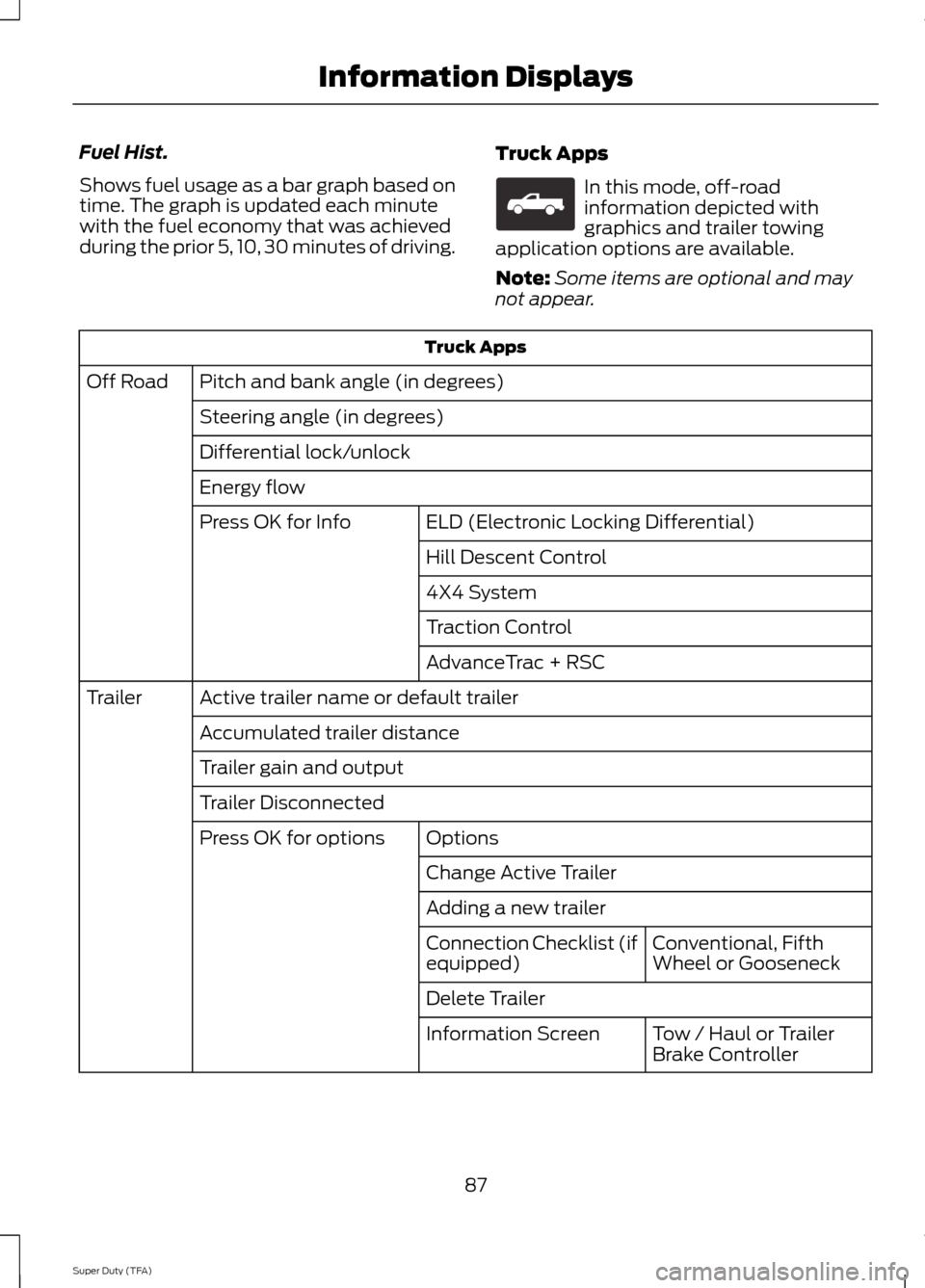
Truck Apps In this mode, off-road
information depicted with
graphics and trailer towing
application options are available.
Note: Some items are optional and may
not appear. Truck Apps
Pitch and bank angle (in degrees)
Off Road
Steering angle (in degrees)
Differential lock/unlock
Energy flow ELD (Electronic Locking Differential)
Press OK for Info
Hill Descent Control
4X4 System
Traction Control
AdvanceTrac + RSC
Active trailer name or default trailer
Trailer
Accumulated trailer distance
Trailer gain and output
Trailer Disconnected Options
Press OK for options
Change Active Trailer
Adding a new trailerConventional, Fifth
Wheel or Gooseneck
Connection Checklist (if
equipped)
Delete Trailer
Tow / Haul or Trailer
Brake Controller
Information Screen
87
Super Duty (TFA) Information DisplaysE163181
Page 92 of 458
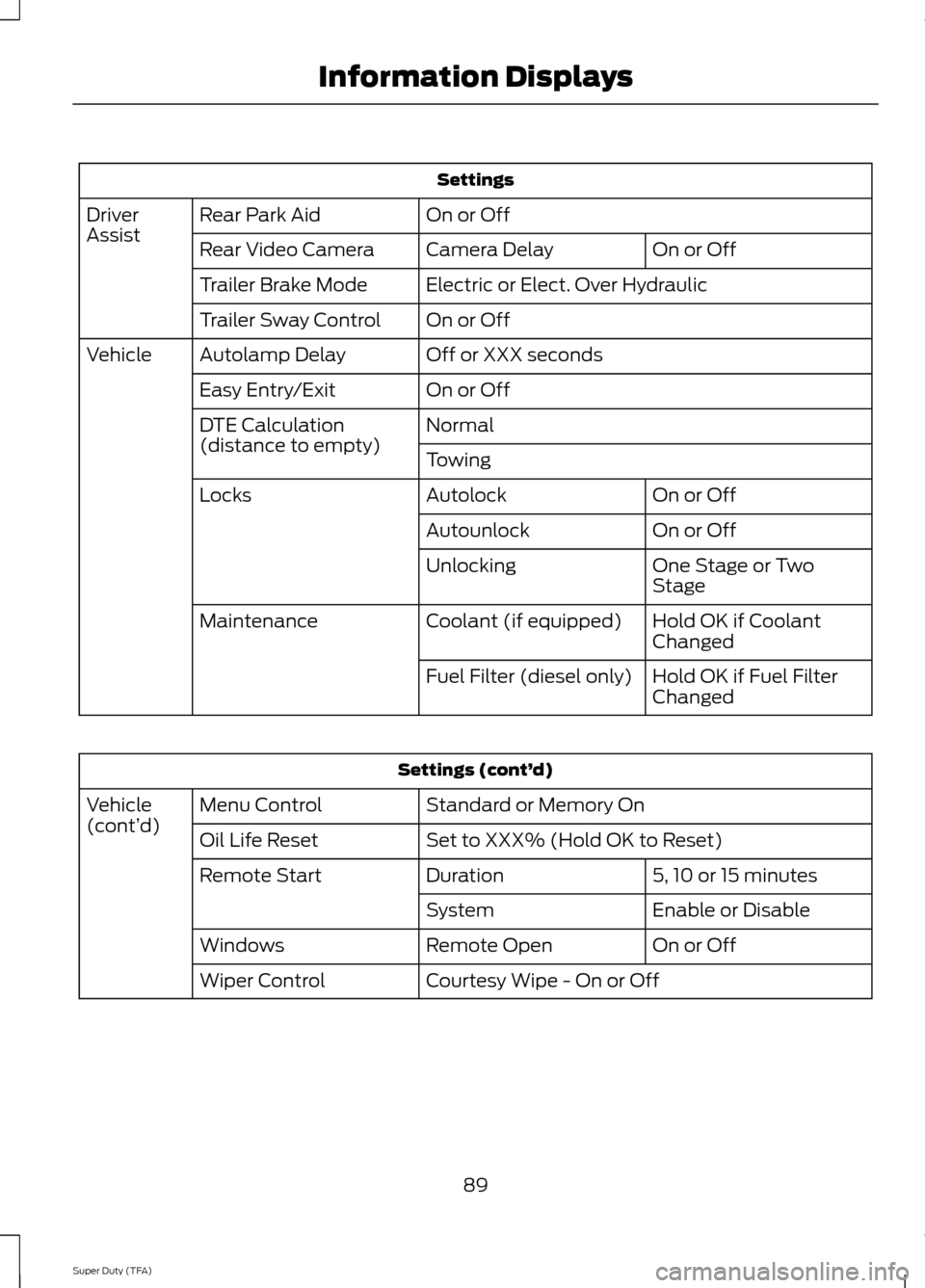
Settings
On or Off
Rear Park Aid
Driver
Assist
On or Off
Camera Delay
Rear Video Camera
Electric or Elect. Over Hydraulic
Trailer Brake Mode
On or Off
Trailer Sway Control
Off or XXX seconds
Autolamp Delay
Vehicle
On or Off
Easy Entry/Exit
Normal
DTE Calculation
(distance to empty)
Towing
On or Off
Autolock
Locks
On or Off
Autounlock
One Stage or Two
Stage
Unlocking
Hold OK if Coolant
Changed
Coolant (if equipped)
Maintenance
Hold OK if Fuel Filter
Changed
Fuel Filter (diesel only) Settings (cont’
d)
Standard or Memory On
Menu Control
Vehicle
(cont’ d)
Set to XXX% (Hold OK to Reset)
Oil Life Reset
5, 10 or 15 minutes
Duration
Remote Start
Enable or Disable
System
On or Off
Remote Open
Windows
Courtesy Wipe - On or Off
Wiper Control
89
Super Duty (TFA) Information Displays
Page 96 of 458
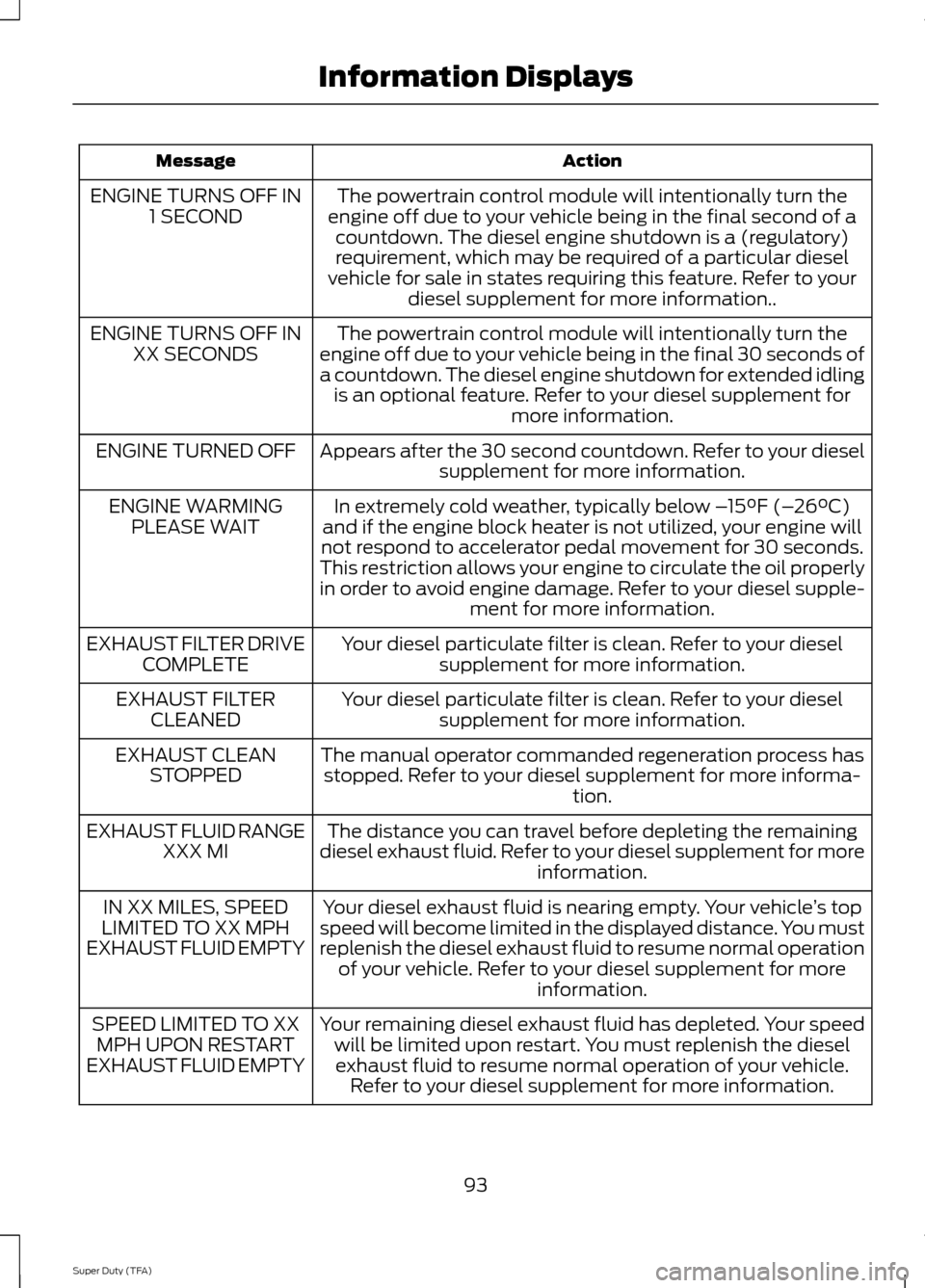
Action
Message
The powertrain control module will intentionally turn the
engine off due to your vehicle being in the final second of a countdown. The diesel engine shutdown is a (regulatory)
requirement, which may be required of a particular diesel
vehicle for sale in states requiring this feature. Refer to your diesel supplement for more information..
ENGINE TURNS OFF IN
1 SECOND
The powertrain control module will intentionally turn the
engine off due to your vehicle being in the final 30 seconds of
a countdown. The diesel engine shutdown for extended idling is an optional feature. Refer to your diesel supplement for more information.
ENGINE TURNS OFF IN
XX SECONDS
Appears after the 30 second countdown. Refer to your dieselsupplement for more information.
ENGINE TURNED OFF
In extremely cold weather, typically below – 15°F (–26°C)
and if the engine block heater is not utilized, your engine will
not respond to accelerator pedal movement for 30 seconds.
This restriction allows your engine to circulate the oil properly
in order to avoid engine damage. Refer to your diesel supple- ment for more information.
ENGINE WARMING
PLEASE WAIT
Your diesel particulate filter is clean. Refer to your dieselsupplement for more information.
EXHAUST FILTER DRIVE
COMPLETE
Your diesel particulate filter is clean. Refer to your dieselsupplement for more information.
EXHAUST FILTER
CLEANED
The manual operator commanded regeneration process hasstopped. Refer to your diesel supplement for more informa- tion.
EXHAUST CLEAN
STOPPED
The distance you can travel before depleting the remaining
diesel exhaust fluid. Refer to your diesel supplement for more information.
EXHAUST FLUID RANGE
XXX MI
Your diesel exhaust fluid is nearing empty. Your vehicle ’s top
speed will become limited in the displayed distance. You must
replenish the diesel exhaust fluid to resume normal operation of your vehicle. Refer to your diesel supplement for more information.
IN XX MILES, SPEED
LIMITED TO XX MPH
EXHAUST FLUID EMPTY
Your remaining diesel exhaust fluid has depleted. Your speedwill be limited upon restart. You must replenish the dieselexhaust fluid to resume normal operation of your vehicle. Refer to your diesel supplement for more information.
SPEED LIMITED TO XX
MPH UPON RESTART
EXHAUST FLUID EMPTY
93
Super Duty (TFA) Information Displays
Page 98 of 458
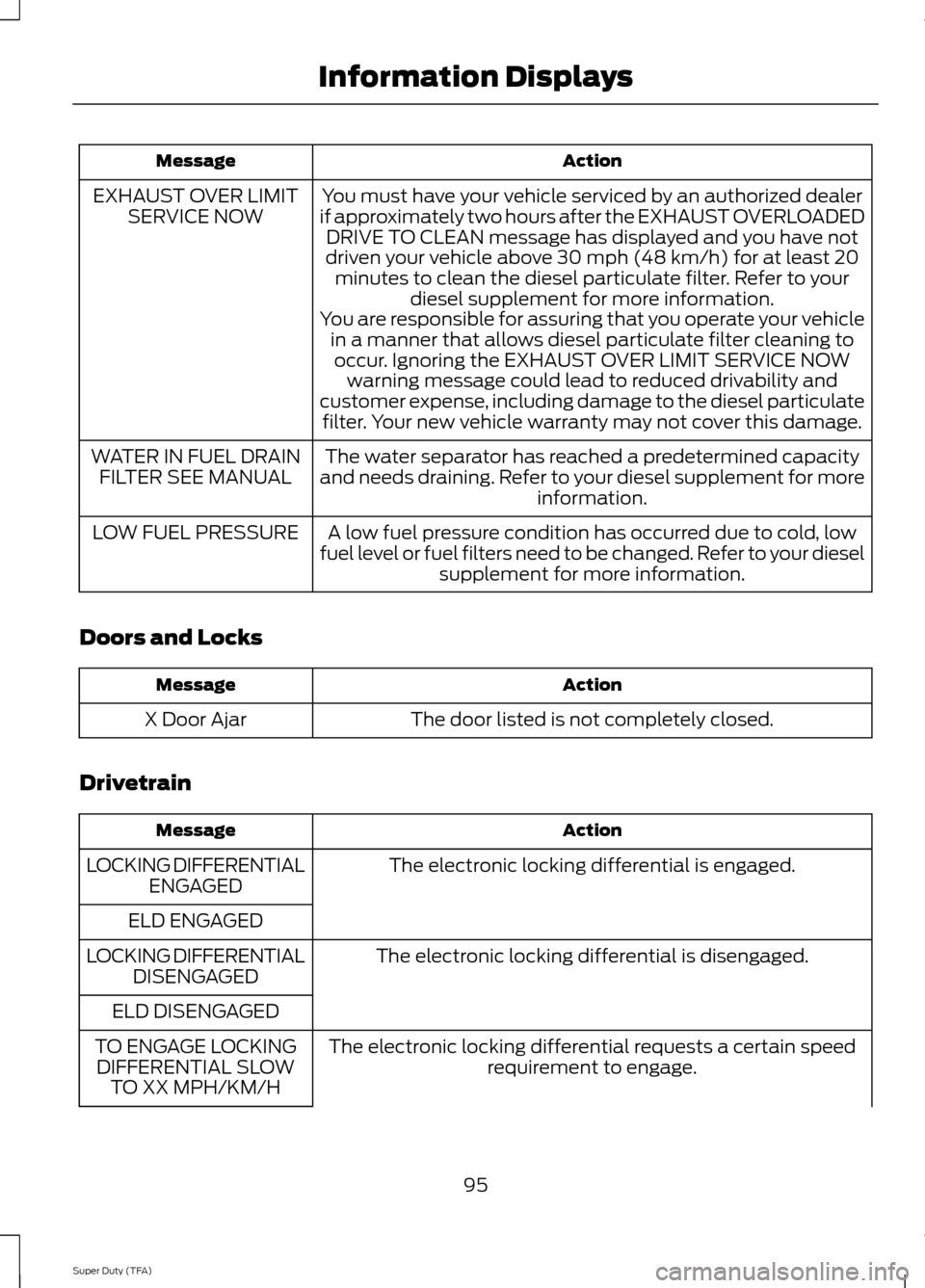
Action
Message
You must have your vehicle serviced by an authorized dealer
if approximately two hours after the EXHAUST OVERLOADED DRIVE TO CLEAN message has displayed and you have not
driven your vehicle above 30 mph (48 km/h) for at least 20 minutes to clean the diesel particulate filter. Refer to your diesel supplement for more information.
EXHAUST OVER LIMIT
SERVICE NOW
You are responsible for assuring that you operate your vehiclein a manner that allows diesel particulate filter cleaning tooccur. Ignoring the EXHAUST OVER LIMIT SERVICE NOW warning message could lead to reduced drivability and
customer expense, including damage to the diesel particulate filter. Your new vehicle warranty may not cover this damage.
The water separator has reached a predetermined capacity
and needs draining. Refer to your diesel supplement for more information.
WATER IN FUEL DRAIN
FILTER SEE MANUAL
A low fuel pressure condition has occurred due to cold, low
fuel level or fuel filters need to be changed. Refer to your diesel supplement for more information.
LOW FUEL PRESSURE
Doors and Locks Action
Message
The door listed is not completely closed.
X Door Ajar
Drivetrain Action
Message
The electronic locking differential is engaged.
LOCKING DIFFERENTIAL
ENGAGED
ELD ENGAGED The electronic locking differential is disengaged.
LOCKING DIFFERENTIAL
DISENGAGED
ELD DISENGAGED The electronic locking differential requests a certain speedrequirement to engage.
TO ENGAGE LOCKING
DIFFERENTIAL SLOW TO XX MPH/KM/H
95
Super Duty (TFA) Information Displays
Page 99 of 458

Action
Message
TO ENGAGE ELD SLOW TO XX MPH/KM/H
The electronic locking differential request the release of theaccelerator pedal in order to engage.
TO ENGAGE LOCKING
DIFFERENTIAL RELEASE ACCELERATOR PEDAL
TO ENGAGE ELD
RELEASE PEDAL
The electronic locking differential requests a certain speedrequirement to engage.
SLOW VEHICLE TO XX
KM/H FOR ELD
The electronic locking differential requests a certain speedrequirement to engage.
SLOW VEHICLE TO XX
MPH FOR ELD
An electronic locking differential system fault is present. SeeUsing Four-Wheel Drive (page 147).
CHECK LOCKING
DIFFERENTIAL
A reminder to shift into park.
SHIFT TO PARK
Engine Action
Message
Your vehicle is set to transport mode. The transportmode disables certain vehicle functions to prevent battery discharge.
TRANSPORT MODE CONTACT
DEALER
The engine has reduced power in order to help reduce
high coolant temperature See Engine Coolant Check(page
226).
POWER REDUCED TO LOWER
ENGINE TEMP
Fuel Action
Message
An early reminder of a low fuel condition.
FUEL LEVEL LOW
The fuel cap may not be properly closed.
CHECK FUEL CAP
96
Super Duty (TFA) Information Displays
Page 111 of 458
WARNINGS
Install the head restraint properly to
help minimize the risk of neck injury
in the event of a crash.
Note:
Adjust the seat back to an upright
driving position before adjusting the head
restraint. Adjust the head restraint so that
the top of it is level with the top of your head
and as far forward as possible. Make sure
that you remain comfortable. If you are
extremely tall, adjust the head restraint to
its highest position.
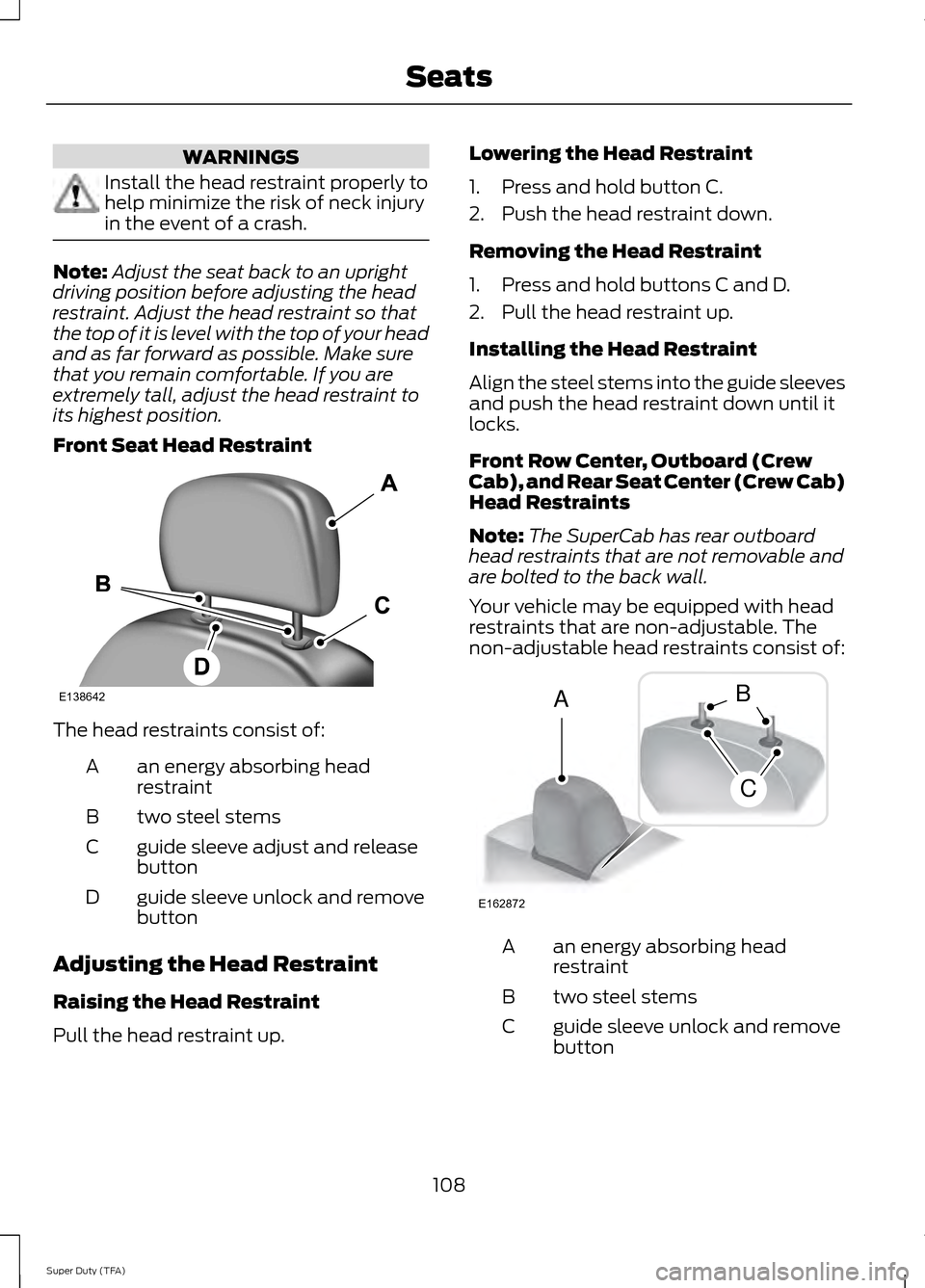
Front Seat Head Restraint The head restraints consist of:
an energy absorbing head
restraint
A
two steel stems
B
guide sleeve adjust and release
button
C
guide sleeve unlock and remove
button
D
Adjusting the Head Restraint
Raising the Head Restraint
Pull the head restraint up. Lowering the Head Restraint
1. Press and hold button C.
2. Push the head restraint down.
Removing the Head Restraint
1. Press and hold buttons C and D.
2. Pull the head restraint up.
Installing the Head Restraint
Align the steel stems into the guide sleeves
and push the head restraint down until it
locks.
Front Row Center, Outboard (Crew
Cab), and Rear Seat Center (Crew Cab)
Head Restraints
Note:
The SuperCab has rear outboard
head restraints that are not removable and
are bolted to the back wall.
Your vehicle may be equipped with head
restraints that are non-adjustable. The
non-adjustable head restraints consist of: an energy absorbing head
restraint
A
two steel stems
B
guide sleeve unlock and remove
button
C
108
Super Duty (TFA) SeatsE138642 E162872
A
C
B