2014 FORD MONDEO steering wheel
[x] Cancel search: steering wheelPage 314 of 446
![FORD MONDEO 2014 4.G Owners Manual Downloaded from www.Manualslib.com manuals search engine Command
(turn ringer on | silent mode off)
(turn ringer off | silent mode [on])
Words in parentheses or brackets are optional and do not have t](/manual-img/11/5483/w960_5483-313.png "FORD MONDEO 2014 4.G Owners Manual Downloaded from www.Manualslib.com manuals search engine Command
(turn ringer on | silent mode off)
(turn ringer off | silent mode [on])
Words in parentheses or brackets are optional and do not have t")
Downloaded from www.Manualslib.com manuals search engine Command
(turn ringer on | silent mode off)
(turn ringer off | silent mode [on])
Words in parentheses or brackets are optional and do not have to be spoken for thesystem to understand the command.
Making a Call
Press the voice button and when promptedsay either:
ActionCommand
call (someone | [[a]name])
dial [[a]number]Followed by a number. When the systemconfirms the number say:dial [[a] number]
To erase the last spoken digit say:
ActionCommand
Or press the left arrow button on the audio unit.(delete | correct)
To erase all spoken digits say:
ActionCommand
Or press and hold the left arrow button on the audio unit.clear
To end the call, press the end call buttonon the steering wheel or select the end calloption in the audio display and press OK.
312Mondeo (CNG) Vehicles Built From: 08-09-2014 Vehicles Built Up To: 19-04-2015, CG3633en enGBR, Edition date: 10/2014, First PrintingSYNC™
Page 315 of 446
Downloaded from www.Manualslib.com manuals search engine Receiving a Call
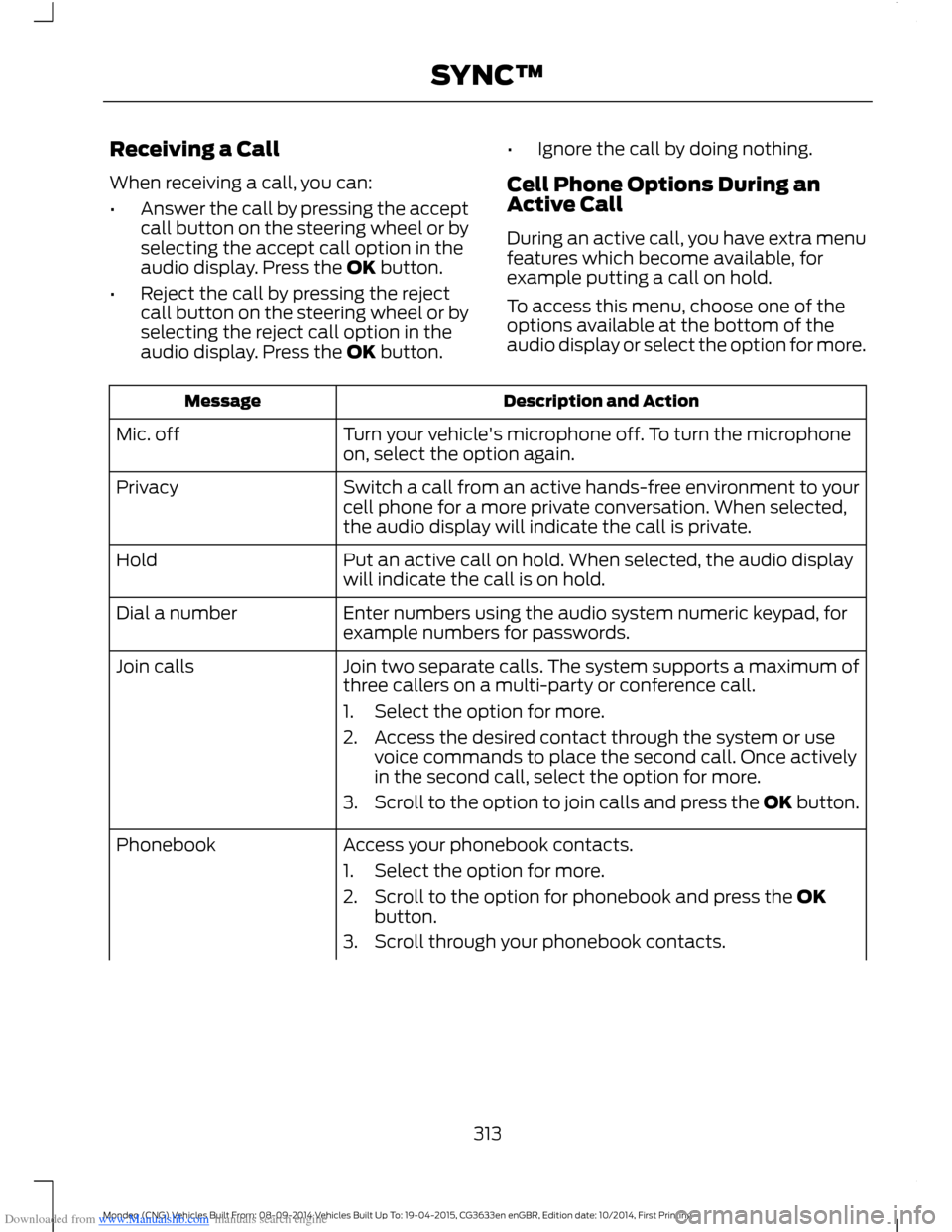
When receiving a call, you can:
•Answer the call by pressing the acceptcall button on the steering wheel or byselecting the accept call option in theaudio display. Press the OK button.
•Reject the call by pressing the rejectcall button on the steering wheel or byselecting the reject call option in theaudio display. Press the OK button.
•Ignore the call by doing nothing.
Cell Phone Options During anActive Call
During an active call, you have extra menufeatures which become available, forexample putting a call on hold.
To access this menu, choose one of theoptions available at the bottom of theaudio display or select the option for more.
Description and ActionMessage
Turn your vehicle's microphone off. To turn the microphoneon, select the option again.Mic. off
Switch a call from an active hands-free environment to yourcell phone for a more private conversation. When selected,the audio display will indicate the call is private.
Privacy
Put an active call on hold. When selected, the audio displaywill indicate the call is on hold.Hold
Enter numbers using the audio system numeric keypad, forexample numbers for passwords.Dial a number
Join two separate calls. The system supports a maximum ofthree callers on a multi-party or conference call.Join calls
1.Select the option for more.
2.Access the desired contact through the system or usevoice commands to place the second call. Once activelyin the second call, select the option for more.
3.Scroll to the option to join calls and press the OK button.
Access your phonebook contacts.Phonebook
1.Select the option for more.
2.Scroll to the option for phonebook and press the OKbutton.
3.Scroll through your phonebook contacts.
313Mondeo (CNG) Vehicles Built From: 08-09-2014 Vehicles Built Up To: 19-04-2015, CG3633en enGBR, Edition date: 10/2014, First PrintingSYNC™
Page 324 of 446

Downloaded from www.Manualslib.com manuals search engine Display Options
If you switch on this feature, a confirmationmessage appears in the display.
If you switch off this feature, a dialog willappear in the display, which allows you toset a voice reminder.
Off with voice reminder provides a displayand voice reminder when your cell phoneconnects and your vehicle starts.
Off without voice reminder provides adisplay reminder only without a voicereminder when your cell phone connects.
To make sure that Emergency Assistanceworks correctly:
•The system must have power and beworking correctly at the time of thecrash and during feature activation anduse.
•You must switch on the feature beforea crash.
•You must have a cell phone connectedto the system.
•In certain countries, it may benecessary to have a valid andregistered SIM card with credit in orderto place and maintain an emergencycall.
•A connected cell phone must have theability to make and maintain anoutgoing call at the time of the crash.
•A connected cell phone must haveadequate network coverage, batterypower and signal strength.
•Your vehicle must have battery power.
Note:This feature only works in a Europeancountry or region where SYNC EmergencyAssistance can call the local emergencyservices. Visit the regional Ford website fordetails.
In the Event of a Crash
Note:Not every crash deploys an airbag ortriggers the fuel pump shut off (which mayturn on Emergency Assistance). However,if Emergency Assistance is triggered thesystem tries to contact the emergencyservices. If a connected cell phone sustainsdamage or loses connection to the system,it searches for and tries to connect to anyavailable previously paired cell phone. Thesystem attempts to dial 112.
Before making a call:
•If you do not cancel the call and SYNCmakes a successful call, anintroductory message plays for theemergency operator. After thismessage, there is hands-freecommunication between your vehicle'soccupants and the operator.
•The system provides a short windowof time (approximately 10 seconds) tocancel the call. If you do not cancel thecall, the system attempts to dial 112.
•The system plays a message lettingyou know when it attempts to make anemergency call. You can cancel the callby selecting the relevant functionbutton or by pressing the end callbutton on the steering wheel.
During a call:
•Emergency Assistance uses yourvehicle GPS or cellular networkinformation when available todetermine the most appropriatelanguage to use. It alerts theemergency operator of the crash anddelivers the introductory message. Thismay include your vehicle GPScoordinates.
•The language the system uses tointeract with the occupants of yourvehicle may differ from the languageused to deliver information to theemergency operator.
322Mondeo (CNG) Vehicles Built From: 08-09-2014 Vehicles Built Up To: 19-04-2015, CG3633en enGBR, Edition date: 10/2014, First PrintingSYNC™
Page 348 of 446

Downloaded from www.Manualslib.com manuals search engine Action and DescriptionMessage
Adjust the settings for:Sound
Bass
Treble
Midrange
Set Balance and Fade
DSP
EQ Mode
Speed Compensated Volume
Using the Steering Wheel Controls
Depending on your vehicle and optionpackage, you can use your steering wheelcontrols to interact with the touchscreensystem.
•VOL: Control the volume of audiooutput.
•Mute: Mute the audio output.
•Voice: Press to start a voice session.Press again and hold to end a voicesession.
•SEEK and PHONE ACCEPT:
•While in radio mode, press to seekbetween memory presets or pressand hold to seek between stations.
•While in USB or CD mode, press toseek between stations or press andhold to fast seek.
•While in phone mode, press toanswer a call, or to switch betweencalls.
•SEEK and PHONE REJECT:
•While in radio mode, press to seekbetween memory presets or pressand hold to seek between stations.
•While in USB or CD mode, press toseek between stations or press andhold to fast seek.
•While in phone mode, press to enda call, or to reject an incoming call.
•Source: Touch the control repeatedlyto switch between media modes.
•Sound: Touch the control to adjust thesound settings. See Settings (page352).
See Steering Wheel (page 56).
Cleaning the Touchscreen Display
Use a dry, clean, soft cloth. If dirt orfingerprints are still visible, apply a smallamount of alcohol to the cloth. Do not pouror spray alcohol onto the display. Do notuse detergent or any type of solvent toclean the display.
Support
For further support, contact an authorizeddealer. For more information, visit theregional Ford website.
346Mondeo (CNG) Vehicles Built From: 08-09-2014 Vehicles Built Up To: 19-04-2015, CG3633en enGBR, Edition date: 10/2014, First PrintingSYNC™ 2
Page 351 of 446
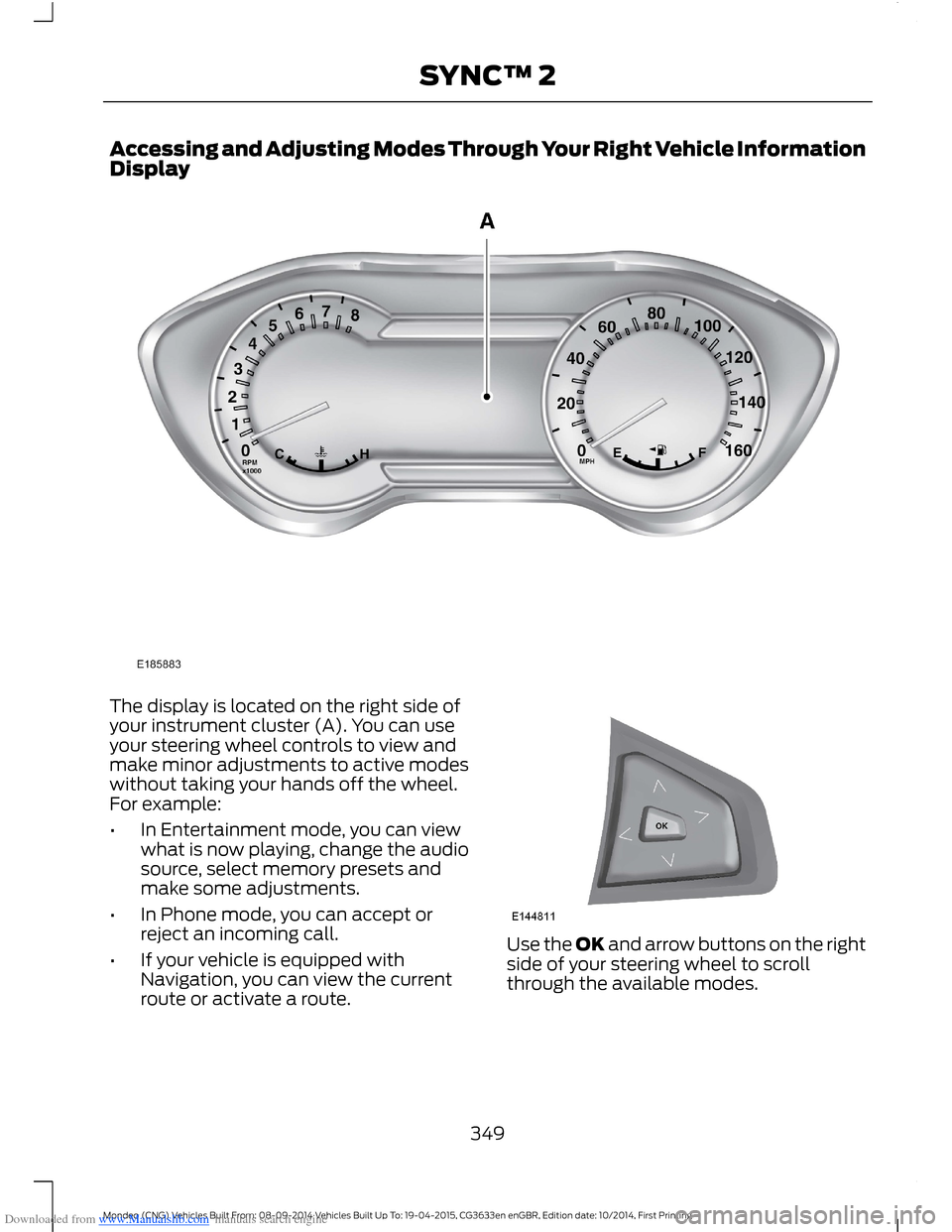
Downloaded from www.Manualslib.com manuals search engine Accessing and Adjusting Modes Through Your Right Vehicle InformationDisplay
The display is located on the right side ofyour instrument cluster (A). You can useyour steering wheel controls to view andmake minor adjustments to active modeswithout taking your hands off the wheel.For example:
•In Entertainment mode, you can viewwhat is now playing, change the audiosource, select memory presets andmake some adjustments.
•In Phone mode, you can accept orreject an incoming call.
•If your vehicle is equipped withNavigation, you can view the currentroute or activate a route.
Use the OK and arrow buttons on the rightside of your steering wheel to scrollthrough the available modes.
349Mondeo (CNG) Vehicles Built From: 08-09-2014 Vehicles Built Up To: 19-04-2015, CG3633en enGBR, Edition date: 10/2014, First PrintingSYNC™ 2
Page 353 of 446
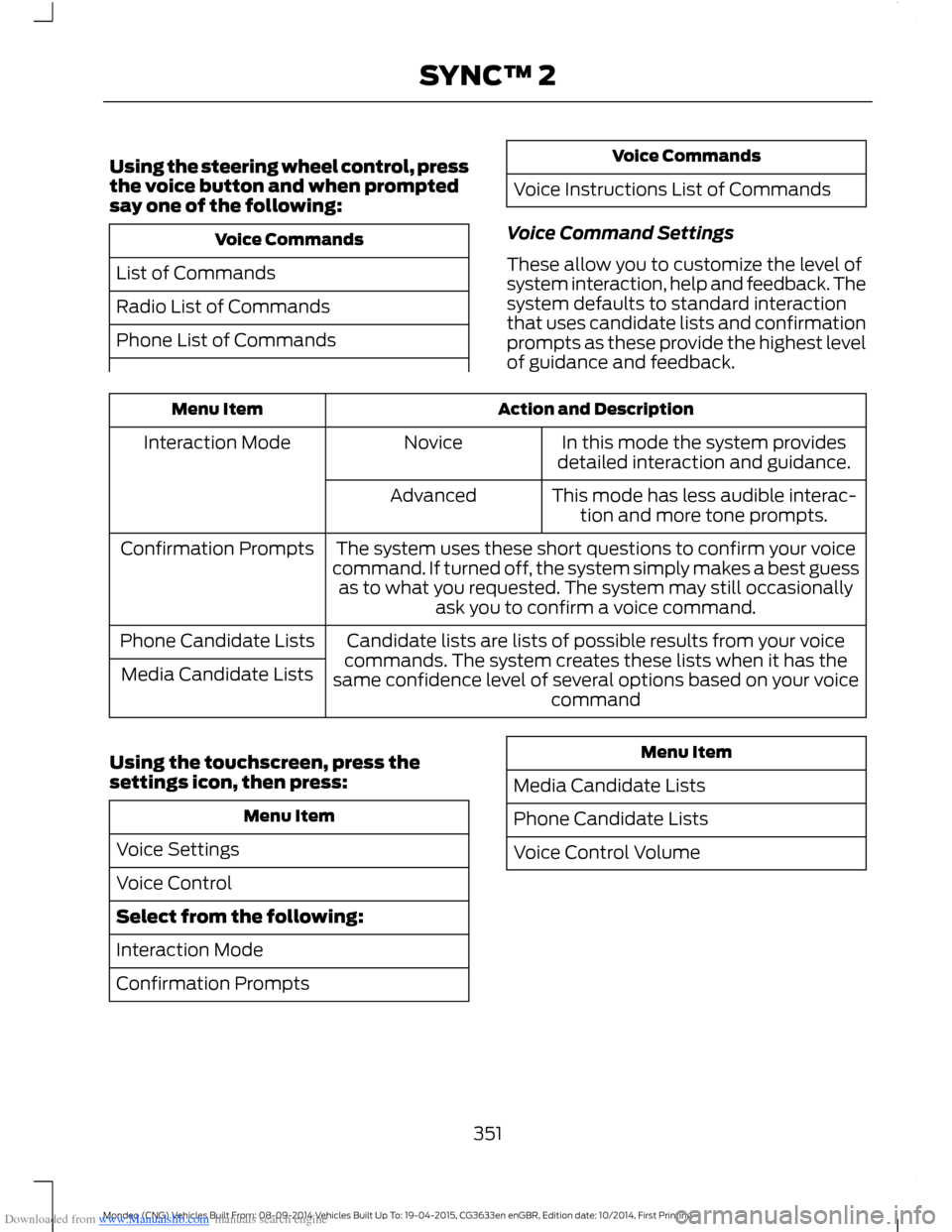
Downloaded from www.Manualslib.com manuals search engine Using the steering wheel control, pressthe voice button and when promptedsay one of the following:
Voice Commands
List of Commands
Radio List of Commands
Phone List of Commands
Voice Commands
Voice Instructions List of Commands
Voice Command Settings
These allow you to customize the level ofsystem interaction, help and feedback. Thesystem defaults to standard interactionthat uses candidate lists and confirmationprompts as these provide the highest levelof guidance and feedback.
Action and DescriptionMenu Item
In this mode the system providesdetailed interaction and guidance.NoviceInteraction Mode
This mode has less audible interac-tion and more tone prompts.Advanced
The system uses these short questions to confirm your voicecommand. If turned off, the system simply makes a best guessas to what you requested. The system may still occasionallyask you to confirm a voice command.
Confirmation Prompts
Candidate lists are lists of possible results from your voicecommands. The system creates these lists when it has thesame confidence level of several options based on your voicecommand
Phone Candidate Lists
Media Candidate Lists
Using the touchscreen, press thesettings icon, then press:
Menu Item
Voice Settings
Voice Control
Select from the following:
Interaction Mode
Confirmation Prompts
Menu Item
Media Candidate Lists
Phone Candidate Lists
Voice Control Volume
351Mondeo (CNG) Vehicles Built From: 08-09-2014 Vehicles Built Up To: 19-04-2015, CG3633en enGBR, Edition date: 10/2014, First PrintingSYNC™ 2
Page 355 of 446

Downloaded from www.Manualslib.com manuals search engine Clock
Under this menu, you can set theclock, access and adjust the
display, sound and vehicle settings as wellas access settings for specific modes orthe help feature.
To make adjustments using the touchscreen, select:
Action and DescriptionMenu Item
Press the settings icon.Settings
Press the + or - to adjust the time.ClockFrom this screen, you can also make other adjustments suchas 12-hour or 24-hour mode, activate GPS time synchroniza-tion and have the system automatically update new timezones.You can also switch the outside air temperature display offand on. It appears at the top center of the touchscreen, nextto the time and date.
Note:You cannot manually set the date. Your vehicle’s GPS does this for you.
Note:If the battery has been disconnected, your vehicle needs to acquire a GPS signal toupdate the clock. Once your vehicle acquires the signal, it may take a few minutes for theupdate to display the correct time.
Display
You can adjust the display usingthe touchscreen or the voicebutton on the steering wheelcontrols.
To make adjustments using the touchscreen, select:
Action and DescriptionMenu Item
Press the settings icon.Settings
Display
Then select from the following:
Allows you to switch the display off. It also allows you to set the screento a certain brightness or have the system automatically change basedon the outside light level.
Mode
If you also select:
These features will allow you to adjust the dimming ofyour screen.Auto
Night
353Mondeo (CNG) Vehicles Built From: 08-09-2014 Vehicles Built Up To: 19-04-2015, CG3633en enGBR, Edition date: 10/2014, First PrintingSYNC™ 2
Page 371 of 446
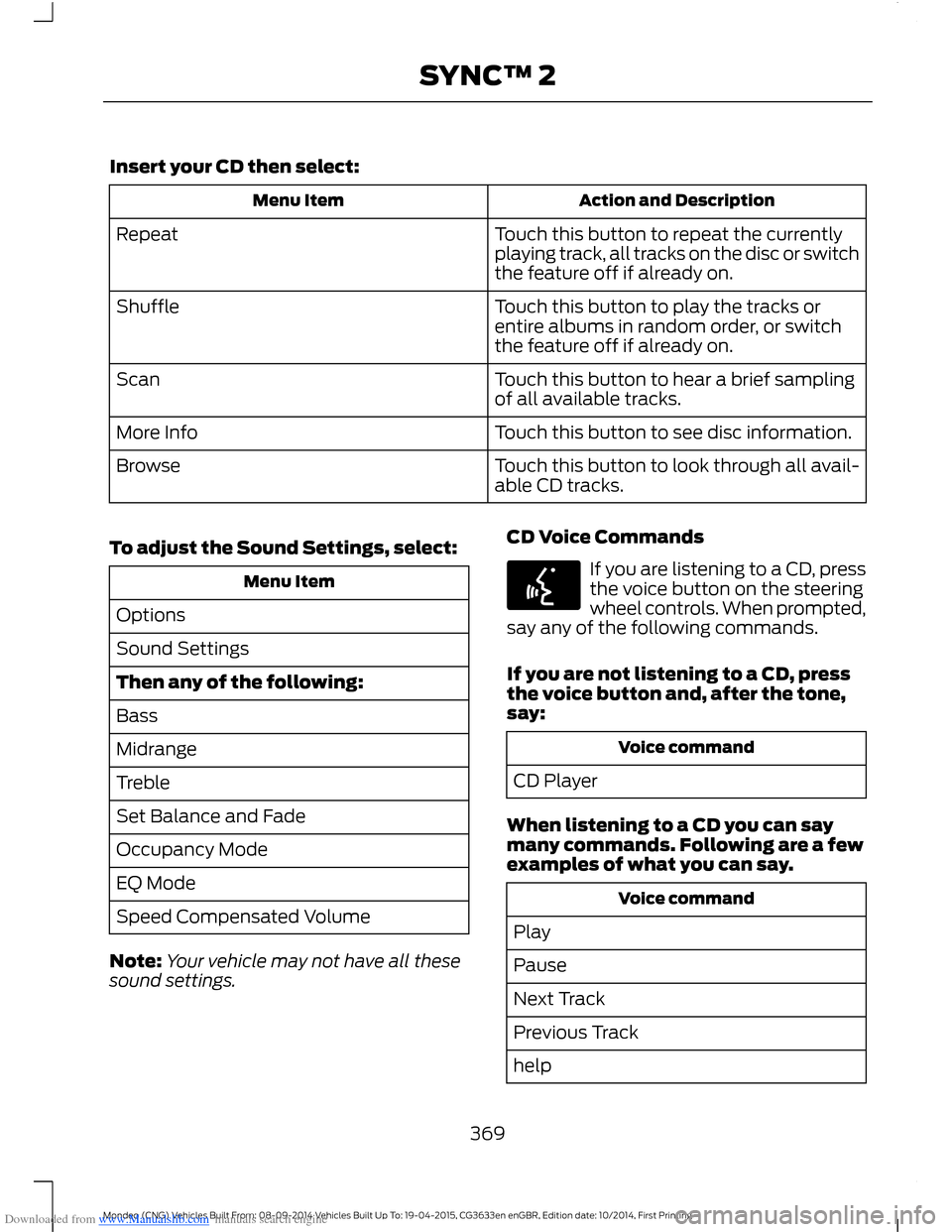
Downloaded from www.Manualslib.com manuals search engine Insert your CD then select:
Action and DescriptionMenu Item
Touch this button to repeat the currentlyplaying track, all tracks on the disc or switchthe feature off if already on.
Repeat
Touch this button to play the tracks orentire albums in random order, or switchthe feature off if already on.
Shuffle
Touch this button to hear a brief samplingof all available tracks.Scan
Touch this button to see disc information.More Info
Touch this button to look through all avail-able CD tracks.Browse
To adjust the Sound Settings, select:
Menu Item
Options
Sound Settings
Then any of the following:
Bass
Midrange
Treble
Set Balance and Fade
Occupancy Mode
EQ Mode
Speed Compensated Volume
Note:Your vehicle may not have all thesesound settings.
CD Voice Commands
If you are listening to a CD, pressthe voice button on the steeringwheel controls. When prompted,say any of the following commands.
If you are not listening to a CD, pressthe voice button and, after the tone,say:
Voice command
CD Player
When listening to a CD you can saymany commands. Following are a fewexamples of what you can say.
Voice command
Play
Pause
Next Track
Previous Track
help
369Mondeo (CNG) Vehicles Built From: 08-09-2014 Vehicles Built Up To: 19-04-2015, CG3633en enGBR, Edition date: 10/2014, First PrintingSYNC™ 2