2014 FORD MONDEO displays
[x] Cancel search: displaysPage 144 of 446
Downloaded from www.Manualslib.com manuals search engine You can stop the shutdown, or reset thetimer, at any point before the 30-secondcountdown has expired by doing any of thefollowing:
•You can reset the timer by interactingwith your vehicle (such as pressing thebrake pedal or accelerator pedal).
•You can temporarily switch off theshutdown feature any time the ignitionis on (for the current ignition cycleonly). Use the information display todo so. See Information Displays(page 86).
•During the countdown beforeshutdown, you are prompted to pressOK or RESET (depending on your typeof information display) to temporarilyswitch the feature off (for the currentignition cycle only).
Switching Off the Vehicle When itis Stationary
Vehicles with an Ignition Key
1.Move the transmission selector leverto a low gear (manual transmission)or park (P) (automatic transmission).
2.Turn the key to position 0.
3.Apply the parking brake.
Vehicles with Keyless Start
1.Move the transmission selector leverto a low gear (manual transmission)or park (P) (automatic transmission).
2.Press the button once.
3.Apply the parking brake.
Note:This switches off the ignition, allelectrical circuits, warning lamps andindicators.
Note:If the engine is idling for 30 minutes,the ignition and engine automatically shutdown.
Switching Off the Vehicle When ItIs Moving
WARNING
Switching off the engine when thevehicle is still moving will result in aloss of brake and steering assistance.The steering will not lock, but higher effortwill be required. When the ignition isswitched off, some electrical circuits,including air bags, warning lamps andindicators may also be off. If the ignitionwas turned off accidentally, you can shiftinto neutral (N) and re-start the engine.
Vehicles with an Ignition Key
1.Move the transmission selector leverto the neutral position (manualtransmission) or neutral (N)(automatic transmission) and use thebrakes to bring your vehicle to a safestop.
2.When your vehicle has stopped, movethe transmission selector lever to a lowgear (manual transmission) or park (P)(automatic transmission) and turn thekey to position 0.
3.Apply the parking brake.
Vehicles with Keyless Start
1.Move the transmission selector leverto the neutral position (manualtransmission) or neutral (N)(automatic transmission) and use thebrakes to bring your vehicle to a safestop.
2.When your vehicle has stopped, movethe transmission selector lever to a lowgear (manual transmission) or park (P)(automatic transmission).
3.Press and hold the button for onesecond, or press it three times withintwo seconds.
4.Apply the parking brake.
142Mondeo (CNG) Vehicles Built From: 08-09-2014 Vehicles Built Up To: 19-04-2015, CG3633en enGBR, Edition date: 10/2014, First PrintingStarting and Stopping the Engine
Page 159 of 446
Downloaded from www.Manualslib.com manuals search engine Note:Engine damage may occur if youmaintain excessive engine revving withoutshifting.
SelectShift does not automatically upshift,even if the engine is approaching the RPMlimit. It must be shifted manually bypressing the + button.
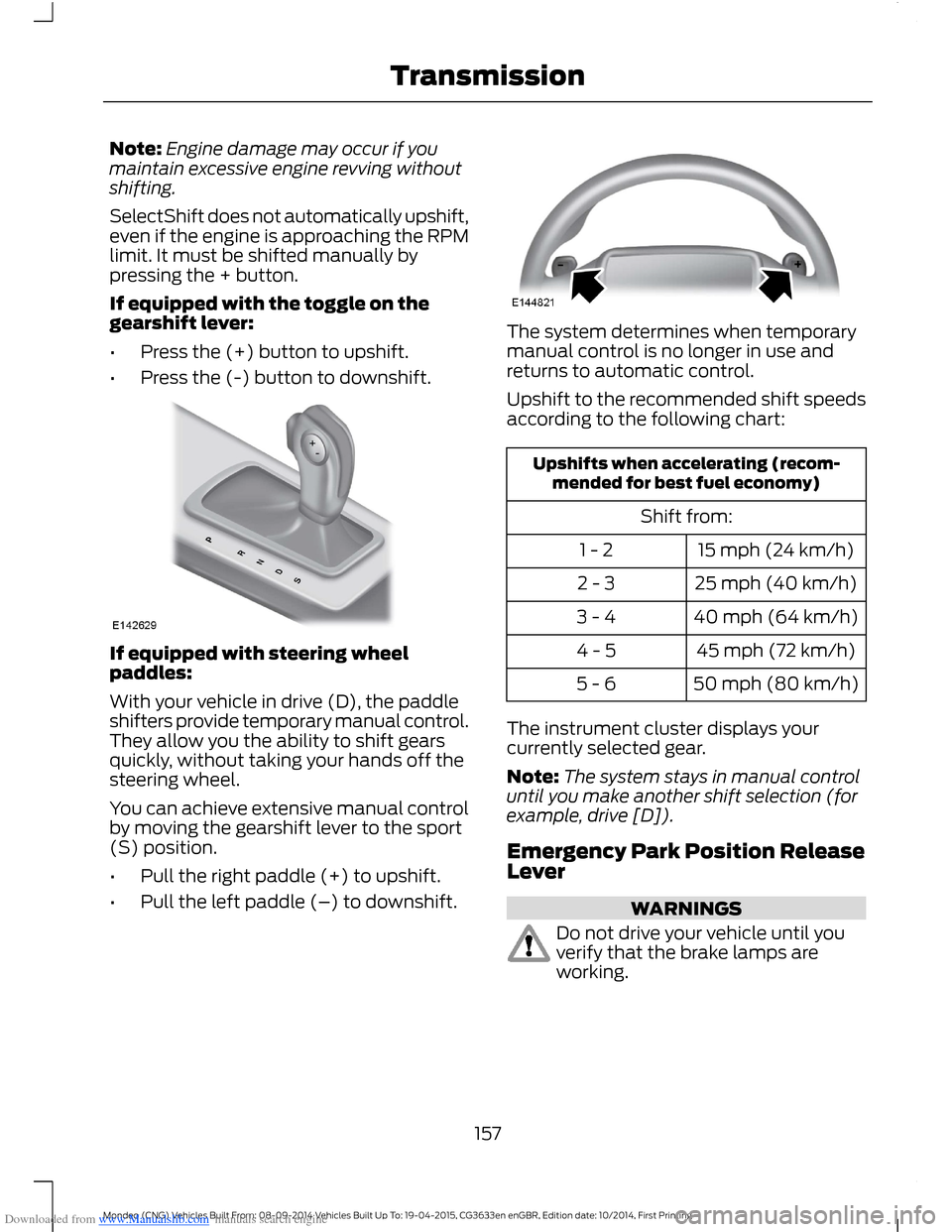
If equipped with the toggle on thegearshift lever:
•Press the (+) button to upshift.
•Press the (-) button to downshift.
If equipped with steering wheelpaddles:
With your vehicle in drive (D), the paddleshifters provide temporary manual control.They allow you the ability to shift gearsquickly, without taking your hands off thesteering wheel.
You can achieve extensive manual controlby moving the gearshift lever to the sport(S) position.
•Pull the right paddle (+) to upshift.
•Pull the left paddle (–) to downshift.
The system determines when temporarymanual control is no longer in use andreturns to automatic control.
Upshift to the recommended shift speedsaccording to the following chart:
Upshifts when accelerating (recom-mended for best fuel economy)
Shift from:
15 mph (24 km/h)1 - 2
25 mph (40 km/h)2 - 3
40 mph (64 km/h)3 - 4
45 mph (72 km/h)4 - 5
50 mph (80 km/h)5 - 6
The instrument cluster displays yourcurrently selected gear.
Note:The system stays in manual controluntil you make another shift selection (forexample, drive [D]).
Emergency Park Position ReleaseLever
WARNINGS
Do not drive your vehicle until youverify that the brake lamps areworking.
157Mondeo (CNG) Vehicles Built From: 08-09-2014 Vehicles Built Up To: 19-04-2015, CG3633en enGBR, Edition date: 10/2014, First PrintingTransmission
Page 163 of 446

Downloaded from www.Manualslib.com manuals search engine Note:When you apply the electric parkingbrake in certain conditions, for example, ona steep hill, the electric parking brake mayreapply the brakes within three to tenminutes.
Note:You may notice various noises whenyou apply and release the electric parkingbrake. This is normal and no cause forconcern.
Parking On a Hill (Vehicles With aManual Transmission)
If you park your vehicle facing uphill, movethe transmission to first gear (1) and turnthe steering wheel away from the curb. Ifyou park your vehicle facing downhill, movethe transmission to reverse (R) and turnthe steering wheel toward the curb.
Applying the Electric Parkingbrake
WARNING
If the brake system warning lampflashes, there could be a problemwith your electric parking brake. Havethe system checked by an authorizeddealer as soon as possible.
Note:The brake system warning lamp willilluminate for ten seconds, if the ignition isturned off after the electric parking brakehas been applied, or the electric parkingbrake has been applied after the ignition hasbeen turned off.
Note:The electric parking brake will notautomatically apply. You must apply theelectric parking brake using the electricparking brake switch.
Pull the switch up to apply the electricparking brake.
The brake system warning lamp willilluminate to confirm that the electricparking brake has been applied. SeeInformation Displays (page 86).
Apply the electric parking brake whenthe vehicle is moving
WARNINGS
Applying the electric parking brakewhile moving will result in use of theanti-lock braking system. Do not usethe electric parking brake system when thevehicle is moving unless the normal brakesystem is unable to stop the vehicle.
With the exception of emergencyconditions (for example, the brakepedal does not work or is blocked),do not apply the electric parking brakewhile the vehicle is moving. On bends, orpoor road surfaces or weather conditions,emergency braking can cause the vehicleto skid out of control or off the road.
If you apply the electric parking brake whenyour vehicle is moving, the brake systemwarning lamp will illuminate and a warningchime will sound. See InformationDisplays (page 86).
161Mondeo (CNG) Vehicles Built From: 08-09-2014 Vehicles Built Up To: 19-04-2015, CG3633en enGBR, Edition date: 10/2014, First PrintingBrakes
Page 172 of 446
Downloaded from www.Manualslib.com manuals search engine If the transmission is in reverse (R), thefront sensing system provides audiowarnings when your vehicle is moving andthe detected obstacle is moving towardsyour vehicle. Once the vehicle is stationary,the audio warning will be stopped after 2seconds.
Obstacle Distance Indicator (If
Equipped)
The system provides obstacle distanceindication through the information display.The distance indicator displays when thetransmission is in reverse (R).
The indicator displays:
•As the distance to the obstacledecreases the indicator blocksilluminate and move towards thevehicle icon.
•If there is no obstacle detected, thedistance indicator blocks are greyedout.
Vehicles with automatic transmission
If the gearshift is in neutral (N), the systemprovides obstacle distance indicationthrough the information display. If yourvehicle moves the front sensing systemprovides an audible warning when thevehicle is moving at 7 mph (12 km/h) orbelow and an obstacle is located insidethe detection area. Once the vehicle isstationary, the audio warning will bestopped after 4 seconds.
If the gearshift is in drive (D) or any otherforward gear, the front sensing systemprovides audio warnings when the vehicleis moving and an obstacle is located insidethe detection area. Once the vehicle isstationary, the audio warning will bestopped after 2 seconds.
SIDE SENSING SYSTEM
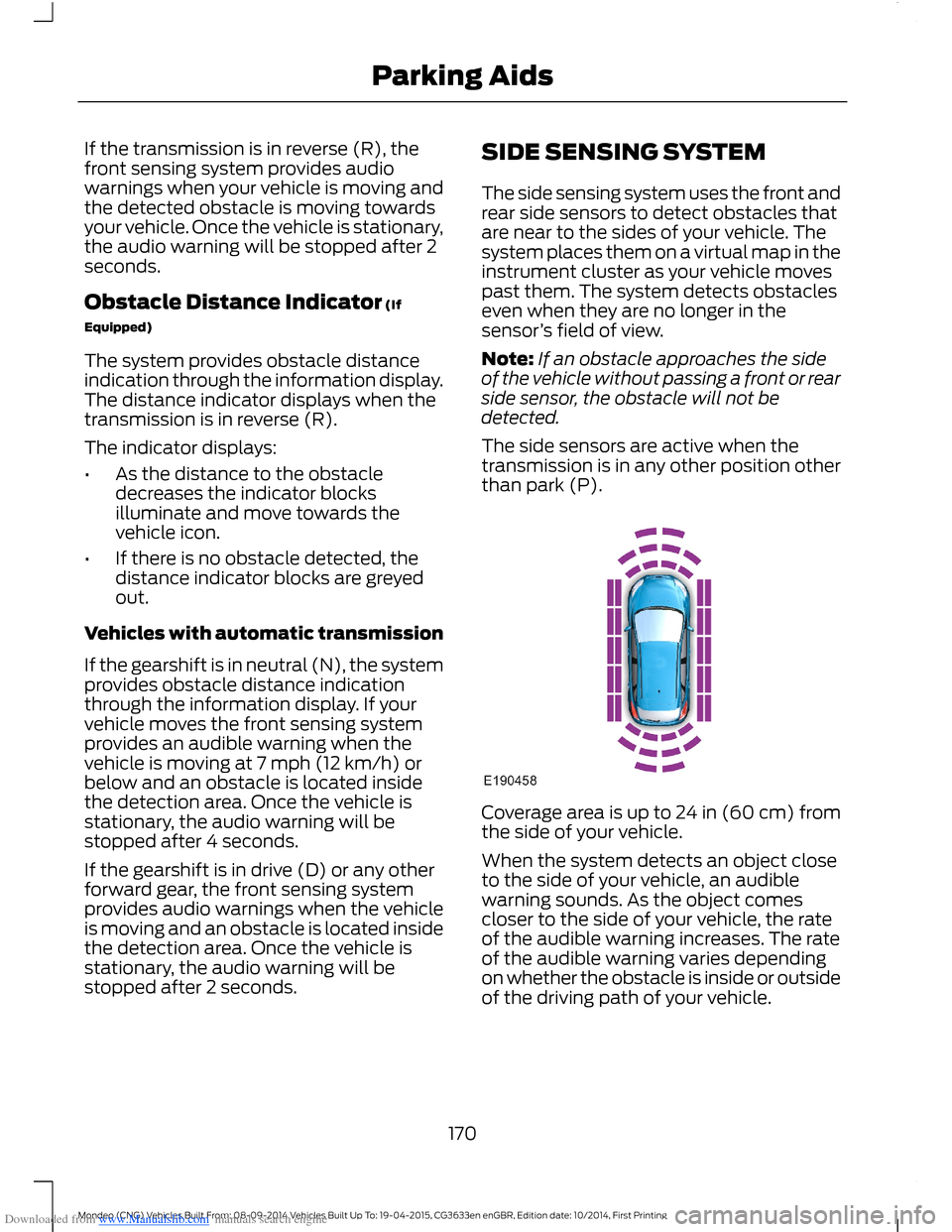
The side sensing system uses the front andrear side sensors to detect obstacles thatare near to the sides of your vehicle. Thesystem places them on a virtual map in theinstrument cluster as your vehicle movespast them. The system detects obstacleseven when they are no longer in thesensor’s field of view.
Note:If an obstacle approaches the sideof the vehicle without passing a front or rearside sensor, the obstacle will not bedetected.
The side sensors are active when thetransmission is in any other position otherthan park (P).
Coverage area is up to 24 in (60 cm) fromthe side of your vehicle.
When the system detects an object closeto the side of your vehicle, an audiblewarning sounds. As the object comescloser to the side of your vehicle, the rateof the audible warning increases. The rateof the audible warning varies dependingon whether the obstacle is inside or outsideof the driving path of your vehicle.
170Mondeo (CNG) Vehicles Built From: 08-09-2014 Vehicles Built Up To: 19-04-2015, CG3633en enGBR, Edition date: 10/2014, First PrintingParking Aids
Page 174 of 446
Downloaded from www.Manualslib.com manuals search engine ACTIVE PARK ASSIST
Parallel Parking, PerpendicularParking, Park Out Assist
WARNINGS
You must remain in your vehiclewhen the system turns on. At alltimes, you are responsible forcontrolling your vehicle, supervising thesystem and intervening if required. Failureto take care may result in the loss ofcontrol of your vehicle, serious personalinjury or death.
The sensors may not detect objectsin heavy rain or other conditions thatcause disruptive reflections.
The system scans the area adjacent toboth sides of your vehicle to locate asuitable parking space.
The system informs you when it locates asuitable parking space. When you stopyour vehicle, the system takes control ofthe steering to guide your vehicle into theparking space.
Park Out Assist automatically steers yourvehicle out of a parallel parking space(hands-free) while you control theaccelerator, gearshift and brakes. Thesystem visually and audibly instructs youto enter traffic.
The system may not correctly operate inany of the following conditions:
•a spare tire or a significantly worn tiremore than the other tires is used
•you use a tire size not recommendedby us
•you try to park on a tight curve
•if the edge of the neighboring parkedvehicle is high off the ground (forexample, a bus, tow truck or flatbedtruck)
•the weather conditions are poor (heavyrain, snow, fog, etc).
Note:Keep the sensors, located on thebumper or fascia, free from snow, ice andlarge accumulations of dirt. Covered sensorscan affect the system's accuracy. Do notclean the sensors with sharp objects.
Do not use the system if:
•You have attached a foreign object(bike rack or trailer) to the front or rearof your vehicle or close to the sensors.
•You have attached an overhangingobject (surfboard) to the roof.
•A foreign object damages or obstructsthe front or rear bumper or sidesensors.
•The correct tire size is not in use on yourvehicle (for example, a mini-spare tire).
Using Active Park Assist - ParallelParking
Press the button located on thecenter console near the gearshiftlever once.
When driving at a speed less than 19 mph(30 km/h) the system automatically scansboth sides of your vehicle for an availableparking space. The system displays amessage and a corresponding graphic toindicate it is searching for a parking space.Use the direction indicator to selectsearching either to the left-hand side orright-hand side of your vehicle.
Note:If you do not make a selection thesystem will default to the passenger's side.
172Mondeo (CNG) Vehicles Built From: 08-09-2014 Vehicles Built Up To: 19-04-2015, CG3633en enGBR, Edition date: 10/2014, First PrintingParking Aids
Page 175 of 446

Downloaded from www.Manualslib.com manuals search engine When the system finds a suitable space,it displays a message and a tone sounds.Stop your vehicle and follow theinstructions on the screen. If your vehicleis moving very slowly, you may need to pullforward a short distance before the systemis ready to park.
Note:You must observe that the selectedspace remains clear of obstructions at alltimes during the maneuver.
Note:Active park assist may not detectstreet furniture and other items. You mustmake sure the selected space is suitable forparking.
Note:You should drive your vehicle asparallel to the other vehicles as possiblewhile passing a parking space.
Note:The system always offers the lastdetected parking space (for example, if yourvehicle detects multiple spaces while youare driving, it offers the last one).
Note:If driven above approximately 22 mph(35 km/h), the system shows a message toalert you to reduce your vehicle speed.
Automatic Steering into Parking Space
Note:If your vehicle speed exceeds 6 mph(9 km/h) or an object interrupts a maneuverbefore completion, the automatic steeringfunction switches off and you need to takefull control of your vehicle.
When you shift the transmission intoreverse (R), with your hands off the wheel(and nothing obstructing its movement),your vehicle steers itself into the space.The system displays instructions to moveyour vehicle back and forth in the space.
173Mondeo (CNG) Vehicles Built From: 08-09-2014 Vehicles Built Up To: 19-04-2015, CG3633en enGBR, Edition date: 10/2014, First PrintingParking Aids
Page 176 of 446

Downloaded from www.Manualslib.com manuals search engine When you think your vehicle is properlyparked, or you hear a solid tone from theparking aid (accompanied by a displaymessage and a chime), bring your vehicleto a complete stop.
When automatic steering is complete, thesystem displays a message and a tonesounds, indicating that the active parkassist process is finished. You areresponsible for checking the parking joband making any necessary correctionsbefore leaving your vehicle.
Using Active Park Assist -Perpendicular Parking
Press the button located on thecenter console near the gearshiftlever twice.
The system displays a message and acorresponding graphic to indicate it issearching for a parking space. Use thedirection indicator to select searchingeither to the left-hand side or right-handside of your vehicle.
Note:If you do not make a selection thesystem will default to the passenger's side.
When the system finds a suitable space,it displays a message and a tone sounds.Stop your vehicle and follow theinstructions on the screen. If your vehicleis moving very slowly, you may need to pullforward a short distance before the systemis ready to park.
Note:You must observe that the selectedspace remains clear of obstructions at alltimes during the maneuver.
Note:You should drive your vehicle asperpendicular to the other vehicles aspossible while passing a parking space.
Note:The system always offers the lastdetected parking space (for example, if yourvehicle detects multiple spaces while youare driving, it offers the last one).
Note:If driven above approximately 19 mph(30 km/h), the system shows a message toalert you to reduce your vehicle speed.
Automatic Steering into Parking Space
Note:If your vehicle speed exceeds 6 mph(9 km/h) or an object interrupts a maneuverbefore completion, the automatic steeringfunction switches off and you need to takefull control of your vehicle.
174Mondeo (CNG) Vehicles Built From: 08-09-2014 Vehicles Built Up To: 19-04-2015, CG3633en enGBR, Edition date: 10/2014, First PrintingParking Aids
Page 177 of 446
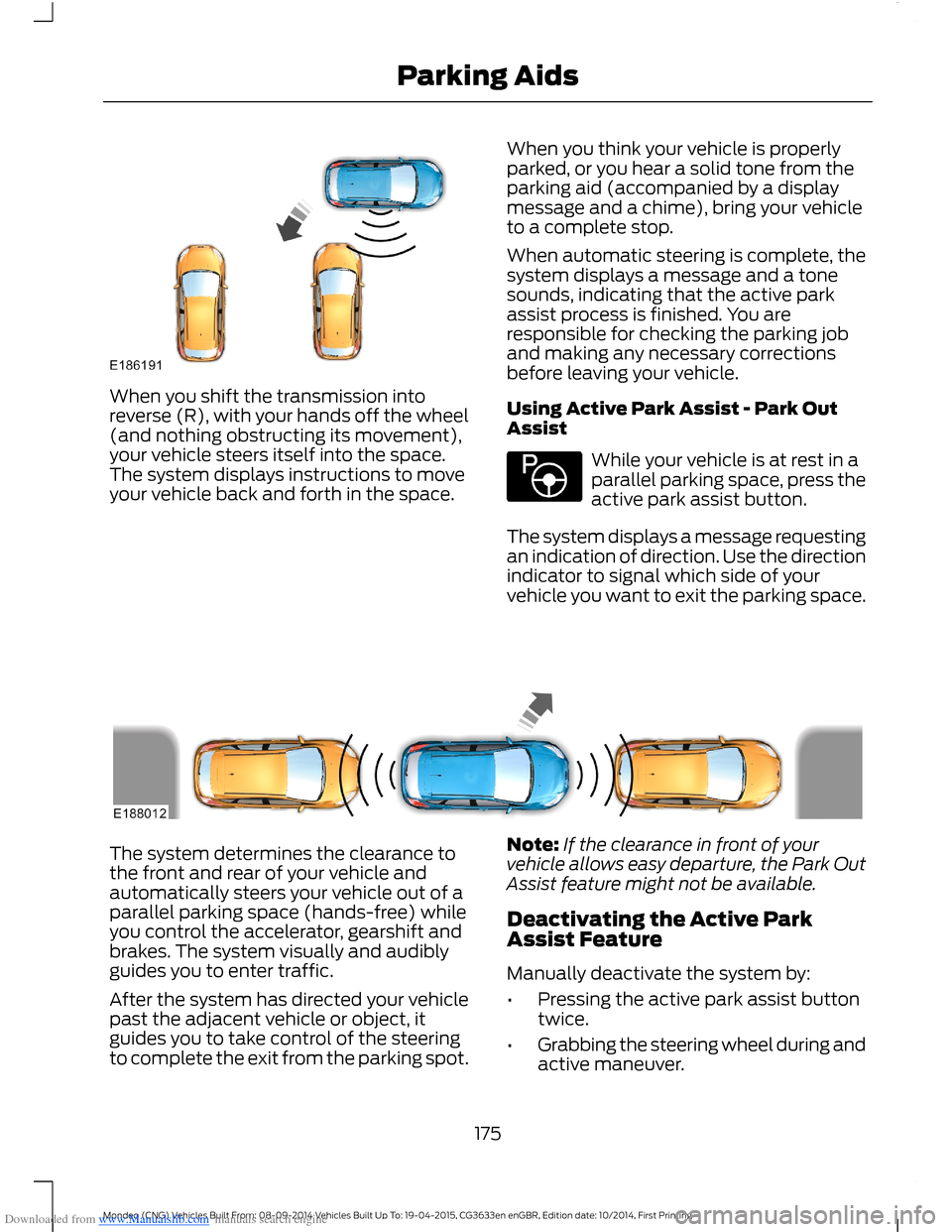
Downloaded from www.Manualslib.com manuals search engine When you shift the transmission intoreverse (R), with your hands off the wheel(and nothing obstructing its movement),your vehicle steers itself into the space.The system displays instructions to moveyour vehicle back and forth in the space.
When you think your vehicle is properlyparked, or you hear a solid tone from theparking aid (accompanied by a displaymessage and a chime), bring your vehicleto a complete stop.
When automatic steering is complete, thesystem displays a message and a tonesounds, indicating that the active parkassist process is finished. You areresponsible for checking the parking joband making any necessary correctionsbefore leaving your vehicle.
Using Active Park Assist - Park OutAssist
While your vehicle is at rest in aparallel parking space, press theactive park assist button.
The system displays a message requestingan indication of direction. Use the directionindicator to signal which side of yourvehicle you want to exit the parking space.
The system determines the clearance tothe front and rear of your vehicle andautomatically steers your vehicle out of aparallel parking space (hands-free) whileyou control the accelerator, gearshift andbrakes. The system visually and audiblyguides you to enter traffic.
After the system has directed your vehiclepast the adjacent vehicle or object, itguides you to take control of the steeringto complete the exit from the parking spot.
Note:If the clearance in front of yourvehicle allows easy departure, the Park OutAssist feature might not be available.
Deactivating the Active ParkAssist Feature
Manually deactivate the system by:
•Pressing the active park assist buttontwice.
•Grabbing the steering wheel during andactive maneuver.
175Mondeo (CNG) Vehicles Built From: 08-09-2014 Vehicles Built Up To: 19-04-2015, CG3633en enGBR, Edition date: 10/2014, First PrintingParking Aids