Page 68 of 446

Downloaded from www.Manualslib.com manuals search engine WARNINGS
Check and replace wiper bladesregularly to ensure the camerasensor has a clear view through thewindscreen. Replacement wiper bladesmust be the correct length.
Note:Keep the windscreen free fromobstructions such as bird droppings, insectsand snow or ice.
Note:Reflective road signs may bedetected as oncoming traffic and theheadlamps will be switched to low beam.
Note:Always fit Ford Original Parts whenreplacing headlamp bulbs. Other bulbs mayreduce system performance.
The system will automatically switch onhigh beams if it is dark enough and no othertraffic is present. If it detects anapproaching vehicle’s headlamps or taillamps, or street lighting ahead the systemwill switch off high beam before it candistract other road users. Low beam willremain on.
A camera sensor is centrally mountedbehind the windshield of your vehicle. Thismonitors conditions continuously to decidewhen to switch the high beams on and off.
Once the system is active the high beamwill switch on if:
•It is dark enough to require the use ofhigh beams and
•there is no traffic or street lightingahead and
•vehicle speed is greater than 25 mph(40 km/h).
The high beam will switch off if:
•The ambient light is high enough thathigh beam is not required.
•An approaching vehicle's headlampsor tail lamps are detected.
•Street lighting is detected.
•Vehicle speed falls below 19 mph(30 km/h).
•The camera sensor is too hot orbecomes blocked.
Activating the System
Switch the system on using the informationdisplay. See Information Displays (page86). Turn the switch to the autolampsposition. See Autolamps (page 64).
The indicator will illuminate to confirmwhen the system is ready to assist.
Manually Overriding the System
Push or pull the lever to switch betweenhigh and low beam.
Note:This is a temporary override and thesystem will return to automatic operationafter a short period.
66Mondeo (CNG) Vehicles Built From: 08-09-2014 Vehicles Built Up To: 19-04-2015, CG3633en enGBR, Edition date: 10/2014, First PrintingLighting
Page 81 of 446
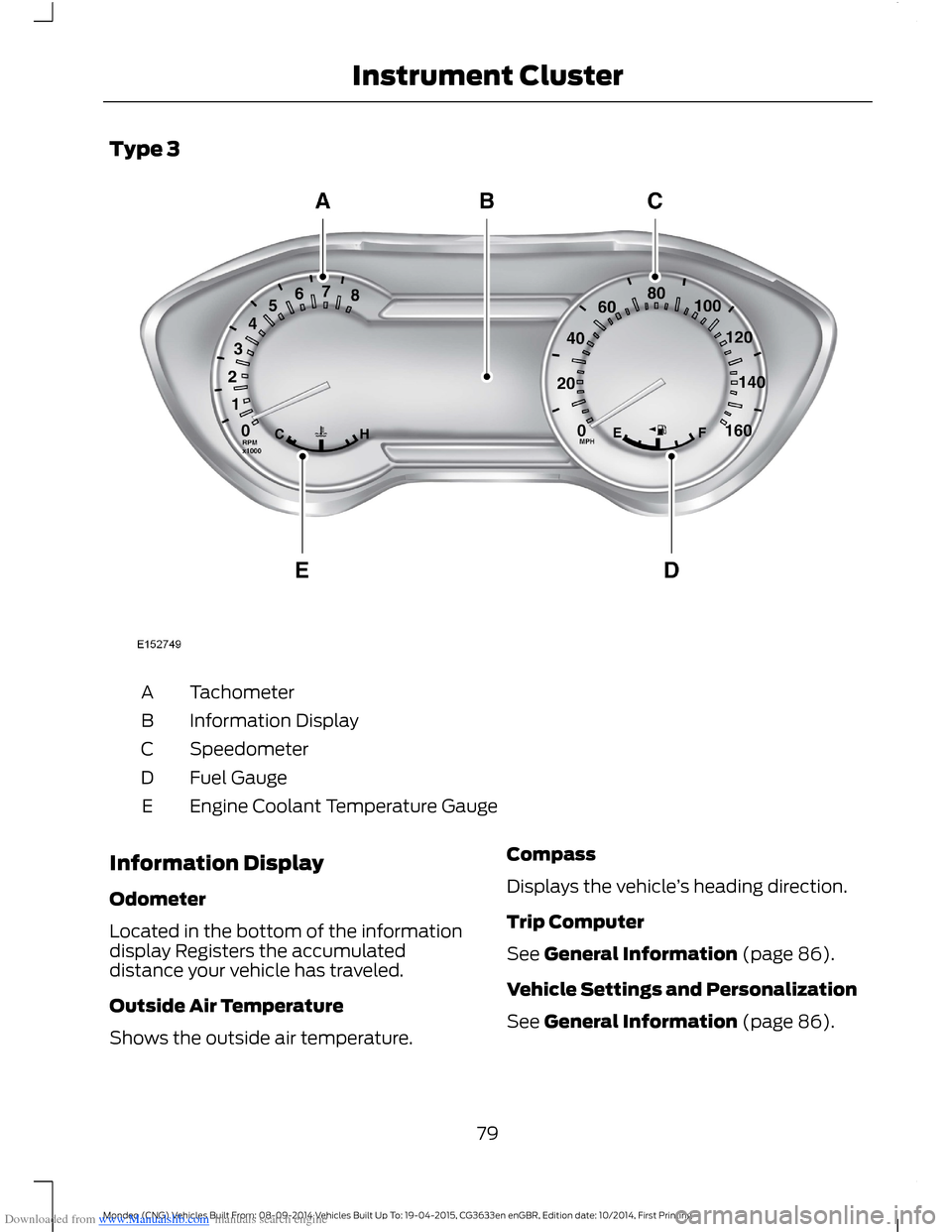
Downloaded from www.Manualslib.com manuals search engine Type 3
TachometerA
Information DisplayB
SpeedometerC
Fuel GaugeD
Engine Coolant Temperature GaugeE
Information Display
Odometer
Located in the bottom of the informationdisplay Registers the accumulateddistance your vehicle has traveled.
Outside Air Temperature
Shows the outside air temperature.
Compass
Displays the vehicle’s heading direction.
Trip Computer
See General Information (page 86).
Vehicle Settings and Personalization
See General Information (page 86).
79Mondeo (CNG) Vehicles Built From: 08-09-2014 Vehicles Built Up To: 19-04-2015, CG3633en enGBR, Edition date: 10/2014, First PrintingInstrument Cluster
Page 88 of 446

Downloaded from www.Manualslib.com manuals search engine GENERAL INFORMATION
WARNING
Driving while distracted can result inloss of vehicle control, crash andinjury. We strongly recommend thatyou use extreme caution when using anydevice that may take your focus off theroad. Your primary responsibility is the safeoperation of your vehicle. We recommendagainst the use of any hand-held devicewhile driving and encourage the use ofvoice-operated systems when possible.Make sure you are aware of all applicablelocal laws that may affect the use ofelectronic devices while driving.
You can control various systems on yourvehicle using the information displaycontrols on the steering wheel.
The information display shows thecorresponding information.
Information Display Controls(Type 1 and 2)
•Press the up and down arrow buttonsto scroll through and highlight theoptions within a menu.
•Press the right arrow button to enter asubmenu.
•Press the left arrow button to exit asubmenu.
•Press and hold the left arrow button atany time to return to the main menudisplay (escape button).
•Press the OK button to choose andconfirm settings or messages.
Menu
You can access the menu using theinformation display control.
Note:It may describe options not fitted tothe vehicle you have purchased.
Trip 1 and 2
Digital Speedo
Distance to E
Trip Odometer
Trip Timer
Fuel Used
86Mondeo (CNG) Vehicles Built From: 08-09-2014 Vehicles Built Up To: 19-04-2015, CG3633en enGBR, Edition date: 10/2014, First PrintingInformation Displays
Page 89 of 446

Downloaded from www.Manualslib.com manuals search engine Trip 1 and 2
Average Fuel
Outside Temp
All Values 1
1 Type 2
•Resetting the Trip Computer — Press and hold OK on the current screen to reset therespective trip, distance, time and fuel information.
•Digital Speedo - Shows a digital display of your vehicle speed.
•Distance to E - Shows the approximate distance your vehicle can travel before runningout of fuel.
•Trip Odometer — Registers the distance of individual journeys.
•Trip Timer — The timer stops when you turn your vehicle off and restarts when yourestart your vehicle.
•Fuel Used — Shows the amount of fuel used for a given trip.
•Average Fuel — Shows the average fuel economy for a given trip.
•Outside Temp — Shows the outside air temperature.
•All Values — Shows the Distance to E, Trip Odometer, Trip Timer and Average Fuel.
Note:Press and hold OK on the current screen to reset the respective trip, distance, timeand fuel information.
Fuel Economy
Distance to E
Inst Fuel Economy
Avg MPG 1
Average Fuel
Fuel History 1
Average Speed
87Mondeo (CNG) Vehicles Built From: 08-09-2014 Vehicles Built Up To: 19-04-2015, CG3633en enGBR, Edition date: 10/2014, First PrintingInformation Displays
Page 90 of 446

Downloaded from www.Manualslib.com manuals search engine Fuel Economy
All Values 1
Auto StartStop
1 Type 2
•Distance to Empty - Shows the approximate distance your vehicle can travel beforerunning out of fuel.
•Inst Fuel Economy - Shows a visual graph of your instantaneous fuel economy alongwith your Avg MPG since the function was last reset.
•Long Term Fuel Economy - Shows your long term fuel economy.
•Fuel History - Shows a bar chart of your fuel history.
•Average Speed - Shows your vehicles average speed since the function was last reset.
•All Values — Shows all fuel economy values (DTE, Inst Fuel Econ, Long Term Fuel,Avg Speed).
•Auto StartStop - Available Auto Start-Stop messaging will provide details about whatis happening with your system. See Information Messages (page 96).
Note:You can reset your average fuel economy by pressing and holding the OK button onthe left hand steering wheel controls.
Driver Assist
Traction Ctrl - check enabled or uncheck disabled
Active City Stop - check enabled or uncheck disabled
Blind Spot - check enabled or uncheck disabled 1
Cross Traffic - check enabled or uncheck disabled 1
Adaptive or NormalCruise Control 1
Driver Alert or Driver Alert DisplayDriver Alert 1
Sport, Normal or ComfortDriver Select Suspension 1
Hill Start Assist - check enabled or uncheck disabled
Intelligent AWD 1
Alert, Aid or BothModeLane Keeping System 1
High, Normal or LowIntensity
88Mondeo (CNG) Vehicles Built From: 08-09-2014 Vehicles Built Up To: 19-04-2015, CG3633en enGBR, Edition date: 10/2014, First PrintingInformation Displays
Page 91 of 446
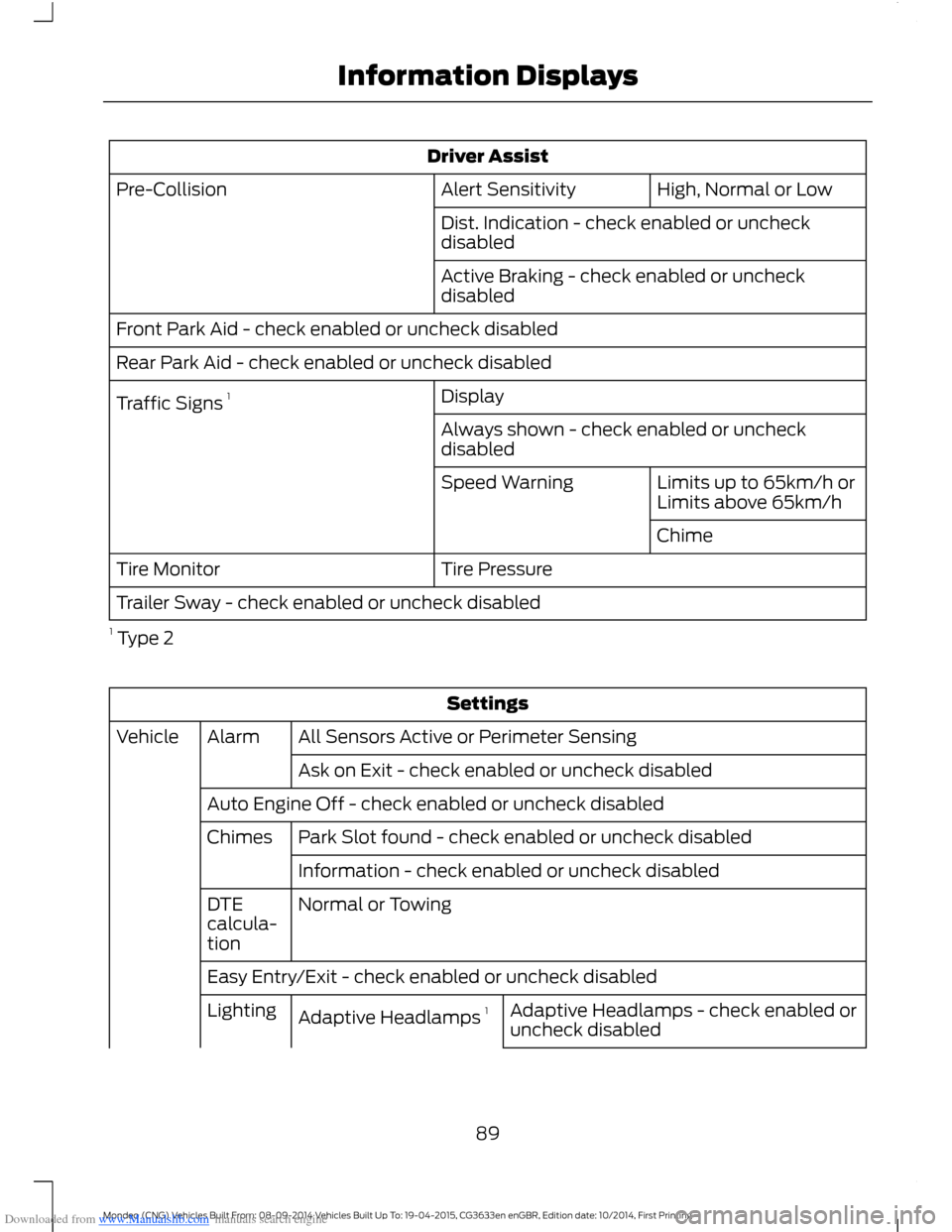
Downloaded from www.Manualslib.com manuals search engine Driver Assist
High, Normal or LowAlert SensitivityPre-Collision
Dist. Indication - check enabled or uncheckdisabled
Active Braking - check enabled or uncheckdisabled
Front Park Aid - check enabled or uncheck disabled
Rear Park Aid - check enabled or uncheck disabled
DisplayTraffic Signs 1
Always shown - check enabled or uncheckdisabled
Limits up to 65km/h orLimits above 65km/hSpeed Warning
Chime
Tire PressureTire Monitor
Trailer Sway - check enabled or uncheck disabled
1 Type 2
Settings
All Sensors Active or Perimeter SensingAlarmVehicle
Ask on Exit - check enabled or uncheck disabled
Auto Engine Off - check enabled or uncheck disabled
Park Slot found - check enabled or uncheck disabledChimes
Information - check enabled or uncheck disabled
Normal or TowingDTEcalcula-tion
Easy Entry/Exit - check enabled or uncheck disabled
Adaptive Headlamps - check enabled oruncheck disabledAdaptive Headlamps 1Lighting
89Mondeo (CNG) Vehicles Built From: 08-09-2014 Vehicles Built Up To: 19-04-2015, CG3633en enGBR, Edition date: 10/2014, First PrintingInformation Displays
Page 92 of 446
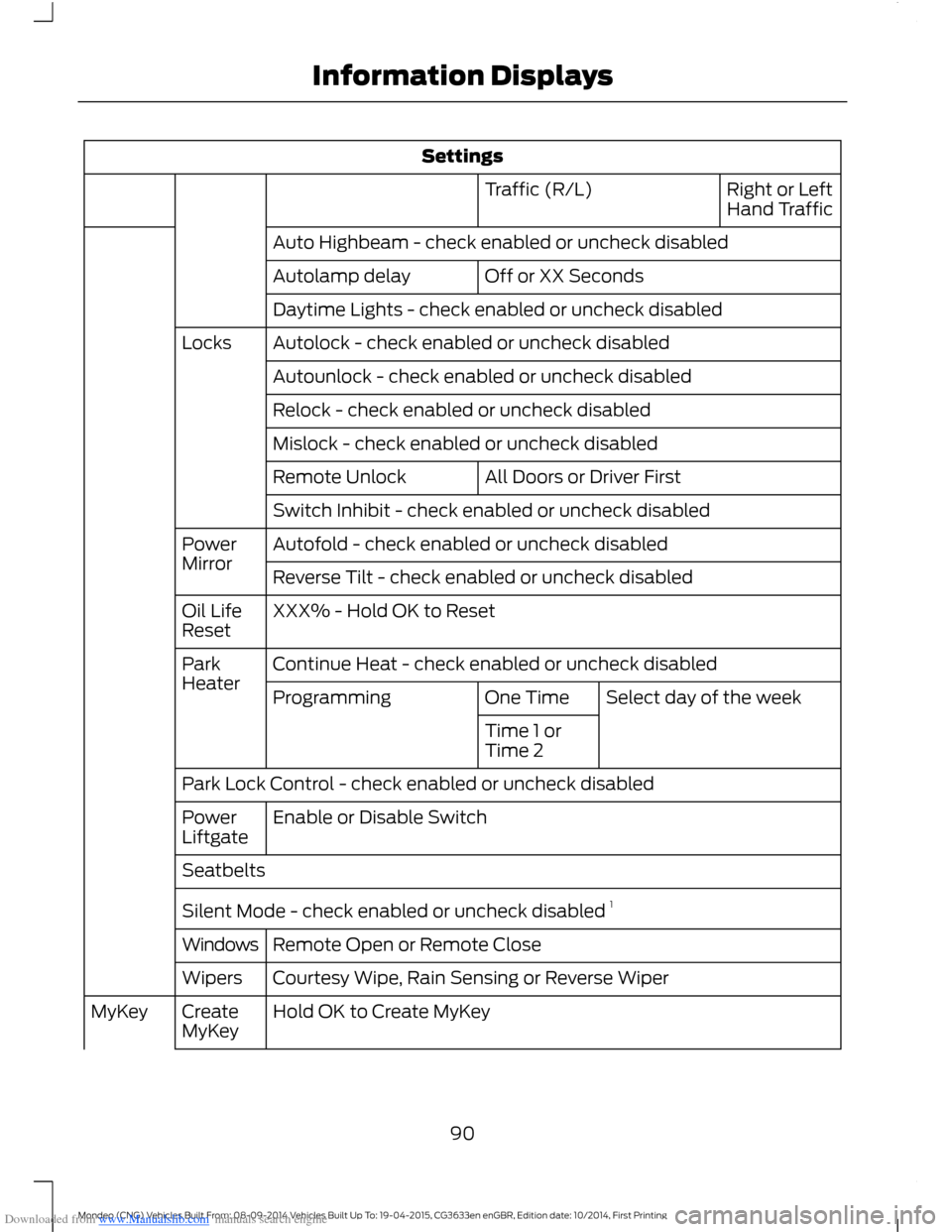
Downloaded from www.Manualslib.com manuals search engine Settings
Right or LeftHand TrafficTraffic (R/L)
Auto Highbeam - check enabled or uncheck disabled
Off or XX SecondsAutolamp delay
Daytime Lights - check enabled or uncheck disabled
Autolock - check enabled or uncheck disabledLocks
Autounlock - check enabled or uncheck disabled
Relock - check enabled or uncheck disabled
Mislock - check enabled or uncheck disabled
All Doors or Driver FirstRemote Unlock
Switch Inhibit - check enabled or uncheck disabled
Autofold - check enabled or uncheck disabledPowerMirrorReverse Tilt - check enabled or uncheck disabled
XXX% - Hold OK to ResetOil LifeReset
Continue Heat - check enabled or uncheck disabledParkHeaterSelect day of the weekOne TimeProgramming
Time 1 orTime 2
Park Lock Control - check enabled or uncheck disabled
Enable or Disable SwitchPowerLiftgate
Seatbelts
Silent Mode - check enabled or uncheck disabled 1
Remote Open or Remote CloseWindows
Courtesy Wipe, Rain Sensing or Reverse WiperWipers
Hold OK to Create MyKeyCreateMyKeyMyKey
90Mondeo (CNG) Vehicles Built From: 08-09-2014 Vehicles Built Up To: 19-04-2015, CG3633en enGBR, Edition date: 10/2014, First PrintingInformation Displays
Page 93 of 446
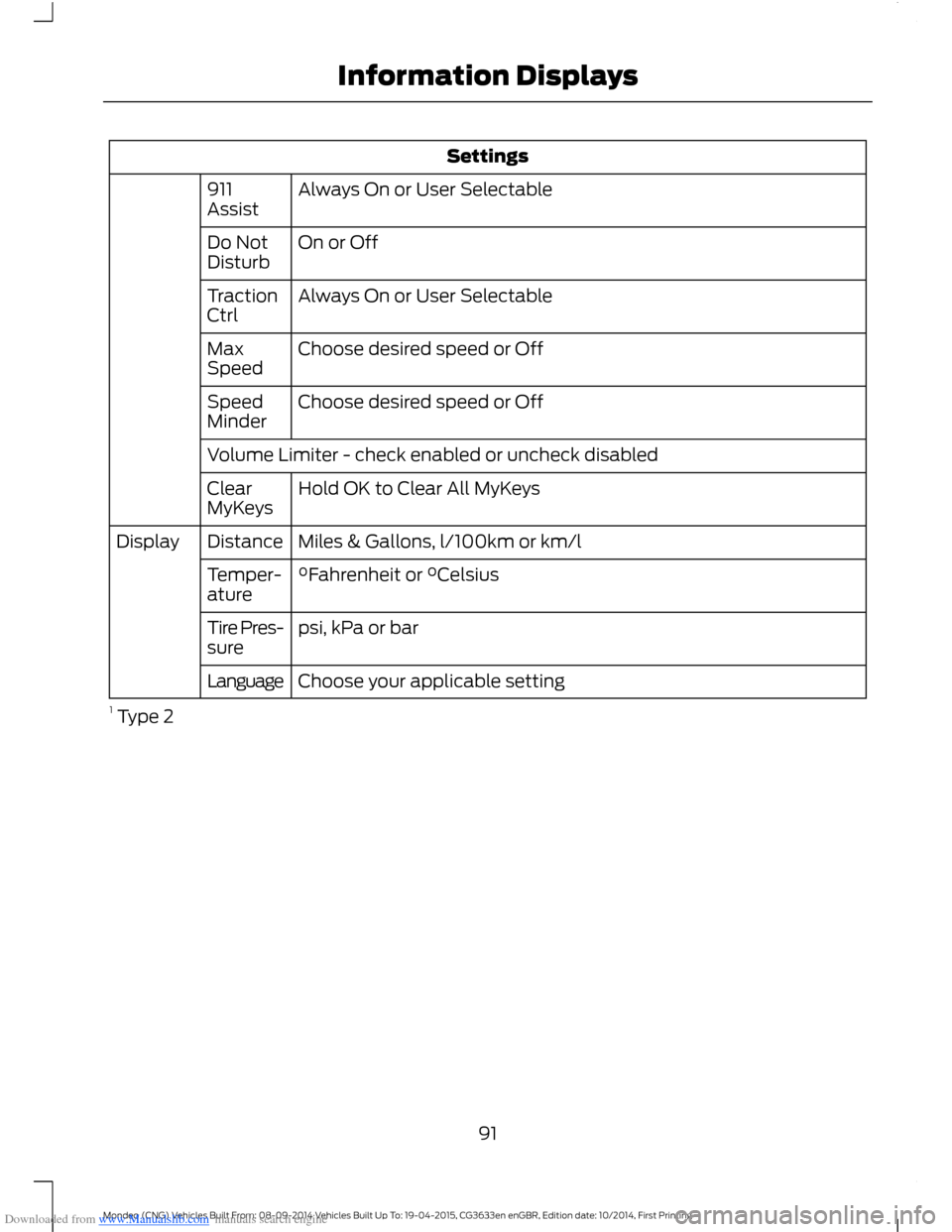
Downloaded from www.Manualslib.com manuals search engine Settings
Always On or User Selectable911Assist
On or OffDo NotDisturb
Always On or User SelectableTractionCtrl
Choose desired speed or OffMaxSpeed
Choose desired speed or OffSpeedMinder
Volume Limiter - check enabled or uncheck disabled
Hold OK to Clear All MyKeysClearMyKeys
Miles & Gallons, l/100km or km/lDistanceDisplay
°Fahrenheit or °CelsiusTemper-ature
psi, kPa or barTire Pres-sure
Choose your applicable settingLanguage
1 Type 2
91Mondeo (CNG) Vehicles Built From: 08-09-2014 Vehicles Built Up To: 19-04-2015, CG3633en enGBR, Edition date: 10/2014, First PrintingInformation Displays