2014 FORD MONDEO brake
[x] Cancel search: brakePage 188 of 446
Downloaded from www.Manualslib.com manuals search engine Overriding the System
WARNING
Whenever the driver is overriding thesystem by pressing the acceleratorpedal, the system does notautomatically apply the brakes to maintainseparation from any vehicle ahead.
You can override the set speed and gap bypressing the accelerator pedal.
When you override the system,the green indicator lightilluminates and the lead vehiclegraphic does not show in theinformation display.
The system resumes operation when yourelease the accelerator pedal. The vehiclespeed decreases to the set speed, or alower speed if following a slower vehicle.
Automatic Switch Off
The system does not operate below12 mph (20 km/h). An audible warningsounds and the automatic braking releasesif the vehicle drops below this speed.
Automatic cancellation can also occur if:
•The tires lose traction.
•The engine speed is too low.
•You apply the parking brake.
Note:If the engine speed drops too low,the information display indicates low enginespeed. Shift to a lower gear (manualtransmission only) to avoid automaticcancellation.
Hilly Condition Usage
You should select a lower gear positionwhen the system is active in situationssuch as prolonged downhill driving onsteep grades, for example in mountainousareas. The system needs additional enginebraking in these situations to reduce theload on the vehicle’s regular brake systemto prevent them from overheating.
Note:An audible warning sounds and thesystem shuts down if it applies brakes foran extended period of time. This allows thebrakes to cool down. The system functionsnormally again when the brakes have cooleddown.
Detection Beam Issues
The radar sensor has a limited field ofvision. It may not detect vehicles at all ordetect a vehicle later than expected insome situations. The lead vehicle graphicdoes not illuminate if the system does notdetect a vehicle in front of you.
186Mondeo (CNG) Vehicles Built From: 08-09-2014 Vehicles Built Up To: 19-04-2015, CG3633en enGBR, Edition date: 10/2014, First PrintingCruise Control
Page 189 of 446
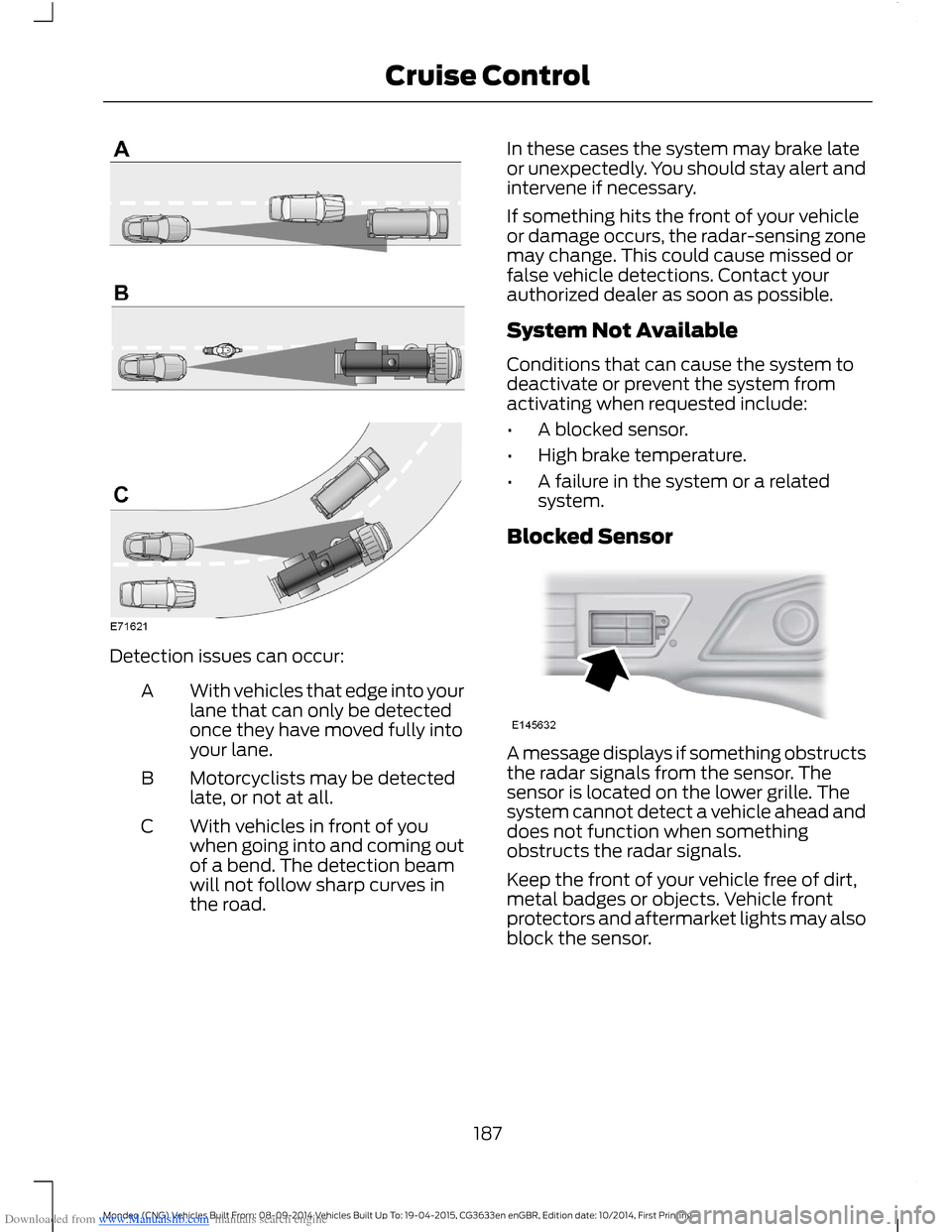
Downloaded from www.Manualslib.com manuals search engine Detection issues can occur:
With vehicles that edge into yourlane that can only be detectedonce they have moved fully intoyour lane.
A
Motorcyclists may be detectedlate, or not at all.B
With vehicles in front of youwhen going into and coming outof a bend. The detection beamwill not follow sharp curves inthe road.
C
In these cases the system may brake lateor unexpectedly. You should stay alert andintervene if necessary.
If something hits the front of your vehicleor damage occurs, the radar-sensing zonemay change. This could cause missed orfalse vehicle detections. Contact yourauthorized dealer as soon as possible.
System Not Available
Conditions that can cause the system todeactivate or prevent the system fromactivating when requested include:
•A blocked sensor.
•High brake temperature.
•A failure in the system or a relatedsystem.
Blocked Sensor
A message displays if something obstructsthe radar signals from the sensor. Thesensor is located on the lower grille. Thesystem cannot detect a vehicle ahead anddoes not function when somethingobstructs the radar signals.
Keep the front of your vehicle free of dirt,metal badges or objects. Vehicle frontprotectors and aftermarket lights may alsoblock the sensor.
187Mondeo (CNG) Vehicles Built From: 08-09-2014 Vehicles Built Up To: 19-04-2015, CG3633en enGBR, Edition date: 10/2014, First PrintingCruise Control
Page 190 of 446
Downloaded from www.Manualslib.com manuals search engine The following table lists possible causes and actions for this message displaying.
ActionCause
Clean the grille surface in front of the radaror remove the object causing the obstruc-tion.
The surface of the radar in the grille is dirtyor obstructed in some way.
Wait a short time. It may take severalminutes for the radar to detect that it is freefrom obstruction.
The surface of the radar in the grille is cleanbut the message remains in the display.
Do not use the system in these conditionsbecause it may not detect any vehiclesahead.
Heavy rain or snow is interfering with theradar signals.
Do not use the system in these conditionsbecause it may not detect any vehiclesahead.
Swirling water, snow or ice on the surfaceof the road may interfere with the radarsignals.
It is possible to get a blockage warning andnot be blocked. A false blocked conditionself clears or clears after a key cycle.
Switching to Normal CruiseControl
WARNING
Normal cruise control does not brakedue to slower vehicles. Always beaware of which mode you haveselected and apply the brakes whennecessary.
You can manually change from adaptivecruise control to normal cruise controlthrough the information display.
The cruise control indicator lightreplaces the adaptive cruisecontrol indicator light if youselect normal cruise control. The gapsetting does not display, the system doesnot automatically respond to lead vehiclesand automatic braking does not activate.The system remembers the last settingwhen you start your vehicle.
188Mondeo (CNG) Vehicles Built From: 08-09-2014 Vehicles Built Up To: 19-04-2015, CG3633en enGBR, Edition date: 10/2014, First PrintingCruise Control
Page 191 of 446
Downloaded from www.Manualslib.com manuals search engine SPEED LIMITER
Principle of Operation
WARNING
When you are going downhill, yourspeed may increase above the setspeed. The system will not apply thebrakes but a warning will be given.
The system allows you to set a speed, towhich your vehicle then becomes limited.The set speed will become the effectivemaximum speed of your vehicle, but withthe option to temporarily exceed this limitif required.
Using the System
Note:The set speed limit can beintentionally exceeded for a short period oftime if required, for example whenovertaking.
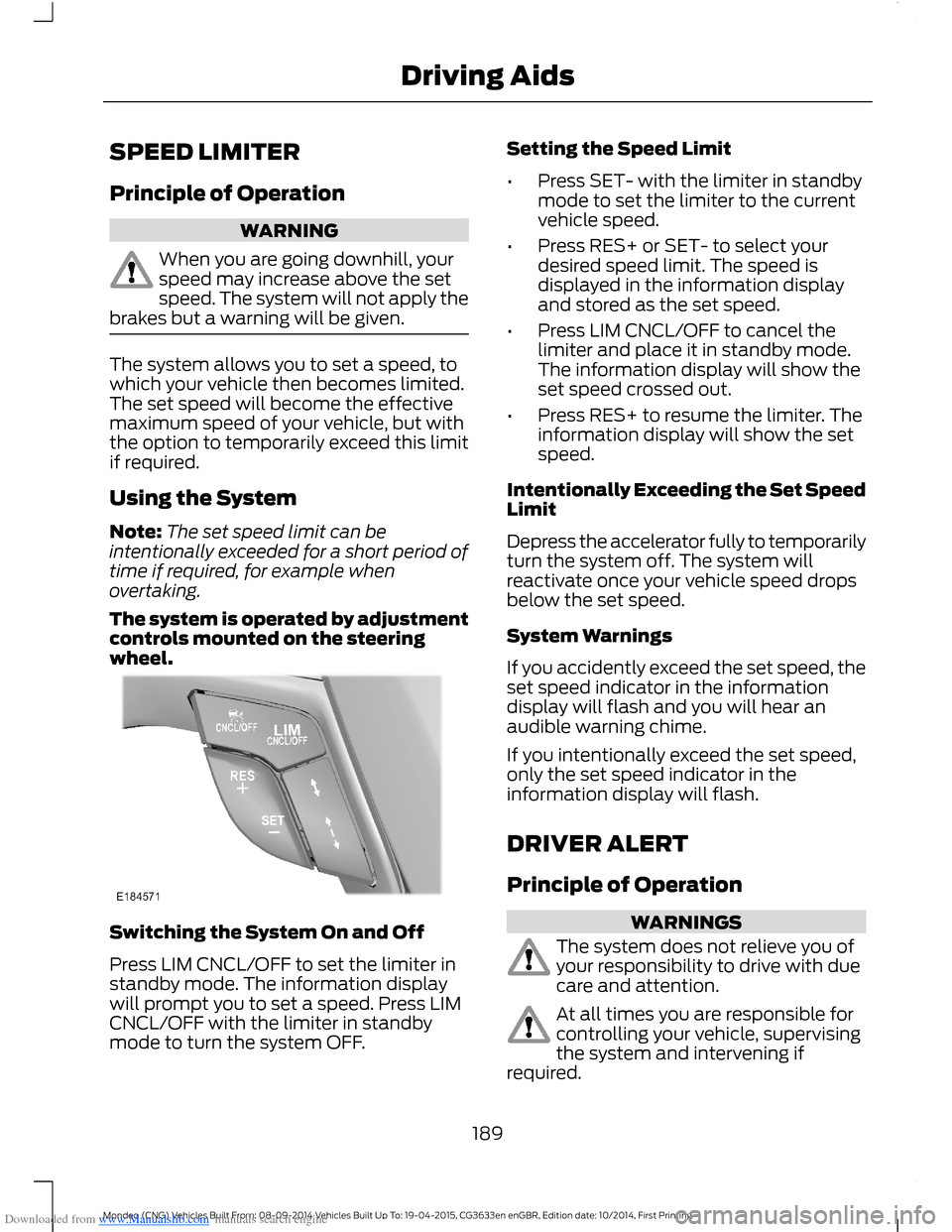
The system is operated by adjustmentcontrols mounted on the steeringwheel.
Switching the System On and Off
Press LIM CNCL/OFF to set the limiter instandby mode. The information displaywill prompt you to set a speed. Press LIMCNCL/OFF with the limiter in standbymode to turn the system OFF.
Setting the Speed Limit
•Press SET- with the limiter in standbymode to set the limiter to the currentvehicle speed.
•Press RES+ or SET- to select yourdesired speed limit. The speed isdisplayed in the information displayand stored as the set speed.
•Press LIM CNCL/OFF to cancel thelimiter and place it in standby mode.The information display will show theset speed crossed out.
•Press RES+ to resume the limiter. Theinformation display will show the setspeed.
Intentionally Exceeding the Set SpeedLimit
Depress the accelerator fully to temporarilyturn the system off. The system willreactivate once your vehicle speed dropsbelow the set speed.
System Warnings
If you accidently exceed the set speed, theset speed indicator in the informationdisplay will flash and you will hear anaudible warning chime.
If you intentionally exceed the set speed,only the set speed indicator in theinformation display will flash.
DRIVER ALERT
Principle of Operation
WARNINGS
The system does not relieve you ofyour responsibility to drive with duecare and attention.
At all times you are responsible forcontrolling your vehicle, supervisingthe system and intervening ifrequired.
189Mondeo (CNG) Vehicles Built From: 08-09-2014 Vehicles Built Up To: 19-04-2015, CG3633en enGBR, Edition date: 10/2014, First PrintingDriving Aids
Page 195 of 446
Downloaded from www.Manualslib.com manuals search engine Instances where a lane boundary may besuppressed:
•Lane markings on the road may not bedetected by the sensor.
•You turn the direction indicator for thatside of your vehicle on.
•If you apply direct steering, acceleratefast or brake hard.
•Your vehicle speed is outside theoperating limits.
•If there is an anti-lock brake or stabilitycontrol intervention.
•Narrow lane width.
If the lane markings in the display turn redor you feel a vibration through the steeringwheel you must take immediate and safeaction to align your vehicle. Correct anyunintended lane drift immediately.
Lane Keeping Aid
Switching the System On and Off
Note:The system does not automaticallyturn on every time you switch the ignitionon.
Note:When you switch the system on, thiswill automatically turn lane keeping alerton.
Switch the system on and off using thebutton on the indicator stalk.
Press the button three times to switch thesystem on. Press the button again toswitch the system off.
Setting the System Sensitivity
You can adjust how quickly the systemintervenes in a dangerous situation. Thesystem has two sensitivity levels which youcan set using the information display. SeeGeneral Information (page 86).
System Warnings
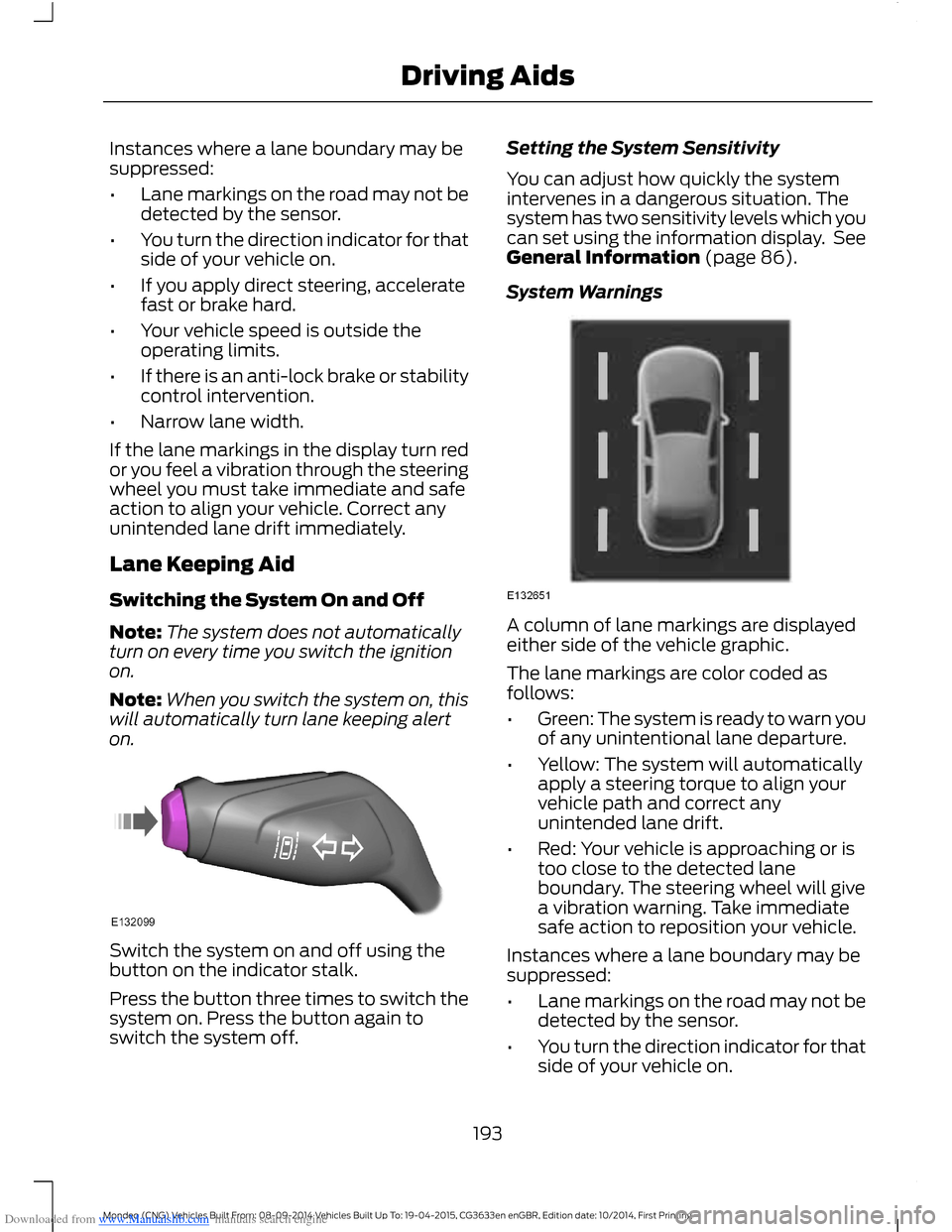
A column of lane markings are displayedeither side of the vehicle graphic.
The lane markings are color coded asfollows:
•Green: The system is ready to warn youof any unintentional lane departure.
•Yellow: The system will automaticallyapply a steering torque to align yourvehicle path and correct anyunintended lane drift.
•Red: Your vehicle is approaching or istoo close to the detected laneboundary. The steering wheel will givea vibration warning. Take immediatesafe action to reposition your vehicle.
Instances where a lane boundary may besuppressed:
•Lane markings on the road may not bedetected by the sensor.
•You turn the direction indicator for thatside of your vehicle on.
193Mondeo (CNG) Vehicles Built From: 08-09-2014 Vehicles Built Up To: 19-04-2015, CG3633en enGBR, Edition date: 10/2014, First PrintingDriving Aids
Page 196 of 446
Downloaded from www.Manualslib.com manuals search engine •If you apply direct steering, acceleratefast or brake hard.
•Your vehicle speed is outside theoperating limits.
•If there is an anti-lock brake or stabilitycontrol intervention.
•Narrow lane width.
Note:You can override the system at anytime during its operation by turning thesteering wheel.
BLIND SPOT INFORMATION
SYSTEM
Blind Spot Information System(BLIS™) with Cross Traffic Alert
(If Equipped)
WARNING
Do not use the system as areplacement for using the mirrors orlooking over your shoulder beforechanging lanes. You should only use thesystem as an aid. It is not a replacementfor careful driving.
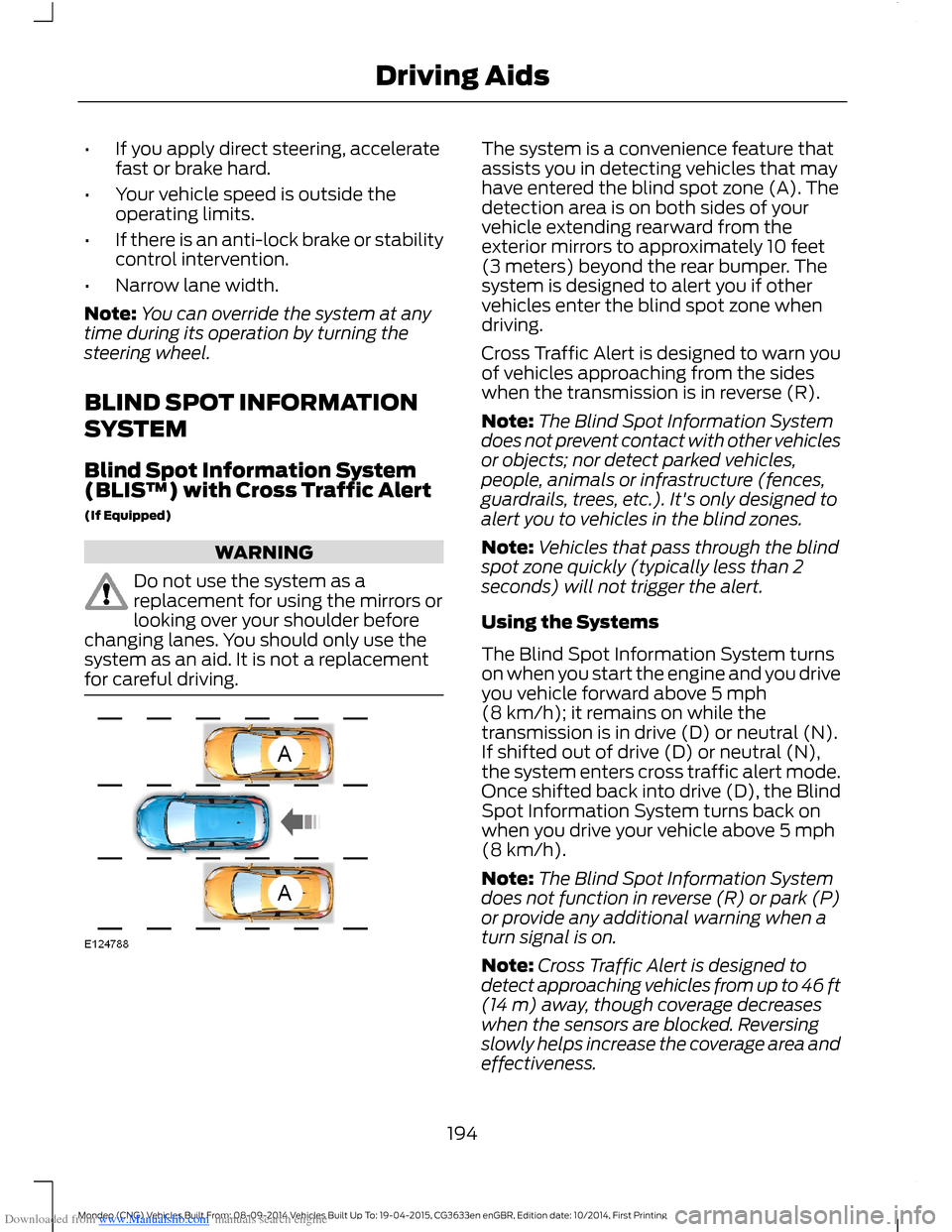
The system is a convenience feature thatassists you in detecting vehicles that mayhave entered the blind spot zone (A). Thedetection area is on both sides of yourvehicle extending rearward from theexterior mirrors to approximately 10 feet(3 meters) beyond the rear bumper. Thesystem is designed to alert you if othervehicles enter the blind spot zone whendriving.
Cross Traffic Alert is designed to warn youof vehicles approaching from the sideswhen the transmission is in reverse (R).
Note:The Blind Spot Information Systemdoes not prevent contact with other vehiclesor objects; nor detect parked vehicles,people, animals or infrastructure (fences,guardrails, trees, etc.). It's only designed toalert you to vehicles in the blind zones.
Note:Vehicles that pass through the blindspot zone quickly (typically less than 2seconds) will not trigger the alert.
Using the Systems
The Blind Spot Information System turnson when you start the engine and you driveyou vehicle forward above 5 mph(8 km/h); it remains on while thetransmission is in drive (D) or neutral (N).If shifted out of drive (D) or neutral (N),the system enters cross traffic alert mode.Once shifted back into drive (D), the BlindSpot Information System turns back onwhen you drive your vehicle above 5 mph(8 km/h).
Note:The Blind Spot Information Systemdoes not function in reverse (R) or park (P)or provide any additional warning when aturn signal is on.
Note:Cross Traffic Alert is designed todetect approaching vehicles from up to 46 ft(14 m) away, though coverage decreaseswhen the sensors are blocked. Reversingslowly helps increase the coverage area andeffectiveness.
194Mondeo (CNG) Vehicles Built From: 08-09-2014 Vehicles Built Up To: 19-04-2015, CG3633en enGBR, Edition date: 10/2014, First PrintingDriving Aids
Page 202 of 446
Downloaded from www.Manualslib.com manuals search engine ACTIVE CITY STOP
Principle of Operation
WARNINGS
You are responsible for controllingyour vehicle at all times. The systemdoes not relieve you of yourresponsibility to drive with due care andattention. Failure to take care may resultin the loss of control of your vehicle, seriouspersonal injury or death.
To achieve full system performanceyou must break in the brakingsystem. See Breaking-In (page 221).Failure to take care may result in the lossof control of your vehicle, serious personalinjury or death.
If the system applies the brakes andthe engine stops the hazard warningflashers will automatically turn on.Failure to take care may lead to a crash orpersonal injury.
The system does not react tocyclists, motorcyclists, pedestrians,animals or vehicles that are drivingin a different direction. Failure to take caremay result in the loss of control of yourvehicle, serious personal injury or death.
The system does not operate duringharsh acceleration or steering. Failureto take care may lead to a crash orpersonal injury.
The system may not operate duringcold or severe weather conditions.Snow, ice, heavy rain and spray caninfluence the system. Keep the hood freeof snow and ice. Failure to take care mayresult in the loss of control of your vehicle,serious personal injury or death.
The system may not operate whendriving around sharp curves. Failureto take care may lead to a crash orpersonal injury.
WARNINGS
The system may not operatecorrectly if you replace thewindshield with a non-Fordwindshield. Do not carry out windshieldrepairs in front of the sensor. Failure toadhere to this warning may lead to anaccident or injury.
The system may not detect objectswith surfaces that absorb reflections.Failure to take care may result in theloss of control of your vehicle, seriouspersonal injury or death.
The system will not operate correctlyif the sensor is blocked. Keep thewindshield free from obstructions,for example, bird droppings, insects, snowor ice. Failure to adhere to this warning maylead to an accident or injury.
When you switch the ignition on thesensor transmits a laser beam. Neverlook directly into the sensor with anytype of object, there is a risk of eye injury.
The sensor is on the rear of the interiormirror. It continuously monitors conditionsto decide when to intervene.
The system operates at speeds belowapproximately 25 mph (40 km/h) byapplying the brakes if it detects that acrash is likely. If the system applies thebrakes, a message appears in theinformation display.
The system may reduce the risk of a lowspeed crash into another vehicle. It alsohelps reduce impact damage or may avoidthe crash completely.
Note:You must depress the brake pedal toobtain full braking force.
200Mondeo (CNG) Vehicles Built From: 08-09-2014 Vehicles Built Up To: 19-04-2015, CG3633en enGBR, Edition date: 10/2014, First PrintingDriving Aids
Page 203 of 446
Downloaded from www.Manualslib.com manuals search engine Switching the System Off and On
In certain situations, it is advisable toswitch the system off. For example:
•Driving off road when objects maycover the windshield.
•Driving through a car wash facility.
Selectable settings for this feature are ONand OFF. The default setting for active citystop is ON.
You can switch the system off and on usingthe information display. See (page 86).
COLLISION WARNING SYSTEM
PRINCIPLE OF OPERATION
WARNINGS
You are responsible for controllingyour vehicle at all times. The systemdoes not relieve you of yourresponsibility to drive with due care andattention. Failure to take care may resultin the loss of control of your vehicle, seriouspersonal injury or death.
To achieve full system performanceyou must break in the brakingsystem. See (page 160).Failure totake care may result in the loss of controlof your vehicle, serious personal injury ordeath.
The system does not react tocyclists, animals, pedestrians atnight, or vehicles that are driving in adifferent direction. Failure to take care mayresult in the loss of control of your vehicle,serious personal injury or death.
The system does not operate duringharsh acceleration or steering. Failureto take care may lead to a crash orpersonal injury.
WARNINGS
The system may or may not operateor may operate with reducedfunction during cold or severeweather conditions. Snow, ice, rain, sprayand fog can influence the system. Keepthe front camera and radar free of snowand ice. Failure to take care may result inthe loss of control of your vehicle, seriouspersonal injury or death.
System performance may reduce insituations where the camera'sdetection capability is limited. Thesesituations include but are not limited todirect or low sunlight, vehicles at nightwithout tail lights, unconventional vehicletypes, pedestrians with complexbackgrounds, running pedestrians, partlyobscured pedestrians, or pedestrians whichcannot be distinguished from a group.Failure to take care may result in the lossof control of your vehicle, serious personalinjury or death.
The system cannot help prevent allcollisions. Do not rely on this systemto replace driver judgment and theneed to maintain distance and speed.
Note:The Pre-Collision Assist system isactive at speeds above approximately3 mph (5 km/h).
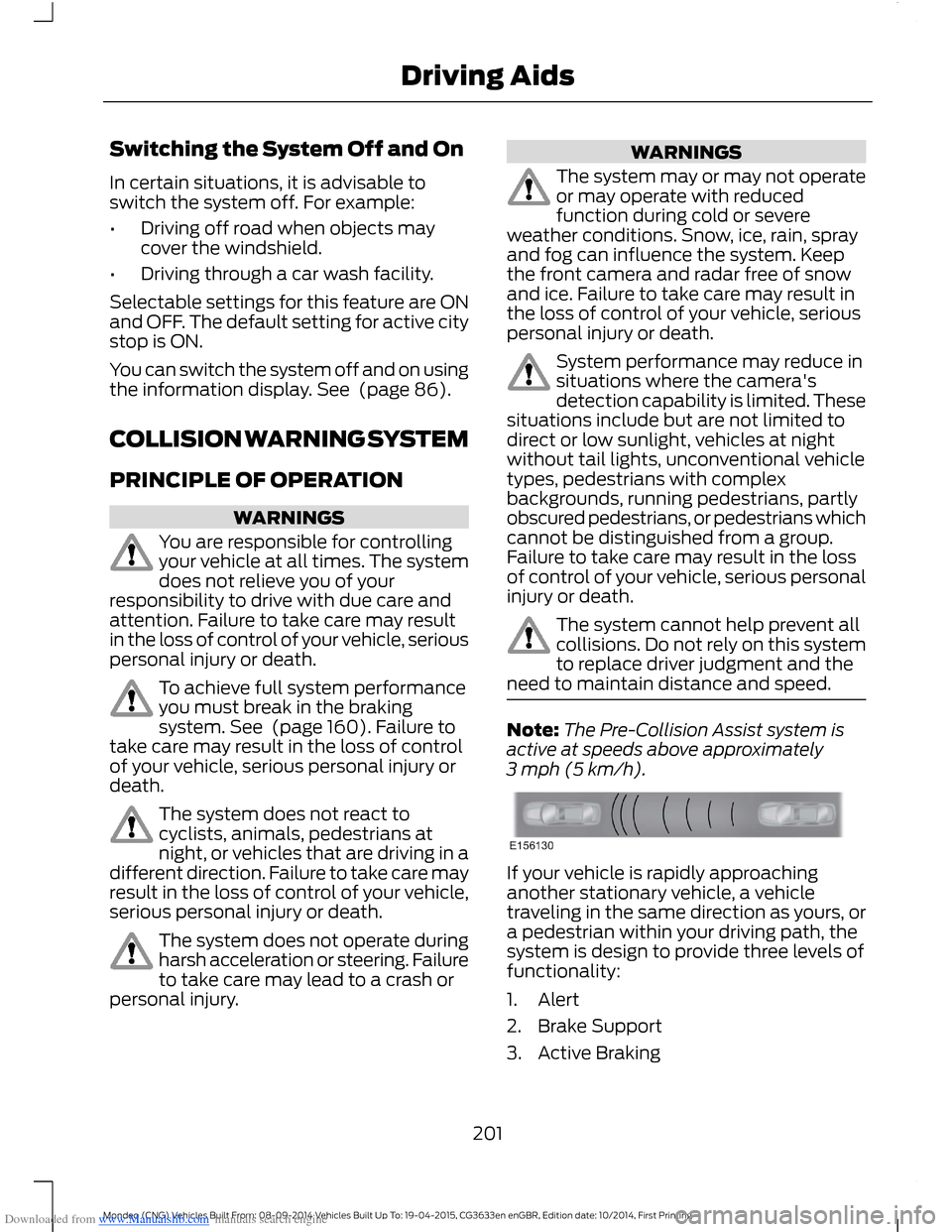
If your vehicle is rapidly approachinganother stationary vehicle, a vehicletraveling in the same direction as yours, ora pedestrian within your driving path, thesystem is design to provide three levels offunctionality:
1.Alert
2.Brake Support
3.Active Braking
201Mondeo (CNG) Vehicles Built From: 08-09-2014 Vehicles Built Up To: 19-04-2015, CG3633en enGBR, Edition date: 10/2014, First PrintingDriving Aids