2014 FORD MONDEO wheel
[x] Cancel search: wheelPage 162 of 446
Downloaded from www.Manualslib.com manuals search engine GENERAL INFORMATION
WARNING
Driving while distracted can result inloss of vehicle control, crash andinjury. We strongly recommend thatyou use extreme caution when using anydevice that may take your focus off theroad. Your primary responsibility is the safeoperation of your vehicle. We recommendagainst the use of any handheld devicewhile driving and encourage the use ofvoice-operated systems when possible.Make sure you are aware of all applicablelocal laws that may affect the use ofelectronic devices while driving.
Note:Occasional brake noise is normal. Ifa metal-to-metal, continuous grinding orcontinuous squeal sound is present, thebrake linings may be worn-out. If yourvehicle has continuous vibration or shudderin the steering wheel while braking, haveyour vehicle checked by an authorizeddealer.
Note:Brake dust may accumulate on thewheels, even under normal drivingconditions. Some dust is inevitable as thebrakes wear. See Cleaning the AlloyWheels (page 258).
Note:Depending on applicable laws andregulations in the country for which yourvehicle was originally built, the brake lampsmay flash during heavy braking. Followingthis the hazard warning flashers may alsoflash when your vehicle comes to a stop.
Wet brakes result in reduced brakingefficiency. Gently press the brake pedal afew times when driving from a car wash orstanding water to dry the brakes.
Brake Assist
Brake assist detects when you brakeheavily by measuring the rate at which youpress the brake pedal. It providesmaximum braking efficiency as long as youpress the pedal. Brake assist can reducestopping distances in critical situations.
Anti-lock Brake System
This system helps you maintain steeringcontrol and vehicle stability duringemergency stops by keeping the brakesfrom locking.
HINTS ON DRIVING WITH
ANTI-LOCK BRAKES
Note:When the system is operating, thebrake pedal will pulse and may travelfurther. Maintain pressure on the brakepedal. You may also hear a noise from thesystem. This is normal.
The anti-lock braking system will noteliminate the risks when:
•You drive too closely to the vehicle infront of you.
•Your vehicle is hydroplaning.
•You take corners too fast.
•The road surface is poor.
ELECTRIC PARKING BRAKE
The electric parking brake replaces theconventional handbrake. The operatingswitch is located in the center console.
WARNING
Always set the parking brake andleave your vehicle with thetransmission in park (P) (automatictransmission) or in first gear (1) or reverse(R) (manual transmission).
160Mondeo (CNG) Vehicles Built From: 08-09-2014 Vehicles Built Up To: 19-04-2015, CG3633en enGBR, Edition date: 10/2014, First PrintingBrakes
Page 163 of 446

Downloaded from www.Manualslib.com manuals search engine Note:When you apply the electric parkingbrake in certain conditions, for example, ona steep hill, the electric parking brake mayreapply the brakes within three to tenminutes.
Note:You may notice various noises whenyou apply and release the electric parkingbrake. This is normal and no cause forconcern.
Parking On a Hill (Vehicles With aManual Transmission)
If you park your vehicle facing uphill, movethe transmission to first gear (1) and turnthe steering wheel away from the curb. Ifyou park your vehicle facing downhill, movethe transmission to reverse (R) and turnthe steering wheel toward the curb.
Applying the Electric Parkingbrake
WARNING
If the brake system warning lampflashes, there could be a problemwith your electric parking brake. Havethe system checked by an authorizeddealer as soon as possible.
Note:The brake system warning lamp willilluminate for ten seconds, if the ignition isturned off after the electric parking brakehas been applied, or the electric parkingbrake has been applied after the ignition hasbeen turned off.
Note:The electric parking brake will notautomatically apply. You must apply theelectric parking brake using the electricparking brake switch.
Pull the switch up to apply the electricparking brake.
The brake system warning lamp willilluminate to confirm that the electricparking brake has been applied. SeeInformation Displays (page 86).
Apply the electric parking brake whenthe vehicle is moving
WARNINGS
Applying the electric parking brakewhile moving will result in use of theanti-lock braking system. Do not usethe electric parking brake system when thevehicle is moving unless the normal brakesystem is unable to stop the vehicle.
With the exception of emergencyconditions (for example, the brakepedal does not work or is blocked),do not apply the electric parking brakewhile the vehicle is moving. On bends, orpoor road surfaces or weather conditions,emergency braking can cause the vehicleto skid out of control or off the road.
If you apply the electric parking brake whenyour vehicle is moving, the brake systemwarning lamp will illuminate and a warningchime will sound. See InformationDisplays (page 86).
161Mondeo (CNG) Vehicles Built From: 08-09-2014 Vehicles Built Up To: 19-04-2015, CG3633en enGBR, Edition date: 10/2014, First PrintingBrakes
Page 167 of 446
Downloaded from www.Manualslib.com manuals search engine PRINCIPLE OF OPERATION
The traction control system helps avoiddrive wheel spin and loss of traction.
If your vehicle begins to slide, the systemapplies the brakes to individual wheelsand, when needed, reduces engine powerat the same time. If the wheels spin whenaccelerating on slippery or loose surfaces,the system reduces engine power in orderto increase traction.
USING TRACTION CONTROL
The system automatically turns on eachtime you switch the ignition on.
Note:In some situations for example if yourvehicle is stuck in snow or mud, turning thesystem off may be beneficial as this allowsthe wheels to spin with full engine power.
Switching the System Off and OnUsing the Information DisplayControls
Your vehicle comes with this featurealready enabled. If required, you can switchthis feature off using the informationdisplay controls. See GeneralInformation (page 86).
Stability control will remain on even whenyou have switched the traction control off.
Switching the System Off and OnUsing the Button (If Equipped)
The button is located in the instrumentpanel.
Press the button. You will see a messagein conjunction with an illuminated icon inthe display. Press the button again toreturn the system to normal mode.
Stability control will remain on even whenyou have switched the traction control off.
165Mondeo (CNG) Vehicles Built From: 08-09-2014 Vehicles Built Up To: 19-04-2015, CG3633en enGBR, Edition date: 10/2014, First PrintingTraction Control
Page 168 of 446
Downloaded from www.Manualslib.com manuals search engine PRINCIPLE OF OPERATION
Electronic Stability Program
WARNING
The system does not relieve you ofyour responsibility to drive with duecare and attention. Failure to do socould result in loss of vehicle control,personal injury or death.
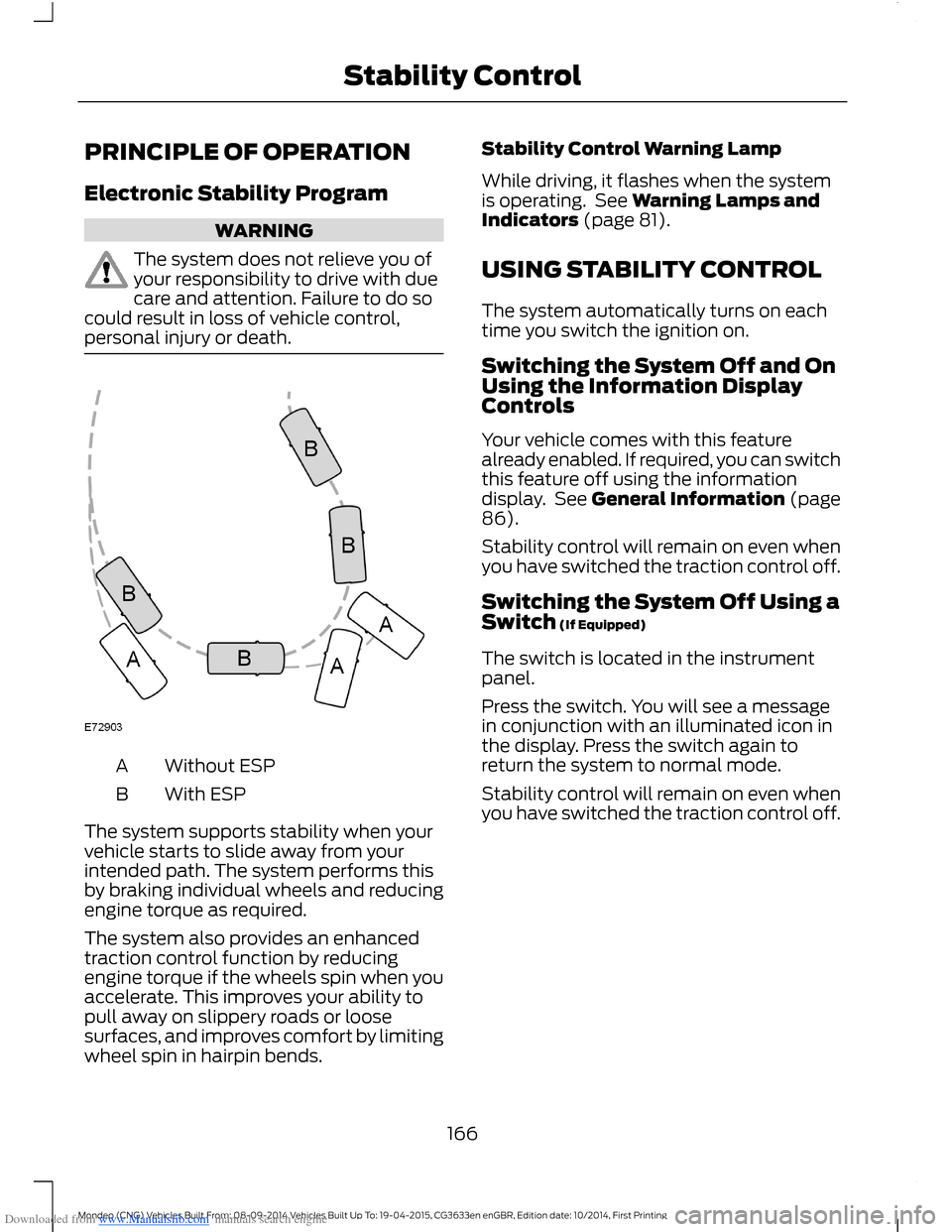
Without ESPA
With ESPB
The system supports stability when yourvehicle starts to slide away from yourintended path. The system performs thisby braking individual wheels and reducingengine torque as required.
The system also provides an enhancedtraction control function by reducingengine torque if the wheels spin when youaccelerate. This improves your ability topull away on slippery roads or loosesurfaces, and improves comfort by limitingwheel spin in hairpin bends.
Stability Control Warning Lamp
While driving, it flashes when the systemis operating. See Warning Lamps andIndicators (page 81).
USING STABILITY CONTROL
The system automatically turns on eachtime you switch the ignition on.
Switching the System Off and OnUsing the Information DisplayControls
Your vehicle comes with this featurealready enabled. If required, you can switchthis feature off using the informationdisplay. See General Information (page86).
Stability control will remain on even whenyou have switched the traction control off.
Switching the System Off Using aSwitch (If Equipped)
The switch is located in the instrumentpanel.
Press the switch. You will see a messagein conjunction with an illuminated icon inthe display. Press the switch again toreturn the system to normal mode.
Stability control will remain on even whenyou have switched the traction control off.
166Mondeo (CNG) Vehicles Built From: 08-09-2014 Vehicles Built Up To: 19-04-2015, CG3633en enGBR, Edition date: 10/2014, First PrintingStability Control
Page 175 of 446

Downloaded from www.Manualslib.com manuals search engine When the system finds a suitable space,it displays a message and a tone sounds.Stop your vehicle and follow theinstructions on the screen. If your vehicleis moving very slowly, you may need to pullforward a short distance before the systemis ready to park.
Note:You must observe that the selectedspace remains clear of obstructions at alltimes during the maneuver.
Note:Active park assist may not detectstreet furniture and other items. You mustmake sure the selected space is suitable forparking.
Note:You should drive your vehicle asparallel to the other vehicles as possiblewhile passing a parking space.
Note:The system always offers the lastdetected parking space (for example, if yourvehicle detects multiple spaces while youare driving, it offers the last one).
Note:If driven above approximately 22 mph(35 km/h), the system shows a message toalert you to reduce your vehicle speed.
Automatic Steering into Parking Space
Note:If your vehicle speed exceeds 6 mph(9 km/h) or an object interrupts a maneuverbefore completion, the automatic steeringfunction switches off and you need to takefull control of your vehicle.
When you shift the transmission intoreverse (R), with your hands off the wheel(and nothing obstructing its movement),your vehicle steers itself into the space.The system displays instructions to moveyour vehicle back and forth in the space.
173Mondeo (CNG) Vehicles Built From: 08-09-2014 Vehicles Built Up To: 19-04-2015, CG3633en enGBR, Edition date: 10/2014, First PrintingParking Aids
Page 177 of 446
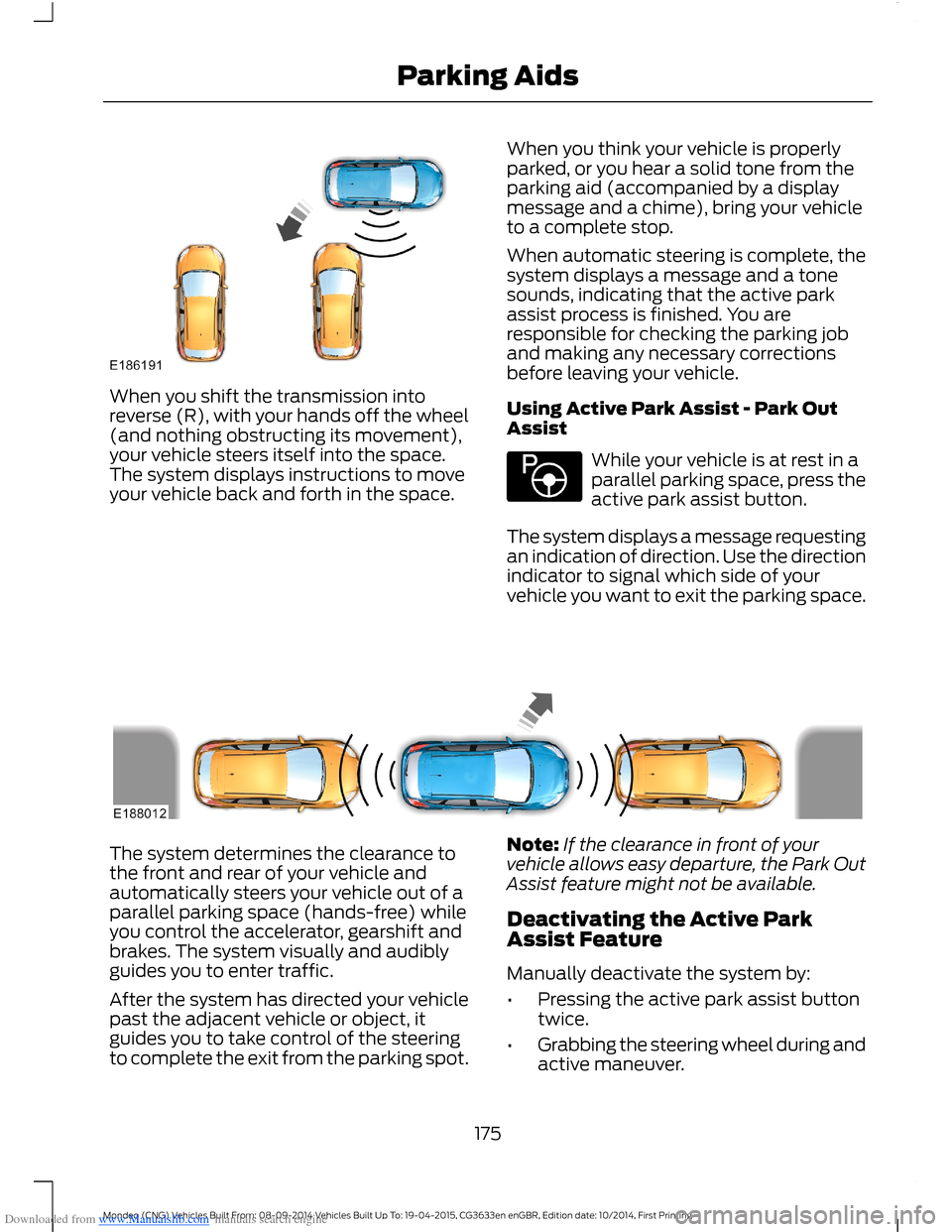
Downloaded from www.Manualslib.com manuals search engine When you shift the transmission intoreverse (R), with your hands off the wheel(and nothing obstructing its movement),your vehicle steers itself into the space.The system displays instructions to moveyour vehicle back and forth in the space.
When you think your vehicle is properlyparked, or you hear a solid tone from theparking aid (accompanied by a displaymessage and a chime), bring your vehicleto a complete stop.
When automatic steering is complete, thesystem displays a message and a tonesounds, indicating that the active parkassist process is finished. You areresponsible for checking the parking joband making any necessary correctionsbefore leaving your vehicle.
Using Active Park Assist - Park OutAssist
While your vehicle is at rest in aparallel parking space, press theactive park assist button.
The system displays a message requestingan indication of direction. Use the directionindicator to signal which side of yourvehicle you want to exit the parking space.
The system determines the clearance tothe front and rear of your vehicle andautomatically steers your vehicle out of aparallel parking space (hands-free) whileyou control the accelerator, gearshift andbrakes. The system visually and audiblyguides you to enter traffic.
After the system has directed your vehiclepast the adjacent vehicle or object, itguides you to take control of the steeringto complete the exit from the parking spot.
Note:If the clearance in front of yourvehicle allows easy departure, the Park OutAssist feature might not be available.
Deactivating the Active ParkAssist Feature
Manually deactivate the system by:
•Pressing the active park assist buttontwice.
•Grabbing the steering wheel during andactive maneuver.
175Mondeo (CNG) Vehicles Built From: 08-09-2014 Vehicles Built Up To: 19-04-2015, CG3633en enGBR, Edition date: 10/2014, First PrintingParking Aids
Page 181 of 446
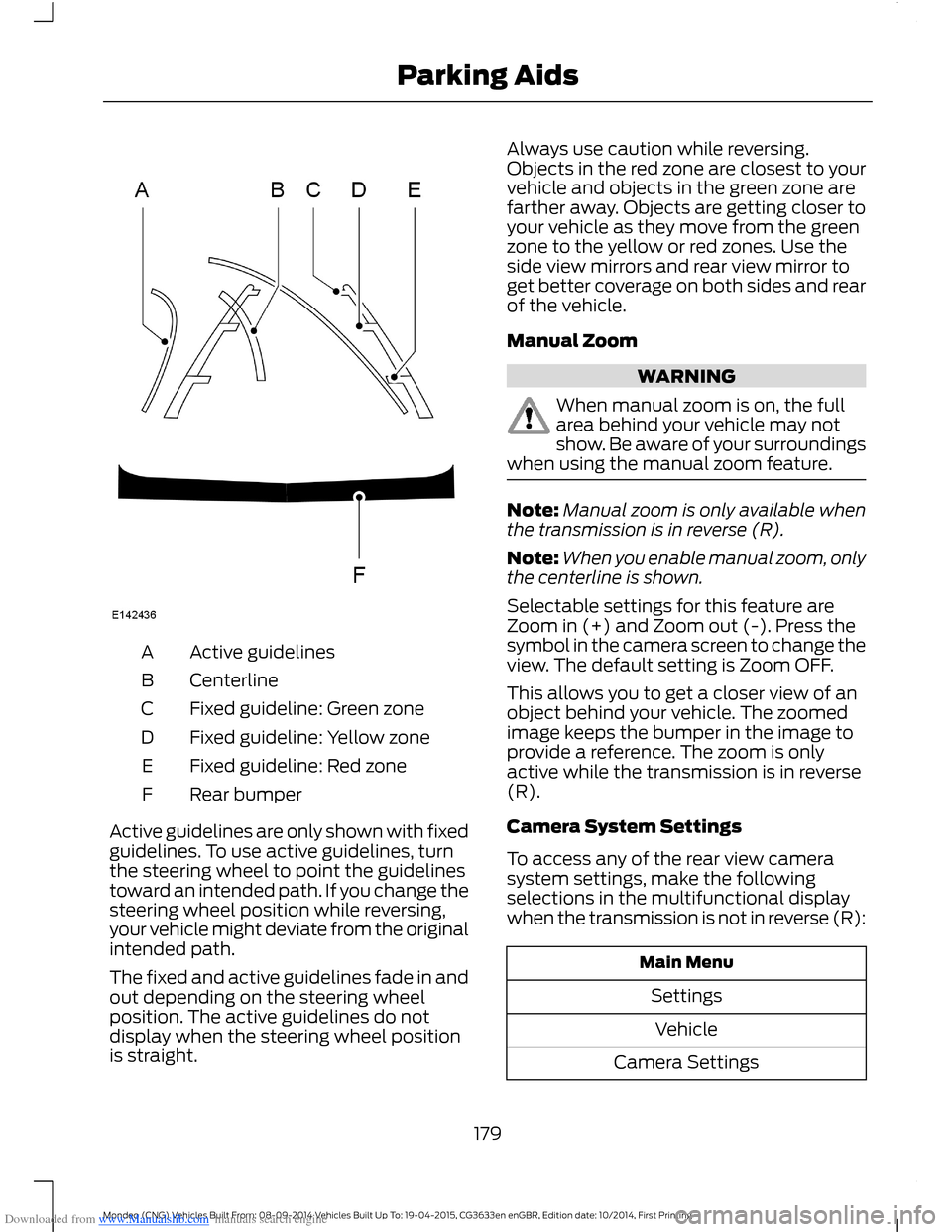
Downloaded from www.Manualslib.com manuals search engine Active guidelinesA
CenterlineB
Fixed guideline: Green zoneC
Fixed guideline: Yellow zoneD
Fixed guideline: Red zoneE
Rear bumperF
Active guidelines are only shown with fixedguidelines. To use active guidelines, turnthe steering wheel to point the guidelinestoward an intended path. If you change thesteering wheel position while reversing,your vehicle might deviate from the originalintended path.
The fixed and active guidelines fade in andout depending on the steering wheelposition. The active guidelines do notdisplay when the steering wheel positionis straight.
Always use caution while reversing.Objects in the red zone are closest to yourvehicle and objects in the green zone arefarther away. Objects are getting closer toyour vehicle as they move from the greenzone to the yellow or red zones. Use theside view mirrors and rear view mirror toget better coverage on both sides and rearof the vehicle.
Manual Zoom
WARNING
When manual zoom is on, the fullarea behind your vehicle may notshow. Be aware of your surroundingswhen using the manual zoom feature.
Note:Manual zoom is only available whenthe transmission is in reverse (R).
Note:When you enable manual zoom, onlythe centerline is shown.
Selectable settings for this feature areZoom in (+) and Zoom out (-). Press thesymbol in the camera screen to change theview. The default setting is Zoom OFF.
This allows you to get a closer view of anobject behind your vehicle. The zoomedimage keeps the bumper in the image toprovide a reference. The zoom is onlyactive while the transmission is in reverse(R).
Camera System Settings
To access any of the rear view camerasystem settings, make the followingselections in the multifunctional displaywhen the transmission is not in reverse (R):
Main Menu
Settings
Vehicle
Camera Settings
179Mondeo (CNG) Vehicles Built From: 08-09-2014 Vehicles Built Up To: 19-04-2015, CG3633en enGBR, Edition date: 10/2014, First PrintingParking Aids
Page 183 of 446
Downloaded from www.Manualslib.com manuals search engine PRINCIPLE OF OPERATION
Cruise control lets you maintain a setspeed without keeping your foot on theaccelerator pedal. You can use cruisecontrol when your vehicle speed is greaterthan 20 mph (30 km/h).
USING CRUISE CONTROL
WARNINGS
Do not use cruise control on windingroads, in heavy traffic or, when theroad surface is slippery. This couldresult in loss of vehicle control, seriousinjury or death.
When you are going downhill, yourvehicle speed may increase abovethe set speed. The system will notapply the brakes but a warning displays.
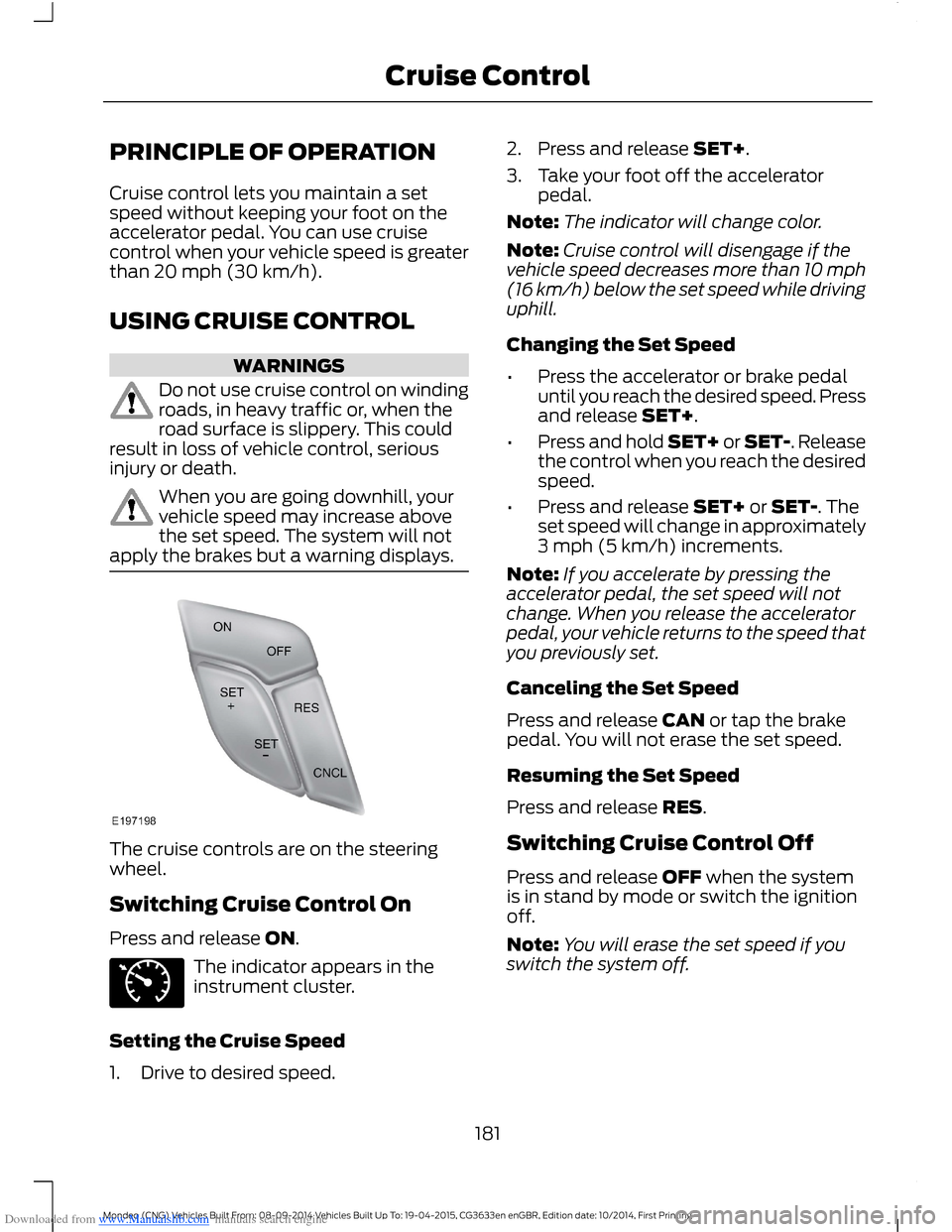
The cruise controls are on the steeringwheel.
Switching Cruise Control On
Press and release ON.
The indicator appears in theinstrument cluster.
Setting the Cruise Speed
1.Drive to desired speed.
2.Press and release SET+.
3.Take your foot off the acceleratorpedal.
Note:The indicator will change color.
Note:Cruise control will disengage if thevehicle speed decreases more than 10 mph(16 km/h) below the set speed while drivinguphill.
Changing the Set Speed
•Press the accelerator or brake pedaluntil you reach the desired speed. Pressand release SET+.
•Press and hold SET+ or SET-. Releasethe control when you reach the desiredspeed.
•Press and release SET+ or SET-. Theset speed will change in approximately3 mph (5 km/h) increments.
Note:If you accelerate by pressing theaccelerator pedal, the set speed will notchange. When you release the acceleratorpedal, your vehicle returns to the speed thatyou previously set.
Canceling the Set Speed
Press and release CAN or tap the brakepedal. You will not erase the set speed.
Resuming the Set Speed
Press and release RES.
Switching Cruise Control Off
Press and release OFF when the systemis in stand by mode or switch the ignitionoff.
Note:You will erase the set speed if youswitch the system off.
181Mondeo (CNG) Vehicles Built From: 08-09-2014 Vehicles Built Up To: 19-04-2015, CG3633en enGBR, Edition date: 10/2014, First PrintingCruise Control