Page 18 of 446
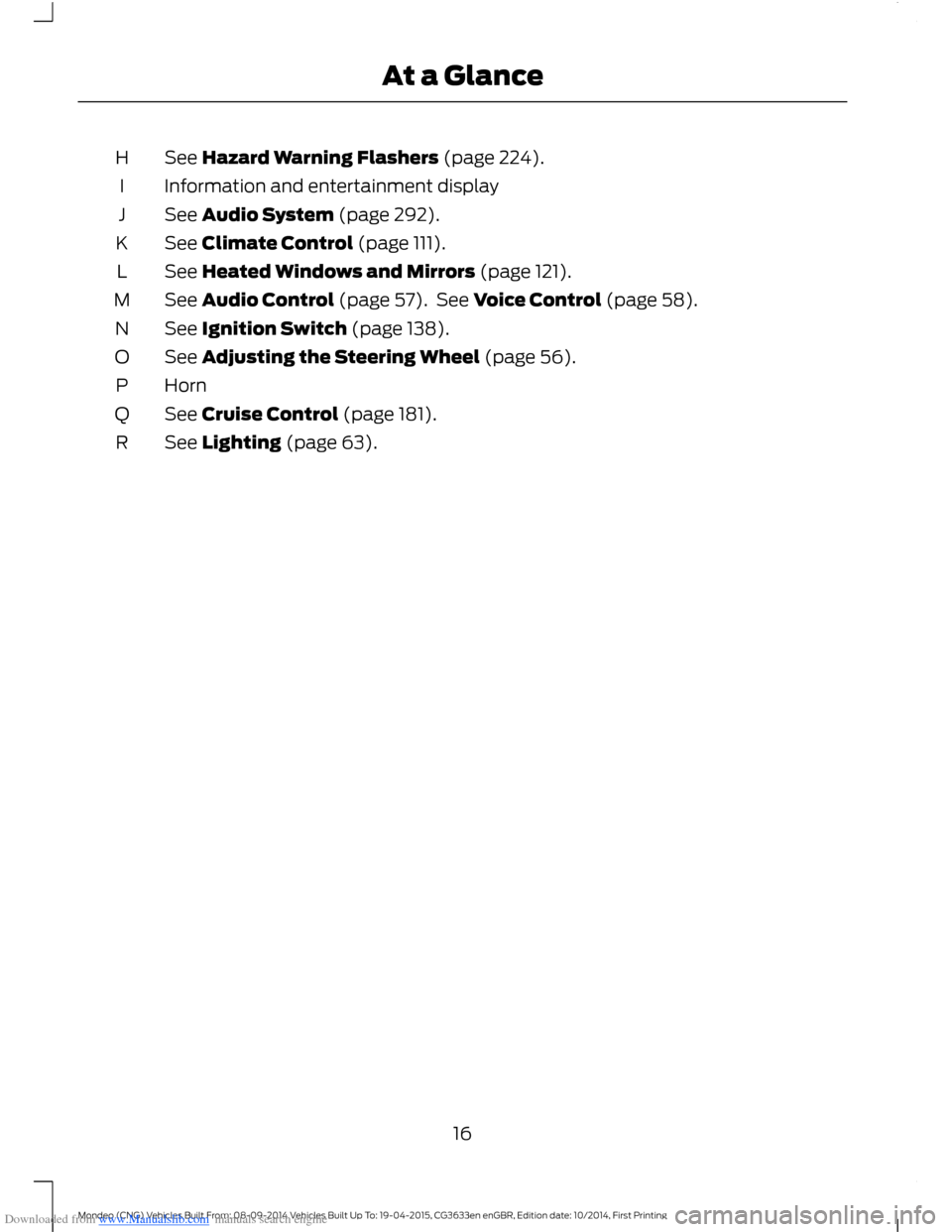
Downloaded from www.Manualslib.com manuals search engine See Hazard Warning Flashers (page 224).H
Information and entertainment displayI
See Audio System (page 292).J
See Climate Control (page 111).K
See Heated Windows and Mirrors (page 121).L
See Audio Control (page 57). See Voice Control (page 58).M
See Ignition Switch (page 138).N
See Adjusting the Steering Wheel (page 56).O
HornP
See Cruise Control (page 181).Q
See Lighting (page 63).R
16Mondeo (CNG) Vehicles Built From: 08-09-2014 Vehicles Built Up To: 19-04-2015, CG3633en enGBR, Edition date: 10/2014, First PrintingAt a Glance
Page 29 of 446

Downloaded from www.Manualslib.com manuals search engine PRINCIPLE OF OPERATION
WARNINGS
Extreme Hazard! Never use arearward facing child restraint on aseat protected by an active airbag infront of it. Death or serious injury to thechild can occur.
Do not modify the front of yourvehicle in any way. This couldadversely affect deployment of theairbags. Failure to adhere to this warningcould result in serious personal injury ordeath.
Wear a safety belt and keepsufficient distance between yourselfand the steering wheel. Only whenyou use the safety belt correctly, can it holdyou in a position that allows the airbag toachieve its optimum effect. See Sittingin the Correct Position (page 126). Failureto adhere to this warning could result inserious personal injury or death.
Repairs to the steering wheel,steering column, seats, airbags andsafety belts must be carried out byan authorized dealer. Failure to adhere tothis warning could result in seriouspersonal injury or death.
Keep the areas in front of the airbagsfree from obstruction. Do not affixanything to or over the airbag covers.In the event of a crash, hard objects couldcause serious personal injury or death.
Do not puncture the seat with sharpobjects. This could damage andadversely affect deployment of theairbags. Failure to adhere to this warningcould result in serious personal injury ordeath.
Use seat covers designed for seatswith side airbags. Have these fittedby an authorized dealer. Failure toadhere to this warning could result inserious personal injury or death.
Note:You will hear a loud bang and see acloud of harmless powdery residue if anairbag deploys. This is normal.
Note:Only wipe airbag covers with a dampcloth.
DRIVER AIRBAG
The airbag will deploy during significantfrontal collisions or collisions that are upto 30 degrees from the left or the right. Theairbag will inflate within a few thousandthsof a second and deflate on contact withthe occupant, thus cushioning forwardbody movement. During minor frontalcollisions, overturns, rear collisions andside collisions, the airbag will not deploy.
27Mondeo (CNG) Vehicles Built From: 08-09-2014 Vehicles Built Up To: 19-04-2015, CG3633en enGBR, Edition date: 10/2014, First PrintingSupplementary Restraints System
Page 41 of 446
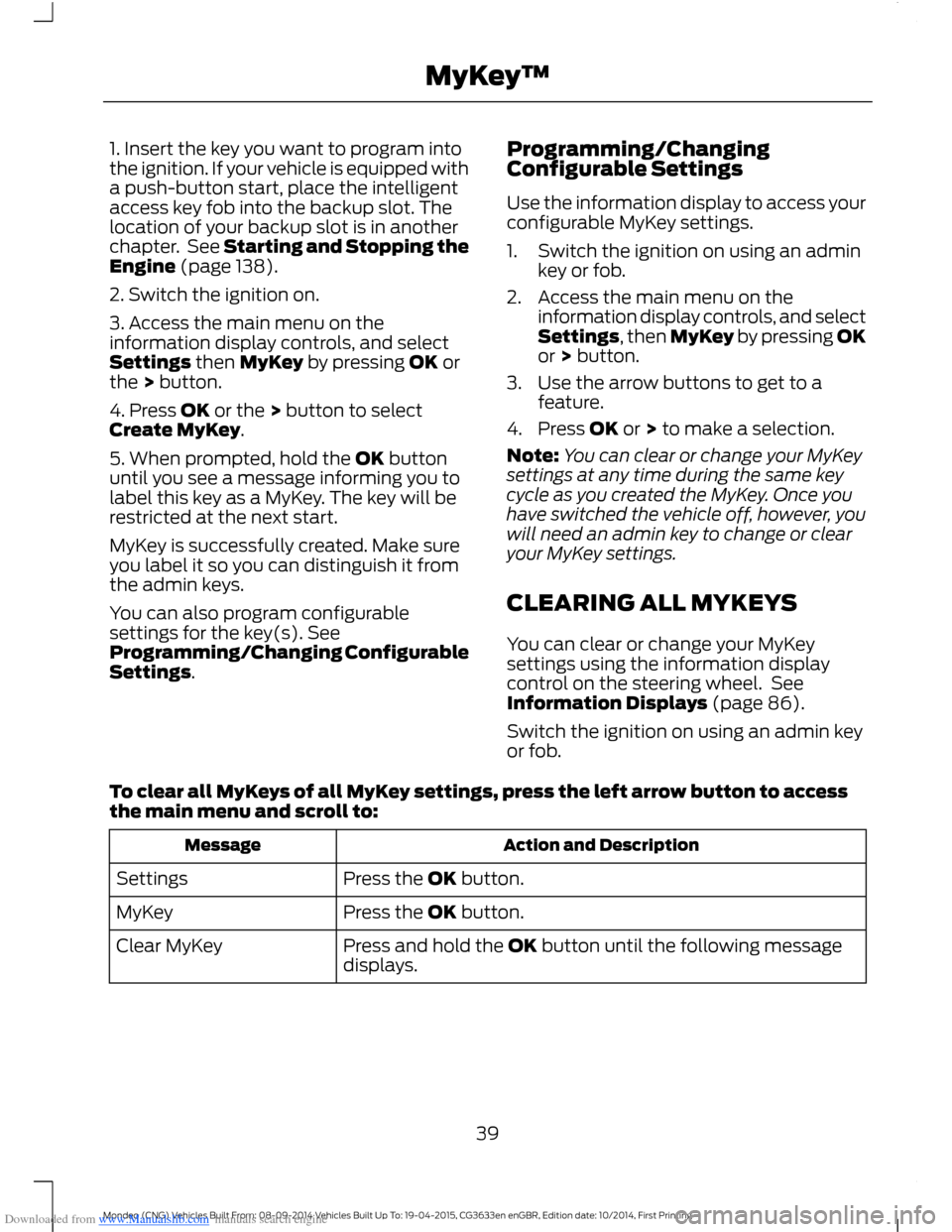
Downloaded from www.Manualslib.com manuals search engine 1. Insert the key you want to program intothe ignition. If your vehicle is equipped witha push-button start, place the intelligentaccess key fob into the backup slot. Thelocation of your backup slot is in anotherchapter. See Starting and Stopping theEngine (page 138).
2. Switch the ignition on.
3. Access the main menu on theinformation display controls, and selectSettings then MyKey by pressing OK orthe > button.
4. Press OK or the > button to selectCreate MyKey.
5. When prompted, hold the OK buttonuntil you see a message informing you tolabel this key as a MyKey. The key will berestricted at the next start.
MyKey is successfully created. Make sureyou label it so you can distinguish it fromthe admin keys.
You can also program configurablesettings for the key(s). SeeProgramming/Changing ConfigurableSettings.
Programming/ChangingConfigurable Settings
Use the information display to access yourconfigurable MyKey settings.
1.Switch the ignition on using an adminkey or fob.
2.Access the main menu on theinformation display controls, and selectSettings, then MyKey by pressing OKor > button.
3.Use the arrow buttons to get to afeature.
4.Press OK or > to make a selection.
Note:You can clear or change your MyKeysettings at any time during the same keycycle as you created the MyKey. Once youhave switched the vehicle off, however, youwill need an admin key to change or clearyour MyKey settings.
CLEARING ALL MYKEYS
You can clear or change your MyKeysettings using the information displaycontrol on the steering wheel. SeeInformation Displays (page 86).
Switch the ignition on using an admin keyor fob.
To clear all MyKeys of all MyKey settings, press the left arrow button to accessthe main menu and scroll to:
Action and DescriptionMessage
Press the OK button.Settings
Press the OK button.MyKey
Press and hold the OK button until the following messagedisplays.Clear MyKey
39Mondeo (CNG) Vehicles Built From: 08-09-2014 Vehicles Built Up To: 19-04-2015, CG3633en enGBR, Edition date: 10/2014, First PrintingMyKey™
Page 43 of 446
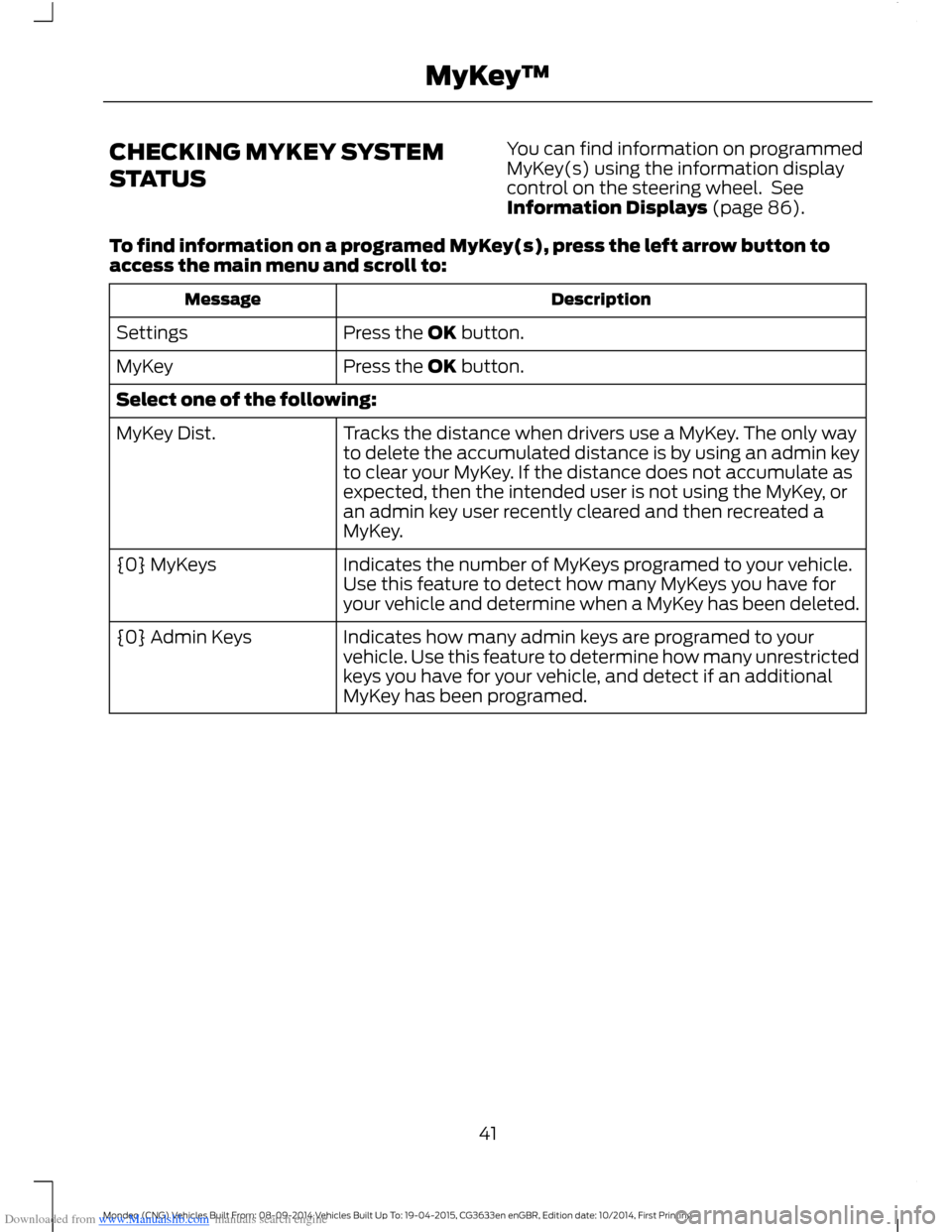
Downloaded from www.Manualslib.com manuals search engine CHECKING MYKEY SYSTEM
STATUS
You can find information on programmedMyKey(s) using the information displaycontrol on the steering wheel. SeeInformation Displays (page 86).
To find information on a programed MyKey(s), press the left arrow button toaccess the main menu and scroll to:
DescriptionMessage
Press the OK button.Settings
Press the OK button.MyKey
Select one of the following:
Tracks the distance when drivers use a MyKey. The only wayto delete the accumulated distance is by using an admin keyto clear your MyKey. If the distance does not accumulate asexpected, then the intended user is not using the MyKey, oran admin key user recently cleared and then recreated aMyKey.
MyKey Dist.
Indicates the number of MyKeys programed to your vehicle.Use this feature to detect how many MyKeys you have foryour vehicle and determine when a MyKey has been deleted.
{0} MyKeys
Indicates how many admin keys are programed to yourvehicle. Use this feature to determine how many unrestrictedkeys you have for your vehicle, and detect if an additionalMyKey has been programed.
{0} Admin Keys
41Mondeo (CNG) Vehicles Built From: 08-09-2014 Vehicles Built Up To: 19-04-2015, CG3633en enGBR, Edition date: 10/2014, First PrintingMyKey™
Page 58 of 446
Downloaded from www.Manualslib.com manuals search engine ADJUSTING THE STEERING
WHEEL - VEHICLES WITH:
MANUAL ADJUSTABLE
STEERING COLUMN
WARNING
Do not adjust the steering wheelwhen your vehicle is moving.
Note:Make sure that you are sitting in thecorrect position. See Sitting in the CorrectPosition (page 126).
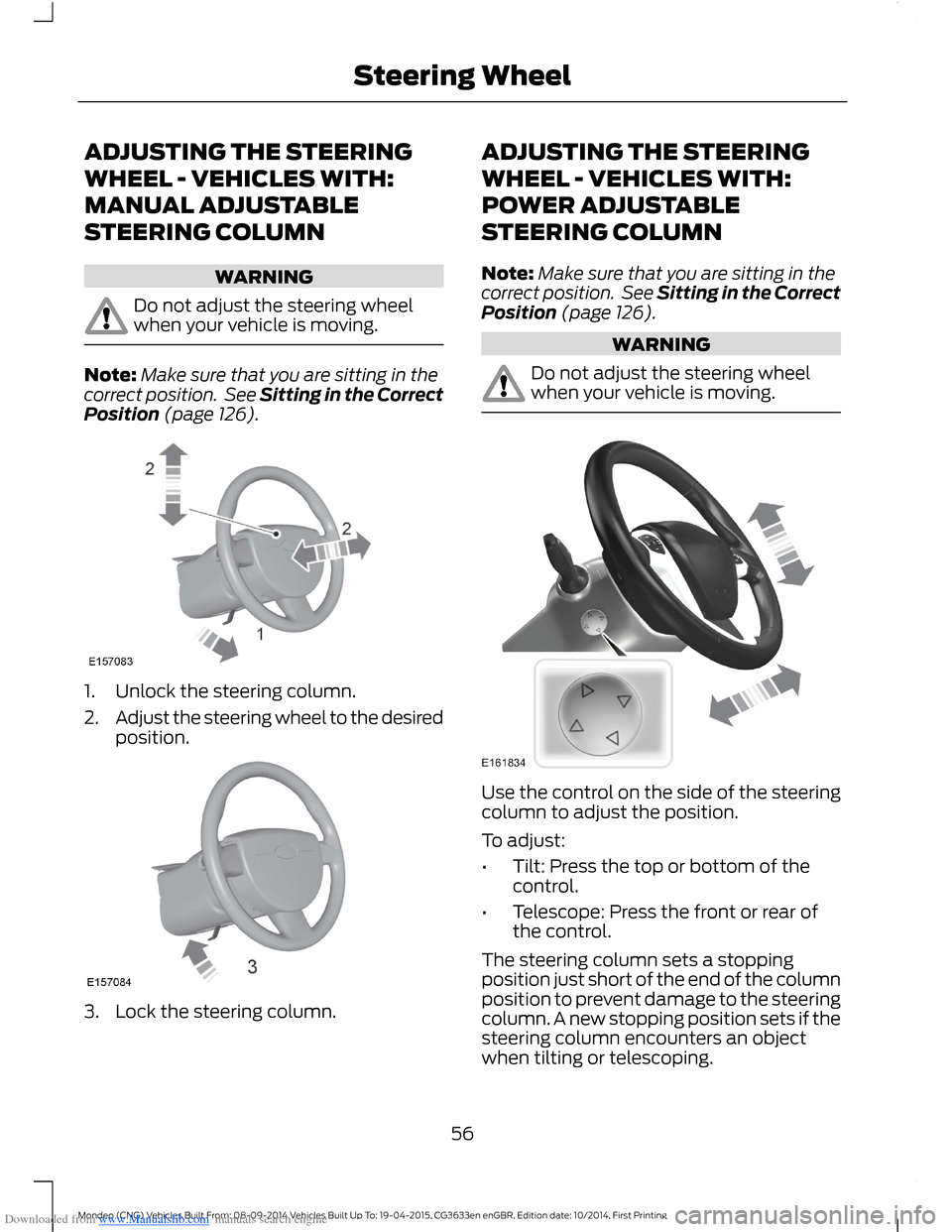
1.Unlock the steering column.
2.Adjust the steering wheel to the desiredposition.
3.Lock the steering column.
ADJUSTING THE STEERING
WHEEL - VEHICLES WITH:
POWER ADJUSTABLE
STEERING COLUMN
Note:Make sure that you are sitting in thecorrect position. See Sitting in the CorrectPosition (page 126).
WARNING
Do not adjust the steering wheelwhen your vehicle is moving.
Use the control on the side of the steeringcolumn to adjust the position.
To adjust:
•Tilt: Press the top or bottom of thecontrol.
•Telescope: Press the front or rear ofthe control.
The steering column sets a stoppingposition just short of the end of the columnposition to prevent damage to the steeringcolumn. A new stopping position sets if thesteering column encounters an objectwhen tilting or telescoping.
56Mondeo (CNG) Vehicles Built From: 08-09-2014 Vehicles Built Up To: 19-04-2015, CG3633en enGBR, Edition date: 10/2014, First PrintingSteering Wheel
Page 59 of 446

Downloaded from www.Manualslib.com manuals search engine To reset the steering column to its normalstopping position:
1.Press the steering column control againafter encountering the new stoppingposition.
2.Continue pressing the control until itreaches the end of the column position.
A new stopping position is set. The nexttime you tilt or telescope the steeringcolumn, it will stop just short of the end ofthe column position.
Memory Feature
You can save and recall the steeringcolumn position with the memory function.See Memory Function (page 131).
Note:Pressing the adjustment controlduring memory recall cancels the operation.The column responds to the adjustmentcontrol.
Easy Entry and Exit Feature (If
Equipped)
When you switch the ignition off, thesteering column will move to the full upposition to allow extra room to exit yourvehicle. The column will return to theprevious setting when you switch theignition on. You can enable or disable thisfeature in the information display. SeeInformation Displays (page 86).
AUDIO CONTROL
Select the required source on the audiounit.
Operate the following functions with thecontrol:
Volume up.A
Volume down.B
Mute.C
Mode.D
Seek down or previous.E
Seek up or next.F
MODE
Press repeatedly to scroll through availableaudio sources.
Seek, Next or Previous
Press the seek button to:
•tune the radio to the next or previousstored preset.
•play the next or the previous track.
Press and hold the seek button to:
•tune the radio to the next station up ordown the frequency band.
•seek through a track.
57Mondeo (CNG) Vehicles Built From: 08-09-2014 Vehicles Built Up To: 19-04-2015, CG3633en enGBR, Edition date: 10/2014, First PrintingSteering Wheel
Page 60 of 446
Downloaded from www.Manualslib.com manuals search engine VOICE CONTROL
Push the control to select or deselect voicecontrol. See SYNC™ 2 (page 343).
CRUISE CONTROL
Type 1
Type 2
See Cruise Control (page 181).
INFORMATION DISPLAY
CONTROL
See Information Displays (page 86).
58Mondeo (CNG) Vehicles Built From: 08-09-2014 Vehicles Built Up To: 19-04-2015, CG3633en enGBR, Edition date: 10/2014, First PrintingSteering Wheel
Page 61 of 446
Downloaded from www.Manualslib.com manuals search engine Information Display ControlFeatures
This control functions the same as thecenter control on the faceplate. See AudioUnit (page 296).
Use this control to adjust the right side ofthe information display. Navigate throughthe screen and press OK to select.
HEATED STEERING WHEEL
See SYNC™ 2 (page 343).
59Mondeo (CNG) Vehicles Built From: 08-09-2014 Vehicles Built Up To: 19-04-2015, CG3633en enGBR, Edition date: 10/2014, First PrintingSteering Wheel