2014 FORD MONDEO sensor
[x] Cancel search: sensorPage 172 of 446
Downloaded from www.Manualslib.com manuals search engine If the transmission is in reverse (R), thefront sensing system provides audiowarnings when your vehicle is moving andthe detected obstacle is moving towardsyour vehicle. Once the vehicle is stationary,the audio warning will be stopped after 2seconds.
Obstacle Distance Indicator (If
Equipped)
The system provides obstacle distanceindication through the information display.The distance indicator displays when thetransmission is in reverse (R).
The indicator displays:
•As the distance to the obstacledecreases the indicator blocksilluminate and move towards thevehicle icon.
•If there is no obstacle detected, thedistance indicator blocks are greyedout.
Vehicles with automatic transmission
If the gearshift is in neutral (N), the systemprovides obstacle distance indicationthrough the information display. If yourvehicle moves the front sensing systemprovides an audible warning when thevehicle is moving at 7 mph (12 km/h) orbelow and an obstacle is located insidethe detection area. Once the vehicle isstationary, the audio warning will bestopped after 4 seconds.
If the gearshift is in drive (D) or any otherforward gear, the front sensing systemprovides audio warnings when the vehicleis moving and an obstacle is located insidethe detection area. Once the vehicle isstationary, the audio warning will bestopped after 2 seconds.
SIDE SENSING SYSTEM
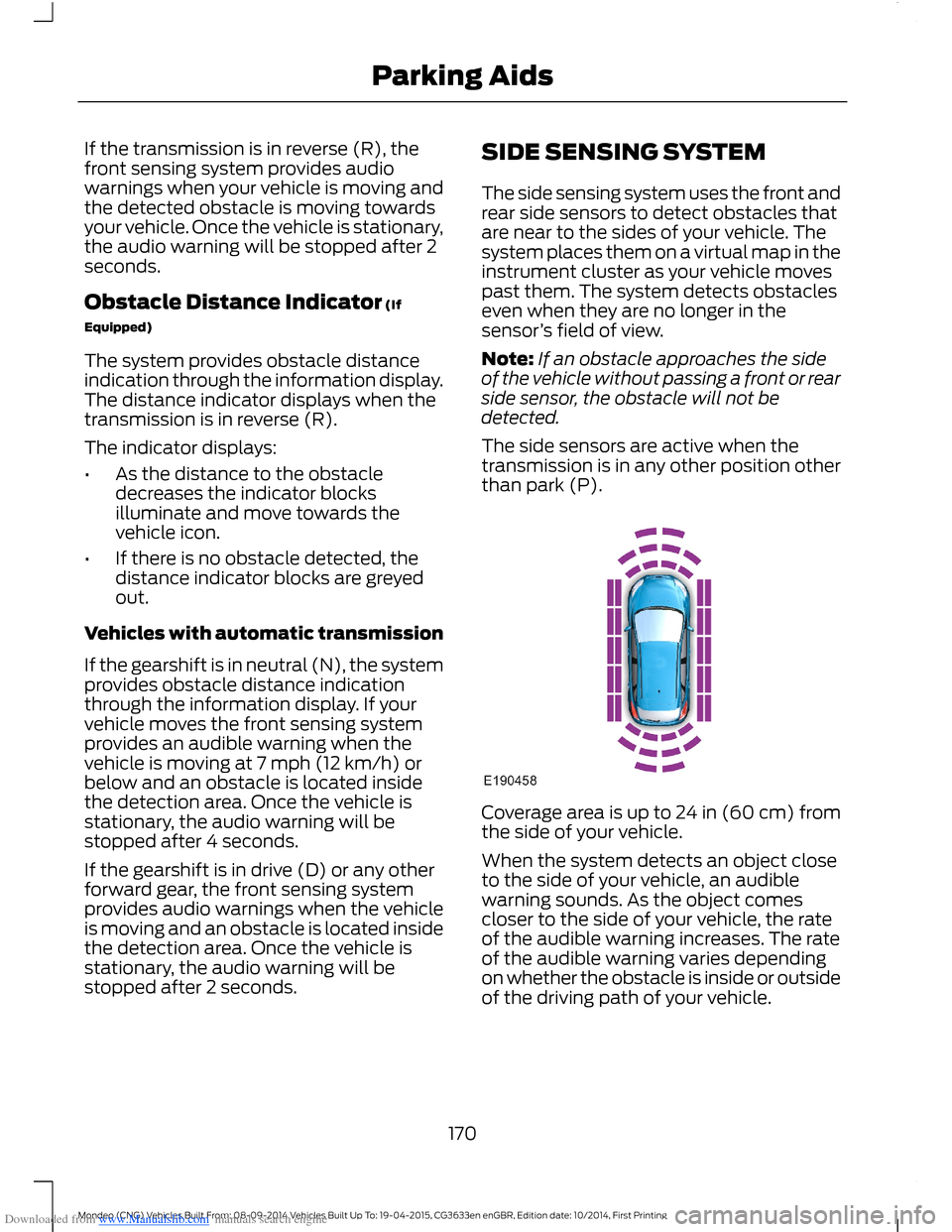
The side sensing system uses the front andrear side sensors to detect obstacles thatare near to the sides of your vehicle. Thesystem places them on a virtual map in theinstrument cluster as your vehicle movespast them. The system detects obstacleseven when they are no longer in thesensor’s field of view.
Note:If an obstacle approaches the sideof the vehicle without passing a front or rearside sensor, the obstacle will not bedetected.
The side sensors are active when thetransmission is in any other position otherthan park (P).
Coverage area is up to 24 in (60 cm) fromthe side of your vehicle.
When the system detects an object closeto the side of your vehicle, an audiblewarning sounds. As the object comescloser to the side of your vehicle, the rateof the audible warning increases. The rateof the audible warning varies dependingon whether the obstacle is inside or outsideof the driving path of your vehicle.
170Mondeo (CNG) Vehicles Built From: 08-09-2014 Vehicles Built Up To: 19-04-2015, CG3633en enGBR, Edition date: 10/2014, First PrintingParking Aids
Page 174 of 446
Downloaded from www.Manualslib.com manuals search engine ACTIVE PARK ASSIST
Parallel Parking, PerpendicularParking, Park Out Assist
WARNINGS
You must remain in your vehiclewhen the system turns on. At alltimes, you are responsible forcontrolling your vehicle, supervising thesystem and intervening if required. Failureto take care may result in the loss ofcontrol of your vehicle, serious personalinjury or death.
The sensors may not detect objectsin heavy rain or other conditions thatcause disruptive reflections.
The system scans the area adjacent toboth sides of your vehicle to locate asuitable parking space.
The system informs you when it locates asuitable parking space. When you stopyour vehicle, the system takes control ofthe steering to guide your vehicle into theparking space.
Park Out Assist automatically steers yourvehicle out of a parallel parking space(hands-free) while you control theaccelerator, gearshift and brakes. Thesystem visually and audibly instructs youto enter traffic.
The system may not correctly operate inany of the following conditions:
•a spare tire or a significantly worn tiremore than the other tires is used
•you use a tire size not recommendedby us
•you try to park on a tight curve
•if the edge of the neighboring parkedvehicle is high off the ground (forexample, a bus, tow truck or flatbedtruck)
•the weather conditions are poor (heavyrain, snow, fog, etc).
Note:Keep the sensors, located on thebumper or fascia, free from snow, ice andlarge accumulations of dirt. Covered sensorscan affect the system's accuracy. Do notclean the sensors with sharp objects.
Do not use the system if:
•You have attached a foreign object(bike rack or trailer) to the front or rearof your vehicle or close to the sensors.
•You have attached an overhangingobject (surfboard) to the roof.
•A foreign object damages or obstructsthe front or rear bumper or sidesensors.
•The correct tire size is not in use on yourvehicle (for example, a mini-spare tire).
Using Active Park Assist - ParallelParking
Press the button located on thecenter console near the gearshiftlever once.
When driving at a speed less than 19 mph(30 km/h) the system automatically scansboth sides of your vehicle for an availableparking space. The system displays amessage and a corresponding graphic toindicate it is searching for a parking space.Use the direction indicator to selectsearching either to the left-hand side orright-hand side of your vehicle.
Note:If you do not make a selection thesystem will default to the passenger's side.
172Mondeo (CNG) Vehicles Built From: 08-09-2014 Vehicles Built Up To: 19-04-2015, CG3633en enGBR, Edition date: 10/2014, First PrintingParking Aids
Page 178 of 446
Downloaded from www.Manualslib.com manuals search engine •Driving above approximately 22 mph(35 km/h) for 30 seconds during anactive park search.
•Driving above 6 mph (9 km/h) duringautomatic steering.
•Switching off the traction controlsystem.
Certain vehicle conditions can alsodeactivate the system, such as:
•Traction control has activated.
•There is an anti-lock brake systemactivation or failure.
If a problem occurs with the system, awarning message displays accompaniedby a tone. Occasional system messagesmay occur in normal operation. Forrecurring or frequent system faults, contactan authorized dealer to have your vehicleserviced.
Troubleshooting the System
The system does not look for a space
The traction control system may be off.
The transmission is in reverse (R). Your vehicle must be moving forward to be able todetect a parking space.
The system does not offer a particular space
The sensors may be covered (for example, snow, ice or dirt buildup). Covered senorscan affect the system's functionality.
There is not enough room in the parking space for your vehicle to safely park.
There is not enough space for the parking maneuver on the opposite side of the parkingspace.
The parking space is farther than 4.9 ft (1.5 m) or closer than 15.7 in (0.4 m) away.
The transmission is in reverse (R). Your vehicle must be moving forward to be able todetect a parking space.
Your vehicle is going faster than 19 mph (30 km/h) for parallel and 22 mph (35 km/h)for perpendicular parking.
176Mondeo (CNG) Vehicles Built From: 08-09-2014 Vehicles Built Up To: 19-04-2015, CG3633en enGBR, Edition date: 10/2014, First PrintingParking Aids
Page 184 of 446
Downloaded from www.Manualslib.com manuals search engine USING ADAPTIVE CRUISE
CONTROL (If Equipped)
WARNINGS
Always pay close attention tochanging road conditions, especiallywhen using adaptive cruise control.Adaptive cruise control cannot replaceattentive driving. Failing to follow any ofthe warnings below or failing to payattention to the road may result in a crash,serious injury or death.
The system is not a crash warning oravoidance system. You mustintervene if the system does notdetect a vehicle in front of you.
Adaptive cruise control does notdetect stationary or slow movingvehicles below 6 mph (10 km/h).
The system does not brake for slowor stationary vehicles, pedestrians,objects in the road, oncoming andcrossing vehicles.
Do not use the system when enteringor leaving a freeway.
Do not use adaptive cruise controlon winding roads, in heavy traffic orwhen the road surface is slippery.This could result in loss of vehicle control,serious injury or death.
Do not use the system in poorvisibility, specifically fog, heavy rain,spray or snow.
WARNINGS
Do not use the system when towinga trailer with electronic aftermarkettrailer brake controls. Electronicaftermarket trailer brakes do not functionproperly when you switch on the systembecause the brakes are electronicallycontrolled. Failing to do so may result inloss of vehicle control, which could resultin serious injury. Overrun brakes, surgebrakes and other non-electronictrailer-brake controllers are not affected.
Do not use tire sizes other than thoserecommended because this canaffect the normal operation of thesystem. Failing to do so may result in a lossof vehicle control, which could result inserious injury.
The system is designed to help youmaintain a gap from the vehicle in front ofyou. If there is no vehicle in front of you thesystem will maintain a set speed. Thesystem is intended to provide enhancedoperation of your vehicle when followingother vehicles which are in the same laneand traveling in the same direction. Youcan select from one of five gap settings.
The system is based on the use of a radarsensor which projects a beam directlyforward of your vehicle. This beam willdetect any vehicle ahead within thesystem's range.
If there is no vehicle in front of you, thesystem maintains your set speed.
182Mondeo (CNG) Vehicles Built From: 08-09-2014 Vehicles Built Up To: 19-04-2015, CG3633en enGBR, Edition date: 10/2014, First PrintingCruise Control
Page 186 of 446

Downloaded from www.Manualslib.com manuals search engine Resuming the Set Speed
Press and release RES+. The vehiclereturns to the previously set speed and gapsetting. The set speed displayscontinuously in the information displaywhile the system is active.
Switching the System Off
Press and release the Adaptive CruiseControl CAN/OFF button when thesystem is in stand by mode or switch theignition off.
Note:The set speed memory erases whenyou switch off the system.
Following a Vehicle
WARNINGS
When following a vehicle, yourvehicle does not decelerateautomatically to a stop, nor doesyour vehicle always decelerate quicklyenough to avoid a crash without driverintervention. Always apply the brakes whennecessary. Failing to do so may result in acrash, serious injury or death.
Adaptive cruise control only warnsof vehicles detected by the radarsensor. In some cases there may beno warning or a delayed warning. Youshould always apply the brakes whennecessary. Failing to do so may result in acrash, serious injury or death.
When a vehicle ahead of you enters thesame lane or a slower vehicle is ahead inthe same lane, the vehicle speed adjuststo maintain a preset gap.
The lead vehicle graphic illuminates.
Your vehicle maintains a constant gapbehind the vehicle ahead until:
•The vehicle in front of you acceleratesto a speed above the set speed.
•The vehicle in front of you moves outof your lane or out of view.
•The vehicle speed falls below 12 mph(20 km/h).
•A new gap is set.
The system applies the brakes to slow yourvehicle to maintain a safe gap from thevehicle in front. The maximum brakingwhich the system can apply is limited. Youcan override the system by applying thebrakes.
If the system predicts that its maximumbraking level is insufficient, an audiblewarning sounds and a message appearsin the information display while the systemcontinues to brake.
The system is designed to assist you bywarning you of the risk of a crash with thevehicle in front of you.
The system is designed to alert you bywarning chimes and a visual warning in theinformation display.
Brake support is turned on to enable fullbraking effectiveness and reduce theseverity of a crash with the vehicle in frontof you.
Note:The brakes may emit a sound whenmodulated by the adaptive cruise controlsystem.
184Mondeo (CNG) Vehicles Built From: 08-09-2014 Vehicles Built Up To: 19-04-2015, CG3633en enGBR, Edition date: 10/2014, First PrintingCruise Control
Page 188 of 446
Downloaded from www.Manualslib.com manuals search engine Overriding the System
WARNING
Whenever the driver is overriding thesystem by pressing the acceleratorpedal, the system does notautomatically apply the brakes to maintainseparation from any vehicle ahead.
You can override the set speed and gap bypressing the accelerator pedal.
When you override the system,the green indicator lightilluminates and the lead vehiclegraphic does not show in theinformation display.
The system resumes operation when yourelease the accelerator pedal. The vehiclespeed decreases to the set speed, or alower speed if following a slower vehicle.
Automatic Switch Off
The system does not operate below12 mph (20 km/h). An audible warningsounds and the automatic braking releasesif the vehicle drops below this speed.
Automatic cancellation can also occur if:
•The tires lose traction.
•The engine speed is too low.
•You apply the parking brake.
Note:If the engine speed drops too low,the information display indicates low enginespeed. Shift to a lower gear (manualtransmission only) to avoid automaticcancellation.
Hilly Condition Usage
You should select a lower gear positionwhen the system is active in situationssuch as prolonged downhill driving onsteep grades, for example in mountainousareas. The system needs additional enginebraking in these situations to reduce theload on the vehicle’s regular brake systemto prevent them from overheating.
Note:An audible warning sounds and thesystem shuts down if it applies brakes foran extended period of time. This allows thebrakes to cool down. The system functionsnormally again when the brakes have cooleddown.
Detection Beam Issues
The radar sensor has a limited field ofvision. It may not detect vehicles at all ordetect a vehicle later than expected insome situations. The lead vehicle graphicdoes not illuminate if the system does notdetect a vehicle in front of you.
186Mondeo (CNG) Vehicles Built From: 08-09-2014 Vehicles Built Up To: 19-04-2015, CG3633en enGBR, Edition date: 10/2014, First PrintingCruise Control
Page 189 of 446
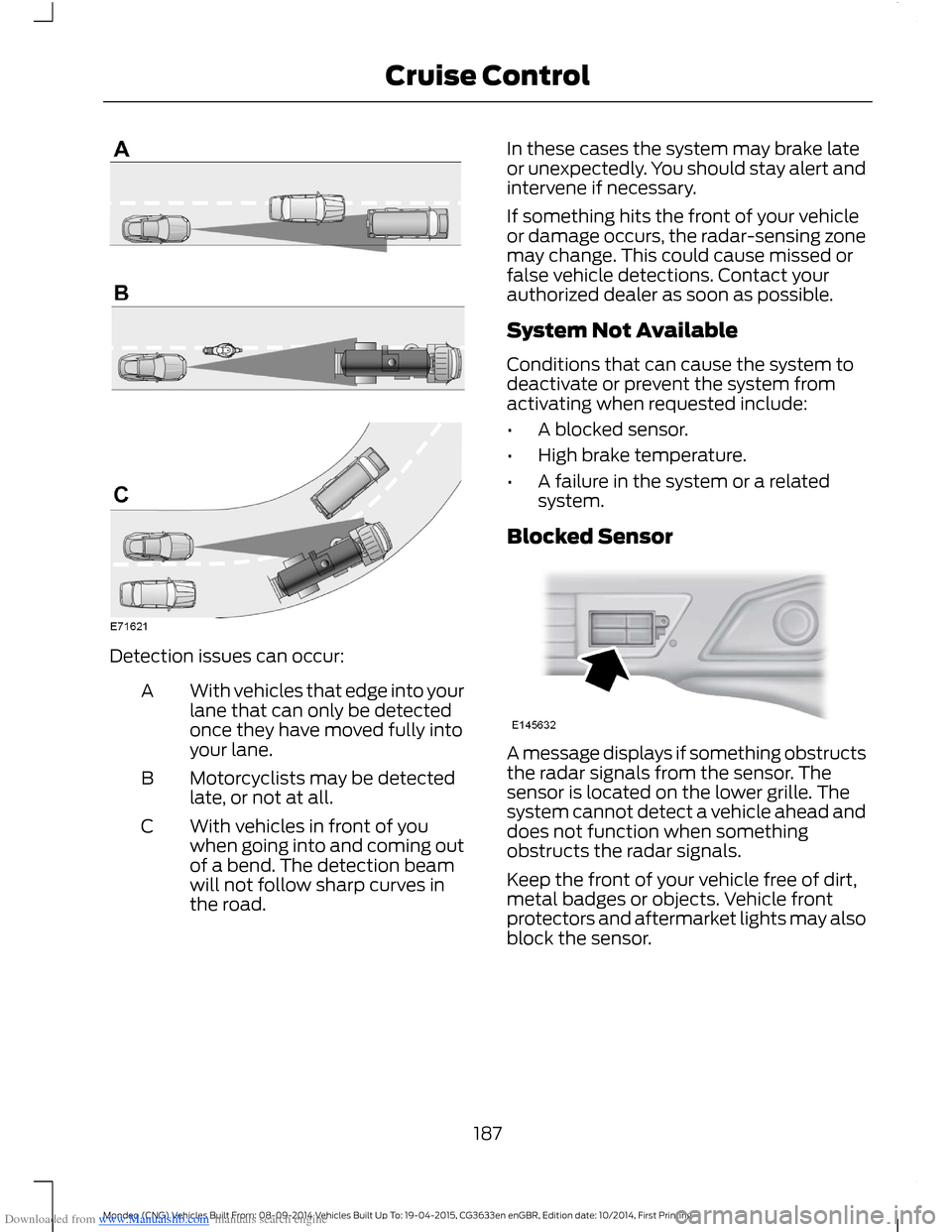
Downloaded from www.Manualslib.com manuals search engine Detection issues can occur:
With vehicles that edge into yourlane that can only be detectedonce they have moved fully intoyour lane.
A
Motorcyclists may be detectedlate, or not at all.B
With vehicles in front of youwhen going into and coming outof a bend. The detection beamwill not follow sharp curves inthe road.
C
In these cases the system may brake lateor unexpectedly. You should stay alert andintervene if necessary.
If something hits the front of your vehicleor damage occurs, the radar-sensing zonemay change. This could cause missed orfalse vehicle detections. Contact yourauthorized dealer as soon as possible.
System Not Available
Conditions that can cause the system todeactivate or prevent the system fromactivating when requested include:
•A blocked sensor.
•High brake temperature.
•A failure in the system or a relatedsystem.
Blocked Sensor
A message displays if something obstructsthe radar signals from the sensor. Thesensor is located on the lower grille. Thesystem cannot detect a vehicle ahead anddoes not function when somethingobstructs the radar signals.
Keep the front of your vehicle free of dirt,metal badges or objects. Vehicle frontprotectors and aftermarket lights may alsoblock the sensor.
187Mondeo (CNG) Vehicles Built From: 08-09-2014 Vehicles Built Up To: 19-04-2015, CG3633en enGBR, Edition date: 10/2014, First PrintingCruise Control
Page 192 of 446

Downloaded from www.Manualslib.com manuals search engine WARNINGS
If the sensor becomes blocked thesystem may not function.
Take regular rest breaks as requiredand do not wait for the system towarn you if you feel tired.
Take rest breaks only where it is safeto do so.
Certain driving styles and behaviormay result in the system issuing awarning even if you are not feelingtired.
In cold and severe weatherconditions the system may notfunction. Rain, snow, spray and largecontrasts in lighting can all influence thesensor.
The system will not operate if thesensor cannot track the road lanemarkings.
The system may not operate in areasduring roadwork construction.
The system may not operate onroads with sharp bends or narrowlanes.
Do not carry out windshield repairsin the immediate area surroundingthe sensor.
If your vehicle has a suspension kitnot approved by us, the system maynot function correctly.
Note:Keep the windshield free fromobstructions such as bird droppings, insectsand snow or ice.
Note:The system assists you when drivingon fast main roads and freeways.
Note:The system calculates an alertnesslevel at vehicle speeds above approximately40 mph (65 km/h).
The system automatically monitors yourdriving behavior.
The system is designed to alert you if itdetects that you are becoming drowsy orif your driving deteriorates.
Using Driver Alert
Switching the System On and Off
Note:The system will remain on or offdepending on how it was last set.
Switch the system on using the informationdisplay. See Information Displays (page86).
The system will calculate your alertnesslevel based upon your driving behavior inrelation to the lane markings and otherfactors.
System Warnings
Note:The system will not issue warningsbelow approximately 40 mph (65 km/h).
The warning system has two stages:
1.A temporary warning is issued to adviseyou to take a rest. This message onlyappears for a short time.
2.If you do not rest and the systemcontinues to detect that your drivingdeteriorates, it will issue a furtherwarning. This will remain in theinformation display until you cancel it.See Information Messages (page96).
Press OK on the steering wheel control toremove the warning.
System Display
When active the system will runautomatically in the background and onlyissue warnings if required. You can viewthe status at any time using theinformation display. See GeneralInformation (page 86).
190Mondeo (CNG) Vehicles Built From: 08-09-2014 Vehicles Built Up To: 19-04-2015, CG3633en enGBR, Edition date: 10/2014, First PrintingDriving Aids