Page 236 of 446
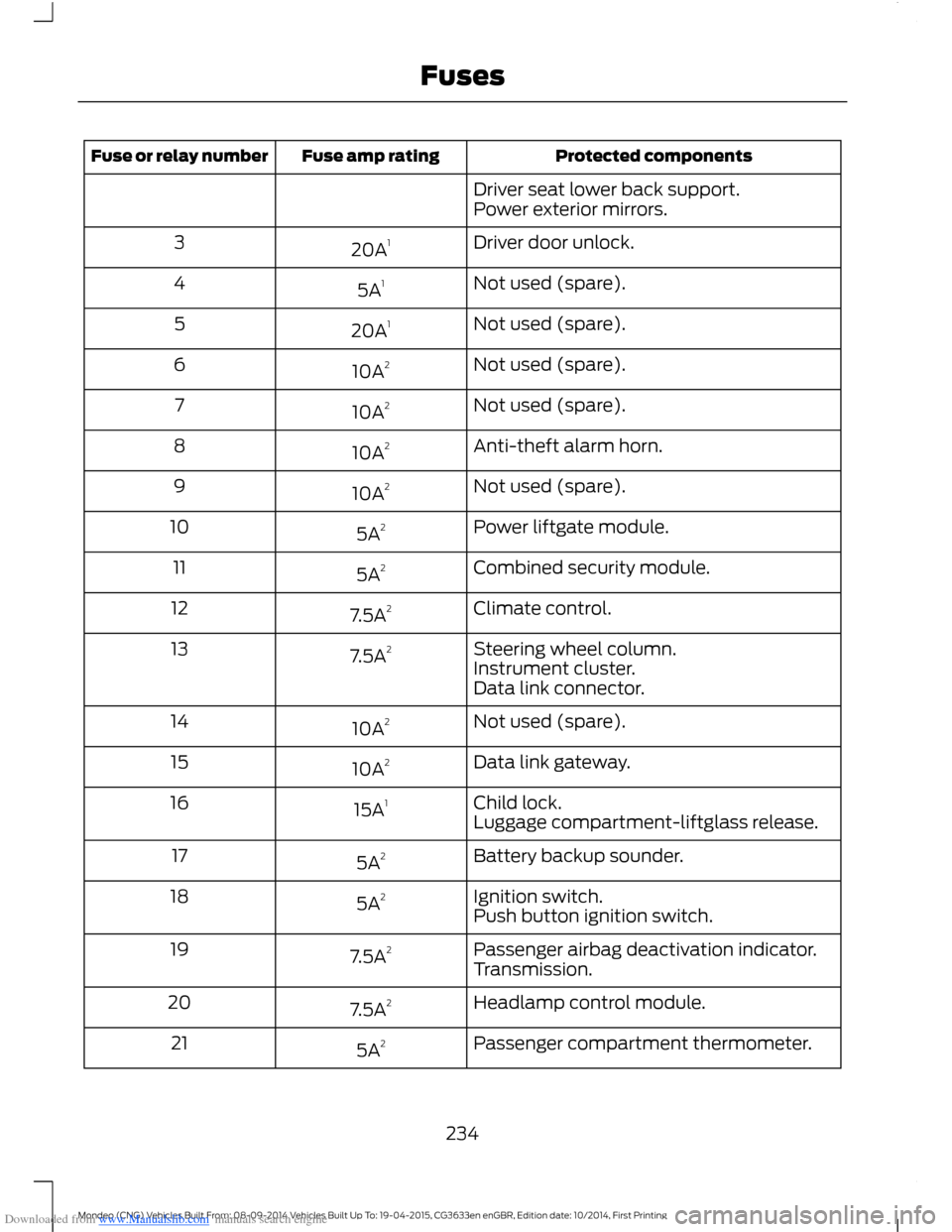
Downloaded from www.Manualslib.com manuals search engine Protected componentsFuse amp ratingFuse or relay number
Driver seat lower back support.Power exterior mirrors.
Driver door unlock.20A13
Not used (spare).5A14
Not used (spare).20A15
Not used (spare).10A26
Not used (spare).10A27
Anti-theft alarm horn.10A28
Not used (spare).10A29
Power liftgate module.5A210
Combined security module.5A211
Climate control.7.5A212
Steering wheel column.7.5A213Instrument cluster.Data link connector.
Not used (spare).10A214
Data link gateway.10A215
Child lock.15A116Luggage compartment-liftglass release.
Battery backup sounder.5A217
Ignition switch.5A218Push button ignition switch.
Passenger airbag deactivation indicator.7.5A219Transmission.
Headlamp control module.7.5A220
Passenger compartment thermometer.5A221
234Mondeo (CNG) Vehicles Built From: 08-09-2014 Vehicles Built Up To: 19-04-2015, CG3633en enGBR, Edition date: 10/2014, First PrintingFuses
Page 237 of 446
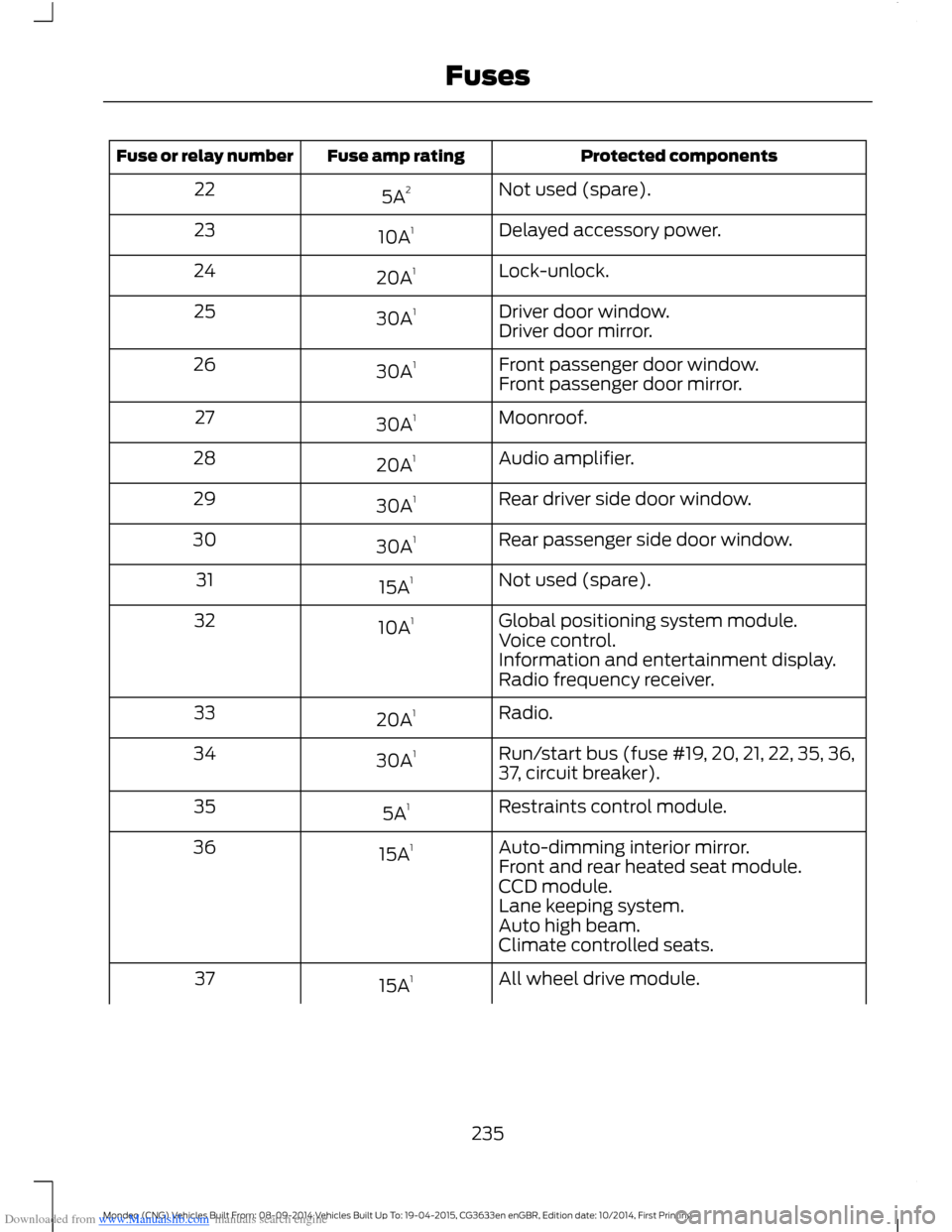
Downloaded from www.Manualslib.com manuals search engine Protected componentsFuse amp ratingFuse or relay number
Not used (spare).5A222
Delayed accessory power.10A123
Lock-unlock.20A124
Driver door window.30A125Driver door mirror.
Front passenger door window.30A126Front passenger door mirror.
Moonroof.30A127
Audio amplifier.20A128
Rear driver side door window.30A129
Rear passenger side door window.30A130
Not used (spare).15A131
Global positioning system module.10A132Voice control.Information and entertainment display.Radio frequency receiver.
Radio.20A133
Run/start bus (fuse #19, 20, 21, 22, 35, 36,37, circuit breaker).30A134
Restraints control module.5A135
Auto-dimming interior mirror.15A136Front and rear heated seat module.CCD module.Lane keeping system.Auto high beam.Climate controlled seats.
All wheel drive module.15A137
235Mondeo (CNG) Vehicles Built From: 08-09-2014 Vehicles Built Up To: 19-04-2015, CG3633en enGBR, Edition date: 10/2014, First PrintingFuses
Page 341 of 446

Downloaded from www.Manualslib.com manuals search engine Voice command issues
Possible solutionPossible causeIssue
SYNC uses a synthetically generated voicerather than pre-recorded human voice.
SYNC uses text-to-speech voice prompttechnology.
The systemgenerates voiceprompts andthe pronunci-ation of somewords may notbe accurate formy language.
SYNC offers several new voice controlfeatures for a wide range of languages.Dialing a contact name directly from thephonebook without pre-recording (forexample,“call John Smith”) or selecting atrack, artist, album, genre or playlist directlyfrom your media player (for example," playartist Madonna).
SYNC offers significant capability beyondthe previous system such as dialing acontact name directly from the phonebookwithout pre-recording (for example,“callJohn Smith”) or selecting a track, artist,album, genre or playlist directly from yourmedia player (for example, " play artistMadonna).
The focus of SYNC is tocontrol your mobiledevices and the contentstored on them.
My previousBluetooth voicecontrol systemallowed me tocontrol theradio, CD, andclimate controlsystems. Whycan I not controlthese systemswith SYNC?
339Mondeo (CNG) Vehicles Built From: 08-09-2014 Vehicles Built Up To: 19-04-2015, CG3633en enGBR, Edition date: 10/2014, First PrintingSYNC™
Page 345 of 446
Downloaded from www.Manualslib.com manuals search engine GENERAL INFORMATIONWARNING
Driving while distracted can result inloss of vehicle control, crash andinjury. We strongly recommend thatyou use extreme caution when using anydevice that may take your focus off theroad. Your primary responsibility is the safeoperation of your vehicle. We recommendagainst the use of any hand-held devicewhile driving and encourage the use ofvoice-operated systems when possible.Make sure you are aware of all applicablelocal laws that may affect the use ofelectronic devices while driving.
MessageItem
PhoneA
NavigationB
ClimateC
SettingsD
MessageItem
HomeE
InformationF
EntertainmentG
343Mondeo (CNG) Vehicles Built From: 08-09-2014 Vehicles Built Up To: 19-04-2015, CG3633en enGBR, Edition date: 10/2014, First PrintingSYNC™ 2
Page 346 of 446

Downloaded from www.Manualslib.com manuals search engine This system uses a four-corner strategy toprovide quick access to several vehiclefeatures and settings. The touchscreenprovides easy interaction with your cellularphone, multimedia, climate control andnavigation system. The corners display anyactive modes within those menus, such asphone status or the climate temperature.
Note:Some features are not available whileyour vehicle is moving.
Note:Your system is equipped with afeature that allows you to access andcontrol audio features for 10 minutes afteryou switch the ignition off (and no doorsopen).
PHONE
Press to select any of the following:
Message
Phone
Quick Dial
Phonebook
History
Messaging
Settings
NAVIGATION
Press to select any of the following:
Message
My Home
Favorites
Previous Destinations
Point of Interest
Emergency
Street Address
Message
Intersection
City Center
Latitude/Longitude
Edit Route
Cancel Route
CLIMATE
Press the corresponding icons to controlthe following options:
•Driver Settings
•Recirculated Air
•Auto
•Dual
•Passenger Settings
•A/C
•Defrost
SETTINGS
Press to select any of the following:
Message
Clock
Display
Sound
Vehicle
Settings
Help
344Mondeo (CNG) Vehicles Built From: 08-09-2014 Vehicles Built Up To: 19-04-2015, CG3633en enGBR, Edition date: 10/2014, First PrintingSYNC™ 2
Page 390 of 446
Downloaded from www.Manualslib.com manuals search engine CLIMATE
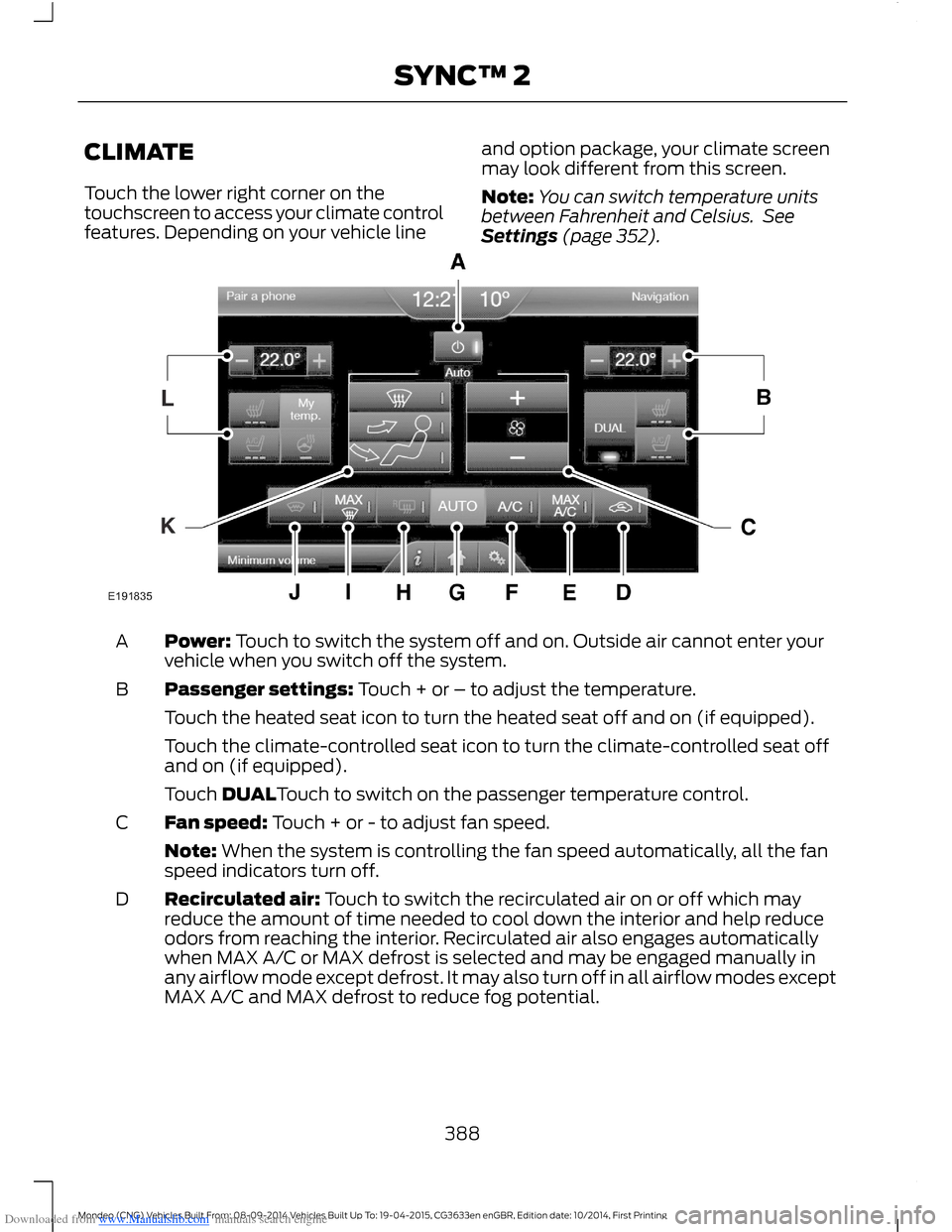
Touch the lower right corner on thetouchscreen to access your climate controlfeatures. Depending on your vehicle line
and option package, your climate screenmay look different from this screen.
Note:You can switch temperature unitsbetween Fahrenheit and Celsius. SeeSettings (page 352).
Power: Touch to switch the system off and on. Outside air cannot enter yourvehicle when you switch off the system.A
Passenger settings: Touch + or – to adjust the temperature.B
Touch the heated seat icon to turn the heated seat off and on (if equipped).
Touch the climate-controlled seat icon to turn the climate-controlled seat offand on (if equipped).
Touch DUALTouch to switch on the passenger temperature control.
Fan speed: Touch + or - to adjust fan speed.C
Note: When the system is controlling the fan speed automatically, all the fanspeed indicators turn off.
Recirculated air: Touch to switch the recirculated air on or off which mayreduce the amount of time needed to cool down the interior and help reduceodors from reaching the interior. Recirculated air also engages automaticallywhen MAX A/C or MAX defrost is selected and may be engaged manually inany airflow mode except defrost. It may also turn off in all airflow modes exceptMAX A/C and MAX defrost to reduce fog potential.
D
388Mondeo (CNG) Vehicles Built From: 08-09-2014 Vehicles Built Up To: 19-04-2015, CG3633en enGBR, Edition date: 10/2014, First PrintingSYNC™ 2
Page 391 of 446
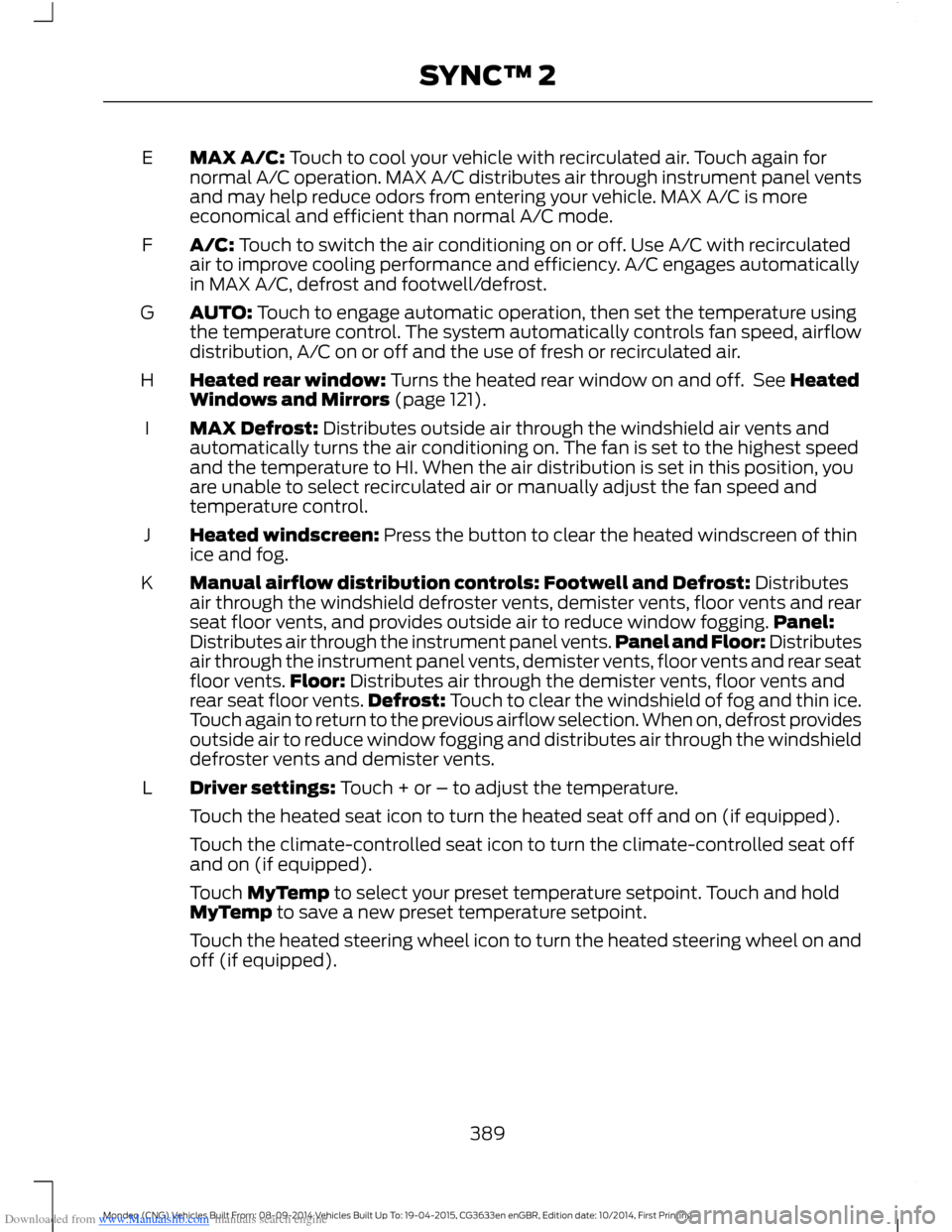
Downloaded from www.Manualslib.com manuals search engine MAX A/C: Touch to cool your vehicle with recirculated air. Touch again fornormal A/C operation. MAX A/C distributes air through instrument panel ventsand may help reduce odors from entering your vehicle. MAX A/C is moreeconomical and efficient than normal A/C mode.
E
A/C: Touch to switch the air conditioning on or off. Use A/C with recirculatedair to improve cooling performance and efficiency. A/C engages automaticallyin MAX A/C, defrost and footwell/defrost.
F
AUTO: Touch to engage automatic operation, then set the temperature usingthe temperature control. The system automatically controls fan speed, airflowdistribution, A/C on or off and the use of fresh or recirculated air.
G
Heated rear window: Turns the heated rear window on and off. See HeatedWindows and Mirrors (page 121).H
MAX Defrost: Distributes outside air through the windshield air vents andautomatically turns the air conditioning on. The fan is set to the highest speedand the temperature to HI. When the air distribution is set in this position, youare unable to select recirculated air or manually adjust the fan speed andtemperature control.
I
Heated windscreen: Press the button to clear the heated windscreen of thinice and fog.J
Manual airflow distribution controls: Footwell and Defrost: Distributesair through the windshield defroster vents, demister vents, floor vents and rearseat floor vents, and provides outside air to reduce window fogging.Panel:Distributes air through the instrument panel vents.Panel and Floor: Distributesair through the instrument panel vents, demister vents, floor vents and rear seatfloor vents.Floor: Distributes air through the demister vents, floor vents andrear seat floor vents.Defrost: Touch to clear the windshield of fog and thin ice.Touch again to return to the previous airflow selection. When on, defrost providesoutside air to reduce window fogging and distributes air through the windshielddefroster vents and demister vents.
K
Driver settings: Touch + or – to adjust the temperature.L
Touch the heated seat icon to turn the heated seat off and on (if equipped).
Touch the climate-controlled seat icon to turn the climate-controlled seat offand on (if equipped).
Touch MyTemp to select your preset temperature setpoint. Touch and holdMyTemp to save a new preset temperature setpoint.
Touch the heated steering wheel icon to turn the heated steering wheel on andoff (if equipped).
389Mondeo (CNG) Vehicles Built From: 08-09-2014 Vehicles Built Up To: 19-04-2015, CG3633en enGBR, Edition date: 10/2014, First PrintingSYNC™ 2
Page 392 of 446
Downloaded from www.Manualslib.com manuals search engine Climate Control Voice CommandsPress the voice button on thesteering wheel controls. Whenprompted, say any of thefollowing or a similar command:
Voice commands
Climate On
Climate Off
Adjust the temperature to between 15.0 - 30.0°C or59 - 86°F.Set temperature
NAVIGATION
Note:The navigation SD card must be inthe SD card slot to operate the navigationsystem. If you need a replacement SD card,contact an authorized dealer.
Note:The SD card slot is spring-loaded. Toremove the SD card, just push the card inand release it. Do not attempt to pull thecard out to remove it; this could causedamage.
Your navigation system is comprised oftwo main features, destination mode andmap mode.
Destination Mode
To set a destination press the green corner of your touchscreen, then the press:
Menu Item
Dest.
Choose any of the following:
My Home
Favorites
Previous Destinations
Point of Interest
Emergency
Street Address
Intersection
City Center
390Mondeo (CNG) Vehicles Built From: 08-09-2014 Vehicles Built Up To: 19-04-2015, CG3633en enGBR, Edition date: 10/2014, First PrintingSYNC™ 2