2014 FORD MONDEO buttons
[x] Cancel search: buttonsPage 351 of 446
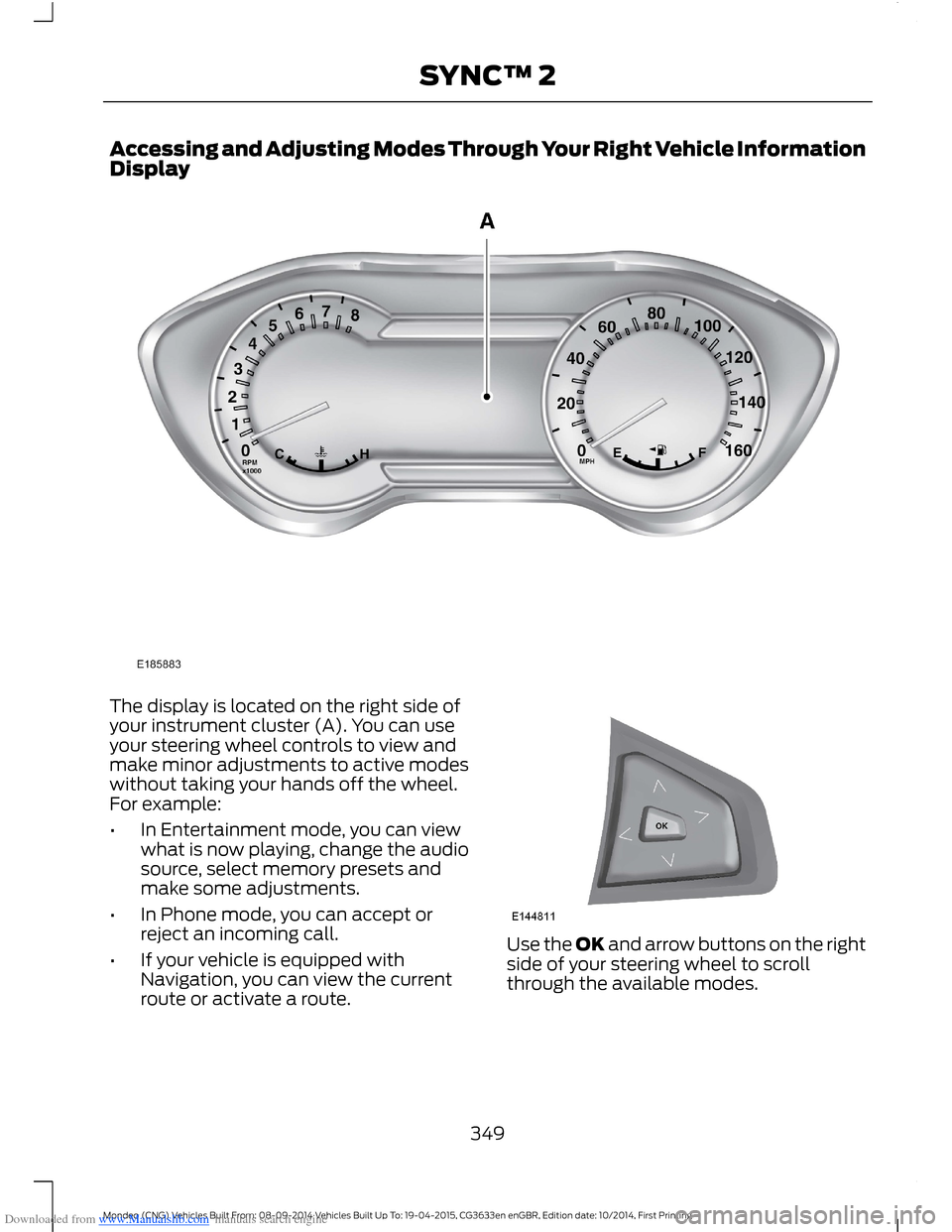
Downloaded from www.Manualslib.com manuals search engine Accessing and Adjusting Modes Through Your Right Vehicle InformationDisplay
The display is located on the right side ofyour instrument cluster (A). You can useyour steering wheel controls to view andmake minor adjustments to active modeswithout taking your hands off the wheel.For example:
•In Entertainment mode, you can viewwhat is now playing, change the audiosource, select memory presets andmake some adjustments.
•In Phone mode, you can accept orreject an incoming call.
•If your vehicle is equipped withNavigation, you can view the currentroute or activate a route.
Use the OK and arrow buttons on the rightside of your steering wheel to scrollthrough the available modes.
349Mondeo (CNG) Vehicles Built From: 08-09-2014 Vehicles Built Up To: 19-04-2015, CG3633en enGBR, Edition date: 10/2014, First PrintingSYNC™ 2
Page 367 of 446
Downloaded from www.Manualslib.com manuals search engine Action and DescriptionMenu Item
The ICE contacts you selectappear at the end of theEmergency Assistance callprocess.
Select to access your phone-book and then select thedesired contacts. Thenumbers then appear asoptions on this screen for theICE 1 and ICE 2 buttons.
Edit
View categorized lists of voice commands.VoiceCommand List
You can also access Help usingthe voice commands. Thesystem provides allowable voicecommands for the current mode.
Press the voice button and whenprompted say:
Voice command
help
You can say help at any time to getassistance with commands, menus orother information.
365Mondeo (CNG) Vehicles Built From: 08-09-2014 Vehicles Built Up To: 19-04-2015, CG3633en enGBR, Edition date: 10/2014, First PrintingSYNC™ 2
Page 368 of 446

Downloaded from www.Manualslib.com manuals search engine ENTERTAINMENT
Action and DescriptionMessage
AMA
FMB
DABC
CDD
USBE
Touch this button to scrolldown for more options, such asSD Card, BT Stereo and A/V In
F
These buttons change with themedia mode you are in.G
Radio memory presets and CDcontrols.H
Note:Some features may not be availablein your area. Contact an authorized dealerfor more information.
You can access these options using thetouchscreen or voice commands.
AM/FM Radio
Touch the AM or FM tab to listento the radio.
To change between AM and FM presets,just touch the AM or FM tab.
Memory Presets
Save a station by pressing and holding oneof the memory preset areas. There is a briefmute while the radio saves the station.Sound returns when finished.
TA
When active TA interrupts active audiosource to provide incoming trafficannouncements.
Scan
Touch this button to scan through AM orFM band. The system will remain on anystrong station for 10 seconds. The light onthe button illuminates when the feature ison.
366Mondeo (CNG) Vehicles Built From: 08-09-2014 Vehicles Built Up To: 19-04-2015, CG3633en enGBR, Edition date: 10/2014, First PrintingSYNC™ 2
Page 399 of 446

Downloaded from www.Manualslib.com manuals search engine North up (2D map) always showsthe northern direction to beupward on the screen.
3D map mode provides anelevated perspective of the map.This viewing angle can be adjustedand the map can be rotated 180degrees by touching the map twice, andthen dragging your finger along the shadedbar with arrows at the bottom of the map.
You can also select the followingoptions:
Menu Items
Switches betweenfull map, street listand exit view inroute guidance.
View
Displays a pop-upbox that allowsdirect access tonavigation settings.
Menu
Press the speaker button on themap to mute route guidance.When the light on the buttonilluminates, the feature is on. The speakerbutton appears on the map only whenroute guidance is active.
Re-center the map by pressingthis icon whenever you scroll themap away from your vehicle’scurrent location.
Auto Zoom
Press the green bar to access map mode,then select the + or - zoom button to bringup the zoom level and Auto buttons on thetouchscreen. When you press Auto, AutoZoom turns on and Auto displays in thebottom left corner of the screen in the mapscale. The map zoom level then
synchronizes with vehicle speed. Theslower your vehicle is traveling, the fartherin the map zooms in; the faster your vehicleis traveling, the farther the map zooms out.To switch the feature off, just press the +or - button again.
In 3D mode, rotate the map view byswiping your finger across the shaded barwith the arrows.
The ETA box under the zoom buttonsappears when a route is active anddisplays the distance and time to yourdestination. If the button is pressed, a popup appears with the destination listed (andwaypoint if applicable) along with mileageand time to destination. You may alsoselect to have either the estimated timeto reach your destination or your estimatedarrival time.
Map Icons
Vehicle mark shows the currentlocation of your vehicle. It staysin the center of the map display,except when in scroll mode.
Scroll cursor allows you to scrollthe map; the fixed icon is in thecenter of the screen. The mapposition closest to the cursor is ina window on the top center part of thescreen.
Address book entry defaulticon(s) indicates the location onthe map of an address book entry.This is the default symbol shownafter the entry has been stored to theAddress Book by any method other thanthe map. You can select from any of the22 icons available. You can use each iconmore than once.
397Mondeo (CNG) Vehicles Built From: 08-09-2014 Vehicles Built Up To: 19-04-2015, CG3633en enGBR, Edition date: 10/2014, First PrintingSYNC™ 2
Page 400 of 446
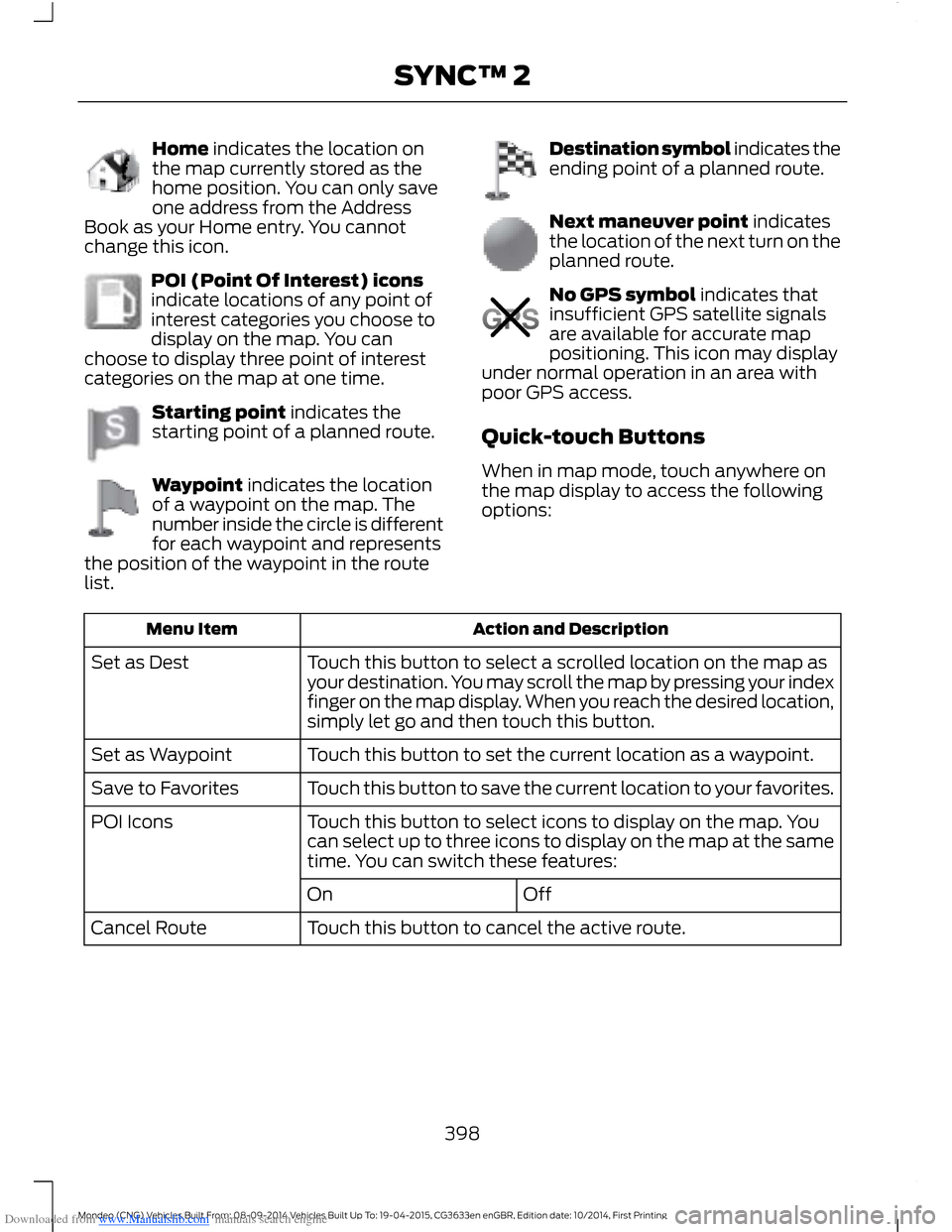
Downloaded from www.Manualslib.com manuals search engine Home indicates the location onthe map currently stored as thehome position. You can only saveone address from the AddressBook as your Home entry. You cannotchange this icon.
POI (Point Of Interest) iconsindicate locations of any point ofinterest categories you choose todisplay on the map. You canchoose to display three point of interestcategories on the map at one time.
Starting point indicates thestarting point of a planned route.
Waypoint indicates the locationof a waypoint on the map. Thenumber inside the circle is differentfor each waypoint and representsthe position of the waypoint in the routelist.
Destination symbol indicates theending point of a planned route.
Next maneuver point indicatesthe location of the next turn on theplanned route.
No GPS symbol indicates thatinsufficient GPS satellite signalsare available for accurate mappositioning. This icon may displayunder normal operation in an area withpoor GPS access.
Quick-touch Buttons
When in map mode, touch anywhere onthe map display to access the followingoptions:
Action and DescriptionMenu Item
Touch this button to select a scrolled location on the map asyour destination. You may scroll the map by pressing your indexfinger on the map display. When you reach the desired location,simply let go and then touch this button.
Set as Dest
Touch this button to set the current location as a waypoint.Set as Waypoint
Touch this button to save the current location to your favorites.Save to Favorites
Touch this button to select icons to display on the map. Youcan select up to three icons to display on the map at the sametime. You can switch these features:
POI Icons
OffOn
Touch this button to cancel the active route.Cancel Route
398Mondeo (CNG) Vehicles Built From: 08-09-2014 Vehicles Built Up To: 19-04-2015, CG3633en enGBR, Edition date: 10/2014, First PrintingSYNC™ 2
Page 439 of 446
Downloaded from www.Manualslib.com manuals search engine Locking and Unlocking.................................44Locking and Unlocking the Doors FromInside....................................................................45Locking and Unlocking the DoorsIndividually with the Key Blade..................45Locking and Unlocking the Doors with theKey Blade............................................................45Power Door Locks................................................44Remote Control....................................................44Locks...................................................................44Luggage Anchor Points.............................2074-door and 5-door............................................207Hybrid....................................................................208Wagon....................................................................207Luggage Covers............................................209Stowing the luggage cover - Estate withoutfull size spare wheel.....................................210Lug NutsSee: Changing a Road Wheel.......................268Lug Nuts..........................................................276
M
Maintenance..................................................237General Information..........................................237Manual Climate Control..............................112Manual Liftgate..............................................46Closing the Liftgate.............................................46Opening the Liftgate...........................................46Manual Seats.................................................128Manual Transmission..................................155Selecting Reverse Gear....................................155Media Hub......................................................304Memory Function...........................................131Easy Entry and Exit Function..........................132Linking a PreSet Position to Your RemoteControl or Intelligent Access Key.............132Saving a PreSet Position..................................132Message CenterSee: Information Displays.................................86MirrorsSee: Heated Windows and Mirrors................121See: Windows and Mirrors.................................72Mobile CommunicationsEquipment......................................................10
Moonroof...........................................................76Bounce-Back..........................................................77Opening and Closing the Moonroof..............76Venting the Moonroof.........................................77MyKey Troubleshooting...............................42MyKey™.............................................................38Principle of Operation........................................38
N
Navigation......................................................390Destination Mode..............................................390Map Mode............................................................396Michelin Travel Guide.......................................392Navigation Map Updates...............................399Navigation Voice Commands.......................399Point of Interest (POI) Categories...............392Quick-touch Buttons.......................................398Setting Your Navigation Preferences.........393
O
Oil CheckSee: Engine Oil Check......................................246Opening and Closing the Hood...............237Closing the Hood...............................................238Opening the Hood..............................................237Overhead Console........................................137
P
Parking Aids....................................................167Principle of Operation.......................................167Passenger Airbag...........................................28.....................................................................................28Switching the Passenger Airbag Off.............28Switching the Passenger Airbag On.............29Passive Anti-Theft System..........................51Arming the Engine Immobilizer........................51Coded Keys..............................................................51Disarming the Engine Immobilizer..................51Principle of Operation..........................................51PATSSee: Passive Anti-Theft System......................51
437Mondeo (CNG) Vehicles Built From: 08-09-2014 Vehicles Built Up To: 19-04-2015, CG3633en enGBR, Edition date: 10/2014, First PrintingIndex
Page 441 of 446

Downloaded from www.Manualslib.com manuals search engine Speed ControlSee: Cruise Control.............................................181Speed Limiter................................................189Principle of Operation......................................189Using the System...............................................189Spinout Detection.......................................226Stability Control............................................166Principle of Operation......................................166Starter SwitchSee: Ignition Switch...........................................138Starting a Diesel Engine.............................143Cold or Hot Engine.............................................143Failure to Start ....................................................143Starting a Gasoline Engine.......................140Automatic Shutdown.........................................141Guarding Against Exhaust Fumes................143Important Ventilating Information...............143Switching Off the Vehicle When It IsMoving................................................................142Switching Off the Vehicle When it isStationary.........................................................142Vehicles with an Ignition Key.........................140Vehicles with Keyless Start............................140Starting and Stopping the Engine..........138General Information..........................................138Steering Wheel Lock - Vehicles With:Keyless Entry and Push ButtonStart................................................................139Unlocking the Steering Wheel......................140Steering Wheel Lock - Vehicles Without:Keyless Entry and Push ButtonStart................................................................139Steering Wheel...............................................56Storage Compartments.............................137SunroofSee: Moonroof.......................................................76Sun Visors..........................................................76Illuminated Vanity Mirror...................................76Supplementary Restraints System..........27Principle of Operation.........................................27Switching Off the Engine...........................144Vehicles With a Turbocharger........................144Symbols Glossary.............................................7SYNC™ 2........................................................343General Information.........................................343
SYNC™ Applications andServices........................................................320In the Event of a Crash.....................................322Switching Emergency Assistance On andOff........................................................................321SYNC AppLink.....................................................323SYNC Emergency Assistance.........................321SYNC™...........................................................305General Information.........................................305SYNC™ Troubleshooting..........................333
T
TailgateSee: Manual Liftgate...........................................46See: Power Liftgate.............................................46Technical SpecificationsSee: Capacities and Specifications.............277Temporary Mobility Kit..............................260Checking the Tire Pressure............................263General Information.........................................260Inflating the Tire..................................................261Using the Temporary Mobility Kit................260Tire Care..........................................................263Tire Inflation When PuncturedSee: Temporary Mobility Kit..........................260Tire Pressure Monitoring System..........264Changing Tires With a Tire PressureMonitoring System.......................................265How Temperature Affects the TirePressures..........................................................267Tire Pressure Monitoring System ResetProcedure.........................................................267Understanding the Tire Pressure MonitoringSystem..............................................................265Tire Pressures................................................273Tire Repair KitSee: Temporary Mobility Kit..........................260TiresSee: Wheels and Tires.....................................260Tow Ball............................................................216Driving with a Trailer...........................................217Maintenance.........................................................217Swiveling the Tow Ball Arm............................216Towbar Dimensions....................................278Sedan and 5-Door.............................................279Wagon....................................................................279
439Mondeo (CNG) Vehicles Built From: 08-09-2014 Vehicles Built Up To: 19-04-2015, CG3633en enGBR, Edition date: 10/2014, First PrintingIndex