2014 FORD MONDEO buttons
[x] Cancel search: buttonsPage 126 of 446
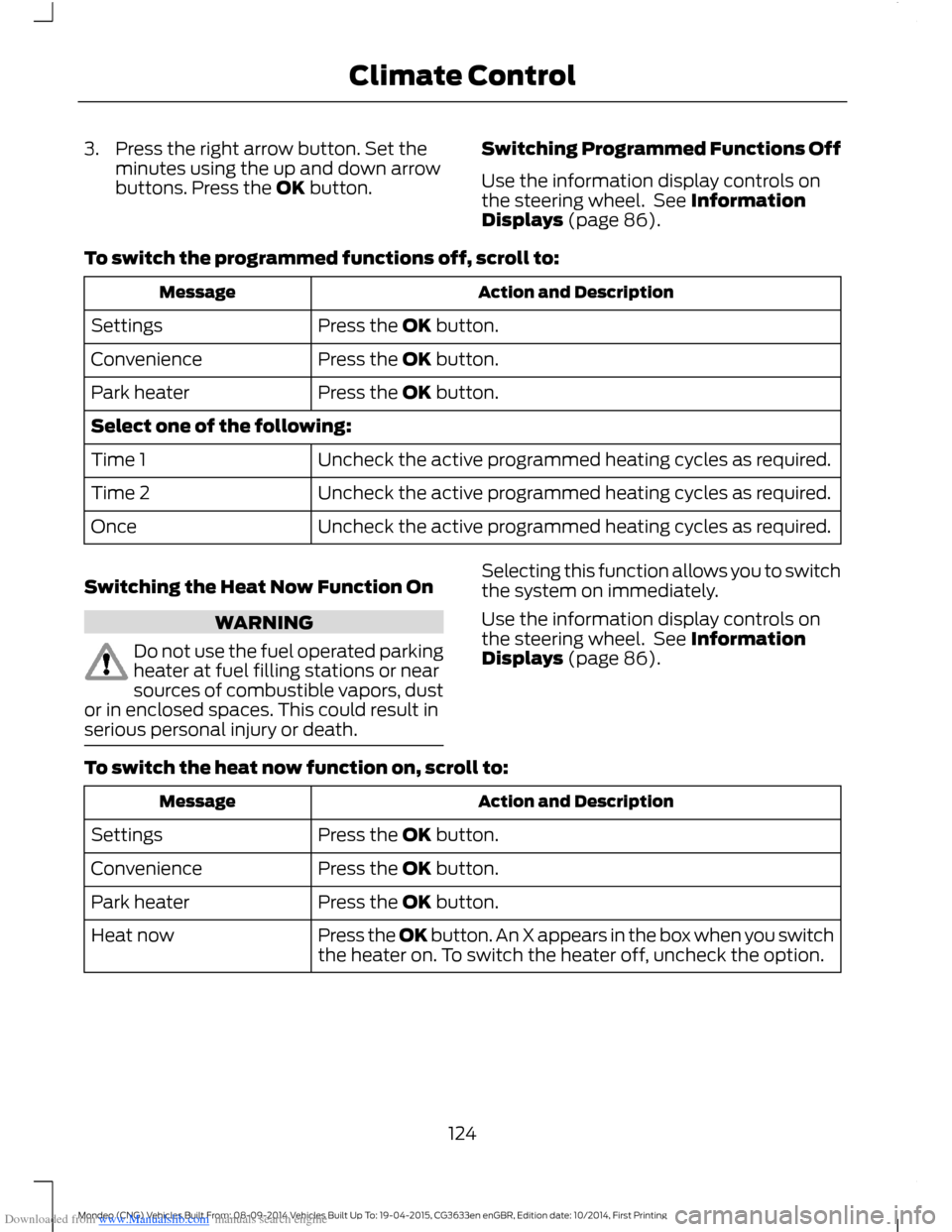
Downloaded from www.Manualslib.com manuals search engine 3.Press the right arrow button. Set theminutes using the up and down arrowbuttons. Press the OK button.
Switching Programmed Functions Off
Use the information display controls onthe steering wheel. See InformationDisplays (page 86).
To switch the programmed functions off, scroll to:
Action and DescriptionMessage
Press the OK button.Settings
Press the OK button.Convenience
Press the OK button.Park heater
Select one of the following:
Uncheck the active programmed heating cycles as required.Time 1
Uncheck the active programmed heating cycles as required.Time 2
Uncheck the active programmed heating cycles as required.Once
Switching the Heat Now Function On
WARNING
Do not use the fuel operated parkingheater at fuel filling stations or nearsources of combustible vapors, dustor in enclosed spaces. This could result inserious personal injury or death.
Selecting this function allows you to switchthe system on immediately.
Use the information display controls onthe steering wheel. See InformationDisplays (page 86).
To switch the heat now function on, scroll to:
Action and DescriptionMessage
Press the OK button.Settings
Press the OK button.Convenience
Press the OK button.Park heater
Press the OK button. An X appears in the box when you switchthe heater on. To switch the heater off, uncheck the option.Heat now
124Mondeo (CNG) Vehicles Built From: 08-09-2014 Vehicles Built Up To: 19-04-2015, CG3633en enGBR, Edition date: 10/2014, First PrintingClimate Control
Page 129 of 446
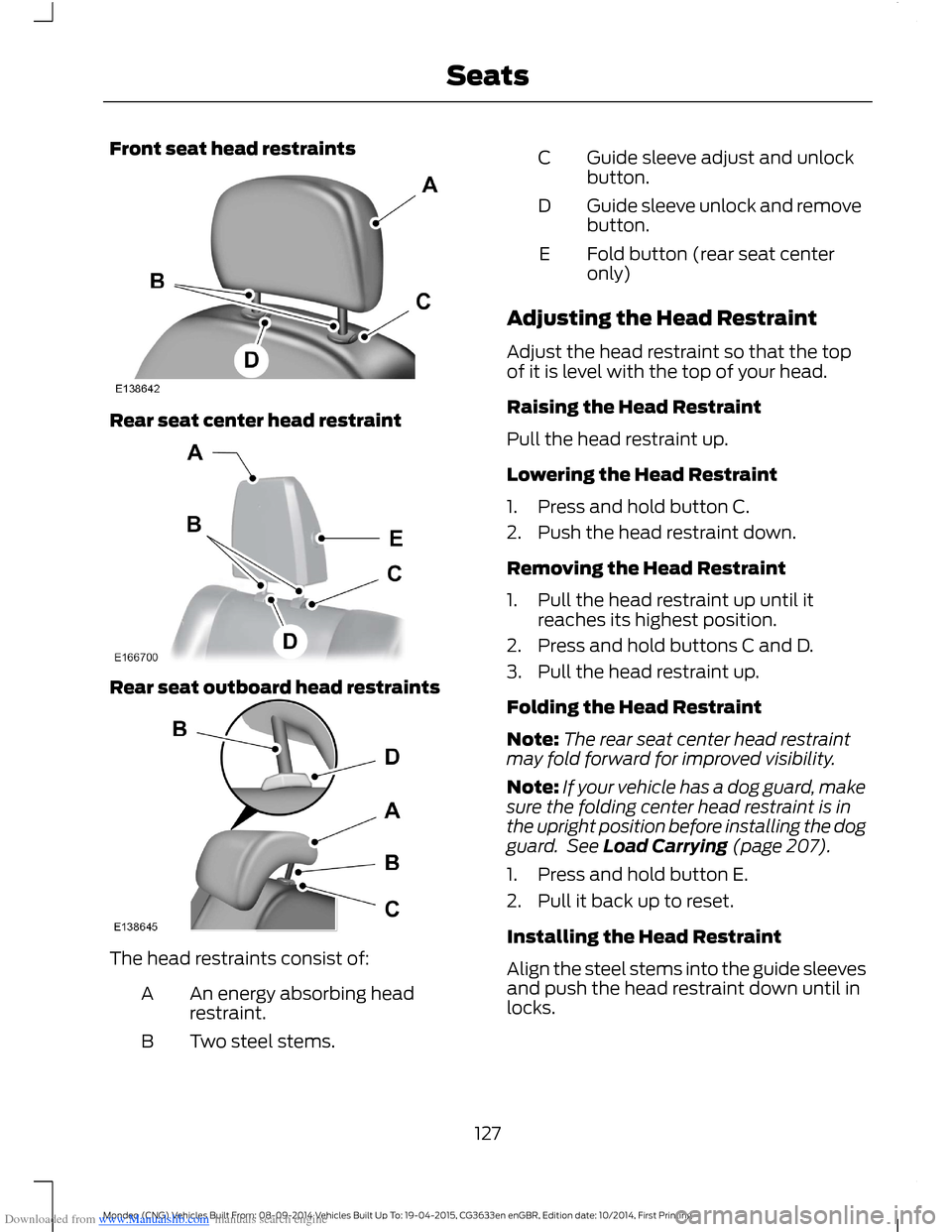
Downloaded from www.Manualslib.com manuals search engine Front seat head restraints
Rear seat center head restraint
Rear seat outboard head restraints
The head restraints consist of:
An energy absorbing headrestraint.A
Two steel stems.B
Guide sleeve adjust and unlockbutton.C
Guide sleeve unlock and removebutton.D
Fold button (rear seat centeronly)E
Adjusting the Head Restraint
Adjust the head restraint so that the topof it is level with the top of your head.
Raising the Head Restraint
Pull the head restraint up.
Lowering the Head Restraint
1.Press and hold button C.
2.Push the head restraint down.
Removing the Head Restraint
1.Pull the head restraint up until itreaches its highest position.
2.Press and hold buttons C and D.
3.Pull the head restraint up.
Folding the Head Restraint
Note:The rear seat center head restraintmay fold forward for improved visibility.
Note:If your vehicle has a dog guard, makesure the folding center head restraint is inthe upright position before installing the dogguard. See Load Carrying (page 207).
1.Press and hold button E.
2.Pull it back up to reset.
Installing the Head Restraint
Align the steel stems into the guide sleevesand push the head restraint down until inlocks.
127Mondeo (CNG) Vehicles Built From: 08-09-2014 Vehicles Built Up To: 19-04-2015, CG3633en enGBR, Edition date: 10/2014, First PrintingSeats
Page 143 of 446

Downloaded from www.Manualslib.com manuals search engine Note:On hybrid vehicles, the green readyindicator illuminates letting you know thatthe vehicle is ready for driving. Since yourvehicle is equipped with a silent key start,the engine may not start at the time of thevehicle start.
The system does not function if:
•The key frequencies are jammed.
•The key battery has no charge.
If you are unable to start the vehicle, dothe following:
1.Locate the key backup slot in thecenter console utility compartment.
2.With the buttons facing the rear of thevehicle and the key ring up, place thekey into the backup slot.
3.With the key in this position, press theclutch pedal (manual transmission) orbrake pedal (automatic transmission),and then press the button to switch onyour vehicle.
Fast Restart
The fast restart feature allows you torestart the engine within 20 seconds ofswitching it off, even if a valid key is notpresent.
Within 20 seconds of switching the engineoff, press the brake pedal and press thebutton. After 20 seconds have expired, youcan no longer restart the vehicle withoutthe key present inside your vehicle.
Once the vehicle has started, it remainsrunning until you press the button, even ifthe system does not detect a valid key. Ifyou open and close a door while the vehicleis running, the system searches for a validkey. You cannot restart the engine if thesystem does not detect a valid key within20 seconds.
Automatic Shutdown
This feature automatically shuts down thevehicle if it has been idling for an extendedperiod. The ignition also turns off in orderto save battery power. Before the vehicleshuts down, a message appears in theinformation display showing a timercounting down from 30 seconds. If you donot intervene within 30 seconds, thevehicle shuts down. Another messageappears in the information display toinform you that the vehicle has shut downin order to save fuel. Start your vehicle asyou normally do.
Automatic Shutdown Override
Note:You cannot permanently switch offthe automatic shutdown feature. When youswitch it off temporarily, it turns on at thenext ignition cycle.
141Mondeo (CNG) Vehicles Built From: 08-09-2014 Vehicles Built Up To: 19-04-2015, CG3633en enGBR, Edition date: 10/2014, First PrintingStarting and Stopping the Engine
Page 226 of 446
Downloaded from www.Manualslib.com manuals search engine HAZARD WARNING FLASHERS
The hazard warning button is located onthe instrument panel. Use it when yourvehicle is creating a safety hazard for othermotorists.
Press the button to turn on the hazardwarning function, and the front and reardirection indicators will flash.
Press the button again to turn them off.
Note:If used when the engine is notrunning, the battery will lose charge. Theremay be insufficient power to restart yourengine.
Note:Depending on applicable laws andregulations in the country for which yourvehicle was originally built, the hazardwarning flashers may flash if you brakeheavily.
FIRST AID KIT
For 5-door and wagon vehicles, stow thefirst aid kit in the left side wall storage areain the luggage compartment. For 4-doorvehicles, stow the first aid kit in the rearunder floor storage compartment. SeeRear Under Floor Storage (page 208).
WARNING TRIANGLE
Space is provided in the luggagecompartment.
FUEL SHUTOFF
WARNING
Failure to inspect and, if necessary,repair fuel leaks after a collision mayincrease the risk of fire and seriousinjury. Ford Motor Company recommendsthat the fuel system be inspected by anauthorized dealer after any collision.
In the event of a moderate to severecollision, this vehicle includes a fuel pumpshutoff feature that stops the flow of fuelto the engine. Not every impact will causea shutoff.
Should your vehicle shut off after acollision, you may restart your vehicle. Forvehicles equipped with a key system:
1.Switch off the ignition.
2.Switch on the ignition.
3.Repeat Steps 1 and 2 to re-enable thefuel pump.
For vehicles equipped with a push buttonstart system:
1.Press the START/STOP button toswitch off the ignition.
2.Press the brake pedal and press theSTART/STOP button to start thevehicle.
3.Remove your foot from the brake pedaland press the START/STOP buttonto switch off the ignition.
4.You can either attempt to start theengine by pressing the brake pedal andthe START/STOP button, or switchon the ignition only by pressing theSTART/STOP button withoutpressing the brake pedal. Both waysre-enable the fuel system.
224Mondeo (CNG) Vehicles Built From: 08-09-2014 Vehicles Built Up To: 19-04-2015, CG3633en enGBR, Edition date: 10/2014, First PrintingRoadside Emergencies
Page 251 of 446
Downloaded from www.Manualslib.com manuals search engine CHANGING THE 12V BATTERY
WARNING
For vehicles with Start-Stop thebattery requirement is different. Youmust replace the battery with one ofexactly the same specification.
The battery is located in the enginecompartment. See Maintenance (page237).
Make sure that you dispose ofold batteries in anenvironmentally friendly way.
Seek advice from your local authorityabout recycling old batteries.
CHECKING THE WIPER
BLADES
Run the tip of your fingers over the edge ofthe blade to check for roughness.
Clean the wiper blades with washer fluidor water applied with a soft sponge orcloth.
CHANGING THE WIPER
BLADES
The wiper arms can be manually movedwhen the ignition is off. This allows for easeof blade replacement and cleaning underthe blades.
Replace wiper blades at least once peryear for optimum performance.
Poor wiper quality can be improved bycleaning the wiper blades and thewindshield.
Changing the Front Wiper Blades
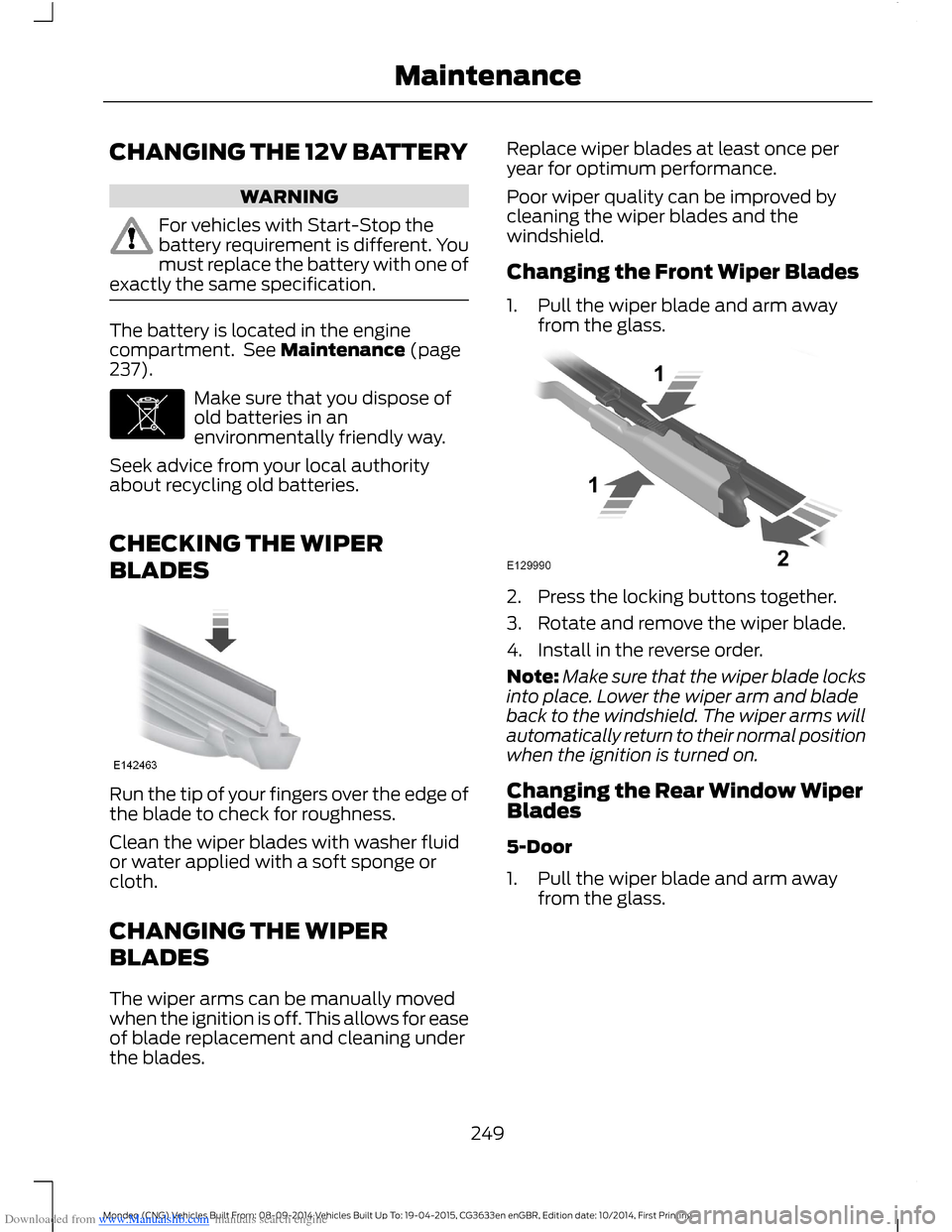
1.Pull the wiper blade and arm awayfrom the glass.
2.Press the locking buttons together.
3.Rotate and remove the wiper blade.
4.Install in the reverse order.
Note:Make sure that the wiper blade locksinto place. Lower the wiper arm and bladeback to the windshield. The wiper arms willautomatically return to their normal positionwhen the ignition is turned on.
Changing the Rear Window WiperBlades
5-Door
1.Pull the wiper blade and arm awayfrom the glass.
249Mondeo (CNG) Vehicles Built From: 08-09-2014 Vehicles Built Up To: 19-04-2015, CG3633en enGBR, Edition date: 10/2014, First PrintingMaintenance
Page 252 of 446
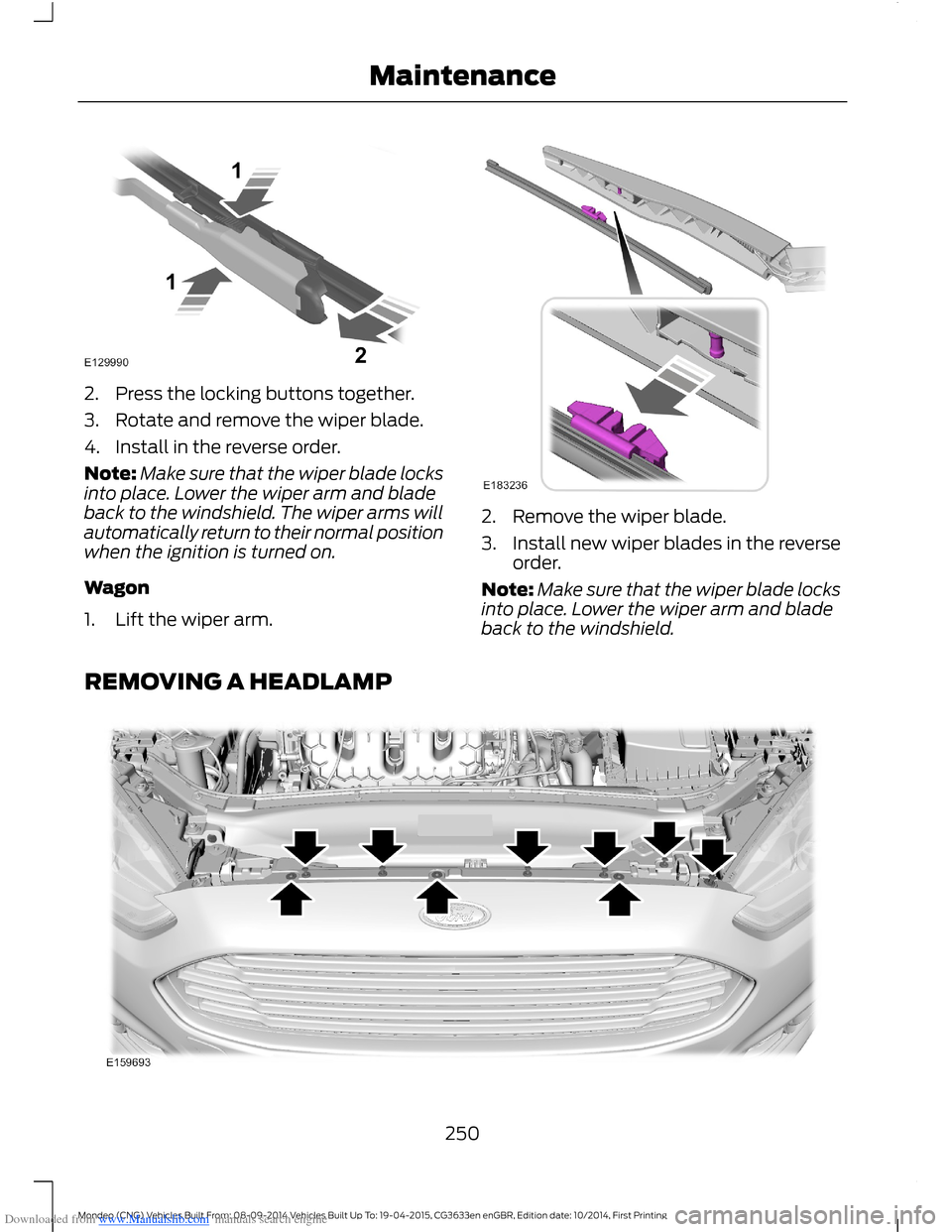
Downloaded from www.Manualslib.com manuals search engine 2.Press the locking buttons together.
3.Rotate and remove the wiper blade.
4.Install in the reverse order.
Note:Make sure that the wiper blade locksinto place. Lower the wiper arm and bladeback to the windshield. The wiper arms willautomatically return to their normal positionwhen the ignition is turned on.
Wagon
1.Lift the wiper arm.
2.Remove the wiper blade.
3.Install new wiper blades in the reverseorder.
Note:Make sure that the wiper blade locksinto place. Lower the wiper arm and bladeback to the windshield.
REMOVING A HEADLAMP
250Mondeo (CNG) Vehicles Built From: 08-09-2014 Vehicles Built Up To: 19-04-2015, CG3633en enGBR, Edition date: 10/2014, First PrintingMaintenance
Page 296 of 446
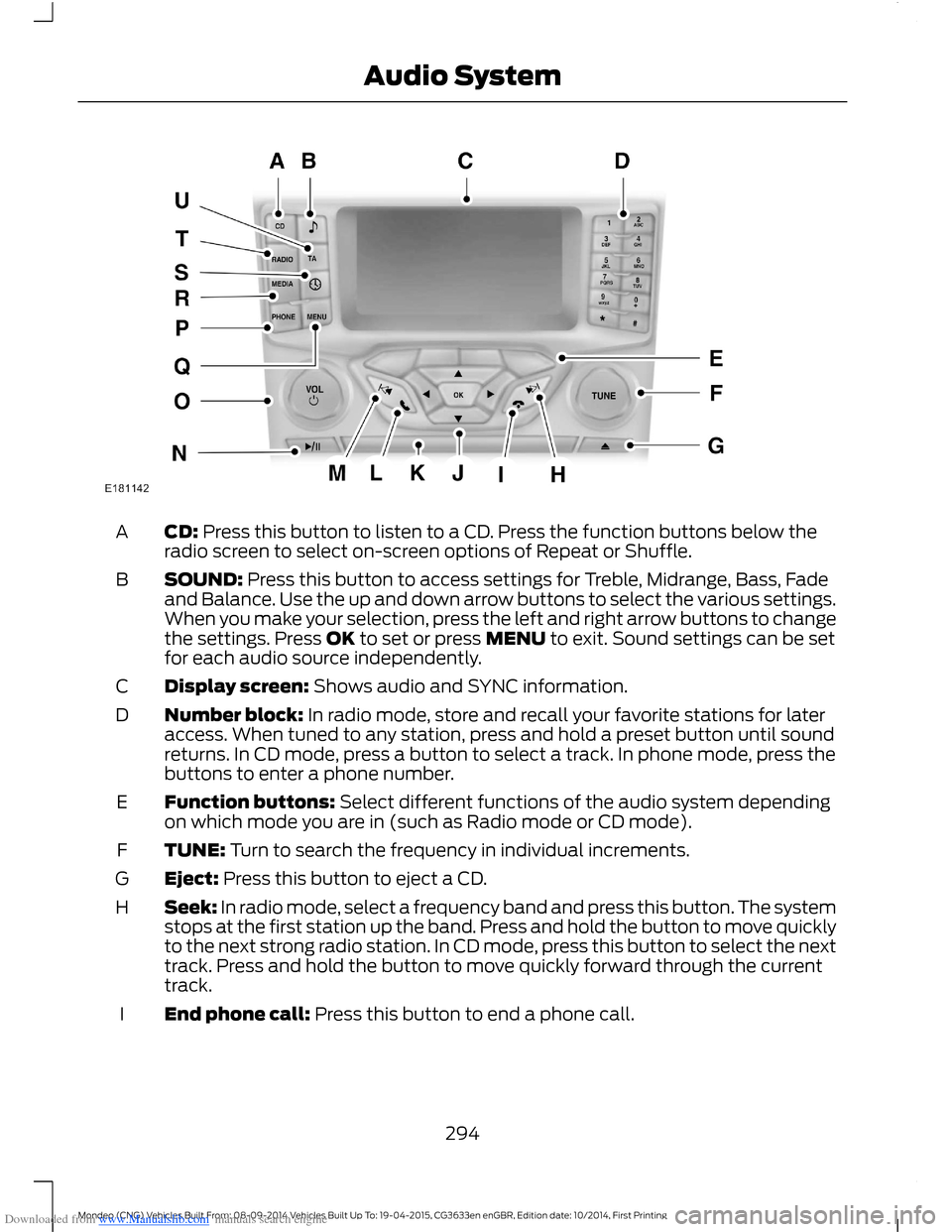
Downloaded from www.Manualslib.com manuals search engine CD: Press this button to listen to a CD. Press the function buttons below theradio screen to select on-screen options of Repeat or Shuffle.A
SOUND: Press this button to access settings for Treble, Midrange, Bass, Fadeand Balance. Use the up and down arrow buttons to select the various settings.When you make your selection, press the left and right arrow buttons to changethe settings. Press OK to set or press MENU to exit. Sound settings can be setfor each audio source independently.
B
Display screen: Shows audio and SYNC information.C
Number block: In radio mode, store and recall your favorite stations for lateraccess. When tuned to any station, press and hold a preset button until soundreturns. In CD mode, press a button to select a track. In phone mode, press thebuttons to enter a phone number.
D
Function buttons: Select different functions of the audio system dependingon which mode you are in (such as Radio mode or CD mode).E
TUNE: Turn to search the frequency in individual increments.F
Eject: Press this button to eject a CD.G
Seek: In radio mode, select a frequency band and press this button. The systemstops at the first station up the band. Press and hold the button to move quicklyto the next strong radio station. In CD mode, press this button to select the nexttrack. Press and hold the button to move quickly forward through the currenttrack.
H
End phone call: Press this button to end a phone call.I
294Mondeo (CNG) Vehicles Built From: 08-09-2014 Vehicles Built Up To: 19-04-2015, CG3633en enGBR, Edition date: 10/2014, First PrintingAudio System
Page 297 of 446

Downloaded from www.Manualslib.com manuals search engine Cursor arrows and OK: Use the up and down arrow buttons to select thevarious settings. When you make your selection, press the left and right arrowbuttons to change the settings. Press OK to set or press MENU to exit.
J
CD slot: Insert a CD.K
Pick-up or Make phone call: Press this button to either pick-up an incomingphone call or to make a phone call.L
Seek: In radio mode, select a frequency band and press this button. The systemstops at the first station down the band. Press and hold the button to movequickly to the previous strong radio station. In CD mode, press this button toselect the previous track. Press and hold the button to move quickly backwardthrough the current track.
M
Play/Pause: Press to either play or pause a track when listening to a CD.N
VOL and Power: Press this button to switch the system off and on. Turn it toadjust the volume.O
PHONE: Press this button to access the phone features of the SYNC® system.See SYNC™ (page 305).P
MENU: Press this button to access different audio system features. See MenuStructure later in this chapter.Q
MEDIA: Press this button to access your auxiliary input jack or switch betweendevices you plug into the input jack or USB port.R
Clock: Press this button to access the clock setting. Use the center arrowcontrols to change the hours and minutes. You can also set the clock by pressingthe MENU button and scrolling to Clock Settings.
S
RADIO: Press this button to listen to the radio or change radio frequency bands.Press the function buttons below the radio screen to select different radiofunctions.
T
TA: The system interrupts the active audio source to provide incoming trafficannouncements.U
295Mondeo (CNG) Vehicles Built From: 08-09-2014 Vehicles Built Up To: 19-04-2015, CG3633en enGBR, Edition date: 10/2014, First PrintingAudio System