2014 FORD MONDEO ECU
[x] Cancel search: ECUPage 103 of 446
Downloaded from www.Manualslib.com manuals search engine Doors and Locks
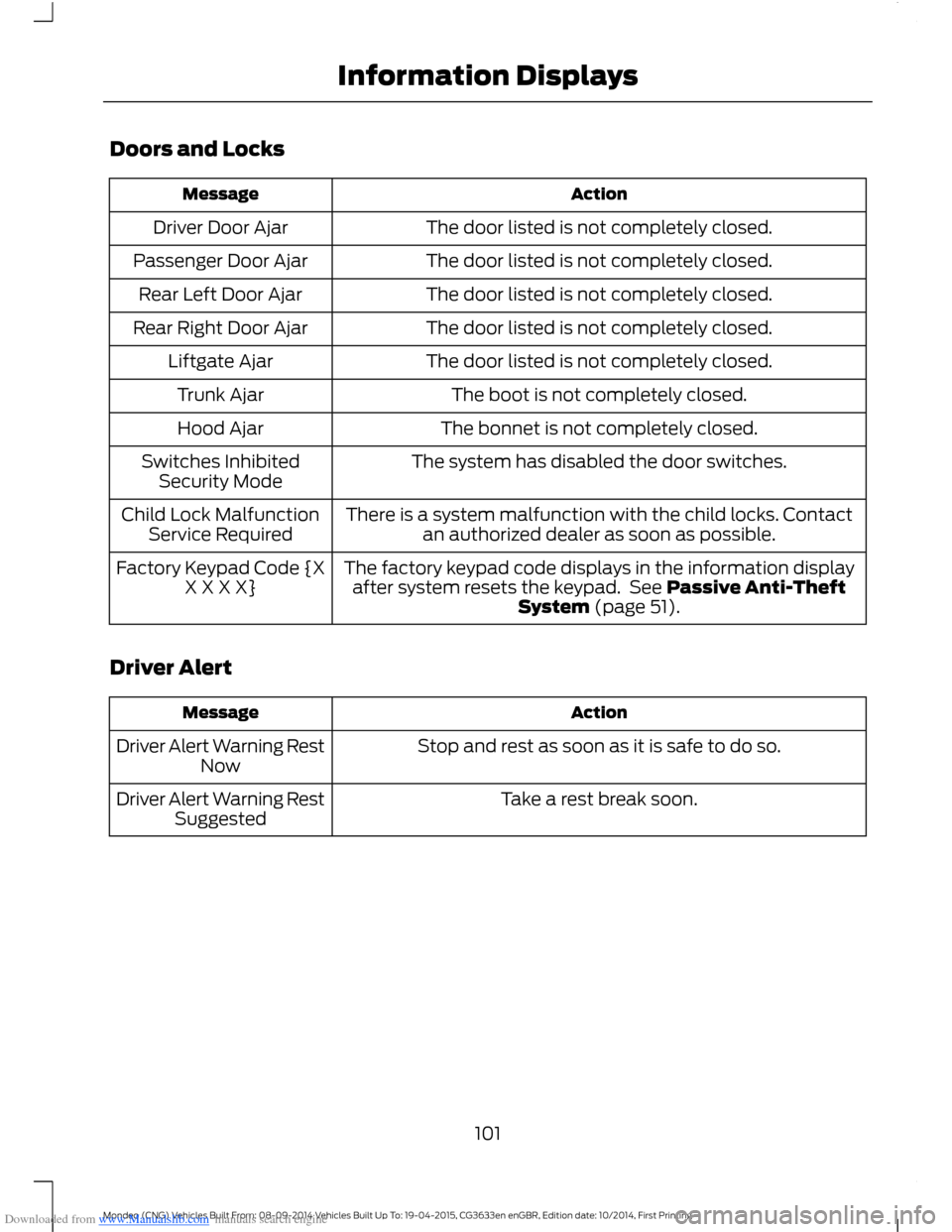
ActionMessage
The door listed is not completely closed.Driver Door Ajar
The door listed is not completely closed.Passenger Door Ajar
The door listed is not completely closed.Rear Left Door Ajar
The door listed is not completely closed.Rear Right Door Ajar
The door listed is not completely closed.Liftgate Ajar
The boot is not completely closed.Trunk Ajar
The bonnet is not completely closed.Hood Ajar
The system has disabled the door switches.Switches InhibitedSecurity Mode
There is a system malfunction with the child locks. Contactan authorized dealer as soon as possible.Child Lock MalfunctionService Required
The factory keypad code displays in the information displayafter system resets the keypad. See Passive Anti-TheftSystem (page 51).
Factory Keypad Code {XX X X X}
Driver Alert
ActionMessage
Stop and rest as soon as it is safe to do so.Driver Alert Warning RestNow
Take a rest break soon.Driver Alert Warning RestSuggested
101Mondeo (CNG) Vehicles Built From: 08-09-2014 Vehicles Built Up To: 19-04-2015, CG3633en enGBR, Edition date: 10/2014, First PrintingInformation Displays
Page 133 of 446
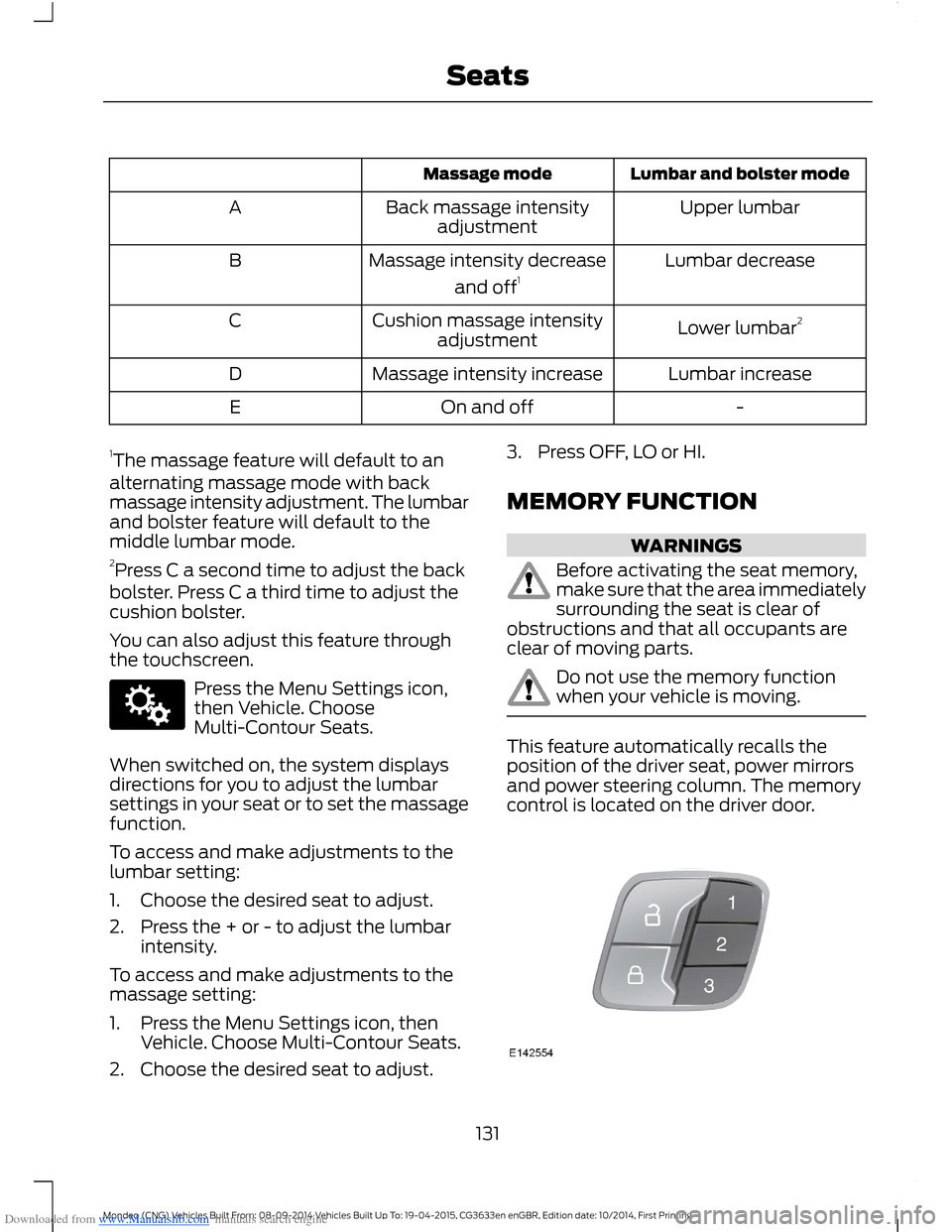
Downloaded from www.Manualslib.com manuals search engine Lumbar and bolster modeMassage mode
Upper lumbarBack massage intensityadjustmentA
Lumbar decreaseMassage intensity decrease
and off1B
Lower lumbar2Cushion massage intensityadjustmentC
Lumbar increaseMassage intensity increaseD
-On and offE
1The massage feature will default to analternating massage mode with backmassage intensity adjustment. The lumbarand bolster feature will default to themiddle lumbar mode.2Press C a second time to adjust the backbolster. Press C a third time to adjust thecushion bolster.
You can also adjust this feature throughthe touchscreen.
Press the Menu Settings icon,then Vehicle. ChooseMulti-Contour Seats.
When switched on, the system displaysdirections for you to adjust the lumbarsettings in your seat or to set the massagefunction.
To access and make adjustments to thelumbar setting:
1.Choose the desired seat to adjust.
2.Press the + or - to adjust the lumbarintensity.
To access and make adjustments to themassage setting:
1.Press the Menu Settings icon, thenVehicle. Choose Multi-Contour Seats.
2.Choose the desired seat to adjust.
3.Press OFF, LO or HI.
MEMORY FUNCTION
WARNINGS
Before activating the seat memory,make sure that the area immediatelysurrounding the seat is clear ofobstructions and that all occupants areclear of moving parts.
Do not use the memory functionwhen your vehicle is moving.
This feature automatically recalls theposition of the driver seat, power mirrorsand power steering column. The memorycontrol is located on the driver door.
131Mondeo (CNG) Vehicles Built From: 08-09-2014 Vehicles Built Up To: 19-04-2015, CG3633en enGBR, Edition date: 10/2014, First PrintingSeats
Page 165 of 446
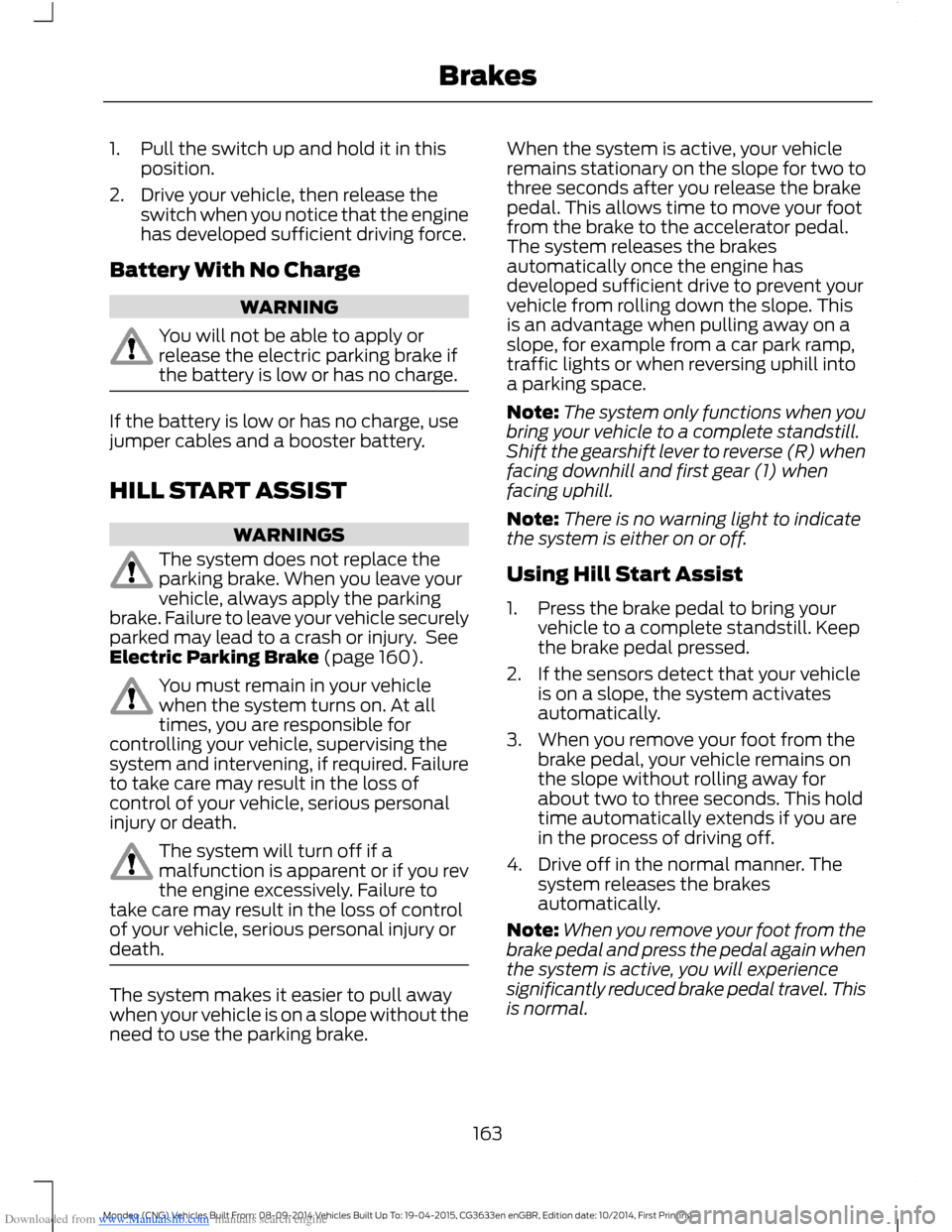
Downloaded from www.Manualslib.com manuals search engine 1.Pull the switch up and hold it in thisposition.
2.Drive your vehicle, then release theswitch when you notice that the enginehas developed sufficient driving force.
Battery With No Charge
WARNING
You will not be able to apply orrelease the electric parking brake ifthe battery is low or has no charge.
If the battery is low or has no charge, usejumper cables and a booster battery.
HILL START ASSIST
WARNINGS
The system does not replace theparking brake. When you leave yourvehicle, always apply the parkingbrake. Failure to leave your vehicle securelyparked may lead to a crash or injury. SeeElectric Parking Brake (page 160).
You must remain in your vehiclewhen the system turns on. At alltimes, you are responsible forcontrolling your vehicle, supervising thesystem and intervening, if required. Failureto take care may result in the loss ofcontrol of your vehicle, serious personalinjury or death.
The system will turn off if amalfunction is apparent or if you revthe engine excessively. Failure totake care may result in the loss of controlof your vehicle, serious personal injury ordeath.
The system makes it easier to pull awaywhen your vehicle is on a slope without theneed to use the parking brake.
When the system is active, your vehicleremains stationary on the slope for two tothree seconds after you release the brakepedal. This allows time to move your footfrom the brake to the accelerator pedal.The system releases the brakesautomatically once the engine hasdeveloped sufficient drive to prevent yourvehicle from rolling down the slope. Thisis an advantage when pulling away on aslope, for example from a car park ramp,traffic lights or when reversing uphill intoa parking space.
Note:The system only functions when youbring your vehicle to a complete standstill.Shift the gearshift lever to reverse (R) whenfacing downhill and first gear (1) whenfacing uphill.
Note:There is no warning light to indicatethe system is either on or off.
Using Hill Start Assist
1.Press the brake pedal to bring yourvehicle to a complete standstill. Keepthe brake pedal pressed.
2.If the sensors detect that your vehicleis on a slope, the system activatesautomatically.
3.When you remove your foot from thebrake pedal, your vehicle remains onthe slope without rolling away forabout two to three seconds. This holdtime automatically extends if you arein the process of driving off.
4.Drive off in the normal manner. Thesystem releases the brakesautomatically.
Note:When you remove your foot from thebrake pedal and press the pedal again whenthe system is active, you will experiencesignificantly reduced brake pedal travel. Thisis normal.
163Mondeo (CNG) Vehicles Built From: 08-09-2014 Vehicles Built Up To: 19-04-2015, CG3633en enGBR, Edition date: 10/2014, First PrintingBrakes
Page 178 of 446
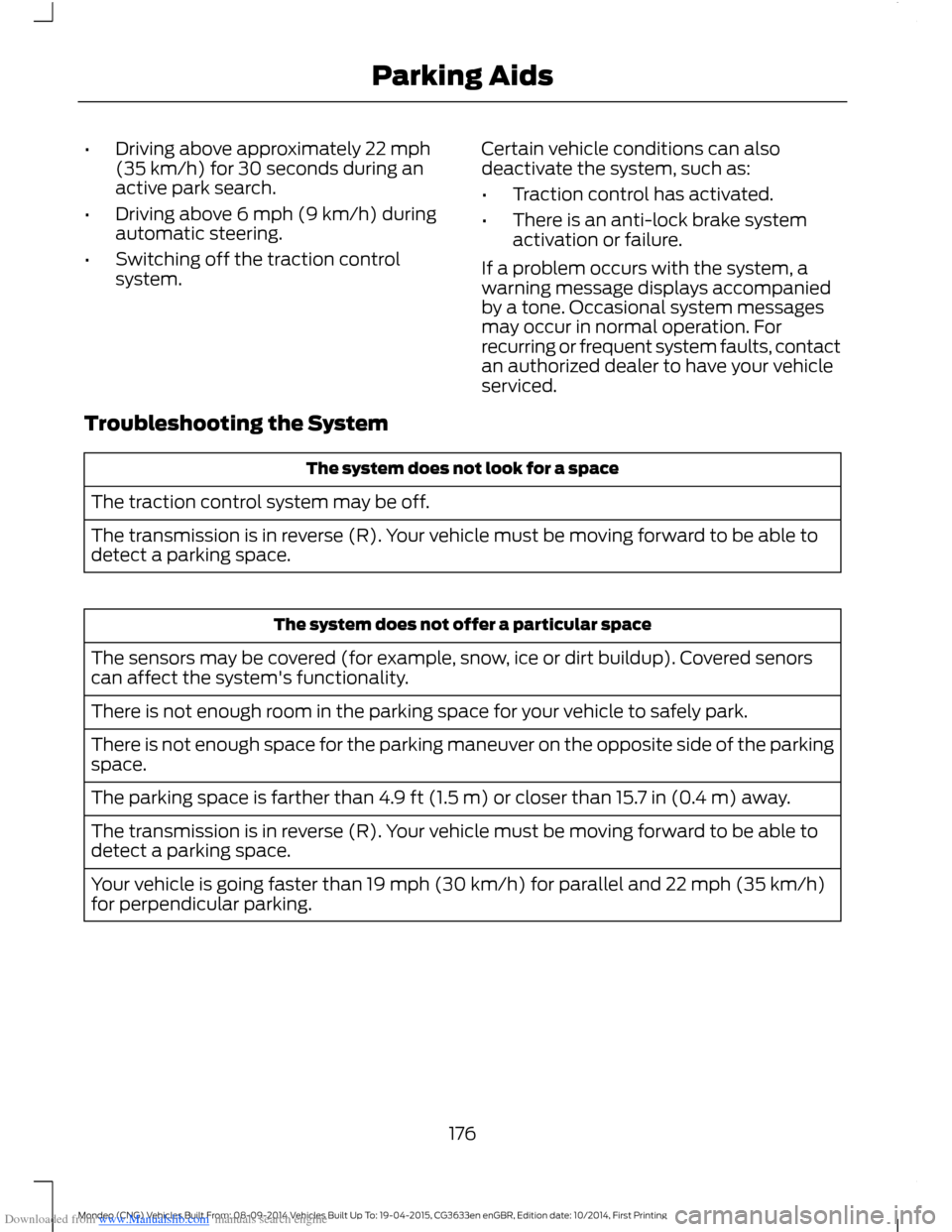
Downloaded from www.Manualslib.com manuals search engine •Driving above approximately 22 mph(35 km/h) for 30 seconds during anactive park search.
•Driving above 6 mph (9 km/h) duringautomatic steering.
•Switching off the traction controlsystem.
Certain vehicle conditions can alsodeactivate the system, such as:
•Traction control has activated.
•There is an anti-lock brake systemactivation or failure.
If a problem occurs with the system, awarning message displays accompaniedby a tone. Occasional system messagesmay occur in normal operation. Forrecurring or frequent system faults, contactan authorized dealer to have your vehicleserviced.
Troubleshooting the System
The system does not look for a space
The traction control system may be off.
The transmission is in reverse (R). Your vehicle must be moving forward to be able todetect a parking space.
The system does not offer a particular space
The sensors may be covered (for example, snow, ice or dirt buildup). Covered senorscan affect the system's functionality.
There is not enough room in the parking space for your vehicle to safely park.
There is not enough space for the parking maneuver on the opposite side of the parkingspace.
The parking space is farther than 4.9 ft (1.5 m) or closer than 15.7 in (0.4 m) away.
The transmission is in reverse (R). Your vehicle must be moving forward to be able todetect a parking space.
Your vehicle is going faster than 19 mph (30 km/h) for parallel and 22 mph (35 km/h)for perpendicular parking.
176Mondeo (CNG) Vehicles Built From: 08-09-2014 Vehicles Built Up To: 19-04-2015, CG3633en enGBR, Edition date: 10/2014, First PrintingParking Aids
Page 201 of 446

Downloaded from www.Manualslib.com manuals search engine Note:Keep the windshield free fromobstructions such as bird droppings, insectsand snow or ice.
Note:The system may not detect all trafficsigns and may read signs incorrectly.
Note:The system is designed toautomatically detect traffic signs meetingthe Vienna convention.
Note:Traffic sign data provided by thenavigation system contains informationintegrated to the data carrier release.
There is a sensor mounted behind theinterior rear view mirror. It continuouslymonitors road signs to inform you of thecurrent speed limit and overtakingregulations.
The system automatically detectsrecognisable traffic signs, such as:
•Speed limit signs.
•No overtaking signs.
•Speed limit cancellation signs.
When the system recognises a traffic sign,it will be shown in the display.
Using the System
Switching the System On and Off
Note:The system status and settings willremain unchanged during ignition cycles.
You can switch the system on and off usingthe information display. See GeneralInformation (page 86).
Setting the System Speed Warning
The system has a number of speedwarning levels which can be set using theinformation display. See GeneralInformation (page 86).
System Display
The system can display two traffic signsin parallel.
You can view the status at any time usingthe information display.
The system display is in four stages asfollows:
1.All new recognizable traffic signs willappear brighter than the other trafficsigns in the display.
2.After a predetermined time they willbe shown normally.
3.After a predetermined distance theywill be shown greyed out.
4.After another predetermined distancethey will be deleted.
If the system detects a supplementarytraffic sign, this sign is indicated as a boxbelow the respective traffic sign. Forexample, when passing a reduced speedlimit in wet road conditions sign.
If your vehicle has a navigation system,stored traffic sign data may influence theindicated speed limit value.
199Mondeo (CNG) Vehicles Built From: 08-09-2014 Vehicles Built Up To: 19-04-2015, CG3633en enGBR, Edition date: 10/2014, First PrintingDriving Aids
Page 209 of 446
Downloaded from www.Manualslib.com manuals search engine GENERAL INFORMATION
WARNINGS
Use load securing straps to anapproved standard, e.g. DIN.
Make sure that you secure all looseitems properly.
Place luggage and other loads as lowand as far forward as possible withinthe luggage or loadspace.
Do not drive with the liftgate or reardoor open. Exhaust fumes may enteryour vehicle.
Do not exceed the maximum frontand rear axle loads for your vehicle.See Vehicle Identification Plate(page 280).
Do not allow items to contact therear windows.
Note:When loading long objects in to yourvehicle, for example pipes, timber orfurniture be careful not to damage theinterior trim.
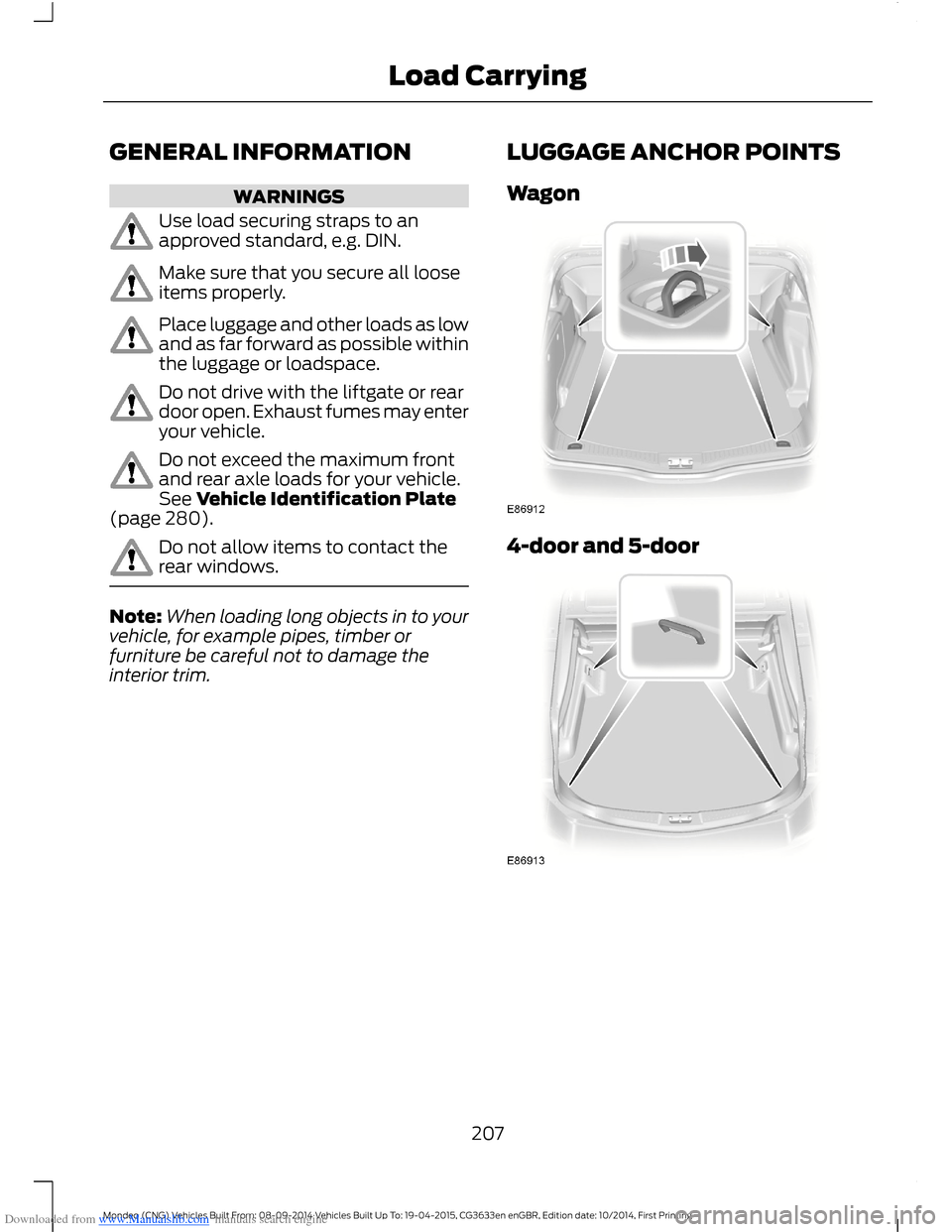
LUGGAGE ANCHOR POINTS
Wagon
4-door and 5-door
207Mondeo (CNG) Vehicles Built From: 08-09-2014 Vehicles Built Up To: 19-04-2015, CG3633en enGBR, Edition date: 10/2014, First PrintingLoad Carrying
Page 212 of 446
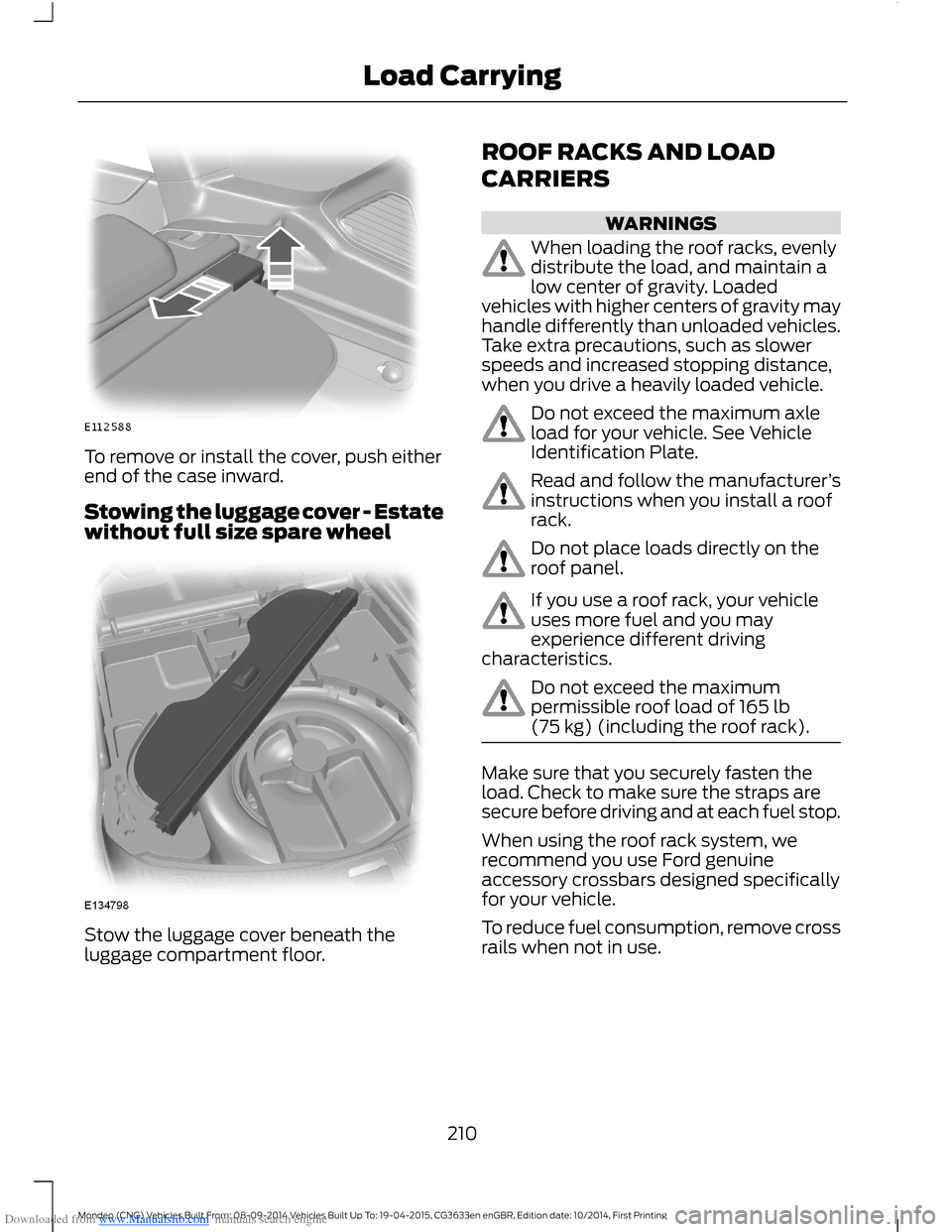
Downloaded from www.Manualslib.com manuals search engine To remove or install the cover, push eitherend of the case inward.
Stowing the luggage cover - Estatewithout full size spare wheel
Stow the luggage cover beneath theluggage compartment floor.
ROOF RACKS AND LOAD
CARRIERS
WARNINGS
When loading the roof racks, evenlydistribute the load, and maintain alow center of gravity. Loadedvehicles with higher centers of gravity mayhandle differently than unloaded vehicles.Take extra precautions, such as slowerspeeds and increased stopping distance,when you drive a heavily loaded vehicle.
Do not exceed the maximum axleload for your vehicle. See VehicleIdentification Plate.
Read and follow the manufacturer’sinstructions when you install a roofrack.
Do not place loads directly on theroof panel.
If you use a roof rack, your vehicleuses more fuel and you mayexperience different drivingcharacteristics.
Do not exceed the maximumpermissible roof load of 165 lb(75 kg) (including the roof rack).
Make sure that you securely fasten theload. Check to make sure the straps aresecure before driving and at each fuel stop.
When using the roof rack system, werecommend you use Ford genuineaccessory crossbars designed specificallyfor your vehicle.
To reduce fuel consumption, remove crossrails when not in use.
210Mondeo (CNG) Vehicles Built From: 08-09-2014 Vehicles Built Up To: 19-04-2015, CG3633en enGBR, Edition date: 10/2014, First PrintingLoad Carrying
Page 213 of 446
Downloaded from www.Manualslib.com manuals search engine LOAD RETAINING FIXTURES
WARNING
Do not exceed the maximumpermissible load of 132 lb (60 kg) ontwo load retaining fixtures and 66 lb(30 kg) on one.
Check the security of the load retainingfixtures and tighten the fittings as follows:
•Before starting.
•After driving 30 mi (50 km).
•At 620 mi (1,000 km) intervals.
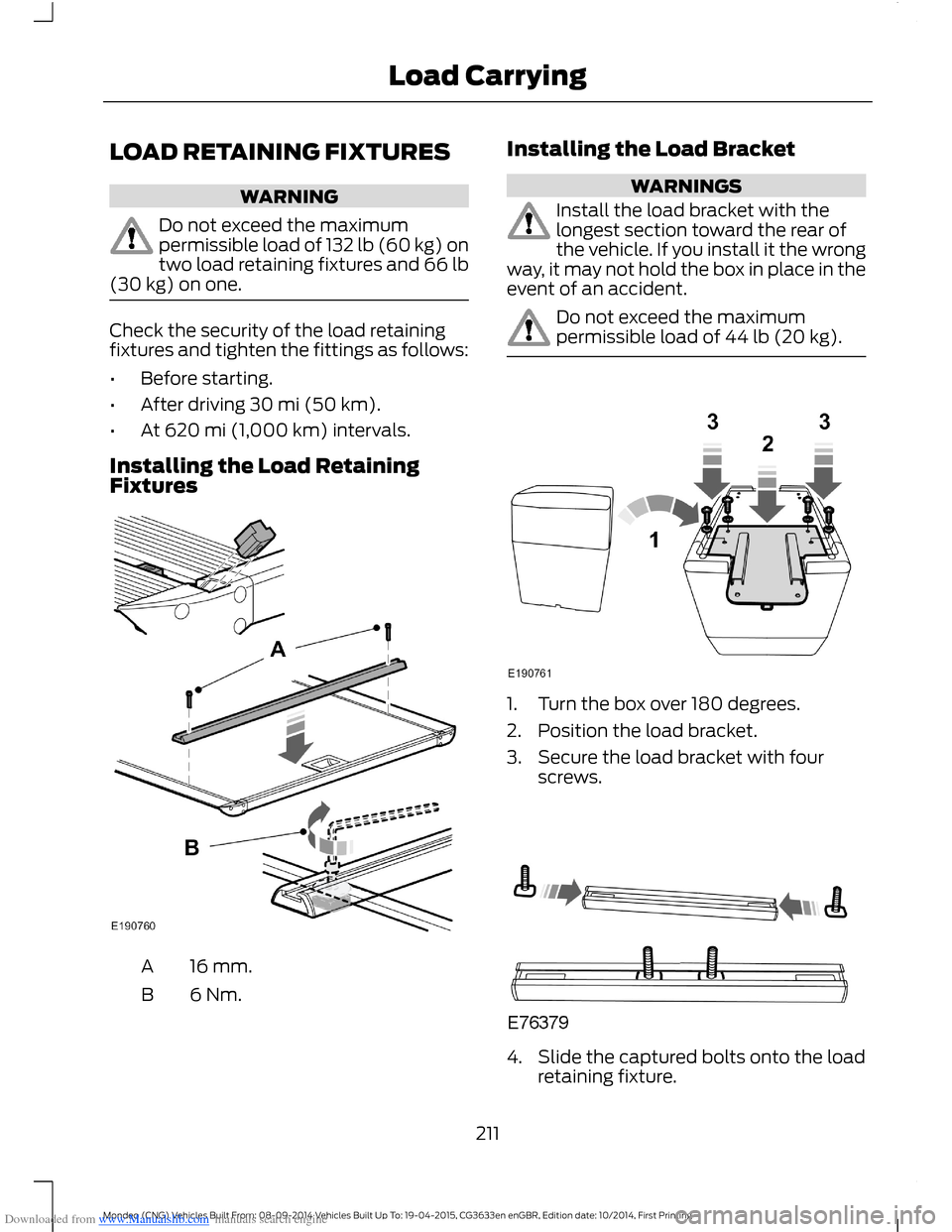
Installing the Load RetainingFixtures
16 mm.A
6 Nm.B
Installing the Load Bracket
WARNINGS
Install the load bracket with thelongest section toward the rear ofthe vehicle. If you install it the wrongway, it may not hold the box in place in theevent of an accident.
Do not exceed the maximumpermissible load of 44 lb (20 kg).
1.Turn the box over 180 degrees.
2.Position the load bracket.
3.Secure the load bracket with fourscrews.
4.Slide the captured bolts onto the loadretaining fixture.
211Mondeo (CNG) Vehicles Built From: 08-09-2014 Vehicles Built Up To: 19-04-2015, CG3633en enGBR, Edition date: 10/2014, First PrintingLoad Carrying