2014 FORD MONDEO display
[x] Cancel search: displayPage 400 of 446
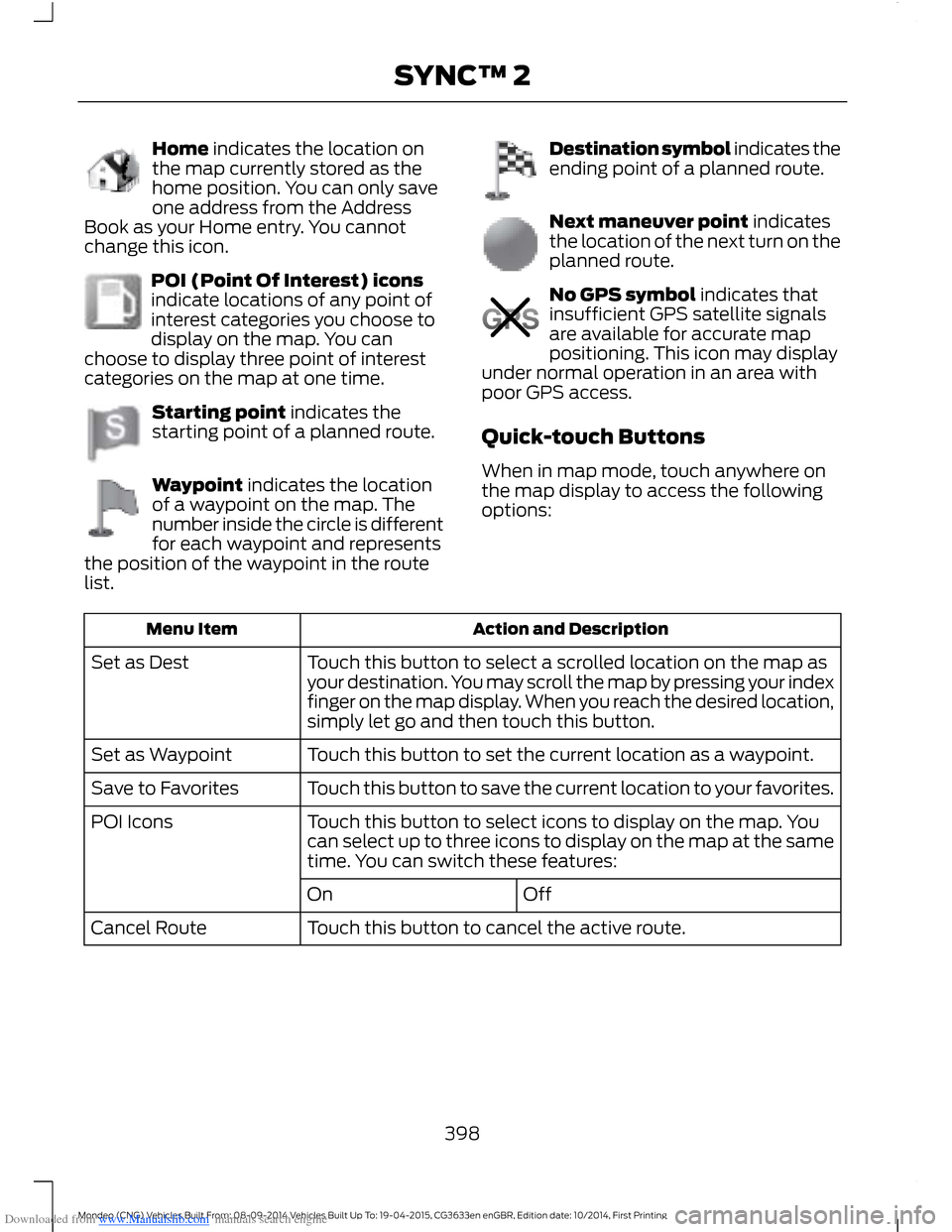
Downloaded from www.Manualslib.com manuals search engine Home indicates the location onthe map currently stored as thehome position. You can only saveone address from the AddressBook as your Home entry. You cannotchange this icon.
POI (Point Of Interest) iconsindicate locations of any point ofinterest categories you choose todisplay on the map. You canchoose to display three point of interestcategories on the map at one time.
Starting point indicates thestarting point of a planned route.
Waypoint indicates the locationof a waypoint on the map. Thenumber inside the circle is differentfor each waypoint and representsthe position of the waypoint in the routelist.
Destination symbol indicates theending point of a planned route.
Next maneuver point indicatesthe location of the next turn on theplanned route.
No GPS symbol indicates thatinsufficient GPS satellite signalsare available for accurate mappositioning. This icon may displayunder normal operation in an area withpoor GPS access.
Quick-touch Buttons
When in map mode, touch anywhere onthe map display to access the followingoptions:
Action and DescriptionMenu Item
Touch this button to select a scrolled location on the map asyour destination. You may scroll the map by pressing your indexfinger on the map display. When you reach the desired location,simply let go and then touch this button.
Set as Dest
Touch this button to set the current location as a waypoint.Set as Waypoint
Touch this button to save the current location to your favorites.Save to Favorites
Touch this button to select icons to display on the map. Youcan select up to three icons to display on the map at the sametime. You can switch these features:
POI Icons
OffOn
Touch this button to cancel the active route.Cancel Route
398Mondeo (CNG) Vehicles Built From: 08-09-2014 Vehicles Built Up To: 19-04-2015, CG3633en enGBR, Edition date: 10/2014, First PrintingSYNC™ 2
Page 402 of 446

Downloaded from www.Manualslib.com manuals search engine One-shot Destination Street Address
To set a destination with voicecommands, you can say:
Action and Descrip-tionVoice Command
The system asksyou to say the fulladdress. Thesystem displays anexample on-screen.
Find an Address
You can then speak the address naturally,such as "One two three four Main Street,Anytown".
SYNC™ TROUBLESHOOTING
Your SYNC system is easy to use. However,should questions arise, please refer to thetables below.
To check your cell phone's compatibility,visit the regional Ford website.
Cell phone issues
Possible solutionPossible causeIssue
Refer to your device's manual about audioadjustments.
The audio controlsettings on your cellphone may be affectingSYNC performance.
A lot of back-ground noiseduring a phonecall.
Try switching off your cell phone, resettingit or removing the battery, then trying again.Possible cell phonemalfunction.
During a call, Ican hear theother personbut they cannothear me.
Make sure that the microphone for SYNCis not set to off.
Check your cell phone's compatibility.This is a cell phone-dependent feature.
SYNC is notable to down-load my phone-book.
Try switching off your cell phone, resettingit or removing the battery, then trying again.
Possible cell phonemalfunction.
Try pushing your phonebook contacts toSYNC by selecting the option to add.
You must switch on your cell phone andthe automatic phonebook downloadfeature on SYNC.
400Mondeo (CNG) Vehicles Built From: 08-09-2014 Vehicles Built Up To: 19-04-2015, CG3633en enGBR, Edition date: 10/2014, First PrintingSYNC™ 2
Page 406 of 446
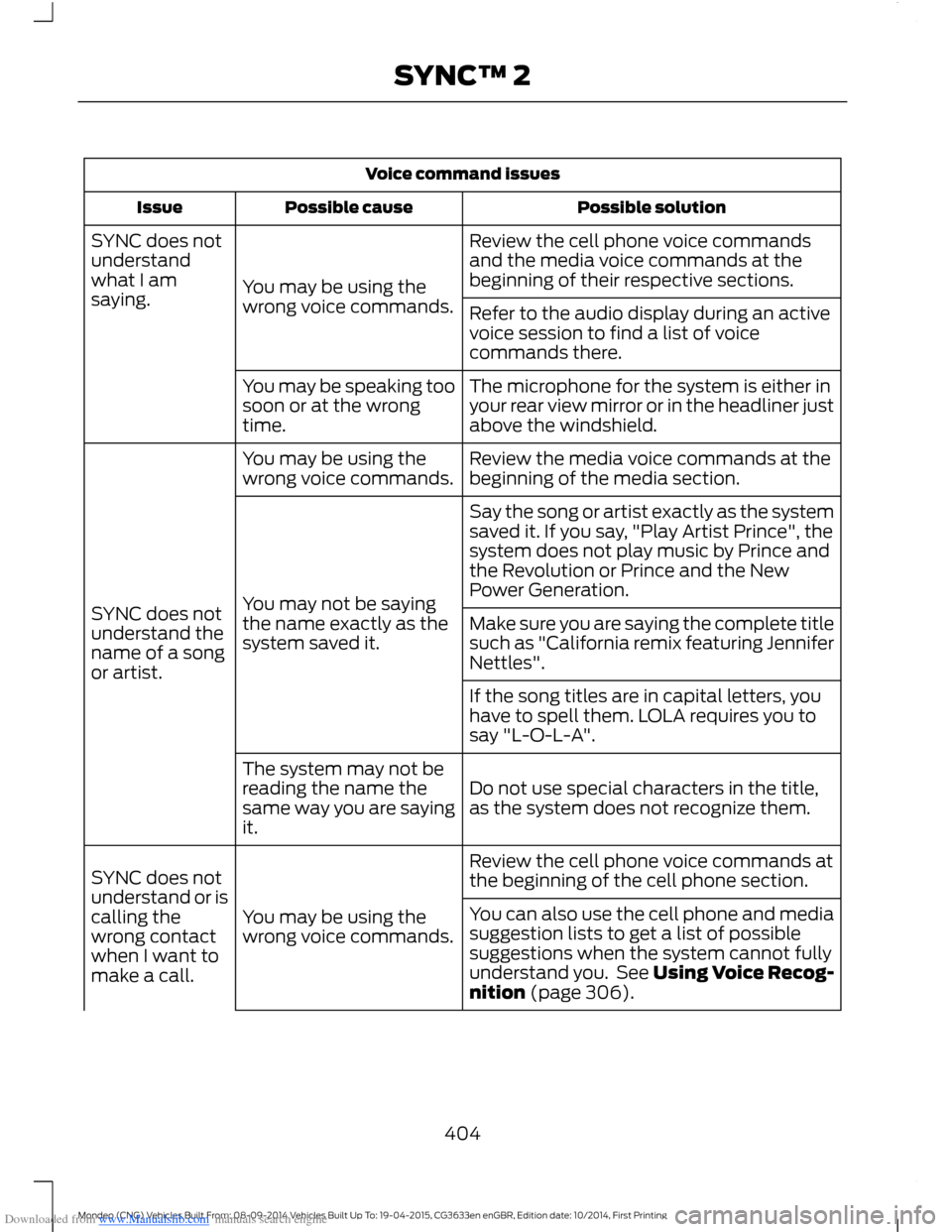
Downloaded from www.Manualslib.com manuals search engine Voice command issues
Possible solutionPossible causeIssue
Review the cell phone voice commandsand the media voice commands at thebeginning of their respective sections.You may be using thewrong voice commands.
SYNC does notunderstandwhat I amsaying.Refer to the audio display during an activevoice session to find a list of voicecommands there.
The microphone for the system is either inyour rear view mirror or in the headliner justabove the windshield.
You may be speaking toosoon or at the wrongtime.
Review the media voice commands at thebeginning of the media section.You may be using thewrong voice commands.
SYNC does notunderstand thename of a songor artist.
Say the song or artist exactly as the systemsaved it. If you say, "Play Artist Prince", thesystem does not play music by Prince andthe Revolution or Prince and the NewPower Generation.You may not be sayingthe name exactly as thesystem saved it.Make sure you are saying the complete titlesuch as "California remix featuring JenniferNettles".
If the song titles are in capital letters, youhave to spell them. LOLA requires you tosay "L-O-L-A".
Do not use special characters in the title,as the system does not recognize them.
The system may not bereading the name thesame way you are sayingit.
Review the cell phone voice commands atthe beginning of the cell phone section.
You may be using thewrong voice commands.
SYNC does notunderstand or iscalling thewrong contactwhen I want tomake a call.
You can also use the cell phone and mediasuggestion lists to get a list of possiblesuggestions when the system cannot fullyunderstand you. See Using Voice Recog-nition (page 306).
404Mondeo (CNG) Vehicles Built From: 08-09-2014 Vehicles Built Up To: 19-04-2015, CG3633en enGBR, Edition date: 10/2014, First PrintingSYNC™ 2
Page 409 of 446
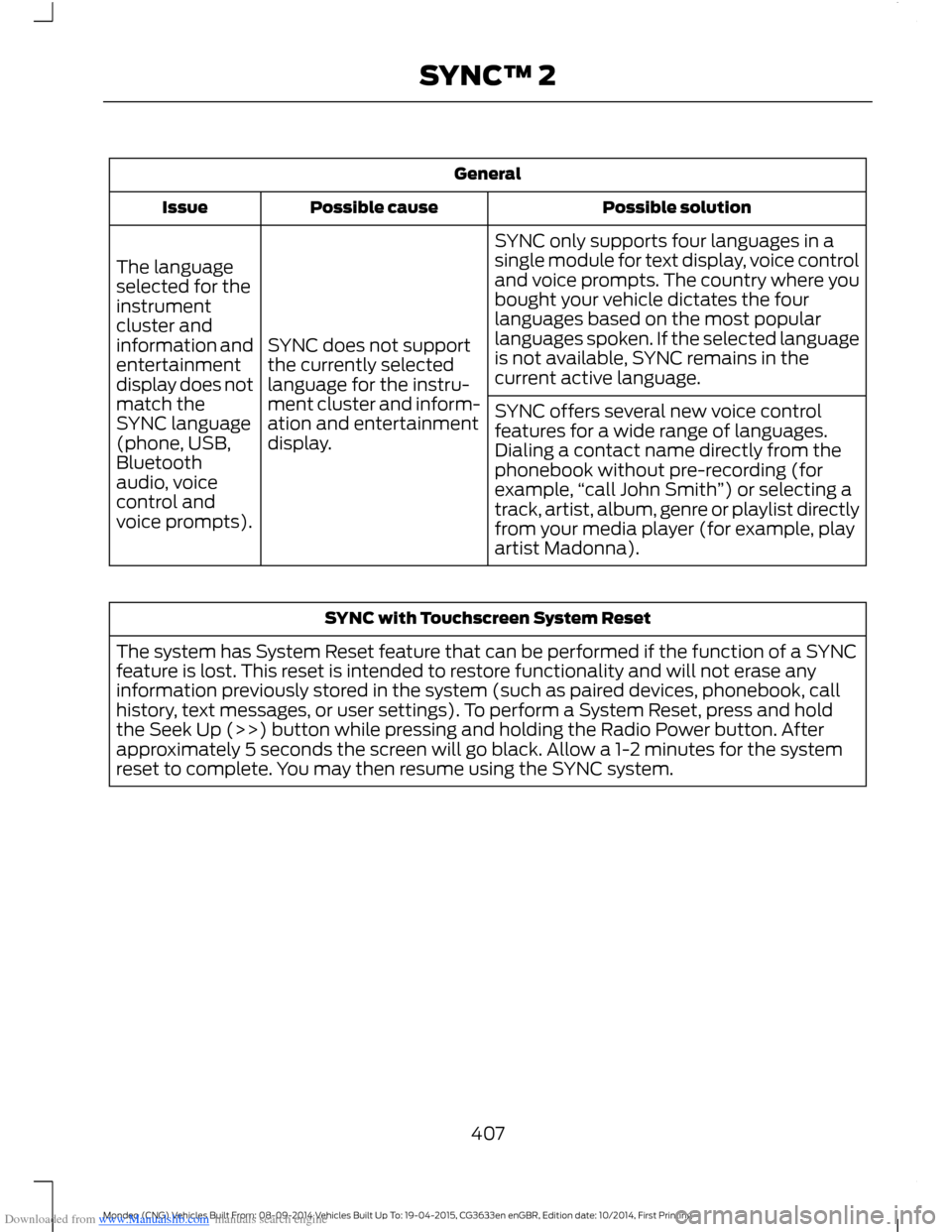
Downloaded from www.Manualslib.com manuals search engine General
Possible solutionPossible causeIssue
SYNC only supports four languages in asingle module for text display, voice controland voice prompts. The country where youbought your vehicle dictates the fourlanguages based on the most popularlanguages spoken. If the selected languageis not available, SYNC remains in thecurrent active language.
SYNC does not supportthe currently selectedlanguage for the instru-ment cluster and inform-ation and entertainmentdisplay.
The languageselected for theinstrumentcluster andinformation andentertainmentdisplay does notmatch theSYNC language(phone, USB,Bluetoothaudio, voicecontrol andvoice prompts).
SYNC offers several new voice controlfeatures for a wide range of languages.Dialing a contact name directly from thephonebook without pre-recording (forexample,“call John Smith”) or selecting atrack, artist, album, genre or playlist directlyfrom your media player (for example, playartist Madonna).
SYNC with Touchscreen System Reset
The system has System Reset feature that can be performed if the function of a SYNCfeature is lost. This reset is intended to restore functionality and will not erase anyinformation previously stored in the system (such as paired devices, phonebook, callhistory, text messages, or user settings). To perform a System Reset, press and holdthe Seek Up (>>) button while pressing and holding the Radio Power button. Afterapproximately 5 seconds the screen will go black. Allow a 1-2 minutes for the systemreset to complete. You may then resume using the SYNC system.
407Mondeo (CNG) Vehicles Built From: 08-09-2014 Vehicles Built Up To: 19-04-2015, CG3633en enGBR, Edition date: 10/2014, First PrintingSYNC™ 2
Page 427 of 446
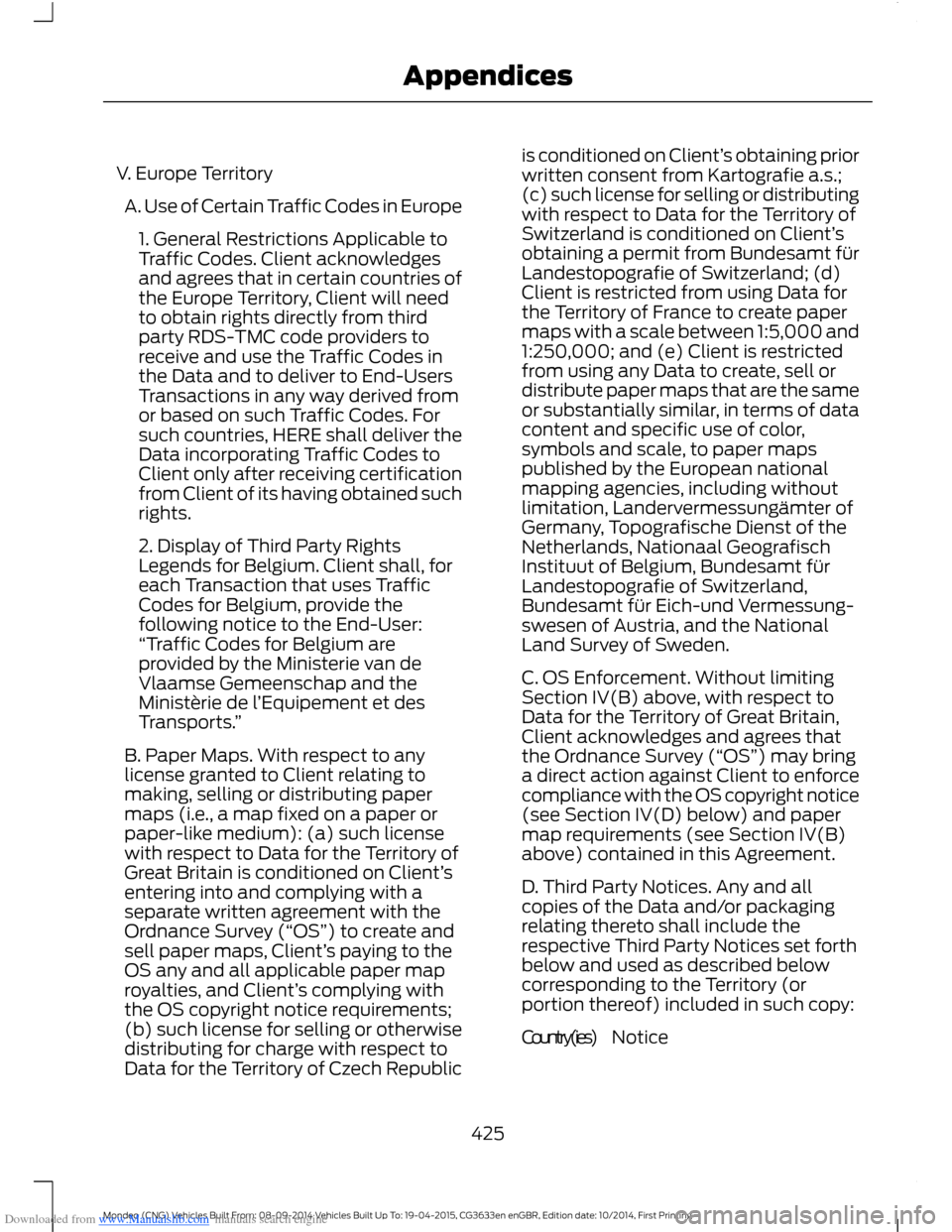
Downloaded from www.Manualslib.com manuals search engine V. Europe Territory
A. Use of Certain Traffic Codes in Europe
1. General Restrictions Applicable toTraffic Codes. Client acknowledgesand agrees that in certain countries ofthe Europe Territory, Client will needto obtain rights directly from thirdparty RDS-TMC code providers toreceive and use the Traffic Codes inthe Data and to deliver to End-UsersTransactions in any way derived fromor based on such Traffic Codes. Forsuch countries, HERE shall deliver theData incorporating Traffic Codes toClient only after receiving certificationfrom Client of its having obtained suchrights.
2. Display of Third Party RightsLegends for Belgium. Client shall, foreach Transaction that uses TrafficCodes for Belgium, provide thefollowing notice to the End-User:“Traffic Codes for Belgium areprovided by the Ministerie van deVlaamse Gemeenschap and theMinistèrie de l’Equipement et desTransports.”
B. Paper Maps. With respect to anylicense granted to Client relating tomaking, selling or distributing papermaps (i.e., a map fixed on a paper orpaper-like medium): (a) such licensewith respect to Data for the Territory ofGreat Britain is conditioned on Client’sentering into and complying with aseparate written agreement with theOrdnance Survey (“OS”) to create andsell paper maps, Client’s paying to theOS any and all applicable paper maproyalties, and Client’s complying withthe OS copyright notice requirements;(b) such license for selling or otherwisedistributing for charge with respect toData for the Territory of Czech Republic
is conditioned on Client’s obtaining priorwritten consent from Kartografie a.s.;(c) such license for selling or distributingwith respect to Data for the Territory ofSwitzerland is conditioned on Client’sobtaining a permit from Bundesamt fürLandestopografie of Switzerland; (d)Client is restricted from using Data forthe Territory of France to create papermaps with a scale between 1:5,000 and1:250,000; and (e) Client is restrictedfrom using any Data to create, sell ordistribute paper maps that are the sameor substantially similar, in terms of datacontent and specific use of color,symbols and scale, to paper mapspublished by the European nationalmapping agencies, including withoutlimitation, Landervermessungämter ofGermany, Topografische Dienst of theNetherlands, Nationaal GeografischInstituut of Belgium, Bundesamt fürLandestopografie of Switzerland,Bundesamt für Eich-und Vermessung-swesen of Austria, and the NationalLand Survey of Sweden.
C. OS Enforcement. Without limitingSection IV(B) above, with respect toData for the Territory of Great Britain,Client acknowledges and agrees thatthe Ordnance Survey (“OS”) may bringa direct action against Client to enforcecompliance with the OS copyright notice(see Section IV(D) below) and papermap requirements (see Section IV(B)above) contained in this Agreement.
D. Third Party Notices. Any and allcopies of the Data and/or packagingrelating thereto shall include therespective Third Party Notices set forthbelow and used as described belowcorresponding to the Territory (orportion thereof) included in such copy:
NoticeCountry(ies)
425Mondeo (CNG) Vehicles Built From: 08-09-2014 Vehicles Built Up To: 19-04-2015, CG3633en enGBR, Edition date: 10/2014, First PrintingAppendices
Page 437 of 446

Downloaded from www.Manualslib.com manuals search engine Fuse Specification Chart...........................227Passenger Compartment Fuse Panel........233Power Distribution Box.....................................227
G
Gauges...............................................................78Engine Coolant Temperature Gauge............80Fuel Gauge.............................................................80Information Display.............................................79Type 1 and 2............................................................78Type 3........................................................................79General Information on RadioFrequencies...................................................32Global Opening and Closing......................73Closing the Windows..........................................73Opening the Windows........................................73
H
Hazard Warning Flashers..........................224Headlamp Exit Delay....................................65Headlamp Leveling........................................67Head Restraints.............................................126Adjusting the Head Restraint..........................127Tilting Head Restraints ....................................128Heated Seats..................................................133Heated Steering Wheel...............................59Heated Windows and Mirrors....................121Heated Exterior Mirror.......................................122Heated Rear Window.........................................121Heated Windshield.......................................122HeatingSee: Climate Control...........................................111Hill Start Assist..............................................163Switching the System On and Off...............164Using Hill Start Assist.......................................163Hints on Controlling the InteriorClimate...........................................................119Cooling the Interior Quickly..............................121General Hints........................................................119Heating the Interior Quickly............................120Recommended Settings for Cooling ...........121Recommended Settings for Heating..........120Side Window Defogging in ColdWeather..............................................................121Hints on Driving With Anti-LockBrakes............................................................160
Hood LockSee: Opening and Closing the Hood...........237
I
Ignition Switch...............................................138Inflatable Safety Belts.................................30Rear Inflatable Safety Belt...............................30Information Display Control......................58Information Display Control Features..........59Information Displays....................................86General Information...........................................86Information....................................................383Calendar...............................................................384Emergency Assistance....................................384Notifications........................................................383
435Mondeo (CNG) Vehicles Built From: 08-09-2014 Vehicles Built Up To: 19-04-2015, CG3633en enGBR, Edition date: 10/2014, First PrintingIndex
Page 439 of 446
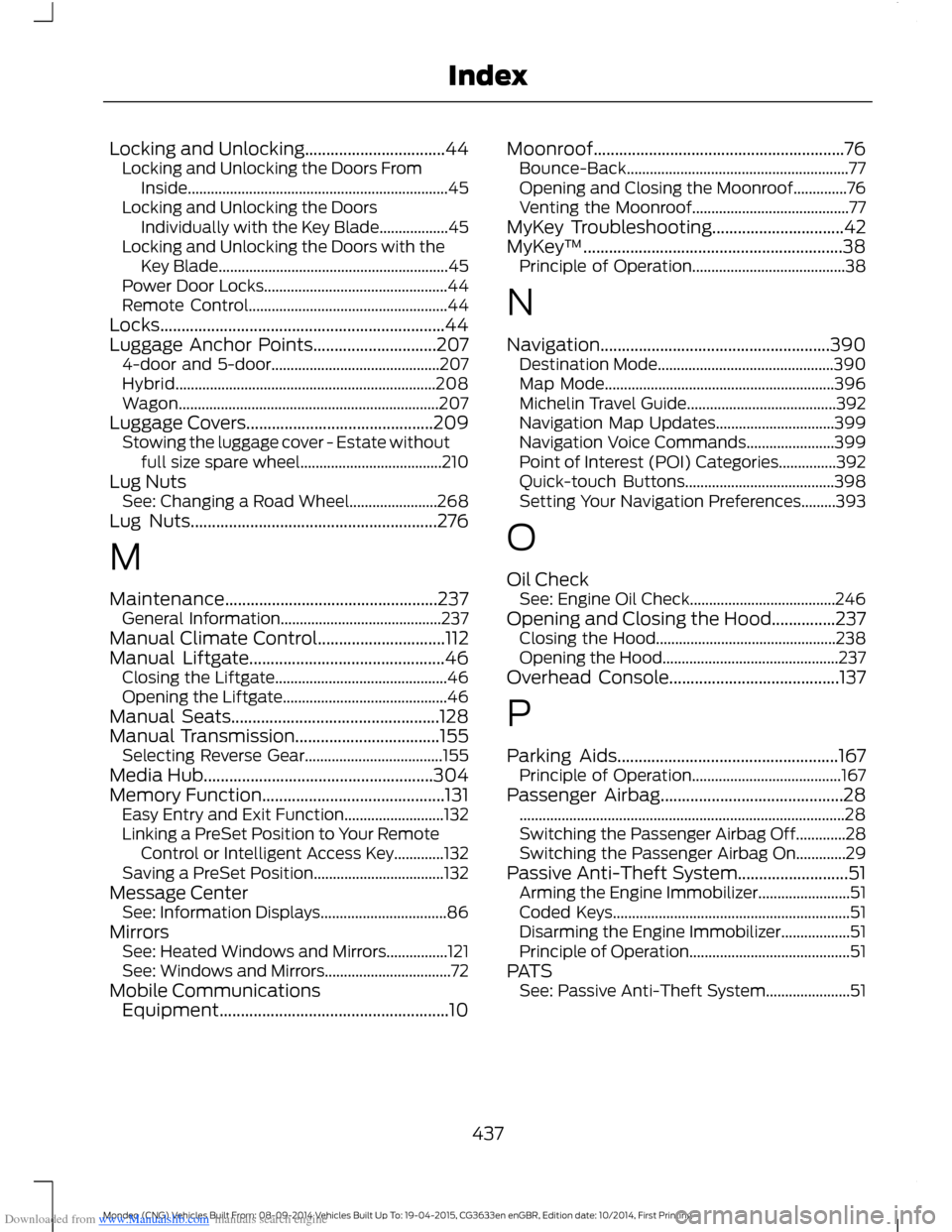
Downloaded from www.Manualslib.com manuals search engine Locking and Unlocking.................................44Locking and Unlocking the Doors FromInside....................................................................45Locking and Unlocking the DoorsIndividually with the Key Blade..................45Locking and Unlocking the Doors with theKey Blade............................................................45Power Door Locks................................................44Remote Control....................................................44Locks...................................................................44Luggage Anchor Points.............................2074-door and 5-door............................................207Hybrid....................................................................208Wagon....................................................................207Luggage Covers............................................209Stowing the luggage cover - Estate withoutfull size spare wheel.....................................210Lug NutsSee: Changing a Road Wheel.......................268Lug Nuts..........................................................276
M
Maintenance..................................................237General Information..........................................237Manual Climate Control..............................112Manual Liftgate..............................................46Closing the Liftgate.............................................46Opening the Liftgate...........................................46Manual Seats.................................................128Manual Transmission..................................155Selecting Reverse Gear....................................155Media Hub......................................................304Memory Function...........................................131Easy Entry and Exit Function..........................132Linking a PreSet Position to Your RemoteControl or Intelligent Access Key.............132Saving a PreSet Position..................................132Message CenterSee: Information Displays.................................86MirrorsSee: Heated Windows and Mirrors................121See: Windows and Mirrors.................................72Mobile CommunicationsEquipment......................................................10
Moonroof...........................................................76Bounce-Back..........................................................77Opening and Closing the Moonroof..............76Venting the Moonroof.........................................77MyKey Troubleshooting...............................42MyKey™.............................................................38Principle of Operation........................................38
N
Navigation......................................................390Destination Mode..............................................390Map Mode............................................................396Michelin Travel Guide.......................................392Navigation Map Updates...............................399Navigation Voice Commands.......................399Point of Interest (POI) Categories...............392Quick-touch Buttons.......................................398Setting Your Navigation Preferences.........393
O
Oil CheckSee: Engine Oil Check......................................246Opening and Closing the Hood...............237Closing the Hood...............................................238Opening the Hood..............................................237Overhead Console........................................137
P
Parking Aids....................................................167Principle of Operation.......................................167Passenger Airbag...........................................28.....................................................................................28Switching the Passenger Airbag Off.............28Switching the Passenger Airbag On.............29Passive Anti-Theft System..........................51Arming the Engine Immobilizer........................51Coded Keys..............................................................51Disarming the Engine Immobilizer..................51Principle of Operation..........................................51PATSSee: Passive Anti-Theft System......................51
437Mondeo (CNG) Vehicles Built From: 08-09-2014 Vehicles Built Up To: 19-04-2015, CG3633en enGBR, Edition date: 10/2014, First PrintingIndex
Page 440 of 446

Downloaded from www.Manualslib.com manuals search engine Phone...............................................................375Making Calls.........................................................378Pairing Subsequent Cell Phones..................377Pairing Your Cell Phone for the FirstTime...................................................................376Phone Menu Options.......................................378Phone Settings....................................................381Phone Voice Commands................................382Receiving Calls....................................................378Text Messaging...................................................379Post-Crash Alert System..........................226Power Door LocksSee: Locking and Unlocking.............................44Power Liftgate.................................................46Closing the Liftgate.............................................48Programming the Liftgate................................48Power Seats - Vehicles With:Multi-Contour Seats.................................129Multi-Contour Front Seats With ActiveMotion ...............................................................130Power Lumbar.....................................................130Power Seats - Vehicles Without:Multi-Contour Seats.................................128Power Lumbar.....................................................129Power Windows..............................................72Accessory Delay....................................................72Bounce-Back..........................................................72One-Touch Down.................................................72One-Touch Up.......................................................72Window Lock..........................................................72
R
Rear Exterior Overview..................................12Rear Fog Lamps..............................................67Rear Parking Aid............................................167Rear Sensing System.........................................167Rear Seat Armrest........................................134Rear Under Floor Storage........................208Rear View Camera........................................177Using the Rear View Camera System.........178Rear View CameraSee: Rear View Camera.....................................177Rear Window Wiper and Washers...........62Rear Window Washer.........................................62Rear Window Wiper............................................62Reduced Engine Performance.................221Refueling..........................................................152
Remote Control...............................................32Changing the Remote Control Battery........34Integrated Keyhead Transmitters ..................32Intelligent Access Key.........................................32Remote Start ........................................................35Using the Key Blade.............................................33Removing a Headlamp.............................250Repairing Minor Paint Damage..............258Replacement PartsRecommendation........................................10Collision Repairs....................................................10Scheduled Maintenance and MechanicalRepairs.................................................................10Warranty on Replacement Parts....................10Replacing a Lost Key or RemoteControl.............................................................37Roadside Emergencies..............................224Roof Racks and Load Carriers.................210Running-InSee: Breaking-In..................................................221Running Out of Fuel....................................150Adding Fuel From a Portable FuelContainer...........................................................151Filling a Portable Fuel Container...................151
S
Safety Belt Height Adjustment.................26Safety Belt Minder.........................................26Turning the Safety Belt Minder Off................26Safety Belts......................................................25Safety Precautions......................................148Seats.................................................................126Security...............................................................51Settings...........................................................352Clock.......................................................................353Display...................................................................353Settings..................................................................357Sound.....................................................................354Vehicle...................................................................355Side Airbags.....................................................29Side Curtain Airbags.....................................29Side Sensing System...................................170Distance Indication..............................................171Sitting in the Correct Position..................126Snow ChainsSee: Using Snow Chains.................................264
438Mondeo (CNG) Vehicles Built From: 08-09-2014 Vehicles Built Up To: 19-04-2015, CG3633en enGBR, Edition date: 10/2014, First PrintingIndex