2014 FORD MONDEO display
[x] Cancel search: displayPage 332 of 446
![FORD MONDEO 2014 4.G Owners Manual Downloaded from www.Manualslib.com manuals search engine Voice Command
[play] (similar music | more like this)
((whos | who is) this | who plays this | (whats | what is) playing [now] | (what | whic](/manual-img/11/5483/w960_5483-331.png "FORD MONDEO 2014 4.G Owners Manual Downloaded from www.Manualslib.com manuals search engine Voice Command
[play] (similar music | more like this)
((whos | who is) this | who plays this | (whats | what is) playing [now] | (what | whic")
Downloaded from www.Manualslib.com manuals search engine Voice Command
[play] (similar music | more like this)
((who's | who is) this | who plays this | (what's | what is) playing [now] | (what | which)(song | track | artist) is this | (who's | who is) playing | (what's | what is) this)
* This voice command is not available until indexing is complete.
Voice Command Guide
Description and ActionVoice Command
The system searches all the data from your indexed musicand if available, begins to play the chosen type of music.(browse | search | show)genre
The system compiles a playlist and then plays similar musicto what is currently playing from the USB port using indexedmetadata information.
[play] (similar music |more like this)
The system searches for a specific artist, track or album fromthe music indexed through the USB port.(browse | search | show)artist
The system searches for a specific artist, track or album fromthe music indexed through the USB port.(browse | search | show)album
The system is also capable of playingmusic from your cell phone throughBluetooth.
To switch the Bluetooth audio on, use theMEDIA button (next to the audio display)or Source button, or press the voice buttonand when prompted say:
Description and ActionVoice Command
Bluetooth audio
Then any of the following:
Description and ActionVoice Command
pause
play
[play] next track
[play] previous track
330Mondeo (CNG) Vehicles Built From: 08-09-2014 Vehicles Built Up To: 19-04-2015, CG3633en enGBR, Edition date: 10/2014, First PrintingSYNC™
Page 333 of 446
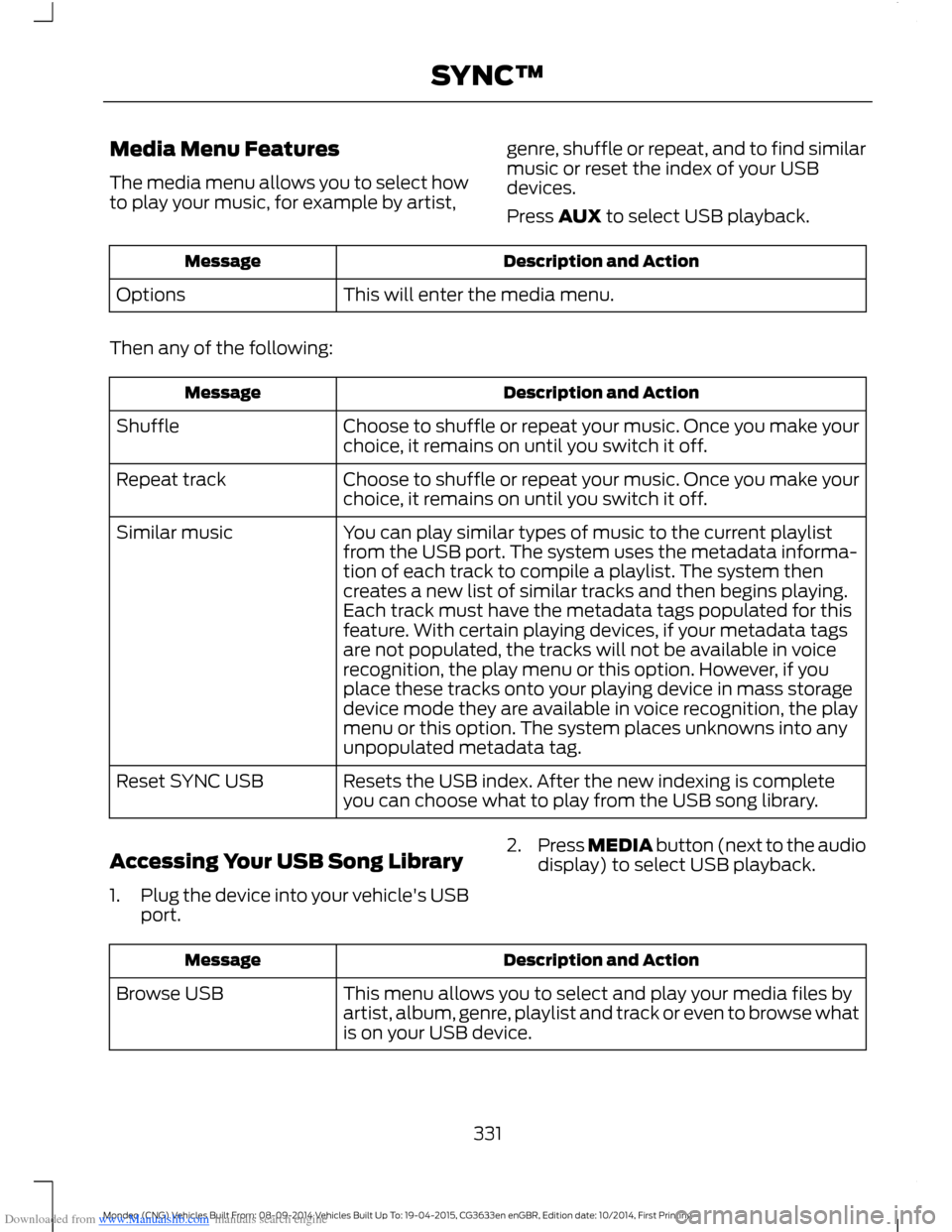
Downloaded from www.Manualslib.com manuals search engine Media Menu Features
The media menu allows you to select howto play your music, for example by artist,
genre, shuffle or repeat, and to find similarmusic or reset the index of your USBdevices.
Press AUX to select USB playback.
Description and ActionMessage
This will enter the media menu.Options
Then any of the following:
Description and ActionMessage
Choose to shuffle or repeat your music. Once you make yourchoice, it remains on until you switch it off.Shuffle
Choose to shuffle or repeat your music. Once you make yourchoice, it remains on until you switch it off.Repeat track
You can play similar types of music to the current playlistfrom the USB port. The system uses the metadata informa-tion of each track to compile a playlist. The system thencreates a new list of similar tracks and then begins playing.Each track must have the metadata tags populated for thisfeature. With certain playing devices, if your metadata tags
Similar music
are not populated, the tracks will not be available in voicerecognition, the play menu or this option. However, if youplace these tracks onto your playing device in mass storagedevice mode they are available in voice recognition, the playmenu or this option. The system places unknowns into anyunpopulated metadata tag.
Resets the USB index. After the new indexing is completeyou can choose what to play from the USB song library.Reset SYNC USB
Accessing Your USB Song Library
1.Plug the device into your vehicle's USBport.
2.Press MEDIA button (next to the audiodisplay) to select USB playback.
Description and ActionMessage
This menu allows you to select and play your media files byartist, album, genre, playlist and track or even to browse whatis on your USB device.
Browse USB
331Mondeo (CNG) Vehicles Built From: 08-09-2014 Vehicles Built Up To: 19-04-2015, CG3633en enGBR, Edition date: 10/2014, First PrintingSYNC™
Page 334 of 446

Downloaded from www.Manualslib.com manuals search engine If there are no media files to access, thedisplay indicates there is no media. If thereare media files, you have the followingoptions to scroll through and select:
Description and ActionMessage
Play all indexed media files from your playing device one at
a time in numerical order.*Play all
1.Press OK to select. The first track title appears in thedisplay.
Access your playlists from formats, ASX, M3U, WPL or MTP.*
1.Press OK to select.
2.Scroll to select the desired playlist, and then press OK.
Playlists
Search for and play a specific indexed track.*
1.Press OK to select.
2.Scroll to select the desired track, and then press OK.
Songs
Sort all indexed media files by artist. Once selected, thesystem lists and then plays all artists and tracks alphabetic-
ally.*
1.Press OK to select.
2.Scroll to select the desired artist, and then press OK.
Artists
Sort all indexed media files by albums.*
1.Press OK to select.
2.Scroll to select the desired albums, and then press OK.
Albums
Sort indexed music by genre type.*
1.Press OK to select.
2.Scroll to select the desired genre, and then press OK.
Genres
332Mondeo (CNG) Vehicles Built From: 08-09-2014 Vehicles Built Up To: 19-04-2015, CG3633en enGBR, Edition date: 10/2014, First PrintingSYNC™
Page 335 of 446
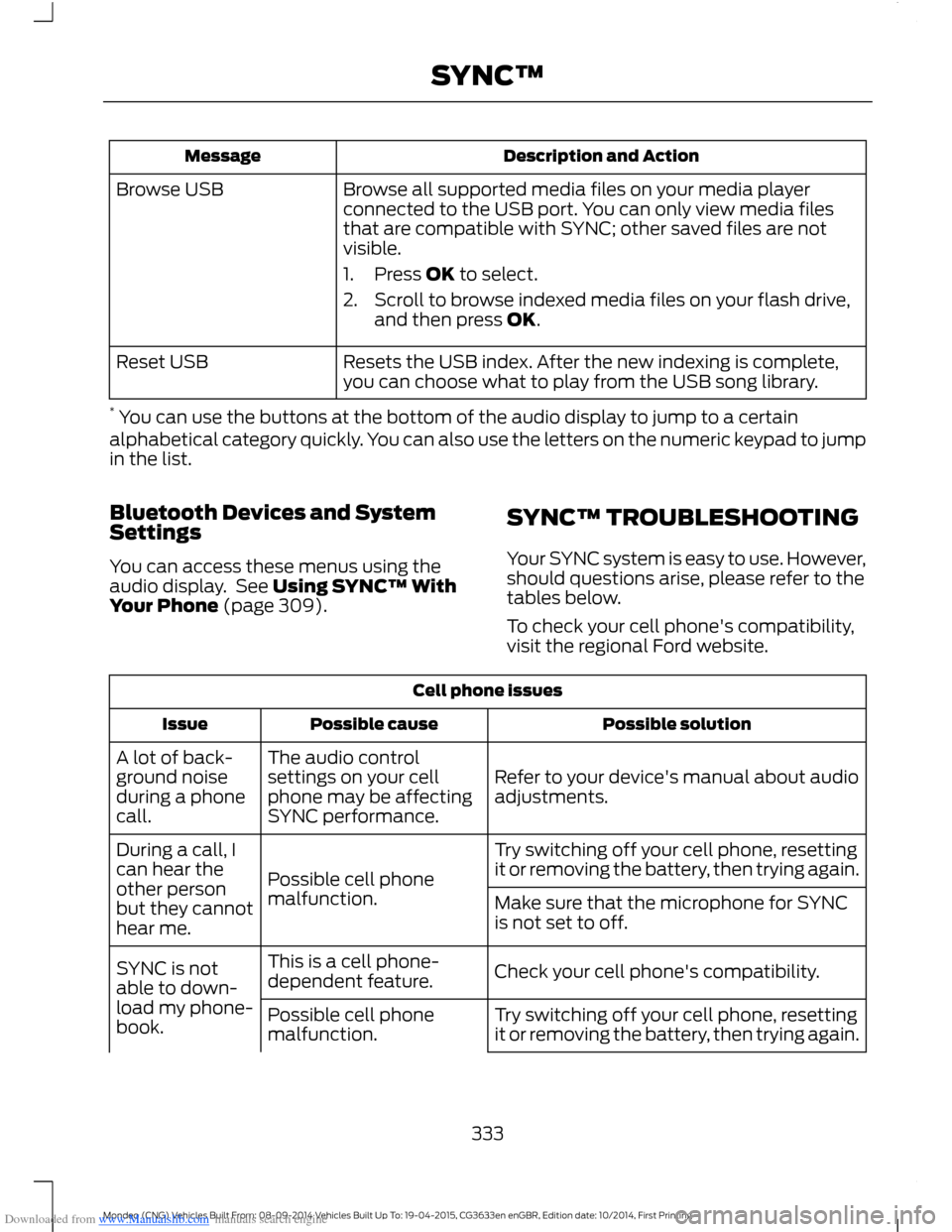
Downloaded from www.Manualslib.com manuals search engine Description and ActionMessage
Browse all supported media files on your media playerconnected to the USB port. You can only view media filesthat are compatible with SYNC; other saved files are notvisible.
1.Press OK to select.
2.Scroll to browse indexed media files on your flash drive,and then press OK.
Browse USB
Resets the USB index. After the new indexing is complete,you can choose what to play from the USB song library.Reset USB
* You can use the buttons at the bottom of the audio display to jump to a certainalphabetical category quickly. You can also use the letters on the numeric keypad to jumpin the list.
Bluetooth Devices and SystemSettings
You can access these menus using theaudio display. See Using SYNC™ WithYour Phone (page 309).
SYNC™ TROUBLESHOOTING
Your SYNC system is easy to use. However,should questions arise, please refer to thetables below.
To check your cell phone's compatibility,visit the regional Ford website.
Cell phone issues
Possible solutionPossible causeIssue
Refer to your device's manual about audioadjustments.
The audio controlsettings on your cellphone may be affectingSYNC performance.
A lot of back-ground noiseduring a phonecall.
Try switching off your cell phone, resettingit or removing the battery, then trying again.Possible cell phonemalfunction.
During a call, Ican hear theother personbut they cannothear me.
Make sure that the microphone for SYNCis not set to off.
Check your cell phone's compatibility.This is a cell phone-dependent feature.SYNC is notable to down-load my phone-book.Try switching off your cell phone, resettingit or removing the battery, then trying again.Possible cell phonemalfunction.
333Mondeo (CNG) Vehicles Built From: 08-09-2014 Vehicles Built Up To: 19-04-2015, CG3633en enGBR, Edition date: 10/2014, First PrintingSYNC™
Page 339 of 446

Downloaded from www.Manualslib.com manuals search engine Voice command issues
Possible solutionPossible causeIssue
Review the cell phone voice commandsand the media voice commands at thebeginning of their respective sections.You may be using thewrong voice commands.
SYNC does notunderstandwhat I amsaying.Refer to the audio display during an activevoice session to find a list of voicecommands there.
The microphone for the system is either inyour rear view mirror or in the headliner justabove the windshield.
You may be speaking toosoon or at the wrongtime.
Review the media voice commands at thebeginning of the media section.You may be using thewrong voice commands.
SYNC does notunderstand thename of a songor artist.
Say the song or artist exactly as the systemsaved it. If you say, "Play Artist Prince", thesystem does not play music by Prince andthe Revolution or Prince and the NewPower Generation.You may not be sayingthe name exactly as thesystem saved it.Make sure you are saying the complete titlesuch as "California remix featuring JenniferNettles".
If the song titles are in capital letters, youhave to spell them. LOLA requires you tosay "L-O-L-A".
Do not use special characters in the title,as the system does not recognize them.
The system may not bereading the name thesame way you are sayingit.
Review the cell phone voice commands atthe beginning of the cell phone section.
You may be using thewrong voice commands.
SYNC does notunderstand or iscalling thewrong contactwhen I want tomake a call.
You can also use the cell phone and mediasuggestion lists to get a list of possiblesuggestions when the system cannot fullyunderstand you. See Using Voice Recog-nition (page 306).
337Mondeo (CNG) Vehicles Built From: 08-09-2014 Vehicles Built Up To: 19-04-2015, CG3633en enGBR, Edition date: 10/2014, First PrintingSYNC™
Page 342 of 446
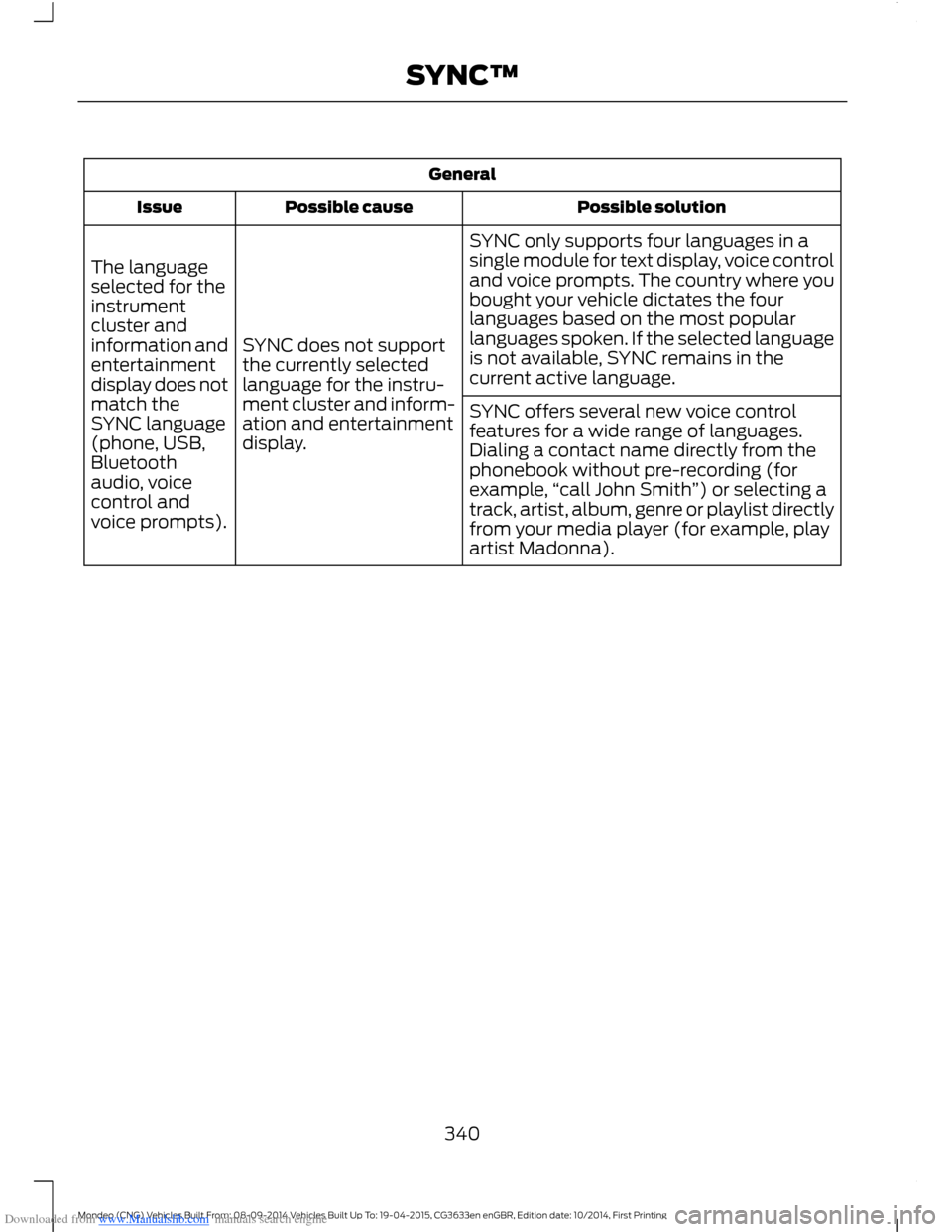
Downloaded from www.Manualslib.com manuals search engine General
Possible solutionPossible causeIssue
SYNC only supports four languages in asingle module for text display, voice controland voice prompts. The country where youbought your vehicle dictates the fourlanguages based on the most popularlanguages spoken. If the selected languageis not available, SYNC remains in thecurrent active language.
SYNC does not supportthe currently selectedlanguage for the instru-ment cluster and inform-ation and entertainmentdisplay.
The languageselected for theinstrumentcluster andinformation andentertainmentdisplay does notmatch theSYNC language(phone, USB,Bluetoothaudio, voicecontrol andvoice prompts).
SYNC offers several new voice controlfeatures for a wide range of languages.Dialing a contact name directly from thephonebook without pre-recording (forexample,“call John Smith”) or selecting atrack, artist, album, genre or playlist directlyfrom your media player (for example, playartist Madonna).
340Mondeo (CNG) Vehicles Built From: 08-09-2014 Vehicles Built Up To: 19-04-2015, CG3633en enGBR, Edition date: 10/2014, First PrintingSYNC™
Page 346 of 446

Downloaded from www.Manualslib.com manuals search engine This system uses a four-corner strategy toprovide quick access to several vehiclefeatures and settings. The touchscreenprovides easy interaction with your cellularphone, multimedia, climate control andnavigation system. The corners display anyactive modes within those menus, such asphone status or the climate temperature.
Note:Some features are not available whileyour vehicle is moving.
Note:Your system is equipped with afeature that allows you to access andcontrol audio features for 10 minutes afteryou switch the ignition off (and no doorsopen).
PHONE
Press to select any of the following:
Message
Phone
Quick Dial
Phonebook
History
Messaging
Settings
NAVIGATION
Press to select any of the following:
Message
My Home
Favorites
Previous Destinations
Point of Interest
Emergency
Street Address
Message
Intersection
City Center
Latitude/Longitude
Edit Route
Cancel Route
CLIMATE
Press the corresponding icons to controlthe following options:
•Driver Settings
•Recirculated Air
•Auto
•Dual
•Passenger Settings
•A/C
•Defrost
SETTINGS
Press to select any of the following:
Message
Clock
Display
Sound
Vehicle
Settings
Help
344Mondeo (CNG) Vehicles Built From: 08-09-2014 Vehicles Built Up To: 19-04-2015, CG3633en enGBR, Edition date: 10/2014, First PrintingSYNC™ 2
Page 347 of 446
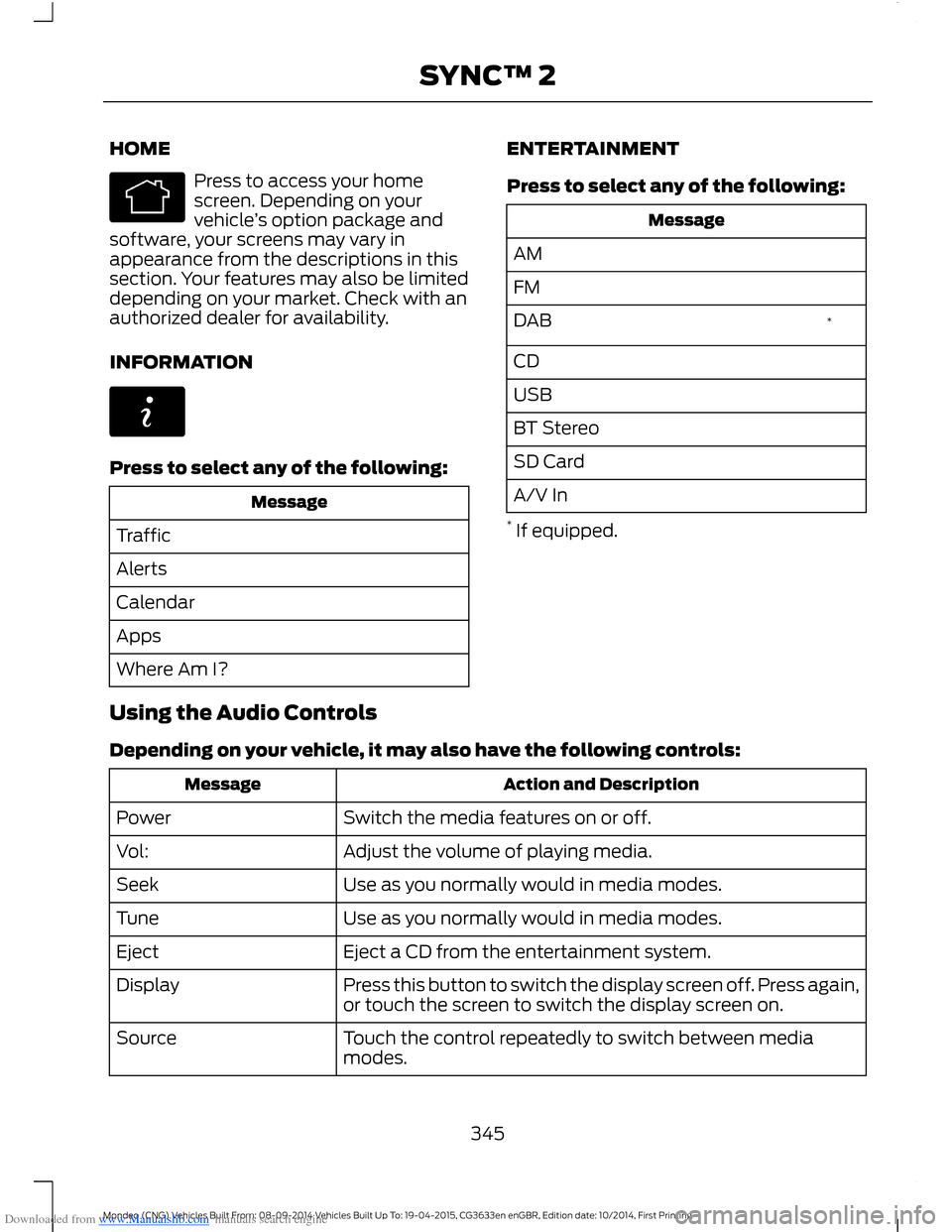
Downloaded from www.Manualslib.com manuals search engine HOME
Press to access your homescreen. Depending on yourvehicle’s option package andsoftware, your screens may vary inappearance from the descriptions in thissection. Your features may also be limiteddepending on your market. Check with anauthorized dealer for availability.
INFORMATION
Press to select any of the following:
Message
Traffic
Alerts
Calendar
Apps
Where Am I?
ENTERTAINMENT
Press to select any of the following:
Message
AM
FM
*DAB
CD
USB
BT Stereo
SD Card
A/V In
* If equipped.
Using the Audio Controls
Depending on your vehicle, it may also have the following controls:
Action and DescriptionMessage
Switch the media features on or off.Power
Adjust the volume of playing media.Vol:
Use as you normally would in media modes.Seek
Use as you normally would in media modes.Tune
Eject a CD from the entertainment system.Eject
Press this button to switch the display screen off. Press again,or touch the screen to switch the display screen on.Display
Touch the control repeatedly to switch between mediamodes.Source
345Mondeo (CNG) Vehicles Built From: 08-09-2014 Vehicles Built Up To: 19-04-2015, CG3633en enGBR, Edition date: 10/2014, First PrintingSYNC™ 2