2014 FORD MONDEO display
[x] Cancel search: displayPage 362 of 446

Downloaded from www.Manualslib.com manuals search engine Action and DescriptionMenu Item
Switch breadcrumbs on and off.Map Prefer-encesHave the system display your turn list top to bottom or bottom to top.
Switch the Parking POI notification on and off.
Select shortest route, fastest route or ecological route as your preferredroute. This route displays first.Route Pref-erences
Always use preferred route. If set to yes, the system only calculates a singleroute. This speeds up your destination entry process.
Select a low, medium or high cost for the calculated ecological route. Thismay incur a time penalty.
Have the system avoid freeways.
Have the system avoid toll roads.
Have the system avoid ferries or car trains.
Have the system avoid tunnels.
Have the system use guidance prompts.NavigationPrefer-encesHave the system automatically fill in State/Province information.
Hazard Spot Warning
Have the system activate hazard spot warning in countries where legallyallowed.
Have the system avoid traffic problems automatically.TrafficPrefer-encesSwitch traffic alert notifications on or off.
Have the system display accident icons.
Have the system display traffic jam icons.
Have the system display closed roads.
Have the system display road work icons.
Have the system display incident icons.
Have the system display icons for areas where difficult driving conditionsmay occur.
Have the system display icons for areas where snow and ice on the roadmay occur.
360Mondeo (CNG) Vehicles Built From: 08-09-2014 Vehicles Built Up To: 19-04-2015, CG3633en enGBR, Edition date: 10/2014, First PrintingSYNC™ 2
Page 363 of 446
Downloaded from www.Manualslib.com manuals search engine Action and DescriptionMenu Item
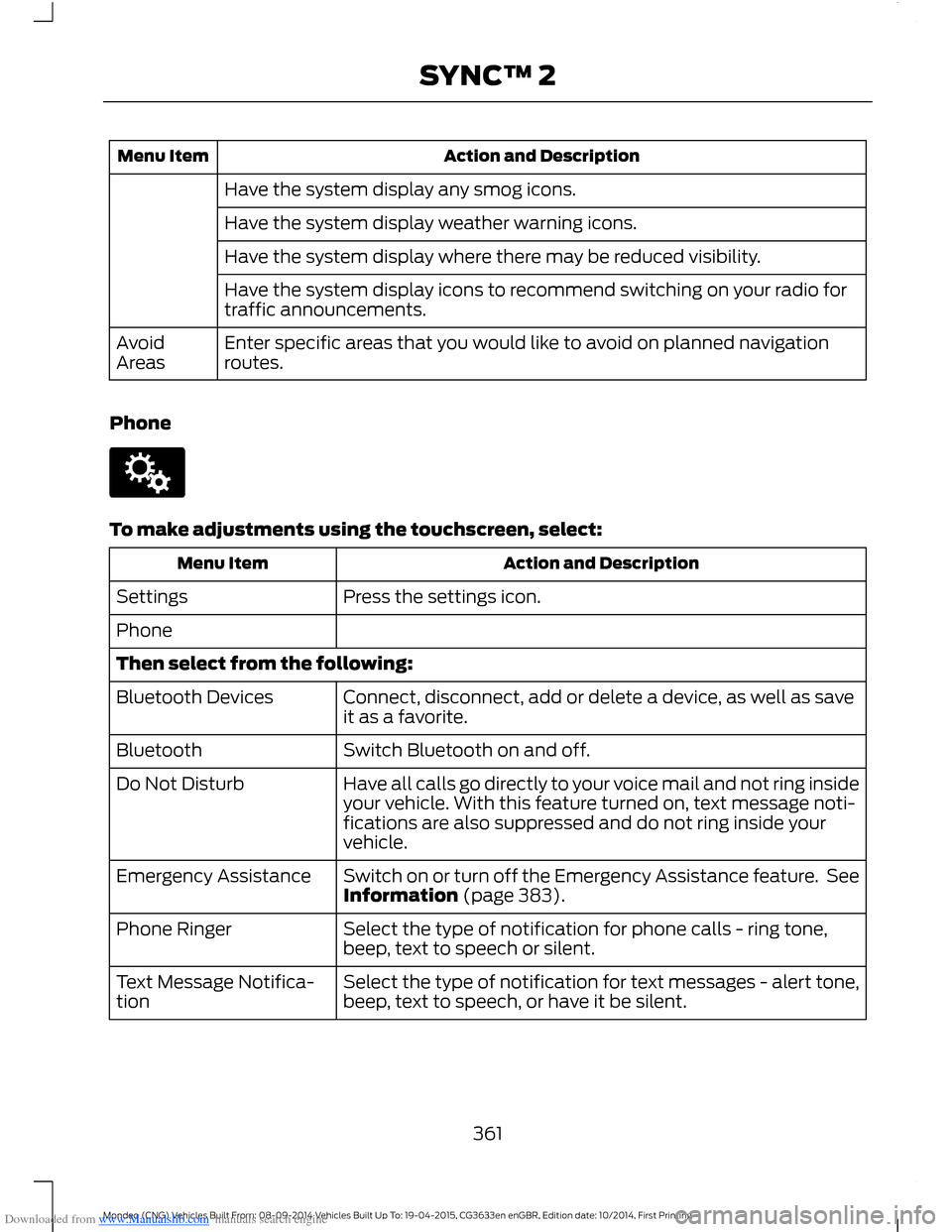
Have the system display any smog icons.
Have the system display weather warning icons.
Have the system display where there may be reduced visibility.
Have the system display icons to recommend switching on your radio fortraffic announcements.
Enter specific areas that you would like to avoid on planned navigationroutes.AvoidAreas
Phone
To make adjustments using the touchscreen, select:
Action and DescriptionMenu Item
Press the settings icon.Settings
Phone
Then select from the following:
Connect, disconnect, add or delete a device, as well as saveit as a favorite.Bluetooth Devices
Switch Bluetooth on and off.Bluetooth
Have all calls go directly to your voice mail and not ring insideyour vehicle. With this feature turned on, text message noti-fications are also suppressed and do not ring inside yourvehicle.
Do Not Disturb
Switch on or turn off the Emergency Assistance feature. SeeInformation (page 383).Emergency Assistance
Select the type of notification for phone calls - ring tone,beep, text to speech or silent.Phone Ringer
Select the type of notification for text messages - alert tone,beep, text to speech, or have it be silent.Text Message Notifica-tion
361Mondeo (CNG) Vehicles Built From: 08-09-2014 Vehicles Built Up To: 19-04-2015, CG3633en enGBR, Edition date: 10/2014, First PrintingSYNC™ 2
Page 365 of 446

Downloaded from www.Manualslib.com manuals search engine Action and DescriptionMenu Item
Makes SYNC an access point for a phone or a computer whenturned on. This forms the local area network within yourvehicle for things, such as game playing, file transfer andinternet browsing. Press ? for more information.
Gateway (Access Point) Settings
Allows you to view and change settings for using SYNC asthe internet gateway.
Gateway (Access Point) Devices List
Allows you to view recent connections to your Wi-Fi system.
Instead of using Wi-Fi, your system can also use a USB mobilebroadband connection to access the internet. (You mustswitch on your mobile broadband device on your personalcomputer before connecting it to the system.) This screenallows you to set up what is your typical area for your USBmobile broadband connection. (USB mobile broadbandsettings may not display if the device is already on.) You canselect the following:
USB Mobile Broadband
Country
Carrier
Phone Number
User Name
Password
Shows you the currently paired devices as well as giving youyour typical Bluetooth options to connect, disconnect, set asfavorite, delete and add device. Bluetooth is a registeredtrademark of the Bluetooth SIG.
Bluetooth Settings
Choose your connection methods and change them asneeded. You can select to change order and have the systemeither always attempt to connect using a USB mobilebroadband or using Wi-Fi.
Prioritize ConnectionMethods
363Mondeo (CNG) Vehicles Built From: 08-09-2014 Vehicles Built Up To: 19-04-2015, CG3633en enGBR, Edition date: 10/2014, First PrintingSYNC™ 2
Page 369 of 446
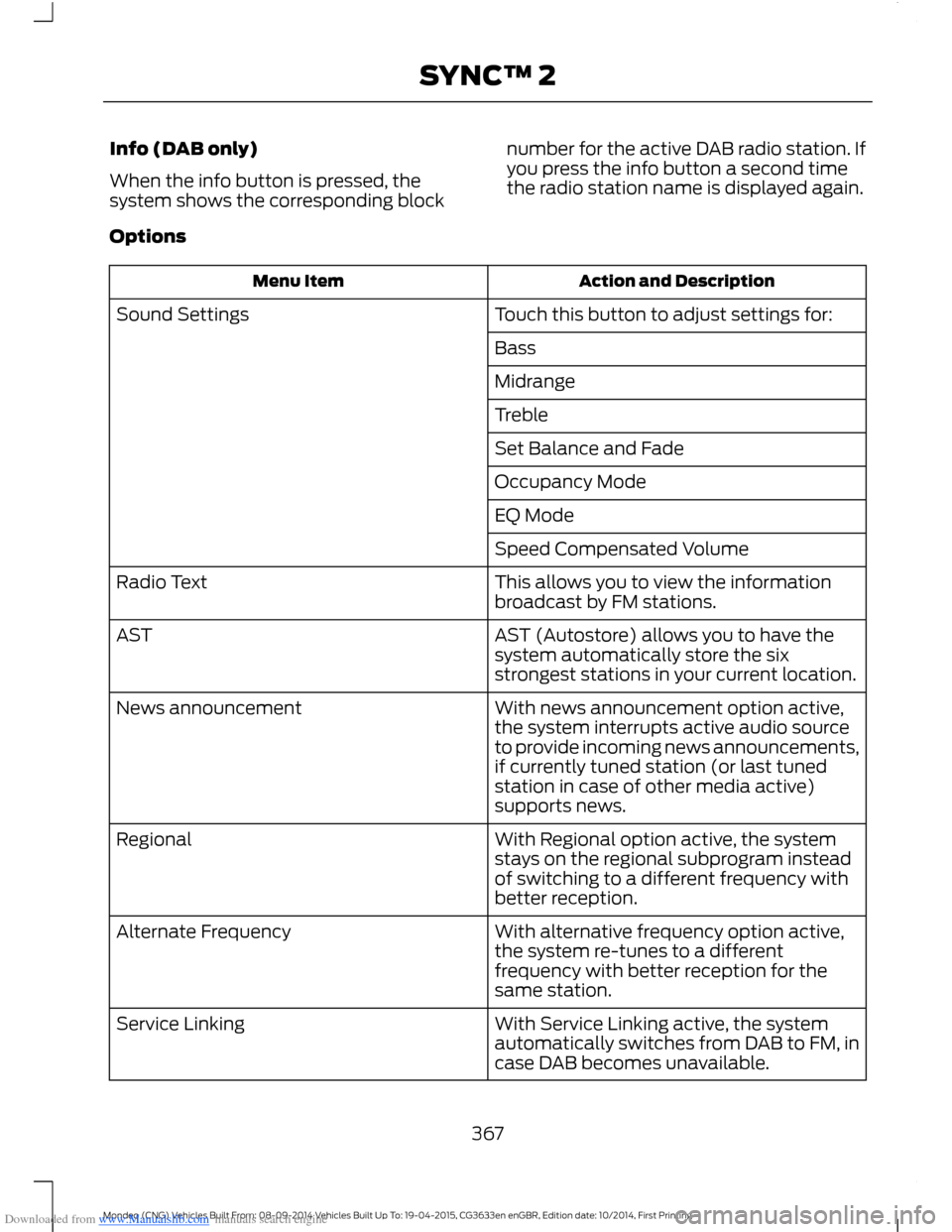
Downloaded from www.Manualslib.com manuals search engine Info (DAB only)
When the info button is pressed, thesystem shows the corresponding block
number for the active DAB radio station. Ifyou press the info button a second timethe radio station name is displayed again.
Options
Action and DescriptionMenu Item
Touch this button to adjust settings for:Sound Settings
Bass
Midrange
Treble
Set Balance and Fade
Occupancy Mode
EQ Mode
Speed Compensated Volume
This allows you to view the informationbroadcast by FM stations.Radio Text
AST (Autostore) allows you to have thesystem automatically store the sixstrongest stations in your current location.
AST
With news announcement option active,the system interrupts active audio sourceto provide incoming news announcements,if currently tuned station (or last tunedstation in case of other media active)supports news.
News announcement
With Regional option active, the systemstays on the regional subprogram insteadof switching to a different frequency withbetter reception.
Regional
With alternative frequency option active,the system re-tunes to a differentfrequency with better reception for thesame station.
Alternate Frequency
With Service Linking active, the systemautomatically switches from DAB to FM, incase DAB becomes unavailable.
Service Linking
367Mondeo (CNG) Vehicles Built From: 08-09-2014 Vehicles Built Up To: 19-04-2015, CG3633en enGBR, Edition date: 10/2014, First PrintingSYNC™ 2
Page 374 of 446

Downloaded from www.Manualslib.com manuals search engine Action and DescriptionMessage
Displays software and firmware information about thecurrently connected media device.Device Information
Indexes your device when you connect it for the first time andeach time the content changes (for example adding orremoving tracks) to make sure you have the latest voicecommands available for all media on the device.
Update Media Index
Note:Your vehicle may not have all these sound settings.
Browse
This feature allows you to view thecontents of the device. It also allows youto search by categories, for example genre,artist or album.
If you want to view song information, forexample Title, Artist, File, Folder, Album,and Genre, touch the on-screen album art.
You can also select:
Action and DescriptionMessage
To hear how the system pronounces the current band andsong. This can be helpful when using voice commands tomake sure the system correctly plays your request.
What’s Playing?
Playing Video from Your Device
To access and play video from your device,your vehicle's transmission must be in park(P) with the ignition in accessory mode.See Starting and Stopping the Engine(page 138).
USB and SD Card Voice Commands
The voice system allows you to controlyour media with voice commands. Forexample, if you are listening to music onyour USB device, and wish to changesongs, you can press the voice button andthe system provides you with audioprompts.
Press the voice button and when prompted say:
Voice command
SD Card
USB
Then commands such as the following:
372Mondeo (CNG) Vehicles Built From: 08-09-2014 Vehicles Built Up To: 19-04-2015, CG3633en enGBR, Edition date: 10/2014, First PrintingSYNC™ 2
Page 379 of 446
Downloaded from www.Manualslib.com manuals search engine Action and DescriptionMenu Item
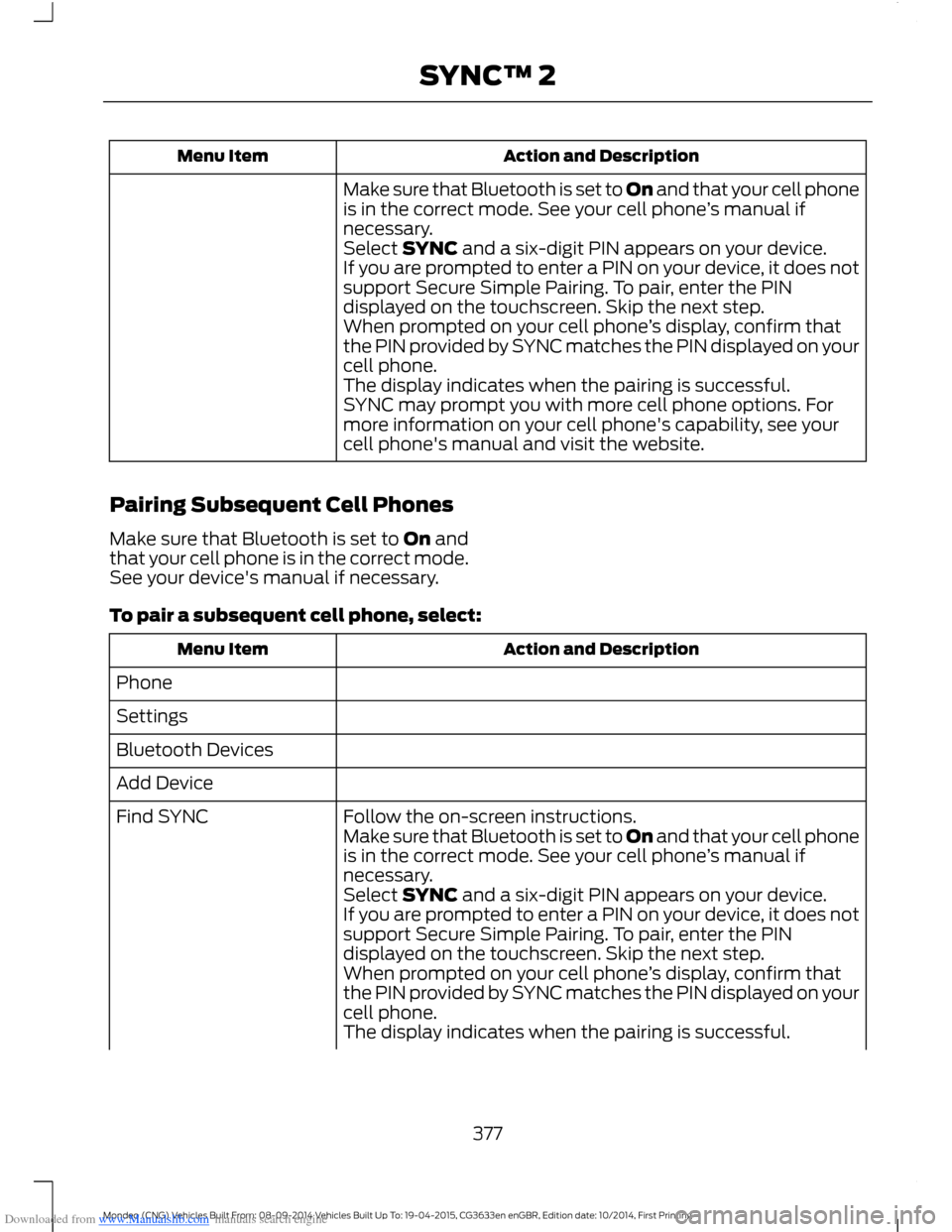
Make sure that Bluetooth is set to On and that your cell phoneis in the correct mode. See your cell phone’s manual ifnecessary.Select SYNC and a six-digit PIN appears on your device.If you are prompted to enter a PIN on your device, it does notsupport Secure Simple Pairing. To pair, enter the PINdisplayed on the touchscreen. Skip the next step.When prompted on your cell phone’s display, confirm thatthe PIN provided by SYNC matches the PIN displayed on yourcell phone.The display indicates when the pairing is successful.SYNC may prompt you with more cell phone options. Formore information on your cell phone's capability, see yourcell phone's manual and visit the website.
Pairing Subsequent Cell Phones
Make sure that Bluetooth is set to On andthat your cell phone is in the correct mode.See your device's manual if necessary.
To pair a subsequent cell phone, select:
Action and DescriptionMenu Item
Phone
Settings
Bluetooth Devices
Add Device
Follow the on-screen instructions.Find SYNCMake sure that Bluetooth is set to On and that your cell phoneis in the correct mode. See your cell phone’s manual ifnecessary.Select SYNC and a six-digit PIN appears on your device.If you are prompted to enter a PIN on your device, it does notsupport Secure Simple Pairing. To pair, enter the PINdisplayed on the touchscreen. Skip the next step.When prompted on your cell phone’s display, confirm thatthe PIN provided by SYNC matches the PIN displayed on yourcell phone.The display indicates when the pairing is successful.
377Mondeo (CNG) Vehicles Built From: 08-09-2014 Vehicles Built Up To: 19-04-2015, CG3633en enGBR, Edition date: 10/2014, First PrintingSYNC™ 2
Page 380 of 446

Downloaded from www.Manualslib.com manuals search engine Action and DescriptionMenu Item
SYNC may prompt you with more cell phone options. Formore information on your cell phone's capability, see yourcell phone's manual and visit the website.
Making Calls
Press the voice button and say acommand similar to the following:
Voice command
Call
Dial
You can say the name of a person fromyour phone book to call or a say a numberto dial. For example "Call Jenny" or "Dial867-5309".
To end the call or exit phonemode, press and hold the phonebutton.
Receiving Calls
During an incoming call, an audible tonesounds. Call information appears in thedisplay if it is available.
To accept the call, select:
Menu Item
Accept
Note:You can also accept the call bypressing the phone button on the steeringwheel.
To reject the call, select:
Menu Item
Reject
Note:You can also reject the call bypressing the phone button on the steeringwheel.
Ignore the call by doing nothing. SYNC logsit as a missed call.
Phone Menu Options
Press the top left corner on thetouchscreen to select from the followingoptions:
Action and DescriptionMenu Item
Touch this button to accessthe on-screen numerical padto enter a number and placea call. During an active call,you can also choose any ofthese options:
Phone
Mute Call
Hold Call
Privacy
Join Calls
End
Select to call storedcontacts.Quick Dial
378Mondeo (CNG) Vehicles Built From: 08-09-2014 Vehicles Built Up To: 19-04-2015, CG3633en enGBR, Edition date: 10/2014, First PrintingSYNC™ 2
Page 381 of 446
Downloaded from www.Manualslib.com manuals search engine Action and DescriptionMenu Item
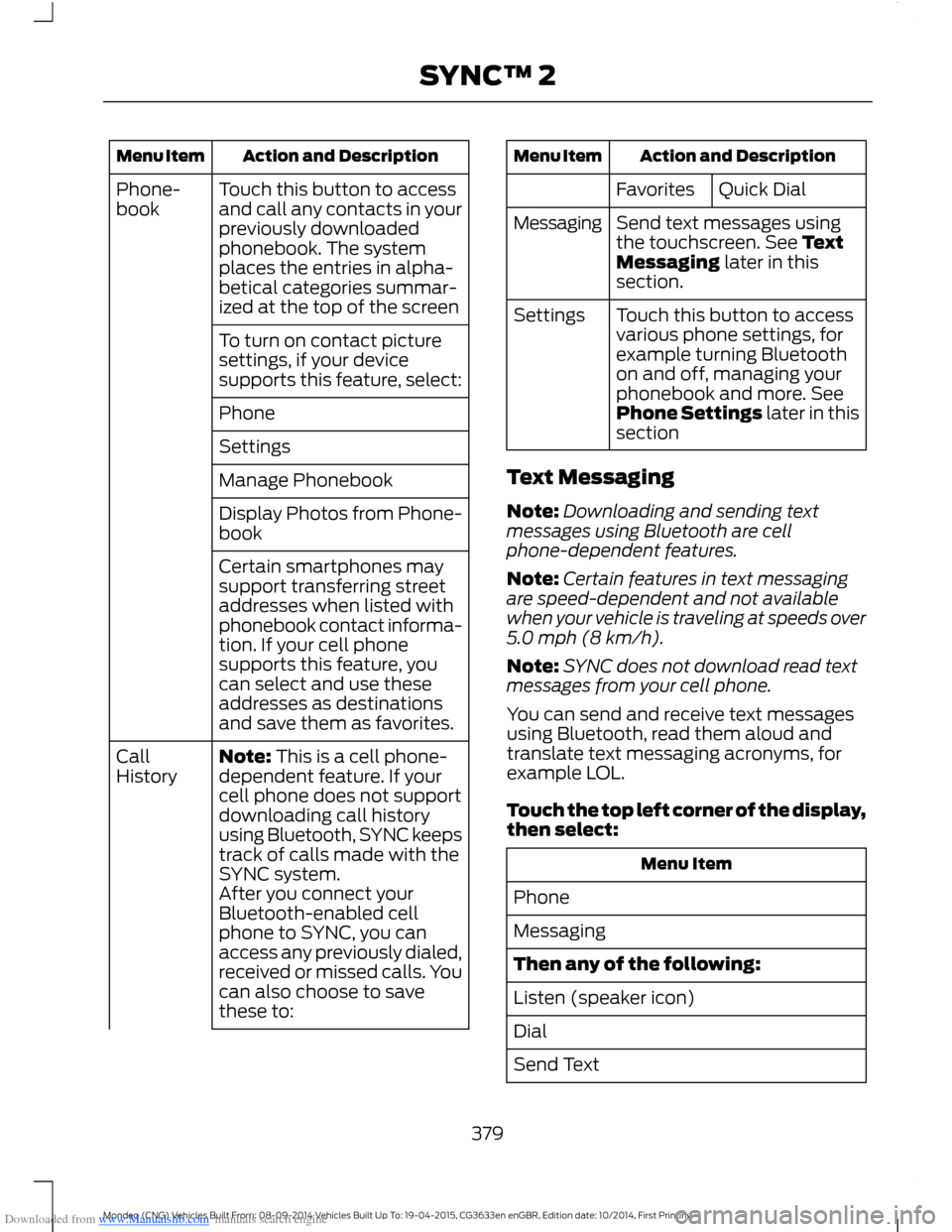
Touch this button to accessand call any contacts in yourpreviously downloadedphonebook. The systemplaces the entries in alpha-betical categories summar-ized at the top of the screen
Phone-book
To turn on contact picturesettings, if your devicesupports this feature, select:
Phone
Settings
Manage Phonebook
Display Photos from Phone-book
Certain smartphones maysupport transferring streetaddresses when listed withphonebook contact informa-tion. If your cell phonesupports this feature, youcan select and use theseaddresses as destinationsand save them as favorites.
Note: This is a cell phone-dependent feature. If yourcell phone does not supportdownloading call historyusing Bluetooth, SYNC keepstrack of calls made with theSYNC system.
CallHistory
After you connect yourBluetooth-enabled cellphone to SYNC, you canaccess any previously dialed,received or missed calls. Youcan also choose to savethese to:
Action and DescriptionMenu Item
Quick DialFavorites
Send text messages usingthe touchscreen. See TextMessaging later in thissection.
Messaging
Touch this button to accessvarious phone settings, forexample turning Bluetoothon and off, managing yourphonebook and more. SeePhone Settings later in thissection
Settings
Text Messaging
Note:Downloading and sending textmessages using Bluetooth are cellphone-dependent features.
Note:Certain features in text messagingare speed-dependent and not availablewhen your vehicle is traveling at speeds over5.0 mph (8 km/h).
Note:SYNC does not download read textmessages from your cell phone.
You can send and receive text messagesusing Bluetooth, read them aloud andtranslate text messaging acronyms, forexample LOL.
Touch the top left corner of the display,then select:
Menu Item
Phone
Messaging
Then any of the following:
Listen (speaker icon)
Dial
Send Text
379Mondeo (CNG) Vehicles Built From: 08-09-2014 Vehicles Built Up To: 19-04-2015, CG3633en enGBR, Edition date: 10/2014, First PrintingSYNC™ 2