2014 FORD MONDEO low beam
[x] Cancel search: low beamPage 184 of 446
Downloaded from www.Manualslib.com manuals search engine USING ADAPTIVE CRUISE
CONTROL (If Equipped)
WARNINGS
Always pay close attention tochanging road conditions, especiallywhen using adaptive cruise control.Adaptive cruise control cannot replaceattentive driving. Failing to follow any ofthe warnings below or failing to payattention to the road may result in a crash,serious injury or death.
The system is not a crash warning oravoidance system. You mustintervene if the system does notdetect a vehicle in front of you.
Adaptive cruise control does notdetect stationary or slow movingvehicles below 6 mph (10 km/h).
The system does not brake for slowor stationary vehicles, pedestrians,objects in the road, oncoming andcrossing vehicles.
Do not use the system when enteringor leaving a freeway.
Do not use adaptive cruise controlon winding roads, in heavy traffic orwhen the road surface is slippery.This could result in loss of vehicle control,serious injury or death.
Do not use the system in poorvisibility, specifically fog, heavy rain,spray or snow.
WARNINGS
Do not use the system when towinga trailer with electronic aftermarkettrailer brake controls. Electronicaftermarket trailer brakes do not functionproperly when you switch on the systembecause the brakes are electronicallycontrolled. Failing to do so may result inloss of vehicle control, which could resultin serious injury. Overrun brakes, surgebrakes and other non-electronictrailer-brake controllers are not affected.
Do not use tire sizes other than thoserecommended because this canaffect the normal operation of thesystem. Failing to do so may result in a lossof vehicle control, which could result inserious injury.
The system is designed to help youmaintain a gap from the vehicle in front ofyou. If there is no vehicle in front of you thesystem will maintain a set speed. Thesystem is intended to provide enhancedoperation of your vehicle when followingother vehicles which are in the same laneand traveling in the same direction. Youcan select from one of five gap settings.
The system is based on the use of a radarsensor which projects a beam directlyforward of your vehicle. This beam willdetect any vehicle ahead within thesystem's range.
If there is no vehicle in front of you, thesystem maintains your set speed.
182Mondeo (CNG) Vehicles Built From: 08-09-2014 Vehicles Built Up To: 19-04-2015, CG3633en enGBR, Edition date: 10/2014, First PrintingCruise Control
Page 188 of 446
Downloaded from www.Manualslib.com manuals search engine Overriding the System
WARNING
Whenever the driver is overriding thesystem by pressing the acceleratorpedal, the system does notautomatically apply the brakes to maintainseparation from any vehicle ahead.
You can override the set speed and gap bypressing the accelerator pedal.
When you override the system,the green indicator lightilluminates and the lead vehiclegraphic does not show in theinformation display.
The system resumes operation when yourelease the accelerator pedal. The vehiclespeed decreases to the set speed, or alower speed if following a slower vehicle.
Automatic Switch Off
The system does not operate below12 mph (20 km/h). An audible warningsounds and the automatic braking releasesif the vehicle drops below this speed.
Automatic cancellation can also occur if:
•The tires lose traction.
•The engine speed is too low.
•You apply the parking brake.
Note:If the engine speed drops too low,the information display indicates low enginespeed. Shift to a lower gear (manualtransmission only) to avoid automaticcancellation.
Hilly Condition Usage
You should select a lower gear positionwhen the system is active in situationssuch as prolonged downhill driving onsteep grades, for example in mountainousareas. The system needs additional enginebraking in these situations to reduce theload on the vehicle’s regular brake systemto prevent them from overheating.
Note:An audible warning sounds and thesystem shuts down if it applies brakes foran extended period of time. This allows thebrakes to cool down. The system functionsnormally again when the brakes have cooleddown.
Detection Beam Issues
The radar sensor has a limited field ofvision. It may not detect vehicles at all ordetect a vehicle later than expected insome situations. The lead vehicle graphicdoes not illuminate if the system does notdetect a vehicle in front of you.
186Mondeo (CNG) Vehicles Built From: 08-09-2014 Vehicles Built Up To: 19-04-2015, CG3633en enGBR, Edition date: 10/2014, First PrintingCruise Control
Page 189 of 446
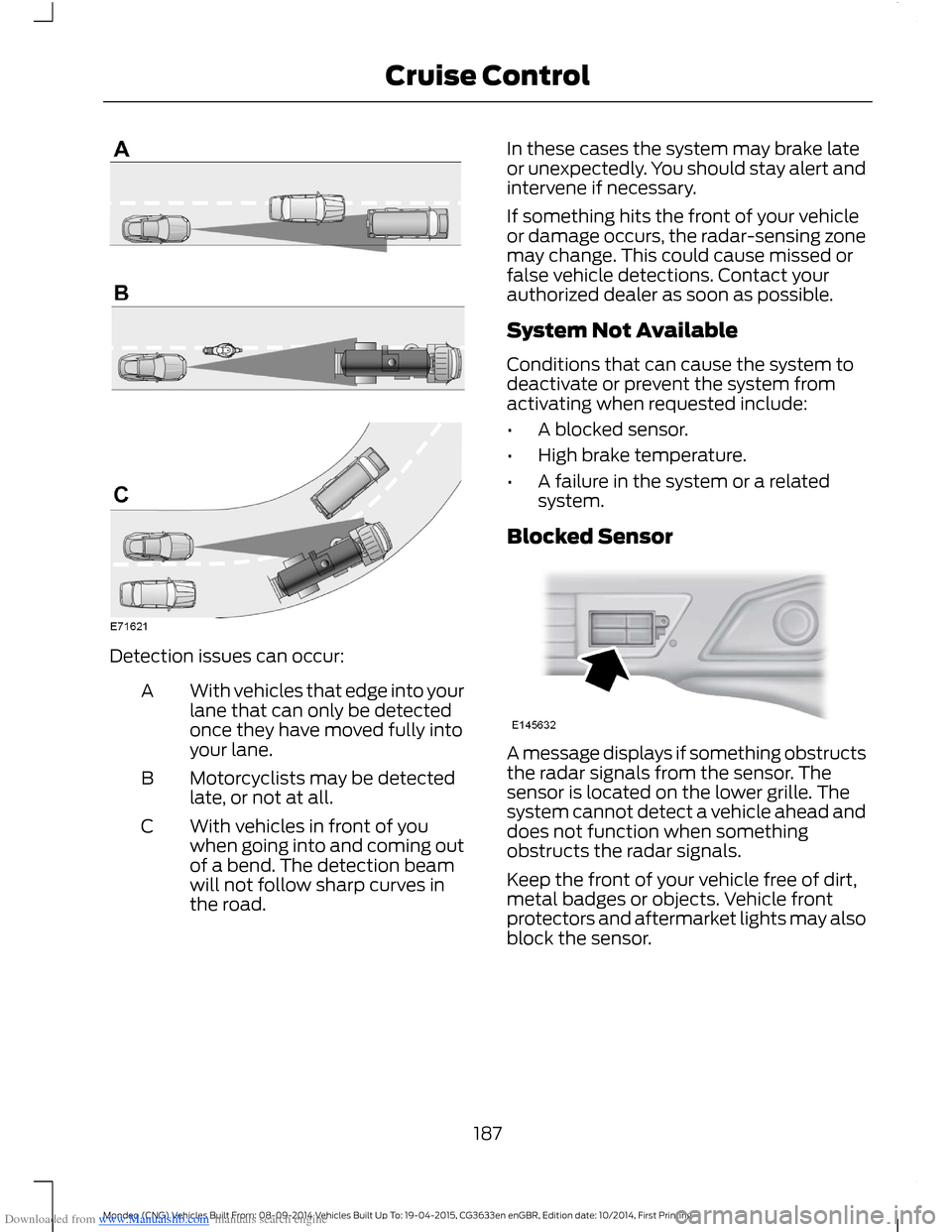
Downloaded from www.Manualslib.com manuals search engine Detection issues can occur:
With vehicles that edge into yourlane that can only be detectedonce they have moved fully intoyour lane.
A
Motorcyclists may be detectedlate, or not at all.B
With vehicles in front of youwhen going into and coming outof a bend. The detection beamwill not follow sharp curves inthe road.
C
In these cases the system may brake lateor unexpectedly. You should stay alert andintervene if necessary.
If something hits the front of your vehicleor damage occurs, the radar-sensing zonemay change. This could cause missed orfalse vehicle detections. Contact yourauthorized dealer as soon as possible.
System Not Available
Conditions that can cause the system todeactivate or prevent the system fromactivating when requested include:
•A blocked sensor.
•High brake temperature.
•A failure in the system or a relatedsystem.
Blocked Sensor
A message displays if something obstructsthe radar signals from the sensor. Thesensor is located on the lower grille. Thesystem cannot detect a vehicle ahead anddoes not function when somethingobstructs the radar signals.
Keep the front of your vehicle free of dirt,metal badges or objects. Vehicle frontprotectors and aftermarket lights may alsoblock the sensor.
187Mondeo (CNG) Vehicles Built From: 08-09-2014 Vehicles Built Up To: 19-04-2015, CG3633en enGBR, Edition date: 10/2014, First PrintingCruise Control
Page 202 of 446
Downloaded from www.Manualslib.com manuals search engine ACTIVE CITY STOP
Principle of Operation
WARNINGS
You are responsible for controllingyour vehicle at all times. The systemdoes not relieve you of yourresponsibility to drive with due care andattention. Failure to take care may resultin the loss of control of your vehicle, seriouspersonal injury or death.
To achieve full system performanceyou must break in the brakingsystem. See Breaking-In (page 221).Failure to take care may result in the lossof control of your vehicle, serious personalinjury or death.
If the system applies the brakes andthe engine stops the hazard warningflashers will automatically turn on.Failure to take care may lead to a crash orpersonal injury.
The system does not react tocyclists, motorcyclists, pedestrians,animals or vehicles that are drivingin a different direction. Failure to take caremay result in the loss of control of yourvehicle, serious personal injury or death.
The system does not operate duringharsh acceleration or steering. Failureto take care may lead to a crash orpersonal injury.
The system may not operate duringcold or severe weather conditions.Snow, ice, heavy rain and spray caninfluence the system. Keep the hood freeof snow and ice. Failure to take care mayresult in the loss of control of your vehicle,serious personal injury or death.
The system may not operate whendriving around sharp curves. Failureto take care may lead to a crash orpersonal injury.
WARNINGS
The system may not operatecorrectly if you replace thewindshield with a non-Fordwindshield. Do not carry out windshieldrepairs in front of the sensor. Failure toadhere to this warning may lead to anaccident or injury.
The system may not detect objectswith surfaces that absorb reflections.Failure to take care may result in theloss of control of your vehicle, seriouspersonal injury or death.
The system will not operate correctlyif the sensor is blocked. Keep thewindshield free from obstructions,for example, bird droppings, insects, snowor ice. Failure to adhere to this warning maylead to an accident or injury.
When you switch the ignition on thesensor transmits a laser beam. Neverlook directly into the sensor with anytype of object, there is a risk of eye injury.
The sensor is on the rear of the interiormirror. It continuously monitors conditionsto decide when to intervene.
The system operates at speeds belowapproximately 25 mph (40 km/h) byapplying the brakes if it detects that acrash is likely. If the system applies thebrakes, a message appears in theinformation display.
The system may reduce the risk of a lowspeed crash into another vehicle. It alsohelps reduce impact damage or may avoidthe crash completely.
Note:You must depress the brake pedal toobtain full braking force.
200Mondeo (CNG) Vehicles Built From: 08-09-2014 Vehicles Built Up To: 19-04-2015, CG3633en enGBR, Edition date: 10/2014, First PrintingDriving Aids
Page 254 of 446

Downloaded from www.Manualslib.com manuals search engine 9.From the front of the vehicle, gentlypull the front bumper cover forward 4inches (10 centimeters) by grasping itnext to the headlamp to be servicedand in the lower front of the wheelopening.
10.Gently pull the headlamp assemblyoutward to disengage it from thelower fixing point.
11.Carefully lift the headlamp andremove it from the vehicle.
12.Disconnect the electrical connectorfrom the headlamp assembly bypushing the release tab on theconnector.
CHANGING A BULB
WARNINGS
Switch all of the lamps and theignition off. Failure to follow thiswarning could result in seriouspersonal injury.
Bulbs become hot when in use. Letthem cool down before you removethem.
Use the correct specification bulb. SeeBulb Specification Chart (page 255).
Install in the reverse order unless otherwisestated.
Headlamp
You must remove the headlamp assemblyprior to replacing any bulb. See BulbSpecification Chart (page 255).
Front side lamp.A
High beam.B
Low beam.C
Front direction indicator.D
Front Side Lamp
1.Remove the headlamp.
2.Remove the cover.
3.Remove the bulb holder by pulling itstraight out.
4.Remove the bulb by pulling it straightout.
Front Direction Indicator
1.Remove the headlamp.
2.Turn the bulb holder counterclockwiseand remove it.
Note:You cannot separate the bulb fromthe bulb holder.
Headlamp Low Beam
1.Remove the headlamp.
2.Remove the cover.
252Mondeo (CNG) Vehicles Built From: 08-09-2014 Vehicles Built Up To: 19-04-2015, CG3633en enGBR, Edition date: 10/2014, First PrintingMaintenance
Page 255 of 446
Downloaded from www.Manualslib.com manuals search engine 3.Turn the bulb holder counterclockwiseand remove it.
4.Disconnect the electrical connector.
Note:Do not touch the bulb glass.
Note:You cannot separate the bulb fromthe bulb holder.
Headlamp High Beam
1.Remove the headlamp.
2.Remove the cover.
3.Turn the bulb holder counterclockwiseand remove it.
4.Disconnect the electrical connector.
Note:Do not touch the bulb glass.
Note:You cannot separate the bulb fromthe bulb holder.
High-Intensity Discharge Headlamps
These lamps operate at a high voltage. Seean authorized dealer if they fail.
LED Lamps
LED lamps are not serviceable items. Seean authorized dealer if they fail.
The following lamps are LED:
•Brake and rear lamps.
•Central high mounted brake lamp.
•Daytime running lamps.
•Rear direction indicators.
•Side direction indicators.
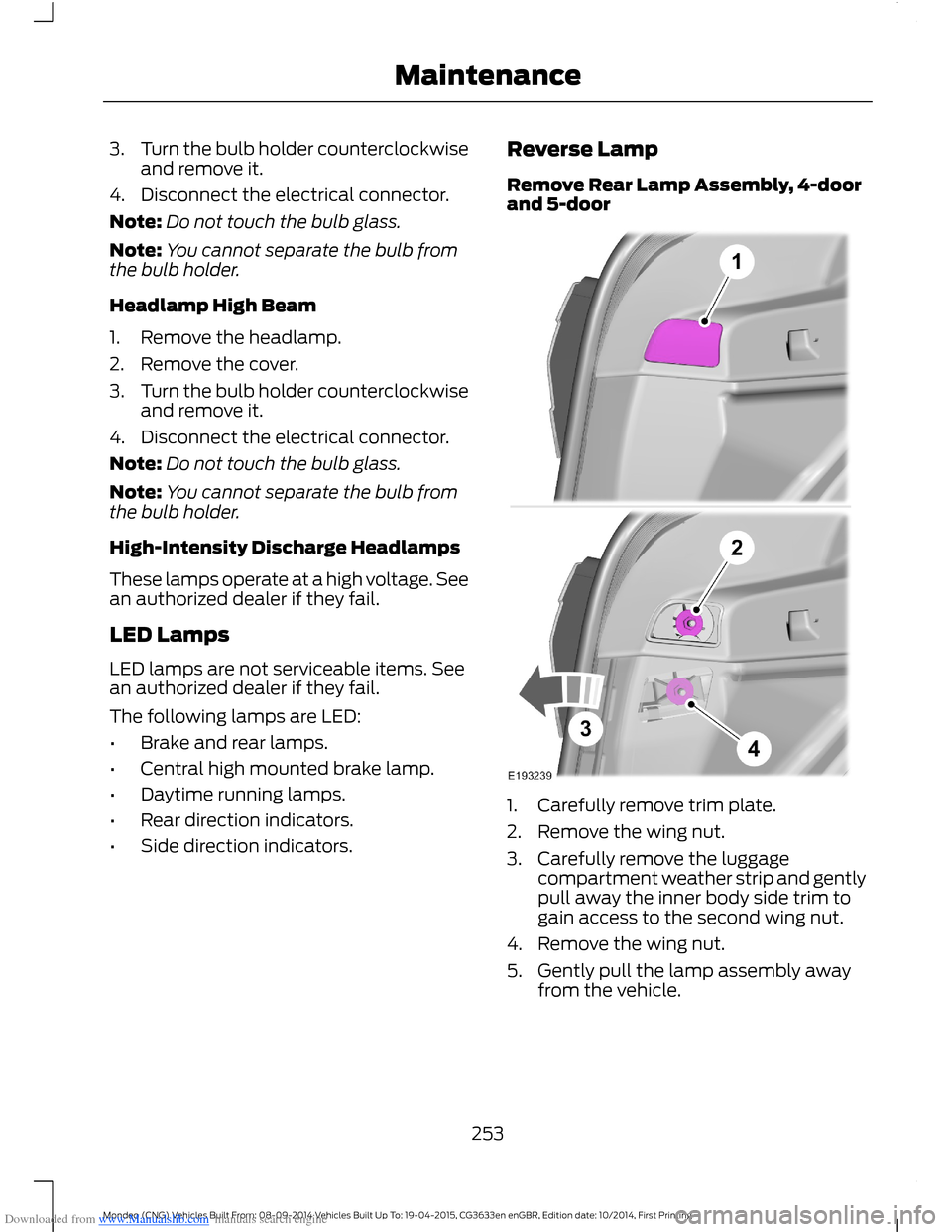
Reverse Lamp
Remove Rear Lamp Assembly, 4-doorand 5-door
1.Carefully remove trim plate.
2.Remove the wing nut.
3.Carefully remove the luggagecompartment weather strip and gentlypull away the inner body side trim togain access to the second wing nut.
4.Remove the wing nut.
5.Gently pull the lamp assembly awayfrom the vehicle.
253Mondeo (CNG) Vehicles Built From: 08-09-2014 Vehicles Built Up To: 19-04-2015, CG3633en enGBR, Edition date: 10/2014, First PrintingMaintenance
Page 257 of 446
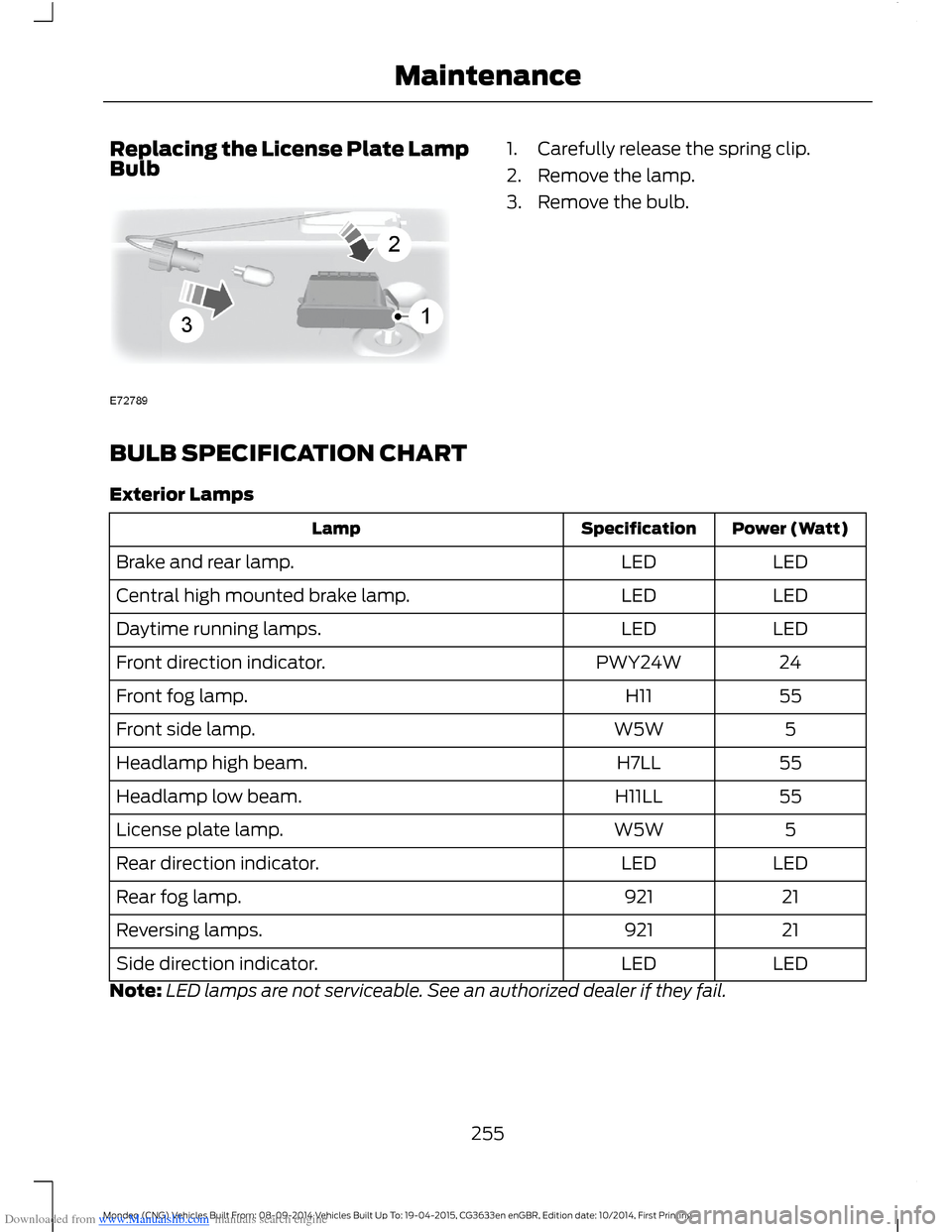
Downloaded from www.Manualslib.com manuals search engine Replacing the License Plate LampBulb1.Carefully release the spring clip.
2.Remove the lamp.
3.Remove the bulb.
BULB SPECIFICATION CHART
Exterior Lamps
Power (Watt)SpecificationLamp
LEDLEDBrake and rear lamp.
LEDLEDCentral high mounted brake lamp.
LEDLEDDaytime running lamps.
24PWY24WFront direction indicator.
55H11Front fog lamp.
5W5WFront side lamp.
55H7LLHeadlamp high beam.
55H11LLHeadlamp low beam.
5W5WLicense plate lamp.
LEDLEDRear direction indicator.
21921Rear fog lamp.
21921Reversing lamps.
LEDLEDSide direction indicator.
Note:LED lamps are not serviceable. See an authorized dealer if they fail.
255Mondeo (CNG) Vehicles Built From: 08-09-2014 Vehicles Built Up To: 19-04-2015, CG3633en enGBR, Edition date: 10/2014, First PrintingMaintenance
Page 442 of 446
Downloaded from www.Manualslib.com manuals search engine Towing a Trailer..............................................215When towing a trailer:.......................................215Towing Points.................................................217Front Towing Eye................................................218Rear Towing Eye..................................................218Towing Eye Locations.......................................218Towing the Vehicle on Four Wheels -Automatic Transmission.........................219Emergency Towing............................................220Towing the Vehicle on Four Wheels -Manual Transmission...............................219Towing...............................................................215Traction Control............................................165Principle of Operation.......................................165Traffic Sign Recognition............................198Principle of Operation......................................198Using the System...............................................199Trailer Sway Control....................................216Transmission..................................................155TransmissionSee: Transmission..............................................155
U
Under Hood Overview - 1.0LEcoBoost™.................................................239Under Hood Overview - 1.5LDuratorq-TDCi Diesel/1.6LDiesel.............................................................243Under Hood Overview - 1.5LEcoBoost™.................................................240Under Hood Overview - 2.0LDiesel.............................................................244Under Hood Overview - 2.0LEcoBoost™..................................................241Under Hood Overview - 2.5L...................242Unique Driving Characteristics................146USB Port.........................................................304
Using Adaptive Cruise Control................182Automatic Switch Off.......................................186Blocked Sensor....................................................187Canceling the Set Speed.................................183Changing the Set Speed..................................183Detection Beam Issues....................................186Following a Vehicle............................................184Hilly Condition Usage.......................................186Overriding the System......................................186Resuming the Set Speed.................................184Setting a Speed...................................................183Setting the Gap...................................................185Switching the System Off...............................184Switching the System On................................183Switching to Normal Cruise Control...........188System Not Available........................................187Using Cruise Control.....................................181Switching Cruise Control Off..........................181Switching Cruise Control On...........................181Using MyKey With Remote StartSystems..........................................................42Using Snow Chains.....................................264Vehicles with Stability Control.....................264Using Stability Control...............................166Switching the System Off and On Using theInformation Display Controls....................166Switching the System Off Using aSwitch................................................................166Using SYNC™ With Your MediaPlayer.............................................................327Accessing Your USB Song Library................331Bluetooth Devices and SystemSettings.............................................................333Connecting Your Media Player to the USBPort.....................................................................327Media Menu Features........................................331Media Voice Commands.................................328What's Playing?.................................................328
440Mondeo (CNG) Vehicles Built From: 08-09-2014 Vehicles Built Up To: 19-04-2015, CG3633en enGBR, Edition date: 10/2014, First PrintingIndex