2014 FORD MONDEO USB port
[x] Cancel search: USB portPage 332 of 446
![FORD MONDEO 2014 4.G Owners Manual Downloaded from www.Manualslib.com manuals search engine Voice Command
[play] (similar music | more like this)
((whos | who is) this | who plays this | (whats | what is) playing [now] | (what | whic](/manual-img/11/5483/w960_5483-331.png "FORD MONDEO 2014 4.G Owners Manual Downloaded from www.Manualslib.com manuals search engine Voice Command
[play] (similar music | more like this)
((whos | who is) this | who plays this | (whats | what is) playing [now] | (what | whic")
Downloaded from www.Manualslib.com manuals search engine Voice Command
[play] (similar music | more like this)
((who's | who is) this | who plays this | (what's | what is) playing [now] | (what | which)(song | track | artist) is this | (who's | who is) playing | (what's | what is) this)
* This voice command is not available until indexing is complete.
Voice Command Guide
Description and ActionVoice Command
The system searches all the data from your indexed musicand if available, begins to play the chosen type of music.(browse | search | show)genre
The system compiles a playlist and then plays similar musicto what is currently playing from the USB port using indexedmetadata information.
[play] (similar music |more like this)
The system searches for a specific artist, track or album fromthe music indexed through the USB port.(browse | search | show)artist
The system searches for a specific artist, track or album fromthe music indexed through the USB port.(browse | search | show)album
The system is also capable of playingmusic from your cell phone throughBluetooth.
To switch the Bluetooth audio on, use theMEDIA button (next to the audio display)or Source button, or press the voice buttonand when prompted say:
Description and ActionVoice Command
Bluetooth audio
Then any of the following:
Description and ActionVoice Command
pause
play
[play] next track
[play] previous track
330Mondeo (CNG) Vehicles Built From: 08-09-2014 Vehicles Built Up To: 19-04-2015, CG3633en enGBR, Edition date: 10/2014, First PrintingSYNC™
Page 333 of 446
Downloaded from www.Manualslib.com manuals search engine Media Menu Features
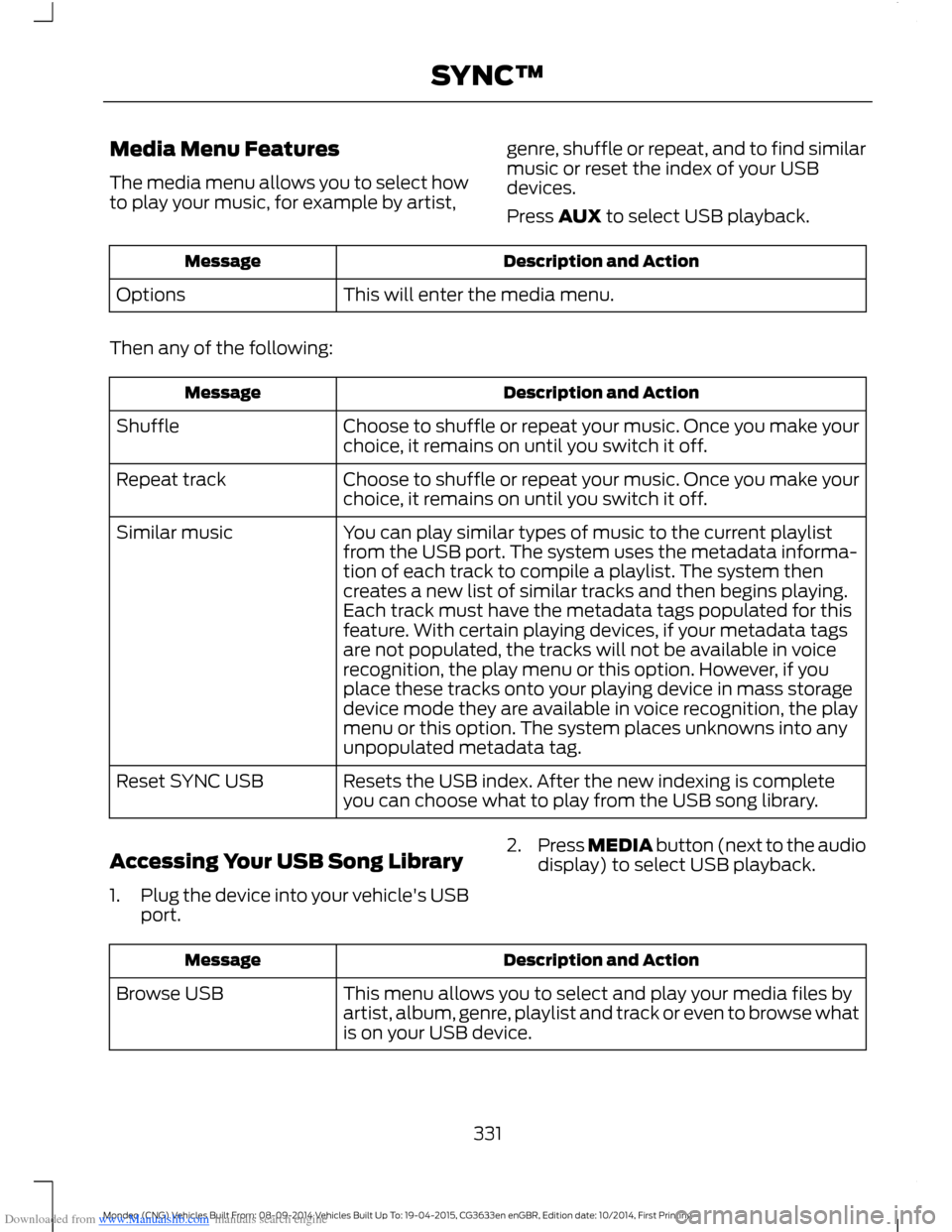
The media menu allows you to select howto play your music, for example by artist,
genre, shuffle or repeat, and to find similarmusic or reset the index of your USBdevices.
Press AUX to select USB playback.
Description and ActionMessage
This will enter the media menu.Options
Then any of the following:
Description and ActionMessage
Choose to shuffle or repeat your music. Once you make yourchoice, it remains on until you switch it off.Shuffle
Choose to shuffle or repeat your music. Once you make yourchoice, it remains on until you switch it off.Repeat track
You can play similar types of music to the current playlistfrom the USB port. The system uses the metadata informa-tion of each track to compile a playlist. The system thencreates a new list of similar tracks and then begins playing.Each track must have the metadata tags populated for thisfeature. With certain playing devices, if your metadata tags
Similar music
are not populated, the tracks will not be available in voicerecognition, the play menu or this option. However, if youplace these tracks onto your playing device in mass storagedevice mode they are available in voice recognition, the playmenu or this option. The system places unknowns into anyunpopulated metadata tag.
Resets the USB index. After the new indexing is completeyou can choose what to play from the USB song library.Reset SYNC USB
Accessing Your USB Song Library
1.Plug the device into your vehicle's USBport.
2.Press MEDIA button (next to the audiodisplay) to select USB playback.
Description and ActionMessage
This menu allows you to select and play your media files byartist, album, genre, playlist and track or even to browse whatis on your USB device.
Browse USB
331Mondeo (CNG) Vehicles Built From: 08-09-2014 Vehicles Built Up To: 19-04-2015, CG3633en enGBR, Edition date: 10/2014, First PrintingSYNC™
Page 335 of 446
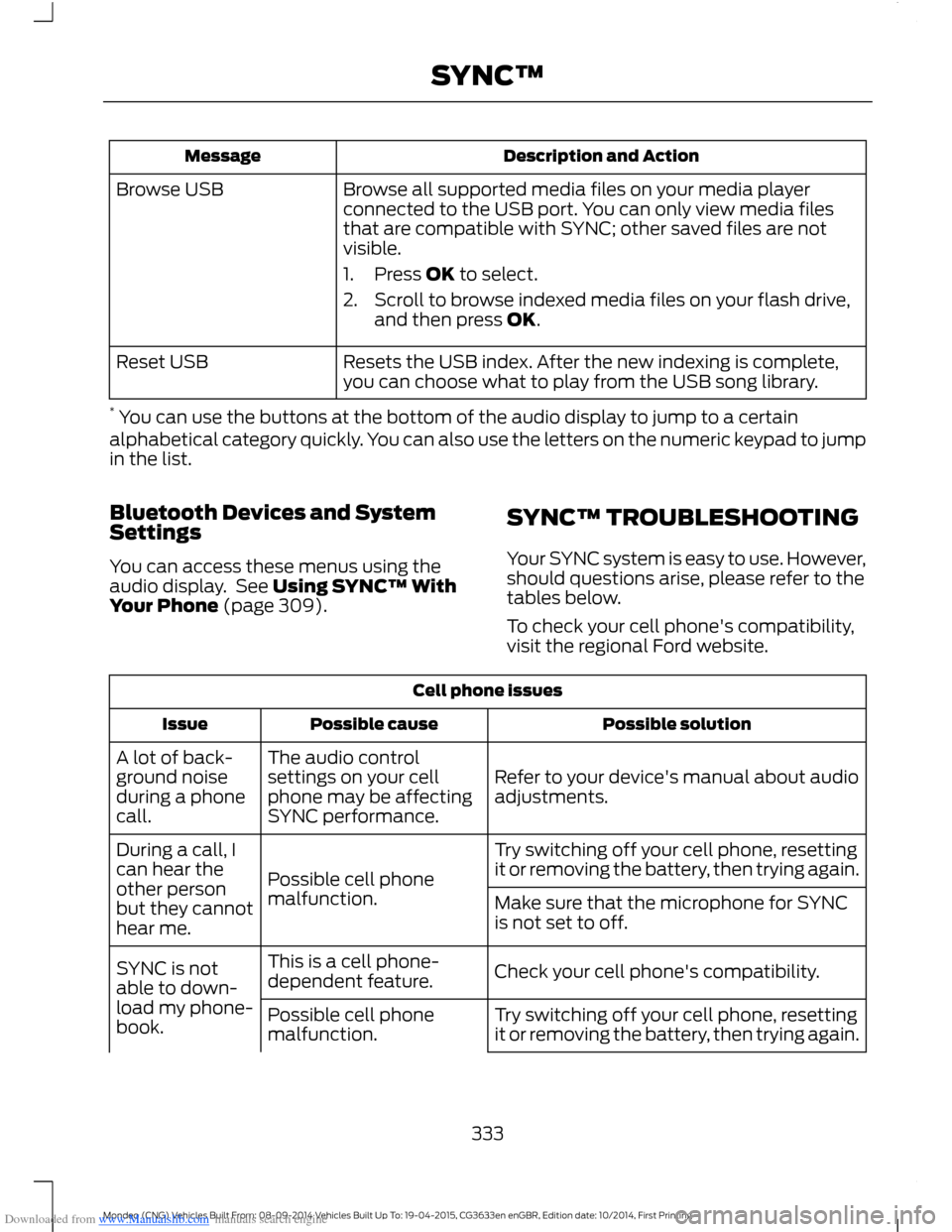
Downloaded from www.Manualslib.com manuals search engine Description and ActionMessage
Browse all supported media files on your media playerconnected to the USB port. You can only view media filesthat are compatible with SYNC; other saved files are notvisible.
1.Press OK to select.
2.Scroll to browse indexed media files on your flash drive,and then press OK.
Browse USB
Resets the USB index. After the new indexing is complete,you can choose what to play from the USB song library.Reset USB
* You can use the buttons at the bottom of the audio display to jump to a certainalphabetical category quickly. You can also use the letters on the numeric keypad to jumpin the list.
Bluetooth Devices and SystemSettings
You can access these menus using theaudio display. See Using SYNC™ WithYour Phone (page 309).
SYNC™ TROUBLESHOOTING
Your SYNC system is easy to use. However,should questions arise, please refer to thetables below.
To check your cell phone's compatibility,visit the regional Ford website.
Cell phone issues
Possible solutionPossible causeIssue
Refer to your device's manual about audioadjustments.
The audio controlsettings on your cellphone may be affectingSYNC performance.
A lot of back-ground noiseduring a phonecall.
Try switching off your cell phone, resettingit or removing the battery, then trying again.Possible cell phonemalfunction.
During a call, Ican hear theother personbut they cannothear me.
Make sure that the microphone for SYNCis not set to off.
Check your cell phone's compatibility.This is a cell phone-dependent feature.SYNC is notable to down-load my phone-book.Try switching off your cell phone, resettingit or removing the battery, then trying again.Possible cell phonemalfunction.
333Mondeo (CNG) Vehicles Built From: 08-09-2014 Vehicles Built Up To: 19-04-2015, CG3633en enGBR, Edition date: 10/2014, First PrintingSYNC™
Page 338 of 446
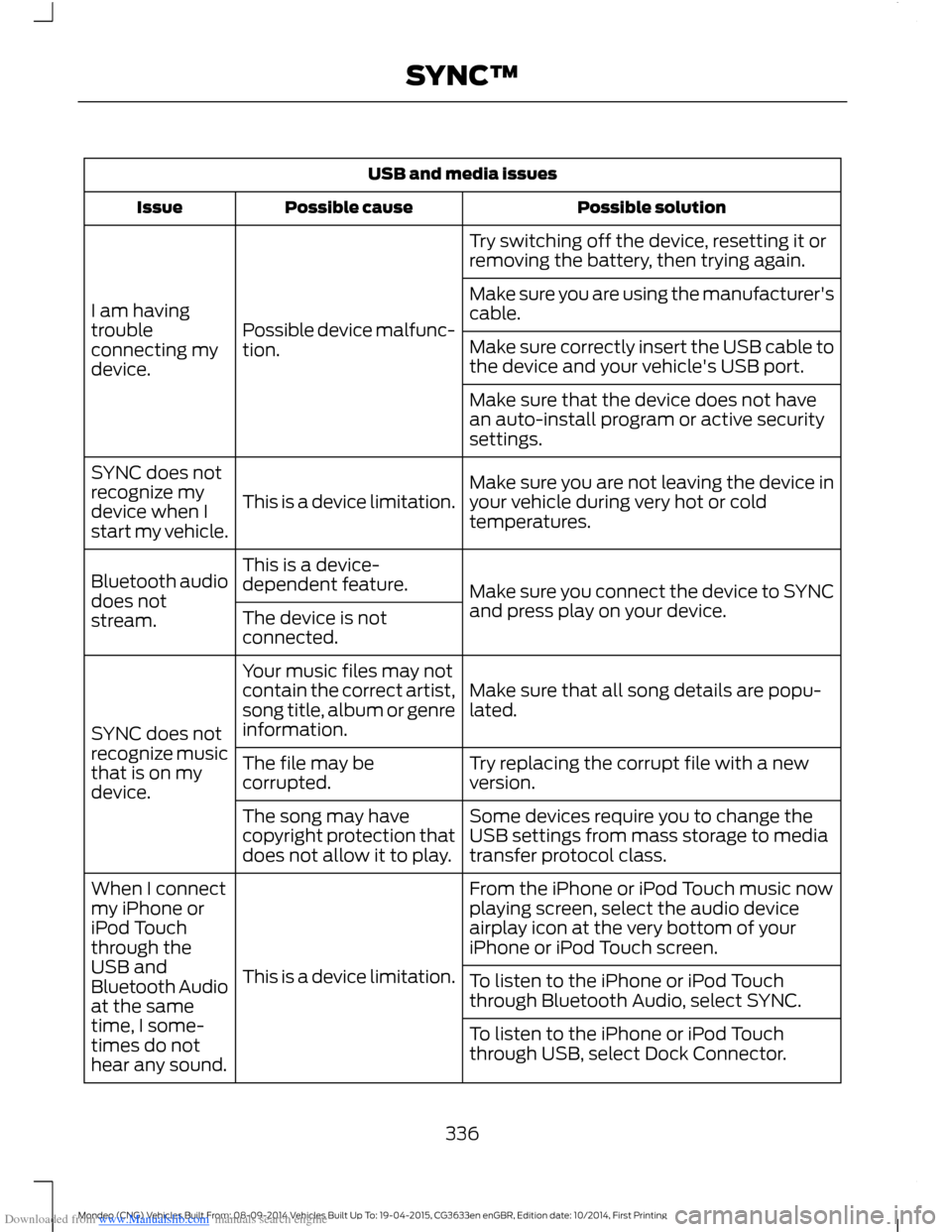
Downloaded from www.Manualslib.com manuals search engine USB and media issues
Possible solutionPossible causeIssue
Try switching off the device, resetting it orremoving the battery, then trying again.
Possible device malfunc-tion.
I am havingtroubleconnecting mydevice.
Make sure you are using the manufacturer'scable.
Make sure correctly insert the USB cable tothe device and your vehicle's USB port.
Make sure that the device does not havean auto-install program or active securitysettings.
Make sure you are not leaving the device inyour vehicle during very hot or coldtemperatures.This is a device limitation.
SYNC does notrecognize mydevice when Istart my vehicle.
Make sure you connect the device to SYNCand press play on your device.
This is a device-dependent feature.Bluetooth audiodoes notstream.The device is notconnected.
Make sure that all song details are popu-lated.
Your music files may notcontain the correct artist,song title, album or genreinformation.SYNC does notrecognize musicthat is on mydevice.
Try replacing the corrupt file with a newversion.The file may becorrupted.
Some devices require you to change theUSB settings from mass storage to mediatransfer protocol class.
The song may havecopyright protection thatdoes not allow it to play.
From the iPhone or iPod Touch music nowplaying screen, select the audio deviceairplay icon at the very bottom of youriPhone or iPod Touch screen.
This is a device limitation.
When I connectmy iPhone oriPod Touchthrough theUSB andBluetooth Audioat the sametime, I some-times do nothear any sound.
To listen to the iPhone or iPod Touchthrough Bluetooth Audio, select SYNC.
To listen to the iPhone or iPod Touchthrough USB, select Dock Connector.
336Mondeo (CNG) Vehicles Built From: 08-09-2014 Vehicles Built Up To: 19-04-2015, CG3633en enGBR, Edition date: 10/2014, First PrintingSYNC™
Page 342 of 446
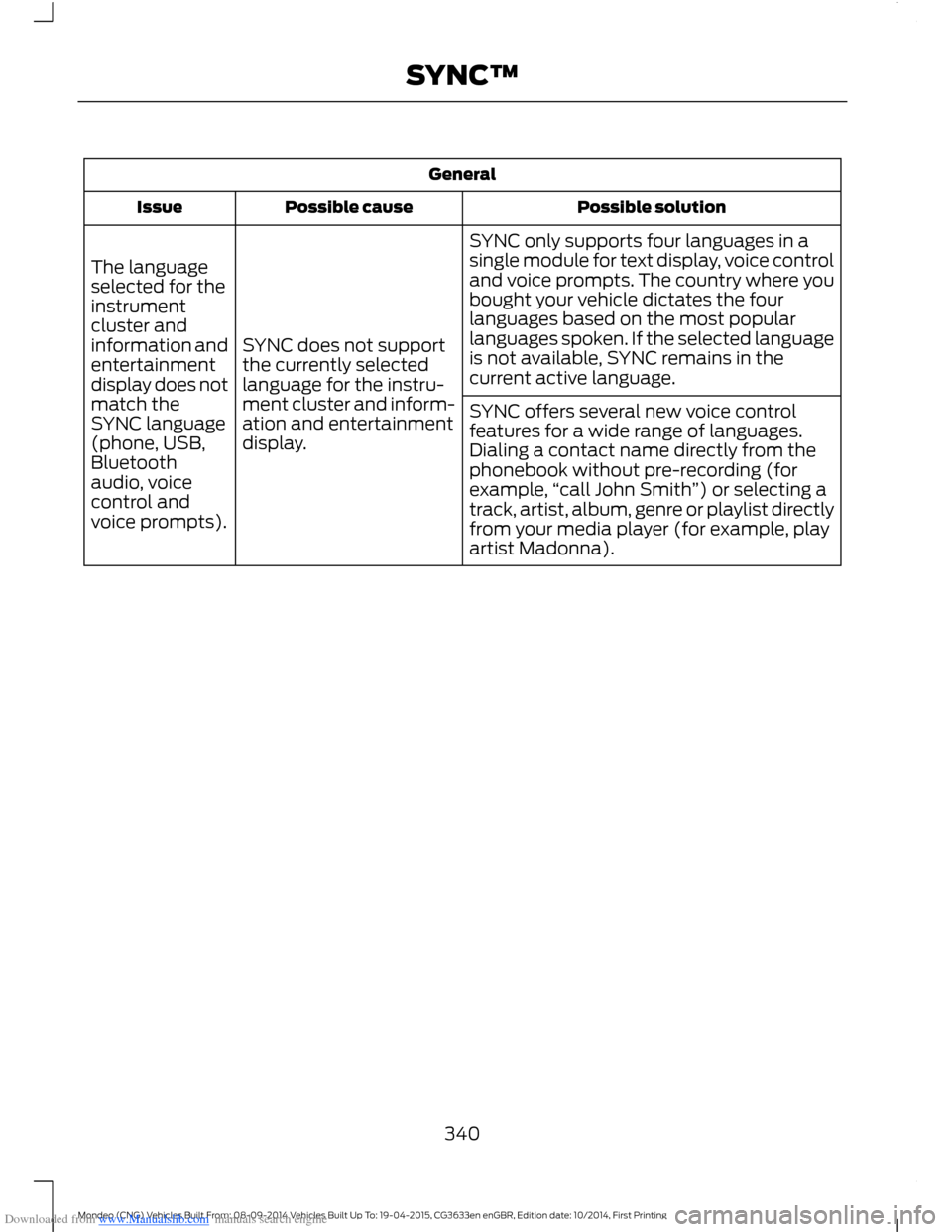
Downloaded from www.Manualslib.com manuals search engine General
Possible solutionPossible causeIssue
SYNC only supports four languages in asingle module for text display, voice controland voice prompts. The country where youbought your vehicle dictates the fourlanguages based on the most popularlanguages spoken. If the selected languageis not available, SYNC remains in thecurrent active language.
SYNC does not supportthe currently selectedlanguage for the instru-ment cluster and inform-ation and entertainmentdisplay.
The languageselected for theinstrumentcluster andinformation andentertainmentdisplay does notmatch theSYNC language(phone, USB,Bluetoothaudio, voicecontrol andvoice prompts).
SYNC offers several new voice controlfeatures for a wide range of languages.Dialing a contact name directly from thephonebook without pre-recording (forexample,“call John Smith”) or selecting atrack, artist, album, genre or playlist directlyfrom your media player (for example, playartist Madonna).
340Mondeo (CNG) Vehicles Built From: 08-09-2014 Vehicles Built Up To: 19-04-2015, CG3633en enGBR, Edition date: 10/2014, First PrintingSYNC™
Page 343 of 446
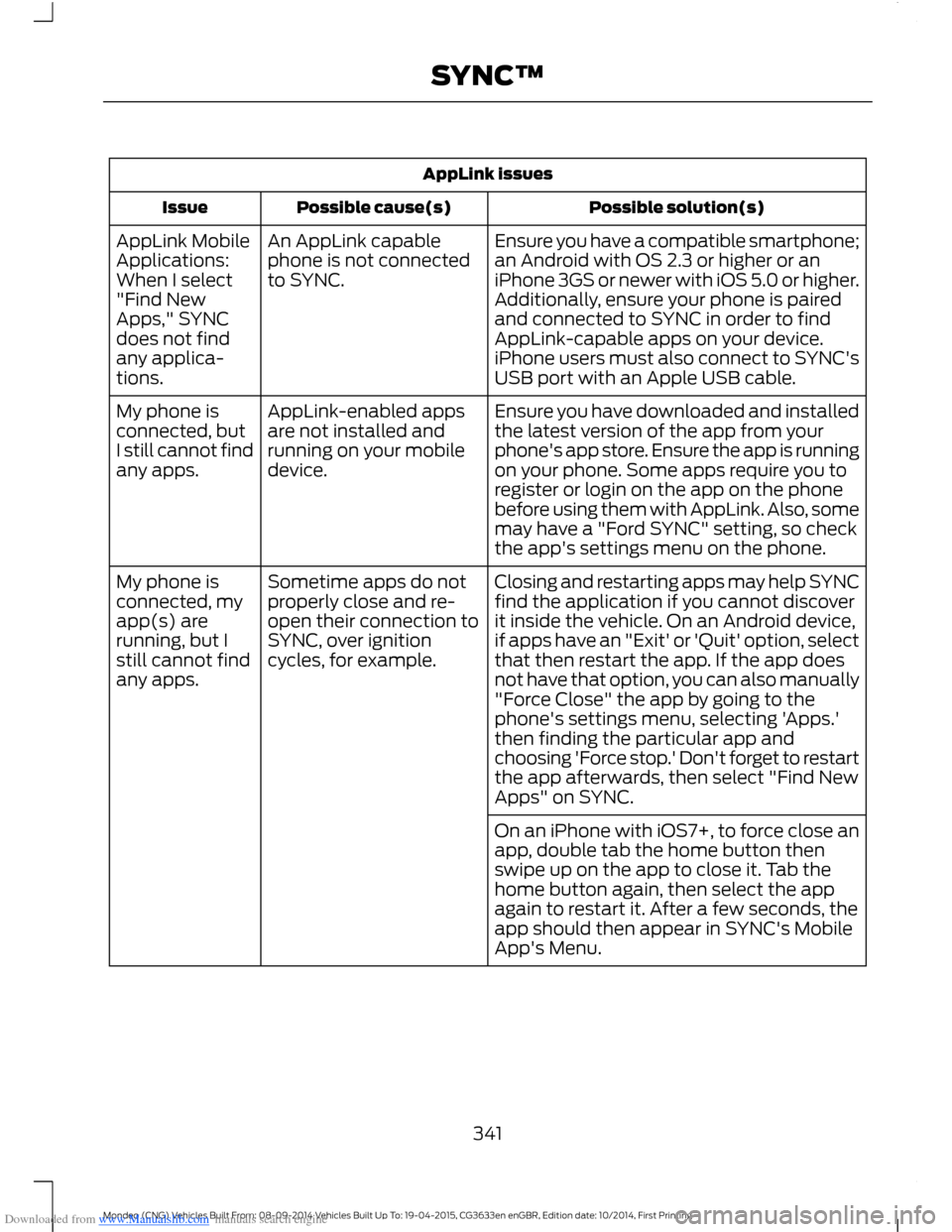
Downloaded from www.Manualslib.com manuals search engine AppLink issues
Possible solution(s)Possible cause(s)Issue
Ensure you have a compatible smartphone;an Android with OS 2.3 or higher or aniPhone 3GS or newer with iOS 5.0 or higher.Additionally, ensure your phone is pairedand connected to SYNC in order to findAppLink-capable apps on your device.iPhone users must also connect to SYNC'sUSB port with an Apple USB cable.
An AppLink capablephone is not connectedto SYNC.
AppLink MobileApplications:When I select"Find NewApps," SYNCdoes not findany applica-tions.
Ensure you have downloaded and installedthe latest version of the app from yourphone's app store. Ensure the app is runningon your phone. Some apps require you toregister or login on the app on the phonebefore using them with AppLink. Also, somemay have a "Ford SYNC" setting, so checkthe app's settings menu on the phone.
AppLink-enabled appsare not installed andrunning on your mobiledevice.
My phone isconnected, butI still cannot findany apps.
Closing and restarting apps may help SYNCfind the application if you cannot discoverit inside the vehicle. On an Android device,if apps have an "Exit' or 'Quit' option, selectthat then restart the app. If the app doesnot have that option, you can also manually
Sometime apps do notproperly close and re-open their connection toSYNC, over ignitioncycles, for example.
My phone isconnected, myapp(s) arerunning, but Istill cannot findany apps."Force Close" the app by going to thephone's settings menu, selecting 'Apps.'then finding the particular app andchoosing 'Force stop.' Don't forget to restartthe app afterwards, then select "Find NewApps" on SYNC.
On an iPhone with iOS7+, to force close anapp, double tab the home button thenswipe up on the app to close it. Tab thehome button again, then select the appagain to restart it. After a few seconds, theapp should then appear in SYNC's MobileApp's Menu.
341Mondeo (CNG) Vehicles Built From: 08-09-2014 Vehicles Built Up To: 19-04-2015, CG3633en enGBR, Edition date: 10/2014, First PrintingSYNC™
Page 344 of 446

Downloaded from www.Manualslib.com manuals search engine AppLink issues
Possible solution(s)Possible cause(s)Issue
Reset the Bluetooth on your phone byturning it off and then turning Bluetoothback on. If you are in your vehicle, SYNCshould be able to automatically re-connectto your phone if you press the "Phone"button.
There is a bluetooth bugon some order versionsof the Android OS thatmay cause apps thatwere found on yourprevious vehicle drive tonot be found again if youhave not turned offbluetooth.
My Androidphone isconnected, myapp(s) arerunning, Irestarted them,but I still cannotfind any apps.
Unplug the USB cable from the phone, waita moment, and plug the USB cable back into the phone. After a few seconds, the appshould appear in SYNC's Mobile AppsMenu. If not, "Force Close" the applicationand restart it.
The USB connection toSYNC may need to bereset.
My iPhonephone isconnected, myapp is running, Irestarted theapp but I stillcannot find it onSYNC.
Try increasing the Bluetooth volume of thedevice by using the device's volume controlbuttons which are most often found on theside of the device.
The bluetooth volume onthe phone may be low.I have anAndroid phone.I found andstarted mymedia app onSYNC, but thereis no sound orthe sound isvery low.
Force close or uninstall the apps you do notwant SYNC to find. If the app has a "FordSYNC" setting, disable that setting in theapp's settings menu on the phone.
Some Android deviceshave a limited number ofbluetooth ports apps canuse to connect. If youhave more AppLink appson your phone than thenumber of availbleBluetooth ports, you willnot see all of your appslisted in SYNC's mobileapps menu.
I can only seesome of theAppLink appsrunning on myphone listed inSYNC's MobileApps Menu.
342Mondeo (CNG) Vehicles Built From: 08-09-2014 Vehicles Built Up To: 19-04-2015, CG3633en enGBR, Edition date: 10/2014, First PrintingSYNC™
Page 348 of 446

Downloaded from www.Manualslib.com manuals search engine Action and DescriptionMessage
Adjust the settings for:Sound
Bass
Treble
Midrange
Set Balance and Fade
DSP
EQ Mode
Speed Compensated Volume
Using the Steering Wheel Controls
Depending on your vehicle and optionpackage, you can use your steering wheelcontrols to interact with the touchscreensystem.
•VOL: Control the volume of audiooutput.
•Mute: Mute the audio output.
•Voice: Press to start a voice session.Press again and hold to end a voicesession.
•SEEK and PHONE ACCEPT:
•While in radio mode, press to seekbetween memory presets or pressand hold to seek between stations.
•While in USB or CD mode, press toseek between stations or press andhold to fast seek.
•While in phone mode, press toanswer a call, or to switch betweencalls.
•SEEK and PHONE REJECT:
•While in radio mode, press to seekbetween memory presets or pressand hold to seek between stations.
•While in USB or CD mode, press toseek between stations or press andhold to fast seek.
•While in phone mode, press to enda call, or to reject an incoming call.
•Source: Touch the control repeatedlyto switch between media modes.
•Sound: Touch the control to adjust thesound settings. See Settings (page352).
See Steering Wheel (page 56).
Cleaning the Touchscreen Display
Use a dry, clean, soft cloth. If dirt orfingerprints are still visible, apply a smallamount of alcohol to the cloth. Do not pouror spray alcohol onto the display. Do notuse detergent or any type of solvent toclean the display.
Support
For further support, contact an authorizeddealer. For more information, visit theregional Ford website.
346Mondeo (CNG) Vehicles Built From: 08-09-2014 Vehicles Built Up To: 19-04-2015, CG3633en enGBR, Edition date: 10/2014, First PrintingSYNC™ 2