2014 FORD FUSION (AMERICAS) instrument cluster
[x] Cancel search: instrument clusterPage 192 of 458

•Low
•Medium
•High
System Display
When the system is turned on, an overheadgraphic of a vehicle with lane markings willbe displayed in the information display. Ifthe aid mode is selected when the systemis turned on, a separate white icon will alsoappear in the instrument cluster or in somevehicles arrows will be displayed with thelane markings.
When the system is turned off, the lanemarking graphics will not be displayed.
While the system is on, the color of thelane markings will change to indicate thesystem status.
Gray: Indicates that the system istemporarily unable to provide a warningor intervention on the indicated side(s).This may be because:
•the vehicle is under the activationspeed
•the turn indicator is active
•the vehicle is in a dynamic maneuver
•the road has no or poor lane markingsin the camera field-of-view
•the camera is obscured or unable todetect the lane markings due toenvironmental conditions (e.g.significant sun angles or shadows,snow, heavy rain, fog), trafficconditions (e.g. following a largevehicle that is blocking or shadowingthe lane), or vehicle conditions (e.g.poor headlamp illumination).
See Troubleshooting for additionalinformation.
Green: Indicates that the system isavailable or ready to provide a warning orintervention, on the indicated side(s).
Yellow: Indicates that the system isproviding or has just provided a lanekeeping aid intervention.
Red: Indicates that the system is providingor has just provided a lane keeping alertwarning.
The system can be temporarily suppressedat any time by the following:
•Quick braking
•Fast acceleration
•Using the turn signal indicator
•Evasive steering maneuver
Troubleshooting
Why is the feature not available (line markings are gray) when I can see the lane markingson the road?
Vehicle speed is outside the operational range of the feature
Sun is shining directly into the camera lens
Quick intentional lane change
189Fusion (CC7) , enUSADriving AidsE151660
Page 221 of 458

Jump Starting
1.Start the engine of the booster vehicleand rev the engine moderately, or pressthe accelerator gently to keep yourengine speed between 2000 and 3000rpms, as shown in your tachometer.
2.Start the engine of the disabled vehicle.
3.Once the disabled vehicle has beenstarted, run both vehicle engines for anadditional three minutes beforedisconnecting the jumper cables.
Removing the Jumper Cables
Remove the jumper cables in the reverseorder that they were connected.
1.Remove the jumper cable from theground metal surface or connectingpoint, if available.
2.Remove the jumper cable on thenegative (-) terminal of the boostervehicle's battery.
3.Remove the jumper cable from thepositive (+) terminal of the boostervehicle's battery.
4.Remove the jumper cable from thepositive (+) terminal of the disabledvehicle's battery.
After the disabled vehicle has been startedand the jumper cables removed, allow itto idle for several minutes so the batterycan recharge.
POST-CRASH ALERT SYSTEM
The system flashes the turn signal lampsand sounds the horn (intermittently) in theevent of a serious impact that deploys anairbag (front, side, side curtain or SafetyCanopy) or the safety belt pretensioners.
The horn and lamps will turn off when:
•The hazard control button is pressed
•The panic button (if equipped) ispressed on the remote entrytransmitter
•Your vehicle runs out of power
Spinout Detection
If a spinout is detected, the vehicle comesto a stop and the hazard warning flasherscome on. The message Spinout DetectedHazards Activated will also appear onthe instrument cluster. The message maynot appear if your vehicle runs out ofpower.
Once the hazard warning flashers havebeen activated, you can turn them off by:
•Pressing the hazard warning flasherbutton
•Pressing the remote control unlockbutton
218Fusion (CC7) , enUSARoadside Emergencies4132E142665
Page 261 of 458
•Never wash or rinse any ignition coil,spark plug wire or spark plug well, orthe area in and around these locations.
•Cover the battery, power distributionbox, and air filter assembly to preventwater damage when cleaning theengine.
CLEANING THE WINDOWS AND
WIPER BLADES
Car wash chemicals and environmentalfallout can result in windshield and wiperblade contamination. Dirty windshield andwipers will result in poor windshield wiperoperation. Keep the windshield and wiperblades clean to maintain windshield wiperperformance.
To clean the windshield and wiper blades:
•Clean the windshield with anon-abrasive glass cleaner.
•For windshields contaminated withtree sap, chemicals, wax or bugs, cleanthe entire windshield using steel wool(no greater than 0000 grade) in acircular motion and rinse with water.
•Clean the wiper blades with isopropylrubbing alcohol or windshield washerfluid.
Note: Do not use razor blades or othersharp objects to clean or remove decalsfrom the inside of the heated rear window.The vehicle warranty does not coverdamage caused to the heated rear windowgrid lines.
CLEANING THE INTERIOR
WARNINGS
Do not use cleaning solvents, bleachor dye on the vehicle’s safety belts,as these actions may weaken thebelt webbing.
WARNINGS
On vehicles equipped withseat-mounted airbags, do not usechemical solvents or strongdetergents. Such products couldcontaminate the side airbag system andaffect performance of the side airbag in acollision.
For fabric, carpets, cloth seats, safety beltsand seats equipped with side airbags:
•Remove dust and loose dirt with avacuum cleaner.
•Remove light stains and soil withMotorcraft Professional StrengthCarpet & Upholstery Cleaner.
•If grease or tar is present on thematerial, spot-clean the area first withMotorcraft Spot and Stain Remover. InCanada, use Motorcraft Multi-PurposeCleaner.
•If a ring forms on the fabric after spotcleaning, clean the entire areaimmediately (but do not oversaturate)or the ring will set.
•Do not use household cleaningproducts or glass cleaners, which canstain and discolor the fabric and affectthe flame retardant abilities of the seatmaterials.
CLEANING THE INSTRUMENT
PANEL AND INSTRUMENT
CLUSTER LENS
WARNING
Do not use chemical solvents orstrong detergents when cleaning thesteering wheel or instrument panelto avoid contamination of the airbagsystem.
258Fusion (CC7) , enUSAVehicle Care
Page 262 of 458
Clean the instrument panel and clusterlens with a clean, damp, white cottoncloth, then use a clean and dry whitecotton cloth to dry these areas.
•Avoid cleaners or polishes that increasethe gloss of the upper portion of theinstrument panel. The dull finish in thisarea helps protect you fromundesirable windshield reflection.
•Be certain to wash or wipe your handsclean if you have been in contact withcertain products such as insectrepellent and suntan lotion in order toavoid possible damage to the interiorpainted surfaces.
•Do not use household or glass cleanersas these may damage the finish of theinstrument panel, interior trim andcluster lens.
•Do not allow air fresheners and handsanitizers to spill onto interior surfaces.If a spill occurs, wipe off immediately.Damage may not be covered by yourwarranty.
If a staining liquid like coffee or juice hasbeen spilled on the instrument panel or oninterior trim surfaces, clean as follows:
1.Wipe up spilled liquid using a clean,white, cotton cloth.
2.Wipe the surface with a damp, clean,white cotton cloth. For more thoroughcleaning, use a mild soap and watersolution. If the spot cannot becompletely cleaned by this method,the area may be cleaned using acommercially available cleaningproduct designed for automotiveinteriors.
3.If necessary, apply more soap andwater solution or cleaning product toa clean, white, cotton cloth and pressthe cloth onto the soiled area. Allowthis to set at room temperature for 30minutes.
4.Remove the soaked cloth and if it is notsoiled badly, use this cloth to clean thearea by using a rubbing motion for 60seconds.
5.Following this, wipe area dry with aclean, white, cotton cloth.
CLEANING LEATHER SEATS (IF
EQUIPPED)
For routine cleaning, wipe the surface witha soft, damp cloth. For more thoroughcleaning, wipe the surface with a mild soapand water solution. Dry the area with a softcloth.
If you cannot completely clean the leatherusing a mild soap and water solution, youcan try a commercially available leathercleaning product designed for automotiveinteriors.
Note:To check for compatibility, first testany cleaner or stain remover on aninconspicuous part of the leather.
You should:
•remove dust and loose dirt with avacuum cleaner
•clean spills and stains as quickly aspossible
•check for compatibility by first testingany cleaner or stain remover on aninconspicuous part of the leather.
Do not use the following products as thesemay damage the leather:
•oil/petroleum-based leatherconditioners
•household cleaners
•alcohol solutions
•solvents or cleaners intendedspecifically for rubber, vinyl andplastics.
259Fusion (CC7) , enUSAVehicle Care
Page 354 of 458
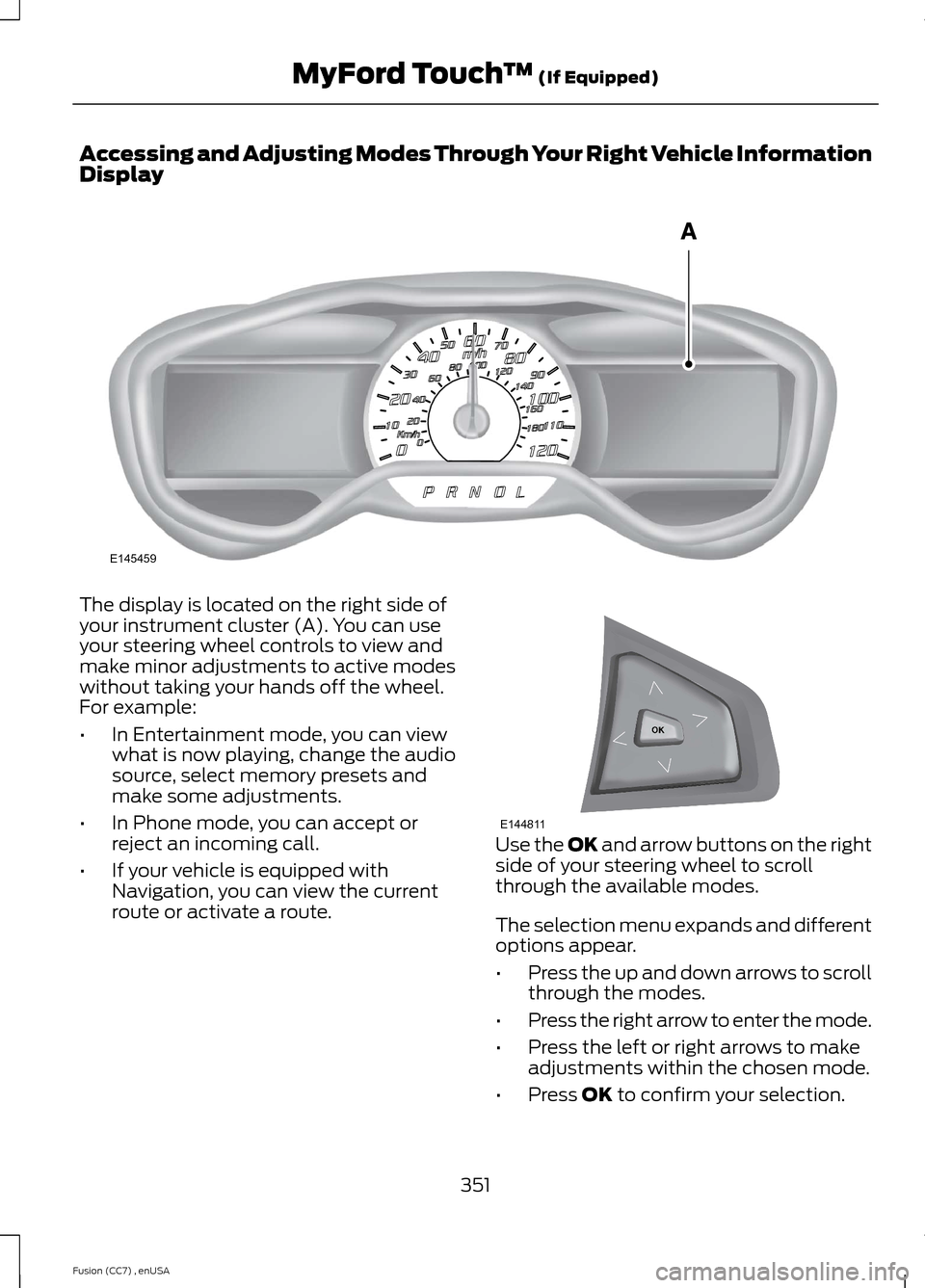
Accessing and Adjusting Modes Through Your Right Vehicle InformationDisplay
The display is located on the right side ofyour instrument cluster (A). You can useyour steering wheel controls to view andmake minor adjustments to active modeswithout taking your hands off the wheel.For example:
•In Entertainment mode, you can viewwhat is now playing, change the audiosource, select memory presets andmake some adjustments.
•In Phone mode, you can accept orreject an incoming call.
•If your vehicle is equipped withNavigation, you can view the currentroute or activate a route.
Use the OK and arrow buttons on the rightside of your steering wheel to scrollthrough the available modes.
The selection menu expands and differentoptions appear.
•Press the up and down arrows to scrollthrough the modes.
•Press the right arrow to enter the mode.
•Press the left or right arrows to makeadjustments within the chosen mode.
•Press OK to confirm your selection.
351Fusion (CC7) , enUSAMyFord Touch™ (If Equipped)E145459 E144811
Page 449 of 458

Booster Seats..................................................20Types of Booster Seats......................................20Brake and Clutch Fluid Check.................245Brakes...............................................................163General Information..........................................163Breaking-In......................................................213Bulb Specification Chart...........................253
C
Cabin Air Filter................................................119California Proposition 65..............................11Capacities and Specifications................287Technical Specifications..................................291Car WashSee: Cleaning the Exterior..............................256Center Console..............................................135Changing a Bulb............................................251Lamp Assembly Condensation.....................251Replacing a Reverse Lamp Bulb..................252Replacing the Headlamp Bulbs....................251Replacing the License Plate LampBulb....................................................................253Replacing the Tail, Brake, High-MountBrake Lamp, and Turn Signal LampBulbs..................................................................252Changing a Fuse...........................................235Fuses.......................................................................235Changing a Road Wheel...........................282Dissimilar Spare Wheel and Tire AssemblyInformation.....................................................282Stowing the flat tire..........................................285Tire Change Procedure....................................283Changing the 12V Battery.........................245Changing the Engine Air Filter.................2552.5L Engine...........................................................255EcoBoost Engines..............................................255Changing the Wiper Blades.....................247Checking MyKey System Status................51Checking the Wiper Blades......................247Child Restraint and Safety BeltMaintenance.................................................32Child Safety.......................................................13General Information.............................................13Child Safety Locks..........................................23Left-Hand Side......................................................24Right-Hand Side...................................................24Child Seat Positioning...................................22
Cleaning Leather Seats.............................259Cleaning Products.......................................256Cleaning the Alloy Wheels.......................260Cleaning the Engine....................................257Cleaning the Exterior..................................256Cleaning Plastic Exterior Parts......................257Exterior Chrome.................................................256Stripes or Graphics (if equipped)................256Underbody............................................................257Cleaning the Instrument Panel andInstrument Cluster Lens........................258Cleaning the Interior...................................258Cleaning the Windows and WiperBlades...........................................................258Clearing All MyKeys........................................51Climate............................................................396Climate Control Voice Commands.............399Climate Control..............................................110Collision Warning System.........................196PRINCIPLE OF OPERATION...........................196Coolant CheckSee: Engine Coolant Check............................242Crash Sensors and Airbag Indicator........42Creating a MyKey.............................................51Programming/Changing ConfigurableSettings................................................................51Cruise Control..................................................65Principle of Operation.......................................179Type 1........................................................................65Type 2.......................................................................65Cruise controlSee: Using Cruise Control................................179Customer Assistance.................................220
D
Data Recording..................................................9Event Data Recording...........................................9Service Data Recording........................................9Daytime Running Lamps..............................71Digital Radio..................................................302HD Radio Reception and StationTroubleshooting............................................303Direction Indicators........................................73Driver Alert......................................................186PRINCIPLE OF OPERATION...........................186USING DRIVER ALERT.....................................186
446Fusion (CC7) , enUSAIndex
Page 452 of 458

Information....................................................387911 Assist...............................................................393Alerts......................................................................393Calendar................................................................393Sirius Travel Link.................................................391SYNC Services (If Equipped, United StatesOnly).................................................................388Vehicle Health Report......................................395Information Messages.................................95Active Park..............................................................96Adaptive Cruise Control....................................96AdvanceTrac®.......................................................97Airbag........................................................................97Alarm.........................................................................97Automatic Engine Shutdown..........................99Auto Start-Stop....................................................97AWD........................................................................100Battery and Charging System.......................100Blind Spot Information and Cross TrafficAlert System.....................................................101Collision Warning System................................101Doors and Locks.................................................102Driver Alert............................................................102Fuel..........................................................................102Hill Start Assist....................................................102Keys and Intelligent Access............................103Lane Keeping System.......................................104Maintenance........................................................104MyKey.....................................................................105Park Aid..................................................................106Park Brake.............................................................106Power Steering....................................................107Remote Start........................................................107Seats........................................................................107Starting System .................................................108Tire Pressure Monitoring System.................108Traction Control..................................................108Transmission........................................................109Installing Child Seats.....................................14Child Seats...............................................................14Using Lap and Shoulder Belts..........................15Using Lower Anchors and Tethers forCHildren (LATCH).............................................17Using Tether Straps..............................................19Instrument Cluster........................................80Instrument Lighting Dimmer.....................70Vehicles With Front Fog Lamps......................70Vehicles Without Front Fog Lamps...............70
Interior Lamps..................................................73Front Interior Lamp..............................................73Rear Interior Lamp................................................73Interior Luggage CompartmentRelease...........................................................60Interior Mirror....................................................77Auto-Dimming Mirror..........................................78Introduction.........................................................7
J
Jump Starting the Vehicle.........................216Connecting the Jumper Cables......................217Jump Starting.......................................................218Preparing Your Vehicle......................................217Removing the Jumper Cables........................218
K
Keyless Entry....................................................57SECURICODE™ KEYLESS ENTRYKEYPAD...............................................................57Keyless Starting............................................136Ignition Modes......................................................137Keys and Remote Controls.........................44
L
Lane Keeping System.................................187Switching the System On and Off................187Lighting Control..............................................69Headlamp Flasher...............................................69High Beams............................................................69Lighting..............................................................69Load Carrying.................................................199Load Limit.......................................................199Vehicle Loading - with and without aTrailer.................................................................199
449Fusion (CC7) , enUSAIndex