2014 FORD FUSION (AMERICAS) engine
[x] Cancel search: enginePage 101 of 458
ActionMessage
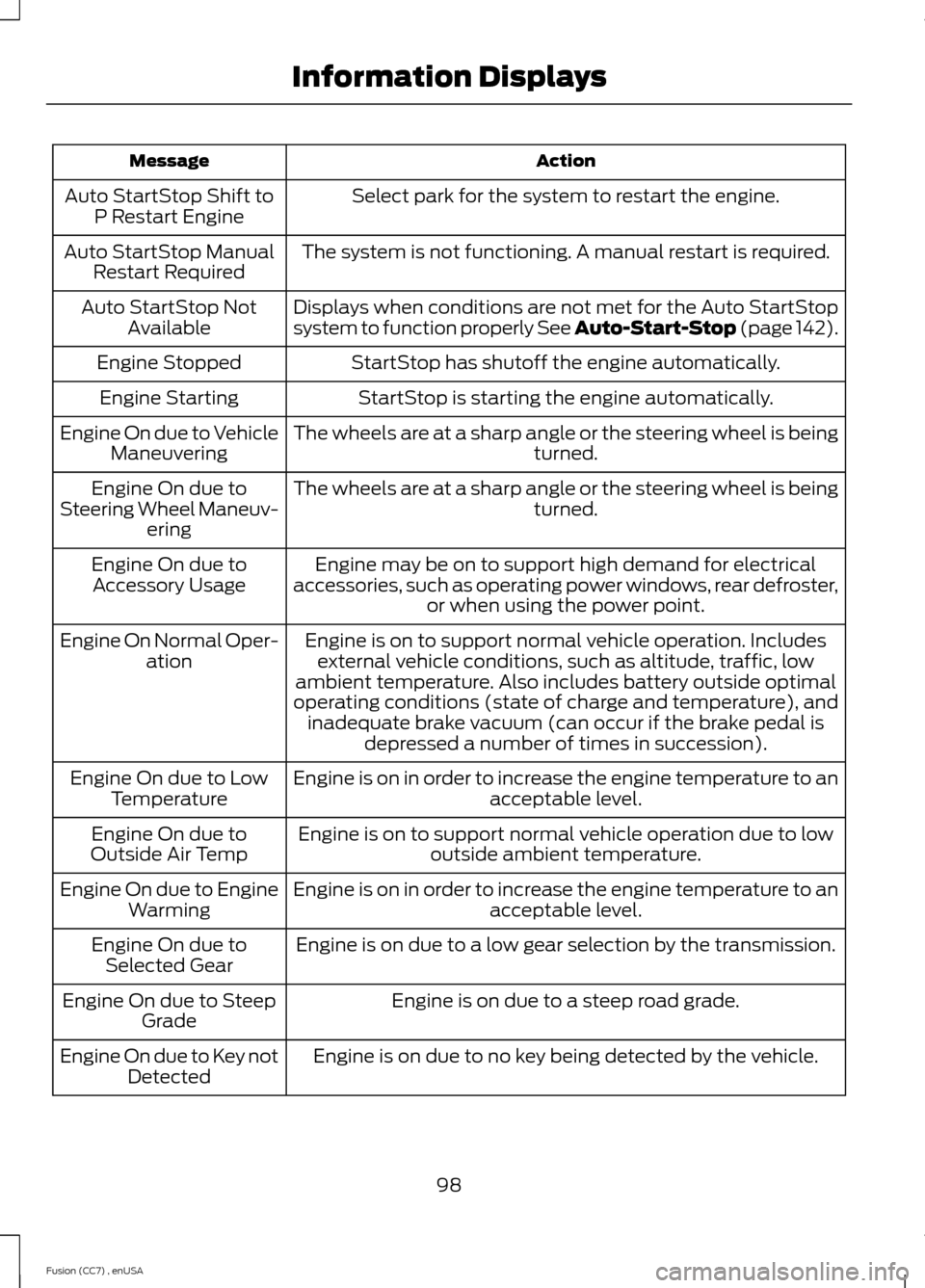
Select park for the system to restart the engine.Auto StartStop Shift toP Restart Engine
The system is not functioning. A manual restart is required.Auto StartStop ManualRestart Required
Displays when conditions are not met for the Auto StartStopsystem to function properly See Auto-Start-Stop (page 142).Auto StartStop NotAvailable
StartStop has shutoff the engine automatically.Engine Stopped
StartStop is starting the engine automatically.Engine Starting
The wheels are at a sharp angle or the steering wheel is beingturned.Engine On due to VehicleManeuvering
The wheels are at a sharp angle or the steering wheel is beingturned.Engine On due toSteering Wheel Maneuv-ering
Engine may be on to support high demand for electricalaccessories, such as operating power windows, rear defroster,or when using the power point.
Engine On due toAccessory Usage
Engine is on to support normal vehicle operation. Includesexternal vehicle conditions, such as altitude, traffic, lowambient temperature. Also includes battery outside optimaloperating conditions (state of charge and temperature), andinadequate brake vacuum (can occur if the brake pedal isdepressed a number of times in succession).
Engine On Normal Oper-ation
Engine is on in order to increase the engine temperature to anacceptable level.Engine On due to LowTemperature
Engine is on to support normal vehicle operation due to lowoutside ambient temperature.Engine On due toOutside Air Temp
Engine is on in order to increase the engine temperature to anacceptable level.Engine On due to EngineWarming
Engine is on due to a low gear selection by the transmission.Engine On due toSelected Gear
Engine is on due to a steep road grade.Engine On due to SteepGrade
Engine is on due to no key being detected by the vehicle.Engine On due to Key notDetected
98Fusion (CC7) , enUSAInformation Displays
Page 102 of 458
ActionMessage
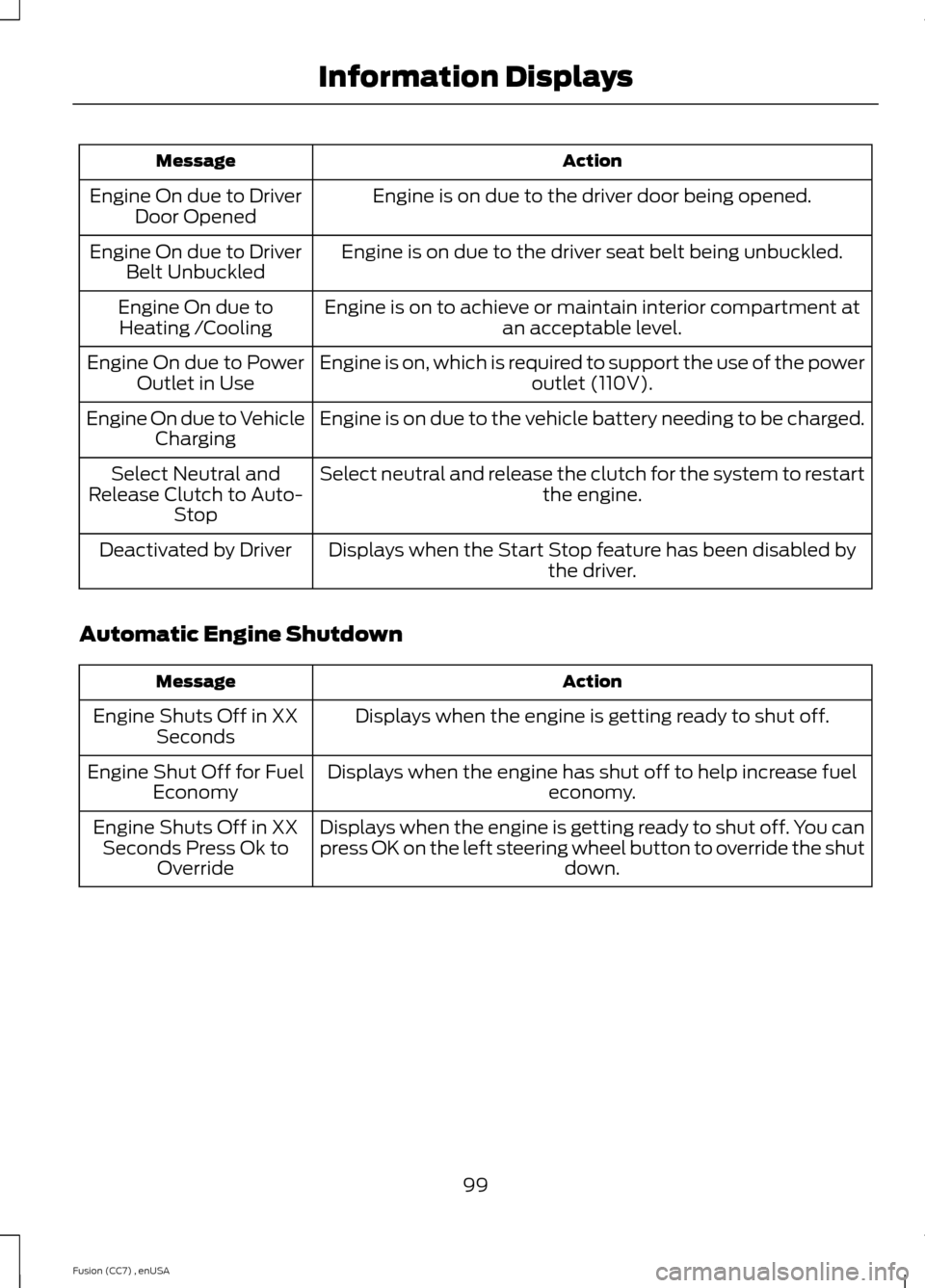
Engine is on due to the driver door being opened.Engine On due to DriverDoor Opened
Engine is on due to the driver seat belt being unbuckled.Engine On due to DriverBelt Unbuckled
Engine is on to achieve or maintain interior compartment atan acceptable level.Engine On due toHeating /Cooling
Engine is on, which is required to support the use of the poweroutlet (110V).Engine On due to PowerOutlet in Use
Engine is on due to the vehicle battery needing to be charged.Engine On due to VehicleCharging
Select neutral and release the clutch for the system to restartthe engine.Select Neutral andRelease Clutch to Auto-Stop
Displays when the Start Stop feature has been disabled bythe driver.Deactivated by Driver
Automatic Engine Shutdown
ActionMessage
Displays when the engine is getting ready to shut off.Engine Shuts Off in XXSeconds
Displays when the engine has shut off to help increase fueleconomy.Engine Shut Off for FuelEconomy
Displays when the engine is getting ready to shut off. You canpress OK on the left steering wheel button to override the shutdown.
Engine Shuts Off in XXSeconds Press Ok toOverride
99Fusion (CC7) , enUSAInformation Displays
Page 106 of 458
Keys and Intelligent Access
ActionMessage
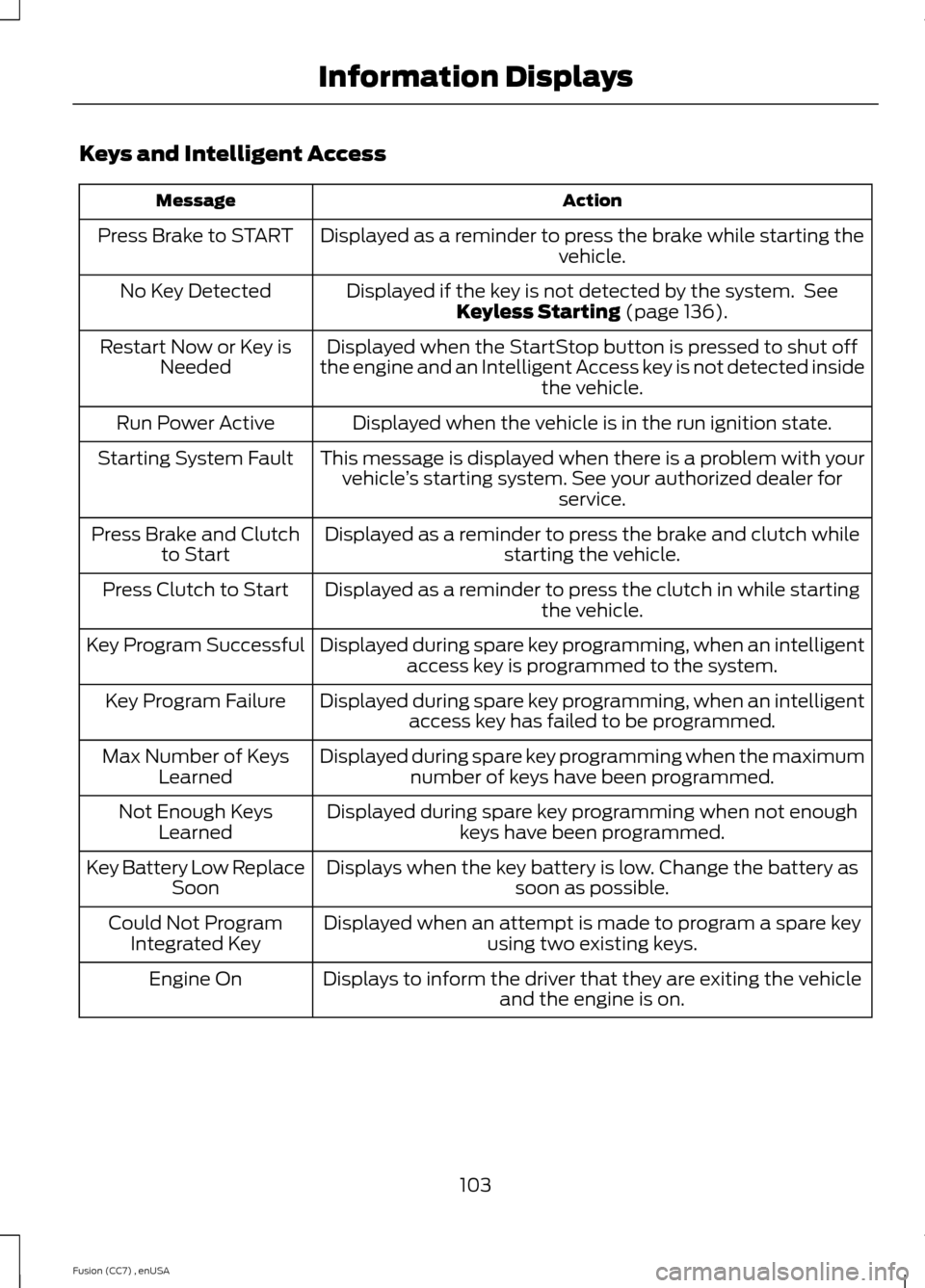
Displayed as a reminder to press the brake while starting thevehicle.Press Brake to START
Displayed if the key is not detected by the system. SeeKeyless Starting (page 136).No Key Detected
Displayed when the StartStop button is pressed to shut offthe engine and an Intelligent Access key is not detected insidethe vehicle.
Restart Now or Key isNeeded
Displayed when the vehicle is in the run ignition state.Run Power Active
This message is displayed when there is a problem with yourvehicle’s starting system. See your authorized dealer forservice.
Starting System Fault
Displayed as a reminder to press the brake and clutch whilestarting the vehicle.Press Brake and Clutchto Start
Displayed as a reminder to press the clutch in while startingthe vehicle.Press Clutch to Start
Displayed during spare key programming, when an intelligentaccess key is programmed to the system.Key Program Successful
Displayed during spare key programming, when an intelligentaccess key has failed to be programmed.Key Program Failure
Displayed during spare key programming when the maximumnumber of keys have been programmed.Max Number of KeysLearned
Displayed during spare key programming when not enoughkeys have been programmed.Not Enough KeysLearned
Displays when the key battery is low. Change the battery assoon as possible.Key Battery Low ReplaceSoon
Displayed when an attempt is made to program a spare keyusing two existing keys.Could Not ProgramIntegrated Key
Displays to inform the driver that they are exiting the vehicleand the engine is on.Engine On
103Fusion (CC7) , enUSAInformation Displays
Page 107 of 458

Lane Keeping System
ActionMessage
The system has malfunctioned. Contact your authorizeddealer as soon as possible.Lane Keeping Sys.Malfunction ServiceRequired
The system has detected a condition that has caused thesystem to be temporarily unavailable.Front Camera Tempor-arily Not Available
The system has detected a condition that requires the wind-shield to be cleaned to operate properly.Front Camera Low Visib-ility Clean Screen
The system has malfunctioned. Contact your authorizeddealer as soon as possible.Front Camera Malfunc-tion Service Required
Displayed when the system requests the driver to keep theirhands on the steering wheel.Keep Hands on SteeringWheel
Maintenance
ActionMessage
Stop the vehicle as soon as safely possible, turn off the engine.Check the oil level. If the warning stays on or continues tocome on with your engine running, contact your authorizeddealer as soon as possible.
LOW Engine Oil Pressure
Displayed when the engine oil life remaining is 10% or less.See Engine Oil Check (page 241).Change Engine Oil Soon
Displayed when the oil life left reaches 0%. See Engine OilCheck (page 241).Oil Change Required
Indicates the brake fluid level is low and the brake systemshould be inspected immediately. See Brake and ClutchFluid Check (page 245).
Brake Fluid Level LOW
Displays when the brake system needs servicing. Stop thevehicle in a safe place. Contact your authorized dealer.Check Brake System
Displays when the engine temperature is too high. Stop thevehicle in a safe place and allow the engine to cool. If theproblem persists, contact your authorized dealer. See EngineCoolant Check (page 242).
Engine Coolant Overtem-perature
104Fusion (CC7) , enUSAInformation Displays
Page 108 of 458

ActionMessage
Displays when the engine has reduced power in order to helpreduce high coolant temperatures.Power Reduced toLower Engine Temp
Displays to indicate that the vehicle is still in Transport orFactory mode. This may not allow some features to operateproperly. See your authorized dealer.
Transport / FactoryMode
Informs the driver that the powertrain needs service due to apowertrain malfunction.See Manual
MyKey
ActionMessage
Displayed during key programming when MyKey cannot beprogrammed.MyKey Not Created
Displays when MyKey is active.MyKey Active DriveSafely
Displays when starting the vehicle and MyKey is in use andthe MyKey speed limit is on.Speed Limited to XXMPH/km/h
Displays when a MyKey is in use and the MyKey speed limit ison and the vehicle speed is approaching 80 mph (130 km/h).Near Vehicle Top Speed
Displays when a MyKey is in use and the MyKey speed limit isreached.Vehicle at Top Speed ofMyKey Setting
Displays when MyKey is active.Check Speed DriveSafely
Displays when a MyKey is in use and Belt-Minder is activated.Buckle Up to UnmuteAudio
Displays when a MyKey is in use and AdvanceTrac is activated.AdvanceTrac On -MyKey Setting
Displays when a MyKey is in use and Traction control isactivated.Traction Control On -MyKey Setting
Displays when a MyKey is in use and park aid is activated.MyKey Park Aid Cannotbe Deactivated
Displayed when the lane keeping aid is on per MyKey settings.Lane Keeping Alert OnMyKey Setting
105Fusion (CC7) , enUSAInformation Displays
Page 109 of 458
Park Aid
ActionMessage
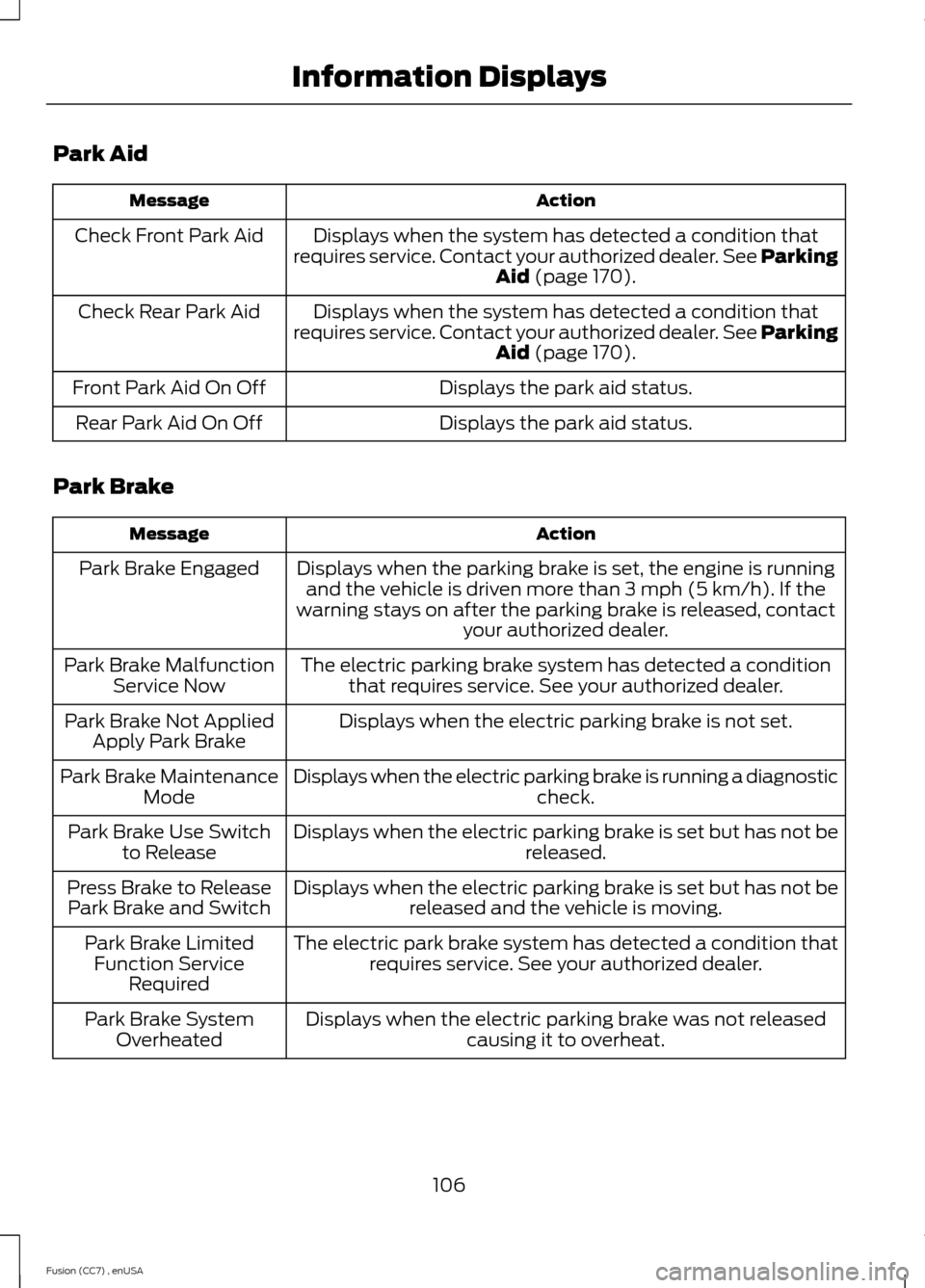
Displays when the system has detected a condition thatrequires service. Contact your authorized dealer. See ParkingAid (page 170).
Check Front Park Aid
Displays when the system has detected a condition thatrequires service. Contact your authorized dealer. See ParkingAid (page 170).
Check Rear Park Aid
Displays the park aid status.Front Park Aid On Off
Displays the park aid status.Rear Park Aid On Off
Park Brake
ActionMessage
Displays when the parking brake is set, the engine is runningand the vehicle is driven more than 3 mph (5 km/h). If thewarning stays on after the parking brake is released, contactyour authorized dealer.
Park Brake Engaged
The electric parking brake system has detected a conditionthat requires service. See your authorized dealer.Park Brake MalfunctionService Now
Displays when the electric parking brake is not set.Park Brake Not AppliedApply Park Brake
Displays when the electric parking brake is running a diagnosticcheck.Park Brake MaintenanceMode
Displays when the electric parking brake is set but has not bereleased.Park Brake Use Switchto Release
Displays when the electric parking brake is set but has not bereleased and the vehicle is moving.Press Brake to ReleasePark Brake and Switch
The electric park brake system has detected a condition thatrequires service. See your authorized dealer.Park Brake LimitedFunction ServiceRequired
Displays when the electric parking brake was not releasedcausing it to overheat.Park Brake SystemOverheated
106Fusion (CC7) , enUSAInformation Displays
Page 111 of 458

Starting System
ActionMessage
Displays when starting the vehicle as a reminder to apply thebrake.Press Brake to Start
Displays when the starter is attempting to start the vehicle.Engine Start PendingPlease Wait
Displays when the pending start has been cancelled.Pending Start Cancelled
Displays when the starter has exceeded its cranking time inattempting to start the vehicle.Cranking Time Exceeded
Tire Pressure Monitoring System
ActionMessage
Displays when one or more tires on your vehicle have low tirepressure. See Tire Pressure Monitoring System (page 279).LOW Tire Pressure
Displays when the tire pressure monitoring system ismalfunctioning. If the warning stays on or continues to comeon, contact your authorized dealer. See Tire PressureMonitoring System (page 279).
Tire Pressure MonitorFault
Displayed when a tire pressure sensor is malfunctioning, oryour spare tire is in use. For more information on how thesystem operates under these conditions, See Tire PressureMonitoring System (page 279). If the warning stays on orcontinues to come on, contact your authorized dealer as soonas possible.
Tire Pressure SensorFault
Traction Control
ActionMessage
Displays when the traction control system has been switchedoff or on. See Using Traction Control (page 168).Traction Control Off /Traction Control On
Displays when a spinout has occurred and the hazard areactivated.Spinout DetectedHazards Activated
108Fusion (CC7) , enUSAInformation Displays
Page 120 of 458
HINTS ON CONTROLLING THE
INTERIOR CLIMATE
General Hints
Note:Prolonged use of recirculated air maycause the windows to fog up.
Note:You may feel a small amount of airfrom the footwell air vents regardless of theair distribution setting.
Note:To reduce humidity build-up insideyour vehicle, do not drive with the systemswitched off or with recirculated air alwaysswitched on.
Note:Do not place objects under the frontseats as this may interfere with the airflowto the rear seats.
Note:Remove any snow, ice or leaves fromthe air intake area at the base of thewindshield.
Note:To improve the time to reach comfortin hot weather, drive with the windowsslightly open for 2-3 minutes after start-upor until your vehicle airs out.
Manual Climate Control
Note:To reduce fogging of the windshieldduring humid weather, adjust the airdistribution control to the windshield airvents position.
Automatic Climate Control
Note:Adjusting the settings when yourvehicle interior is extremely hot or cold isnot necessary. The system automaticallyadjusts to heat or cool the cabin to yourselected temperature as quickly as possible.For the system to function efficiently, theinstrument panel and side air vents shouldbe fully open.
Note:If you select AUTO during coldoutside temperatures, the system directsairflow to the windshield and side windowvents. In addition, the fan may run at aslower speed until the engine warms up.
Note:If you select AUTO during hot outsidetemperatures, or when the inside of thevehicle is hot, the system automatically usesrecirculated air to maximize interior cooling.When the interior reaches the selectedtemperature, the system automaticallyswitches to using outside air.
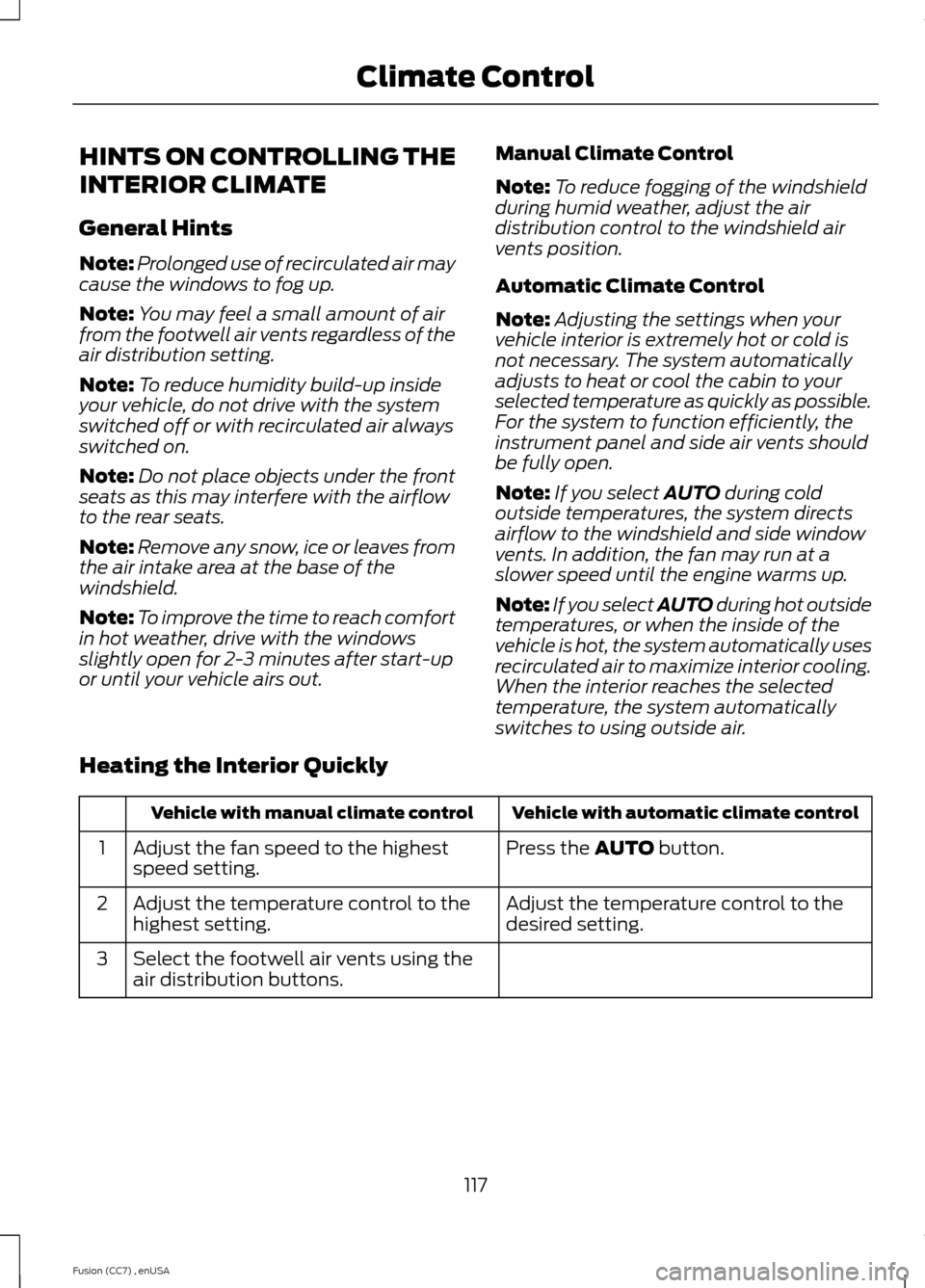
Heating the Interior Quickly
Vehicle with automatic climate controlVehicle with manual climate control
Press the AUTO button.Adjust the fan speed to the highestspeed setting.1
Adjust the temperature control to thedesired setting.Adjust the temperature control to thehighest setting.2
Select the footwell air vents using theair distribution buttons.3
117Fusion (CC7) , enUSAClimate Control