2014 FORD FUSION (AMERICAS) park assist
[x] Cancel search: park assistPage 169 of 458

Note:If the electric parking brake warninglamp stays illuminated, the electric parkingbrake will not automatically release. Youmust release the electric parking brake usingthe electric parking brake switch.
Note:On manual transmission vehicles, ifthe transmission is not in neutral (N) whenyou release the clutch pedal and press theaccelerator pedal, the electric parking brakewill release automatically.
Note:On manual transmission vehicles, theclutch pedal must be fully pressed beforethe drive away release feature will operate.Drive as normal using the accelerator andclutch pedals and the electric parking brakewill be automatically released.
The brake system warning lamp will go offto confirm that the electric parking brakehas been released.
Note:The electric parking brake drive awayrelease makes starting on a hill easier. Thisfeature will release the parking brakeautomatically when the vehicle hassufficient drive force to move up the hill. Toassure drive away release when startinguphill, press the accelerator pedal quickly.
Battery With No Charge
WARNING
You will not be able to apply orrelease the electric parking brake ifthe battery is low or has no charge.
If the battery is low or has no charge, usejumper cables and a booster battery.
HILL START ASSIST
WARNINGS
The system does not replace theparking brake. When you leave yourvehicle, always apply the parkingbrake and put the transmission in park (P).
WARNINGS
You must remain in your vehicle onceyou have activated the system.
During all times, you are responsiblefor controlling your vehicle,supervising the system andintervening, if required.
If the engine is revved excessively, orif a malfunction is detected, thesystem will be deactivated.
The system makes it easier to pull awaywhen your vehicle is on a slope without theneed to use the parking brake.
When the system is active, your vehicle willremain stationary on the slope for two tothree seconds after you release the brakepedal. This allows you time to move yourfoot from the brake to the acceleratorpedal. The brakes are releasedautomatically once the engine hasdeveloped sufficient drive to prevent yourvehicle from rolling down the slope. Thisis an advantage when pulling away on aslope, (for example from a car park ramp,traffic lights or when reversing uphill intoa parking space).
The system will activate automatically onany slope that will cause significant vehiclerollback.
Using Hill Start Assist
1.Press the brake pedal to bring yourvehicle to a complete standstill. Keepthe brake pedal pressed.
2.If the sensors detect that your vehicleis on a slope, the system will activateautomatically.
3.When you remove your foot from thebrake pedal, your vehicle will remainon the slope without rolling away forabout two or three seconds. This holdtime will automatically be extended ifyou are in the process of driving off.
166Fusion (CC7) , enUSABrakes
Page 173 of 458

PARKING AID (IF EQUIPPED)
WARNINGS
To help avoid personal injury, pleaseread and understand the limitationsof the system as contained in thissection. Sensing is only an aid for some(generally large and fixed) objects whenmoving in reverse on a flat surface atparking speeds. Traffic control systems,inclement weather, air brakes, and externalmotors and fans may also affect thefunction of the sensing system; this mayinclude reduced performance or a falseactivation.
To help avoid personal injury, alwaysuse caution when in R (Reverse) andwhen using the sensing system.
This system is not designed toprevent contact with small or movingobjects. The system is designed toprovide a warning to assist the driver indetecting large stationary objects to avoiddamaging the vehicle. The system may notdetect smaller objects, particularly thoseclose to the ground.
Certain add-on devices such as largetrailer hitches, bike or surfboard racksand any device that may block thenormal detection zone of the system, maycreate false beeps.
Note:Keep the sensors, located on thebumper or fascia, free from snow, ice andlarge accumulations of dirt. If the sensorsare covered, the system’s accuracy can beaffected. Do not clean the sensors withsharp objects.
Note:If your vehicle sustains damage tothe bumper or fascia, leaving it misalignedor bent, the sensing zone may be alteredcausing inaccurate measurement ofobstacles or false alarms.
Note:If your vehicle is equipped withMyKey®, it is possible to prevent turning thesensing system off. See MyKey™ (page50).
The sensing system warns the driver ofobstacles within a certain range of thebumper area. The system turns onautomatically whenever the ignition isswitched on.
When receiving a detection warning, theradio volume is reduced to apredetermined level. After the warninggoes away, the radio volume returns to theprevious level.
The system can be switched off throughthe information display menu or from thepop-up message that appears once thetransmission is shifted into R. See GeneralInformation (page 87).
If a fault is present in the system, a warningmessage appears in the informationdisplay and does not allow the driver toswitch the faulted system on. SeeInformation Messages (page 95).
Rear Sensing System
The rear sensors are only active when thetransmission is in R. As the vehicle movescloser to the obstacle, the rate of theaudible warning increases. When theobstacle is fewer than 10 inches (25centimeters) away, the warning soundscontinuously. If a stationary or recedingobject is detected farther than 10 inches(25 centimeters) from the side of thevehicle, the tone sounds for only threeseconds. Once the system detects anobject approaching, the warning soundsagain.
170Fusion (CC7) , enUSAParking Aids
Page 175 of 458

For specific information on the reversesensing portion of the system, refer to thatsection.
ACTIVE PARK ASSIST (IF
EQUIPPED)
WARNING
Designed to be a supplementary parkaid, this system may not work in allconditions. This system cannotreplace the driver’s attention andjudgment. The driver is responsible foravoiding hazards and maintaining a safedistance and speed, even when the systemis in use.
Note:The driver is always responsible forcontrolling the vehicle, supervising thesystem and intervening if required.
The system detects an available parallelparking space and automatically steersyour vehicle into the space (hands-free)while you control the accelerator, gearshiftand brakes. The system visually andaudibly instructs you to park your vehicle.
The system may not function correctly ifsomething passes between the frontbumper and the parking space (apedestrian or cyclist) or if the edge of theneighboring parked vehicle is high off theground (for example, a bus, tow truck orflatbed truck).
Note:The sensors may not detect objectsin heavy rain or other conditions that causedisruptive reflections.
Note:The sensors may not detect objectswith surfaces that absorb ultrasonic waves.
Do not use the system if:
•You have attached a foreign object(bike rack or trailer) to the front or rearof your vehicle or attached close to thesensors.
•You have attached an overhangingobject (surfboard) to the roof.
•The front bumper or side sensors aredamaged or obstructed by a foreignobject (front bumper cover).
•A mini-spare tire is in use.
Using Active Park Assist
Press the button located on thecenter console near the gearshiftlever.
The touchscreen displays a message anda corresponding graphic to indicate it issearching for a parking space. Use thedirection indicator to indicate which sideof your vehicle you want the system tosearch.
Note:If the turn signal is not on, the systemautomatically searches on your vehicle'spassenger side.
172Fusion (CC7) , enUSAParking AidsE146186 AE130107
Page 176 of 458
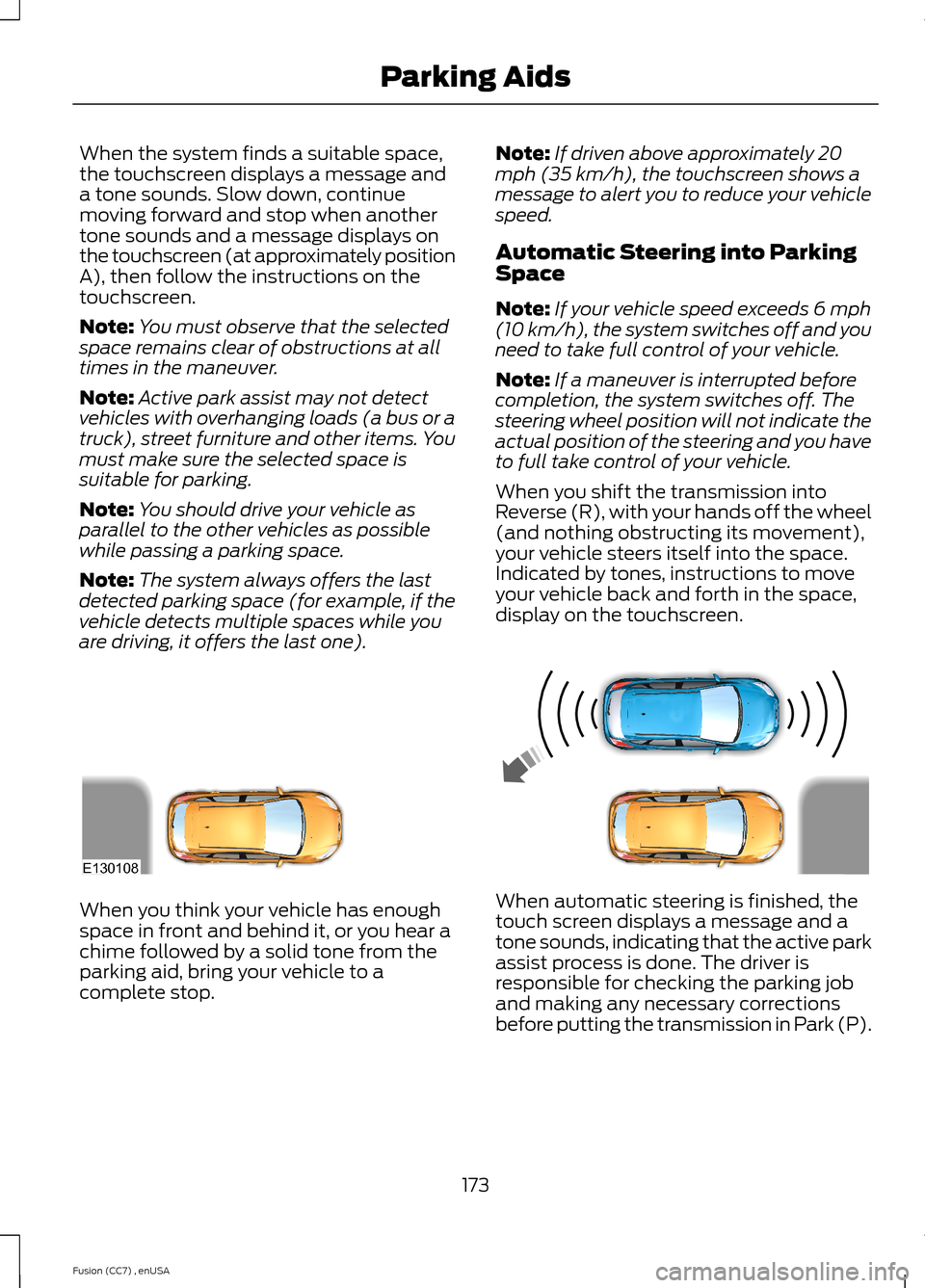
When the system finds a suitable space,the touchscreen displays a message anda tone sounds. Slow down, continuemoving forward and stop when anothertone sounds and a message displays onthe touchscreen (at approximately positionA), then follow the instructions on thetouchscreen.
Note:You must observe that the selectedspace remains clear of obstructions at alltimes in the maneuver.
Note:Active park assist may not detectvehicles with overhanging loads (a bus or atruck), street furniture and other items. Youmust make sure the selected space issuitable for parking.
Note:You should drive your vehicle asparallel to the other vehicles as possiblewhile passing a parking space.
Note:The system always offers the lastdetected parking space (for example, if thevehicle detects multiple spaces while youare driving, it offers the last one).
Note:If driven above approximately 20mph (35 km/h), the touchscreen shows amessage to alert you to reduce your vehiclespeed.
Automatic Steering into ParkingSpace
Note:If your vehicle speed exceeds 6 mph(10 km/h), the system switches off and youneed to take full control of your vehicle.
Note:If a maneuver is interrupted beforecompletion, the system switches off. Thesteering wheel position will not indicate theactual position of the steering and you haveto full take control of your vehicle.
When you shift the transmission intoReverse (R), with your hands off the wheel(and nothing obstructing its movement),your vehicle steers itself into the space.Indicated by tones, instructions to moveyour vehicle back and forth in the space,display on the touchscreen.
When you think your vehicle has enoughspace in front and behind it, or you hear achime followed by a solid tone from theparking aid, bring your vehicle to acomplete stop.
When automatic steering is finished, thetouch screen displays a message and atone sounds, indicating that the active parkassist process is done. The driver isresponsible for checking the parking joband making any necessary correctionsbefore putting the transmission in Park (P).
173Fusion (CC7) , enUSAParking AidsE130108
Page 177 of 458

Deactivating the Park AssistFeature
Manually deactivate the system by::
•Pressing the active park assist button.
•Grabbing the steering wheel.
•Driving above approximately 50 mph(80 km/h) for 10 seconds during anactive park search.
•Driving above 6 mph (10 km/h) duringautomatic steering.
•Turning off the traction control system.
Certain vehicle conditions can alsodeactivate the system, such as:
•Traction control has activated on aslippery or loose surface.
•There is an anti-lock brake systemactivation or failure.
•Something touches the steering wheel.
If a problem occurs with the system, awarning message is displayed, followedby a tone. Occasional system messagesmay occur in normal operation. Forrecurring or frequent system faults, contactan authorized dealer to have your vehicleserviced.
Troubleshooting the System
The system does not look for a space
The traction control system may be off
The transmission is in Reverse (R); your vehicle must be moving forward to detect aparking space
The system does not offer a particular space
Something may be contacting the front bumper or side sensors
There is not enough room on both sides of your vehicle in order to park
There is not enough space for the parking maneuver on the opposite side of the parkingspace
Your vehicle is farther than 5 ft (1.5 m) from the parking space
Your vehicle is closer than 16 in. (40 cm) from neighboring parked vehicles
The transmission is in Reverse (R); your vehicle must be moving forward to detect aparking space
Your vehicle is going faster than 20 mph (35 km/h)
174Fusion (CC7) , enUSAParking Aids
Page 198 of 458

•Driving in reverse faster than 5 mph(8 km/h).
•Backing out of an angled parking spot.
False Alerts
Note:If your vehicle has a factory equippedtow bar and it is towing a trailer, the sensorswill detect the trailer and turn the Blind SpotInformation and Cross Traffic Alert systemsoff to avoid false alerts. For non-factoryequipped tow bars, you may want to turnthe Blind Spot Information System offmanually.
There may be certain instances when thereis a false alert by either the Blind SpotInformation or the Cross Traffic Alertsystems that illuminates the alert indicatorwith no vehicle in the coverage zone. Someamount of false alerts are normal; they aretemporary and self-correct.
System Errors
If either system senses a problem with theleft or right sensor, the Blind SpotInformation System telltale will illuminateand a message will appear in theinformation display.
All other system faults will display onlywith a message in the information display.See Information Messages (page 95).
Switching the Systems Off and On
You can temporarily switch off one or bothsystems in the information display. SeeGeneral Information (page 87). Whenyou switch off the Blind Spot InformationSystem, you will not receive alerts and theinformation display will display a systemoff message. The system switches backon whenever you switch the ignition on.
Note:The Cross Traffic Alert system alwaysswitches on whenever the ignition isswitched on. However, the Blind SpotInformation System will remember the lastselected on or off setting.
One or both systems cannot be switchedoff when MyKey is used. See Principle ofOperation (page 50).
You can also have one or both systemsswitched off permanently at an authorizeddealer. Once switched off, the system canonly be switched back on at an authorizeddealer.
STEERING
Electric Power Steering
WARNINGS
The electric power steering systemhas diagnostic checks thatcontinuously monitor the system toensure proper operation. When a systemerror is detected a steering message willappear in the information display.
The electric power steering systemhas diagnostic checks thatcontinuously monitor the system toensure proper operation of the electronicsystem. When an electronic error isdetected, a message will be displayed inthe information display. If this happens,stop the vehicle in a safe place, and turnoff the engine. After at least 10 seconds,reset the system by restarting the engine,and watch the information display for asteering message. If a steering messagereturns, or returns while driving, take thevehicle to your dealer to have it checked.
Obtain immediate service if a systemerror is detected. You may not noticeany difference in the feel of yoursteering, but a serious condition may exist.Failure to do so may result in loss ofsteering control.
Your vehicle is equipped with an electricpower-assisted steering system. There isno fluid reservoir to check or fill.
195Fusion (CC7) , enUSADriving Aids
Page 213 of 458

Trailer lamps are required on most towedvehicles. Make sure all running lights, brakelights, turn signals and hazard lights areworking.
Before Towing a Trailer
Practice turning, stopping and backing-upto get the feel of your vehicle-trailercombination before starting on a trip.When turning, make wider turns so thetrailer wheels clear curbs and otherobstacles.
When Towing a Trailer
•Do not drive faster than 70 mph (113km/h) during the first 500 miles (800kilometers).
•Do not make full-throttle starts.
•Check your hitch, electrical connectionsand trailer wheel lug nuts thoroughlyafter you have traveled 50 miles (80kilometers).
•When stopped in congested or heavytraffic during hot weather, place thegearshift in position P (automatictransmission) or neutral (manualtransmission) to aid engine andtransmission cooling and to help A/Cperformance.
•Turn off the speed control with heavyloads or in hilly terrain. The speedcontrol may turn off automaticallywhen you are towing on long, steepgrades.
•Shift to a lower gear when driving downa long or steep hill. Do not apply thebrakes continuously, as they mayoverheat and become less effective.
•If your transmission is equipped with aGrade Assist or Tow/Haul feature, usethis feature when towing. This providesengine braking and helps eliminateexcessive transmission shifting foroptimum fuel economy andtransmission cooling.
•Allow more distance for stopping witha trailer attached. Anticipate stops andbrake gradually.
•Avoid parking on a grade. However, ifyou must park on a grade:
1.Turn the steering wheel to point yourvehicle tires away from traffic flow.
2.Set your vehicle parking brake.
3.Place the automatic transmission inposition P or manual transmission in alow gear.
4.Place wheel chocks in front and backof the trailer wheels. (Chocks notincluded with vehicle.)
Launching or Retrieving a Boat orPersonal Watercraft (PWC)
Note:Disconnect the wiring to the trailerbefore backing the trailer into the water.
Note:Reconnect the wiring to the trailerafter removing the trailer from the water.
When backing down a ramp during boatlaunching or retrieval:
•Do not allow the static water level torise above the bottom edge of the rearbumper.
•Do not allow waves to break higherthan 6 inches (15 centimeters) abovethe bottom edge of the rear bumper.
Exceeding these limits may allow water toenter vehicle components:
•Causing internal damage to thecomponents.
•Affecting drivability, emissions, andreliability.
Replace the rear axle lubricant anytimethe rear axle has been submerged in water.Water may have contaminated the rearaxle lubricant, which is not normallychecked or changed unless a leak issuspected or other axle repair is required.
210Fusion (CC7) , enUSATowing
Page 220 of 458

Preparing Your Vehicle
Note:Do not attempt to push-start yourautomatic transmission vehicle. Automatictransmissions do not have push-startcapability. Attempting to push-start avehicle with an automatic transmission maycause transmission damage.
Note:Use only a 12-volt supply to start yourvehicle.
Note:Do not disconnect the battery of thedisabled vehicle as this could damage thevehicle's electrical system.
Park the booster vehicle close to the hoodof the disabled vehicle, making sure thetwo vehicles do not touch. Turn allaccessories off.
Connecting the Jumper Cables
WARNING
Do not attach the cables to fuel lines,engine rocker covers, the intakemanifold or electrical componentsas grounding points. Stay clear of movingparts. To avoid reverse polarityconnections, make sure that you correctlyidentify the positive (+) and negative (-)terminals on both the disabled and boostervehicles before connecting the cables.
Note:In the illustration, the bottom vehiclerepresents the booster vehicle.
1.Connect the positive (+) jumper cableto the positive (+) terminal of thedischarged battery.
2.Connect the other end of the positive(+) cable to the positive (+) terminalof the assisting battery.
3.Connect the negative (-) cable to thenegative (-) terminal of the assistingbattery.
4.Make the final connection of thenegative (-) cable to an exposed metalpart of the stalled vehicle's engine, orconnect the negative (-) cable to aground connection point if available.
WARNING
Do not connect the end of thesecond cable to the negative (-)terminal of the battery to be jumped.A spark may cause an explosion of thegases that surround the battery.
217Fusion (CC7) , enUSARoadside Emergencies4213E142664