2014 FORD FUSION (AMERICAS) buttons
[x] Cancel search: buttonsPage 93 of 458

Settings (cont’d)
On or OffVolumeLimiter
On or OffDo NotDisturb
Hold OK to Clear All MyKeysClear MyKeys
Choose your applicable settingLanguageDisplay
Choose yourapplicable settingDistanceUnits
Choose yourapplicable settingTemperature
Information Display Controls(Type 3)
•Press the up and down arrow buttonsto scroll through and highlight theoptions within a menu.
•Press the right arrow button to enter asub-menu.
•Press the left arrow button to exit amenu.
•Press and hold the left arrow button atany time to return to the main menudisplay (escape button).
•Press the OK button to choose andconfirm settings or messages.
Main menu
From the main menu bar on the left sideof the information display, you can choosefrom the following categories:
Display Mode
Trip 1 & 2
Fuel Economy
Information
Settings
Scroll up/down to highlight one of thecategories, then press the right arrow keyor OK to enter into that category. Press theleft arrow key as needed to exit back to themain menu.
90Fusion (CC7) , enUSAInformation DisplaysE144638 E144639 E138660 E144640 E144642 E100023
Page 94 of 458

Display ModeUse the up/down arrow buttonsto choose between the followingdisplay options.
Option 4Option 3Option 2Option 1Display mode
--XXXXX mi (km) to empty
XXXXFuel gauge
XX--Round tachometer
--X-Vertical tachometer
X---Engine coolant temp gauge
•XXX mi (km) to empty: Shows the approximate distance the vehicle will travel.
•Fuel gauge: Indicates approximately how much fuel is left in the fuel tank. The fuelgauge may vary slightly when the vehicle is in motion or on a grade. When the fuellevel becomes low, the level indicator will change to amber. When the fuel levelbecomes critically low, the level indicator will change to red. Note: When a MyKey®is in use, low fuel warnings will display earlier. The fuel icon and arrow indicates whichside of the vehicle the fuel filler door is located.
•Round tachometer: Indicates the engine speed in revolutions per minute. Driving withyour tachometer pointer continuously at the top of the scale may damage the engine.During SelectShift Automatic™ transmission (SST) use, the currently selected gearwill appear in the display.
•Engine coolant temperature gauge: Indicates engine coolant temperature. At normaloperating temperature, the level indicator will be in the normal range. If the enginecoolant temperature exceeds the normal range, stop the vehicle as soon as safelypossible, switch off the engine and let the engine cool.
Trip 1 & 2
Choose between the standardor enhanced trip display.
Enhanced displayStandard displayTrip 1 & 2
XXTrip Odometer
XXTrip Timer
X-Average Fuel
91Fusion (CC7) , enUSAInformation DisplaysE144639 E138660
Page 95 of 458

Enhanced displayStandard displayTrip 1 & 2
X-Fuel Used
-Press and hold OK to reset the currentlydisplayed trip information.
•Trip Odometer — shows the accumulated trip distance.
•Trip Timer— timer stops when the vehicle is turned off and restarts when the vehicleis restarted.
•Average Fuel — shows the average fuel economy for a given trip.
•Fuel Used — shows the amount of fuel used for a given trip.
Fuel Economy
Use the left/right arrow buttonsto choose the desired fueleconomy display.
Option 2Option 1Fuel Economy
XXDTE
-XInst Fuel Econ
XXAverage Fuel
X-Fuel History
5, 10, or 30 minuteFuel History Duration
•DTE: Distance To Empty shows the approximate distance the vehicle will travel onthe fuel remaining in the tank. Changes in driving pattern may cause the value to vary.
•Inst Fuel Econ: This display shows a visual graph of your instantaneous fuel economy.
•Average Fuel: Indicates the average fuel consumption since the function was lastreset.
•Fuel History: shows a bar chart of your fuel history.
•Fuel History Duration: shows fuel usage over a 5, 10, or 30 minute time span.
Note:You can reset your average fueleconomy by pressing and holding the OKbutton on the left hand steering wheelcontrols.
Info
In this mode, you can viewdifferent vehicle systeminformation and perform asystem check.
92Fusion (CC7) , enUSAInformation DisplaysE144640 E144642
Page 96 of 458
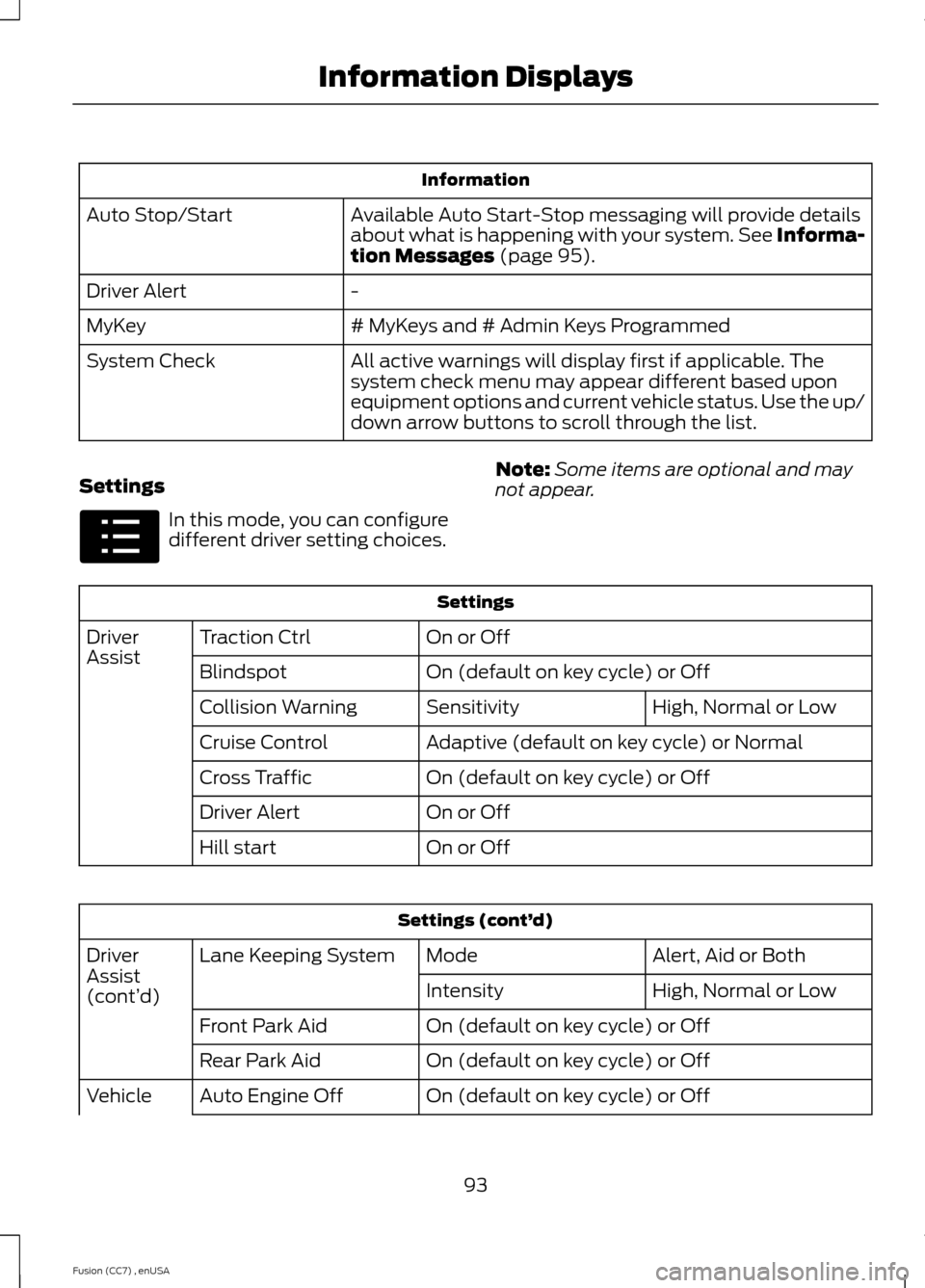
Information
Available Auto Start-Stop messaging will provide detailsabout what is happening with your system. See Informa-tion Messages (page 95).
Auto Stop/Start
-Driver Alert
# MyKeys and # Admin Keys ProgrammedMyKey
All active warnings will display first if applicable. Thesystem check menu may appear different based uponequipment options and current vehicle status. Use the up/down arrow buttons to scroll through the list.
System Check
Settings
In this mode, you can configuredifferent driver setting choices.
Note:Some items are optional and maynot appear.
Settings
On or OffTraction CtrlDriverAssistOn (default on key cycle) or OffBlindspot
High, Normal or LowSensitivityCollision Warning
Adaptive (default on key cycle) or NormalCruise Control
On (default on key cycle) or OffCross Traffic
On or OffDriver Alert
On or OffHill start
Settings (cont’d)
Alert, Aid or BothModeLane Keeping SystemDriverAssist(cont’d)High, Normal or LowIntensity
On (default on key cycle) or OffFront Park Aid
On (default on key cycle) or OffRear Park Aid
On (default on key cycle) or OffAuto Engine OffVehicle
93Fusion (CC7) , enUSAInformation DisplaysE100023
Page 114 of 458
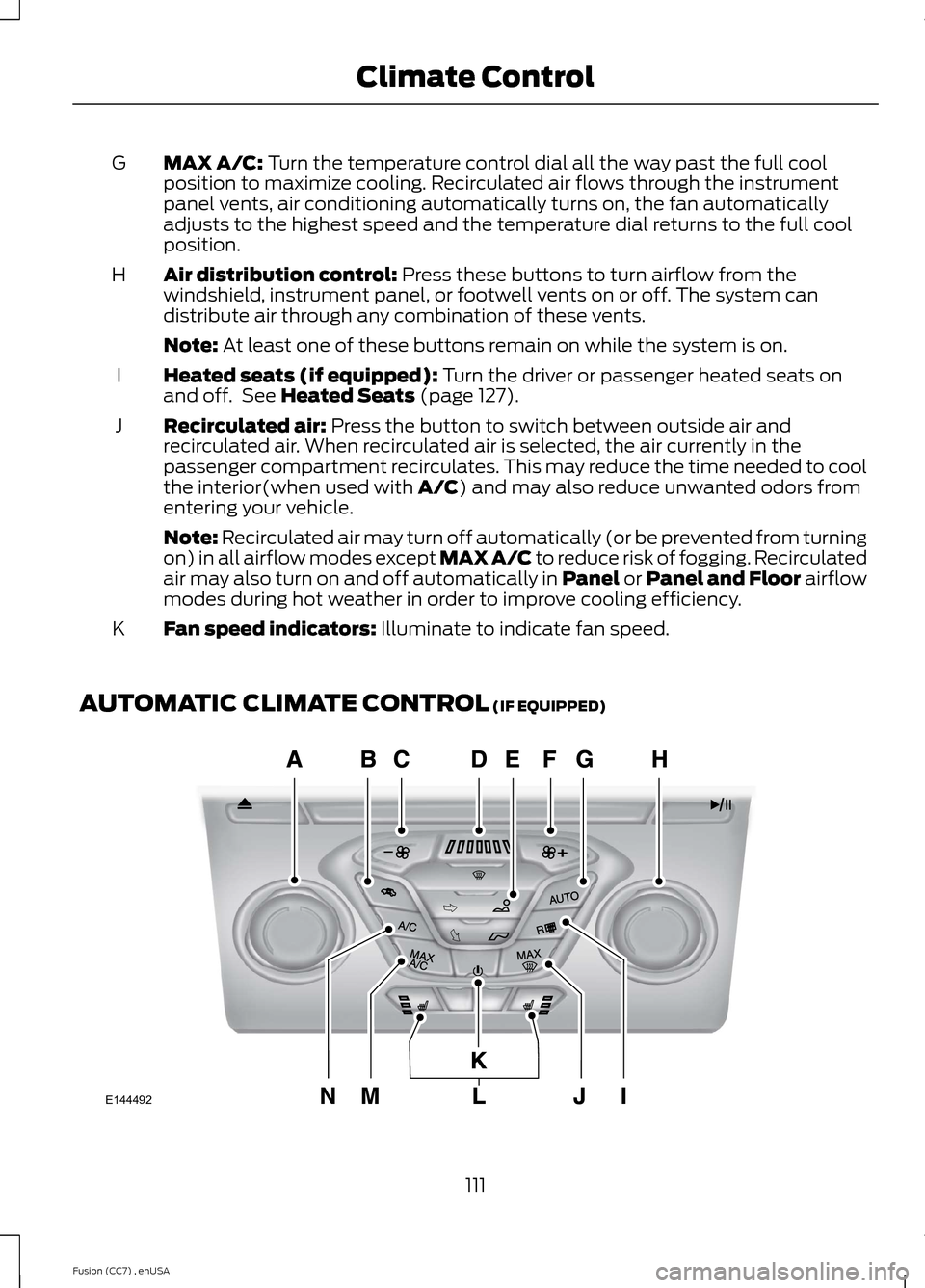
MAX A/C: Turn the temperature control dial all the way past the full coolposition to maximize cooling. Recirculated air flows through the instrumentpanel vents, air conditioning automatically turns on, the fan automaticallyadjusts to the highest speed and the temperature dial returns to the full coolposition.
G
Air distribution control: Press these buttons to turn airflow from thewindshield, instrument panel, or footwell vents on or off. The system candistribute air through any combination of these vents.
H
Note: At least one of these buttons remain on while the system is on.
Heated seats (if equipped): Turn the driver or passenger heated seats onand off. See Heated Seats (page 127).I
Recirculated air: Press the button to switch between outside air andrecirculated air. When recirculated air is selected, the air currently in thepassenger compartment recirculates. This may reduce the time needed to coolthe interior(when used with A/C) and may also reduce unwanted odors fromentering your vehicle.
J
Note: Recirculated air may turn off automatically (or be prevented from turningon) in all airflow modes except MAX A/C to reduce risk of fogging. Recirculatedair may also turn on and off automatically in Panel or Panel and Floor airflowmodes during hot weather in order to improve cooling efficiency.
Fan speed indicators: Illuminate to indicate fan speed.K
AUTOMATIC CLIMATE CONTROL (IF EQUIPPED)
111Fusion (CC7) , enUSAClimate ControlE144492
Page 115 of 458
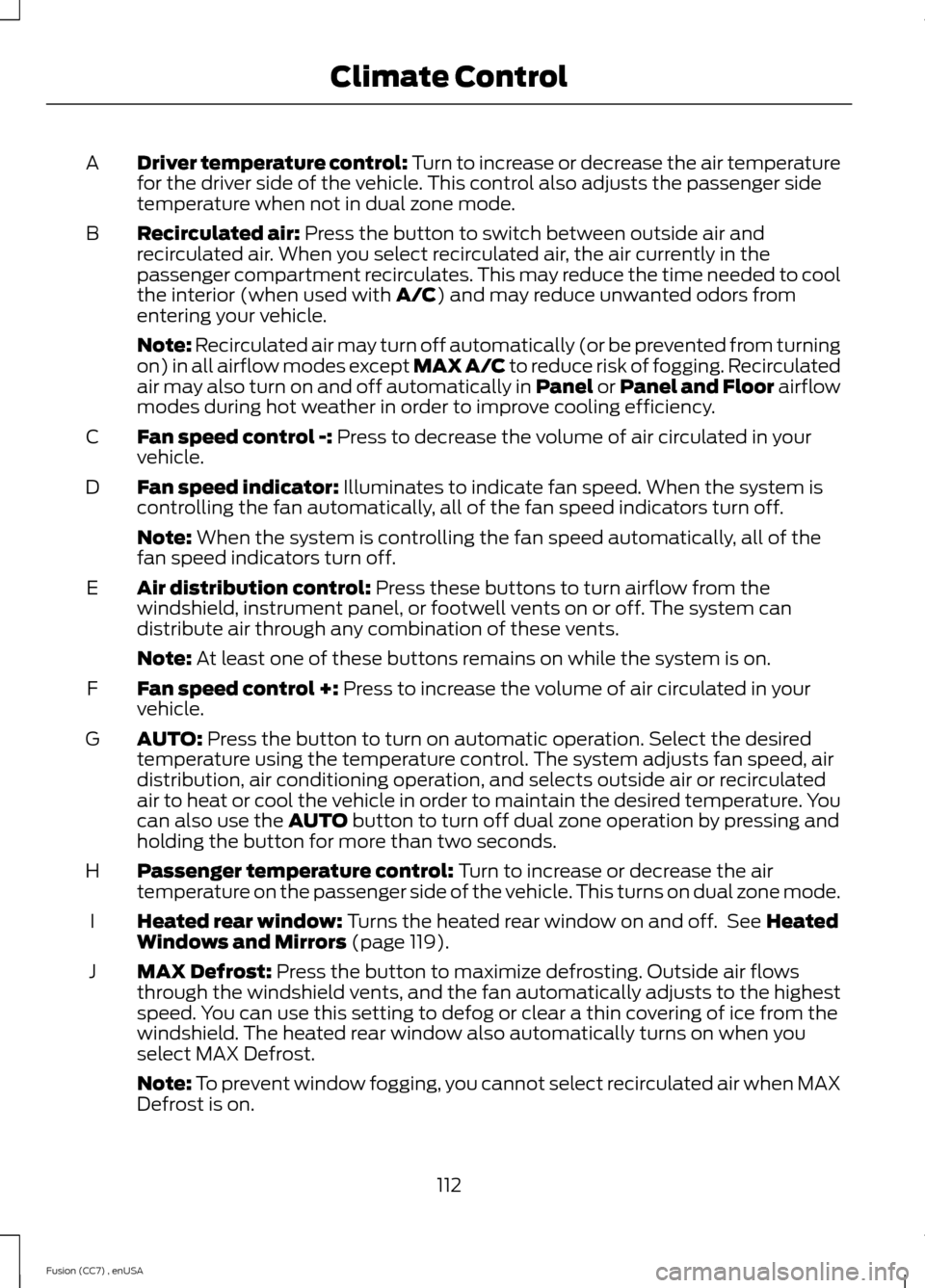
Driver temperature control: Turn to increase or decrease the air temperaturefor the driver side of the vehicle. This control also adjusts the passenger sidetemperature when not in dual zone mode.
A
Recirculated air: Press the button to switch between outside air andrecirculated air. When you select recirculated air, the air currently in thepassenger compartment recirculates. This may reduce the time needed to coolthe interior (when used with A/C) and may reduce unwanted odors fromentering your vehicle.
B
Note: Recirculated air may turn off automatically (or be prevented from turningon) in all airflow modes except MAX A/C to reduce risk of fogging. Recirculatedair may also turn on and off automatically in Panel or Panel and Floor airflowmodes during hot weather in order to improve cooling efficiency.
Fan speed control -: Press to decrease the volume of air circulated in yourvehicle.C
Fan speed indicator: Illuminates to indicate fan speed. When the system iscontrolling the fan automatically, all of the fan speed indicators turn off.D
Note: When the system is controlling the fan speed automatically, all of thefan speed indicators turn off.
Air distribution control: Press these buttons to turn airflow from thewindshield, instrument panel, or footwell vents on or off. The system candistribute air through any combination of these vents.
E
Note: At least one of these buttons remains on while the system is on.
Fan speed control +: Press to increase the volume of air circulated in yourvehicle.F
AUTO: Press the button to turn on automatic operation. Select the desiredtemperature using the temperature control. The system adjusts fan speed, airdistribution, air conditioning operation, and selects outside air or recirculatedair to heat or cool the vehicle in order to maintain the desired temperature. Youcan also use the AUTO button to turn off dual zone operation by pressing andholding the button for more than two seconds.
G
Passenger temperature control: Turn to increase or decrease the airtemperature on the passenger side of the vehicle. This turns on dual zone mode.H
Heated rear window: Turns the heated rear window on and off. See HeatedWindows and Mirrors (page 119).I
MAX Defrost: Press the button to maximize defrosting. Outside air flowsthrough the windshield vents, and the fan automatically adjusts to the highestspeed. You can use this setting to defog or clear a thin covering of ice from thewindshield. The heated rear window also automatically turns on when youselect MAX Defrost.
J
Note: To prevent window fogging, you cannot select recirculated air when MAXDefrost is on.
112Fusion (CC7) , enUSAClimate Control
Page 120 of 458
HINTS ON CONTROLLING THE
INTERIOR CLIMATE
General Hints
Note:Prolonged use of recirculated air maycause the windows to fog up.
Note:You may feel a small amount of airfrom the footwell air vents regardless of theair distribution setting.
Note:To reduce humidity build-up insideyour vehicle, do not drive with the systemswitched off or with recirculated air alwaysswitched on.
Note:Do not place objects under the frontseats as this may interfere with the airflowto the rear seats.
Note:Remove any snow, ice or leaves fromthe air intake area at the base of thewindshield.
Note:To improve the time to reach comfortin hot weather, drive with the windowsslightly open for 2-3 minutes after start-upor until your vehicle airs out.
Manual Climate Control
Note:To reduce fogging of the windshieldduring humid weather, adjust the airdistribution control to the windshield airvents position.
Automatic Climate Control
Note:Adjusting the settings when yourvehicle interior is extremely hot or cold isnot necessary. The system automaticallyadjusts to heat or cool the cabin to yourselected temperature as quickly as possible.For the system to function efficiently, theinstrument panel and side air vents shouldbe fully open.
Note:If you select AUTO during coldoutside temperatures, the system directsairflow to the windshield and side windowvents. In addition, the fan may run at aslower speed until the engine warms up.
Note:If you select AUTO during hot outsidetemperatures, or when the inside of thevehicle is hot, the system automatically usesrecirculated air to maximize interior cooling.When the interior reaches the selectedtemperature, the system automaticallyswitches to using outside air.
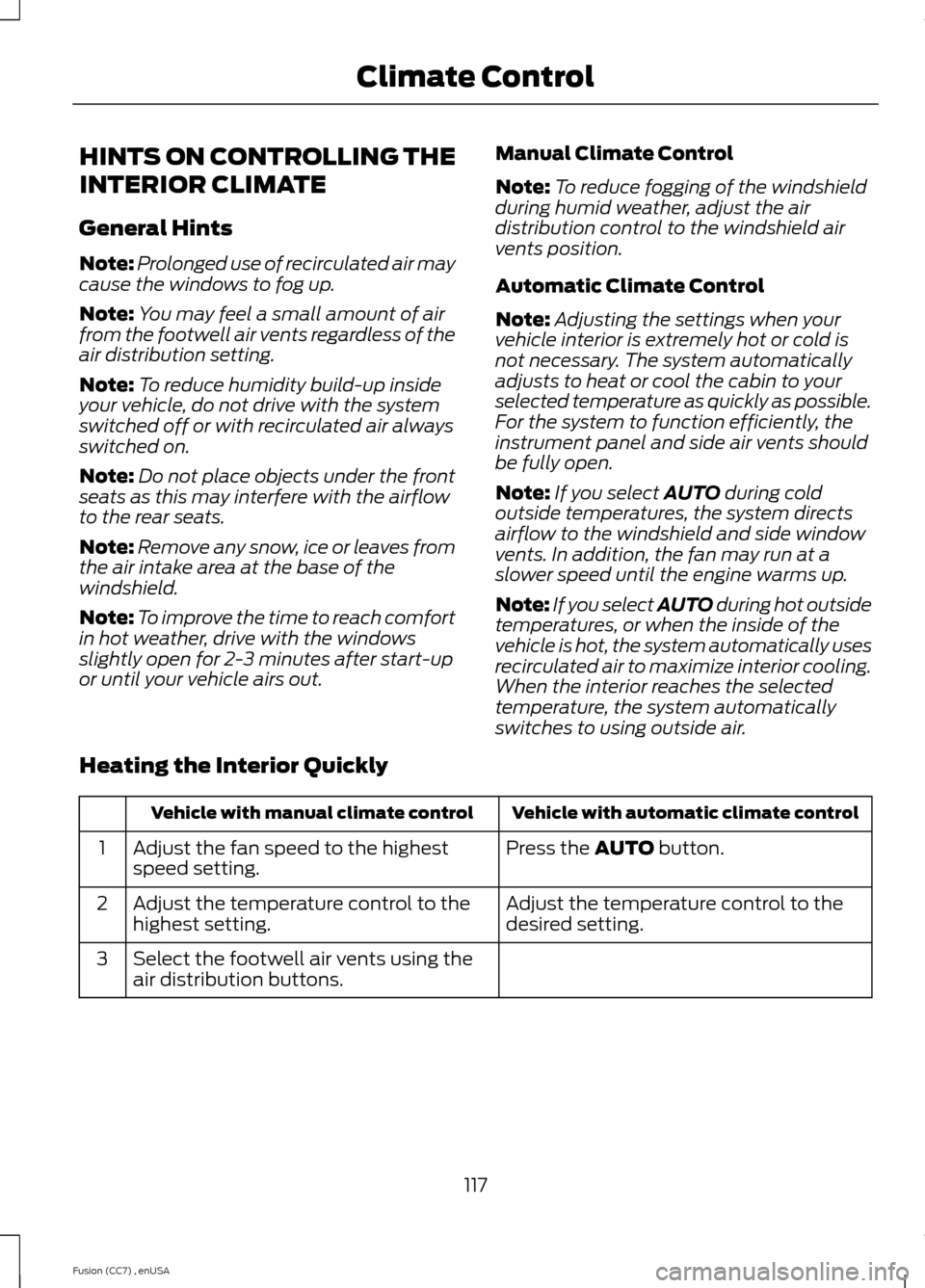
Heating the Interior Quickly
Vehicle with automatic climate controlVehicle with manual climate control
Press the AUTO button.Adjust the fan speed to the highestspeed setting.1
Adjust the temperature control to thedesired setting.Adjust the temperature control to thehighest setting.2
Select the footwell air vents using theair distribution buttons.3
117Fusion (CC7) , enUSAClimate Control
Page 121 of 458
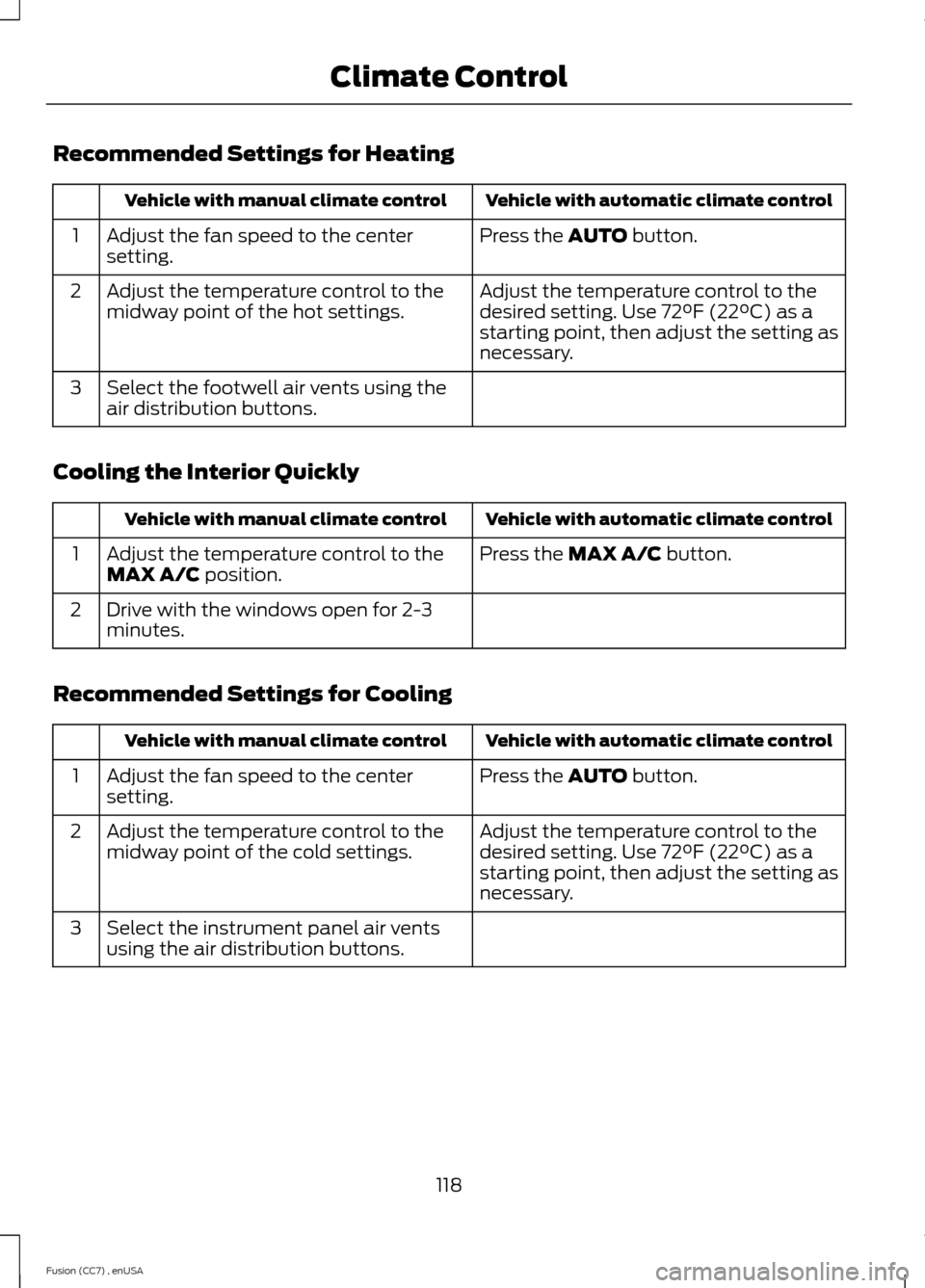
Recommended Settings for Heating
Vehicle with automatic climate controlVehicle with manual climate control
Press the AUTO button.Adjust the fan speed to the centersetting.1
Adjust the temperature control to thedesired setting. Use 72°F (22°C) as astarting point, then adjust the setting asnecessary.
Adjust the temperature control to themidway point of the hot settings.2
Select the footwell air vents using theair distribution buttons.3
Cooling the Interior Quickly
Vehicle with automatic climate controlVehicle with manual climate control
Press the MAX A/C button.Adjust the temperature control to theMAX A/C position.1
Drive with the windows open for 2-3minutes.2
Recommended Settings for Cooling
Vehicle with automatic climate controlVehicle with manual climate control
Press the AUTO button.Adjust the fan speed to the centersetting.1
Adjust the temperature control to thedesired setting. Use 72°F (22°C) as astarting point, then adjust the setting asnecessary.
Adjust the temperature control to themidway point of the cold settings.2
Select the instrument panel air ventsusing the air distribution buttons.3
118Fusion (CC7) , enUSAClimate Control