2014 FORD FUSION (AMERICAS) engine
[x] Cancel search: enginePage 294 of 458

TECHNICAL SPECIFICATIONS
Ford part number /Ford specificationFord part name orequivalentCapacityItem
PM-1-C / WSS-M6C65-A2Motorcraft DOT 4 LVHigh PerformanceBrake Fluid
Between MIN andMAX on reservoirBrake fluid 1
Motorcraft XL-5(aerosol) or CRCSL3151ESB / ESB-M1C93-B
Multi-PurposeGrease Spray(lithium grease)
Not applicableDoor latch, hoodlatch, trunk latchand seat tracks
XL-1 (U.S.) /Motorcraft Penet-rating and LockLubricant (U.S.)
Not applicableLock cylinder--
CXC-51-A (Canada)/Motorcraft Penet-rating fluid (Canada)--
XT-10-QLV MERCONLVMotorcraft MERCONLV ATF9.0 qt (8.5 L)Automatic trans-
mission fluid 2, 3
WSS-M2C200-D2Motorcraft DualClutch TransmissionFluid XT-11-QDC
1.7 qt (1.67 L)6-Speed Manualtransaxle fluid
XY-80W90-QL /WSP-M2C197-AMotorcraft SAE80W-90 PremiumRear Axle Lubricant
1.2 qt (1.15 L)Rear differential(All Wheel Drive)fluid
XY-75W140-QL /WSL-M2C192-AMotorcraft SAE75W-140 SyntheticRear Axle Lubricant
11.8 fl oz (0.35 L)Power TransferUnit (PTU) fluid
(All Wheel Drive) 4
WSS-M2C945-AMotorcraft SAE 5W-20 Motor Oil4.3 qt (4.1 L)1.5L EcoBoost
engine oil 5, 6,7
4.3 qt (4.1 L)1.6L EcoBoost
engine oil 5, 6,7
WSS-M2C946-AMotorcraft SAE 5W-30 Motor Oil5.7 qt (5.4 L)2.0L EcoBoost
engine oil 5, 6,7
WSS-M2C945-AMotorcraft SAE 5W-20 Motor Oil5.7 qt (5.4 L)2.5L engine oil 5, 6,7
291Fusion (CC7) , enUSACapacities and Specifications
Page 295 of 458
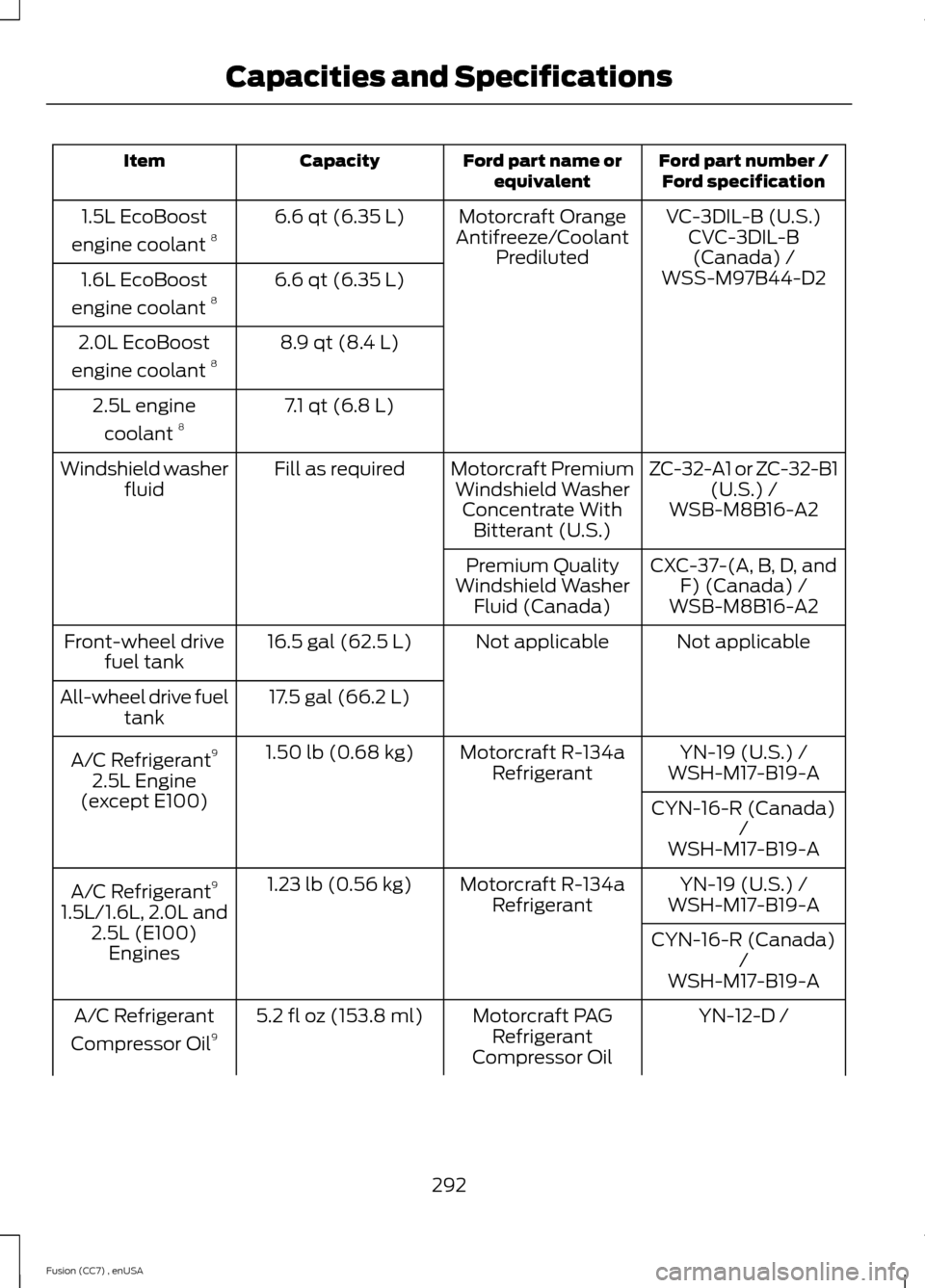
Ford part number /Ford specificationFord part name orequivalentCapacityItem
VC-3DIL-B (U.S.)Motorcraft OrangeAntifreeze/CoolantPrediluted
6.6 qt (6.35 L)1.5L EcoBoost
engine coolant 8CVC-3DIL-B(Canada) /6.6 qt (6.35 L)1.6L EcoBoost
engine coolant 8WSS-M97B44-D2
8.9 qt (8.4 L)2.0L EcoBoost
engine coolant 8
7.1 qt (6.8 L)2.5L engine
coolant 8
ZC-32-A1 or ZC-32-B1(U.S.) /Motorcraft PremiumWindshield WasherConcentrate WithBitterant (U.S.)
Fill as requiredWindshield washerfluidWSB-M8B16-A2
CXC-37-(A, B, D, andF) (Canada) /Premium QualityWindshield WasherFluid (Canada)WSB-M8B16-A2
Not applicableNot applicable16.5 gal (62.5 L)Front-wheel drivefuel tank
17.5 gal (66.2 L)All-wheel drive fueltank
YN-19 (U.S.) /Motorcraft R-134aRefrigerant1.50 lb (0.68 kg)A/C Refrigerant9
2.5L Engine(except E100)
WSH-M17-B19-A
CYN-16-R (Canada)/WSH-M17-B19-A
YN-19 (U.S.) /Motorcraft R-134aRefrigerant1.23 lb (0.56 kg)A/C Refrigerant9
1.5L/1.6L, 2.0L and2.5L (E100)Engines
WSH-M17-B19-A
CYN-16-R (Canada)/WSH-M17-B19-A
YN-12-D /Motorcraft PAGRefrigerantCompressor Oil
5.2 fl oz (153.8 ml)A/C Refrigerant
Compressor Oil9
292Fusion (CC7) , enUSACapacities and Specifications
Page 296 of 458

Ford part number /Ford specificationFord part name orequivalentCapacityItem
WSH-M1C231-A
1Ford recommends using Motorcraft (Ford) DOT 4 LV High Performance Brake Fluid, orequivalent meeting WSS-M6C65-A2. Use of any fluid other than the recommended fluidmay cause degraded brake performance and not meet the Ford performance standards.Keep brake fluid clean and dry. Contamination with dirt, water, petroleum products orother materials may result in brake system damage and possible failure.2Approximate dry fill capacity. Actual amount may vary during fluid changes.3Automatic transmissions that require Motorcraft MERCON LV transmission fluid shouldonly use Motorcraft MERCON LV transmission fluid.
Use of any fluid other than the recommended fluid may cause transmission damage.
Change the automatic transmission fluid and filter at the correct service interval. SeeScheduled Maintenance (page 428).4See your authorized dealer for fluid level checking or filling.5Your engine has been designed to use Motorcraft engine oils or equivalent oils that meetFord's oil specification. It is also acceptable to use an engine oil of recommended viscositygrade that meets API SN requirements and displays the API certification mark for gasolineengines.6Do not use oils labeled as API SN unless the label also displays the API certification mark.These oils do not meet the requirements of your vehicle's engine and emissions system.7Do not use supplemental engine oil additives in your engine. They are unnecessary andcould lead to engine damage not covered by your Ford warranty.8Add the coolant type originally equipped in your vehicle.9 See the Warning below:
WARNING
The air conditioning refrigerant system contains refrigerant R-134a under highpressure. Opening the air conditioning refrigerant system can cause personal injury.Have the air conditioning refrigerant system serviced only by qualified personnel.
293Fusion (CC7) , enUSACapacities and Specifications
Page 310 of 458
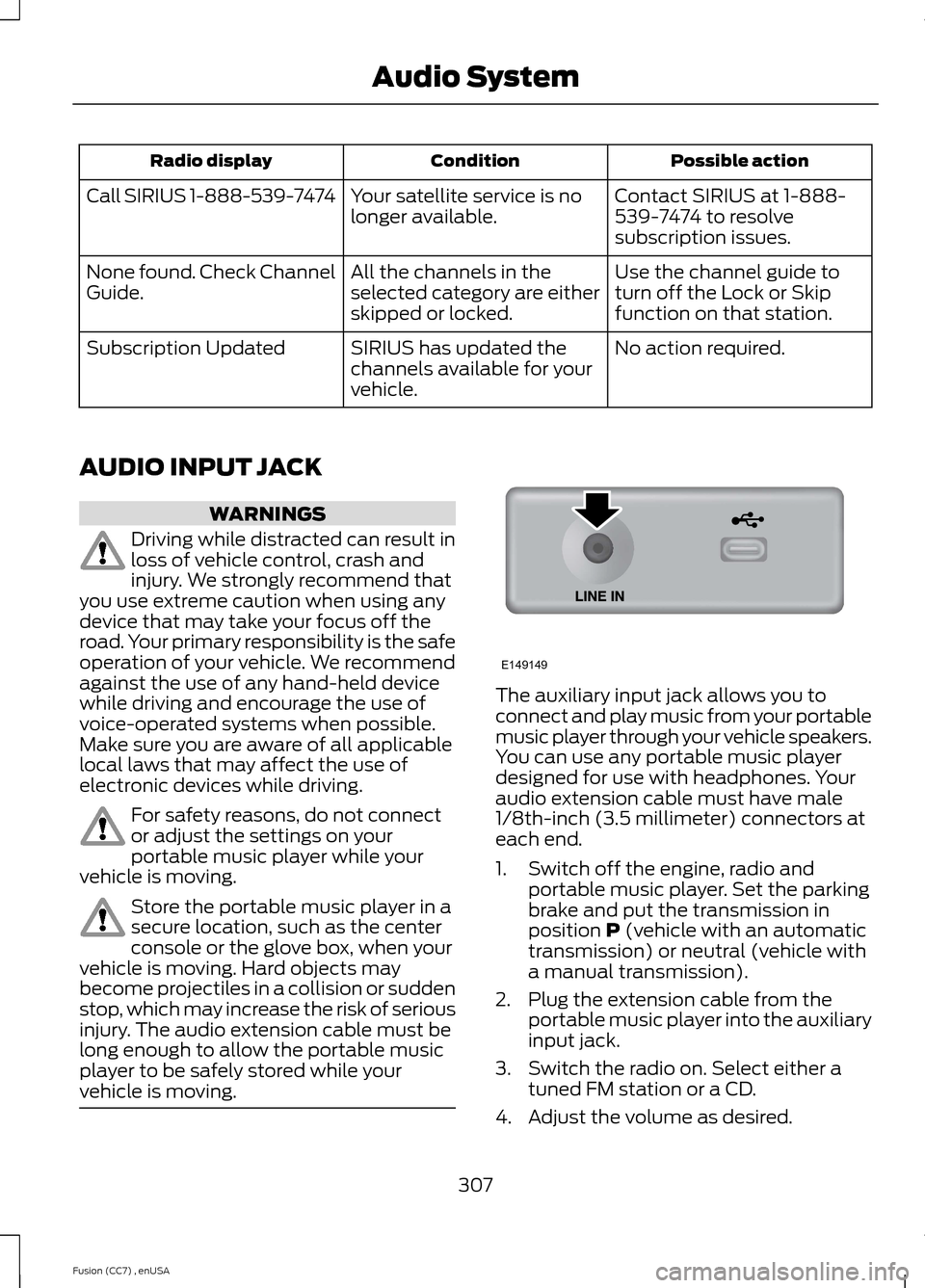
Possible actionConditionRadio display
Contact SIRIUS at 1-888-539-7474 to resolvesubscription issues.
Your satellite service is nolonger available.Call SIRIUS 1-888-539-7474
Use the channel guide toturn off the Lock or Skipfunction on that station.
All the channels in theselected category are eitherskipped or locked.
None found. Check ChannelGuide.
No action required.SIRIUS has updated thechannels available for yourvehicle.
Subscription Updated
AUDIO INPUT JACK
WARNINGS
Driving while distracted can result inloss of vehicle control, crash andinjury. We strongly recommend thatyou use extreme caution when using anydevice that may take your focus off theroad. Your primary responsibility is the safeoperation of your vehicle. We recommendagainst the use of any hand-held devicewhile driving and encourage the use ofvoice-operated systems when possible.Make sure you are aware of all applicablelocal laws that may affect the use ofelectronic devices while driving.
For safety reasons, do not connector adjust the settings on yourportable music player while yourvehicle is moving.
Store the portable music player in asecure location, such as the centerconsole or the glove box, when yourvehicle is moving. Hard objects maybecome projectiles in a collision or suddenstop, which may increase the risk of seriousinjury. The audio extension cable must belong enough to allow the portable musicplayer to be safely stored while yourvehicle is moving.
The auxiliary input jack allows you toconnect and play music from your portablemusic player through your vehicle speakers.You can use any portable music playerdesigned for use with headphones. Youraudio extension cable must have male1/8th-inch (3.5 millimeter) connectors ateach end.
1.Switch off the engine, radio andportable music player. Set the parkingbrake and put the transmission inposition P (vehicle with an automatictransmission) or neutral (vehicle witha manual transmission).
2.Plug the extension cable from theportable music player into the auxiliaryinput jack.
3.Switch the radio on. Select either atuned FM station or a CD.
4.Adjust the volume as desired.
307Fusion (CC7) , enUSAAudio SystemE149149
Page 381 of 458
Playing Video from Your Device
To access and play video from your device,your vehicle's transmission must be inposition P (vehicle equipped with anautomatic transmission) or neutral(vehicle equipped with a manualtransmission) with the ignition in accessorymode. See Starting and Stopping theEngine (page 136).
SD Card and USB Voice Commands
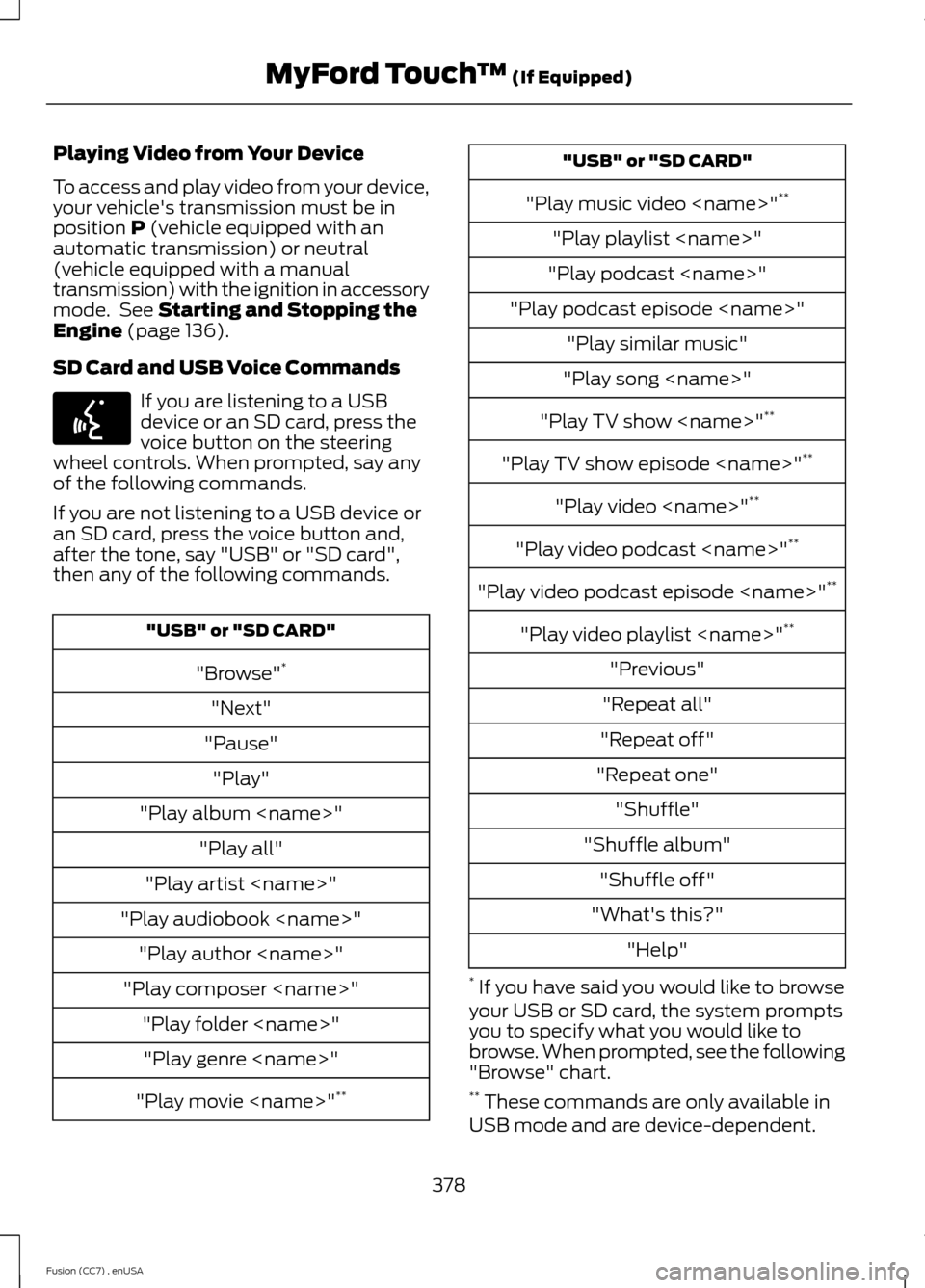
If you are listening to a USBdevice or an SD card, press thevoice button on the steeringwheel controls. When prompted, say anyof the following commands.
If you are not listening to a USB device oran SD card, press the voice button and,after the tone, say "USB" or "SD card",then any of the following commands.
"USB" or "SD CARD"
"Browse"*
"Next"
"Pause"
"Play"
"Play album
"Play all"
"Play artist
"Play audiobook
"Play author
"Play composer
"Play folder
"Play genre
"Play movie
"USB" or "SD CARD"
"Play music video
"Play playlist
"Play podcast
"Play podcast episode
"Play similar music"
"Play song
"Play TV show
"Play TV show episode
"Play video
"Play video podcast
"Play video podcast episode
"Play video playlist
"Previous"
"Repeat all"
"Repeat off"
"Repeat one"
"Shuffle"
"Shuffle album"
"Shuffle off"
"What's this?"
"Help"
* If you have said you would like to browseyour USB or SD card, the system promptsyou to specify what you would like tobrowse. When prompted, see the following"Browse" chart.** These commands are only available inUSB mode and are device-dependent.
378Fusion (CC7) , enUSAMyFord Touch™ (If Equipped)E142599
Page 383 of 458
To access, press the lower leftcorner on the touchscreen, thenselect the BT Stereo tab.
Bluetooth Audio Voice Commands
If you are listening to a Bluetoothaudio device, press the voicebutton on the steering wheelcontrol. When prompted, say "Next song","Pause", "Play" or "Previous song".
If you are not listening to a Bluetooth audiodevice, press the voice button and, afterthe tone, say "Next song", "Pause", "Play"or "Previous song".
A/V Inputs
WARNINGS
Driving while distracted can result inloss of vehicle control, crash andinjury. We strongly recommend thatyou use extreme caution when using anydevice that may take your focus off theroad. Your primary responsibility is the safeoperation of your vehicle. We recommendagainst the use of any handheld devicewhile driving and encourage the use ofvoice-operated systems when possible.Make sure you are aware of all applicablelocal laws that may affect the use ofelectronic devices while driving.
For safety reasons, do not connector adjust the settings on yourportable music player while yourvehicle is moving.
Store the portable music player in asecure location, such as the centerconsole or the glove box, when yourvehicle is moving. Hard objects maybecome projectiles in a crash or suddenstop, which may increase the risk of seriousinjury. The audio extension cable must belong enough to allow the portable musicplayer to be safely stored while yourvehicle is moving.
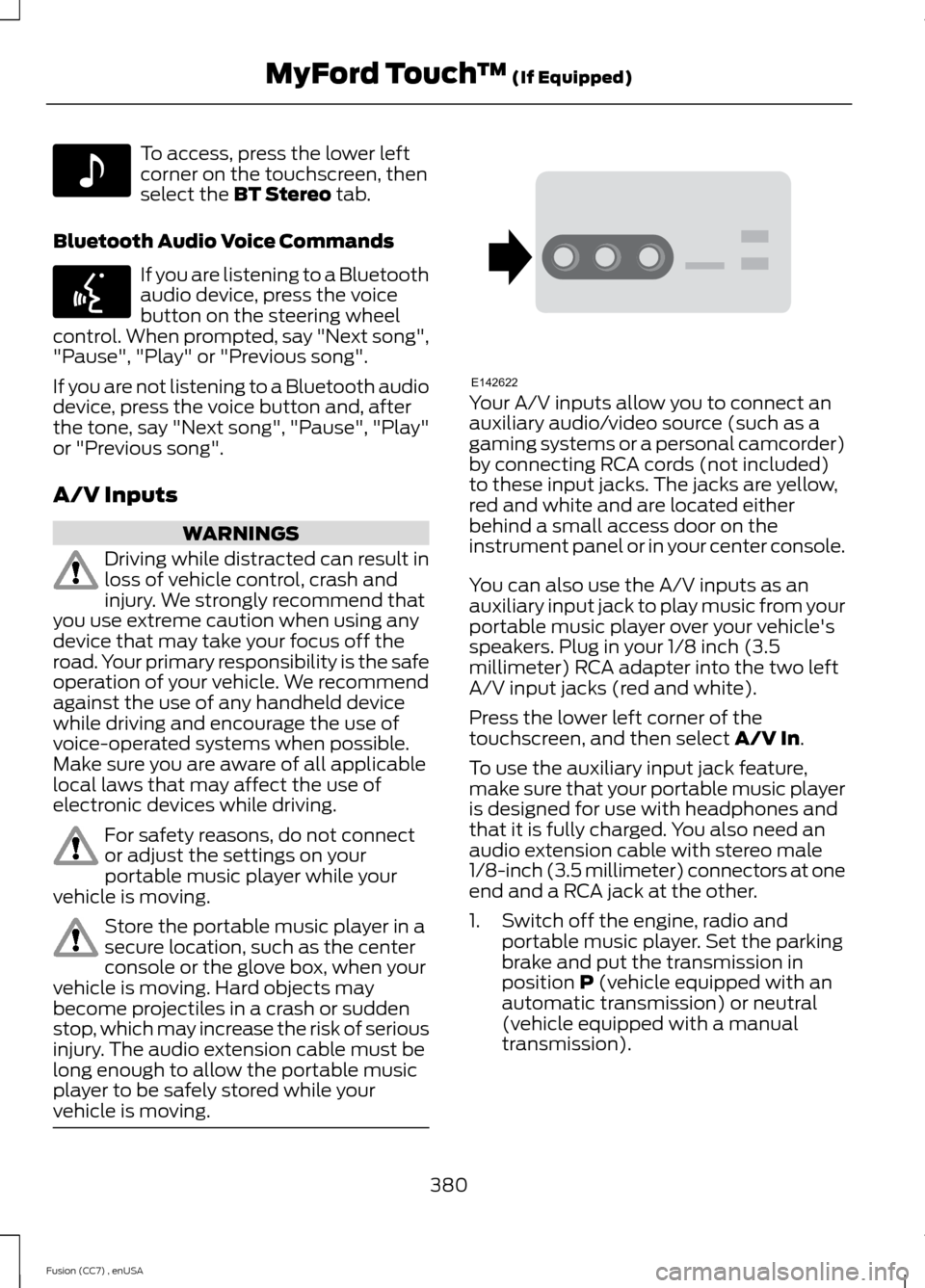
Your A/V inputs allow you to connect anauxiliary audio/video source (such as agaming systems or a personal camcorder)by connecting RCA cords (not included)to these input jacks. The jacks are yellow,red and white and are located eitherbehind a small access door on theinstrument panel or in your center console.
You can also use the A/V inputs as anauxiliary input jack to play music from yourportable music player over your vehicle'sspeakers. Plug in your 1/8 inch (3.5millimeter) RCA adapter into the two leftA/V input jacks (red and white).
Press the lower left corner of thetouchscreen, and then select A/V In.
To use the auxiliary input jack feature,make sure that your portable music playeris designed for use with headphones andthat it is fully charged. You also need anaudio extension cable with stereo male1/8-inch (3.5 millimeter) connectors at oneend and a RCA jack at the other.
1.Switch off the engine, radio andportable music player. Set the parkingbrake and put the transmission inposition P (vehicle equipped with anautomatic transmission) or neutral(vehicle equipped with a manualtransmission).
380Fusion (CC7) , enUSAMyFord Touch™ (If Equipped)E142611 E142599 E142622
Page 412 of 458

For a complete listing of the accessoriesthat are available for your vehicle, pleasecontact your authorized dealer or visit ouronline store atwww.Accessories.Ford.com (UnitedStates only).
Ford Motor Company will repair or replaceany properly authorized dealer-installedFord Custom Accessories found to bedefective in factory-supplied materials orworkmanship during the warranty period,as well as any component damaged by thedefective accessories.
Ford Motor Company will warrant yourvehicle's accessories through the warrantythat provides the greatest benefit:
•24 months, unlimited mileage.
•The remainder of your new vehiclelimited warranty.
Contact your authorized dealer for detailsand a copy of the warranty.
Exterior style
•Side window deflectors.
•Splash guards.
•Rear spoiler.
•Wheels.
•Bumper protectors.
Interior style
•All-weather floor mats.
•Rear seat entertainment*.
•Premium carpeted floor mats.
•Door sill plates.
•Electrochromaticcompass/temperature interior mirrors.
Lifestyle
•Ash cup or smoker's packages.
•Car covers*.
•Cargo area protectors.
•Cargo net.
•Cargo organizers.
•Interior light kit.
•Roof racks and carriers*.
Peace of mind
•Remote start.
•Vehicle security systems.
•Wheel locks.
•Bumper-mounted parking sensor*.
•Locking fuel plug for capless fuelsystem.
*The accessory manufacturer designs,develops and therefore warrants FordLicensed Accessories, and does not designor test these accessories to Ford MotorCompany engineering requirements.Contact an authorized Ford dealer for theaccessory manufacturer's limited warrantydetails and request a copy of the FordLicensed Accessories product limitedwarranty from the accessory manufacturer.
409Fusion (CC7) , enUSAAccessories
Page 415 of 458
Description of Other Rights andLimitations
•Speech Recognition: If theSOFTWARE includes speechrecognition component(s), you shouldunderstand that speech recognition isan inherently statistical process andthat recognition errors are inherent inthe process. Neither FORD MOTORCOMPANY nor its suppliers shall beliable for any damages arising out oferrors in the speech recognitionprocess.
•Limitations on Reverse Engineering,Decompilation and Disassembly:You may not reverse engineer,decompile, or disassemble nor permitothers to reverse engineer, decompileor disassemble the SOFTWARE, exceptand only to the extent that such activityis expressly permitted by applicablelaw notwithstanding this limitation.
•Limitations on Distributing,Copying, Modifying and CreatingDerivative Works: You may notdistribute, copy, make modificationsto or create derivative works based onthe SOFTWARE, except and only to theextent that such activity is expresslypermitted by applicable lawnotwithstanding this limitation.
•Single EULA: The end userdocumentation for the DEVICE andrelated systems and services maycontain multiple EULAs, such asmultiple translations and/or multiplemedia versions (e.g., in the userdocumentation and in the software).Even if you receive multiple EULAs, youare licensed to use only one (1) copy ofthe SOFTWARE.
•SOFTWARE Transfer: You maypermanently transfer your rights underthis EULA only as part of a sale ortransfer of the DEVICE, provided youretain no copies, you transfer all of theSOFTWARE (including all componentparts, the media and printed materials,any upgrades, and, if applicable, theCertificate(s) of Authenticity), and therecipient agrees to the terms of thisEULA. If the SOFTWARE is an upgrade,any transfer must include all priorversions of the SOFTWARE.
•Termination: Without prejudice to anyother rights, FORD MOTOR COMPANYor MS may terminate this EULA if youfail to comply with the terms andconditions of this EULA.
•Security Updates/Digital RightsManagement: Content owners usethe WMDRM technology included inyour DEVICE to protect theirintellectual property, includedcopyrighted content. Portions of theSOFTWARE on your DEVICE useWMDRM software to accessWMDRM-protected content. If theWMDRM software fails to protect thecontent, content owners may askMicrosoft to revoke the SOFTWARE'sability to use WMDRM to play or copyprotected content. This action doesnot affect unprotected content. Whenyour DEVICE downloads licenses forprotected content, you agree thatMicrosoft may include a revocation listwith the licenses. Content owners mayrequire you to upgrade the SOFTWAREon your DEVICE to access their content.If you decline an upgrade, you will notbe able to access content that requiresthe upgrade.
412Fusion (CC7) , enUSAAppendices