2014 FORD FOCUS ELECTRIC charging
[x] Cancel search: chargingPage 326 of 403
Note:Your vehicle may not always reach the set cabin temperature
due to charging and ambient temperature conditions. This is normal
operation.
Clearerases the GO Time and cabin conditioning temperature.
Savestores the GO Time and temperature settings.
•Note:If you select a GO Time, but chooseOfffor the temperature
setting, the vehicle schedules charging to be complete by your GO
Time and does not condition the cabin.
•Note:Make sure you save your settings before returning to the
previous screen. If you do not touchSave,your settings are not
stored in the system.
Value Charge Profiles
Press theEditbutton next to the present charge profile on the Settings
screen to go the Value Charge Profiles screen.
Defaultdisplays the charging mode and off-peak times for your Default
Value Charge profile. The system displays off-peak times for weekdays;
the remaining hours of the day are considered peak time. The system
displays similar off-peak times for weekend days.
•Charge Nowif you want your vehicle to immediately charge when
you plug it in at this profile location.
•Value Chargeif you want to take advantage of off-peak electricity
rates. The vehicle optimizes the charge schedule to be complete by
the next GO Time.
•Editto access yourDefault ValueCharge Profile settings screen
(seeDefault Value Charge Profilelater in this section).
Customer Defined Value Charge Profilesdisplays the Value Charge
profile names and current Charge Mode for specific locations once you
create profile names. You can set up and edit these profiles using the
MyFord Mobile internet or smartphone application. You can program up
to nine unique charge profiles.
Default Value Charge Profile
WeekdayandWeekenddisplay the off-peak charge times when you
touch either button. Set the Weekday times and Weekend time, then
touchSave.
Note:The system does not store your settings until you make selections
for both Weekday and Weekend. If you touch the back arrow button to
return to the previous screen without saving your settings, the system
does not store them and you need to enter them again.
MyFord Touch®325
2014 Focus Electric Vehicle(fob)
Owners Guide gf, 1st Printing, May 2013
USA(fus)
Page 328 of 403
B.Electric Motorrepresents the electric motor. The higher the motor
power is, the larger the circle around this node. Any time the vehicle is
ready to be driven, the motor node illuminates.
C.Battery-to-motor flowshows the direction of power flow between
the high-voltage battery and the electric motor. Flow toward the motor
indicates the battery is providing power to accelerate the vehicle
(discharging the battery). Flow toward the battery indicates the electric
motor is providing power to the battery (charging the battery).
Note:The battery-to-motor flow includes battery power the vehicle is
using for acceleration. It does not include energy the vehicle is using for
accessories (such as air conditioning, headlights and radio). This screen
displays accessories and climate usage separately.
D.Plugappears when you plug your vehicle into the wall. When
charging the high voltage battery from the wall, you can see flow from
the plug to the battery on the screen.
•Accessoriesindicates electrical power demands from your vehicle’s
accessory systems. Accessories use power but do not contribute to
making the vehicle move. The power flow displays power usage from
the climate control system and other accessories separately.
E.Otherincludes all power usage from the low voltage accessories such
as the climate control fan, headlights and heated seats. The higher the
power usage is from these accessories, the larger the circle around the
node. This node illuminates anytime the vehicle is on since there is
always some low level power in use.
F.Climateincludes the power usage from the high-voltage climate
control components such as the electric A/C compressor and the electric
heater. The higher the power usage is from these components, the larger
the circle around this node.
Note:The climate control system may determine A/C is necessary even
when you turn it off. In this case, you may see some climate power when
the A/C is off.
G.High voltage battery powerrepresents your high-voltage battery.
A circle illuminates around the node when the high-voltage battery is
receiving power from regenerative braking or external charging (when
you plug it in). The higher the power going into the high-voltage battery,
the larger the circle around this node.
H.Drive powerrepresents the power going to the wheels. The higher
the wheel power is, the larger the circle around this node.
MyFord Touch®327
2014 Focus Electric Vehicle(fob)
Owners Guide gf, 1st Printing, May 2013
USA(fus)
Page 329 of 403
Status
This indicates which mode is active within the vehicle system.
Charging HV Battery
The hybrid system is storing power in the high-voltage battery.
Idle
The vehicle is either at rest, or sharing very little power between the
electric system parts.
Idle with Charging
The high-voltage battery is receiving power in order to recharge.
Electric Drive
The vehicle is driving in electric mode.
Charge Complete
The high-voltage battery charging from the wall is complete.
INFORMATION
If your vehicle is equipped with Navigation, touch the i
(Information) button to access these features. If your vehicle is
not equipped with Navigation, touch the corner of the
touchscreen with the green tab.
328MyFord Touch®
2014 Focus Electric Vehicle(fob)
Owners Guide gf, 1st Printing, May 2013
USA(fus)
Page 346 of 403
Charge Point Light Ring
Press the Settings icon >Settings>Charge Port Light Ring,
then select from the following:
Charge port light ring
OnIlluminates when plugging in, opening doors,
pressing the unlock button on your remote,
and while charging.
OffDoes not illuminate.
Limited Cord Acknowledgement:Illuminates when
plugging in.
Charge Status:Illuminates when opening
doors or pressing the unlock button on your
remote.
Note:See theHigh Voltage Batterychapter for details on the charge
port light ring functions.
Voice Control
Press the Settings icon >Settings>Voice Control,then
select from the following:
Voice control
Interaction ModeStandard interaction mode provides more
detailed interaction and guidance. Advanced
mode has less audible interaction and more
tone prompts.
Confirmation
PromptsHave the system ask you short questions if it
has not clearly heard or understood your
request.
Note:Even with confirmation prompts turned
off, the system may occasionally ask you to
confirm settings.
Media Candidate
ListsCandidate lists are possible results from your
voice commands. The system simply makes a
best guess at your request with these turned
off.
MyFord Touch®345
2014 Focus Electric Vehicle(fob)
Owners Guide gf, 1st Printing, May 2013
USA(fus)
Page 359 of 403
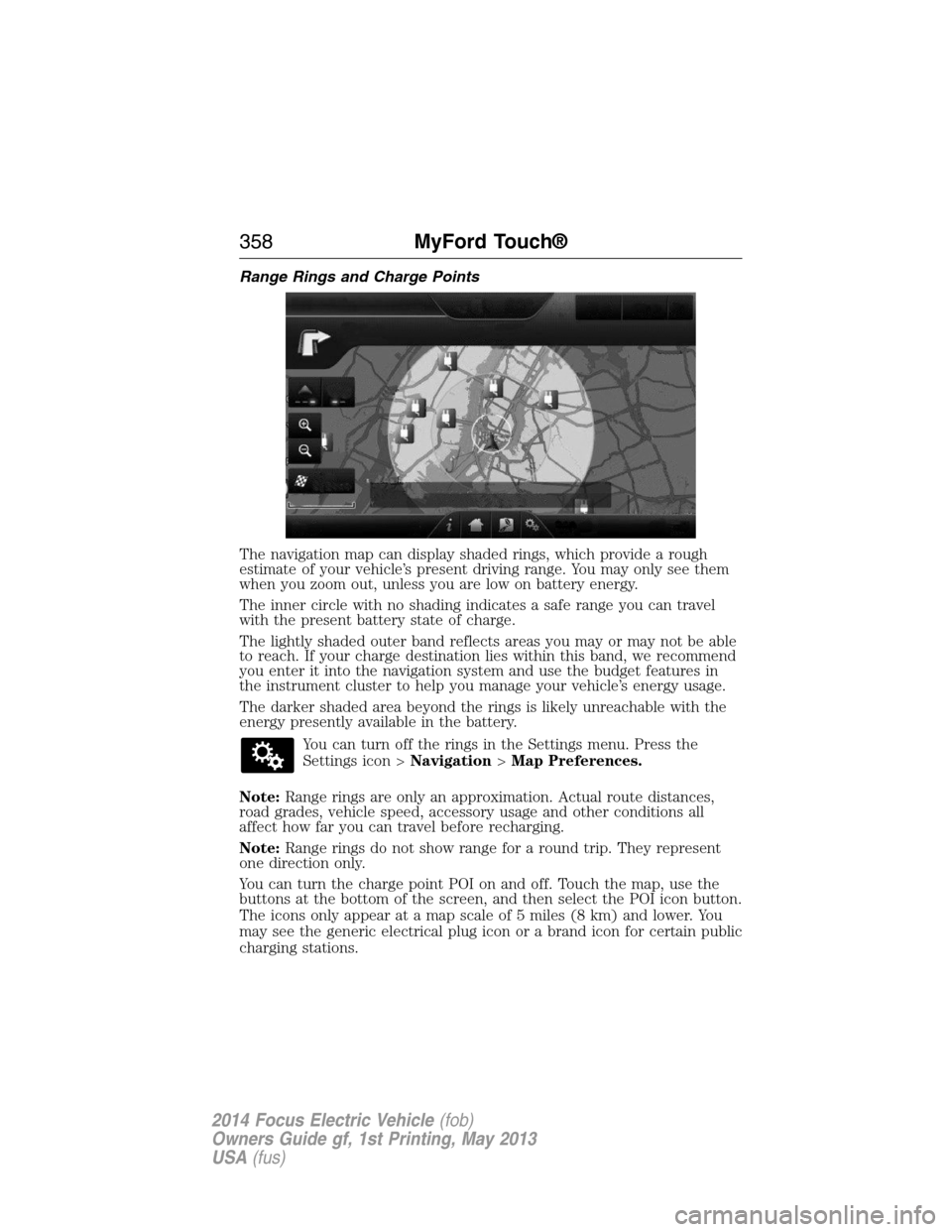
Range Rings and Charge Points
The navigation map can display shaded rings, which provide a rough
estimate of your vehicle’s present driving range. You may only see them
when you zoom out, unless you are low on battery energy.
The inner circle with no shading indicates a safe range you can travel
with the present battery state of charge.
The lightly shaded outer band reflects areas you may or may not be able
to reach. If your charge destination lies within this band, we recommend
you enter it into the navigation system and use the budget features in
the instrument cluster to help you manage your vehicle’s energy usage.
The darker shaded area beyond the rings is likely unreachable with the
energy presently available in the battery.
You can turn off the rings in the Settings menu. Press the
Settings icon >Navigation>Map Preferences.
Note:Range rings are only an approximation. Actual route distances,
road grades, vehicle speed, accessory usage and other conditions all
affect how far you can travel before recharging.
Note:Range rings do not show range for a round trip. They represent
one direction only.
You can turn the charge point POI on and off. Touch the map, use the
buttons at the bottom of the screen, and then select the POI icon button.
The icons only appear at a map scale of 5 miles (8 km) and lower. You
may see the generic electrical plug icon or a brand icon for certain public
charging stations.
358MyFord Touch®
2014 Focus Electric Vehicle(fob)
Owners Guide gf, 1st Printing, May 2013
USA(fus)
Page 400 of 403
G
Gauges .........................................95
Guidance for electric and
hybrid-electric vehicles ............187
H
Hazard flashers .........................183
HD Radio™ ...............................295
Headlamps ...................................81
aiming ..............................219–220
autolamp system .......................82
bulb specifications ..................226
daytime running lights .............84
flash to pass ..............................81
high beam .................................81
replacing bulbs ...............221–222
turning on and off ....................81
Head restraints .........................128
Heated steering wheel ..............352
Heating
heating and air conditioning
system .....................................120
Help ............................................351
High-voltage battery
charging ...................................142
service disconnect ..................148
High-voltage shut off ................184
Hill start assist ..........................152
Hood ..........................................210
How to use voice commands ...288
I
Illuminated visor mirror .............94
Information displays .................102Instrument panel
cleaning ...................................231
cluster ........................................97
lighting up panel and
interior .......................................83
Intelligent Access Key ................56
J
Jump-starting your vehicle ......184
K
Keyless entry system
autolock .....................................69
Keys .............................................73
L
Lamps ..........................................81
autolamp system .......................82
bulb replacement
specifications chart ................226
daytime running light ...............84
fog lamps ...................................84
headlamps .................................81
headlamps, flash to pass ..........81
instrument panel, dimming .....83
interior lamps .....................85–87
replacing bulbs ...............221–222
LATCH anchors ...........................26
Lights, warning and indicator ....97
Listening to music ....................291
Load limits .................................170
Locks
autolock .....................................69
childproof ..................................30
doors ..........................................67
Lubricant specifications ...........265
Lug nuts ....................................264
Index399
2014 Focus Electric Vehicle(fob)
Owners Guide gf, 1st Printing, May 2013
USA(fus)