2014 FORD FOCUS ELECTRIC charging
[x] Cancel search: chargingPage 155 of 403
If the anti-lock brake system is disabled, normal braking is still
effective. If the brake warning lamp illuminates with the parking
brake released, have your brake system serviced immediately.
Regenerative braking system
Your vehicle uses a feature known as regenerative braking. This is used to
simulate the engine braking of an internal combustion engine and assist the
standard brake system while recovering some of the energy of motion and
storing it in the battery to improve fuel economy. The standard brake
system is designed to fully stop the car if regenerative braking is not
available. During regenerative braking, the motor is spun as a generator to
create electrical current. This recharges the battery and slows the vehicle.
In effect, once the accelerator pedal is released, the motor changes from an
energy user to an energy producer.
When the accelerator pedal is released or the brake pedal is applied,
the brake controller automatically detects the amount of deceleration
requested and optimizes how much of the deceleration will be produced
by regenerative braking. The remaining portion is generated by standard
friction braking. When the battery is almost fully charged, the amount of
regenerative braking is limited to avoid overcharging, and the requested
deceleration is produced by standard friction braking alone.
Regenerative braking does not take the place of the standard friction
brakes; it only assists them. Regenerative braking has also been designed
to interact with the anti-lock brake system. Regenerative braking is
disabled when the anti-lock brake system is activated or the battery is
fully charged.
HINTS ON DRIVING WITH ANTI-LOCK BRAKES
When the system is operating, the brake pedal will pulse and may travel
further. Maintain pressure on the brake pedal. You may also hear a noise
from the system. This is normal.
The anti-lock braking system will not eliminate the dangers inherent when:
•you drive too closely to the vehicle in front of you.
•your vehicle is hydroplaning.
•you take corners too fast.
•the road surface is poor.
154Brakes
2014 Focus Electric Vehicle(fob)
Owners Guide gf, 1st Printing, May 2013
USA(fus)
Page 287 of 403
ACCESSING AND ADJUSTING MODES THROUGH YOUR RIGHT
VEHICLE INFORMATION DISPLAY
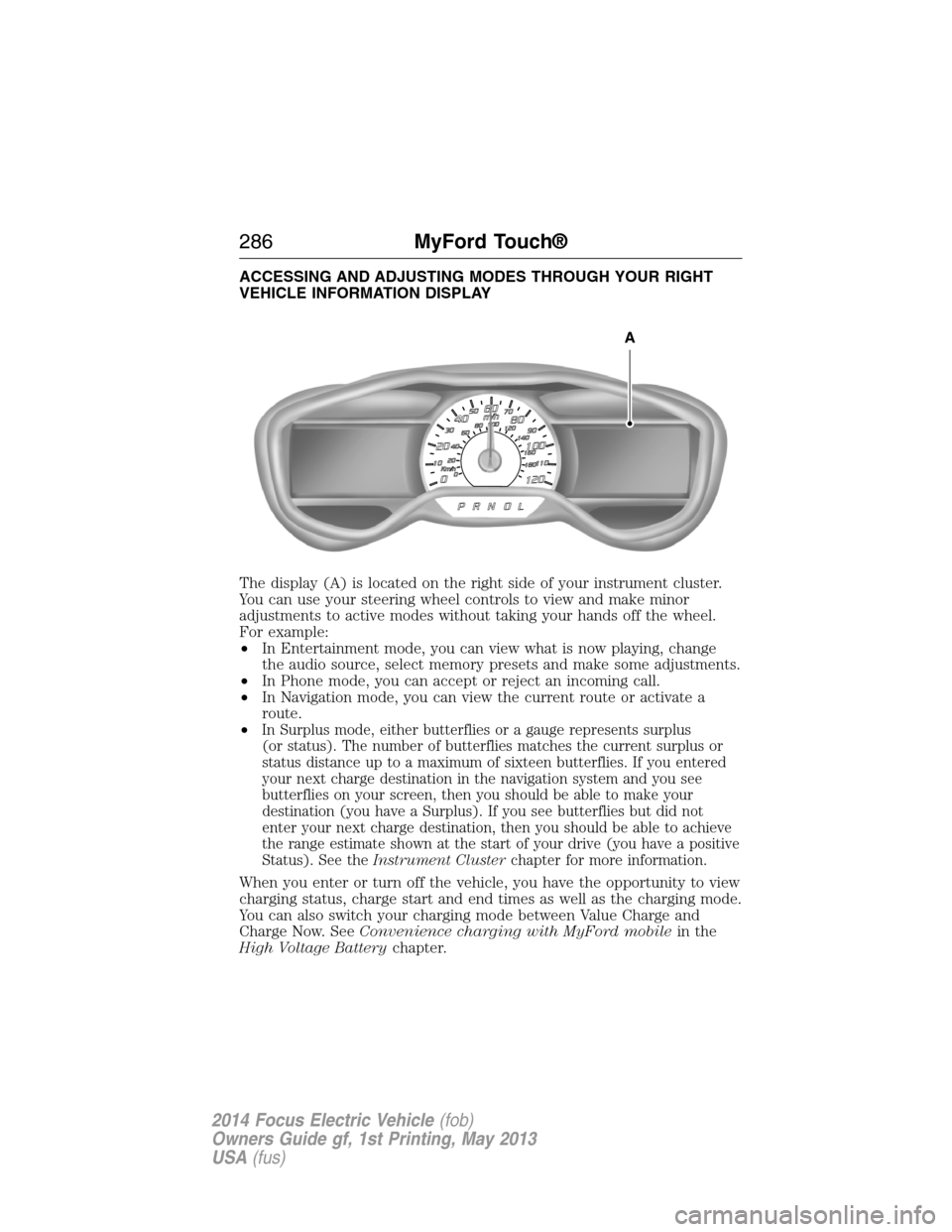
The display (A) is located on the right side of your instrument cluster.
You can use your steering wheel controls to view and make minor
adjustments to active modes without taking your hands off the wheel.
For example:
•In Entertainment mode, you can view what is now playing, change
the audio source, select memory presets and make some adjustments.
•In Phone mode, you can accept or reject an incoming call.
•In Navigation mode, you can view the current route or activate a
route.
•
In Surplus mode, either butterflies or a gauge represents surplus
(or status). The number of butterflies matches the current surplus or
status distance up to a maximum of sixteen butterflies. If you entered
your next charge destination in the navigation system and you see
butterflies on your screen, then you should be able to make your
destination (you have a Surplus). If you see butterflies but did not
enter your next charge destination, then you should be able to achieve
the range estimate shown at the start of your drive (you have a positive
Status). See theInstrument Clusterchapter for more information.
When you enter or turn off the vehicle, you have the opportunity to view
charging status, charge start and end times as well as the charging mode.
You can also switch your charging mode between Value Charge and
Charge Now. SeeConvenience charging with MyFord mobilein the
High Voltage Batterychapter.
A
286MyFord Touch®
2014 Focus Electric Vehicle(fob)
Owners Guide gf, 1st Printing, May 2013
USA(fus)
Page 320 of 403
“MESSAGES”
“Call”
“Forward text messages”
“Listen to text message <#>”
“Listen to text messages”
“Reply to text messages”
“Help”
ELECTRIC VEHICLE INFORMATION
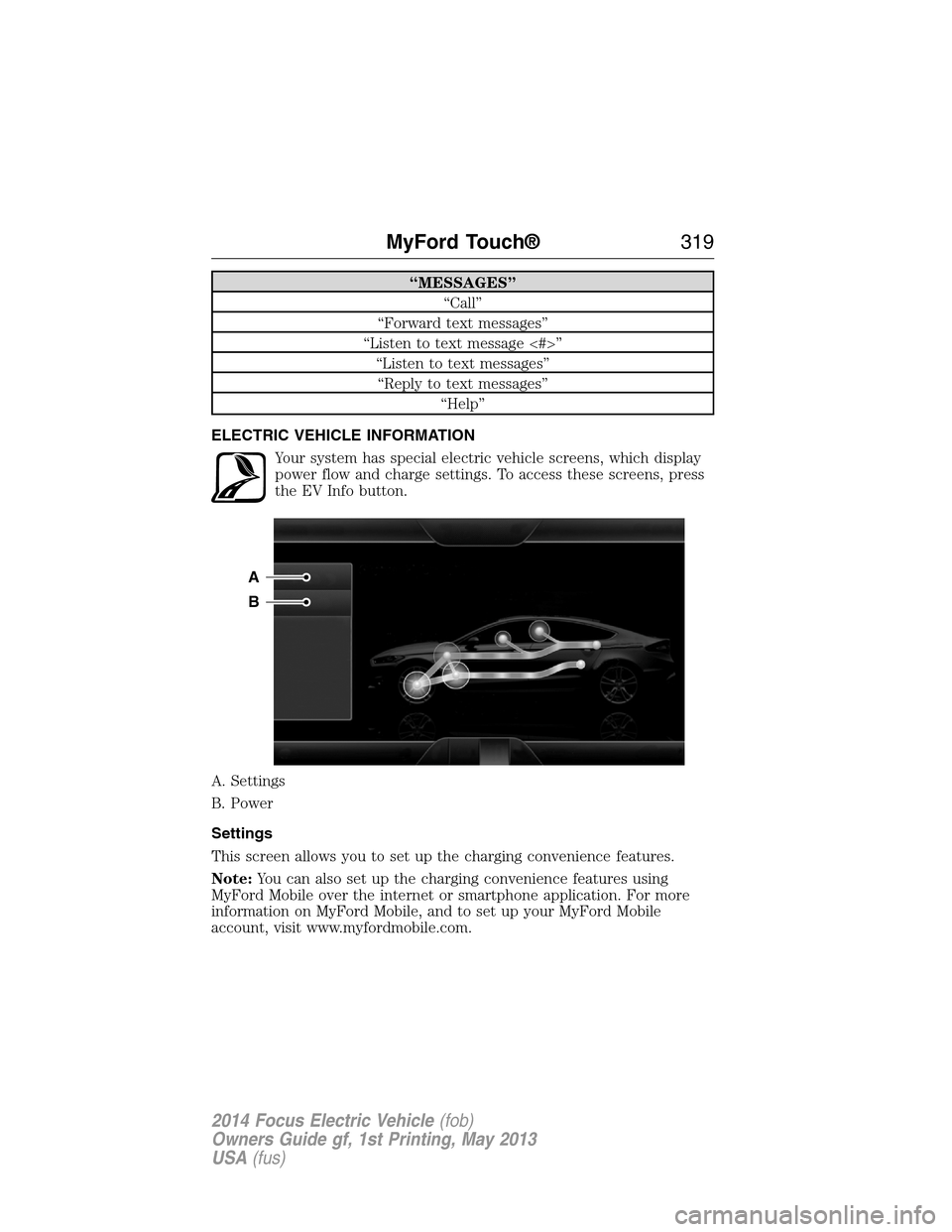
Your system has special electric vehicle screens, which display
power flow and charge settings. To access these screens, press
the EV Info button.
A. Settings
B. Power
Settings
This screen allows you to set up the charging convenience features.
Note:You can also set up the charging convenience features using
MyFord Mobile over the internet or smartphone application. For more
information on MyFord Mobile, and to set up your MyFord Mobile
account, visit www.myfordmobile.com.
A
B
MyFord Touch®319
2014 Focus Electric Vehicle(fob)
Owners Guide gf, 1st Printing, May 2013
USA(fus)
Page 321 of 403
To improve the charging experience, your vehicle has the following
convenience features:
•Value Charge:Your vehicle schedules its charging time for when the
utility rates are lowest. Contact your utility company to see what
rates are available.
•Charge Now:Your vehicle starts charging immediately after you
connect the charging plug.
•My GO Time:
Setting GO Times allows you to control charging
schedules and cabin conditioning settings so your vehicle is ready to
drive when you are. By setting a GO Time, your vehicle can use your
value charge settings to minimize your electricity cost but still prioritize
getting a full charge before your GO Time. A calendar view allows you
to program two GO Times per day for each day of the week.
Note:Remember, you must plug in your vehicle for My GO Time to work.
•Cabin Conditioning:Get the most miles out of every charge by
conditioning your vehicle while it is plugged in. Set the cabin
temperature when you set your GO Time in order to use energy from
your home (or charging station) instead of from your vehicle’s battery.
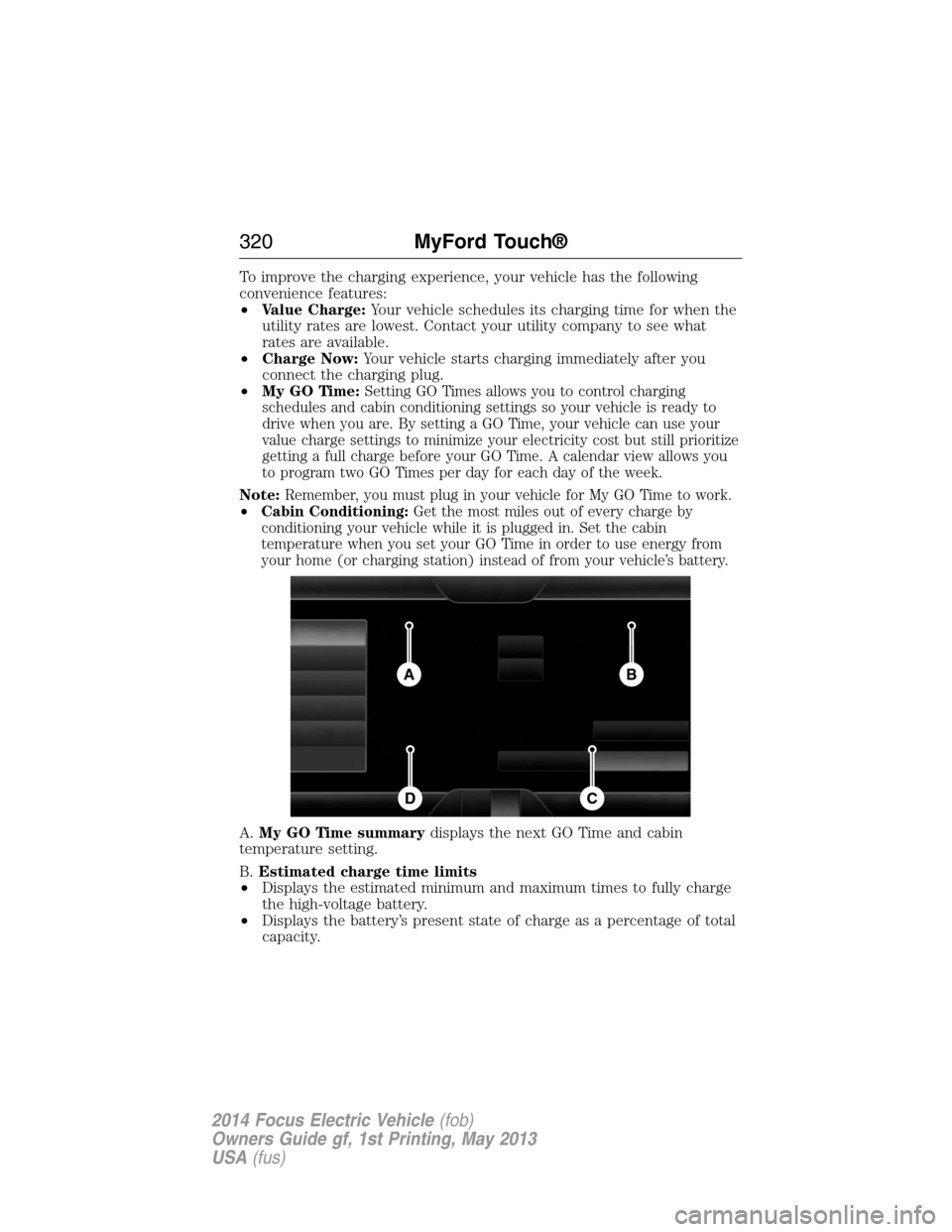
A.My GO Time summarydisplays the next GO Time and cabin
temperature setting.
B.Estimated charge time limits
•Displays the estimated minimum and maximum times to fully charge
the high-voltage battery.
•Displays the battery’s present state of charge as a percentage of total
capacity.
BA
CD
320MyFord Touch®
2014 Focus Electric Vehicle(fob)
Owners Guide gf, 1st Printing, May 2013
USA(fus)
Page 322 of 403
C.Charge profile and modedisplays the charging profile and charging
mode for the vehicle’s present location.
D.Charging status and actual timesdisplays charging status with the
charging start time, end time, and duration.
My GO Time Summary
Temperatureis the chosen cabin conditioning setting for this GO Time.
GO Timeis the time and date of your next set drive time. Your vehicle
automatically schedules charging and cabin conditioning to finish by this
time.
Skipcancels the cabin conditioning for the present GO Time. Once you
touch Skip, the GO Time and Temperature grey out, and the LED
illuminates on the Skip button. Touch the button again to turn on the
cabin conditioning. This feature allows you to ignore the present GO
Time without having to delete it or having to turn off the entire schedule
(seeGO Time Schedulelater in this section). After the present GO
Time passes, the Skip feature resets.
Editaccesses your GO Time Schedule (seeGO Time Schedulelater in
this section)
The system also alerts you to any conflicts by highlighting areas of the
screen in yellow. If your battery cannot have a full charge by the
scheduled drive time, the system highlights your next GO Time and
Charge Complete time, and a messageCharge at GO Time: under
100%appears. This is normal; the vehicle is informing you of the
conflicting situation. This notification only displays when the gearshift
selector lever is in positionP.
Note:Charging occurs as soon as you plug the vehicle in. The system
limits cabin conditioning to 15 minutes before your GO Time.
To eliminate the conflict notification immediately or to prevent a conflict
in the future, try the following:
•Change the present GO Time to occur later.
•Plug the vehicle into a 240V charging station instead of the 120V
convenience cord. Higher power charging yields shorter charge times.
•Plug the vehicle in sooner.
Estimated Charge Time Limits
Batteryshows you the battery’s current charge displayed as a
percentage. A reading of 100% means the battery has a full charge.
A reading of 0% means the battery has no charge.
MyFord Touch®321
2014 Focus Electric Vehicle(fob)
Owners Guide gf, 1st Printing, May 2013
USA(fus)
Page 323 of 403
To fully charge
•240Vis the estimated minimum charging time from the present
high-voltage battery level to full charge (100%). This represents the
shortest amount of time you should expect the high-voltage battery
to recharge under ideal conditions. Ideal conditions include a 240V
charging station and a minimum 30A service and high-voltage battery
at a moderate temperature.
Note:This charging time is only an estimate. It is normal for your actual
charge duration to be longer.
Note:Some charging stations use lower voltage (208V), which result in
longer charge times.
•120Vis the estimated maximum charging time from the present
high-voltage battery level to full charge (100%). This represents the
longest amount of time you should expect the high-voltage battery to
recharge under normal conditions. Normal conditions include a 120V
convenience cord and 12A service.
Note:This charging time is only an estimate. It is possible for your
actual charge duration to be longer. This occurs when the AC line
voltage is low and may indicate your electrical source is not meeting
certain requirements (seeCharging the high-voltage batteryin the
High Voltage Batterychapter).
Value Charge Profile and Mode
Value Charge profile nameis the name of the presently detected
Value Charge Profile. The system detects a customer defined value
charge profile when the vehicle is within approximately 300 feet
(100 meters) of the GPS location registered for the profile. If the vehicle
is close to more than one charge profile, it chooses the closest. When the
vehicle is not at a defined profile, it uses theDefault Valuecharge
profile. The system normally displaysDefault Profilewhile you are
driving because the vehicle is typically between defined value charge
profiles.
Editallows you to access your Value Charge profiles settings screen
(seeValue Charge Profileslater in this section).
Charge Nowif you want your vehicle to immediately charge when
plugged in at this profile location. This button illuminates when Charge
Now is the charge mode selected for the presently detected charge
profile.
322MyFord Touch®
2014 Focus Electric Vehicle(fob)
Owners Guide gf, 1st Printing, May 2013
USA(fus)
Page 324 of 403
Value Chargeif you want to take advantage of off-peak electricity rates.
The vehicle optimizes the charge schedule to be complete by the next
GO Time. This button illuminates when Value Charge is the charge mode
selected for the presently detected charge profile.
Charging Status and Actual Times
This is the status of the charging system, which includes the charging
plug, high-voltage battery and charger.
Next Chargemeans the vehicle is unplugged. Charge Start and
Complete information is for the present vehicle location.
Waiting to Chargemeans the vehicle is plugged in and ready to charge.
Typical of Value Charge mode, the vehicle may not start charging right
away because it is set to charge at times with lower utility costs.
Chargingmeans the high-voltage battery is charging.
Chargedmeans the high-voltage battery is fully charged and not
currently scheduled for further charging.
Charge Faultmeans a fault is present that is preventing the
high-voltage battery from charging. Inspect the charge plug connection,
charge cord and charging station.
Startis the scheduled start time of charging.
•At Plug In:When the vehicle is in Charge Now mode, and
unplugged, the message At Plug In appears, indicating the vehicle
immediately starts charging once you plug it in. Once you plug it in,
the system shows the actual charge start time.
•Scheduled Charge Start Time:When the vehicle is in Value Charge
mode, the system displays the scheduled charge start time (for
example, 8:00 PM). Once charging starts, the system continues to
display the actual charge start time.
Completeis the estimated time of charge completion.
•Charge Now Duration:When the vehicle is in Charge Now mode,
and unplugged, the system displays the charging duration in hours.
Once you plug in the vehicle, the value shows the estimated time to
finish charging.
•Scheduled Charge Complete:When the vehicle is in Value Charge
mode, the system displays the estimated charge complete time. It is
normal for the estimated complete time to change while charging.
The vehicle keeps charging until the high-voltage battery is fully
charged.
MyFord Touch®323
2014 Focus Electric Vehicle(fob)
Owners Guide gf, 1st Printing, May 2013
USA(fus)
Page 325 of 403
GO Time Schedule
Touch theEditbutton in the My GO Time section of the Settings screen
to see the GO Time Schedule.
Onturns on the GO Time schedule.
Offturns off the GO Time schedule. This also turns off the cabin
conditioning function. Use this mode to prevent using energy for cabin
preconditioning when you leave your vehicle plugged in and don’t plan to
use it for a while, such as when on vacation.
Note:If you choose to perform Value Charging with the schedule off, the
vehicle schedules charging to finish at the lowest cost within 24 hours of
plugging the vehicle in.
GO Time 1andGO Time 2display the GO Time day-of-week and time.
The blue highlighted GO Time is the present GO Time the vehicle is
using for charge scheduling and cabin conditioning. You can schedule
two GO Time events per day for each day of the week.
•GO Timeallows you to edit the GO Time and cabin conditioning
temperature.
•--:--indicates that you can add a GO Time to this slot.
Note:If you set GO Time 2 to occur before GO Time 1, a message pops
up alerting you. You need to go back to the previous screen and change
the times so GO Time 1 occurs before GO Time 2.
GO Time and Cabin Conditioning
This screen allows you to enter or change the GO Time and cabin
conditioning temperature.
Time Buttons (+ and -)changes the hours and minutes of your GO
Time. The minutes change in increments of five. You can also change the
settings for AM and PM by touching those buttons.
Cabin Conditioning Buttons (+ and -)changes the setting for your
selected cabin conditioning temperature for this GO Time event. You can
select from four settings:
•65°F (18.5°C)
•72°F (22.0°C)
•85°F (29.5°C)
•Off.
Note:Cabin conditioning can perform differently depending on if you
plug into a 120V convenience cord or 240V charging station. The power
available for conditioning is limited to the charging station power
available.
324MyFord Touch®
2014 Focus Electric Vehicle(fob)
Owners Guide gf, 1st Printing, May 2013
USA(fus)