2014 FORD FIESTA brake
[x] Cancel search: brakePage 133 of 396
With the transmission selector lever in
reverse, power is transmitted to the drive
wheels to allow your vehicle to move
backward.
Note:
Always come to a complete stop
before shifting the transmission selector
lever out of reverse.
N (Neutral)
With the transmission selector lever in
neutral, power is not transmitted to the
drive wheels and the transmission is not
locked, it is possible your vehicle will move
if the brakes are not applied. You can start
the engine with the transmission selector
lever in this position.
D (Drive)
With the transmission selector lever in
drive, your vehicle will shift automatically
through the forward gears.
The transmission will select the
appropriate gear for optimum vehicle
performance and economy based on
ambient temperature, road gradient,
vehicle load, speed and your driving style.
Drive mode provides a downshift function.
See Downshift in this section.
Note: A shift will occur only when your
vehicle and engine speeds are appropriate.
Note: You may temporarily override the
current gear selected using the
+ or -
buttons.
Sport Mode and Manual Shifting
Sport Mode
With the transmission selector lever in
sport mode, gears are selected quicker and
at higher engine speeds. Sport mode will remain on until you either
shift manually up or down the gears using
the
+ or - buttons on the side of the
transmission selector lever or you move
the transmission selector lever to drive.
Sport mode also provides a downshift
function. See
Downshift in this section.
Manual Shifting WARNING
Do not permanently hold the
+ or -
buttons in. This may damage the
transmission and may lead to an
accident or injury. Press the
+ button to shift up and the -
button to shift down.
Gears may be skipped by pressing the + or
-
buttons repeatedly at short intervals.
We recommend you upshift according to
the following guide to achieve the best fuel
economy for your vehicle. Recommended
Speed
Shift From
15 mph (24 km/h)
1 - 2
25 mph (40 km/h)
2 - 3
40 mph (64 km/h)
3 - 4
45 mph (72 km/h)
4 - 5
50 mph (80 km/h)
5 - 6
Manual mode also provides a downshift
function. See
Downshift in this section.
Note: The transmission will automatically
upshift if the engine speed is too high or
downshift if the engine speed is too low.
130
Fiesta (CCT) Transmission
Page 134 of 396
Hints on Driving with an Automatic
Transmission
WARNINGS
Do not apply the brake and
accelerator pedals simultaneously
for more than three seconds, this
limits engine rpm and labors the
transmission. This may make it difficult to
maintain speeds in traffic and lead to an
accident or injury. Do not idle the engine for long
periods of time in drive with the
brakes applied. This could damage
the transmission and may lead to an
accident or injury. Note:
The system carries out a series of
checks when you switch the ignition on and
off. You may hear clicking sounds. This is
normal.
Starting
1. Press the brake pedal to apply the brakes.
2. Move the transmission selector lever to reverse, drive or sport mode.
3. Release the parking brake.
4. Release the brake pedal and press the
accelerator pedal.
Stopping
1. Release the accelerator pedal and press the brake pedal.
2. Apply the parking brake.
3. Move the transmission selector lever to neutral or park. Downshift
Press the accelerator pedal fully with the
transmission selector lever in either drive,
sport mode or manual shifting position to
select a lower gear for optimum
performance. Release the accelerator
pedal when you no longer require
downshift.
If Your Vehicle Gets Stuck In Mud or
Snow
If your vehicle gets stuck in mud or snow,
it may be rocked out by shifting between
forward and reverse gears, stopping
between shifts in a steady pattern. Press
lightly on the accelerator in each gear.
Note:
Do not rock your vehicle if the engine
is not at normal operating temperature,
damage to the transmission may occur.
Note: Do not rock your vehicle for more
than a minute, damage to the transmission
and tires may occur or the engine may
overheat.
Emergency Park Position Release
Lever WARNINGS
Do not drive your vehicle until you
verify that the brake lamps are
working. Failure to adhere to warning
indicators may lead to an accident or injury. If the parking brake is fully released
but the brake warning lamp remains
illuminated, the brakes may not be
working correctly. See an authorized
dealer. Failure to adhere to warning
indicators may lead to an accident or injury. Use the emergency park position release
lever to move the transmission selector
lever from the park position in the event of
a malfunction or if your vehicle battery has
no charge.
131
Fiesta (CCT) Transmission
Page 135 of 396
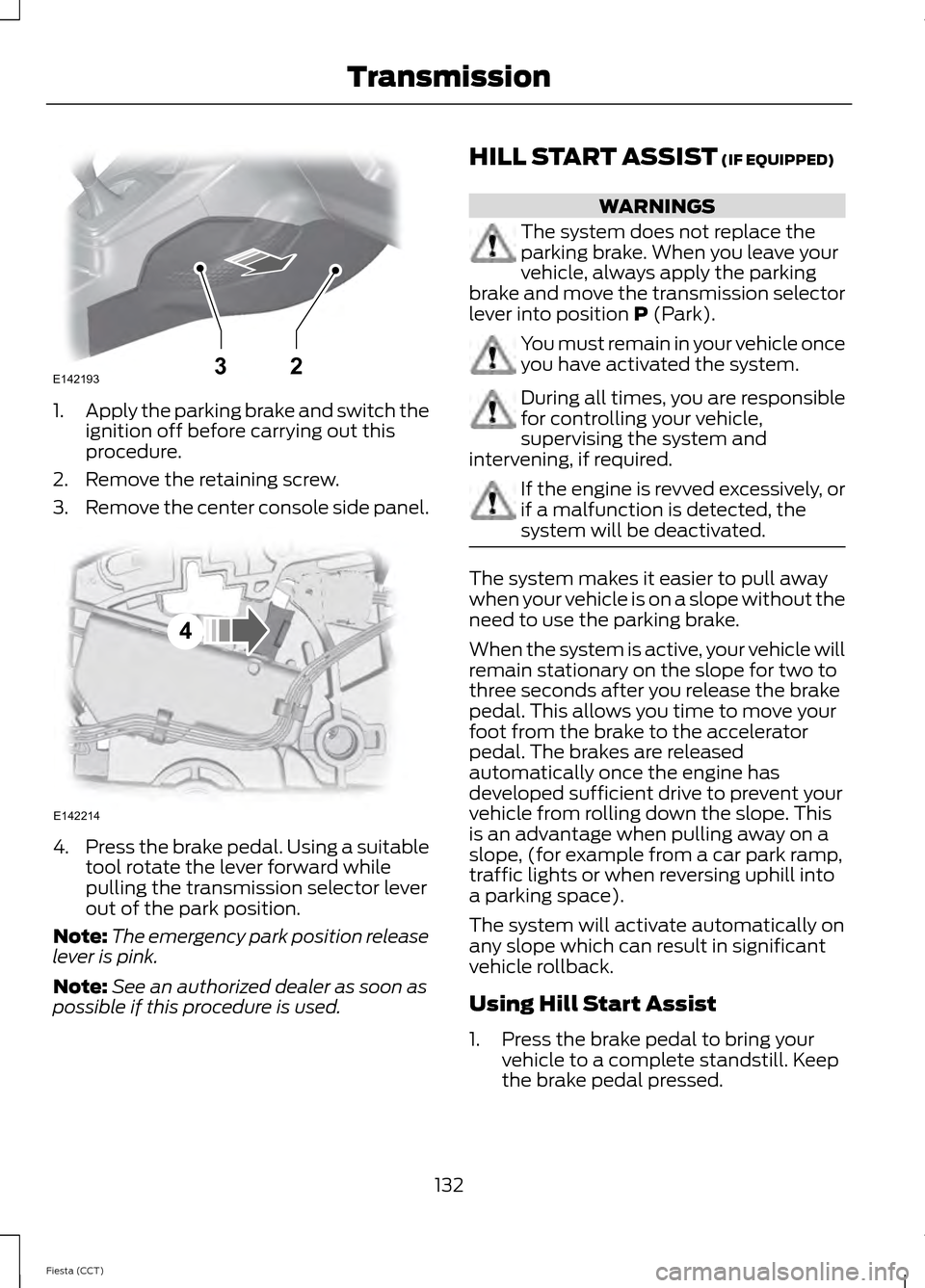
1.
Apply the parking brake and switch the
ignition off before carrying out this
procedure.
2. Remove the retaining screw.
3. Remove the center console side panel. 4.
Press the brake pedal. Using a suitable
tool rotate the lever forward while
pulling the transmission selector lever
out of the park position.
Note: The emergency park position release
lever is pink.
Note: See an authorized dealer as soon as
possible if this procedure is used. HILL START ASSIST (IF EQUIPPED) WARNINGS
The system does not replace the
parking brake. When you leave your
vehicle, always apply the parking
brake and move the transmission selector
lever into position
P (Park). You must remain in your vehicle once
you have activated the system.
During all times, you are responsible
for controlling your vehicle,
supervising the system and
intervening, if required. If the engine is revved excessively, or
if a malfunction is detected, the
system will be deactivated.
The system makes it easier to pull away
when your vehicle is on a slope without the
need to use the parking brake.
When the system is active, your vehicle will
remain stationary on the slope for two to
three seconds after you release the brake
pedal. This allows you time to move your
foot from the brake to the accelerator
pedal. The brakes are released
automatically once the engine has
developed sufficient drive to prevent your
vehicle from rolling down the slope. This
is an advantage when pulling away on a
slope, (for example from a car park ramp,
traffic lights or when reversing uphill into
a parking space).
The system will activate automatically on
any slope which can result in significant
vehicle rollback.
Using Hill Start Assist
1. Press the brake pedal to bring your
vehicle to a complete standstill. Keep
the brake pedal pressed.
132
Fiesta (CCT) TransmissionE14219332 E142214
4
Page 136 of 396

2. If the sensors detect that your vehicle
is on a slope, the system will be
activated automatically.
3. When you remove your foot from the brake pedal, your vehicle will remain
on the slope without rolling away for
approximately two or three seconds.
This hold time will automatically be
extended if you are in the process of
driving off.
4. Drive off in the normal manner. The brakes will be released automatically.
Switching the System On and Off
Note: The system can only be switched on
and off for manual transmissions.
Note: Once you have switched off the
system, it will remain off until you switch it
on again.
Your vehicle comes with the system
already enabled. If desired, you can disable
the feature: See General Information
(page 86).
133
Fiesta (CCT) Transmission
Page 137 of 396
GENERAL INFORMATION
WARNING
The system does not relieve you of
your responsibility to drive with due
care and attention.
Note:
Occasional brake noise is normal. If
a metal-to-metal, continuous grinding or
continuous squeal sound is present, the
brake linings may be worn-out. If the vehicle
has continuous vibration or shudder in the
steering wheel while braking, have your
vehicle checked by an authorized dealer.
Note: Brake dust may accumulate on the
wheels, even under normal driving
conditions. Some dust is inevitable as the
brakes wear. See Cleaning the Alloy
Wheels (page 207).
Wet brakes result in reduced braking
efficiency. Gently press the brake pedal a
few times when driving from a car wash or
standing water to dry the brakes.
Emergency Brake Assist
Emergency brake assist detects when you
brake heavily by measuring the rate at
which you press the brake pedal. It
provides maximum braking efficiency as
long as you press the pedal. Emergency
brake assist can reduce stopping distances
in critical situations.
Anti-lock Brake System
This system helps you maintain steering
control and vehicle stability during
emergency stops by keeping the brakes
from locking. HINTS ON DRIVING WITH
ANTI-LOCK BRAKES
Note:
When the system is operating, the
brake pedal will pulse and may travel
further. Maintain pressure on the brake
pedal. You may also hear a noise from the
system. This is normal.
The anti-lock braking system will not
eliminate the risks when:
• you drive too closely to the vehicle in
front of you
• your vehicle is hydroplaning
• you take corners too fast
• the road surface is poor.
PARKING BRAKE
Vehicles With Automatic
Transmission WARNING
Always set the parking brake fully
and leave your vehicle with the
transmission selector lever in
position P. Note:
If you park your vehicle on a hill and
facing uphill move the transmission selector
lever to position P and turn the steering
wheel away from the curb.
Note: If you park your vehicle on a hill and
facing downhill move the transmission
selector lever to position P and turn the
steering wheel toward the curb.
Vehicles With Manual
Transmission
Note: If you park your vehicle on a hill and
facing uphill select first gear and turn the
steering wheel away from the curb.
134
Fiesta (CCT) Brakes
Page 138 of 396
Note:
If you park your vehicle on a hill and
facing downhill select reverse gear and turn
the steering wheel toward the curb.
All Vehicles
Note: Do not press the release button while
pulling the lever up.
To apply the parking brake:
1. Press the foot brake pedal firmly.
2. Pull the parking brake lever up to its fullest extent.
To release the parking brake:
1. Press the brake pedal firmly.
2. Pull the lever up slightly.
3. Press the release button and push the lever down.
135
Fiesta (CCT) Brakes
Page 141 of 396

PRINCIPLE OF OPERATION
WARNINGS
The system does not relieve you of
your responsibility to drive with due
care and attention.
If your vehicles has a trailer tow
module not approved by us, the
system may not correctly detect
obstacles. The sensors may not detect objects
in heavy rain or other conditions that
cause disruptive reflections.
The sensors may not detect objects
with surfaces that absorb ultrasonic
waves.
The system does not detect
obstacles moving away from your
vehicle. They will only be detected
shortly after they start to move toward
your vehicle. Take particular care when reversing
with a tow ball arm or rear fitted
accessories e.g. a bicycle carrier, as
the rear parking aid will only indicate the
distance from the bumper to the obstacle. If you use a high pressure spray to
wash your vehicle, only spray the
sensors briefly from a distance not
less than 8 inches (20 centimeters). Note:
If your vehicle has a tow ball arm, the
system is switched off automatically when
any trailer lamps (or lighting boards) are
connected to the 13-pin socket via a trailer
tow module we have approved.
Note: Keep the sensors free from dirt, ice
and snow. Do not clean with sharp objects.
Note: The system may emit false tones if
it detects a signal using the same frequency
as the sensors or if your vehicle is fully laden. Note:
The outer sensors may detect the
side walls of a garage. If the distance
between the outer sensor and the side wall
remains constant for three seconds, the
tone will switch off. As you continue, the
inner sensors will detect rearward objects.
PARKING AID WARNINGS
To help avoid personal injury, read
and understand the limitations of the
system as contained in this section.
Sensing is only an aid for some (generally
large and fixed) objects when moving in
reverse on a flat surface at parking speeds.
Traffic control systems, inclement
weather, air brakes and external motors
and fans may also affect the function of
the sensing system. This may include
reduced performance or a false activation. To help avoid personal injury, always
use caution when moving in reverse
and when using the sensing system.
This system is not designed to
prevent contact with small or moving
objects. The system is designed to
provide a warning to assist the driver in
detecting large stationary objects to avoid
damaging the vehicle. The system may not
detect smaller objects, particularly those
close to the ground. Certain add-on devices such as large
trailer hitches, bike or surfboard racks
and any device that may block the
normal detection zone of the system, may
create false audible warnings. Note:
Keep the sensors located on the
bumper or fascia free from snow, ice and
large accumulations of dirt. If the sensors
are covered, the system ’s accuracy can be
affected. Do not clean the sensors with
sharp objects.
138
Fiesta (CCT) Parking Aids (If Equipped)
Page 145 of 396

PRINCIPLE OF OPERATION
WARNING
The system does not relieve you of
your responsibility to drive with due
care and attention.
Cruise control allows you to control your
speed using the switches on the steering
wheel. You can use cruise control when
you exceed approximately 20 mph (30
km/h).
USING CRUISE CONTROL
WARNINGS
Do not use cruise control in heavy
traffic, on winding roads or when the
road surface is slippery. This could
result in loss of vehicle control, serious
injury or death. When you are going downhill, your
speed may increase above the set
speed. The system will not apply the
brakes. Change down a gear to assist the
system in maintaining the set speed.
Failure to do so could result in loss of
vehicle control, serious injury or death. Note:
Cruise control will disengage if your
vehicle speed decreases more than 10 mph
(16 km/h) below your set speed while
driving uphill. The cruise controls are located on the
steering wheel.
Switching Cruise Control On
Press and release ON.
The indicator will display in the
instrument cluster.
Setting a Speed
1. Accelerate to the desired speed.
2. Press and release
SET+.
3. Take your foot off the accelerator pedal.
Changing the Set Speed
• Press and hold SET+ or SET-. Release
the control when you reach the desired
speed.
• Press and release
SET+ or SET-. The
set speed will change in approximately
1 mph (2 km/h) increments.
• Press the accelerator or brake pedal
until you reach the desired speed. Press
and release
SET+.
Canceling the Set Speed
Press and release
CAN, or tap the brake
pedal. The set speed will not be erased.
142
Fiesta (CCT) Cruise Control
(If Equipped)E102679 E71340