2014 FORD FIESTA brake
[x] Cancel search: brakePage 82 of 396

WARNING LAMPS AND
INDICATORS
The following warning lamps and
indicators will alert you to a vehicle
condition that may become serious. Some
lamps will illuminate when you start your
vehicle to make sure they work. If any
lamps remain on after starting your vehicle,
refer to the respective system warning
lamp for further information.
Note:
Some warning indicators appear in
the information display and function the
same as a warning lamp but do not display
when you start your vehicle.
Anti-lock Braking System Warning
Lamp If it illuminates when you are
driving, this indicates a
malfunction. You will continue
to have the normal braking system
(without anti-lock braking system) unless
the brake system warning lamp is also
illuminated. Have your vehicle checked by
an authorized dealer.
Brake System Warning Lamp It will illuminate when you
engage the parking brake with
the ignition on.
If it illuminates when you are driving, check
that the parking brake is not engaged. If
the parking brake is not engaged, this
indicates low brake fluid level or a brake
system malfunction. Have your vehicle
checked immediately by an authorized
dealer. WARNING
Driving your vehicle with the warning
lamp on is dangerous. A significant
decrease in braking performance
may occur. It will take you longer to stop
your vehicle. Have your vehicle checked by
your authorized dealer immediately. Driving
extended distances with the parking brake
engaged can cause brake failure and the
risk of personal injury. Cruise Control Indicator
It will illuminate when you switch
this feature on. See Using
Cruise Control (page 142).
Direction Indicator Illuminates when the left or right
turn signal or the hazard warning
flasher is turned on. If the
indicators stay on or flash faster, check for
a burnt out bulb. See
Changing a Bulb
(page 195).
Door Ajar Warning Lamp Illuminates when you switch the
ignition on and remains on if any
door, the hood or the liftgate is
not closed properly.
Engine Coolant Temperature
Warning Lamp WARNING
Do not resume your journey if it
illuminates despite the level being
correct. Have your vehicle checked
by a an authorized dealer immediately. 79
Fiesta (CCT) Instrument Cluster E138644 E71340
Page 85 of 396

Stability Control Indicator
While driving, it flashes when the
system is operating. After you
switch the ignition on, if it does
not illuminate or illuminates continuously
while driving, this indicates a malfunction.
During a malfunction, the system switches
off. Have your vehicle checked by an
authorized dealer as soon as possible.
It will illuminate when you switch the
system off. It will go out when you switch
the system back on or when you switch the
ignition off.
WARNING LAMPS AND
INDICATORS - 1.6L
ECOBOOST™
The following warning lamps and
indicators will alert you to a vehicle
condition that may become serious. Some
lamps will illuminate when you start your
vehicle to make sure they work. If any
lamps remain on after starting your vehicle,
refer to the respective system warning
lamp for further information.
Note: Some warning indicators appear in
the information display and function the
same as a warning lamp but do not display
when you start your vehicle.
Anti-lock Braking System Warning
Lamp If it illuminates when you are
driving, this indicates a
malfunction. You will continue
to have the normal braking system
(without anti-lock braking system) unless
the brake system warning lamp is also
illuminated. Have your vehicle checked by
an authorized dealer. Brake System Warning Lamp It will illuminate when you
engage the parking brake with
the ignition on.
If it illuminates when you are driving, check
that the parking brake is not engaged. If
the parking brake is not engaged, this
indicates low brake fluid level or a brake
system malfunction. Have your vehicle
checked immediately by an authorized
dealer. WARNING
Driving your vehicle with the warning
lamp on is dangerous. A significant
decrease in braking performance
may occur. It will take you longer to stop
your vehicle. Have your vehicle checked by
your authorized dealer immediately. Driving
extended distances with the parking brake
engaged can cause brake failure and the
risk of personal injury. Cruise Control Indicator
It will illuminate when you switch
this feature on. See Using
Cruise Control (page 142).
Direction Indicator Illuminates when the left or right
turn signal or the hazard warning
flasher is turned on. If the
indicators stay on or flash faster, check for
a burnt out bulb. See
Changing a Bulb
(page 195).
Door Ajar Warning Lamp Illuminates when you switch the
ignition on and remains on if any
door, the hood or the liftgate is
not closed properly.
82
Fiesta (CCT) Instrument Cluster E138644 E71340
Page 96 of 396
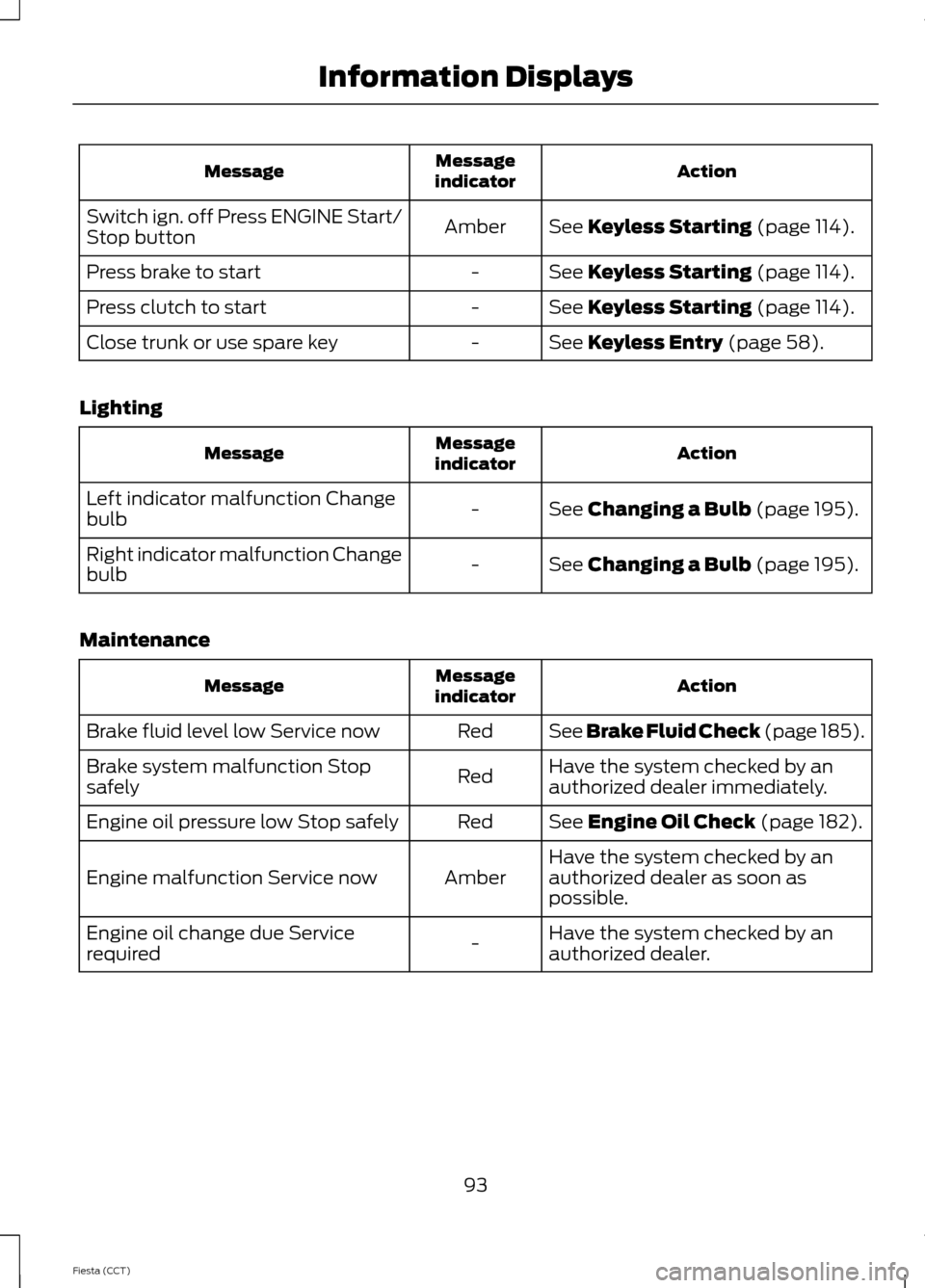
Action
Message
indicator
Message
See Keyless Starting (page 114).
Amber
Switch ign. off Press ENGINE Start/
Stop button
See
Keyless Starting (page 114).
-
Press brake to start
See
Keyless Starting (page 114).
-
Press clutch to start
See
Keyless Entry (page 58).
-
Close trunk or use spare key
Lighting Action
Message
indicator
Message
See
Changing a Bulb (page 195).
-
Left indicator malfunction Change
bulb
See
Changing a Bulb (page 195).
-
Right indicator malfunction Change
bulb
Maintenance Action
Message
indicator
Message
See Brake Fluid Check (page 185).
Red
Brake fluid level low Service now
Have the system checked by an
authorized dealer immediately.
Red
Brake system malfunction Stop
safely
See
Engine Oil Check (page 182).
Red
Engine oil pressure low Stop safely
Have the system checked by an
authorized dealer as soon as
possible.
Amber
Engine malfunction Service now
Have the system checked by an
authorized dealer.
-
Engine oil change due Service
required
93
Fiesta (CCT) Information Displays
Page 97 of 396
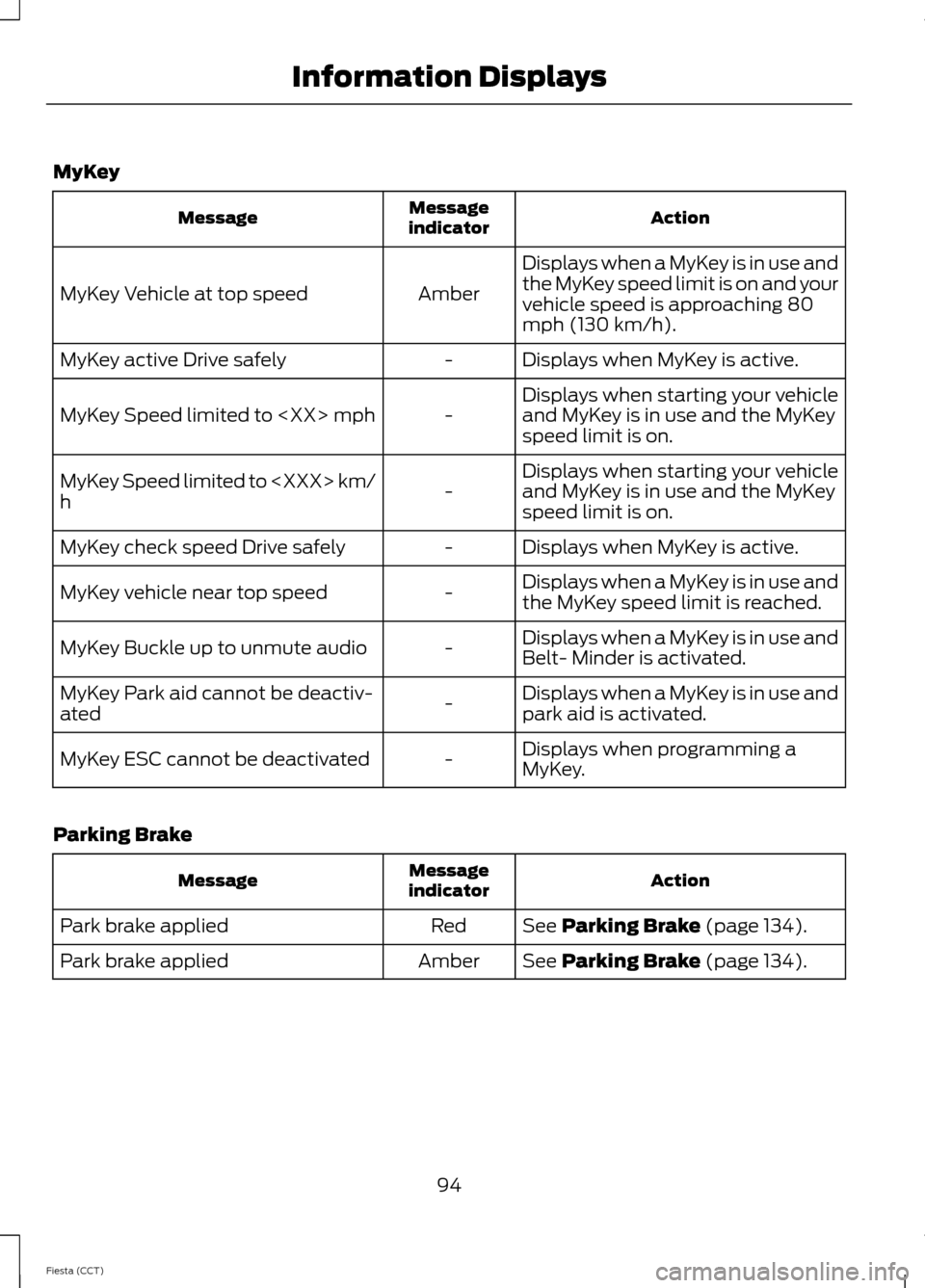
MyKey
Action
Message
indicator
Message
Displays when a MyKey is in use and
the MyKey speed limit is on and your
vehicle speed is approaching 80
mph (130 km/h).
Amber
MyKey Vehicle at top speed
Displays when MyKey is active.
-
MyKey active Drive safely
Displays when starting your vehicle
and MyKey is in use and the MyKey
speed limit is on.
-
MyKey Speed limited to
Displays when starting your vehicle
and MyKey is in use and the MyKey
speed limit is on.
-
MyKey Speed limited to
h
Displays when MyKey is active.
-
MyKey check speed Drive safely
Displays when a MyKey is in use and
the MyKey speed limit is reached.
-
MyKey vehicle near top speed
Displays when a MyKey is in use and
Belt- Minder is activated.
-
MyKey Buckle up to unmute audio
Displays when a MyKey is in use and
park aid is activated.
-
MyKey Park aid cannot be deactiv-
ated
Displays when programming a
MyKey.
-
MyKey ESC cannot be deactivated
Parking Brake Action
Message
indicator
Message
See Parking Brake (page 134).
Red
Park brake applied
See
Parking Brake (page 134).
Amber
Park brake applied
94
Fiesta (CCT) Information Displays
Page 98 of 396

Stability Control
Action
Message
indicator
Message
See Using Stability Control (page
137).
Amber
Electronic stability control off
Have the system checked by an
authorized dealer as soon as
possible.
Amber
ABS malfunction Service Now
See Using Stability Control (page
137
).
-
Traction control off
See Using Stability Control (page
137
).
-
Sport mode
See Using Stability Control (page
137
).
-
Electronic stability control off
Starting and Stopping the Engine Action
Message
indicator
Message
See
Starting and Stopping the
Engine (page 114).
-
Press brake to start
See
Starting and Stopping the
Engine (page 114).
-
Press clutch to start
See
Starting and Stopping the
Engine (page 114).
-
Press brake and clutch to start
See
Starting and Stopping the
Engine (page 114).
-
Cranking time exceeded
Steering Action
Message
indicator
Message
Full steering will be maintained but
you will need to exert greater force
on the steering wheel. Have the
system checked by an authorized
dealer as soon as possible.
Amber
Steering assist fault Service
required
95
Fiesta (CCT) Information Displays
Page 99 of 396
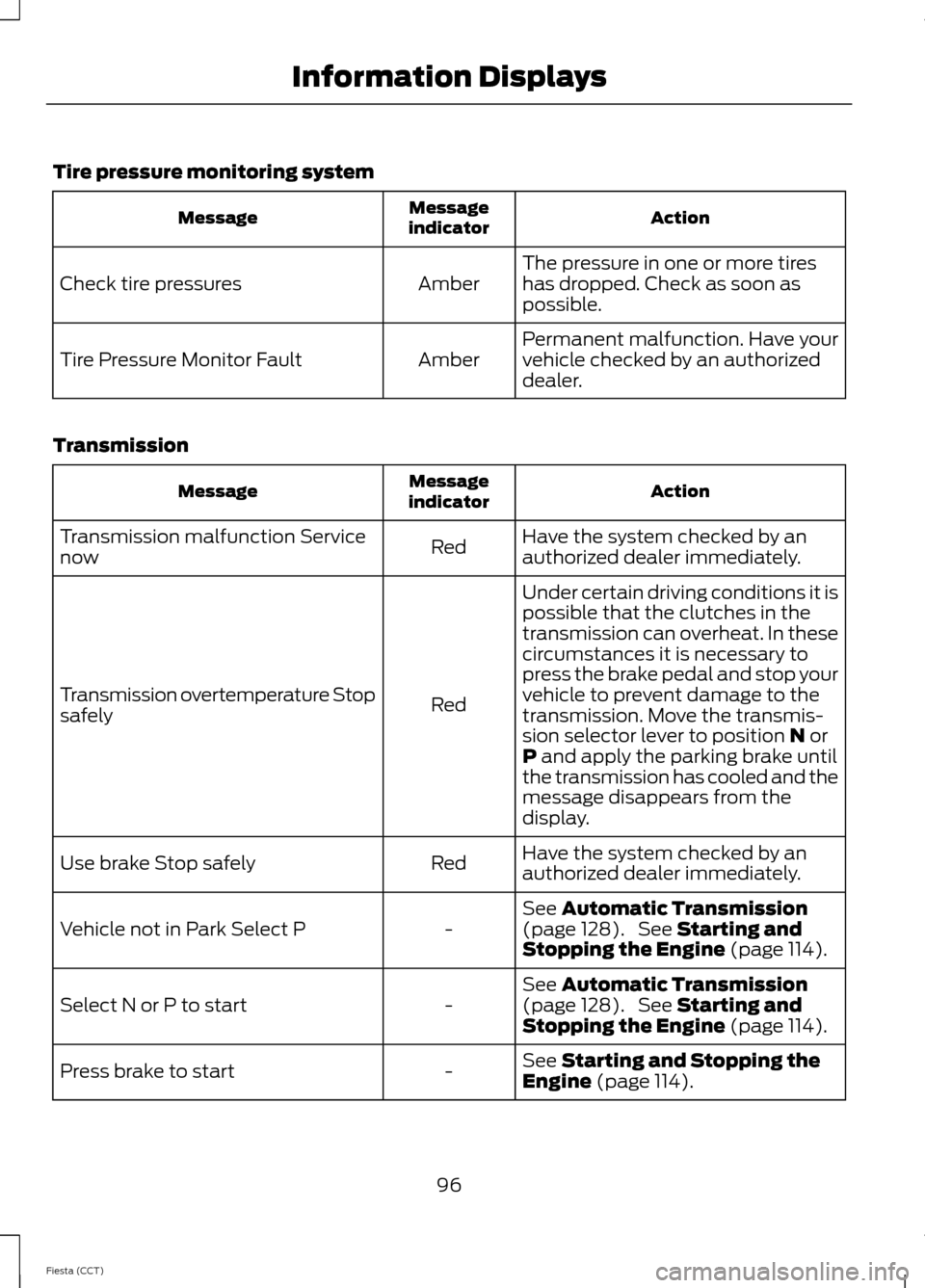
Tire pressure monitoring system
Action
Message
indicator
Message
The pressure in one or more tires
has dropped. Check as soon as
possible.
Amber
Check tire pressures
Permanent malfunction. Have your
vehicle checked by an authorized
dealer.
Amber
Tire Pressure Monitor Fault
Transmission Action
Message
indicator
Message
Have the system checked by an
authorized dealer immediately.
Red
Transmission malfunction Service
now
Under certain driving conditions it is
possible that the clutches in the
transmission can overheat. In these
circumstances it is necessary to
press the brake pedal and stop your
vehicle to prevent damage to the
Red
Transmission overtemperature Stop
safely
transmission. Move the transmis-
sion selector lever to position N or
P and apply the parking brake until
the transmission has cooled and the
message disappears from the
display.
Have the system checked by an
authorized dealer immediately.
Red
Use brake Stop safely
See
Automatic Transmission
(page 128). See Starting and
Stopping the Engine (page 114).
-
Vehicle not in Park Select P
See
Automatic Transmission
(page 128). See Starting and
Stopping the Engine (page 114).
-
Select N or P to start
See
Starting and Stopping the
Engine (page 114).
-
Press brake to start
96
Fiesta (CCT) Information Displays
Page 100 of 396
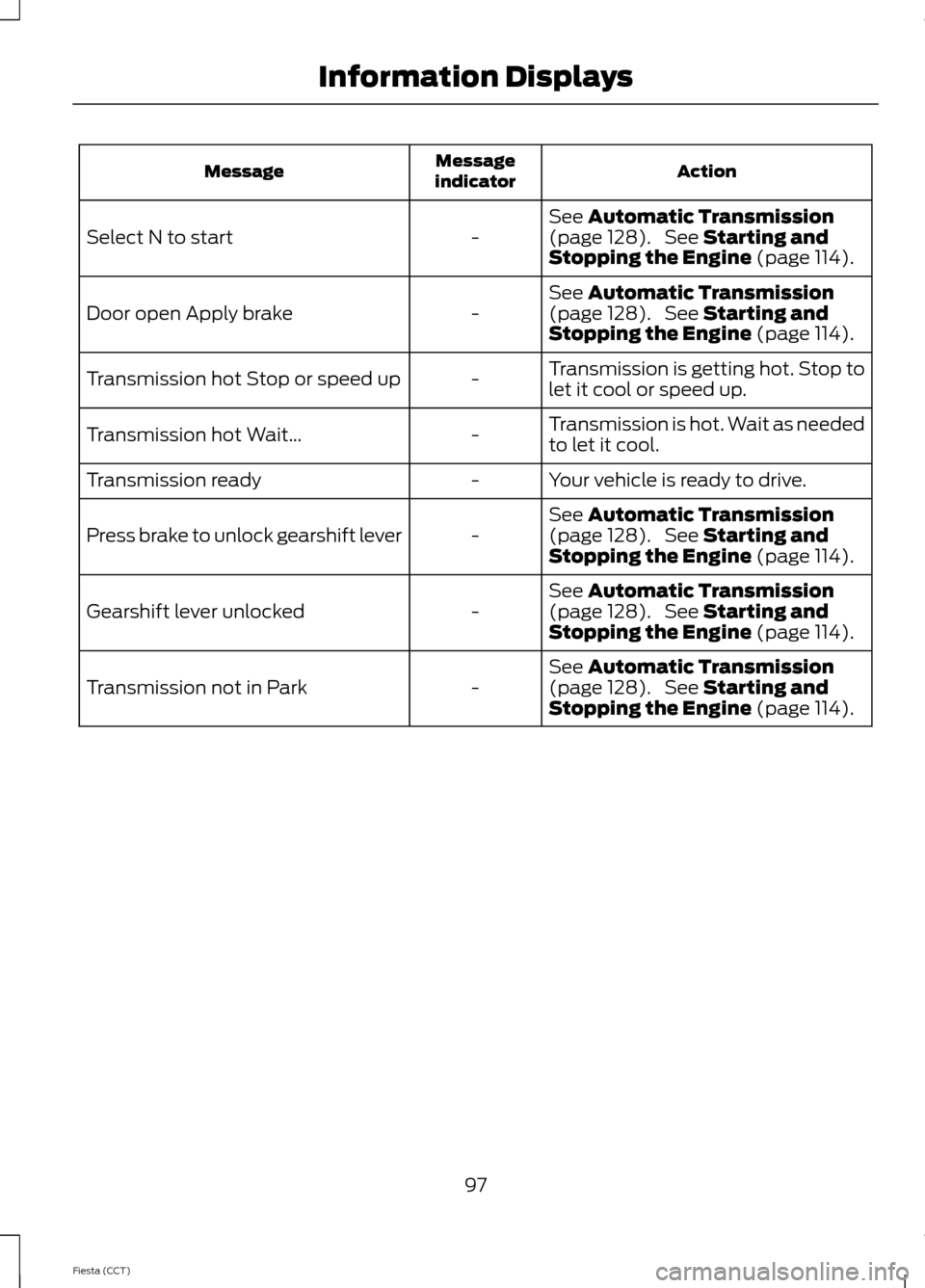
Action
Message
indicator
Message
See Automatic Transmission
(page 128). See Starting and
Stopping the Engine (page 114).
-
Select N to start
See
Automatic Transmission
(page 128). See Starting and
Stopping the Engine (page 114).
-
Door open Apply brake
Transmission is getting hot. Stop to
let it cool or speed up.
-
Transmission hot Stop or speed up
Transmission is hot. Wait as needed
to let it cool.
-
Transmission hot Wait...
Your vehicle is ready to drive.
-
Transmission ready
See
Automatic Transmission
(page 128). See Starting and
Stopping the Engine (page 114).
-
Press brake to unlock gearshift lever
See
Automatic Transmission
(page 128). See Starting and
Stopping the Engine (page 114).
-
Gearshift lever unlocked
See
Automatic Transmission
(page 128). See Starting and
Stopping the Engine (page 114).
-
Transmission not in Park
97
Fiesta (CCT) Information Displays
Page 106 of 396
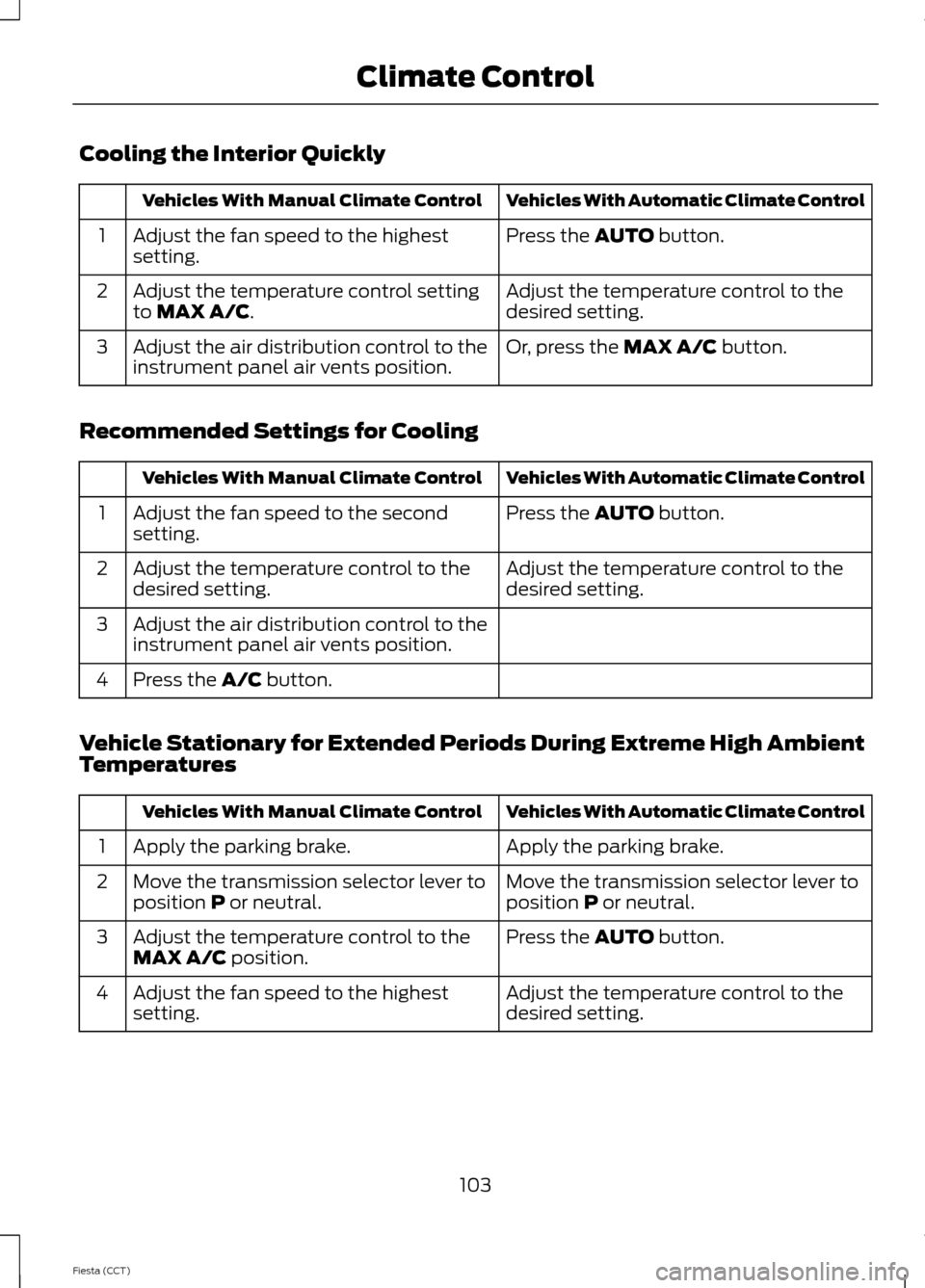
Cooling the Interior Quickly
Vehicles With Automatic Climate Control
Vehicles With Manual Climate Control
Press the AUTO button.
Adjust the fan speed to the highest
setting.
1
Adjust the temperature control to the
desired setting.
Adjust the temperature control setting
to
MAX A/C.
2
Or, press the
MAX A/C button.
Adjust the air distribution control to the
instrument panel air vents position.
3
Recommended Settings for Cooling Vehicles With Automatic Climate Control
Vehicles With Manual Climate Control
Press the
AUTO button.
Adjust the fan speed to the second
setting.
1
Adjust the temperature control to the
desired setting.
Adjust the temperature control to the
desired setting.
2
Adjust the air distribution control to the
instrument panel air vents position.
3
Press the
A/C button.
4
Vehicle Stationary for Extended Periods During Extreme High Ambient
Temperatures Vehicles With Automatic Climate Control
Vehicles With Manual Climate Control
Apply the parking brake.
Apply the parking brake.
1
Move the transmission selector lever to
position
P or neutral.
Move the transmission selector lever to
position P or neutral.
2
Press the
AUTO button.
Adjust the temperature control to the
MAX A/C position.
3
Adjust the temperature control to the
desired setting.
Adjust the fan speed to the highest
setting.
4
103
Fiesta (CCT) Climate Control