2014 FORD F150 seats
[x] Cancel search: seatsPage 265 of 472
Clean the instrument panel and cluster
lens with a clean, damp, white cotton
cloth, then use a clean and dry white
cotton cloth to dry these areas.
•
Avoid cleaners or polishes that increase
the gloss of the upper portion of the
instrument panel. The dull finish in this
area helps protect you from
undesirable windshield reflection.
• Be certain to wash or wipe your hands
clean if you have been in contact with
certain products such as insect
repellent and suntan lotion in order to
avoid possible damage to the interior
painted surfaces.
• Do not use household or glass cleaners
as these may damage the finish of the
instrument panel, interior trim and
cluster lens.
• Do not allow air fresheners and hand
sanitizers to spill onto interior surfaces.
If a spill occurs, wipe off immediately.
Damage may not be covered by your
warranty.
If a staining liquid like coffee or juice has
been spilled on the instrument panel or on
interior trim surfaces, clean as follows:
1. Wipe up spilled liquid using a clean, white, cotton cloth.
2. Wipe the surface with a damp, clean, white cotton cloth. For more thorough
cleaning, use a mild soap and water
solution. If the spot cannot be
completely cleaned by this method,
the area may be cleaned using a
commercially available cleaning
product designed for automotive
interiors.
3. If necessary, apply more soap and water solution or cleaning product to
a clean, white, cotton cloth and press
the cloth onto the soiled area. Allow
this to set at room temperature for 30
minutes. 4.
Remove the soaked cloth and if it is not
soiled badly, use this cloth to clean the
area by using a rubbing motion for 60
seconds.
5. Following this, wipe area dry with a clean, white, cotton cloth.
CLEANING LEATHER SEATS (IF
EQUIPPED)
WITHOUT THE KING RANCH
EDITION
For routine cleaning, wipe the surface with
a soft, damp cloth. For more thorough
cleaning, wipe the surface with a mild soap
and water solution. Dry the area with a soft
cloth.
If you cannot completely clean the leather
using a mild soap and water solution, you
can try a commercially available leather
cleaning product designed for automotive
interiors.
Note: To check for compatibility, first test
any cleaner or stain remover on an
inconspicuous part of the leather.
You should:
• remove dust and loose dirt with a
vacuum cleaner
• clean spills and stains as quickly as
possible
• Check for compatibility, first test any
cleaner or stain remover on an
inconspicuous part of the leather.
Do not use the following products as these
may damage the leather:
• oil/petroleum-based leather
conditioners
• household cleaners
262
F150 (TF6) , enUSA Vehicle Care
Page 327 of 472
Times are subject to change due to
holidays.
SYNC Owner Account
Why do I need a SYNC owner account?
•
Required to activate Vehicle Health
Report and to view the reports online.
• Required to activate the
subscription-based SYNC Services and
to personalize your Saved Points and
Favorites.
• Essential for keeping up with the latest
software downloads available for
SYNC.
• Access to customer support for any
questions you may have.
Driving Restrictions
For your safety, certain features are
speed-dependent and restricted when your
vehicle is traveling over 3 mph (5 km/h).
Safety Information WARNING
Driving while distracted can result in
loss of vehicle control, crash and
injury. We strongly recommend that
you use extreme caution when using any
device that may take your focus off the
road. Your primary responsibility is the safe
operation of your vehicle. We recommend
against the use of any hand-held device
while driving and encourage the use of
voice-operated systems when possible.
Make sure you are aware of all applicable
local laws that may affect the use of
electronic devices while driving. When using SYNC:
•
Do not operate playing devices if the
power cords or cables are broken, split
or damaged. Place cords and cables
out of the way, so they do not interfere
with the operation of pedals, seats,
compartments or safe driving abilities.
• Do not leave playing devices in your
vehicle during extreme conditions as it
could cause them damage. See your
device's manual for further information.
• Do not attempt to service or repair the
system. See an authorized dealer.
Privacy Information
When a cellular phone is connected to
SYNC, the system creates a profile within
your vehicle that is linked to that cellular
phone. This profile is created in order to
offer you more cellular features and to
operate more efficiently. Among other
things, this profile may contain data about
your cellular phone book, text messages
(read and unread), and call history,
including history of calls when your cellular
phone was not connected to the system.
In addition, if you connect a media device,
the system creates and retains an index of
supported media content. The system also
records a short development log of
approximately 10 minutes of all recent
system activity. The log profile and other
system data may be used to improve the
system and help diagnose any problems
that may occur.
The cellular profile, media device index,
and development log will remain in the
vehicle unless you delete them and are
generally accessible only in the vehicle
when the cellular phone or media player
is connected. If you no longer plan to use
the system or the vehicle, we recommend
you perform a Master Reset to erase all
stored information.
324
F150 (TF6) , enUSA SYNC™
Page 365 of 472
Monday-Saturday, 8:30am-9:00pm EST.
Sunday, 10:30am-7:30pm EST.
In the United States, call: 1-800-392-3673.
In Canada, call: 1-800-565-3673.
Times are subject to change due to
holidays.
Safety Information
WARNING
Driving while distracted can result in
loss of vehicle control, crash and
injury. We strongly recommend that
you use extreme caution when using any
device that may take your focus off the
road. Your primary responsibility is the safe
operation of your vehicle. We recommend
against the use of any hand-held device
while driving and encourage the use of
voice-operated systems when possible.
Make sure you are aware of all applicable
local laws that may affect the use of
electronic devices while driving. •
Do not attempt to service or repair the
system. See an authorized dealer.
• Do not operate playing devices if the
power cords or cables are broken, split
or damaged. Place cords and cables
out of the way, so they do not interfere
with the operation of pedals, seats,
compartments or safe driving abilities. •
Do not leave playing devices in your
vehicle during extreme conditions as it
could cause them damage. See your
device's user guide for further
information.
• For your safety, some SYNC functions
are speed-dependent. Their use is
limited to when your vehicle is traveling
at speeds under 3 mph (5 km/h).
Make sure that you review your device's
manual before using it with SYNC.
Speed-restricted Features
Some features of this system may be too
difficult to use while your vehicle is moving
so they are restricted from use unless your
vehicle is stationary.
• Screens crowded with information,
such as Point of Interest reviews and
ratings, SIRIUS Travel Link sports
scores, movie times or ski conditions.
• Any action that requires you to use a
keyboard is restricted, such as entering
a navigation destination or editing
information.
• All lists are limited so the user can view
fewer entries (such as phone contacts
or recent phone call entries).
See the following chart for more specific
examples. Restricted features
Pairing a Bluetooth phone
Cellular Phone
Adding phonebook contacts or uploading phonebook
contacts (from a USB)
List entries are limited for phone contacts and recent
phone call entries
Editing the keypad code
System Functionality
Enabling Valet Mode
362
F150 (TF6) , enUSA MyFord Touch
™ (If Equipped)
Page 411 of 472
To run a report by voice
command, press the voice
button on the steering wheel
and, when prompted, say "Vehicle health
report".
Vehicle Health Report Privacy Notice
When you create a Vehicle Health Report,
Ford Motor Company may collect your
cellular phone number (to process your
report request) and diagnostic information
about your vehicle. Certain versions or
updates to Vehicle Health Report may also
collect more vehicle information. Ford may
use your vehicle information it collects for
any purpose. If you do not want to disclose your cellular phone number or vehicle
information, do not run the feature or set
up your Vehicle Health Report profile at
www.SYNCMyRide.com. See
www.SYNCMyRide.com (Vehicle Health
Report Terms and Conditions, and Privacy
Statement) for more information.
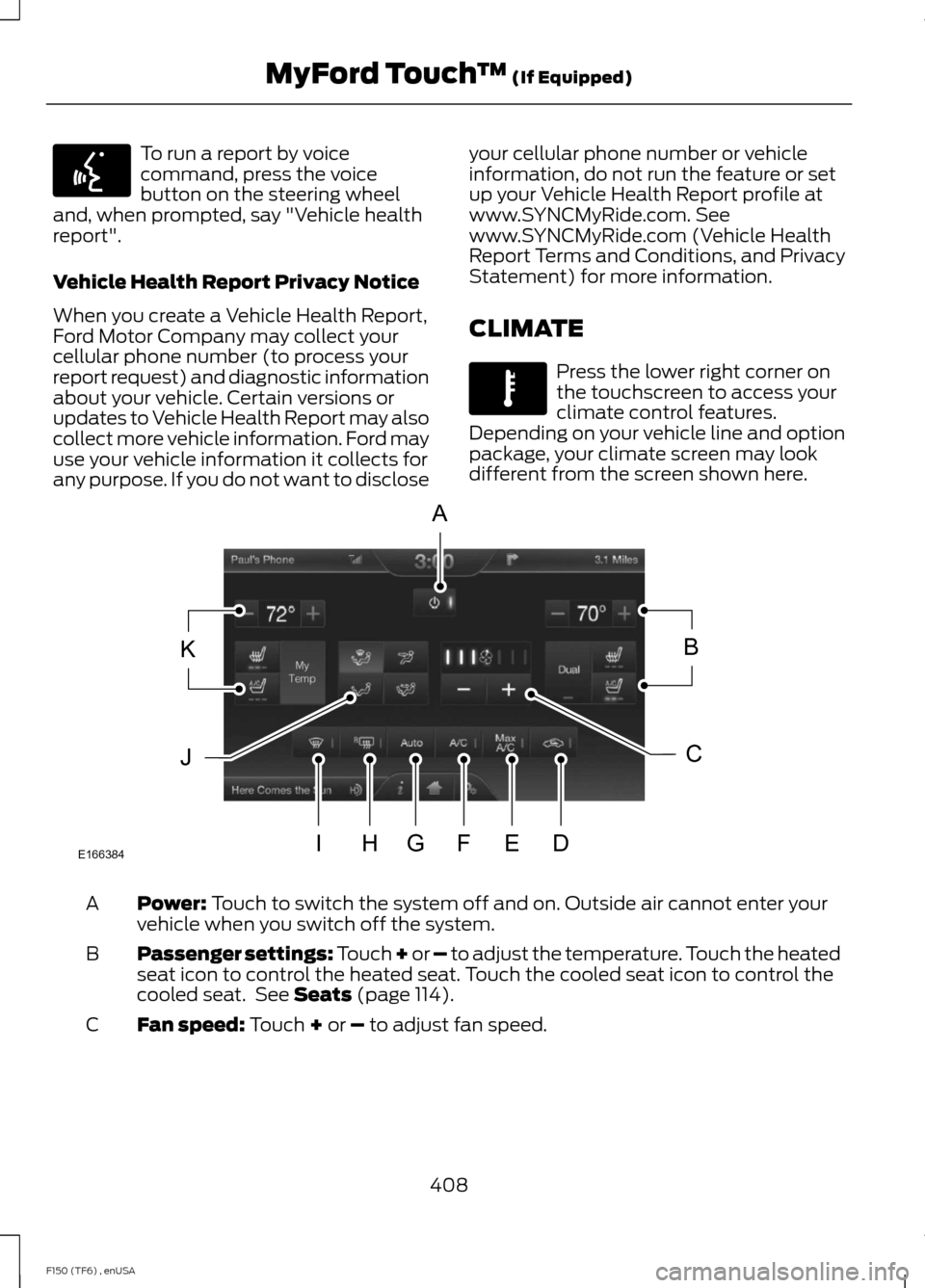
CLIMATE Press the lower right corner on
the touchscreen to access your
climate control features.
Depending on your vehicle line and option
package, your climate screen may look
different from the screen shown here. Power: Touch to switch the system off and on. Outside air cannot enter your
vehicle when you switch off the system.
A
Passenger settings:
Touch + or – to adjust the temperature. Touch the heated
seat icon to control the heated seat. Touch the cooled seat icon to control the
cooled seat. See
Seats (page 114).
B
Fan speed:
Touch + or – to adjust fan speed.
C
408
F150 (TF6) , enUSA MyFord Touch
™
(If Equipped)E142599 E142612 E166384
A
KB
JC
IHGFED
Page 412 of 472
Recirculated air: Touch to turn the recirculated air on or off which may reduce
the amount of time needed to cool down the interior and help reduce odors
from reaching the interior. Recirculated air also engages automatically when
you select MAX A/C and may turn on manually in any airflow mode except
defrost. It may also turn off in all airflow modes except MAX A/C to reduce fog
potential.
D
MAX A/C: Touch to cool your vehicle with recirculated air. Touch again for
normal A/C operation. MAX A/C distributes air through instrument panel vents
and may help reduce odors from entering your vehicle. MAX A/C is more
economical and efficient than normal A/C mode.
E
A/C:
Touch to turn the air conditioning on or off. Use A/C with recirculated air
to improve cooling performance and efficiency. A/C engages automatically in
MAX A/C, defrost and footwell/defrost.
F
AUTO:
Touch to engage automatic operation, then set the temperature using
the temperature control. The system automatically controls fan speed, airflow
distribution, A/C on or off and the use of fresh or recirculated air.
G
Rear defrost:
Touch to turn the rear window defroster and heated mirrors.
H
Defrost:
Touch to clear the windshield of fog and thin ice. Touch again to return
to the previous airflow selection. When on, defrost provides outside air to reduce
window fogging and distributes air through the windshield defroster vents and
demister vents.
I
Manual airflow distribution controls:
Footwell and Defrost: Distributes
air through the windshield defroster vents, demister vents, floor vents and rear
seat floor vents, and provides outside air to reduce window fogging. Panel:
Distributes air through the instrument panel vents. Panel and Floor: Distributes
air through the instrument panel vents, demister vents, floor vents and rear seat
floor vents. Floor:
Distributes air through the demister vents, floor vents and
rear seat floor vents.
J
Driver settings:
Touch + or – adjust the temperature. Touch the heated seat
icon to control the heated seat. Touch the cooled seat icon to control the cooled
seat. See Seats (page 114). Touch and hold MyTemp to select a temperature
you would like your vehicle to remember and maintain for you.
K
Climate Control Voice Commands Press the voice button on the
steering wheel controls. When
prompted, say any of the
following commands: Climate control commands
"Climate automatic" "Climate off""Climate on"
"Climate temperature <15.5-29.5> degrees"
409
F150 (TF6) , enUSA MyFord Touch
™
(If Equipped)E142599
Page 462 of 472

4
4WD
See: Four-Wheel Drive...................................... 153
A
A/C See: Climate Control......................................... 106
About This Manual...........................................7
Protecting the Environment................................ 7
ABS See: Brakes............................................................ 163
ABS driving hints See: Hints on Driving With Anti-Lock
Brakes................................................................ 163
Accessories.....................................................419 Exterior style......................................................... 419
Interior style.......................................................... 419
Lifestyle.................................................................. 419
Peace of mind...................................................... 419
Accessories See: Replacement Parts
Recommendation............................................. 11
Adjusting the Headlamps
........................249
Horizontal Aim Adjustment............................ 251
Vertical Aim Adjustment................................ 249
Adjusting the Pedals
....................................68
Adjusting the Steering Wheel...................65 Power Tilt and Telescope Steering
Column................................................................ 65
Airbag Disposal..............................................48
Air Conditioning See: Climate Control......................................... 106
Alarm See: Anti-Theft Alarm........................................ 62
Anti-Theft Alarm............................................62 Arming the Alarm................................................. 62
Disarming the Alarm........................................... 62
Appendices.....................................................421
Audible Warnings and Indicators.............85 Headlamps On Warning Chime...................... 85
Key in Ignition Warning Chime........................ 85
Parking Brake On Warning Chime.................86 Audio Control
..................................................66
Media........................................................................\
. 67
Seek, Next or Previous........................................ 67
Type 1........................................................................\
66
Type 2....................................................................... 66
Audio Input Jack............................................321
Audio System
...............................................306
General Information......................................... 306
Audio unit - Vehicles With: AM/FM/CD/ SYNC/Satellite Radio.............................308
Audio unit - Vehicles With: AM/FM
.......307
Audio unit - Vehicles With: Sony AM/FM/ CD....................................................................315
Autolamps..........................................................71
Automatic Climate Control......................109
Automatic Transmission............................147 Brake-Shift Interlock......................................... 150
If Your Vehicle Gets Stuck In Mud or Snow................................................................... 152
Understanding the Shift Positions of a 6– Speed Automatic Transmission.........147
Understanding your SelectShift Automatic® transmission.......................... 149
Automatic Transmission Fluid Check.............................................................245
Autowipers.......................................................69
Auxiliary Power Points................................132 110 Volt AC Power Points................................. 132
12 Volt DC Power Point..................................... 132
Locations................................................................ 132
B
Bonnet Lock See: Opening and Closing the Hood..........235
Booster Seats..................................................24 Types of Booster Seats...................................... 25
Brake Fluid Check
........................................246
Brakes...............................................................163
General Information.......................................... 163
Breaking-In......................................................210
Bulb Specification Chart...........................254
C
California Proposition 65..............................11
Capacities and Specifications................296 Technical Specifications.................................. 301
459
F150 (TF6) , enUSA Index
Page 463 of 472

Car Wash
See: Cleaning the Exterior.............................. 259
Center Console..............................................134
Changing a Bulb...........................................252 Lamp Assembly Condensation.................... 252
Replacing Brake/Tail/Turn/Reverse Lamp Bulbs.................................................................. 253
Replacing Cargo Lamp and High-mount Brake Lamp Bulbs........................................ 253
Replacing exterior mounted mirror turn signal indicator lamp bulbs...................... 254
Replacing Fog Lamp Bulbs (If Equipped.......................................................... 253
Replacing the License Plate Lamp Bulb.................................................................... 254
Changing a Fuse
...........................................233
Fuses....................................................................... 233
Changing a Road Wheel
...........................289
Dissimilar Spare Wheel and Tire Assembly
Information..................................................... 289
Location of the Spare Tire and Tools........290
Tire Change Procedure..................................... 291
Changing the 12V Battery.........................246 Battery Management System (If
Equipped)........................................................ 248
Changing the Engine Air Filter - 3.5L Ecoboost™.................................................256
Changing the Engine Air Filter - 3.7L/ 5.0L/6.2L......................................................257
Changing the Wiper Blades
.....................249
Checking MyKey System Status...............55
Checking the Wiper Blades
.....................249
Child Restraint and Safety Belt Maintenance..................................................37
Child Safety.......................................................14 General Information............................................. 14
Child Safety Locks.........................................28 Left-Hand Side...................................................... 29
Right-Hand Side................................................... 29
Child Seat Positioning..................................26
Cleaning Leather Seats.............................262 WITHOUT THE KING RANCH
EDITION............................................................ 262
WITH THE KING RANCH EDITION..............263
Cleaning Products.......................................259
Cleaning the Alloy Wheels.......................264
Cleaning the Engine...................................260 Cleaning the Exterior..................................259
Cleaning Plastic Exterior Parts..................... 260
Exterior Chrome................................................. 259
Stripes or Graphics (if equipped)................259
Underbody........................................................... 260
Cleaning the Instrument Panel and Instrument Cluster Lens..........................261
Cleaning the Interior....................................261
Cleaning the Windows and Wiper Blades............................................................261
Clearing All MyKeys.......................................55
Climate...........................................................408 Climate Control Voice Commands............409
Climate Control
............................................106
Coolant Check See: Engine Coolant Check............................. 241
Crash Sensors and Airbag Indicator.......48
Creating a MyKey............................................53 Programming/Changing Configurable
Settings............................................................... 54
Cruise Control..................................................67 Principle of Operation....................................... 176
Cruise control See: Using Cruise Control................................ 176
Customer Assistance..................................219
D
Data Recording
..................................................9
Event Data Recording........................................... 9
Service Data Recording........................................ 9
Daytime Running Lamps.............................72
Digital Radio...................................................316 HD Radio Reception and Station
Troubleshooting.............................................. 317
Direction Indicators
........................................73
Lane Change.......................................................... 73
Driver and Passenger Airbags
...................40
Children and Airbags.......................................... 40
Proper Driver and Front Passenger Seating Adjustment....................................................... 40
Driving Aids......................................................177
Driving Hints...................................................210
Driving Through Water.................................211
DRL See: Daytime Running Lamps.......................... 72
460
F150 (TF6) , enUSA Index
Page 465 of 472

Front Seat Armrest.......................................122
Fuel and Refueling.......................................139
Fuel Consumption........................................143
Calculating Fuel Economy.............................. 144
Filling the Tank..................................................... 143
Fuel Filter
........................................................246
Fuel Quality....................................................140 Choosing the Right Fuel With a Flex Fuel
Vehicle (If Equipped)................................... 140
Choosing the Right Fuel Without a Flex Fuel Vehicle (If Equipped)................................... 140
Octane Recommendations............................ 140
Fuel Shutoff....................................................216
Fuses.................................................................225
Fuse Specification Chart
...........................225
Auxiliary relay box (SVT Raptor
only)................................................................... 233
Passenger Compartment Fuse Panel.................................................................. 229
Power Distribution Box.................................... 225
G
Garage Door Opener See: Universal Garage Door Opener............124
Gauges................................................................81 Engine Coolant Temperature Gauge............82
Engine Oil Pressure Gauge............................... 82
Fuel Gauge.............................................................. 82
Information Display............................................. 82
Transmission Fluid Temperature Gauge................................................................... 82
General Information on Radio Frequencies...................................................49
General Maintenance Information.......438 Multi-point Inspection.................................... 440
Owner Checks and Services.......................... 439
Protecting Your Investment.......................... 438
Why Maintain Your Vehicle?......................... 438
Why Maintain Your Vehicle at Your Dealership?..................................................... 438
Getting Assistance Outside the U.S. and Canada..........................................................222
Getting the Services You Need................219 Away From Home............................................... 219H
Handbrake
See: Parking Brake............................................. 164
Hazard Warning Flashers
..........................216
HDC See: Using Hill Descent Control.................... 170
Head Restraints
..............................................114
Adjusting the Head Restraint.......................... 115
Heated Seats
.................................................120
Rear Heated Seats............................................... 121
Heated Windows and Mirrors
....................112
Heated Exterior Mirror........................................ 113
Heated Rear Window......................................... 112
Heating See: Climate Control......................................... 106
Hill Start Assist..............................................164 Using Hill Start Assist....................................... 164
Hints on Controlling the Interior Climate...........................................................110
Cooling the Interior Quickly............................... 111
General Hints........................................................ 110
Heating the Interior Quickly.............................. 111
Recommended Settings for Cooling ...........112
Recommended Settings for Heating.............111
Side Window Defogging in Cold Weather.............................................................. 112
Hints on Driving With Anti-Lock Brakes............................................................163
Hood Lock See: Opening and Closing the Hood..........235
I
Ignition Switch
...............................................135
In California (U.S. Only)............................220
Information Display Control.......................67 Type 1........................................................................\
. 67
Type 2........................................................................\
67
Information Displays
.....................................87
General Information............................................ 87
462
F150 (TF6) , enUSA Index