2014 FORD F150 wheel
[x] Cancel search: wheelPage 88 of 472

Normally, the service engine soon light will
stay on until the engine is cranked, then
turn itself off if no malfunctions are
present. However, if after 15 seconds the
service engine soon light blinks eight times,
it means that the vehicle is not ready for
I/M testing. See Emission Control
System (page 144).
Traction and Stability Control Illuminates when the system is
active. If it remains illuminated
or does not illuminate when you
switch the ignition on, this indicates a
malfunction. During a malfunction the
system will switch off. Have the system
checked by your authorized dealer
immediately. See
Using Stability
Control (page 168).
Traction and Stability Control Off Illuminates when you switch the
system off. It will go out when
you switch the system back on
or when you switch the ignition off. See
Using Stability Control
(page 168).
Transmission Tow/Haul
(If Equipped) Illuminates when the tow/haul
feature has been activated. If the
light flashes steadily, have the
system serviced immediately, damage to
the transmission could occur. See
Automatic Transmission
(page 147).
4X2
(If Equipped) Illuminates momentarily when
two-wheel drive high is selected.
If the light fails to display when
the ignition is turned on, or remains on,
have the system serviced immediately by
your authorized dealer. 4X4 Auto
(If Equipped) Illuminates when the four-wheel
drive system is engaged. If the
light fails to display when the
ignition is turned on, or remains on, have
the system serviced immediately by your
authorized dealer.
4X4 LOW
(If Equipped) Illuminates when four-wheel
drive low is engaged. If the light
fails to display when the ignition
is turned on, or remains on, have the
system serviced immediately by your
authorized dealer.
4X4 HIGH
(If Equipped) Illuminates when four-wheel
drive high is engaged. If the light
fails to display when the ignition
is turned on, or remains on, have the
system serviced immediately by your
authorized dealer.
AUDIBLE WARNINGS AND
INDICATORS
Headlamps On Warning Chime
Sounds when you remove the key from the
ignition and open the driver's door and you
have left the headlamps or parking lamps
on.
Key in Ignition Warning Chime
Sounds when you open the driver's door
and you have left the key in the ignition
with it in the off or accessory position.
85
F150 (TF6) , enUSA Instrument ClusterE138639 E161509 E163173 E166922 E163174 E163175
Page 90 of 472
GENERAL INFORMATION
WARNING
Driving while distracted can result in
loss of vehicle control, crash and
injury. We strongly recommend that
you use extreme caution when using any
device that may take your focus off the
road. Your primary responsibility is the safe
operation of your vehicle. We recommend
against the use of any handheld device
while driving and encourage the use of
voice-operated systems when possible.
Make sure you are aware of all applicable
local laws that may affect the use of
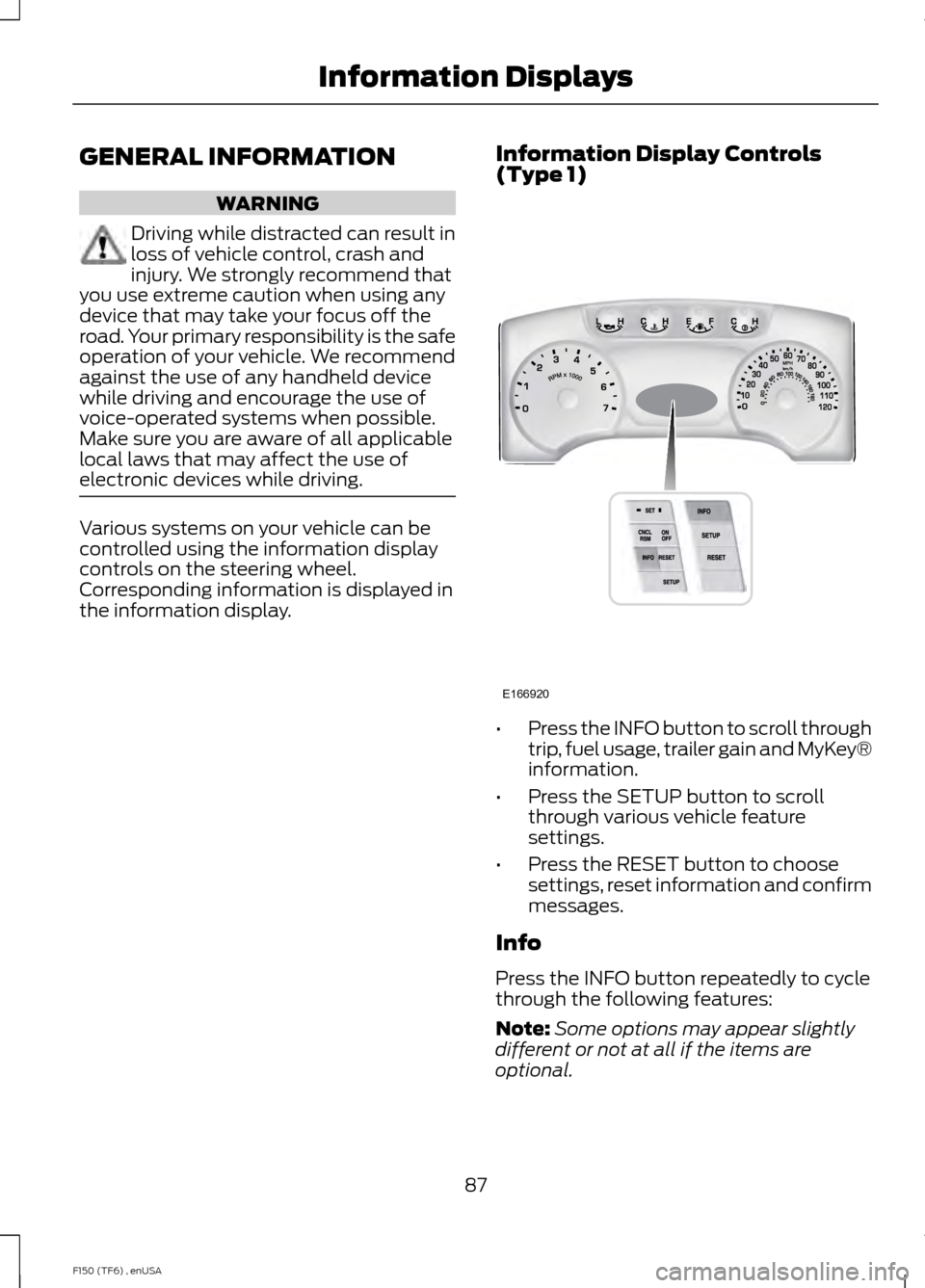
electronic devices while driving. Various systems on your vehicle can be
controlled using the information display
controls on the steering wheel.
Corresponding information is displayed in
the information display.
Information Display Controls
(Type 1) •
Press the INFO button to scroll through
trip, fuel usage, trailer gain and MyKey®
information.
• Press the SETUP button to scroll
through various vehicle feature
settings.
• Press the RESET button to choose
settings, reset information and confirm
messages.
Info
Press the INFO button repeatedly to cycle
through the following features:
Note: Some options may appear slightly
different or not at all if the items are
optional.
87
F150 (TF6) , enUSA Information DisplaysE166920
Page 93 of 472
SETUP
Climate On or Off
Quiet On or Off
English, Spanish or French
LANGUAGE = ENGLISH,
SPANISH or FRENCH
PRESS RESET FOR SYSTEM CHECK
The information display will begin to cycle
through the vehicle systems and provide
a status of the item if needed.
Note: Some systems show a message only
if a condition is present
OIL LIFE XXX%
Displays the remaining oil life. An oil
change is required whenever indicated by
the information display and according to
the recommended maintenance schedule.
USE ONLY RECOMMENDED ENGINE OILS.
To reset the oil monitoring system to 100%
after each oil change, perform the
following:
1. Press and release the SETUP button to display OIL LIFE XXX% HOLD RESET
= NEW.
2. Press and hold the RESET button for two seconds and release to reset the
oil life to 100%.
Note: To change oil life 100% value (if
equipped with this feature) to another value,
proceed to Step 3.
3. Once OIL LIFE SET TO XXX% is displayed, release and press the RESET
button to change the Oil Life Start
Value. Each release and press will
reduce the value by 10%.
UNITS
Displays the current units English or Metric AUTOLAMP (SEC)
This feature keeps your headlights on for
up to three minutes after the ignition is
switched off.
AUTOLOCK
This feature automatically locks all vehicle
doors when the vehicle is shifted into any
gear, putting the vehicle in motion.
AUTOUNLOCK
This feature automatically unlocks all
vehicle doors when the driver
’s door is
opened within 10 minutes of the ignition
being turned off.
COURTESY WIPE
This feature allows for an extra swipe of
the wipers after a wipe/wash cycle.
EASY ENTRY EXIT
This feature automatically moves the
driver ’s seat rearward and adjusts the
steering wheel for easy exit/entry from the
vehicle.
REAR PARK AID (if equipped):
This feature sounds a warning tone to warn
the driver of obstacles near the rear
bumper, and functions only when R
(Reverse) gear is selected.
TRAILER SWAY (if equipped)
This feature uses the electronic stability
control to mitigate trailer sway.
90
F150 (TF6) , enUSA Information Displays
Page 95 of 472
Gauge Mode
Trans Temp
Gauge Detail
The compass orientation
can be changed between
fixed north or rotating north.
To change the modes, press
OK when the compass
display is shown. Use the
right arrow to choose the
mode. Press and hold OK to
set the mode.
Compass
Displays power distribution
between the front and rear
wheels. More power to
either front or rear wheels
will be displayed by more
area filled in.
2
–speed Auto 4X4
Blank
Trip A / B Use the arrow buttons to choose
between the following trip
options.
Trip A / B
Trip time
Trip distance
Gal used
Avg mpg (L/100km)
Odometer (displays in lower line and may display in other menus)
Press OK to pause the Trip A or B screen,
press again to un-pause.
Press and hold OK to reset the currently
displayed trip information. Trip time
Registers the time of individual journeys.
Trip distance
Registers the mileage of individual
journeys.
92
F150 (TF6) , enUSA Information DisplaysE138660
Page 97 of 472
Truck Apps
AdvanceTrac®
2 –speed Auto 4X4
ELD (Electronic Locking Differential)
Hill Descent Control Truck Apps (cont’
d)
Off-Road Mode
Press OK for Info
Off Road
(cont’ d)
Press OK to Enable / Disable
Off-Road Camera (SVT
Raptor)
Trailer Disconnected
Trailer
Active trailer name or default trailer
Accumulated trailer distance
Trailer gain and output Change Active Trailer
Press OK for options
Conventional, Fifth
Wheel or Gooseneck.
Connection Checklist (if
equipped)
Delete Trailer
Tow Haul mode or
Trailer Brake Controller
Information Screen
Rename Trailer
Reset Trailer Mileage / Kilometers (if equipped)
Pitch and bank angle (in degrees)
Displays the pitch angle (front to rear) and
bank angle (side to side) of the road
surface.
Steering angle (in degrees)
Displays the steering angle of the front
wheels after the vehicle has been driven
for a period of time. Differential lock/unlock
Displays the state (locked or unlocked) of
the electronic locking differential.
Torque flow
Displays the torque flow to the front and
rear driveline and operating mode of the
transfer case: 4X2, 4X4 High, 4X4 Low, 4X4
Auto.
94
F150 (TF6) , enUSA Information Displays
Page 103 of 472
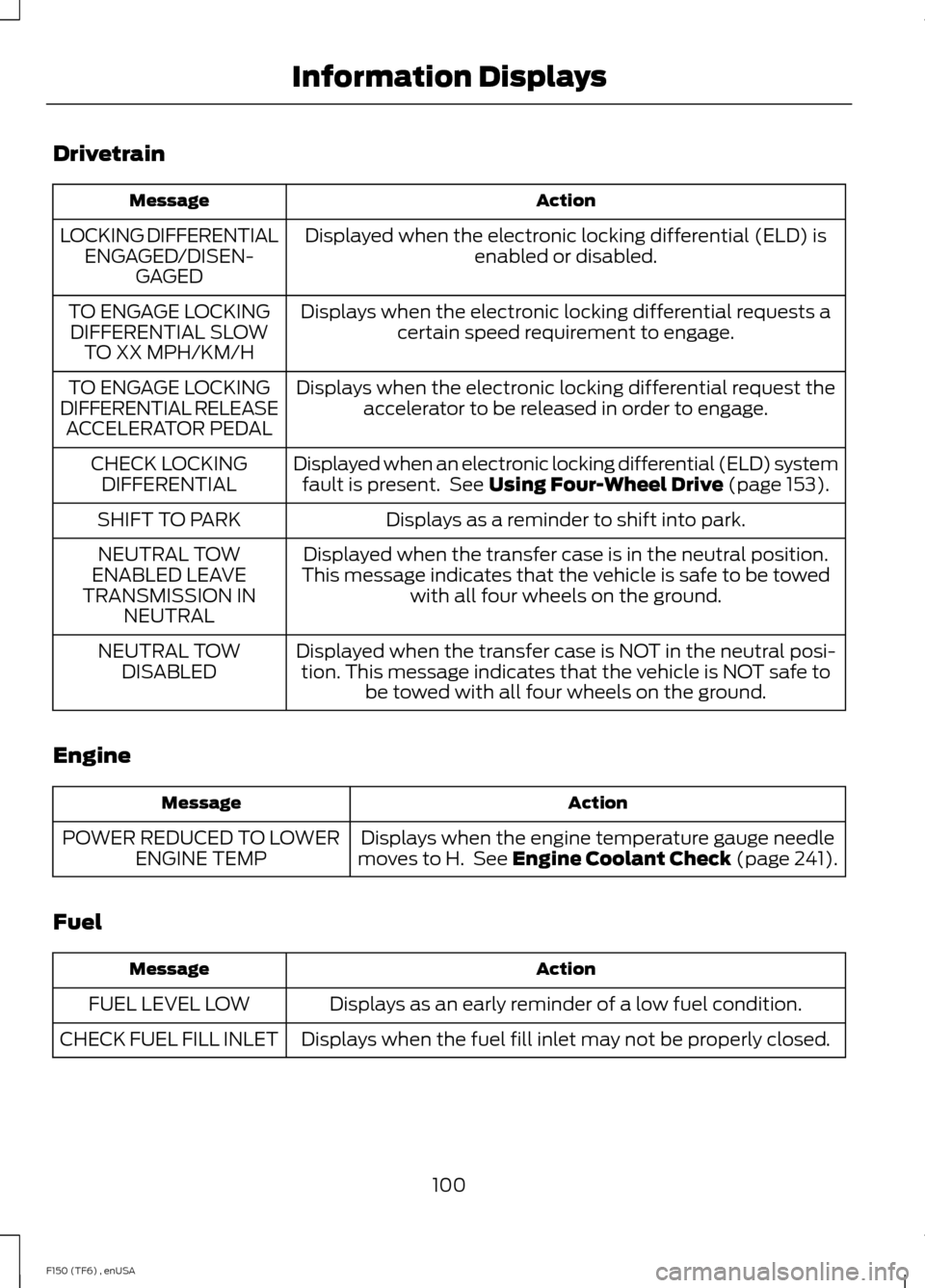
Drivetrain
Action
Message
Displayed when the electronic locking differential (ELD) isenabled or disabled.
LOCKING DIFFERENTIAL
ENGAGED/DISEN- GAGED
Displays when the electronic locking differential requests acertain speed requirement to engage.
TO ENGAGE LOCKING
DIFFERENTIAL SLOW TO XX MPH/KM/H
Displays when the electronic locking differential request theaccelerator to be released in order to engage.
TO ENGAGE LOCKING
DIFFERENTIAL RELEASE ACCELERATOR PEDAL
Displayed when an electronic locking differential (ELD) systemfault is present. See Using Four-Wheel Drive (page 153).
CHECK LOCKING
DIFFERENTIAL
Displays as a reminder to shift into park.
SHIFT TO PARK
Displayed when the transfer case is in the neutral position.
This message indicates that the vehicle is safe to be towed with all four wheels on the ground.
NEUTRAL TOW
ENABLED LEAVE
TRANSMISSION IN NEUTRAL
Displayed when the transfer case is NOT in the neutral posi-tion. This message indicates that the vehicle is NOT safe to be towed with all four wheels on the ground.
NEUTRAL TOW
DISABLED
Engine Action
Message
Displays when the engine temperature gauge needle
moves to H. See
Engine Coolant Check (page 241).
POWER REDUCED TO LOWER
ENGINE TEMP
Fuel Action
Message
Displays as an early reminder of a low fuel condition.
FUEL LEVEL LOW
Displays when the fuel fill inlet may not be properly closed.
CHECK FUEL FILL INLET
100
F150 (TF6) , enUSA Information Displays
Page 108 of 472
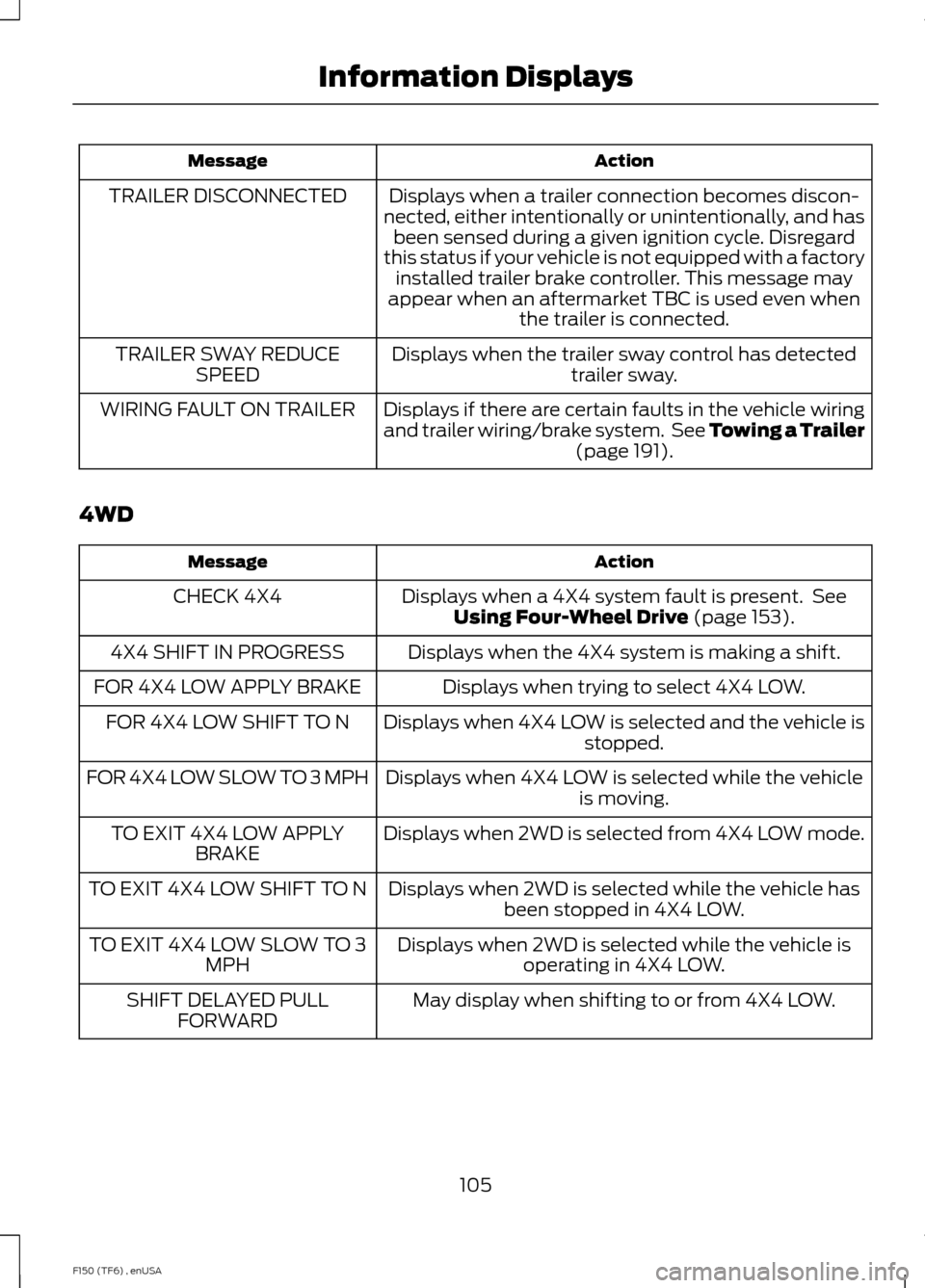
Action
Message
Displays when a trailer connection becomes discon-
nected, either intentionally or unintentionally, and has been sensed during a given ignition cycle. Disregard
this status if your vehicle is not equipped with a factory installed trailer brake controller. This message may
appear when an aftermarket TBC is used even when the trailer is connected.
TRAILER DISCONNECTED
Displays when the trailer sway control has detectedtrailer sway.
TRAILER SWAY REDUCE
SPEED
Displays if there are certain faults in the vehicle wiring
and trailer wiring/brake system. See Towing a Trailer (page 191).
WIRING FAULT ON TRAILER
4WD Action
Message
Displays when a 4X4 system fault is present. SeeUsing Four-Wheel Drive
(page 153).
CHECK 4X4
Displays when the 4X4 system is making a shift.
4X4 SHIFT IN PROGRESS
Displays when trying to select 4X4 LOW.
FOR 4X4 LOW APPLY BRAKE
Displays when 4X4 LOW is selected and the vehicle isstopped.
FOR 4X4 LOW SHIFT TO N
Displays when 4X4 LOW is selected while the vehicleis moving.
FOR 4X4 LOW SLOW TO 3 MPH
Displays when 2WD is selected from 4X4 LOW mode.
TO EXIT 4X4 LOW APPLY
BRAKE
Displays when 2WD is selected while the vehicle hasbeen stopped in 4X4 LOW.
TO EXIT 4X4 LOW SHIFT TO N
Displays when 2WD is selected while the vehicle isoperating in 4X4 LOW.
TO EXIT 4X4 LOW SLOW TO 3
MPH
May display when shifting to or from 4X4 LOW.
SHIFT DELAYED PULL
FORWARD
105
F150 (TF6) , enUSA Information Displays
Page 116 of 472
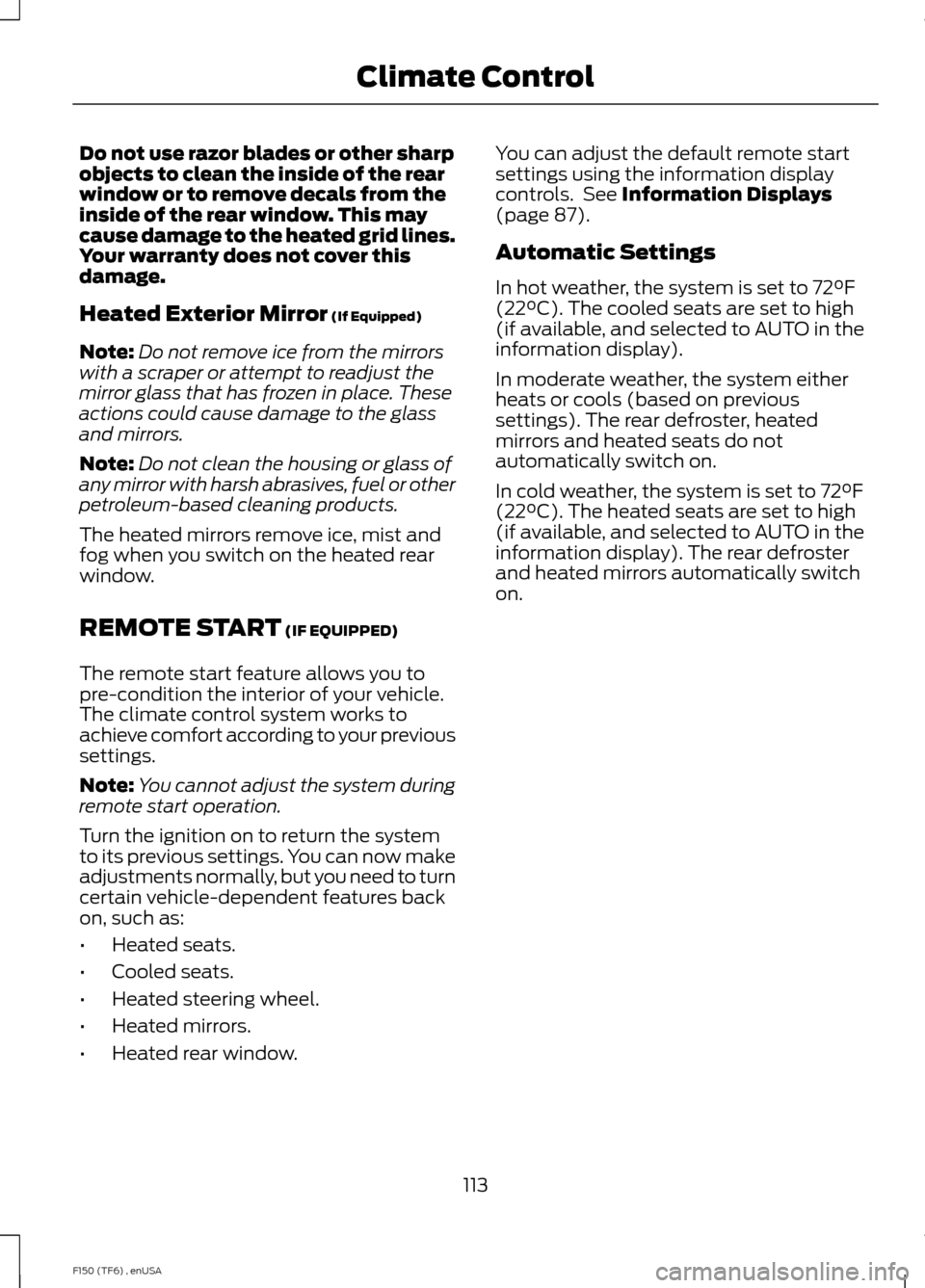
Do not use razor blades or other sharp
objects to clean the inside of the rear
window or to remove decals from the
inside of the rear window. This may
cause damage to the heated grid lines.
Your warranty does not cover this
damage.
Heated Exterior Mirror (If Equipped)
Note: Do not remove ice from the mirrors
with a scraper or attempt to readjust the
mirror glass that has frozen in place. These
actions could cause damage to the glass
and mirrors.
Note: Do not clean the housing or glass of
any mirror with harsh abrasives, fuel or other
petroleum-based cleaning products.
The heated mirrors remove ice, mist and
fog when you switch on the heated rear
window.
REMOTE START
(IF EQUIPPED)
The remote start feature allows you to
pre-condition the interior of your vehicle.
The climate control system works to
achieve comfort according to your previous
settings.
Note: You cannot adjust the system during
remote start operation.
Turn the ignition on to return the system
to its previous settings. You can now make
adjustments normally, but you need to turn
certain vehicle-dependent features back
on, such as:
• Heated seats.
• Cooled seats.
• Heated steering wheel.
• Heated mirrors.
• Heated rear window. You can adjust the default remote start
settings using the information display
controls. See
Information Displays
(page 87).
Automatic Settings
In hot weather, the system is set to 72°F
(22°C). The cooled seats are set to high
(if available, and selected to AUTO in the
information display).
In moderate weather, the system either
heats or cools (based on previous
settings). The rear defroster, heated
mirrors and heated seats do not
automatically switch on.
In cold weather, the system is set to 72°F
(22°C). The heated seats are set to high
(if available, and selected to AUTO in the
information display). The rear defroster
and heated mirrors automatically switch
on.
113
F150 (TF6) , enUSA Climate Control