2014 FORD F150 transmission
[x] Cancel search: transmissionPage 101 of 472

Transmission indicator display (if
equipped)
The transmission gear indicator displays
in the right side of the information display
when using the SelectShift Automatic
™
transmission feature. These displays will
not be shown in all screen modes. For
example: when programming certain
vehicle features or in certain information
menus. INFORMATION MESSAGES
Note:
Depending on the vehicle options
equipped with your vehicle, not all of the
messages will display or be available.
Certain messages may be abbreviated or
shortened depending upon which cluster
type you have.
Press the RESET button for Type 1 displays
or the OK button for Type 2 displays to
acknowledge and remove some messages
from the information display. Other
messages will be removed automatically
after a short time.
Certain messages need to be confirmed
before you can access the menus.
AdvanceTrac® and Traction Control Action
Message
Displays when the system detects a condition that requires
service. Contact your authorized dealer as soon as possible.
SERVICE ADVAN-
CETRAC
Displayed when the AdvanceTrac® system has been disabled by the driver.
ADVANCETRAC OFF
Displayed when the AdvanceTrac® system has been enabledby the driver.
ADVANCETRAC ON
Displayed when the AdvanceTrac® sport mode has beenenabled by the driver. (SVT Raptor)
ADVANCETRAC SPORT
MODE
Displayed when the traction control has been disabled by thedriver. See Using Traction Control (page 166).
TRACTION CONTROL
OFF
Displayed when the traction control has been enabled by thedriver. See
Using Traction Control (page 166).
TRACTION CONTROL
ON
Airbag Action
Message
Displays when the system detects a malfunction due to a blocked sensor.
REMOVE OBJECTS
NEAR PASSENGER SEAT
98
F150 (TF6) , enUSA Information Displays
Page 103 of 472
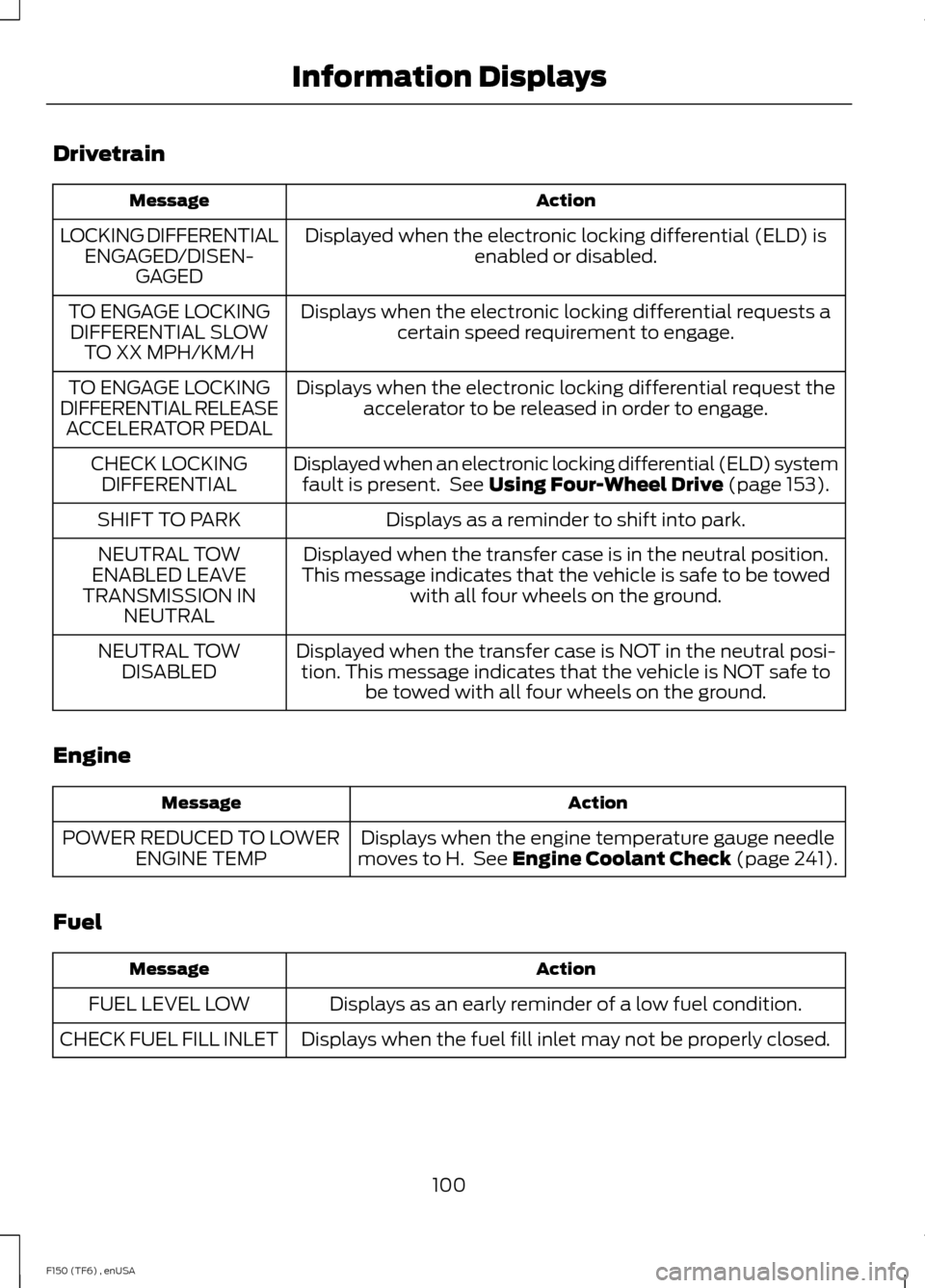
Drivetrain
Action
Message
Displayed when the electronic locking differential (ELD) isenabled or disabled.
LOCKING DIFFERENTIAL
ENGAGED/DISEN- GAGED
Displays when the electronic locking differential requests acertain speed requirement to engage.
TO ENGAGE LOCKING
DIFFERENTIAL SLOW TO XX MPH/KM/H
Displays when the electronic locking differential request theaccelerator to be released in order to engage.
TO ENGAGE LOCKING
DIFFERENTIAL RELEASE ACCELERATOR PEDAL
Displayed when an electronic locking differential (ELD) systemfault is present. See Using Four-Wheel Drive (page 153).
CHECK LOCKING
DIFFERENTIAL
Displays as a reminder to shift into park.
SHIFT TO PARK
Displayed when the transfer case is in the neutral position.
This message indicates that the vehicle is safe to be towed with all four wheels on the ground.
NEUTRAL TOW
ENABLED LEAVE
TRANSMISSION IN NEUTRAL
Displayed when the transfer case is NOT in the neutral posi-tion. This message indicates that the vehicle is NOT safe to be towed with all four wheels on the ground.
NEUTRAL TOW
DISABLED
Engine Action
Message
Displays when the engine temperature gauge needle
moves to H. See
Engine Coolant Check (page 241).
POWER REDUCED TO LOWER
ENGINE TEMP
Fuel Action
Message
Displays as an early reminder of a low fuel condition.
FUEL LEVEL LOW
Displays when the fuel fill inlet may not be properly closed.
CHECK FUEL FILL INLET
100
F150 (TF6) , enUSA Information Displays
Page 105 of 472
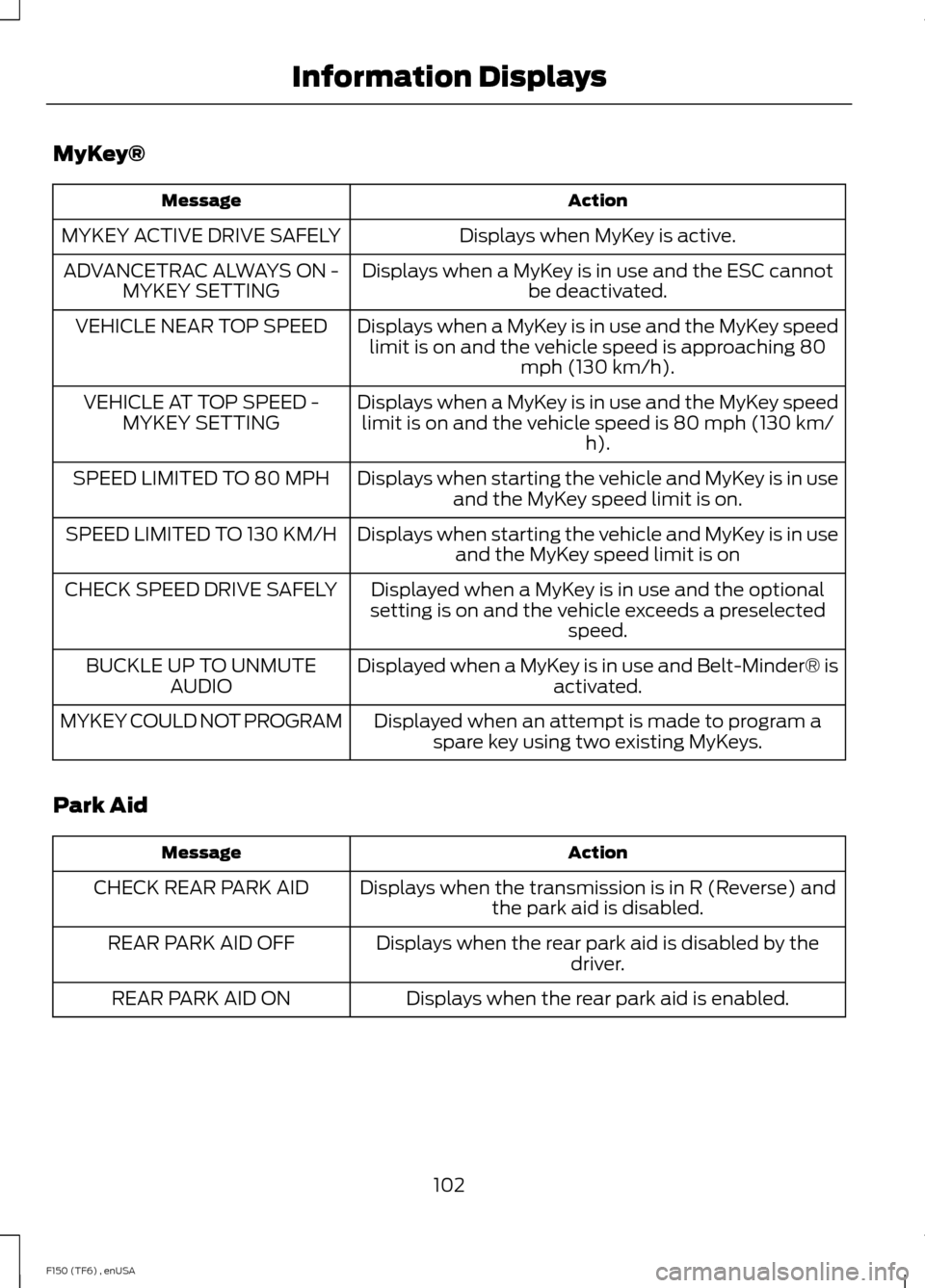
MyKey®
Action
Message
Displays when MyKey is active.
MYKEY ACTIVE DRIVE SAFELY
Displays when a MyKey is in use and the ESC cannotbe deactivated.
ADVANCETRAC ALWAYS ON -
MYKEY SETTING
Displays when a MyKey is in use and the MyKey speedlimit is on and the vehicle speed is approaching 80 mph (130 km/h).
VEHICLE NEAR TOP SPEED
Displays when a MyKey is in use and the MyKey speedlimit is on and the vehicle speed is 80 mph (130 km/ h).
VEHICLE AT TOP SPEED -
MYKEY SETTING
Displays when starting the vehicle and MyKey is in useand the MyKey speed limit is on.
SPEED LIMITED TO 80 MPH
Displays when starting the vehicle and MyKey is in useand the MyKey speed limit is on
SPEED LIMITED TO 130 KM/H
Displayed when a MyKey is in use and the optional
setting is on and the vehicle exceeds a preselected speed.
CHECK SPEED DRIVE SAFELY
Displayed when a MyKey is in use and Belt-Minder® isactivated.
BUCKLE UP TO UNMUTE
AUDIO
Displayed when an attempt is made to program aspare key using two existing MyKeys.
MYKEY COULD NOT PROGRAM
Park Aid Action
Message
Displays when the transmission is in R (Reverse) andthe park aid is disabled.
CHECK REAR PARK AID
Displays when the rear park aid is disabled by thedriver.
REAR PARK AID OFF
Displays when the rear park aid is enabled.
REAR PARK AID ON
102
F150 (TF6) , enUSA Information Displays
Page 121 of 472
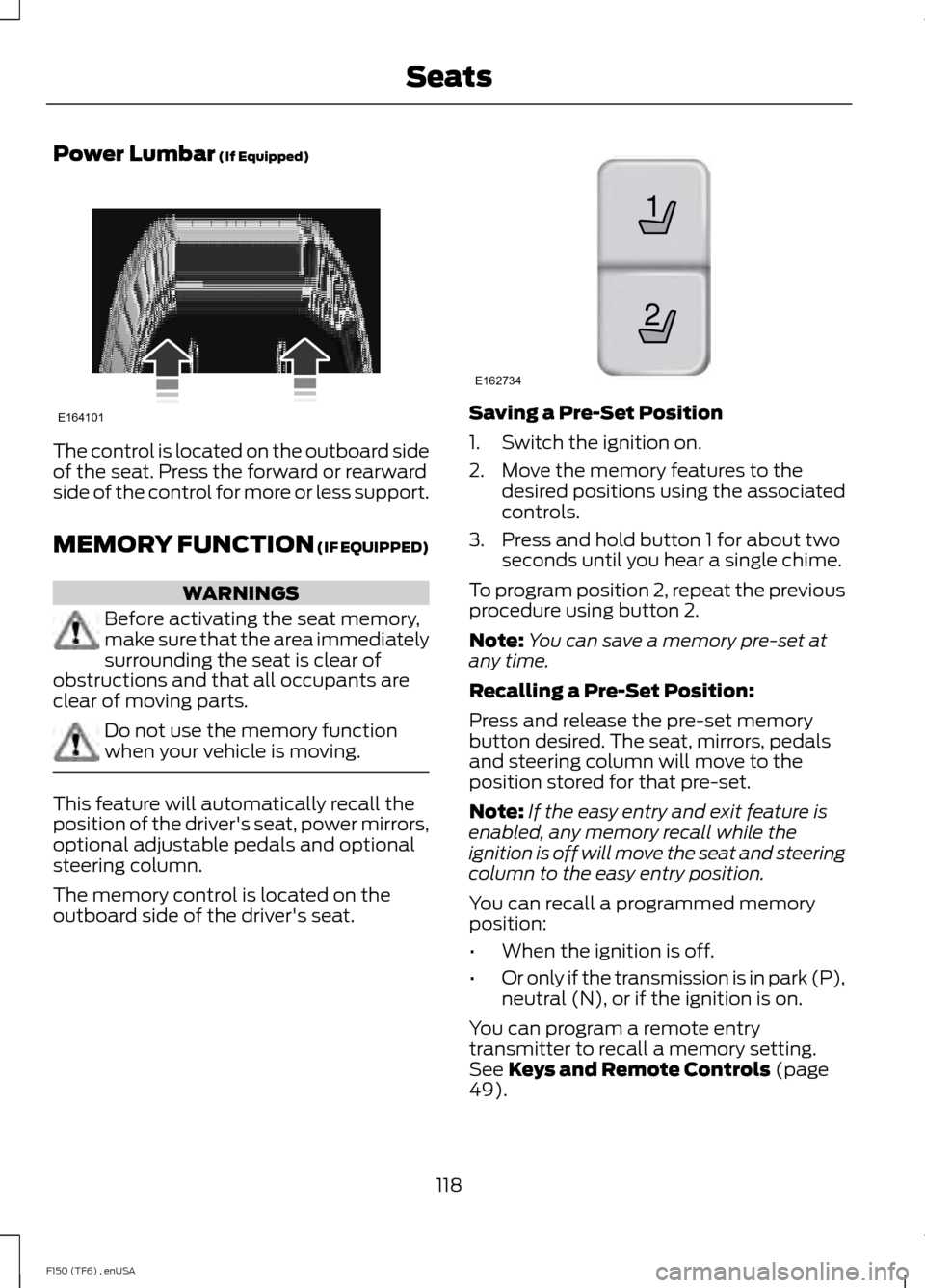
Power Lumbar (If Equipped)
The control is located on the outboard side
of the seat. Press the forward or rearward
side of the control for more or less support.
MEMORY FUNCTION
(IF EQUIPPED)
WARNINGS
Before activating the seat memory,
make sure that the area immediately
surrounding the seat is clear of
obstructions and that all occupants are
clear of moving parts. Do not use the memory function
when your vehicle is moving.
This feature will automatically recall the
position of the driver's seat, power mirrors,
optional adjustable pedals and optional
steering column.
The memory control is located on the
outboard side of the driver's seat. Saving a Pre-Set Position
1. Switch the ignition on.
2. Move the memory features to the
desired positions using the associated
controls.
3. Press and hold button 1 for about two seconds until you hear a single chime.
To program position 2, repeat the previous
procedure using button 2.
Note: You can save a memory pre-set at
any time.
Recalling a Pre-Set Position:
Press and release the pre-set memory
button desired. The seat, mirrors, pedals
and steering column will move to the
position stored for that pre-set.
Note: If the easy entry and exit feature is
enabled, any memory recall while the
ignition is off will move the seat and steering
column to the easy entry position.
You can recall a programmed memory
position:
• When the ignition is off.
• Or only if the transmission is in park (P),
neutral (N), or if the ignition is on.
You can program a remote entry
transmitter to recall a memory setting.
See
Keys and Remote Controls (page
49).
118
F150 (TF6) , enUSA SeatsE164101 21
E162734
Page 122 of 472
You can also program a personal keyless
entry code to recall a memory setting. See
Locks (page 57).
Easy Entry and Exit Feature
(If
Equipped)
If you enable the easy entry and exit
feature, it automatically moves the driver's
seat rearward 2 inches (5 centimeters)
when the transmission selector lever is in
position
P and you remove the key from
the ignition.
If the seat is located less than 2 inches (5
centimeters) from the rear of the seat
track, the seat travel will be less than 2
inches (5 centimeters) rearward.
The driver's seat will return to the previous
position when you put the key in the
ignition.
You can enable or disable this feature
through the information display. See
Information Displays
(page 87).
REAR SEATS
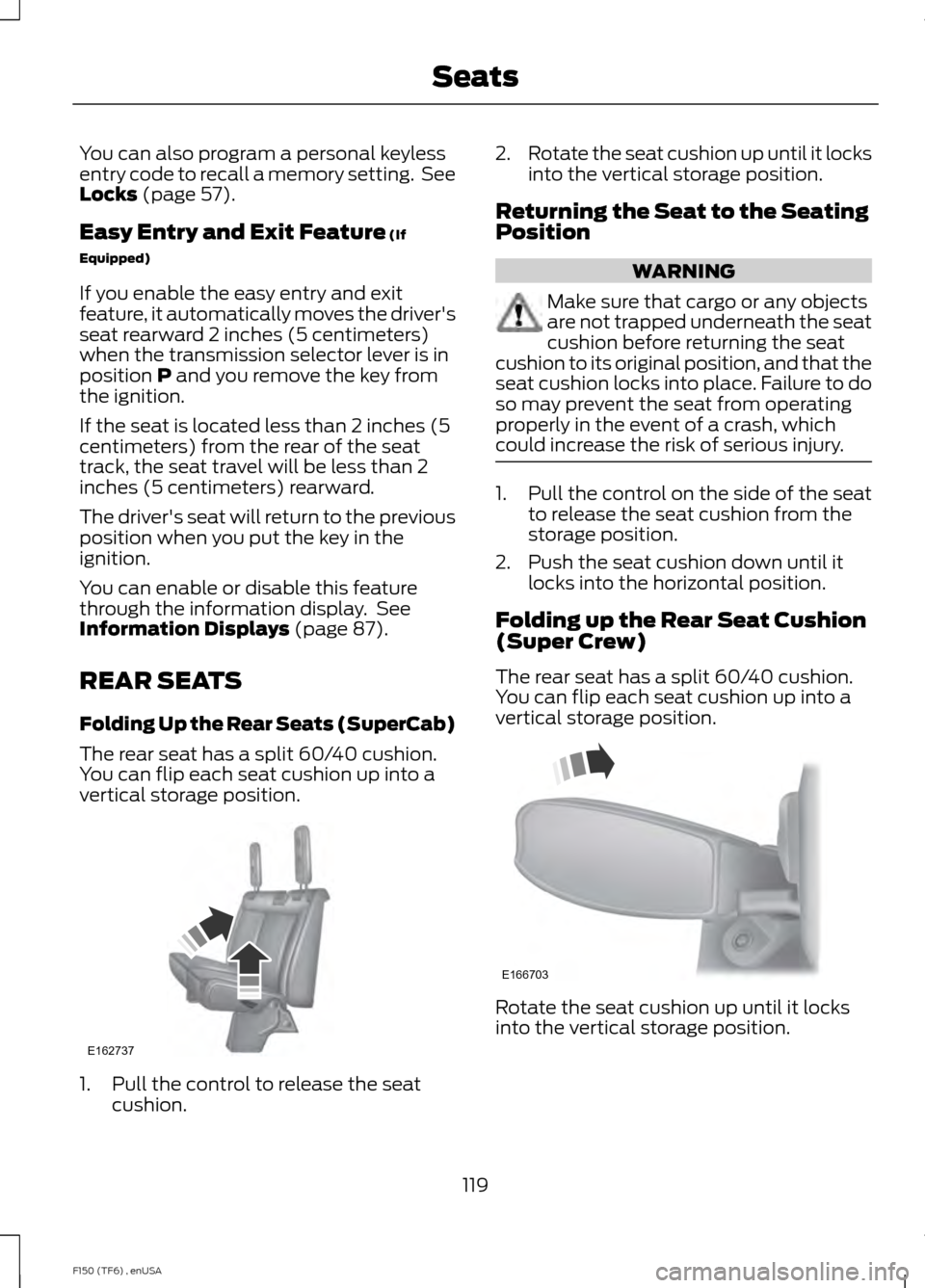
Folding Up the Rear Seats (SuperCab)
The rear seat has a split 60/40 cushion.
You can flip each seat cushion up into a
vertical storage position. 1. Pull the control to release the seat
cushion. 2.
Rotate the seat cushion up until it locks
into the vertical storage position.
Returning the Seat to the Seating
Position WARNING
Make sure that cargo or any objects
are not trapped underneath the seat
cushion before returning the seat
cushion to its original position, and that the
seat cushion locks into place. Failure to do
so may prevent the seat from operating
properly in the event of a crash, which
could increase the risk of serious injury. 1. Pull the control on the side of the seat
to release the seat cushion from the
storage position.
2. Push the seat cushion down until it locks into the horizontal position.
Folding up the Rear Seat Cushion
(Super Crew)
The rear seat has a split 60/40 cushion.
You can flip each seat cushion up into a
vertical storage position. Rotate the seat cushion up until it locks
into the vertical storage position.
119
F150 (TF6) , enUSA SeatsE162737 E166703
Page 131 of 472
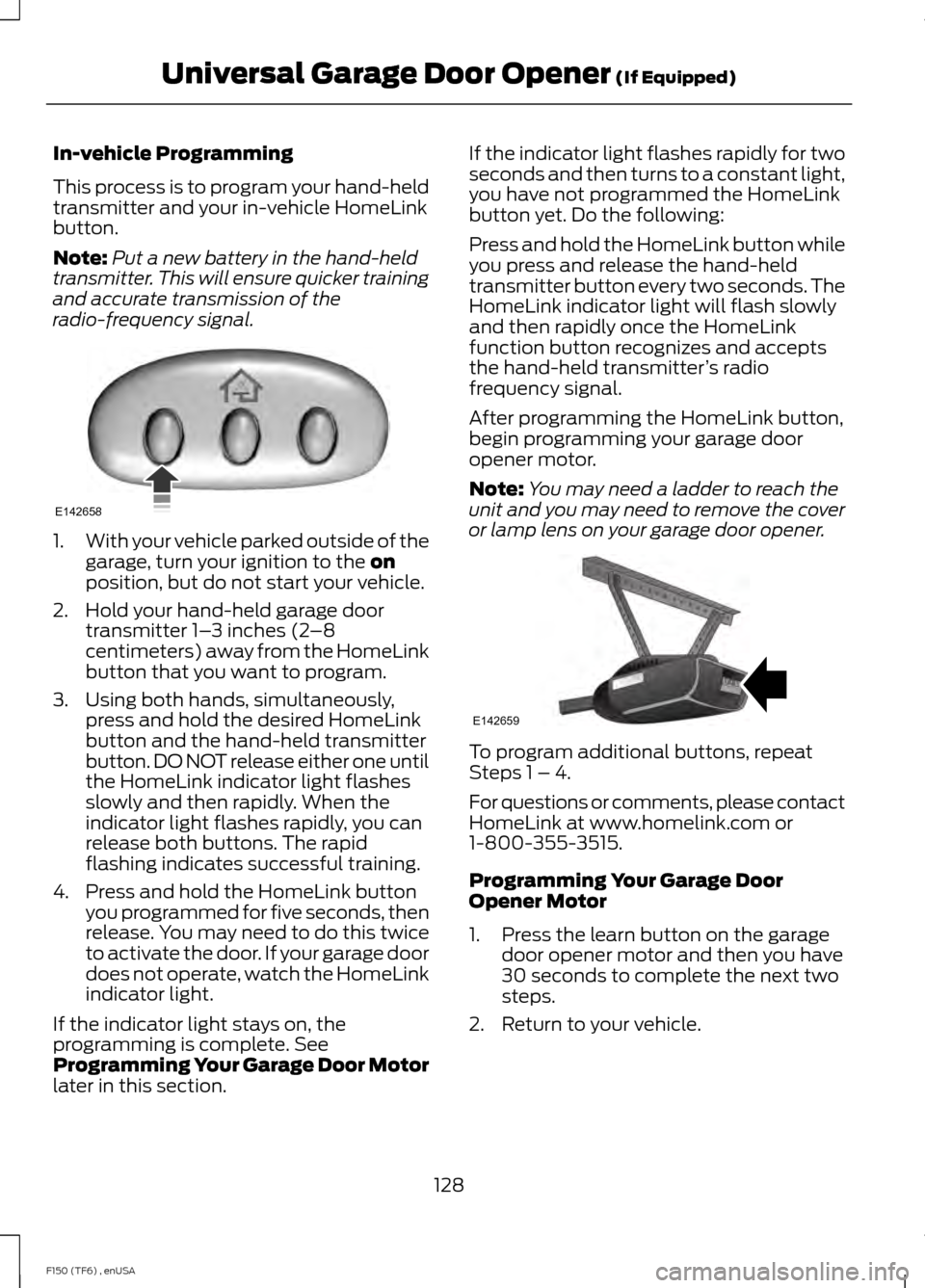
In-vehicle Programming
This process is to program your hand-held
transmitter and your in-vehicle HomeLink
button.
Note:
Put a new battery in the hand-held
transmitter. This will ensure quicker training
and accurate transmission of the
radio-frequency signal. 1.
With your vehicle parked outside of the
garage, turn your ignition to the on
position, but do not start your vehicle.
2. Hold your hand-held garage door transmitter 1– 3 inches (2–8
centimeters) away from the HomeLink
button that you want to program.
3. Using both hands, simultaneously, press and hold the desired HomeLink
button and the hand-held transmitter
button. DO NOT release either one until
the HomeLink indicator light flashes
slowly and then rapidly. When the
indicator light flashes rapidly, you can
release both buttons. The rapid
flashing indicates successful training.
4. Press and hold the HomeLink button you programmed for five seconds, then
release. You may need to do this twice
to activate the door. If your garage door
does not operate, watch the HomeLink
indicator light.
If the indicator light stays on, the
programming is complete. See
Programming Your Garage Door Motor
later in this section. If the indicator light flashes rapidly for two
seconds and then turns to a constant light,
you have not programmed the HomeLink
button yet. Do the following:
Press and hold the HomeLink button while
you press and release the hand-held
transmitter button every two seconds. The
HomeLink indicator light will flash slowly
and then rapidly once the HomeLink
function button recognizes and accepts
the hand-held transmitter
’s radio
frequency signal.
After programming the HomeLink button,
begin programming your garage door
opener motor.
Note: You may need a ladder to reach the
unit and you may need to remove the cover
or lamp lens on your garage door opener. To program additional buttons, repeat
Steps 1 – 4.
For questions or comments, please contact
HomeLink at www.homelink.com or
1-800-355-3515.
Programming Your Garage Door
Opener Motor
1. Press the learn button on the garage
door opener motor and then you have
30 seconds to complete the next two
steps.
2. Return to your vehicle.
128
F150 (TF6) , enUSA Universal Garage Door Opener
(If Equipped)E142658 E142659
Page 139 of 472

Before starting the engine check the
following:
•
Make sure all occupants have fastened
their safety belts.
• Make sure the headlamps and
electrical accessories are off.
• Make sure the parking brake is on.
• Move the transmission selector lever
to position P.
• Turn the ignition key to the on position.
Note: Do not touch the accelerator pedal.
1. Fully press the brake pedal.
2. Turn the key to the start position to start the engine. Release the key when
the engine starts.
Note: The engine may continue cranking
for up to 15 seconds or until it starts.
Note: If you cannot start the engine on the
first try, wait for a short period and try again.
Failure to Start
If you cannot start the engine after three
attempts, wait 10 seconds and follow this
procedure:
1. Fully press the brake pedal.
2. Fully press the accelerator pedal and hold it there.
3. Start the engine.
Stopping the Engine When Your
Vehicle is Stationary
1. Move the transmission selector lever to position
P.
2. Turn the key to the off position.
3. Apply the parking brake. Stopping the Engine When Your
Vehicle is Moving WARNING
Switching off the engine when the
vehicle is still moving will result in a
loss of brake and steering assistance.
The steering will not lock, but higher effort
will be required. When the ignition is
switched off, some electrical circuits,
warning lamps and indicators may also be
off. 1. Move the transmission selector lever
to position
N and use the brakes to
bring your vehicle to a safe stop.
2. When your vehicle has stopped, move the transmission selector lever to
position
P and turn the key to the off
position.
3. Apply the parking brake.
Cold Weather Starting (Flexible
Fuel Vehicles Only)
The starting characteristics of all grades
of E85 ethanol make it unsuitable for use
when ambient temperatures fall below
0°F (-18°C). Consult your fuel distributor
for the availability of winter grade ethanol.
As the outside temperature approaches
freezing, ethanol fuel distributors should
supply winter grade ethanol (same as with
unleaded gasoline). If summer grade
ethanol is used in cold weather conditions,
0°F to 32°F (-18°C to 0°C), you may
experience increased cranking times, rough
idle or hesitation until the engine has
warmed up.
You may experience a decrease in peak
performance when the engine is cold when
operating on E85 ethanol.
136
F150 (TF6) , enUSA Starting and Stopping the Engine
Page 147 of 472
•
Turn the ignition off before fueling; an
inaccurate reading results if the engine
is left running.
• Use the same fill rate
(low-medium-high) each time the tank
is filled.
• Allow no more than two automatic
click-offs when filling.
Results are most accurate when the filling
method is consistent.
Calculating Fuel Economy
Do not measure fuel economy during the
first 1000 miles (1600 kilometers) of
driving (this is your engine ’s break-in
period); a more accurate measurement is
obtained after 2000 miles - 3000 miles
(3200 kilometers - 4800 kilometers). Also,
fuel expense, frequency of fill ups or fuel
gauge readings are not accurate ways to
measure fuel economy.
1. Fill the fuel tank completely and record
the initial odometer reading.
2. Each time you fill the tank, record the amount of fuel added.
3. After at least 3 to 5 tank fill ups, fill the
fuel tank and record the current
odometer reading.
4. Subtract your initial odometer reading from the current odometer reading.
5. Calculate fuel economy by dividing miles traveled by gallons used (For
Metric: Multiply liters used by 100, then
divide by kilometers traveled).
Keep a record for at least 1 month and
record the type of driving (city or highway).
This provides an accurate estimate of the
vehicle ’s fuel economy under current
driving conditions. Additionally, keeping
records during summer and winter show
how temperature impacts fuel economy.
In general, lower temperatures mean lower
fuel economy. Conditions
•
Heavily loading a vehicle or towing a
trailer may reduce fuel economy at any
speed.
• Carrying unnecessary weight may
reduce fuel economy (approximately
1 mpg [0.4 km/L] is lost for every 400
pounds [180 kilograms] of weight
carried).
• Adding certain accessories to your
vehicle (for example bug deflectors,
rollbars/light bars, running boards, ski
racks) may reduce fuel economy.
• Using fuel blended with alcohol may
lower fuel economy.
• Fuel economy may decrease with lower
temperatures during the first 8– 10
miles (12 –16 kilometers) of driving.
• Driving on flat terrain offers improved
fuel economy as compared to driving
on hilly terrain.
• Transmissions give their best fuel
economy when operated in the top
cruise gear and with steady pressure
on the gas pedal.
• Close windows for high speed driving.
EMISSION CONTROL SYSTEM WARNINGS
Do not park, idle, or drive your vehicle
in dry grass or other dry ground cover.
The emission system heats up the
engine compartment and exhaust system,
which can start a fire. Exhaust leaks may result in entry of
harmful and potentially lethal fumes
into the passenger compartment. If
you smell exhaust fumes inside your
vehicle, have your dealer inspect your
vehicle immediately. Do not drive if you
smell exhaust fumes. 144
F150 (TF6) , enUSA Fuel and Refueling