2014 FORD EXPEDITION phone
[x] Cancel search: phonePage 426 of 519
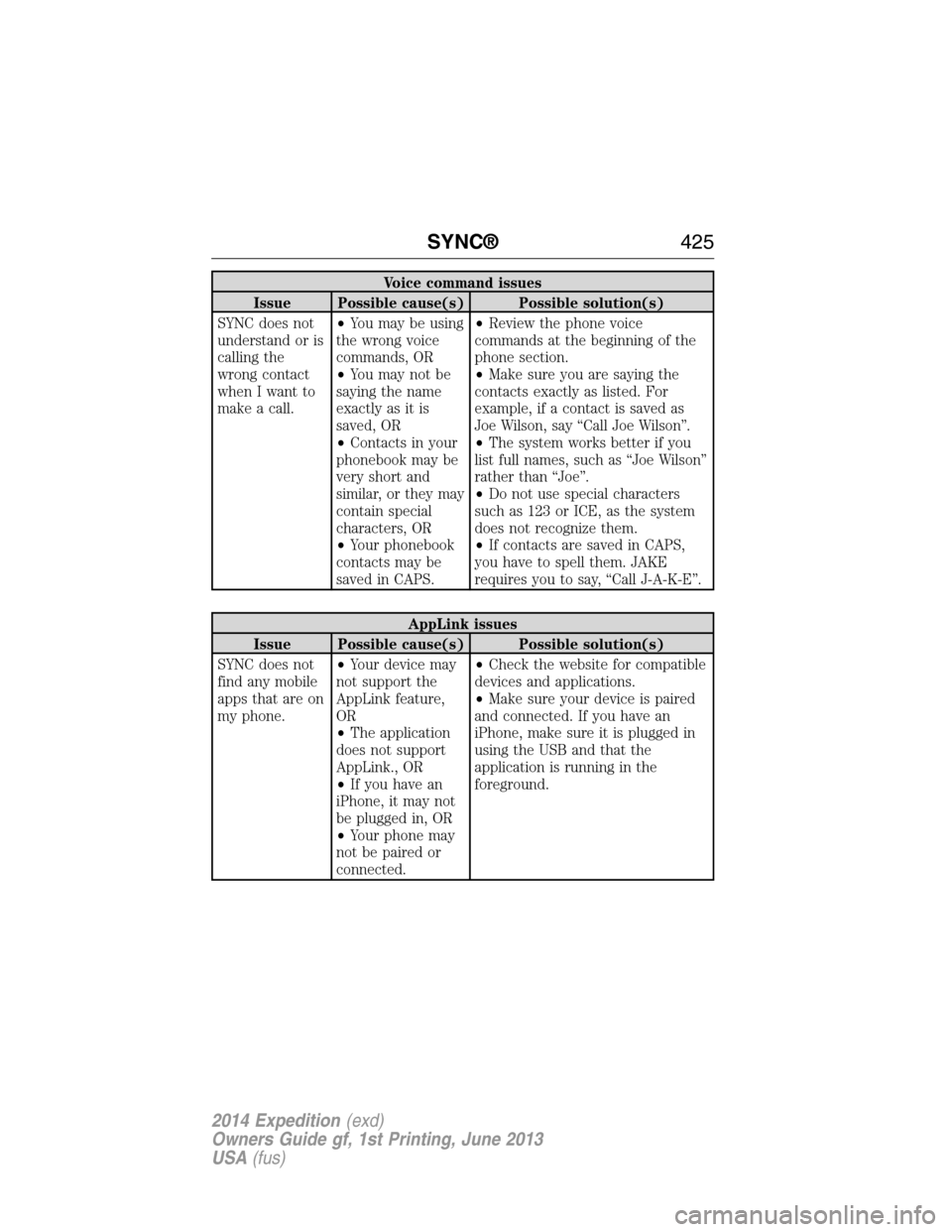
Voice command issues
Issue Possible cause(s) Possible solution(s)
SYNC does not
understand or is
calling the
wrong contact
when I want to
make a call.•You may be using
the wrong voice
commands, OR
•You may not be
saying the name
exactly as it is
saved, OR
•Contacts in your
phonebook may be
very short and
similar, or they may
contain special
characters, OR
•Your phonebook
contacts may be
saved in CAPS.•Review the phone voice
commands at the beginning of the
phone section.
•Make sure you are saying the
contacts exactly as listed. For
example, if a contact is saved as
Joe Wilson, say “Call Joe Wilson”.
•The system works better if you
list full names, such as “Joe Wilson”
rather than “Joe”.
•Do not use special characters
such as 123 or ICE, as the system
does not recognize them.
•If contacts are saved in CAPS,
you have to spell them. JAKE
requires you to say, “Call J-A-K-E”.
AppLink issues
Issue Possible cause(s) Possible solution(s)
SYNC does not
find any mobile
apps that are on
my phone.•Your device may
not support the
AppLink feature,
OR
•The application
does not support
AppLink., OR
•If you have an
iPhone, it may not
be plugged in, OR
•Your phone may
not be paired or
connected.•Check the website for compatible
devices and applications.
•Make sure your device is paired
and connected. If you have an
iPhone, make sure it is plugged in
using the USB and that the
application is running in the
foreground.
SYNC®425
2014 Expedition(exd)
Owners Guide gf, 1st Printing, June 2013
USA(fus)
Page 428 of 519
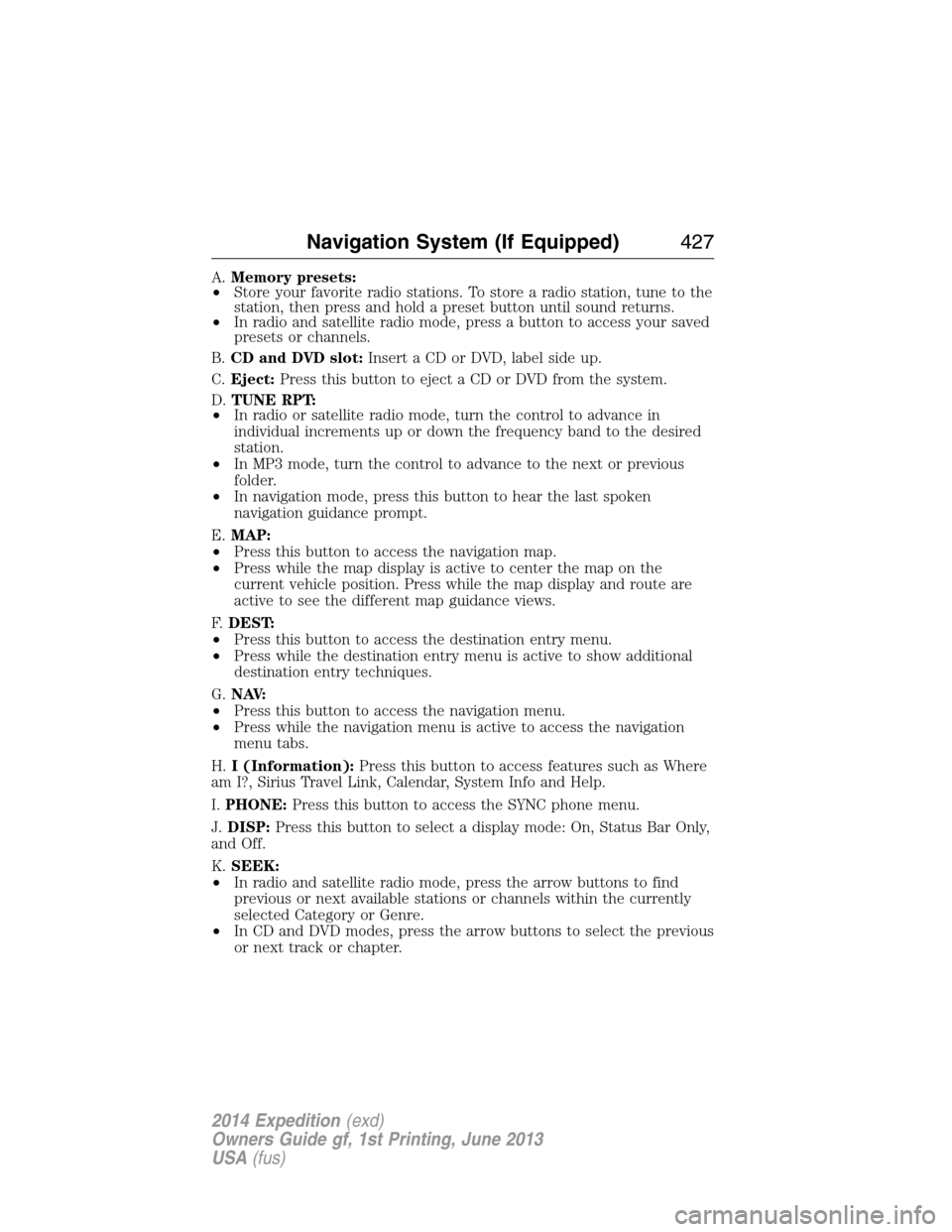
A.Memory presets:
•Store your favorite radio stations. To store a radio station, tune to the
station, then press and hold a preset button until sound returns.
•In radio and satellite radio mode, press a button to access your saved
presets or channels.
B.CD and DVD slot:Insert a CD or DVD, label side up.
C.Eject:Press this button to eject a CD or DVD from the system.
D.TUNE RPT:
•In radio or satellite radio mode, turn the control to advance in
individual increments up or down the frequency band to the desired
station.
•In MP3 mode, turn the control to advance to the next or previous
folder.
•In navigation mode, press this button to hear the last spoken
navigation guidance prompt.
E.MAP:
•Press this button to access the navigation map.
•Press while the map display is active to center the map on the
current vehicle position. Press while the map display and route are
active to see the different map guidance views.
F.DEST:
•Press this button to access the destination entry menu.
•Press while the destination entry menu is active to show additional
destination entry techniques.
G.N AV:
•Press this button to access the navigation menu.
•Press while the navigation menu is active to access the navigation
menu tabs.
H.I (Information):Press this button to access features such as Where
am I?, Sirius Travel Link, Calendar, System Info and Help.
I.PHONE:Press this button to access the SYNC phone menu.
J.DISP:Press this button to select a display mode: On, Status Bar Only,
and Off.
K.SEEK:
•In radio and satellite radio mode, press the arrow buttons to find
previous or next available stations or channels within the currently
selected Category or Genre.
•In CD and DVD modes, press the arrow buttons to select the previous
or next track or chapter.
Navigation System (If Equipped)427
2014 Expedition(exd)
Owners Guide gf, 1st Printing, June 2013
USA(fus)
Page 438 of 519
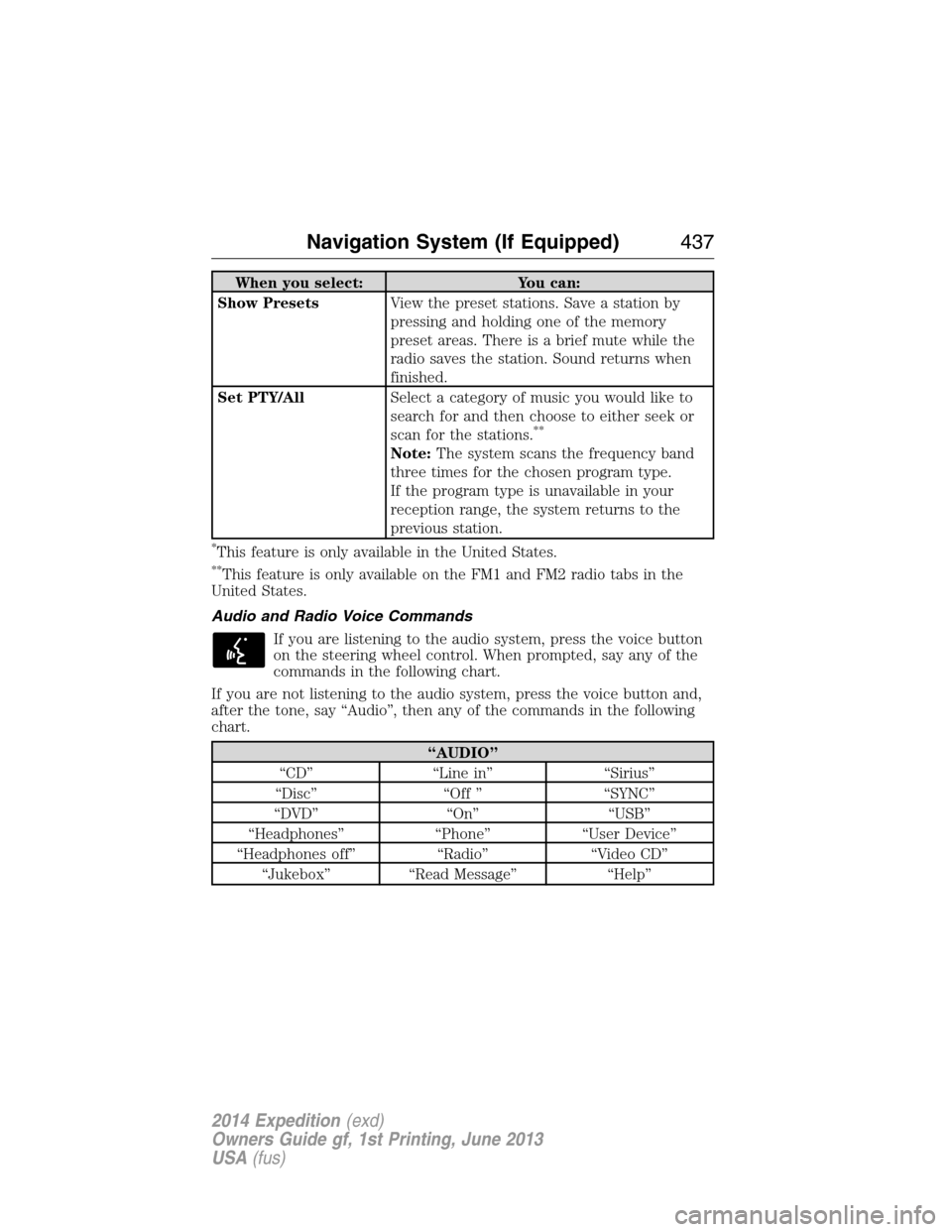
When you select: You can:
Show PresetsView the preset stations. Save a station by
pressing and holding one of the memory
preset areas. There is a brief mute while the
radio saves the station. Sound returns when
finished.
Set PTY/AllSelect a category of music you would like to
search for and then choose to either seek or
scan for the stations.
**
Note:The system scans the frequency band
three times for the chosen program type.
If the program type is unavailable in your
reception range, the system returns to the
previous station.
*This feature is only available in the United States.
**This feature is only available on the FM1 and FM2 radio tabs in the
United States.
Audio and Radio Voice Commands
If you are listening to the audio system, press the voice button
on the steering wheel control. When prompted, say any of the
commands in the following chart.
If you are not listening to the audio system, press the voice button and,
after the tone, say “Audio”, then any of the commands in the following
chart.
“AUDIO”
“CD” “Line in” “Sirius”
“Disc” “Off ” “SYNC”
“DVD” “On” “USB”
“Headphones” “Phone” “User Device”
“Headphones off” “Radio” “Video CD”
“Jukebox” “Read Message” “Help”
Navigation System (If Equipped)437
2014 Expedition(exd)
Owners Guide gf, 1st Printing, June 2013
USA(fus)
Page 461 of 519
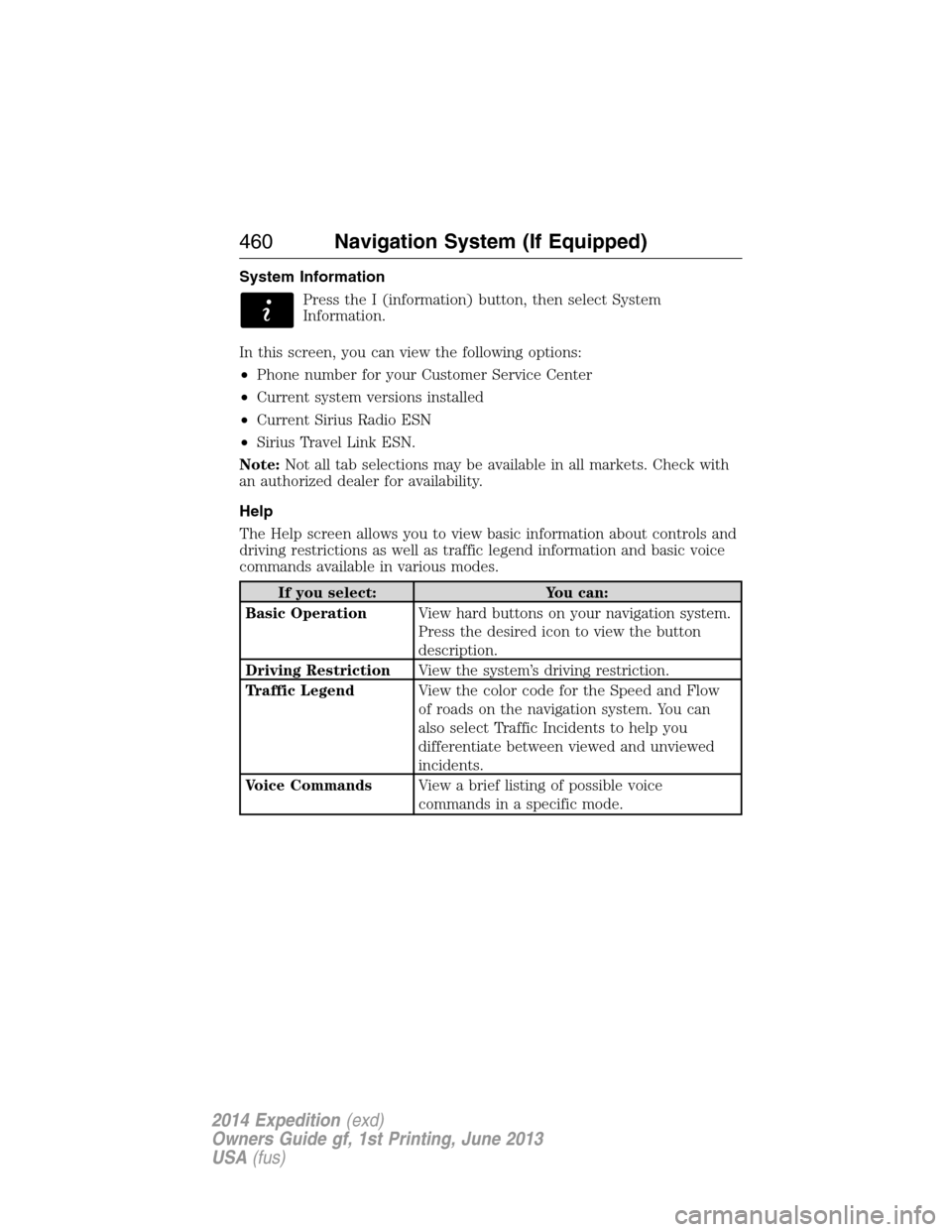
System Information
Press the I (information) button, then select System
Information.
In this screen, you can view the following options:
•Phone number for your Customer Service Center
•Current system versions installed
•Current Sirius Radio ESN
•Sirius Travel Link ESN.
Note:Not all tab selections may be available in all markets. Check with
an authorized dealer for availability.
Help
The Help screen allows you to view basic information about controls and
driving restrictions as well as traffic legend information and basic voice
commands available in various modes.
If you select: You can:
Basic OperationView hard buttons on your navigation system.
Press the desired icon to view the button
description.
Driving RestrictionView the system’s driving restriction.
Traffic LegendView the color code for the Speed and Flow
of roads on the navigation system. You can
also select Traffic Incidents to help you
differentiate between viewed and unviewed
incidents.
Voice CommandsView a brief listing of possible voice
commands in a specific mode.
460Navigation System (If Equipped)
2014 Expedition(exd)
Owners Guide gf, 1st Printing, June 2013
USA(fus)
Page 465 of 519
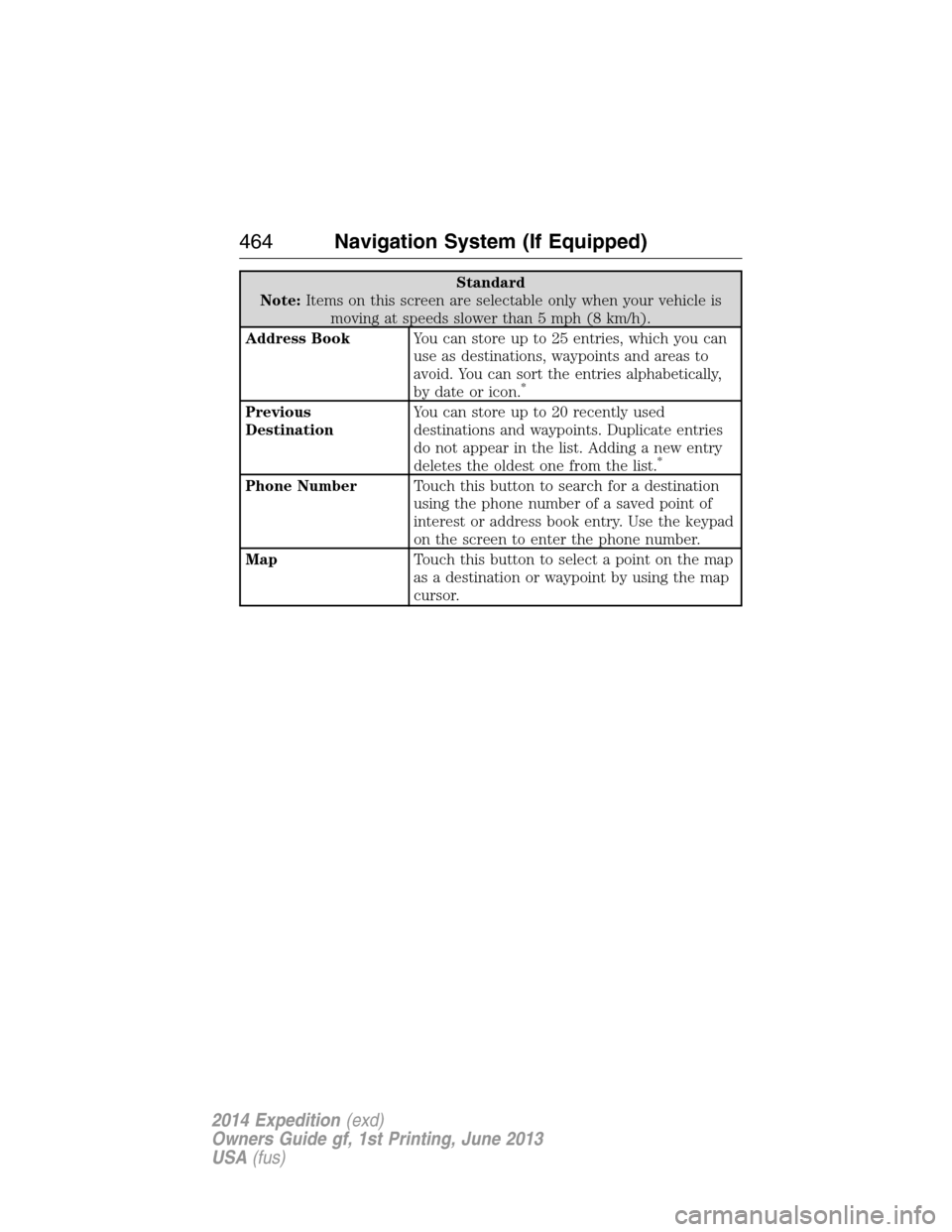
Standard
Note:Items on this screen are selectable only when your vehicle is
moving at speeds slower than 5 mph (8 km/h).
Address BookYou can store up to 25 entries, which you can
use as destinations, waypoints and areas to
avoid. You can sort the entries alphabetically,
by date or icon.
*
Previous
DestinationYou can store up to 20 recently used
destinations and waypoints. Duplicate entries
do not appear in the list. Adding a new entry
deletes the oldest one from the list.
*
Phone NumberTouch this button to search for a destination
using the phone number of a saved point of
interest or address book entry. Use the keypad
on the screen to enter the phone number.
MapTouch this button to select a point on the map
as a destination or waypoint by using the map
cursor.
464Navigation System (If Equipped)
2014 Expedition(exd)
Owners Guide gf, 1st Printing, June 2013
USA(fus)
Page 491 of 519
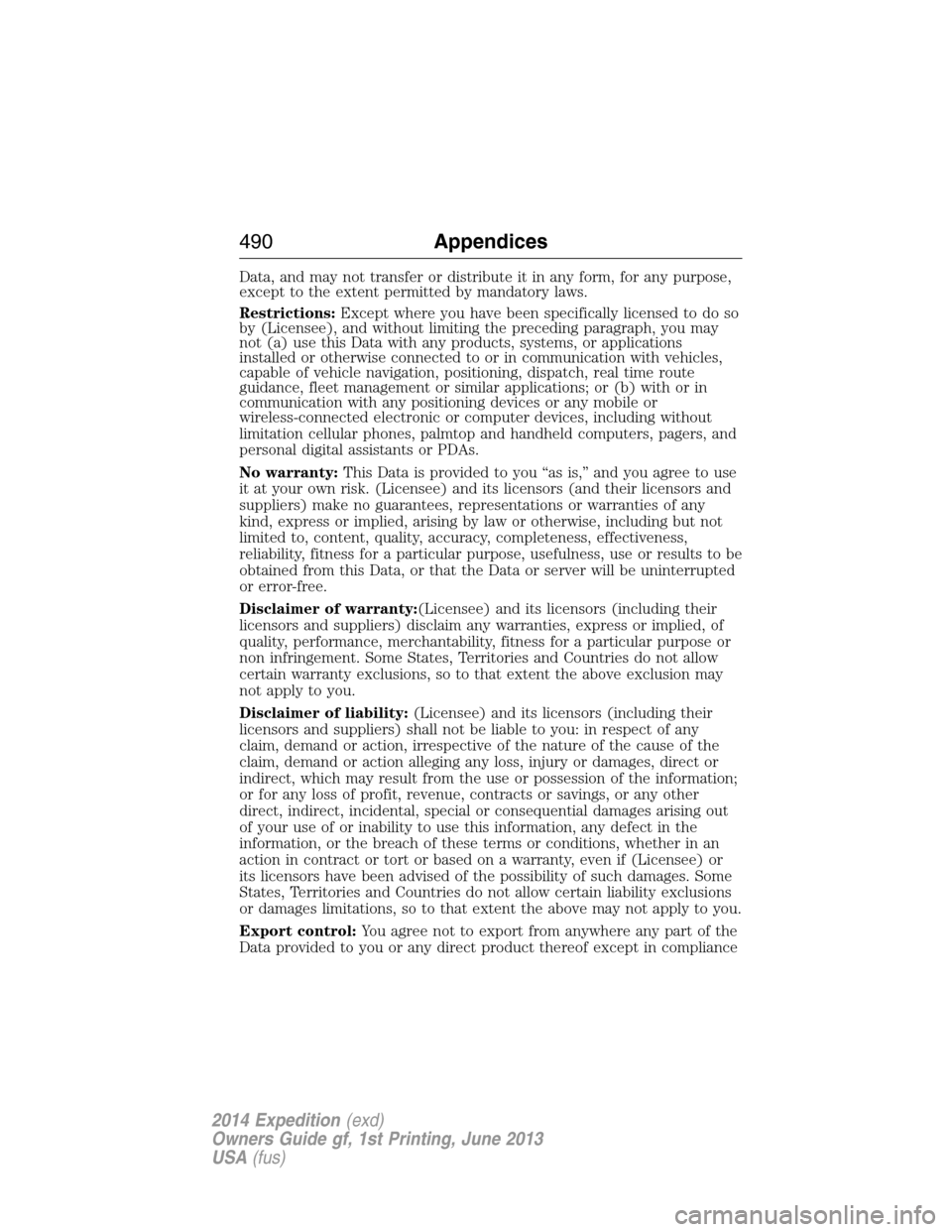
Data, and may not transfer or distribute it in any form, for any purpose,
except to the extent permitted by mandatory laws.
Restrictions:Except where you have been specifically licensed to do so
by (Licensee), and without limiting the preceding paragraph, you may
not (a) use this Data with any products, systems, or applications
installed or otherwise connected to or in communication with vehicles,
capable of vehicle navigation, positioning, dispatch, real time route
guidance, fleet management or similar applications; or (b) with or in
communication with any positioning devices or any mobile or
wireless-connected electronic or computer devices, including without
limitation cellular phones, palmtop and handheld computers, pagers, and
personal digital assistants or PDAs.
No warranty:This Data is provided to you “as is,” and you agree to use
it at your own risk. (Licensee) and its licensors (and their licensors and
suppliers) make no guarantees, representations or warranties of any
kind, express or implied, arising by law or otherwise, including but not
limited to, content, quality, accuracy, completeness, effectiveness,
reliability, fitness for a particular purpose, usefulness, use or results to be
obtained from this Data, or that the Data or server will be uninterrupted
or error-free.
Disclaimer of warranty:(Licensee) and its licensors (including their
licensors and suppliers) disclaim any warranties, express or implied, of
quality, performance, merchantability, fitness for a particular purpose or
non infringement. Some States, Territories and Countries do not allow
certain warranty exclusions, so to that extent the above exclusion may
not apply to you.
Disclaimer of liability:(Licensee) and its licensors (including their
licensors and suppliers) shall not be liable to you: in respect of any
claim, demand or action, irrespective of the nature of the cause of the
claim, demand or action alleging any loss, injury or damages, direct or
indirect, which may result from the use or possession of the information;
or for any loss of profit, revenue, contracts or savings, or any other
direct, indirect, incidental, special or consequential damages arising out
of your use of or inability to use this information, any defect in the
information, or the breach of these terms or conditions, whether in an
action in contract or tort or based on a warranty, even if (Licensee) or
its licensors have been advised of the possibility of such damages. Some
States, Territories and Countries do not allow certain liability exclusions
or damages limitations, so to that extent the above may not apply to you.
Export control:You agree not to export from anywhere any part of the
Data provided to you or any direct product thereof except in compliance
490Appendices
2014 Expedition(exd)
Owners Guide gf, 1st Printing, June 2013
USA(fus)
Page 512 of 519
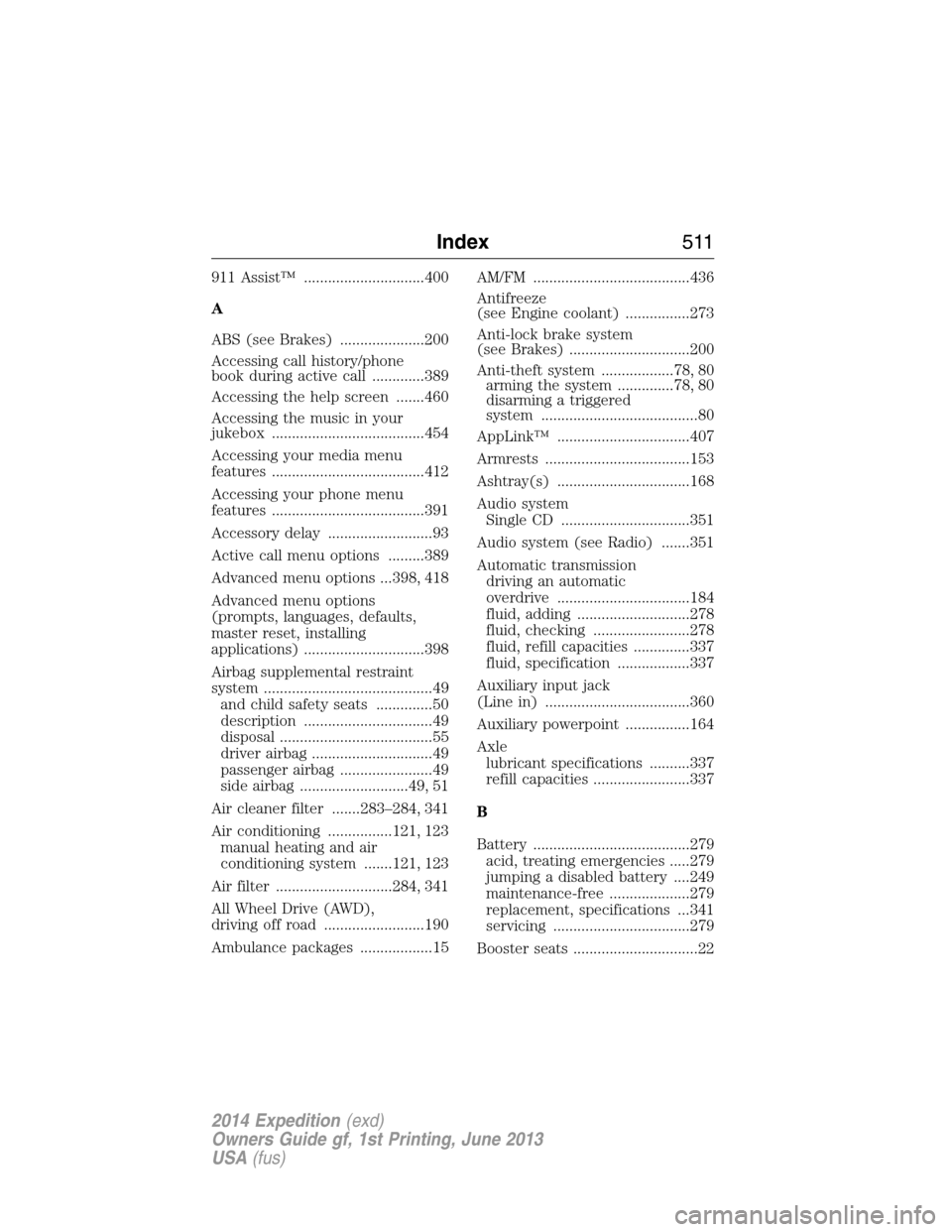
911 Assist™ ..............................400
A
ABS (see Brakes) .....................200
Accessing call history/phone
book during active call .............389
Accessing the help screen .......460
Accessing the music in your
jukebox ......................................454
Accessing your media menu
features ......................................412
Accessing your phone menu
features ......................................391
Accessory delay ..........................93
Active call menu options .........389
Advanced menu options ...398, 418
Advanced menu options
(prompts, languages, defaults,
master reset, installing
applications) ..............................398
Airbag supplemental restraint
system ..........................................49
and child safety seats ..............50
description ................................49
disposal ......................................55
driver airbag ..............................49
passenger airbag .......................49
side airbag ...........................49, 51
Air cleaner filter .......283–284, 341
Air conditioning ................121, 123
manual heating and air
conditioning system .......121, 123
Air filter .............................284, 341
All Wheel Drive (AWD),
driving off road .........................190
Ambulance packages ..................15AM/FM .......................................436
Antifreeze
(see Engine coolant) ................273
Anti-lock brake system
(see Brakes) ..............................200
Anti-theft system ..................78, 80
arming the system ..............78, 80
disarming a triggered
system .......................................80
AppLink™ .................................407
Armrests ....................................153
Ashtray(s) .................................168
Audio system
Single CD ................................351
Audio system (see Radio) .......351
Automatic transmission
driving an automatic
overdrive .................................184
fluid, adding ............................278
fluid, checking ........................278
fluid, refill capacities ..............337
fluid, specification ..................337
Auxiliary input jack
(Line in) ....................................360
Auxiliary powerpoint ................164
Axle
lubricant specifications ..........337
refill capacities ........................337
B
Battery .......................................279
acid, treating emergencies .....279
jumping a disabled battery ....249
maintenance-free ....................279
replacement, specifications ...341
servicing ..................................279
Booster seats ...............................22
Index511
2014 Expedition(exd)
Owners Guide gf, 1st Printing, June 2013
USA(fus)
Page 513 of 519
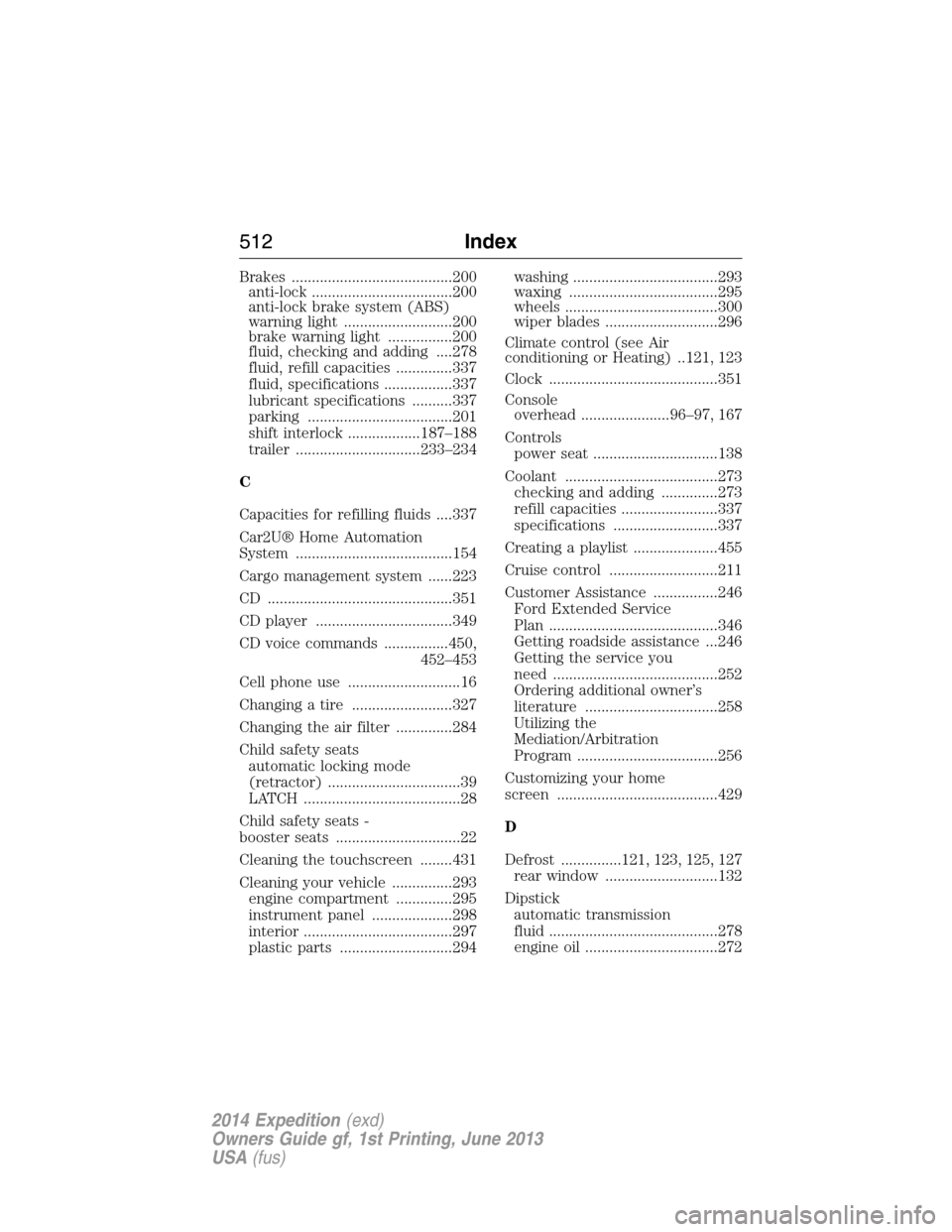
Brakes ........................................200
anti-lock ...................................200
anti-lock brake system (ABS)
warning light ...........................200
brake warning light ................200
fluid, checking and adding ....278
fluid, refill capacities ..............337
fluid, specifications .................337
lubricant specifications ..........337
parking ....................................201
shift interlock ..................187–188
trailer ...............................233–234
C
Capacities for refilling fluids ....337
Car2U® Home Automation
System .......................................154
Cargo management system ......223
CD ..............................................351
CD player ..................................349
CD voice commands ................450,
452–453
Cell phone use ............................16
Changing a tire .........................327
Changing the air filter ..............284
Child safety seats
automatic locking mode
(retractor) .................................39
LATCH .......................................28
Child safety seats -
booster seats ...............................22
Cleaning the touchscreen ........431
Cleaning your vehicle ...............293
engine compartment ..............295
instrument panel ....................298
interior .....................................297
plastic parts ............................294washing ....................................293
waxing .....................................295
wheels ......................................300
wiper blades ............................296
Climate control (see Air
conditioning or Heating) ..121, 123
Clock ..........................................351
Console
overhead ......................96–97, 167
Controls
power seat ...............................138
Coolant ......................................273
checking and adding ..............273
refill capacities ........................337
specifications ..........................337
Creating a playlist .....................455
Cruise control ...........................211
Customer Assistance ................246
Ford Extended Service
Plan ..........................................346
Getting roadside assistance ...246
Getting the service you
need .........................................252
Ordering additional owner’s
literature .................................258
Utilizing the
Mediation/Arbitration
Program ...................................256
Customizing your home
screen ........................................429
D
Defrost ...............121, 123, 125, 127
rear window ............................132
Dipstick
automatic transmission
fluid ..........................................278
engine oil .................................272
512Index
2014 Expedition(exd)
Owners Guide gf, 1st Printing, June 2013
USA(fus)