Page 96 of 540
With fog lamps
Use to manually turn the dome lamp on.
•Press the control. This will turn on the interior courtesy lights.
The lights will remain on until the control is pressed again.
Front Row Map Lamps (If Equipped)
To turn on the map lamps, press the outer edge of the clear lens.
The front row map lamp lights when:
•any door is opened.
•the dome lamp button on the
instrument panel is activated.
•the remote entry controls are
pressed and the ignition is off.
Lighting95
2014 Edge(edg)
Owners Guide gf, 2nd Printing, March 2014
USA(fus)
Page 97 of 540
Map/dome lamp (if equipped)
The dome lamp lights when:
•any door is opened.
•the dome lamp button on the
instrument panel is activated.
•any of the remote entry controls
are pressed and the ignition is off.
The map lamps are activated by pressing the controls on either side of
the lens.
Rear courtesy lamp
Located in the rear cargo area, the courtesy
lamp lights when:
•any door is opened.
•any of the remote entry controls are
pressed and the ignition is off.
96Lighting
2014 Edge(edg)
Owners Guide gf, 2nd Printing, March 2014
USA(fus)
Page 99 of 540
Pull up the window switch and hold within two seconds of the window
reaching the bounce-back position. The window will travel up with no
bounce-back protection. The window will stop if you release the switch
before the window is fully closed.
Accessory Delay
You can use the window switches for several minutes after you switch
the ignition off, or until you open either front door.
Window Lock
A. Unlock
B. Lock
Press the control to lock or unlock the rear window controls.
EXTERIOR MIRRORS
Power Exterior Mirrors
WARNING:Do not adjust the mirror while your vehicle is in
motion.
A. Left mirror
B. Off
C. Right mirror
To adjust your mirrors:
1. Select the mirror you want to adjust.
2. Move the control in the direction you want to tilt the mirror.
3. Return the control to the center position to lock mirrors in place.
AB
B
AC
98Windows and Mirrors
2014 Edge(edg)
Owners Guide gf, 2nd Printing, March 2014
USA(fus)
Page 105 of 540
GAUGES
Type 1
Cluster shown in standard measure – metric clusters similar.
A. Tachometer
B. Information display. SeeInformation displaysfor more information.
C. Speedometer
D. Fuel gauge
Fuel Gauge
Indicates approximately how much fuel is left in the fuel tank (when the
ignition is on). The fuel gauge may vary slightly when the vehicle is in
motion or on a grade. The fuel icon and arrow indicates which side of
the vehicle the fuel filler door is located.
ABC
D
104Instrument Cluster
2014 Edge(edg)
Owners Guide gf, 2nd Printing, March 2014
USA(fus)
Page 107 of 540

Adaptive cruise control (if equipped) (RTT)
The speed control system indicator light changes color to indicate what
mode the system is in:
•On (gray light): Illuminates when the adaptive cruise control system is
turned on. Turns off when the speed control system is turned off.
•Engaged (green light): Illuminates when the adaptive cruise control
system is engaged. Turns off when the speed control system is
disengaged.
Airbag readiness
If this light fails to illuminate when the ignition is turned on,
continues to flash or remains on, contact your authorized
dealer as soon as possible. A chime will sound when there is a
malfunction in the indicator light.
Anti-lock brake system
If the ABS light stays illuminated or continues to flash, a
malfunction has been detected. Contact your authorized dealer
as soon as possible. Normal braking is still functional unless the
brake warning light also is illuminated.
Brake system warning light
To confirm the brake system warning light is functional, it will
momentarily illuminate when the ignition is turned to the on
position when the engine is not running, or in a position
between on and start, or by applying the parking brake when the ignition
is turned to the on position.
If it illuminates when you are driving, check that the parking brake is not
engaged. If the parking brake is not engaged, this indicates low brake
fluid level or a brake system malfunction. Have the system checked
immediately by your authorized dealer.
106Instrument Cluster
2014 Edge(edg)
Owners Guide gf, 2nd Printing, March 2014
USA(fus)
Page 108 of 540
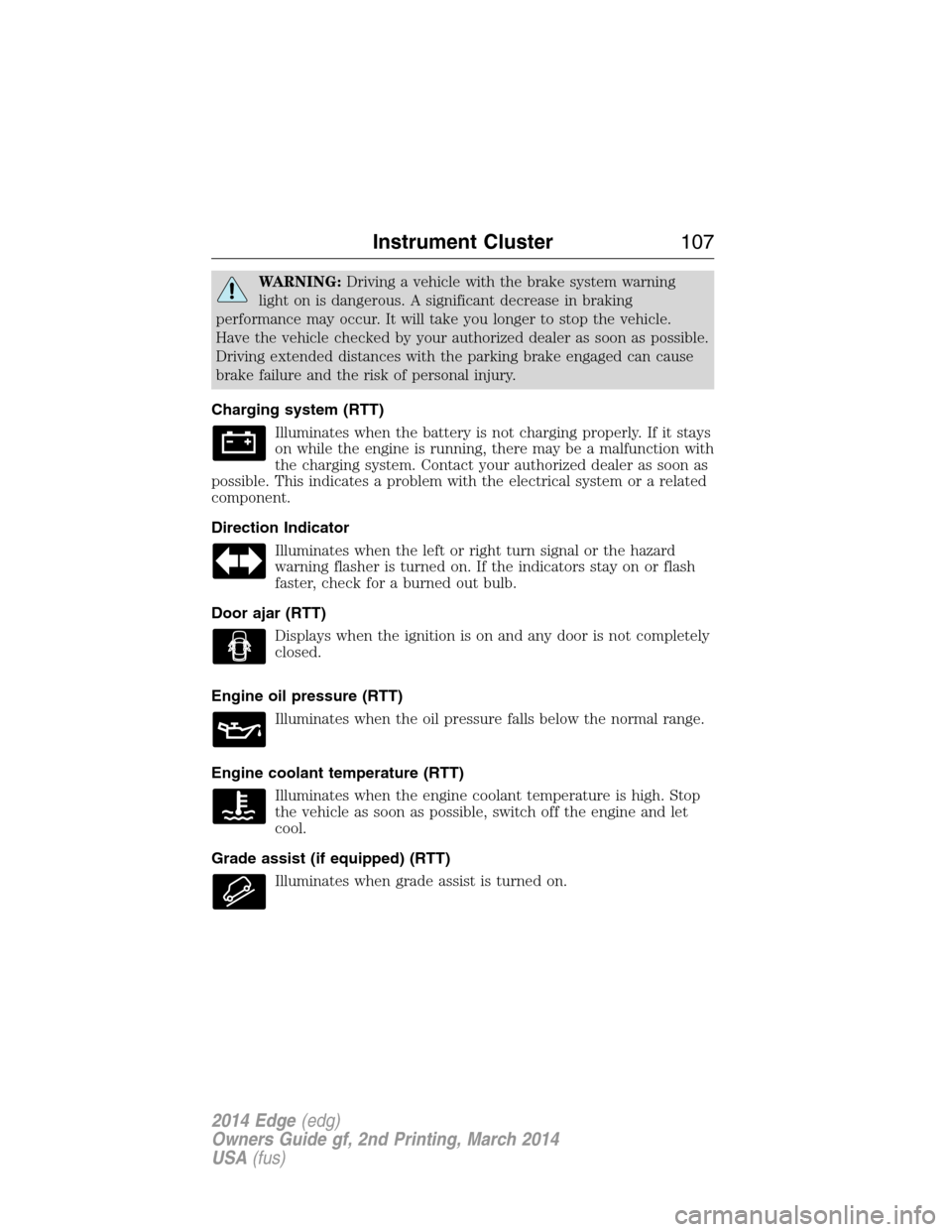
WARNING:Driving a vehicle with the brake system warning
light on is dangerous. A significant decrease in braking
performance may occur. It will take you longer to stop the vehicle.
Have the vehicle checked by your authorized dealer as soon as possible.
Driving extended distances with the parking brake engaged can cause
brake failure and the risk of personal injury.
Charging system (RTT)
Illuminates when the battery is not charging properly. If it stays
on while the engine is running, there may be a malfunction with
the charging system. Contact your authorized dealer as soon as
possible. This indicates a problem with the electrical system or a related
component.
Direction Indicator
Illuminates when the left or right turn signal or the hazard
warning flasher is turned on. If the indicators stay on or flash
faster, check for a burned out bulb.
Door ajar (RTT)
Displays when the ignition is on and any door is not completely
closed.
Engine oil pressure (RTT)
Illuminates when the oil pressure falls below the normal range.
Engine coolant temperature (RTT)
Illuminates when the engine coolant temperature is high. Stop
the vehicle as soon as possible, switch off the engine and let
cool.
Grade assist (if equipped) (RTT)
Illuminates when grade assist is turned on.
Instrument Cluster107
2014 Edge(edg)
Owners Guide gf, 2nd Printing, March 2014
USA(fus)
Page 109 of 540

Heads up display (if equipped)
A red beam of lights will illuminate on the windshield in certain
instances when using adaptive cruise control and/or the
collision warning system. It will also illuminate momentarily
when you start your vehicle to make sure the display works.
High beams
Illuminates when the high-beam headlamps are on.
Low fuel (RTT)
Illuminates when the fuel level in the fuel tank is at or near
empty.
Low tire pressure warning
Illuminates when your tire pressure is low. If the light remains
on at start up or while driving, the tire pressure should be
checked. When the ignition is first turned to on, the light will
illuminate for 3 seconds to ensure the bulb is working. If the light does
not turn on or begins to flash, contact your authorized dealer as soon as
possible.
Low washer fluid (RTT)
Illuminates when the windshield washer fluid is low.
Parking Lamps (RTT)
It will illuminate when you switch the parking lamps on.
Powertrain malfunction/reduced power
Illuminates when a powertrain or an AWD fault has been
detected. Contact your authorized dealer as soon as possible.
Safety belt
Reminds you to fasten your safety belt. A Belt-Minder® chime
will also sound to remind you to fasten your safety belt.
108Instrument Cluster
2014 Edge(edg)
Owners Guide gf, 2nd Printing, March 2014
USA(fus)
Page 110 of 540

Service engine soon
Theservice engine soonindicator light illuminates when
the ignition is first turned to the on position to check the
bulb and to indicate whether the vehicle is ready for
Inspection/Maintenance (I/M) testing. Normally, the “service engine soon”
light will stay on until the engine is cranked, then turn itself off if no
malfunctions are present. However, if after 15 seconds the “service
engine soon” light blinks eight times, it means that the vehicle is not
ready for I/M testing. See theReadiness for inspection/maintenance
(I/M) testingin theFuel and Refuelingchapter.
Solid illumination after the engine is started indicates the on-board
diagnostics system (OBD-II) has detected a malfunction. Refer to
On-board diagnostics (OBD-II)in theFuel and Refuelingchapter.
If the light is blinking, engine misfire is occurring which could damage
your catalytic converter. Drive in a moderate fashion (avoid heavy
acceleration and deceleration) and have your vehicle serviced
immediately by your authorized dealer.
WARNING:Under engine misfire conditions, excessive exhaust
temperatures could damage the catalytic converter, the fuel
system, interior floor coverings or other vehicle components, possibly
causing a fire.
Speed control (if equipped) (RTT)
The speed control system indicator light changes color to
indicate what mode the system is in:
•On (gray light–type 1 and type 2): Illuminates when the speed control
system is turned on. Turns off when the speed control system is
turned off.
•Engaged (grey light-type 1, green light-type 2): Illuminates when the
speed control system is engaged. Turns off when the speed control
system is disengaged.
Instrument Cluster109
2014 Edge(edg)
Owners Guide gf, 2nd Printing, March 2014
USA(fus)


