Page 12 of 540
Symbol Description Symbol Description Symbol Description
Fasten
safety beltFront airbagFront fog
lamps
Fuel pump
resetFuse
compartmentHazard
warning
flasher
Heated rear
windowInterior
luggage
compartment
releaseJack
Lighting
controlLow tire
pressure
warningMaintain
correct fluid
level
Panic alarmParking aid
systemParking
brake system
Power
steering fluidPower
windows
front and
rearPower
window
lockout
Service
engine soonSide airbagStability
control
Windshield
defrost and
demistWindshield
washer and
wiper
Introduction11
2014 Edge(edg)
Owners Guide gf, 2nd Printing, March 2014
USA(fus)
Page 70 of 540

USING MYKEY WITH REMOTE START SYSTEMS
MyKey is not compatible with non-Ford-approved aftermarket remote
start systems. If you choose to install a remote start system, please see
your Ford authorized dealer for a Ford-approved remote start system.
MYKEY TROUBLESHOOTING
Condition Potential causes
I cannot create a
MyKey.•The key or fob used to start the vehicle does
not have admin privileges.
•The key or fob used to start the vehicle is the
only admin key (there always has to be at least
one admin key).
•Vehicles with push-button start: The intelligent
access key is not in the backup slot. The backup
slot location information is in another chapter.
SeeStarting and Stopping the Vehicle.
•SecuriLock passive anti-theft system is disabled
or in unlimited mode.
I cannot program the
configurable settings.•The key or fob used to start the vehicle does
not have admin privileges.
•No MyKeys are created. SeeCreating a MyKey.
I cannot clear the
MyKeys.•The key or fob used to start the vehicle does
not have admin privileges.
•No MyKeys are created. Refer toCreating a
MyKey.
I lost the only admin
key.•Purchase a new key from your authorized
dealer.
I lost a key.•Program a spare key. SeeSecuriLockin the
Security.
No MyKey functions
with intelligent access
key (push- button
start).•An admin fob is present at engine start.
•No MyKey has been created. SeeCreating a
MyKey.
MyKey distances do
not accumulate.•The MyKey user is not using the MyKey.
•An admin key holder cleared the MyKeys and
created new MyKeys.
•The key system has been reset.
MyKey69
2014 Edge(edg)
Owners Guide gf, 2nd Printing, March 2014
USA(fus)
Page 79 of 540

Resetting the Power Liftgate
The liftgate may not operate properly and you may need to reset it if any
of the following conditions occur:
•A low voltage or dead battery
•Disconnected battery
•The liftgate is manually closed and left ajar (unlatched)
To reset the power liftgate:
1. Disconnect the battery for 20 seconds then, reconnect the battery.
2. Manually close and fully latch the liftgate.
3. Power open the liftgate by using the remote control or the instrument
panel button.
SECURICODE™ KEYLESS ENTRY KEYPAD (IF EQUIPPED)
You can use the keypad to:
•lock or unlock the doors
•recall memory features (if equipped)
•enable and disable autolock and autounlock
•program and erase user codes
•arm and disarm the anti-theft alarm (if equipped).
You can operate the keypad with the factory-set 5-digit entry code.
This code is located on the owner’s wallet card in the glove box and is
available from an authorized dealer. You can also create up to five of
your own 5-digit personal entry codes.
78Locks
2014 Edge(edg)
Owners Guide gf, 2nd Printing, March 2014
USA(fus)
Page 87 of 540
ADJUSTING THE STEERING WHEEL
WARNING:Do not adjust the steering wheel when your vehicle
is moving.
Note:Make sure that you are sitting in the correct position. SeeSitting
in the Correct Positionin theSeatschapter.
1. Unlock the steering column.
2. Adjust the steering wheel to the
desired position.
3. Lock the steering column.
AUDIO CONTROL
SEEK:Press to select the next or
previous stored preset or track.
Press and hold to select the next or
previous frequency or seek through
a track.
MEDIA:Press repeatedly to scroll
through available audio modes.
MUTE:Press to silence the radio.
VOL (Volume):Press to increase or decrease the volume.
SEEK
MEDIA
MUTE
V
O
L
86Steering Wheel
2014 Edge(edg)
Owners Guide gf, 2nd Printing, March 2014
USA(fus)
Page 115 of 540
Settings
Convenience Auto Highbeam — check enabled (default) / uncheck
disabled
Autolamp Delay Off or number of seconds
Compass Display Display — check enabled
(default) / uncheck disabled
DTE Calculation Normal or Towing
Easy Entry/Exit — check enabled (default) /
uncheck disabled
Locks Autolock — check enabled
(default) / uncheck disabled
Autounlock — check enabled
(default) / uncheck disabled
Remote Unlock All Doors or
Driver First
Oil life Reset Percent Oil Life XXX%
Hold OK to Reset
Power Liftgate Enable or Disable switch
Remote Start Climate Control Auto or Last
Setting
Seats and Wheel Auto or Off
Wheel Auto or Off
Duration 5, 10 or
15 minutes
System — check enabled
(default) / uncheck disabled
Windows Remote Open or Close
Wipers Courtesy Wipe — check enabled
(default) / uncheck disabled
Rain Sensing
11 4Information Displays
2014 Edge(edg)
Owners Guide gf, 2nd Printing, March 2014
USA(fus)
Page 116 of 540

Settings
MyKey Create MyKey Hold OK to Create MyKey
911 Assist Always On / User Selectable
Traction Control Always On or User Selectable
Max Speed 80 MPH (130 km/h) or Off
Speed Warning 45 mph (75 km/h), 55 mph
(90 km/h), 65 mph (105 km/h)
or Off
Volume Limiter
Do Not Disturb Always On / User Selectable
Clear MyKeys Hold OK to Clear MyKeys
Trip Computer
Resetting the trip computer
Press and hold OK on the current screen to reset the respective trip,
distance, time and fuel information.
Trip Odometer
Registers the distance of individual journeys.
Distance to E
Indicates the approximate distance the vehicle will travel on the fuel
remaining in the tank. Changes in driving pattern may cause the value to
vary.
Inst. Fuel Econ
Shows instantaneous fuel usage.
Average fuel
Indicates the average fuel consumption since the function was last reset.
Fuel Used
Shows the amount of fuel used for a given trip.
Total Odometer
Registers the total mileage of the vehicle.
Information Messages
SeeInformation Messageslater in this chapter for more information.
Information Displays11 5
2014 Edge(edg)
Owners Guide gf, 2nd Printing, March 2014
USA(fus)
Page 119 of 540

Trip1&2
Choose between the standard or enhanced trip display.
Trip1&2
Trip1&2Trip distance
Elapsed trip time
Average fuel economy
Hold OK to Reset
Estimated amount of fuel consumed
Total odometer (lower left corner)
Press OK to pause the Trip 1 or 2 screen. Press again to un-pause.
Press and hold OK to reset the currently displayed trip information.
•Trip distance — shows the accumulated trip distance.
•Elapsed trip time— timer stops when the vehicle is turned off and
restarts when the vehicle is restarted.
•Average fuel economy — shows the average fuel economy for a given
trip.
Fuel Economy
Use the left/right arrow buttons to choose the desired fuel economy
display.
Fuel Economy
Fuel EconomyInst Fuel
EconomyXX. Min Fuel
History
Instantaneous fuel usage X
†Fuel usage over a 30 minute time
spanX
Average fuel economy Always Present
XXX mi (km) to empty Always Present
Avg Speed Always Present
Total odometer (lower left corner)
Press and hold OK to reset the currently displayed fuel usage
information.
11 8Information Displays
2014 Edge(edg)
Owners Guide gf, 2nd Printing, March 2014
USA(fus)
Page 121 of 540
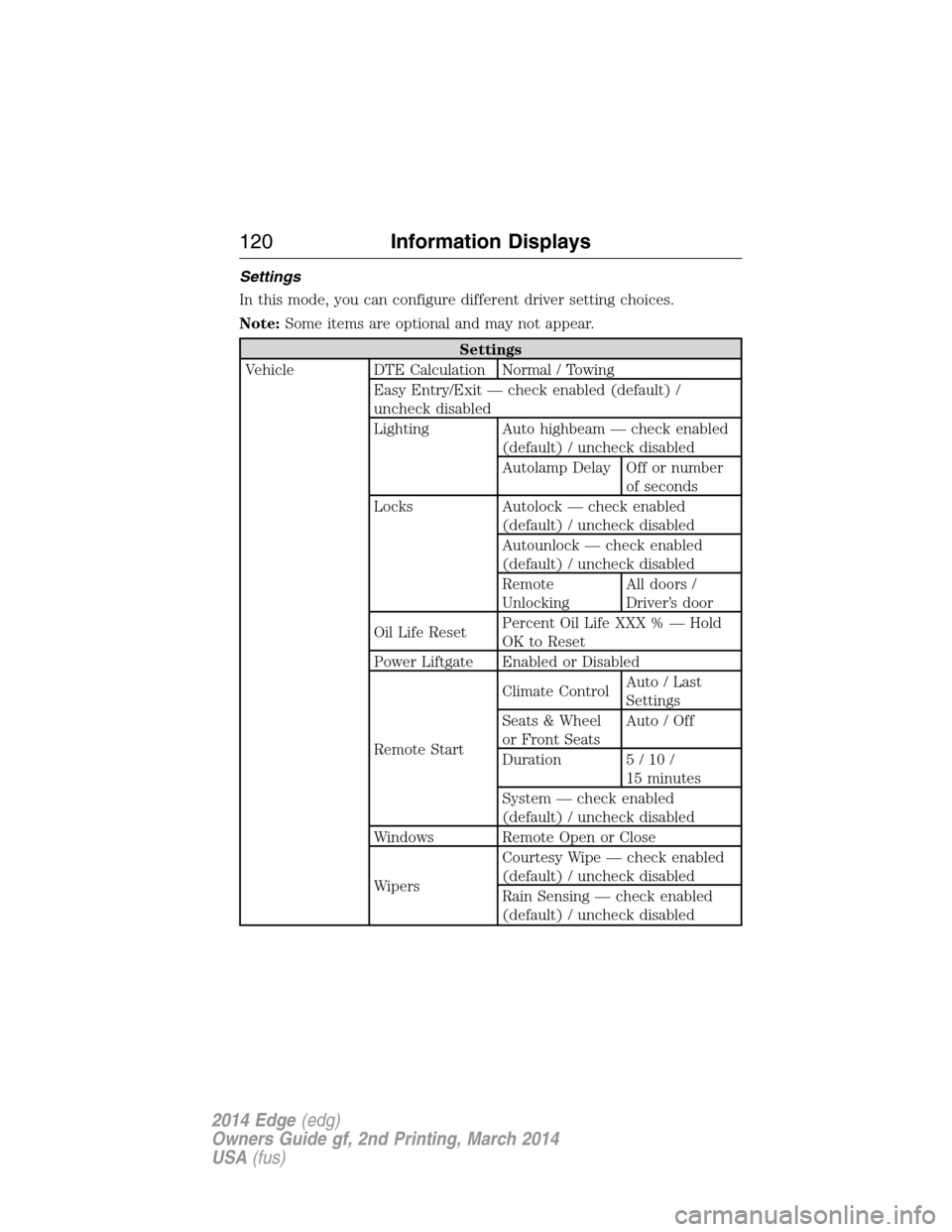
Settings
In this mode, you can configure different driver setting choices.
Note:Some items are optional and may not appear.
Settings
Vehicle DTE Calculation Normal / Towing
Easy Entry/Exit — check enabled (default) /
uncheck disabled
Lighting Auto highbeam — check enabled
(default) / uncheck disabled
Autolamp Delay Off or number
of seconds
Locks Autolock — check enabled
(default) / uncheck disabled
Autounlock — check enabled
(default) / uncheck disabled
Remote
UnlockingAll doors /
Driver’s door
Oil Life ResetPercent Oil Life XXX % — Hold
OK to Reset
Power Liftgate Enabled or Disabled
Remote StartClimate ControlAuto / Last
Settings
Seats & Wheel
or Front SeatsAuto / Off
Duration 5/10/
15 minutes
System — check enabled
(default) / uncheck disabled
Windows Remote Open or Close
WipersCourtesy Wipe — check enabled
(default) / uncheck disabled
Rain Sensing — check enabled
(default) / uncheck disabled
120Information Displays
2014 Edge(edg)
Owners Guide gf, 2nd Printing, March 2014
USA(fus)


