2014 FIAT PANDA elect
[x] Cancel search: electPage 17 of 284

❒press the
button briefly to return to the
submenu screen or hold the button down
to return to the main menu screen without saving;
❒hold thebutton down again to return to the
standard screen or to the main menu according
to where you are in the menu.
Measurement unit (Setting the measurement
unit)
This function can be used to set the units through
three submenus: "Distances", "Consumption" and
"Temperature".
To set the desired unit of measurement, proceed as
follows:
❒briefly press
to display the three submenus;
❒press theor
button to navigate through
the three submenus;
❒once you have selected the submenu to be
changed, press thebutton briefly;
❒if you select "Distances", pressing the button
briefly makes the display show "km" or "mi"
depending on the previous setting;
❒press
or
to select
❒if you select "Consumption", pressing button
briefly makes "km/l", "l/100km" or "mpg" appear
on the display depending on the previous setting;
If the set distance unit is "km", the display enables
setting of the fuel consumption unit (km/l or
l/100km). If the set distance unit is "mi", the display
shows the amount of fuel consumed in "mpg".❒press the
or
button to select;
❒if you select “Temperature”, pressing the
button
briefly makes "°C" or "°F" appear on the display
depending on the previous setting;
❒press the
or
button to select;
❒When you have made the adjustment, press the
button briefly to return to the submenu screen
or hold the button down to return to the main
menu screen without storing.
❒hold the
button down again to return to the
standard screen or to the main menu according
to where you are in the menu.
Language (Language selection)
Display messages can be shown in different
languages: Italian, English, German, Portuguese,
Spanish, French, Dutch, Polish and Turkish.
To set the desired language, proceed as follows:
❒briefly press the
button: the previously set
"language" starts flashing on the display;
❒press the
or
button to select;
❒press the
button briefly to return to the menu
screen or hold the button down to return to the
standard screen without storing.
Warnings volume (Adjusting the failure/
warning acoustic signal volume)
With this function the volume of the buzzer which
accompanies the display of any failure/warning can be
adjusted to 8 levels.
13GETTING TO
KNOW YOUR CARSAFETY
STARTING AND
DRIVING
WARNING LIGHTS
AND MESSAGES
IN AN EMERGENCY
SERVICING AND
MAINTENANCE
TECHNICAL
SPECIFICATIONS
INDEX
Page 18 of 284

To set the desired volume, proceed as follows:
❒press the
button briefly, making the display flash
the previously set volume level;
❒press the
or
button to select;
❒press the
button briefly to return to the menu
screen or hold the button down to return to the
standard screen without storing.
Belt buzzer (Buzzer activation for SBR
indication)(for versions/markets, where provided)
This function can only be displayed after a Fiat
Dealership has deactivated the SBR system (see "SBR
system" in the "Safety" chapter).
Service (Scheduled servicing)
Using this function you can display information about
the mileage or daily intervals for car servicing. With
the Service function it is also possible to view the
interval (in kilometres or miles) before the next
engine oil change is due.
To consult this information, proceed as follows:
❒briefly press the
button, which makes the display
show the service interval in kilometres (km) or
miles (mi) according to the previous setting (see
"Distance measurement units" paragraph);
❒press the
button briefly to return to the menu
screen or hold it down to return to the standard
screen.NoteThe “Scheduled Servicing Plan” requires the
car to be serviced every 30,000 km (or 18,000 miles)
for petrol versions and every 35,000 km (or 21,000
miles) for diesel versions. This message is displayed
automatically when the key is turned to MAR-ON,
starting at 2,000 km (or equivalent value in miles)
from when the next service is due and reappearing
every 200 km (or equivalent value in miles). Below
200 km servicing indications are more frequent. The
display will be in km or mi depending on the
measurement unit settings. When the next
scheduled service is approaching and the key is
turned to MAR, the word “Service” will appear on
the display, followed by the number of kilometres or
miles left before servicing is due. Go to a Fiat
Dealership, where the "Scheduled Servicing Plan"
operations will be performed and the message will
be reset.
Airbag/Passenger bag (Passenger side front
airbag and side bag (chest & pelvis protection
- for versions/markets, where provided)
activation/deactivation)
This function allows the passenger side airbag to be
activated/deactivated.
Proceed as follows:
❒press the
button and, after the message "Bag
pass: Off" (to deactivate) or "Bag pass: On" (to
activate) is displayed by pressing buttons
and
, press the
button again;
❒a confirmation message will appear on the display;
14GETTING TO
KNOW YOUR CAR
SAFETY
STARTING AND
DRIVING
WARNING LIGHTS
AND MESSAGES
IN AN EMERGENCY
SERVICING AND
MAINTENANCE
TECHNICAL
SPECIFICATIONS
INDEX
Page 19 of 284

❒by pressing the
or
buttons select "Yes" (to
confirm activation/deactivation) or "No" (to
cancel);
❒press the
button briefly; a message confirming
the selection is displayed and you return to the
menu screen. Hold down the button to return to
the standard screen without storing.
City Brake Control - "Collision Mitigation"
(for versions/markets, where provided)
This function is used to activate ("On") or
de-activate ("Off") the City Brake Control -
"Collision Mitigation" system.
To adjust, proceed as follows:
❒press button
briefly. "On" or "Off" flash on the
display, according to what has been previously set;
❒a confirmation message will appear on the display;
❒by pressing the
or
buttons select "Yes" (to
confirm activation/deactivation) or "No" (to
cancel);
❒press the
button briefly; a message confirming
the selection is displayed and you return to the
menu screen. Hold down the button to return to
the standard screen without storing.
When the system is deactivated the dedicated
warning light in the instrument panel switches on
(see chapter "Warning lights and Messages").Exit Menu
The last function, which closes the cycle of settings
listed in the menu screen. Pressing the
button
briefly will return the display to the standard screen
without storing. Press the
button to return to
the first menu item (Speed Beep).
15GETTING TO
KNOW YOUR CARSAFETY
STARTING AND
DRIVING
WARNING LIGHTS
AND MESSAGES
IN AN EMERGENCY
SERVICING AND
MAINTENANCE
TECHNICAL
SPECIFICATIONS
INDEX
Page 22 of 284

SYMBOLSSome car components have coloured labels whose
symbols indicate precautions to be observed when
using this component. Under the bonnet there is
also a label that summarises all the symbols.
THE FIAT CODE SYSTEMTo further protect your car from theft, it has been
fitted with an engine immobilising system. It is
automatically activated when the ignition key is
removed.
Each key contains an electronic device which
modulates the signal emitted during ignition by an
antenna built into the ignition device. The signal
is the "password", different every time the car is
started, through which the control unit recognises
the key and enables starting.
OPERATION
Each time the vehicle is started turning the ignition
key to MAR-ON, the Fiat CODE system control unit
sends an acknowledgement code to the engine
control unit to deactivate the immobiliser. The code
is sent only if the Fiat CODE system control unit
has acknowledged the code received from the key.
Each time the ignition key is turned to STOP, the Fiat
CODE system deactivates the functions of the
engine management control unit. If, during starting,
the code is not correctly recognised, the
warning
light switches on in the instrument panel. In this
case, turn the key to STOP and then to MAR-ON; if
it is still locked, try again with the other keys that
come with the vehicle. Contact a Fiat Dealership
if you still cannot start the engine.
18GETTING TO
KNOW YOUR CAR
SAFETY
STARTING AND
DRIVING
WARNING LIGHTS
AND MESSAGES
IN AN EMERGENCY
SERVICING AND
MAINTENANCE
TECHNICAL
SPECIFICATIONS
INDEX
Page 23 of 284

Warning light
switching on while driving
If the
warning light switches on, this means that
the system is running a self-diagnosis (for example
for a voltage drop). Should the fault persist, contact a
Fiat Dealership.
THE KEYS
The electronic components inside the key
may be damaged if the key is subjected
to strong shocks. In order to ensure
complete efficiency of the electronic devices
inside the keys, they should never be exposed to
direct sunlight .
KEY WITHOUT REMOTE CONTROL
The metal insert A fig. 9 operates:
❒the ignition switch;
❒the driver side door and, for versions/markets
where provided, the passenger side door;
❒the boot lock.
To request duplicates of the key, go to a Fiat
Dealership, taking an ID document and the car
ownership documents.
KEY WITH REMOTE CONTROL
(for versions/markets, where provided)
The metal insert A fig. 10 operates:
❒the ignition switch;
❒the driver side door and, for versions/markets
where provided, the passenger side door.
Press button B fig. 10 to open/close the metal insert.
19GETTING TO
KNOW YOUR CARSAFETY
STARTING AND
DRIVING
WARNING LIGHTS
AND MESSAGES
IN AN EMERGENCY
SERVICING AND
MAINTENANCE
TECHNICAL
SPECIFICATIONS
INDEX
Page 24 of 284

Unlocking the doors and the tailgate
Briefly press button
: for unlocking of doors and
luggage compartment, timed switching-on of internal
roof lights and double flashing of direction indicators
(for versions/markets, where provided).The doors are unlocked automatically if the fuel
cut-off system intervenes.
Locking the doors and the tailgate
Briefly press button
: for locking of doors and
luggage compartment, with switching-off of roof light
and single flashing of direction indicators (for
versions/markets, where provided).
If one or more doors are open, the doors will not be
locked. This is indicated by a rapid flashing of the
direction indicators (for versions/markets, where
provided). If the luggage compartment is open, the
doors will not be locked.
When a speed of over 20 km/h is reached, the doors
will be locked automatically if this specific function
was set.
Opening the luggage compartment
Press the
button to open the luggage
compartment using the remote control.
The direction indicators will flash twice to indicate
that the luggage compartment has been opened.
The electronic components inside the key
may be damaged if the key is subjected
to strong shocks. In order to ensure
complete efficiency of the electronic devices
inside the key, it should never be exposed
to direct sunlight .
fig. 9
F0W0077
fig. 10
F0W0299
20GETTING TO
KNOW YOUR CAR
SAFETY
STARTING AND
DRIVING
WARNING LIGHTS
AND MESSAGES
IN AN EMERGENCY
SERVICING AND
MAINTENANCE
TECHNICAL
SPECIFICATIONS
INDEX
Page 26 of 284
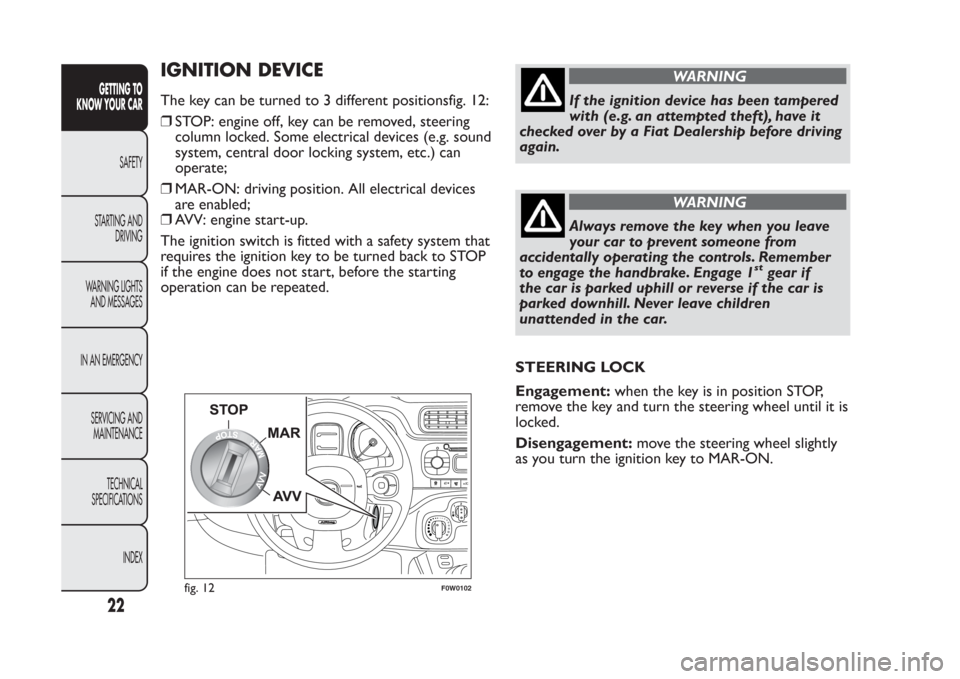
IGNITION DEVICEThe key can be turned to 3 different positionsfig. 12:
❒STOP: engine off, key can be removed, steering
column locked. Some electrical devices (e.g. sound
system, central door locking system, etc.) can
operate;
❒MAR-ON: driving position. All electrical devices
are enabled;
❒AVV: engine start-up.
The ignition switch is fitted with a safety system that
requires the ignition key to be turned back to STOP
if the engine does not start, before the starting
operation can be repeated.
WARNING
If the ignition device has been tampered
with (e.g. an attempted theft), have it
checked over by a Fiat Dealership before driving
again.
WARNING
Always remove the key when you leave
your car to prevent someone from
accidentally operating the controls. Remember
to engage the handbrake. Engage 1
st
gear if
the car is parked uphill or reverse if the car is
parked downhill. Never leave children
unattended in the car.
STEERING LOCK
Engagement:when the key is in position STOP,
remove the key and turn the steering wheel until it is
locked.
Disengagement:move the steering wheel slightly
as you turn the ignition key to MAR-ON.
1
02
fig. 12
F0W0102
22GETTING TO
KNOW YOUR CAR
SAFETY
STARTING AND
DRIVING
WARNING LIGHTS
AND MESSAGES
IN AN EMERGENCY
SERVICING AND
MAINTENANCE
TECHNICAL
SPECIFICATIONS
INDEX
Page 29 of 284

Document holder pocket(for versions/markets
where provided)
On some versions the multifunction pocket can be
removed from the seat backrest, using the two
pullers of the zips in the pocket bottom fig. 16.
The removed pocket can be folded and closed with
the buttons at its ends.
WARNING
If passengers are seating in the rear
seats, remove all potentially dangerous
objects which may cause injuries in case of
accident .Electric front seat heating(for versions/markets,
where provided)
To heat the cushion of the front seats, with the
ignition key in MAR-ON, press respectively button A
or B fig. 17.
To deactivate the function press the button again.
fig. 16
F0W0302
fig. 17
F0W0300
25GETTING TO
KNOW YOUR CARSAFETY
STARTING AND
DRIVING
WARNING LIGHTS
AND MESSAGES
IN AN EMERGENCY
SERVICING AND
MAINTENANCE
TECHNICAL
SPECIFICATIONS
INDEX