2014 Citroen C4 headlamps
[x] Cancel search: headlampsPage 106 of 340
5
VISIBILITY
104
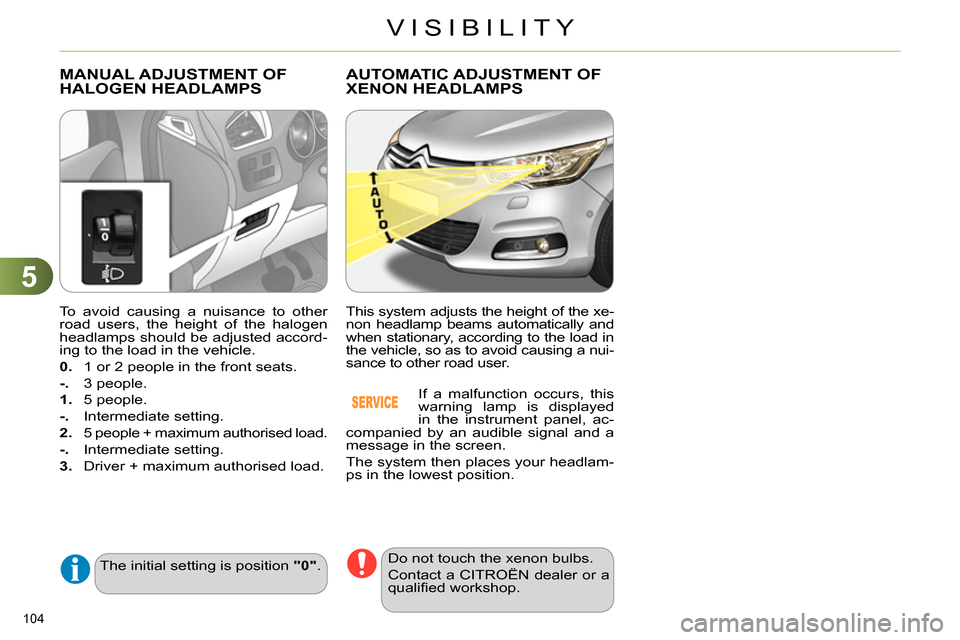
To avoid causing a nuisance to other
road users, the height of the halogen
headlamps should be adjusted accord-
ing to the load in the vehicle.
0.
1 or 2 people in the front seats.
-.
3 people.
1.
5 people.
-.
Intermediate setting.
2.
5 people + maximum authorised load.
-.
Intermediate setting.
3.
Driver + maximum authorised load.
MANUAL ADJUSTMENT OF
HALOGEN HEADLAMPS
The initial setting is position "0"
.
AUTOMATIC ADJUSTMENT OF
XENON HEADLAMPS
This system adjusts the height of the xe-
non headlamp beams automatically and
when stationary, according to the load in
the vehicle, so as to avoid causing a nui-
sance to other road user.
If a malfunction occurs, this
warning lamp is displayed
in the instrument panel, ac-
companied by an audible signal and a
message in the screen.
The system then places your headlam-
ps in the lowest position.
Do not touch the xenon bulbs.
Contact a CITROËN dealer or a
qualifi ed workshop.
Page 107 of 340

5
VISIBILITY
105
DIRECTIONAL LIGHTING
Programming
with directional lighting
without directional lighting
When the dipped or main beam head-
lamps are on, this function, allows the
light beams to better follow the road.
The use of this function, coupled with
the xenon headlamps and the corner-
ing lighting, considerably improves the
quality of your lighting round bends.
Operating fault
If a fault occurs, this warning
lamp fl ashes in the instrument
panel, accompanied by a mes-
sage in the screen.
Contact a CITROËN dealer or a quali-
fi ed workshop.
This function is inactive:
- when stationary or at low speeds,
- when reverse is engaged.
The system is activated or de-
activated in the vehicle confi gu-
ration menu.
The system is activated by de-
fault.
The state of the system stays in memory
on switching off the ignition.
Page 205 of 340
11
PRACTICAL INFORMATION
203
CHANGING A BULB
The headlamps are fi tted with
polycarbonate glass with a pro-
tective coating:
do not clean them using a
dry or abrasive cloth, nor
with a detergent or solvent
product,
use a sponge and soapy wa-
ter or a pH neutral product,
when using a high pressure
washer on persistent marks,
do not keep the lance direct-
ed towards the lamps or their
edges for too long, so as not
to damage their protective
coating and seals.
Changing a bulb should only be
done after the headlamp has
been switched off for a few min-
utes (risk of serious burns).
Do not touch the bulb directly
with your fi ngers, use a lint-
free cloth.
It is imperative to use only anti-
ultraviolet (UV) type bulbs to
avoid damaging the headlamp.
Always replace a failed bulb with
a new bulb with the same type
and specifi cation.
Risk of electrocution
Xenon bulbs (D1S-35W) must
be replaced by a CITROËN
dealer or a qualifi ed workshop.
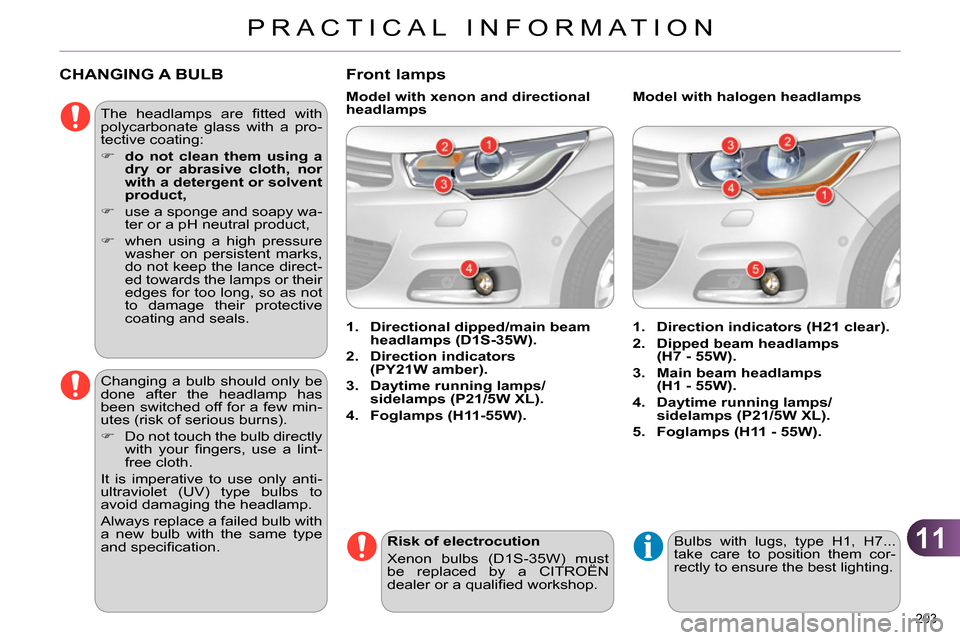
Front lamps
1.
Direction indicators (H21 clear).
2.
Dipped beam headlamps
(H7 - 55W).
3.
Main beam headlamps
(H1 - 55W).
4.
Daytime running lamps/
sidelamps (P21/5W XL).
5.
Foglamps (H11 - 55W).
1.
Directional dipped/main beam
headlamps (D1S-35W).
2.
Direction indicators
(PY21W amber).
3.
Daytime running lamps/
sidelamps (P21/5W XL).
4.
Foglamps (H11-55W).
Model with halogen headlamps
Model with xenon and directional
headlamps
Bulbs with lugs, type H1, H7...
take care to position them cor-
rectly to ensure the best lighting.
Page 206 of 340

11
PRACTICAL INFORMATION
204
Amber coloured bulbs, such as
the direction indicators, must be
replaced with bulbs of identical
specifi cations and colour.
When refi tting, close the protec-
tive cover carefully to preserve
the sealing of the headlamp.
Changing direction indicator bulbs
Model with halogen headlamps
Rapid fl ashing of the direction
indicator warning lamp (right
or left) indicates the failure of a
bulb on that side.
Access to bulbs
Remove the air defl ector by unclip-
ping each of its three attachment
points.
Unclip the bonnet release cable at
its two fi xings.
Move the cable down.
After changing the failed bulb, remember
to put everything back in place (cable and
air defl ector). Depending on the engine and only on
the left hand side, you must fi rst carry
out the following operations for access
to the protective covers on the bulbs.
Turn the bulb holder a quarter of a
turn and extract it.
Pull out the bulb and change it.
To reassemble, carry out these opera-
tions in reverse order.
Model with Xenon headlamps
Remove the protective cover by
pulling on its tongue.
Disconnect the electrical connector.
Separate the springs to release the
bulb.
Pull the bulb out and replace it.
To reassemble, carry out these opera-
tions in reverse order.
Page 207 of 340

11
PRACTICAL INFORMATION
205
Changing dipped beam headlamp
bulbs (only on models with halogen
headlamps)
Changing daytime running lamp/
sidelamp bulbs
Remove the protective cover by
pulling on the tab.
Disconnect the bulb connector.
Turn the bulb holder a quarter of a
turn and extract it.
Pull the bulb and change it.
To r efi t, carry out these operations in
reverse order.
Remove the protective cover by
pulling on the tab.
Disconnect the bulb connector.
Spread the springs to release the
bulb.
Extract the bulb and change it.
To reassemble, carry out these operations
in reverse order.
Changing main beam headlamp
bulbs (only on models with halogen
headlamps)
Remove the protective cover by
pulling on the tab.
Disconnect the bulb connector.
Squeeze the springs to release the
bulb.
Pull out the bulb and replace it.
To reassemble, carry out these operations
in reverse order.
Page 218 of 340
11
PRACTICAL INFORMATION
216
LOAD REDUCTION MODE
System which manages the use of cer-
tain functions according to the level of
charge remaining in the battery.
When the vehicle is being driven, the
load reduction function temporarily de-
activates certain functions, such as the
air conditioning, the heated rear screen...
The deactivated functions are reactivat-
ed automatically as soon as conditions
permit.
ENERGY ECONOMY MODE
System which manages the period of
use of certain functions to conserve a
suffi cient level of charge in the battery.
After the engine has stopped, you can
still use functions such as the audio
equipment, windscreen wipers, dipped
beam headlamps, courtesy lamps, etc.
for a maximum combined period of thirty
minutes.
Switching to economy mode
Once this period has elapsed, a message
appears in the screen indicating that the
vehicle has switched to economy mode
and the active functions are put on standby.
If the telephone is being used at
the same time on the navigation
system, it will be interrupted after
10 minutes.
A fl at battery prevents the en-
gine from starting (refer to the
corresponding paragraph).
Exiting economy mode
These functions are reactivated auto-
matically the next time the vehicle is
driven.
In order to resume the use of these
functions immediately, start the engine
and let it run for a few minutes.
The time available to you will then be
double the period for which the engine
is left running. However, this period will
always be between fi ve and thirty minutes.
This period may be greatly re-
duced if the battery is not fully
charged.
CHANGING A WIPER BLADE
Before removing a front wiper
blade
Within one minute after switching
off the ignition, operate the wiper
stalk to position the wiper blades
vertically on the windscreen.
Removing
Raise the corresponding wiper arm.
Unclip the wiper blade and remove it.
Fitting
Put the corresponding new wiper
blade in place and clip it.
Fold down the wiper arm carefully.
After fitting a front wiper blade
Switch on the ignition.
Operate the wiper stalk again to
park the wiper blades.
Page 280 of 340

10
278
CONFIGURATION
Press SETUP
to display the
" Confi guration
" menu.
Select " Choose colour
" and confi rm to
select the screen colour harmony and
the map presentation mode:
- day mode,
- night mode,
- automatic day/night mode,
according to whether the
headlamps are on.
Select " Adjust luminosity
" and confi rm
to adjust the screen brightness.
Press " OK
" to save the changes.
The settings for day and night are
independent.
Select " Display confi guration
" and
confi rm.
Display configuration
Page 327 of 340

325
VISUAL SEARCH
INSTRUMENTS AND CONTROLS
Instrument panels ....................... 28-31
Warning lamps ............................ 32-42
Indicators .................................... 43-45
Setting buttons............................ 46-48
- trip distance recorder
- dashboard lighting dimmer / black
panel
- customisation of dials and screens
Lighting controls ....................... 98-102
Adjusting headlamps ..................... 104
Stop & Start ............................ 168-170
Lane departure
warning system.............................. 171
Door mirrors ................................ 76-77
Electric windows ......................... 92-93
Dashboard fuses .................... 209-211
Opening the bonnet ....................... 185
Adjusting the steering wheel............ 78
Horn ............................................... 139
Audio system .......................... 289-321
Setting the date / time................ 50, 54
eMyWay satellite
navigation system ................... 235-288
Setting the date / time...................... 56
Manual gearbox ............................. 157
Electronic gearbox .................. 158-160
Automatic gearbox.................. 161-163
Parking brake ................. 150-156, 157
Wiper controls......................... 107-109
Trip computer ............................. 57-60
Rear view mirror .............................. 78
Emergency or
assistance call ......................... 142, 233
Seat belt and front passenger airbag
warning display screen ........... 143-145
Courtesy lamps............................... 110
Interior mood lighting ...................... 111
Hazard warning lamps ................... 139
Central locking ............................ 86-87
Black panel ...................................... 47
Multifunction screens .................. 49-56
Ventilation ................................... 61-62
Manual air conditioning......... 63-64, 69
Digital
air conditioning ..................... 65-68, 69
Demisting / Defrosting
the rear screen ................................ 69
Memorising speeds ....................... 175
Speed limiter........................... 176-177
Cruise control ......................... 178-179