2014 Citroen C4 CACTUS service
[x] Cancel search: servicePage 271 of 331
Points of Interest (POI) show all of the locations of services nearby \
(hotels,
retail outlet, airports, ...).
Select \"Search")
05
269
E3_en_Chap12b_SMEGplus_ed01-2014
Towards points of interest (POI)Points of Interest (POI) show all of the locations of services nearby \
(hotels,
retail outlet, airports, ...).
Select "Search for a point of interest ".
Select "All POIs" or "Garage" or "Dining/
hotels" or "Personal" or "By name".
Select a category from the list offered.
Select "Search". Select a point of interest from the list offered.
Select "Navigate to".
Press on Navigation to display the primary
page then go to the secondary page.
NAVIGATION - GUIDANCE
An annual mapping update allows new points of interest to be
presented to you.
You can also update the Risk areas / Danger areas every month.
The detailed procedure is available on:
http://citroen.navigation.com.
Page 292 of 331

07
290
E3_en_Chap12b_SMEGplus_ed01-2014
CONNECTED SERVICES
290Level 1
Level 2
"Connected services"
Primary page:
Driving assistance
applications, see following
page on "CITROËN
MULTICITY CONNECT"*. Identification
DUN connection settings Transfer rate It may be that certain new
generation smartphones
are not compatible with this
standard.
Secondary page:
Internet navigation via
Bluetooth telephone Dial-Up
Networking (DUN).
* Depending on country.
Page 293 of 331
07
E3_en_Chap12b_SMEGplus_ed01-2014
CITROËN MULTICITY CONNECT
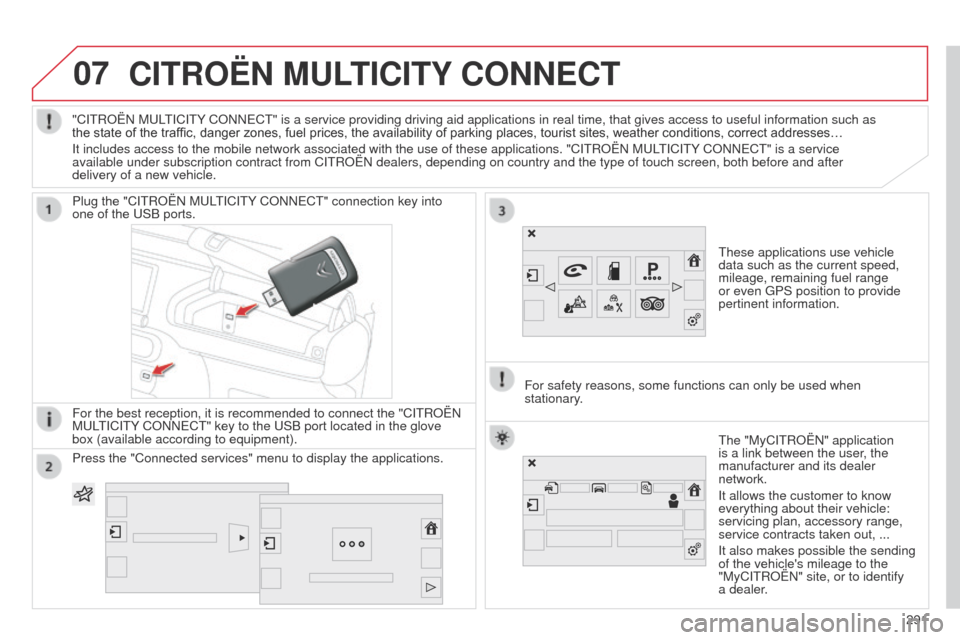
These applications use vehicle
data such as the current speed,
mileage, remaining fuel range
or even GPS position to provide
pertinent information.
Plug the "CITROËN MULTICITY CONNECT" connection key into
one of the USB ports.
For the best reception, it is recommended to connect the "CITROËN
MULTICITY CONNECT" key to the USB port located in the glove
box (available according to equipment).
The "MyCITROËN" application
is a link between the user, the
manufacturer and its dealer
network.
It allows the customer to know
everything about their vehicle:
servicing plan, accessory range,
service contracts taken out, ...
It also makes possible the sending
of the vehicle's mileage to the
"MyCITROËN" site, or to identify
a dealer.
"CITROËN MULTICITY CONNECT" is a service providing driving aid applications in real time, \
that gives access to useful information such as
the state of the traffic, danger zones, fuel prices, the availability of parking places, tourist sites, weather conditions, correct addresses…
It includes access to the mobile network associated with the use of thes\
e applications. "CITROËN MULTICITY CONNECT" is a service
available under subscription contract from CITROËN dealers, depending\
on country and the type of touch screen, both before and after
delivery of a new vehicle.
For safety reasons, some functions can only be used when
stationary.
Press the "Connected services" menu to display the applications.
291
Page 299 of 331
08
297
E3_en_Chap12b_SMEGplus_ed01-2014
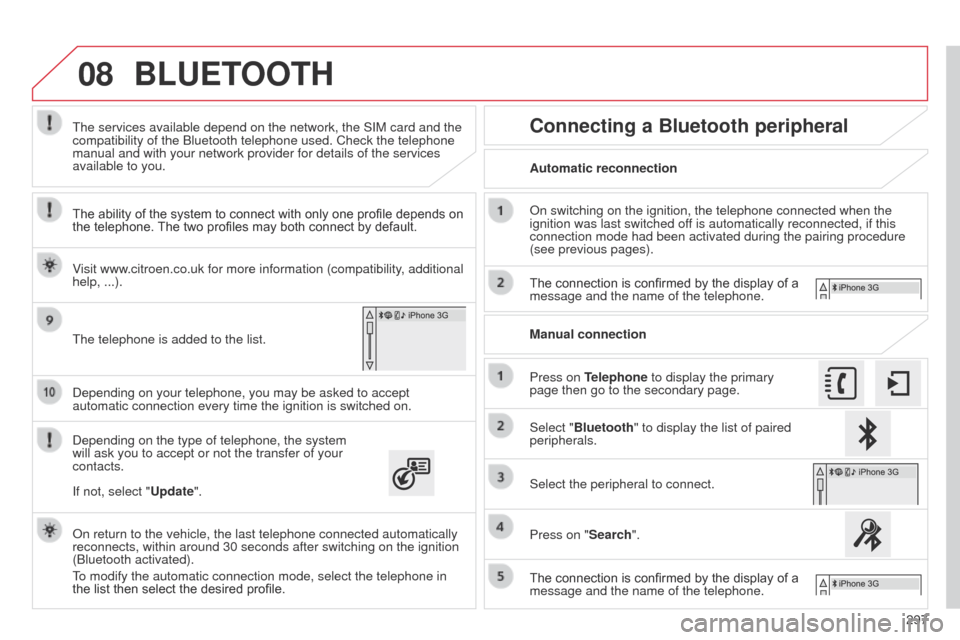
Depending on your telephone, you may be asked to accept
automatic connection every time the ignition is switched on.
Depending on the type of telephone, the system
will ask you to accept or not the transfer of your
contacts. The services available depend on the network, the SIM card and the
compatibility of the Bluetooth telephone used. Check the telephone
manual and with your network provider for details of the services
available to you.
On return to the vehicle, the last telephone connected automatically
reconnects, within around 30 seconds after switching on the ignition
(Bluetooth activated).
To modify the automatic connection mode, select the telephone in
the list then select the desired profile. The telephone is added to the list.
BLUETOOTH
If not, select "Update".
The ability of the system to connect with only one profile depends on
the telephone. The two profiles may both connect by default.
Visit www.citroen.co.uk for more information (compatibility, additional
help, ...).
Automatic reconnection
Connecting a Bluetooth peripheral
On switching on the ignition, the telephone connected when the
ignition was last switched off is automatically reconnected, if this
connection mode had been activated during the pairing procedure
(see previous pages).
The connection is confirmed by the display of a
message and the name of the telephone.
Press on Telephone to display the primary
page then go to the secondary page. Manual connection
Select "Bluetooth" to display the list of paired
peripherals.
Select the peripheral to connect.
Press on "Search".
The connection is confirmed by the display of a
message and the name of the telephone.
Page 305 of 331
E3_en_Chap12b_SMEGplus_ed01-2014
FREQUENTLY ASKED QUESTIONS
303
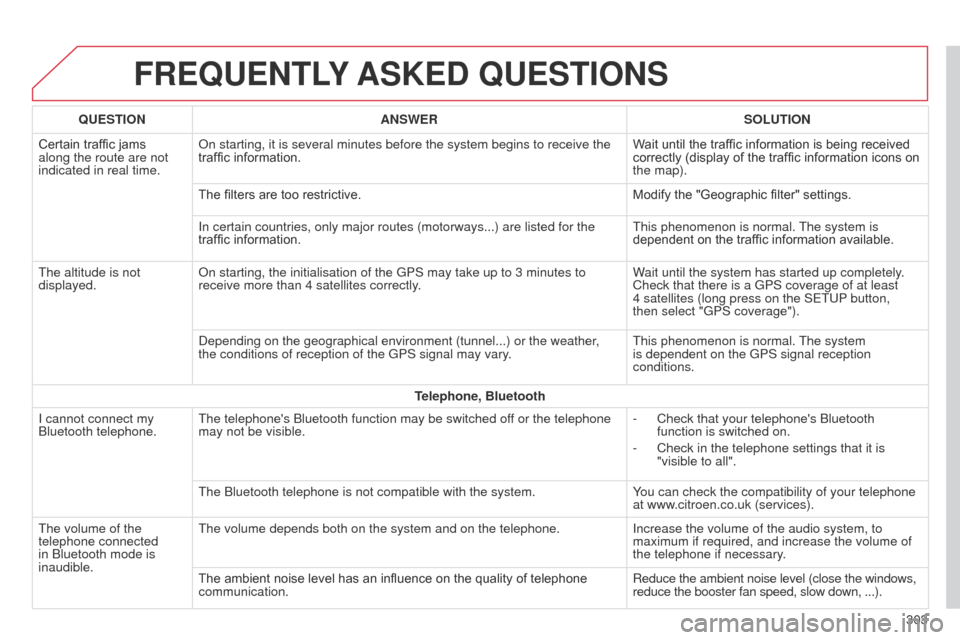
QUESTION
ANSWER SOLUTION
Certain traffic jams
along the route are not
indicated in real time. On starting, it is several minutes before the system begins to receive t\
he
traffic information.
Wait until the traffic information is being received
correctly (display of the traffic information icons on
the map).
The filters are too restrictive. Modify the "Geographic filter" settings.
In certain countries, only major routes (motorways...) are listed for \
the
traffic information. This phenomenon is normal. The system is
dependent on the traffic information available.
The altitude is not
displayed. On starting, the initialisation of the GPS may take up to 3 minutes to
receive more than 4 satellites correctly. Wait until the system has started up completely.
Check that there is a GPS coverage of at least
4
satellites (long press on the SETUP button,
then select "GPS coverage").
Depending on the geographical environment (tunnel...) or the weather,
the conditions of reception of the GPS signal may vary. This phenomenon is normal. The system
is dependent on the GPS signal reception
conditions.
Telephone, Bluetooth
I cannot connect my
Bluetooth telephone. The telephone's Bluetooth function may be switched off or the telephone
may not be visible. -
Check that your telephone's Bluetooth
function is switched on.
-
Check in the telephone settings that it is
"visible to all".
The Bluetooth telephone is not compatible with the system. Y
ou can check the compatibility of your telephone
at www.citroen.co.uk (services).
The volume of the
telephone connected
in Bluetooth mode is
inaudible. The volume depends both on the system and on the telephone.
Increase the volume of the audio system, to
maximum if required, and increase the volume of
the telephone if necessary.
The ambient noise level has an influence on the quality of telephone
communication. Reduce the ambient noise level (close the windows,
reduce the booster fan speed, slow down, ...).
Page 314 of 331

E3_en_Chap13_recherche_visuelle_ed01-2014
Headlamp beam adjustment 120
Lighting control stalk
1
13 -119
Automatic illumination of headlamps
1
17
Direction indicators
1
29
Dashboard fuses
1
96-200 Electronic gearbox
9
0-93
Wiper control stalk
1
22-125
Trip computer
4
3 - 44
Speed limiter
9
8-100
Cruise control
10
1-103
Memorising speeds
1
04Front demist / defrost
7
5
Rear screen demist / defrost
7
6
Central locking
5
1
Park Assist 1 08 -112
ESC 13 4 -13 6
Hazard warning lamps
1
29
Instrument panels
2
0
Warning lamps
2
1-32
Service indicator
3
3-35
Engine oil level indicator
3
6
Gear shift indicator
8
9
Distance recorders
4
5
Steering wheel adjustment
6
4
H or n
13 0
Instruments and controls (cont.)
Starting - switching off the engine 86
Visual search
Page 319 of 331
317
E3_en_Chap14_index_alpha_ed01-2014
Snow chains ..................................................18 7
Spare wheel ............................... ...........181, 182
Speed limiter
........................................... 98, 104
Start
...............................
................................205
Starting the vehicle
................................... 86, 90
Steering mounted controls ............................2 41
Stopping the vehicle
.................................86, 90
Stop Start
............................. 44, 75, 95, 97, 108,
161, 203, 220, 226
Storage
...................................................... 79, 81
Storing a speed
............................................. 104
Sun visor
.................................................... 7 7-79
Synchronising the remote control
...................49
Synthesiser, voice
......................................... 2
79
System settings
............................................. 288
Parking sensors, rear
.................................... 105
Particle emission filter
.................. 220, 224-226
Passenger compartment filter
...................... 226
Plip
............................................................ 4 7, 4 8
Port, USB
............................................ 7
7, 78, 80
Preheater, Diesel
............................................ 23
Priming the fuel system
................................ 165
Protecting children
........................ 141, 146 -148,
153, 155 -159
Protectors
...................................................... 216
Puncture
........................................................ 174
Radio
............................................. 248-250, 254
Radio station
................................. 248, 249, 251
RDS
............................................................... 2 51
Rear door windows
......................................... 56
Rear foglamp ......................................... 115 , 1 9 3
Rear screen (demisting)
.................................. 76
Recharging the battery
................................. 20
6
Reduction of electrical load
.......................... 207
Regeneration of the particle emissions filter
............................................ 226
Reinitialising the remote control
..................... 49
R
emote control
.................................... 4
7, 48, 50
Removable screen (snow shield)
...............................
................ 215
Removing a wheel
........................................ 183
Removing the mat
........................................... 82
Repair kit, puncture
....................................... 174
Replacing bulbs
.................................... 188, 193
Replacing fuses
..............................
...... 19 6, 198
Replacing the air filter
................................... 226
Replacing the oil filter
................................... 2
26
R
Replacing the passenger compartment filter ...................................... 226
Replacing wiper blades .........................125, 20 8
Resetting the service indicator
.......................35
Resetting the trip recorder
..............................45
Reversing camera
......................................... 107
Reversing lamp
............................................. 19
3
Risk areas (update)
....................................... 269
Roof bars
....................................................... 2
13
Routine checks
.................................... 226, 227
Running out of fuel (Diesel)
..........................16
5
S
Safety for children ...................................14 , 16 0
Screen menu ...............242, 244, 246, 260, 262,
264, 280, 292, 294
Screen menu map
................242, 244, 246, 260,
262, 264, 280, 292, 294
Screenwash fluid level
..................................225
Screenwash, front
......................................... 123
Screen-wash reservoir
.................................225
SCR (Selective Catalytic Reduction)
............166
SCR system
.................................................. 166
Seat adjustment
...............................
...............57
Seat belts
....................................... 13
7-13 9, 152
Seat belts warning lamp
............................... 13
8
Seat, rear bench
............................................. 60
Serial number, vehicle
.................................. 23
3
Service indicator
............................................. 33
Service warning light
...................................... 26
S
ervicing
...............................
..........................18
Setting the clock
............................................. 46
Sidelamps
..............113, 118, 119, 188, 189, 193
Side repeater
..............................
..................192
T
Table of weights .................................... 2 29, 231
Tables of engines ................................. 228, 230
Tables of fuses
.............................. 19 6, 198, 201
Tank, AdBlue
® additive ......................... 1 6 6 , 171
Ta n k , f u e l
....................................................... 163
Technical data
....................................... 228 -231
Telephone
..................................... 296-299, 301
Temperature adjustment
........................... 6
7, 71
Temperature control for heated seats
............59
Temporary tyre repair kit .........................8 4 , 174
Third brake lamp
........................................... 19 4
TMC (Traffic info)
.......................................... 2
74
To o l s
.............................................. 174, 181, 182
Total distance recorder
................................... 45
Touch screen ......................................... 237, 239
Touch screen tablet
.................................. 3
9 , 41
Touch screen tablet (Menus)
.......37-39, 41, 238
.
Alphabetical index