2014 CHEVROLET IMPALA instrument cluster
[x] Cancel search: instrument clusterPage 167 of 422

Black plate (3,1)Chevrolet Impala Owner Manual (GMNA-Localizing-U.S./Canada-5772216) -
2014 - 2nd crc - 5/14/13
Lighting 6-3
There is a light sensor on top of the
instrument panel. Do not cover the
sensor, otherwise the headlamps
will come on when they are not
needed.
The system may also turn on the
headlamps when driving through a
parking garage or tunnel.
When it is bright enough outside,
the headlamps will turn off or may
change to Daytime Running
Lamps (DRL).
The automatic headlamp system
turns off when the exterior lamp
control is turned to
Oor the ignition
is off.
Lights On with Wipers
If the windshield wipers are
activated in daylight with the engine
on, and the exterior lamp control is
in AUTO, the headlamps, parking
lamps, and other exterior lamps
come on. The transition time for the
lamps coming on varies based on
wiper speed. When the wipers are not operating, these lamps turn off.
Move the exterior lamp control to
P
or;to disable this feature.
Hazard Warning Flashers
|(Hazard Warning Flashers):
Press this button to make the front
and rear turn signal lamps flash on
and off. Press again to turn the
flashers off.
The hazard warning flashers turn on
automatically if the airbags deploy.
Turn and Lane-Change
Signals
Move the lever all the way up or
down to signal a turn.
An arrow on the instrument cluster
flashes in the direction of the turn or
lane change.
Raise or lower the lever until the
arrow starts to flash to signal a lane
change. Hold it there until the lane
change is completed. If the lever is
briefly pressed and released, the
turn signal flashes three times.
Page 171 of 422

Black plate (1,1)Chevrolet Impala Owner Manual (GMNA-Localizing-U.S./Canada-5772216) -
2014 - 2nd crc - 5/14/13
Infotainment System 7-1
Infotainment
System
Introduction
Infotainment . . . . . . . . . . . . . . . . . . . 7-1
Theft-Deterrent Feature . . . . . . . 7-2
Overview . . . . . . . . . . . . . . . . . . . . . . 7-3
Home Page . . . . . . . . . . . . . . . . . . . 7-4
Software Updates . . . . . . . . . . . . . 7-7
Radio
AM-FM Radio . . . . . . . . . . . . . . . . . 7-7
Satellite Radio . . . . . . . . . . . . . . . . 7-9
Radio Reception . . . . . . . . . . . . . 7-10
Backglass Antenna . . . . . . . . . . 7-11
Multi-Band Antenna . . . . . . . . . . 7-11
Audio Players
CD Player . . . . . . . . . . . . . . . . . . . 7-12
USB Port . . . . . . . . . . . . . . . . . . . . 7-14
Auxiliary Jack . . . . . . . . . . . . . . . . 7-17
Phone
Bluetooth (Overview) . . . . . . . . 7-18
Bluetooth (InfotainmentControls) . . . . . . . . . . . . . . . . . . . 7-20
Bluetooth (Voice Recognition) . . . . . . . . . . . . . . . 7-24
Trademarks and License
Agreements
Trademarks and License
Agreements . . . . . . . . . . . . . . . . 7-29
Introduction
Infotainment
Read the following pages to
become familiar with the
infotainment system featured in this
owner manual.
{Warning
Taking your eyes off the road
for too long or too often while
using any infotainment features
can cause a crash resulting in
injury or death. Do not give
extended attention to
infotainment tasks while
driving. Focus your attention
on driving and limit glances to
the instrument cluster or center
stack screens. Use voice
guidance whenever possible.
The infotainment system has built-in
features intended to help with this
by disabling some functions when
Page 175 of 422
Black plate (5,1)Chevrolet Impala Owner Manual (GMNA-Localizing-U.S./Canada-5772216) -
2014 - 2nd crc - 5/14/13
Infotainment System 7-5
AUDIO:Select the AUDIO screen
icon to display the active source
page. The sources available are
AM, FM, SiriusXM
®(if equipped),
CD, USB/iPod, AUX, and SD Card
Reader. See AM-FM Radio on
page 7-7, Satellite Radio on
page 7-9, CD Player on page 7-12,
and Auxiliary Jack on page 7-17.
PHONE: Select the PHONE screen
icon to display the Phone main
page. See Bluetooth (Infotainment
Controls) on page 7-20 orBluetooth
(Voice Recognition) on page 7-24 or
Bluetooth (Overview) on page 7-18.
NAV: Select the NAV screen icon
to display the last Turn-by-Turn
maneuver if a destination was
downloaded. See Navigation on
page 14-2.
SETTINGS: Select the SETTINGS
screen icon to display the Settings
main page. See “Setting Radio
Preferences” following.
Setting Radio Preferences
Select the SETTINGS screen icon
to display the Settings menu and
the following may display:
Time:SeeClock (Base Radio) on
page 5-5 orClock (Uplevel Radio)
on page 5-5.
Language [Language]: This will
set the display language in the
radio, and Instrument cluster. Select
to display a list of languages. Select
qBACK to go back to the
previous menu.
Valet Mode:
Type a four-digit code on the
circular numeric keypad by:
1. Turning the MENU knob to highlight a number.
2. Press the MENU knob to select it. Do this for each one of the
four digits. Select Enter to go to
the confirmation screen. 3. Re-enter the four-digit code.
Select LOCK to lock the system.
This will also lock out access to
the storage behind the radio,
if equipped. See Instrument
Panel Storage on page 4-1.
4. Type the four-digit code to unlock the system. Select
q
BACK to go back to the
previous menu.
Radio: See“Radio Setup” later in
this section.
Vehicle: SeeVehicle
Personalization on page 5-40.
Display: Press the MENU knob to
turn the display on or off.
Return to Factory Settings: See
“Return to Factory Settings” later in
this section.
Page 177 of 422
Black plate (7,1)Chevrolet Impala Owner Manual (GMNA-Localizing-U.S./Canada-5772216) -
2014 - 2nd crc - 5/14/13
Infotainment System 7-7
Rear Cross Traffic Alert:This
feature will display an alert icon
when cross traffic is detected.
Select Rear Cross Traffic Alert, then
select Off or On.
Return to Factory Settings
Select Return to Factory Settings
and the following list may display:
Restore Vehicle Settings: This
option will restore factory vehicle
personalization settings. Select
Restore Vehicle Settings. A screen
displays stating all vehicle
customization settings will be
restored to the factory settings.
Select Cancel or Continue.
Clear All Private Data: This option
clears all private information from
the vehicle. Select Clear All Private
Data. Select Cancel or Continue. Restore Radio Settings:
This
option will restore factory radio
settings. Select Restore Radio
Settings. A screen displays stating
all personalized radio settings will
be restored back to the factory
settings. Select Cancel or Continue.
English and Metric Unit
Conversion
To change the display units between
English and metric units, see “Units”
under “Settings” inInstrument
Cluster on page 5-9.
Software Updates
See the website for more
information.
In the U.S., see www.chevrolet.com
In Canada, see
www.chevrolet.gm.ca
Radio
AM-FM Radio
Playing the Radio
While on the audio main page,
press the RADIO or MEDIA button
repeatedly to display and scroll
through the available sources: AM,
FM, and SiriusXM
®(if equipped),
CD, USB, SD, and AUX.
The steering wheel controls can
also be used to adjust the volume.
See Steering Wheel Controls on
page 5-3.
AM, FM, SiriusXM (If Equipped)
To select AM, FM, or SiriusXM
(if equipped):
1. Press
{.
2. Turn the MENU knob to highlight the AUDIO screen icon.
3. Press the MENU knob to select.
Page 237 of 422
Black plate (29,1)Chevrolet Impala Owner Manual (GMNA-Localizing-U.S./Canada-5772216) -
2014 - 2nd crc - 5/14/13
Driving and Operating 9-29
Manual Mode
Driver Shift Control (DSC)
To use this feature (if equipped):
1. Move the shift lever fromD (Drive) rearward to
M (Manual Mode).
While driving in Manual Mode,
the transmission will remain in
the driver selected gear. When
coming to a stop in the manual
position, the vehicle will
automatically shift into
1 (First) gear.
2. Using the button on the shift lever, press the + (plus) end of
the button to upshift, or press
the −(minus) end of the button
to downshift.
The Driver Information Center (DIC)
in the instrument cluster will change
from the currently displayed
message to the letter “M,”for
Manual position, and a number
indicating the requested gear. While using the DSC feature the
transmission will have firmer shifting
and sportier performance. You can
use this for sport driving or when
climbing hills to stay in gear longer
or to downshift for more power or
engine braking.
The transmission will only allow you
to shift into gears appropriate for the
vehicle speed and engine
revolutions per minute (rpm):
.The transmission will not allow
shifting to the next higher gear if
the vehicle speed or engine rpm
is too low.
.The transmission will not allow
shifting to the next lower gear if
the vehicle speed or engine rpm
is too high.
Second Gear Start Feature
When accelerating the vehicle from
a stop in snowy and icy conditions,
you may want to shift into
2 (Second) gear. A higher gear
allows you to gain more traction on
slippery surfaces. With the DSC feature, the vehicle
can be set to pull away in
2 (Second) gear.
1. Move the shift lever from
D (Drive) to M (Manual Mode).
2. With the vehicle stopped, press the + (plus) end of the button to
select 2 (Second) gear. The
vehicle will start from a stop
position in 2 (Second) gear.
3. Once moving, select the desired drive gear.
Page 242 of 422
Black plate (34,1)Chevrolet Impala Owner Manual (GMNA-Localizing-U.S./Canada-5772216) -
2014 - 2nd crc - 5/14/13
9-34 Driving and Operating
vehicle wheel brakes to assist the
driver in keeping the vehicle on the
intended path.
If cruise control is being used and
traction control or StabiliTrak begins
to limit wheel spin, cruise control will
disengage. Cruise control may be
turned back on when road
conditions allow.
Both systems come on
automatically when the vehicle is
started and begins to move. The
systems may be heard or felt while
they are operating or while
performing diagnostic checks. This
is normal and does not mean there
is a problem with the vehicle.
It is recommended to leave both
systems on for normal driving
conditions, but it may be necessary
to turn TCS off if the vehicle gets
stuck in sand, mud, ice, or snow.
SeeIf the Vehicle Is Stuck on
page 9-9 and“Turning the Systems
Off and On” later in this section.
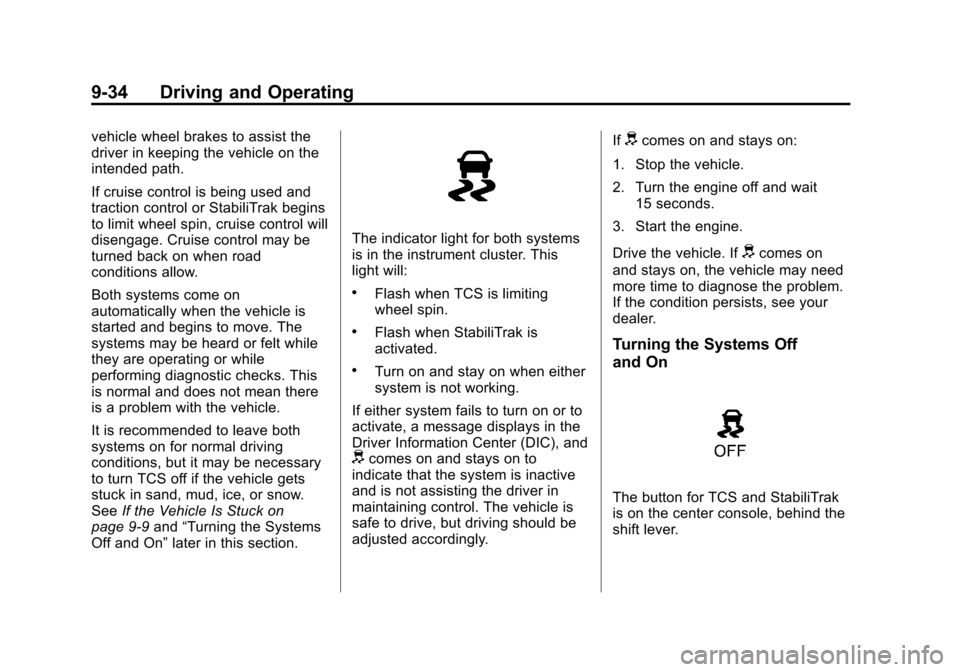
The indicator light for both systems
is in the instrument cluster. This
light will:
.Flash when TCS is limiting
wheel spin.
.Flash when StabiliTrak is
activated.
.Turn on and stay on when either
system is not working.
If either system fails to turn on or to
activate, a message displays in the
Driver Information Center (DIC), and
dcomes on and stays on to
indicate that the system is inactive
and is not assisting the driver in
maintaining control. The vehicle is
safe to drive, but driving should be
adjusted accordingly. If
dcomes on and stays on:
1. Stop the vehicle.
2. Turn the engine off and wait 15 seconds.
3. Start the engine.
Drive the vehicle. If
dcomes on
and stays on, the vehicle may need
more time to diagnose the problem.
If the condition persists, see your
dealer.
Turning the Systems Off
and On
The button for TCS and StabiliTrak
is on the center console, behind the
shift lever.
Page 243 of 422

Black plate (35,1)Chevrolet Impala Owner Manual (GMNA-Localizing-U.S./Canada-5772216) -
2014 - 2nd crc - 5/14/13
Driving and Operating 9-35
{Caution
Do not repeatedly brake or
accelerate heavily when TCS is
off. The vehicle driveline could be
damaged.
To turn off only TCS, press and
release the
gbutton. The Traction
Off Light
idisplays in the
instrument cluster. To turn TCS on
again, press and release the
g
button. The Traction Off Lighti
displayed in the instrument cluster
will turn off.
If TCS is limiting wheel spin when
the
gbutton is pressed, the system
will not turn off until the wheels stop
spinning. To turn off both TCS and StabiliTrak,
press and hold the
gbutton until
the Traction Off Light
iand
StabiliTrak Off Light
gcome on and
stay on in the instrument cluster. To
turn TCS and StabiliTrak on again,
press and release the
gbutton. The
Traction Off Light
iand StabiliTrak
Off Light
gin the instrument cluster
turn off.
Adding accessories can affect the
vehicle performance. See
Accessories and Modifications on
page 10-3.
Cruise Control
With cruise control, you can
maintain a speed of about 40 km/h
(25 mph) or more without keeping
your foot on the accelerator. Cruise
control does not work at speeds
below about 40 km/h (25 mph).
{Warning
Cruise control can be dangerous
where you cannot drive safely at
a steady speed. Do not use the
cruise control on winding roads or
in heavy traffic.
Cruise control can be dangerous
on slippery roads. On such roads,
fast changes in tire traction can
cause excessive wheel slip, and
you could lose control. Do not use
cruise control on slippery roads.
If equipped with the Traction Control
System (TCS), the system may
begin to limit wheel spin while you
are using cruise control. If this
Page 244 of 422
Black plate (36,1)Chevrolet Impala Owner Manual (GMNA-Localizing-U.S./Canada-5772216) -
2014 - 2nd crc - 5/14/13
9-36 Driving and Operating
happens, the cruise control will
automatically disengage. See
Traction Control/Electronic Stability
Control on page 9-33. If a collision
alert occurs when cruise control is
activated, cruise control is
disengaged. SeeForward Collision
Alert (FCA) System on page 9-48.
When road conditions allow you to
safely use it again, the cruise
control can be turned back on.
If the brakes are applied, the cruise
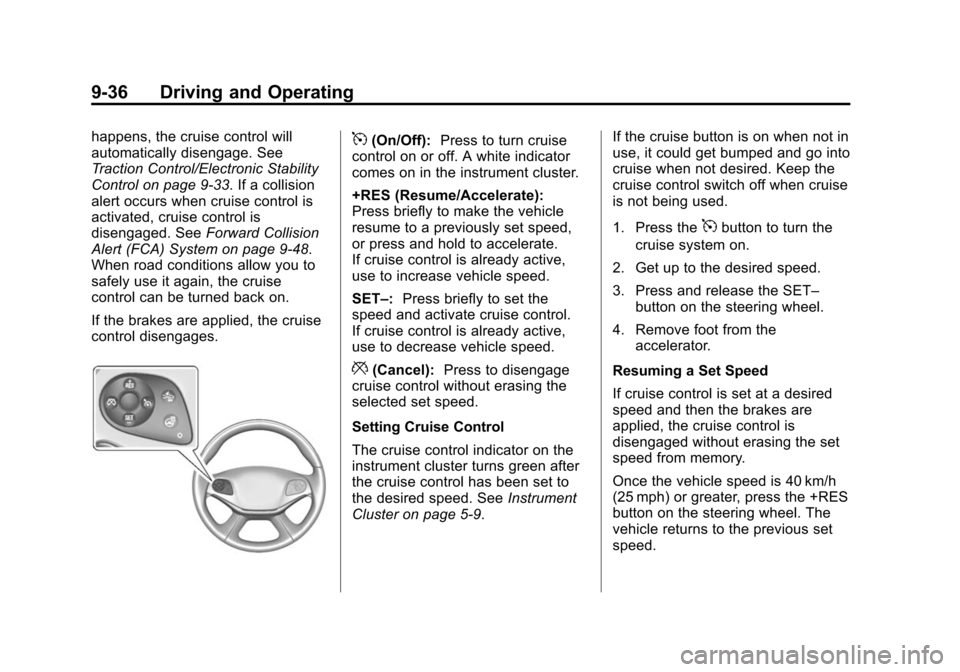
control disengages.5(On/Off): Press to turn cruise
control on or off. A white indicator
comes on in the instrument cluster.
+RES (Resume/Accelerate):
Press briefly to make the vehicle
resume to a previously set speed,
or press and hold to accelerate.
If cruise control is already active,
use to increase vehicle speed.
SET–: Press briefly to set the
speed and activate cruise control.
If cruise control is already active,
use to decrease vehicle speed.
*(Cancel): Press to disengage
cruise control without erasing the
selected set speed.
Setting Cruise Control
The cruise control indicator on the
instrument cluster turns green after
the cruise control has been set to
the desired speed. See Instrument
Cluster on page 5-9. If the cruise button is on when not in
use, it could get bumped and go into
cruise when not desired. Keep the
cruise control switch off when cruise
is not being used.
1. Press the
5button to turn the
cruise system on.
2. Get up to the desired speed.
3. Press and release the SET– button on the steering wheel.
4. Remove foot from the accelerator.
Resuming a Set Speed
If cruise control is set at a desired
speed and then the brakes are
applied, the cruise control is
disengaged without erasing the set
speed from memory.
Once the vehicle speed is 40 km/h
(25 mph) or greater, press the +RES
button on the steering wheel. The
vehicle returns to the previous set
speed.