2014 CHEVROLET IMPALA cruise control
[x] Cancel search: cruise controlPage 140 of 422
Black plate (26,1)Chevrolet Impala Owner Manual (GMNA-Localizing-U.S./Canada-5772216) -
2014 - 2nd crc - 5/14/13
5-26 Instruments and Controls
turns green when the ACC is set
and active. SeeAdaptive Cruise
Control on page 9-37.
Door Ajar Light
This light comes on in the Driver
Information Center (DIC) when a
door is open or not securely latched.
Before driving, check that all doors
are properly closed.
Information Displays
Power Flows
(eAssist Only)
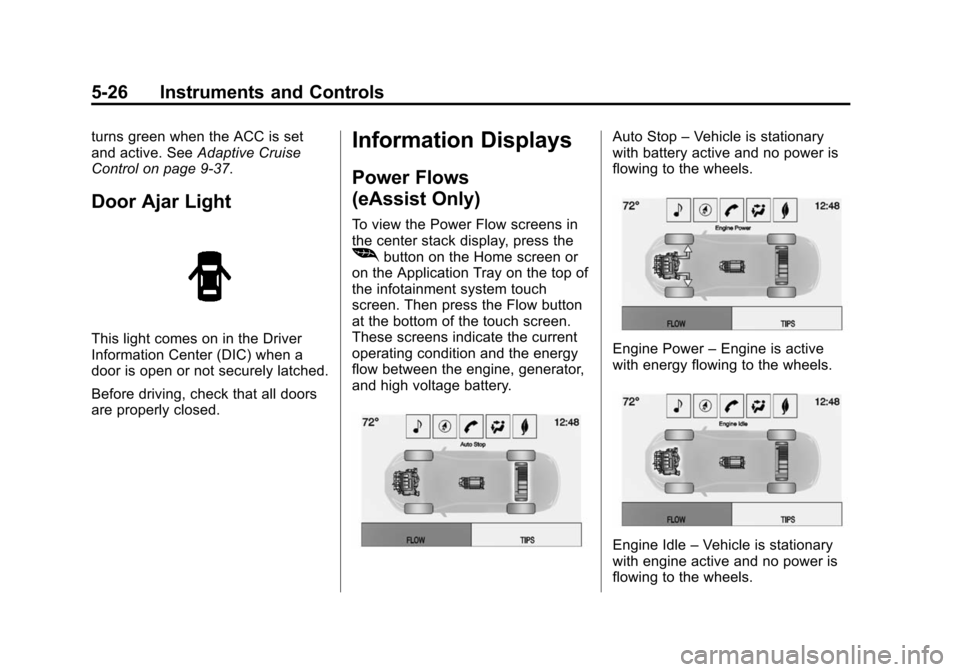
To view the Power Flow screens in
the center stack display, press the
[button on the Home screen or
on the Application Tray on the top of
the infotainment system touch
screen. Then press the Flow button
at the bottom of the touch screen.
These screens indicate the current
operating condition and the energy
flow between the engine, generator,
and high voltage battery.
Auto Stop –Vehicle is stationary
with battery active and no power is
flowing to the wheels.
Engine Power –Engine is active
with energy flowing to the wheels.
Engine Idle –Vehicle is stationary
with engine active and no power is
flowing to the wheels.
Page 145 of 422

Black plate (31,1)Chevrolet Impala Owner Manual (GMNA-Localizing-U.S./Canada-5772216) -
2014 - 2nd crc - 5/14/13
Instruments and Controls 5-31
Brake System Messages
BRAKE FLUID LOW
This message is displayed when the
brake fluid level is low. SeeBrake
Fluid on page 10-26.
PARK BRAKE RELEASED
This message is displayed when the
parking brake is released.
PARK BRAKE SET
This message is displayed when the
parking brake is set.
RELEASE PARKING BRAKE
This message is displayed if the
Electric Parking Brake is on while
the vehicle is in motion. See Parking
Brake on page 9-31.
SERVICE BRAKE ASSIST
This message may be displayed
when there is a problem with the
brake boost assist system. When
this message is displayed, the brake
boost assist motor might be heard
operating and you might notice pulsation in the brake pedal. This is
normal under these conditions. Take
the vehicle to your dealer for
service.
SERVICE PARKING BRAKE
This message is displayed when
there is a problem with the parking
brake. Take the vehicle to your
dealer for service.
STEP ON BRAKE TO
RELEASE PARK BRAKE
This message is displayed if you
attempt to release the Electric
Parking Brake without the brake
pedal applied. See
Parking Brake
on page 9-31.
Compass Messages
Dashes may be displayed if the
vehicle temporarily loses
communication with the Global
Positioning System (GPS).
Cruise Control Messages
ADAPTIVE CRUISE SET
TO XXX
This message displays when the
Adaptive Cruise Control (ACC)
speed is set. See Adaptive Cruise
Control on page 9-37.
ADAPTIVE CRUISE
TEMPORARILY UNAVAILABLE
This message displays when
attempting to activate Adaptive
Cruise Control (ACC) when it is
temporarily unavailable. The ACC
system does not need service.
This can most commonly occur
under the following conditions, but
may also display for other reasons:
.The radar is not clean. Keep the
radar sensors free of mud, dirt,
snow, ice, and slush. Clean the
entire front and/or rear of the
vehicle. For cleaning
instructions, see Exterior Care
on page 10-77.
Page 146 of 422

Black plate (32,1)Chevrolet Impala Owner Manual (GMNA-Localizing-U.S./Canada-5772216) -
2014 - 2nd crc - 5/14/13
5-32 Instruments and Controls
.Heavy rain or snow is interfering
with the radar object detection
performance.
CRUISE RADAR CAN’T SEE—
SEE OWNERS MANUAL
If the ACC does not activate or may
soon disengage due to a temporary
condition, this message may
display. This can occur under the
following conditions:
.The radar is not clean. Keep the
radar sensors free of mud, dirt,
snow, ice, and slush. For
cleaning instructions, see
Exterior Care on page 10-77.
.Heavy rain or snow is interfering
with the radar object detection
performance.
.The vehicle is passing through
an open area, such as the
desert, where there is insufficient
data for operation
CRUISE SET TO XXX
This message displays when the
cruise control speed is set. See
Cruise Control on page 9-35.
NO CRUISE BRAKING —GAS
PEDAL APPLIED
This message displays when
Adaptive Cruise Control (ACC) is
active and the driver is pressing the
gas pedal. When this occurs, ACC
will not brake. See Adaptive Cruise
Control on page 9-37.
SERVICE ADAPTIVE CRUISE
CONTROL
This message displays when the
Adaptive Cruise Control (ACC)
needs service. Take the vehicle to
your dealer.
Door Ajar Messages
DOOR OPEN
A door open symbol will display on
the DIC showing which door is
open. If the vehicle has been shifted
out of P (Park), a DOOR OPEN
message will also be displayed.
If the shift lever is in M (Manual
Mode), the DOOR OPEN message
will display if the vehicle starts to
move. Close the door completely.
HOOD OPEN
This message will display along with
a hood open symbol when the hood
is open. Close the hood completely.
TRUNK OPEN
This message will display along with
a symbol when the trunk is open.
Close the trunk completely.
Page 150 of 422
Black plate (36,1)Chevrolet Impala Owner Manual (GMNA-Localizing-U.S./Canada-5772216) -
2014 - 2nd crc - 5/14/13
5-36 Instruments and Controls
FORWARD COLLISION
ALERT OFF
This message displays when the
Forward Collision Alert has been
turned off.
FRONT CAMERA BLOCKED
CLEAN WINDSHIELD
This message displays when the
camera is blocked. Cleaning the
outside of the windshield behind the
rearview mirror may correct the
issue. The Lane Departure Warning
system will not operate. Forward
Collision Alert (FCA) may not work
or may not work as well.
LANE DEPARTURE WARNING
UNAVAILABLE
This message displays when
attempting to activate the Lane
Departure Warning (LDW) system
when it is temporarily unavailable.
The LDW system does not need
service.This message could be due to the
camera being blocked. Cleaning the
outside of the windshield behind the
rearview mirror may correct the
issue.
PARK ASSIST OFF
This message displays when the
Parking Assist system has been
turned off or when there is a
temporary condition causing the
system to be disabled.
REAR CROSS TRAFFIC
ALERT OFF
This message displays when the
Rear Cross Traffic Alert has been
turned off.
SERVICE AUTOMATIC
COLLISION PREP
If this message displays, take the
vehicle to your dealer to repair the
system. Adaptive Cruise Control
(ACC), Forward Collision Alert
(FCA), and/or the Active EmergencyBraking System may not work. Do
not use these systems until the
vehicle has been repaired.
SERVICE FRONT CAMERA
If this message remains on after
continued driving, the vehicle needs
service. Do not use the Lane
Departure Warning (LDW) and
Forward Collision Alert (FCA)
features. Take the vehicle to your
dealer.
SERVICE PARKING ASSIST
This message displays if there is a
problem with the Parking Assist
system. Do not use this system to
help you park. See your dealer for
service.
SERVICE SIDE DETECTION
SYSTEM
If this message remains on after
continued driving, the vehicle needs
service. Side Blind Zone Alert
(SBZA) and Rear Cross Traffic Alert
(RCTA) features will not work. Take
the vehicle to your dealer.
Page 151 of 422

Black plate (37,1)Chevrolet Impala Owner Manual (GMNA-Localizing-U.S./Canada-5772216) -
2014 - 2nd crc - 5/14/13
Instruments and Controls 5-37
SHIFT TO PARK BEFORE
EXITING
This message may display if
Adaptive Cruise Control (ACC) is
engaged holding the vehicle at a
stop, and the driver attempts to exit
the vehicle. Put the vehicle in
P (Park) before exiting.
SIDE BLIND ZONE ALERT OFF
This message indicates that the
driver has turned the Side Blind
Zone Alert (SBZA) system off.
SIDE DETECTION SYSTEM
UNAVAILABLE
This message indicates that Side
Blind Zone Alert (SBZA) and Rear
Cross Traffic Alert (RCTA) are
disabled either because the sensor
is blocked and cannot detect
vehicles in the blind zone, or the
vehicle is passing through an open
area, such as the desert, where
there is insufficient data for
operation. This message may also
activate during heavy rain or due to
road spray. The vehicle does notneed service. For cleaning, see
"Washing the Vehicle" under
Exterior Care on page 10-77.
Ride Control System
Messages
SERVICE STABILITRAK
This message displays if there is a
problem with the StabiliTrak system.
If this message appears, try to reset
the system. Stop; turn off the engine
for at least 15 seconds; then start
the engine again. If this message
still comes on, it means there is a
problem. See your dealer for
service. The vehicle is safe to drive;
however, you do not have the
benefit of StabiliTrak, so reduce
your speed and drive accordingly.
Airbag System Messages
SERVICE AIRBAG
This message displays if there is a
problem with the airbag system.
Take the vehicle to your dealer for
service.
Security Messages
THEFT ATTEMPTED
This message displays if the vehicle
detects a tamper condition.
Service Vehicle Messages
SERVICE POWER STEERING
This message is displayed if there is
a problem with the power steering
system and a chime may sound.
Take the vehicle to your dealer for
service.
SERVICE VEHICLE SOON
This message is displayed if there is
a problem with the vehicle. Take the
vehicle to your dealer for service.
Page 156 of 422
Black plate (42,1)Chevrolet Impala Owner Manual (GMNA-Localizing-U.S./Canada-5772216) -
2014 - 2nd crc - 5/14/13
5-42 Instruments and Controls
Auto Rear Defog
If equipped, this allows the Auto
Rear Defog to be turned on or off.
This feature will automatically turn
on the rear window defogger when it
is cold outside.
Select Off or On.
Collision/Detection Systems
Select and the following may be
displayed:
.Auto Collision Preparation
.Go Notifier
.Side Blind Zone Alert
.Rear Cross Traffic Alert
Auto Collision Preparation
This feature will turn on or off the
Forward Collision Alert feature as
well as the Automatic Braking
capability of the Auto Collision
Preparation feature. With the Alert
and Brake setting, both Forward
Collision Alert as well as the
Automatic Braking capability of the
Auto Collision Preparation feature are available. The Alert setting
disables most automatic braking
functions of the Auto Collision
Preparation feature. Some
last-second automatic braking
capability is still provided with the
Alert setting, but it is much less
likely to be triggered by most driving
conditions. Off disables all Forward
Collision Alert and Automatic
Braking capabilities of the Auto
Collision Preparation feature.
Select Off, Alert and Brake, or Alert.
See
Driver Assistance Systems on
page 9-45.
Go Notifier
This feature will give a reminder that
Adaptive Cruise Control provides
when it has brought the vehicle to a
complete stop behind another
stopping vehicle, and then that
vehicle drives on.
Select Off or On.
See Active Emergency Braking
System on page 9-51. Side Blind Zone Alert
This allows the feature to be turned
on or off.
Select Off or On.
See
Side Blind Zone Alert (SBZA)
on page 9-52.
Rear Cross Traffic Alert
This allows the feature to be turned
on or off.
Select Off or On.
See Driver Assistance Systems on
page 9-45.
Comfort and Convenience
Select and the following may be
displayed:
.Auto Memory Recall
.Easy Exit Options
.Chime Volume
Page 209 of 422
Black plate (1,1)Chevrolet Impala Owner Manual (GMNA-Localizing-U.S./Canada-5772216) -
2014 - 2nd crc - 5/14/13
Driving and Operating 9-1
Driving and
Operating
Driving Information
Distracted Driving . . . . . . . . . . . . . 9-2
Defensive Driving . . . . . . . . . . . . . 9-3
Drunk Driving . . . . . . . . . . . . . . . . . 9-3
Control of a Vehicle . . . . . . . . . . . 9-3
Braking . . . . . . . . . . . . . . . . . . . . . . . 9-3
Steering . . . . . . . . . . . . . . . . . . . . . . . 9-4
Off-Road Recovery . . . . . . . . . . . . 9-4
Loss of Control . . . . . . . . . . . . . . . . 9-5
Track Events and CompetitiveDriving . . . . . . . . . . . . . . . . . . . . . . . 9-5
Driving on Wet Roads . . . . . . . . . 9-6
Highway Hypnosis . . . . . . . . . . . . 9-7
Hill and Mountain Roads . . . . . . 9-7
Winter Driving . . . . . . . . . . . . . . . . . 9-8
If the Vehicle Is Stuck . . . . . . . . . 9-9
Vehicle Load Limits . . . . . . . . . . 9-10
Starting and Operating
New Vehicle Break-In . . . . . . . . 9-15
Ignition Positions (Keyless Access) . . . . . . . . . . . . . . . . . . . . 9-15
Ignition Positions (Key Access) . . . . . . . . . . . . . . . . . . . . 9-17 Starting the Engine . . . . . . . . . . 9-19
Engine Heater . . . . . . . . . . . . . . . 9-23
Retained Accessory
Power (RAP) . . . . . . . . . . . . . . . 9-24
Shifting Into Park . . . . . . . . . . . . 9-24
Shifting out of Park . . . . . . . . . . 9-25
Parking over Things
That Burn . . . . . . . . . . . . . . . . . . 9-26
Engine Exhaust
Engine Exhaust . . . . . . . . . . . . . . 9-26
Running the Vehicle WhileParked . . . . . . . . . . . . . . . . . . . . . 9-27
Automatic Transmission
Automatic Transmission . . . . . 9-27
Manual Mode . . . . . . . . . . . . . . . . 9-29
Brakes
Antilock BrakeSystem (ABS) . . . . . . . . . . . . . . 9-30
Parking Brake . . . . . . . . . . . . . . . 9-31
Brake Assist . . . . . . . . . . . . . . . . . 9-32
Hill Start Assist (HSA) . . . . . . . 9-33
Ride Control Systems
Traction Control/Electronic Stability Control . . . . . . . . . . . . 9-33
Cruise Control
Cruise Control . . . . . . . . . . . . . . . 9-35
Adaptive Cruise Control . . . . . 9-37
Driver Assistance Systems
Driver AssistanceSystems . . . . . . . . . . . . . . . . . . . . 9-45
Assistance Systems for Parking or Backing . . . . . . . . . 9-46
Assistance Systems for Driving . . . . . . . . . . . . . . . . . . . . . 9-48
Forward Collision Alert (FCA) System . . . . . . . . . . . . . . . . . . . . . 9-48
Active Emergency Braking System . . . . . . . . . . . . . . . . . . . . . 9-51
Side Blind Zone Alert (SBZA) . . . . . . . . . . . . . . . 9-52
Lane Departure
Warning (LDW) . . . . . . . . . . . . . 9-54
Fuel
Fuel . . . . . . . . . . . . . . . . . . . . . . . . . 9-56
Recommended Fuel . . . . . . . . . 9-56
Gasoline Specifications . . . . . . 9-57
California FuelRequirements . . . . . . . . . . . . . . 9-57
Fuels in Foreign Countries . . . 9-57
Fuel Additives . . . . . . . . . . . . . . . 9-58
Page 215 of 422
Black plate (7,1)Chevrolet Impala Owner Manual (GMNA-Localizing-U.S./Canada-5772216) -
2014 - 2nd crc - 5/14/13
Driving and Operating 9-7
Hydroplaning
Hydroplaning is dangerous. Water
can build up under the vehicle's
tires so they actually ride on the
water. This can happen if the road is
wet enough and you are going fast
enough. When the vehicle is
hydroplaning, it has little or no
contact with the road.
There is no hard and fast rule about
hydroplaning. The best advice is to
slow down when the road is wet.
Other Rainy Weather Tips
Besides slowing down, other wet
weather driving tips include:
.Allow extra following distance.
.Pass with caution.
.Keep windshield wiping
equipment in good shape.
.Keep the windshield washer fluid
reservoir filled.
.Have good tires with proper
tread depth. SeeTires on
page 10-42.
.Turn off cruise control.
Highway Hypnosis
Always be alert and pay attention to
your surroundings while driving.
If you become tired or sleepy, find a
safe place to park the vehicle
and rest.
Other driving tips include:
.Keep the vehicle well ventilated.
.Keep the interior
temperature cool.
.Keep your eyes moving —scan
the road ahead and to the sides.
.Check the rearview mirror and
vehicle instruments often.
Hill and Mountain Roads
Driving on steep hills or through
mountains is different than driving
on flat or rolling terrain. Tips for
driving in these conditions include:
.Keep the vehicle serviced and in
good shape.
.Check all fluid levels and brakes,
tires, cooling system, and
transmission.
.Shift to a lower gear when going
down steep or long hills.
{Warning
Using the brakes to slow the
vehicle on a long downhill slope
can cause brake overheating, can
reduce brake performance, and
could result in a loss of braking.
Shift the transmission to a lower
gear to let the engine assist the
brakes on a steep downhill slope.