2014 CHEVROLET IMPALA display
[x] Cancel search: displayPage 297 of 422

Black plate (23,1)Chevrolet Impala Owner Manual (GMNA-Localizing-U.S./Canada-5772216) -
2014 - 2nd crc - 5/14/13
Vehicle Care 10-23
{Caution
Running the engine without
coolant may cause damage or a
fire. Vehicle damage would not be
covered by the vehicle warranty.
SeeOverheated Engine
Protection Operating Mode on
page 10-24 for information on
driving to a safe place in an
emergency.
If Steam Is Coming from the
Engine Compartment
See Overheated Engine Protection
Operating Mode on page 10-24 for
information on driving to a safe
place in an emergency.
If No Steam Is Coming from
the Engine Compartment
If an engine overheat warning is
displayed but no steam can be seen
or heard, the problem might not be
too serious. Sometimes the engine
can get a little too hot when the
vehicle:
.Climbs a long hill on a hot day.
.Stops after high-speed driving.
.Idles for long periods in traffic.
.Tows a trailer.
If the overheat warning displays with
no sign of steam:
1. Turn the air conditioning off.
2. Turn the heater on to the highest temperature and to the highest
fan speed. Open the windows as
necessary.
3. When it is safe to do so, pull off the road, shift to P (Park) or
N (Neutral), and let the
engine idle. If the coolant temperature gauge is
no longer in the overheat zone, the
vehicle can be driven. Continue to
drive the vehicle slowly for about
10 minutes. Keep a safe vehicle
distance from the vehicle in front.
If the warning does not come back
on, continue to drive normally and
have the cooling system checked
for proper fill and function.
If the warning continues, pull over,
stop, and park the vehicle
right away.
If there is no sign of steam, idle the
engine for three minutes while
parked. If the warning is still
displayed, turn off the engine until it
cools down. Also, see
Overheated
Engine Protection Operating Mode
on page 10-24.
Page 313 of 422

Black plate (39,1)Chevrolet Impala Owner Manual (GMNA-Localizing-U.S./Canada-5772216) -
2014 - 2nd crc - 5/14/13
Vehicle Care 10-39
Mini
Fuses Usage
54 Reflected LED Display, Console LED
Display, Heating,
Ventilation and Air
Conditioning Module
55 Outside Rearview Mirror
56 Windshield Washer
60 Heated Mirror
62 Rear Camera/Park Assist/Side Blind
Zone Alert
66 Trunk Release
67 Chassis Control Module
69 Battery Voltage Sensor
70 Canister Vent Solenoid (eAssist)
71 Memory Seat J-Case
Fuses Usage
6 Front Wiper
12 Starter
21 Rear Power Window
22 Sunroof
24 Front Power Window
25 Accessory Relay
26 Antilock Brake System Pump
27 Electric Parking Brake
28 Rear Defogger
41 Vacuum Pump
42 Cooling Fan K2
44 Transmission Auxiliary Pump
(eAssist)
45 Cooling Fan K1
59 Air Pump Emissions Mini
Relays Usage
7 Powertrain
9 Cooling Fan K2
13 Cooling Fan K1
15 Run/Crank
16 Air Pump Emissions
17 Window/Mirror Defogger
Micro
Relays Usage
1 Air Conditioning Compressor Clutch
2 Starter Solenoid
4 Front Wiper Speed
5 Front Wiper Control
6 Air Pump Solenoid Emissions/Cabin
Pump (eAssist)
10 Cooling Fan K3
Page 315 of 422

Black plate (41,1)Chevrolet Impala Owner Manual (GMNA-Localizing-U.S./Canada-5772216) -
2014 - 2nd crc - 5/14/13
Vehicle Care 10-41
Instrument Panel Fuse Block
The vehicle may not be equipped
with all of the fuses, relays, and
features shown. Mini Fuses Usage
1 Telematics
2 Rear Turn Stoplamp, Courtesy Lamps,
Back-up Lamps,
Shift Lock Solenoid,
Puddle Lamps
3 LED Indicator Light
4 Radio Mini Fuses Usage
5 Display
6 Power Outlet –
Console Bin
7 Power Outlet –
Forward/
Console Rear
8 Trunk Release, Brake Pedal Apply,
Keyless Start
Indicators, Hazard
Switch Illumination,
CHMSL/Brake
Relay, Sidemarker
Lamps, Washer
Relay, Run/Crank
Relay
9 Trunk Lamp, Right Low Beam/DRL,
Right Front Turn
Lamp, Right Rear
Park/Stoplamp
14 Diagnostic Link Connector
15 Airbag/SDM Mini Fuses Usage
16 Not Used
17 Heater, Ventilation and Air Conditioning
Controller
18 Logistics
19 Not Used
20 Ignition Switch
21 Not Used
22 Steering Wheel Controls
23 Left Low Beam/DRL, Left Front Turn
Lamp, Left Rear
Park/Stoplamp,
Child Lock Relay
24 Theft Deterrent LED, Key Capture
Solenoid, Run Relay
25 Tilt/Telescope Steering Column
26 110V AC
Page 327 of 422

Black plate (53,1)Chevrolet Impala Owner Manual (GMNA-Localizing-U.S./Canada-5772216) -
2014 - 2nd crc - 5/14/13
Vehicle Care 10-53
the tires and transmits the tire
pressure readings to a receiver
located in the vehicle.
When a low tire pressure condition
is detected, the TPMS illuminates
the low tire pressure warning light
located on the instrument cluster.
If the warning light comes on, stop
as soon as possible and inflate the
tires to the recommended pressure
shown on the Tire and Loading
Information label. SeeVehicle Load
Limits on page 9-10.
A message to check the pressure in
a specific tire displays in the Driver
Information Center (DIC). The low
tire pressure warning light and the
DIC warning message come on at
each ignition cycle until the tires are
inflated to the correct inflation
pressure. Using the DIC, tire pressure levels can be viewed. For
additional information and details
about the DIC operation and
displays see
Driver Information
Center (DIC) on page 5-27.
The low tire pressure warning light
may come on in cool weather when
the vehicle is first started, and then
turn off as the vehicle is driven. This
could be an early indicator that the
air pressure is getting low and
needs to be inflated to the proper
pressure.
A Tire and Loading Information
label, attached to your vehicle,
shows the size of the original
equipment tires and the correct
inflation pressure for the tires when
they are cold. See Vehicle Load
Limits on page 9-10, for an example
of the Tire and Loading Information
label and its location. Also see Tire
Pressure on page 10-50. The TPMS can warn about a low
tire pressure condition but it does
not replace normal tire
maintenance. See
Tire Inspection
on page 10-56, Tire Rotation on
page 10-56 andTires on
page 10-42.
{Caution
Tire sealant materials are not all
the same. A non-approved tire
sealant could damage the TPMS
sensors. TPMS sensor damage
caused by using an incorrect tire
sealant is not covered by the
vehicle warranty. Always use only
the GM approved tire sealant
available through your dealer or
included in the vehicle.
Page 328 of 422

Black plate (54,1)Chevrolet Impala Owner Manual (GMNA-Localizing-U.S./Canada-5772216) -
2014 - 2nd crc - 5/14/13
10-54 Vehicle Care
TPMS Malfunction Light and
Message
The TPMS will not function properly
if one or more of the TPMS sensors
are missing or inoperable. When the
system detects a malfunction, the
low tire warning light flashes for
about one minute and then stays on
for the remainder of the ignition
cycle. A DIC warning message also
displays. The malfunction light and
DIC warning message come on at
each ignition cycle until the problem
is corrected. Some of the conditions
that can cause these to come
on are:
.One of the road tires has been
replaced with the spare tire. The
spare tire does not have a
TPMS sensor. The malfunction
light and DIC message should
go off after the road tire is
replaced and the sensor
matching process is performed
successfully. See“TPMS Sensor
Matching Process” later in this
section.
.The TPMS sensor matching
process was not done or not
completed successfully after
rotating the tires. The
malfunction light and the DIC
message should go off after
successfully completing the
sensor matching process. See
"TPMS Sensor Matching
Process" later in this section.
.One or more TPMS sensors are
missing or damaged. The
malfunction light and the DIC
message should go off when the
TPMS sensors are installed and
the sensor matching process is
performed successfully. See
your dealer for service.
.Replacement tires or wheels do
not match the original equipment
tires or wheels. Tires and wheels
other than those recommended
could prevent the TPMS from
functioning properly. See Buying
New Tires on page 10-58.
.Operating electronic devices or
being near facilities using radio
wave frequencies similar to the
TPMS could cause the TPMS
sensors to malfunction.
If the TPMS is not functioning
properly it cannot detect or signal a
low tire condition. See your dealer
for service if the TPMS malfunction
light and DIC message comes on
and stays on.
TPMS Sensor Matching
Process
Each TPMS sensor has a unique
identification code. The identification
code needs to be matched to a new
tire/wheel position after rotating the
vehicle’s tires or replacing one or
more of the TPMS sensors. The
TPMS sensor matching process
should also be performed after
replacing a spare tire with a road
tire containing the TPMS sensor.
The malfunction light and the DIC
message should go off at the next
ignition cycle. The sensors are
matched to the tire/wheel positions,
Page 329 of 422

Black plate (55,1)Chevrolet Impala Owner Manual (GMNA-Localizing-U.S./Canada-5772216) -
2014 - 2nd crc - 5/14/13
Vehicle Care 10-55
using a TPMS relearn tool, in the
following order: driver side front tire,
passenger side front tire, passenger
side rear tire, and driver side rear.
See your dealer for service or to
purchase a relearn tool.
There are two minutes to match the
first tire/wheel position, and
five minutes overall to match all four
tire/wheel positions. If it takes
longer, the matching process stops
and must be restarted.
The TPMS sensor matching
process is:
1. Set the parking brake.
2. Turn the ignition to ON/RUN withthe engine off or place the
vehicle power mode in ON/RUN/
START. See Ignition Positions
(Keyless Access) on page 9-15
or Ignition Positions (Key
Access) on page 9-17.
3. Make sure the Tire Pressure info page option is turned on. The
info pages on the DIC can be
turned on and off through the Settings menu. See
Driver
Information Center (DIC) on
page 5-27.
4. Use the DIC controls on the right side of the steering wheel to
scroll to the Tire Pressure
screen under the DIC info page.
5. Press and hold the
V(Set/
Reset) button located in the
center of the DIC controls.
The horn sounds twice to signal
the receiver is in relearn mode
and the TIRE LEARNING
ACTIVE message displays on
the DIC screen.
6. Start with the driver side front tire.
7. Place the relearn tool against the tire sidewall, near the valve
stem. Then press the button to
activate the TPMS sensor.
A horn chirp confirms that the
sensor identification code has
been matched to this tire and
wheel position. 8. Proceed to the passenger side
front tire, and repeat the
procedure in Step 7.
9. Proceed to the passenger side rear tire, and repeat the
procedure in Step 7.
10. Proceed to the driver side rear tire, and repeat the procedure
in Step 7. The horn sounds two
times to indicate the sensor
identification code has been
matched to the driver side rear
tire, and the TPMS sensor
matching process is no longer
active. The TIRE LEARNING
ACTIVE message on the DIC
display screen goes off.
11. Turn the ignition to LOCK/OFF or press STOP to turn the
ignition off.
12. Set all four tires to the recommended air pressure
level as indicated on the Tire
and Loading Information label.
Page 345 of 422
Black plate (71,1)Chevrolet Impala Owner Manual (GMNA-Localizing-U.S./Canada-5772216) -
2014 - 2nd crc - 5/14/13
Vehicle Care 10-71
Jump Starting
Jump Starting (On-board
with eAssist Only)
If the vehicle fails to crank, it may
be jump started by using the eAssist
battery to charge the 12-volt battery.
Use the following procedure to
activate the on-board jump start
using the DIC controls.
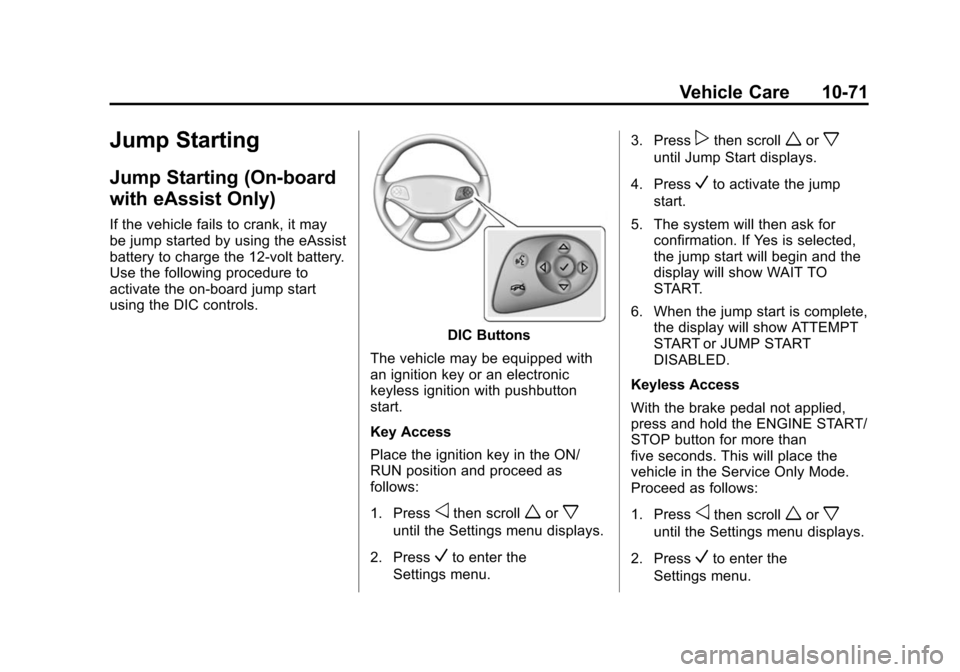
DIC Buttons
The vehicle may be equipped with
an ignition key or an electronic
keyless ignition with pushbutton
start.
Key Access
Place the ignition key in the ON/
RUN position and proceed as
follows:
1. Press
othen scrollworx
until the Settings menu displays.
2. Press
Vto enter the
Settings menu. 3. Press
pthen scrollworx
until Jump Start displays.
4. Press
Vto activate the jump
start.
5. The system will then ask for confirmation. If Yes is selected,
the jump start will begin and the
display will show WAIT TO
START.
6. When the jump start is complete, the display will show ATTEMPT
START or JUMP START
DISABLED.
Keyless Access
With the brake pedal not applied,
press and hold the ENGINE START/
STOP button for more than
five seconds. This will place the
vehicle in the Service Only Mode.
Proceed as follows:
1. Press
othen scrollworx
until the Settings menu displays.
2. Press
Vto enter the
Settings menu.
Page 346 of 422
Black plate (72,1)Chevrolet Impala Owner Manual (GMNA-Localizing-U.S./Canada-5772216) -
2014 - 2nd crc - 5/14/13
10-72 Vehicle Care
3. Presspthen scrollworx
until Jump Start displays.
4. Press
Vto activate the jump
start.
5. The system will then ask for confirmation. If Yes is selected,
the jump start will begin and the
display will show WAIT TO
START.
6. When the jump start is complete, the display will show ATTEMPT
START or JUMP START
DISABLED.
If the vehicle is started, the
on-board jump start function will be
automatically disabled. If the vehicle
cranks but does not start, the
procedure may be repeated again.
If the vehicle start is still
unsuccessful, the jump start can be
attempted using the following jump
starting procedure under “Jump
Starting (with or without eAssist).”
On-board jump starting may be
unavailable due to the 12-volt
battery charge level, the eAssist battery charge level, power
capability, or an issue with the
eAssist system. In these cases, the
display will not be available because
of the power issue, or the DIC will
display JUMP START DISABLED
SEE OWNERS MANUAL.
Jump Starting (with or
without eAssist)
For more information about the
vehicle battery, see
Battery on
page 10-27.
If the battery has run down, try to
use another vehicle and some
jumper cables to start your vehicle.
Be sure to use the following steps to
do it safely.
{Warning
Batteries can hurt you. They can
be dangerous because:
.They contain acid that can
burn you.
(Continued)
Warning (Continued)
.They contain gas that can
explode or ignite.
.They contain enough
electricity to burn you.
If you do not follow these steps
exactly, some or all of these
things can hurt you.
{Caution
Ignoring these steps could result
in costly damage to the vehicle
that would not be covered by the
vehicle warranty. Trying to start
the vehicle by pushing or pulling it
will not work, and it could damage
the vehicle.
The vehicle has a battery cover
which must be removed to gain
access to the battery for jump
starting.