General information
Ensure that the battery is sufficiently charged
to achieve the full battery life.
It may be necessary to charge the battery in
the following cases:▷When the vehicle is frequently used to
drive short distances.▷When the vehicle has not been driven for
more than one month.
Starting aid terminals
Only charge using the starting aid terminals,
refer to page 257, in the engine compartment
while the engine is switched off.
Power failure
After a temporary power loss, some equipment
needs to be reinitialized.
Individual settings need to be reprogrammed:
▷Seat and mirror memory: store the posi‐
tions again, refer to page 48.▷Time: update, refer to page 75.▷Date: update, refer to page 76.▷Radio station: save again, refer to
page 166.▷Navigation system: wait for the navigation
system to be operational.▷Panoramic glass sunroof: it may only be
possible to tilt the roof. Have the system
initialized by the service center.▷Digital compass: recalibrate, refer to
page 115.▷xDrive: the system automatically initializes
as you drive. During this time, indicator
lamps light up. If the lamps do not disap‐
pear during the current trip, have the sys‐
tem checked.
Disposing of old batteries
Have old batteries disposed of by your
service center or bring them to a recy‐
cling center.
Maintain the battery in an upright position for
transport and storage. Secure the battery so
that it does not tip over during transport.
Fuses Replacing fuses
Never attempt to repair a blown fuse and
do not replace a defective fuse with a substi‐
tute of another color or amperage rating; this
could lead to a circuit overload, ultimately re‐
sulting in a fire in the vehicle.◀
Access to fuse box:
1.Open the glove compartment.2.Release the damper from the bottom
holder by applying pressure toward the
front, arrow 1.3.Unlock the glove compartment by pressing
on both tabs, arrows 2, and fold down.
A pair of plastic tweezers is found on the cur‐
rent distributor.
Information on the fuses can be found on the
back of the cover.
Spare fuses are available from the service cen‐
ter.
Seite 254MobilityReplacing components254
Online Edition for Part no. 01 40 2 957 353 - X/14
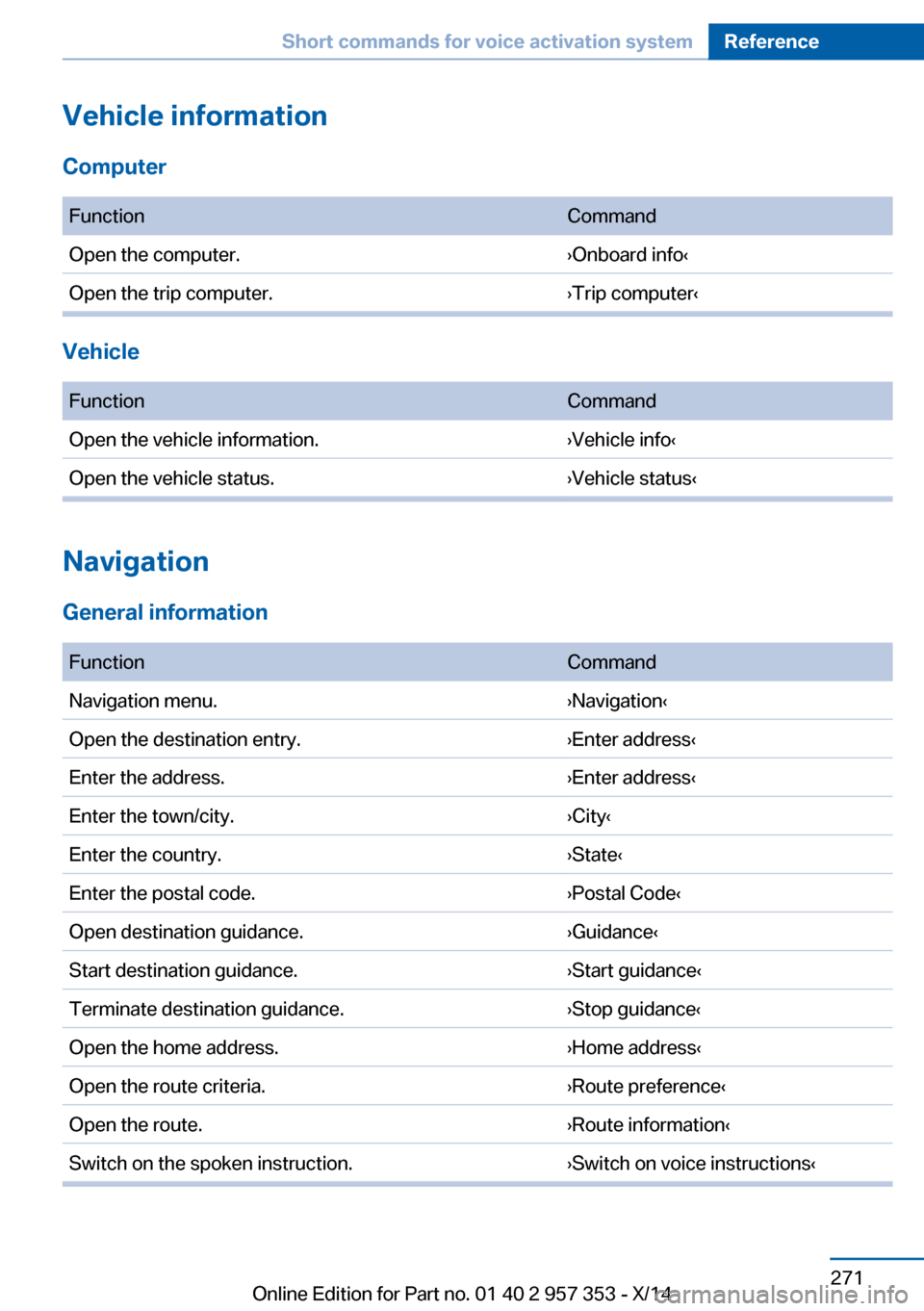
FunctionCommandSplit screen, facing the direction of travel.›Split screen map in direction of
travel‹Split screen, perspective.›Split screen perspective‹Split screen, expanded intersection zoom.›Splitscreen Exit ramp view‹Split screen scale...feet.›Split screen scale ... feet‹ e.g., split
screen scale 100 feetSplit screen scale...meters.›Split screen scale ... meters‹ e.g.,
split screen scale 100 metersSplit screen scale...kilometers.›Split screen scale ... kilometers‹ e.g.,
split screen scale 5 kilometersSplit screen scale...miles.›Split screen scale ... miles‹ e.g., split
screen scale 5 milesSplit screen, highlight the traffic situation.›Split screen, Traffic conditions‹Split screen, computer.›Split screen on board info‹Split screen, trip computer.›Splitscreen trip computer‹Split screen, scale automatically.›Split screen automatic scaling‹
Destination guidance with intermediate destinations
FunctionCommandEnter a new destination.›Enter address‹Trip list.›Stored trips‹
Radio
FM
FunctionCommandOpen a frequency.›Frequency ... megahertz‹ e.g.,
93.5 megahertz or frequency 93.5Open the radio.›Radio‹Open the FM stations.›F M‹Seite 273Short commands for voice activation systemReference273
Online Edition for Part no. 01 40 2 957 353 - X/14
Treble, tone 164
Trip computer, refer to Dis‐ plays on the Control Dis‐
play 74
Trip-distance counter, refer to Trip odometer 71
Triple turn signal activa‐ tion 62
Trip odometer 71
Trips, planning 151
Trunk, refer to Cargo area 118
Turning circle, refer to Dimen‐ sions 268
Turning lamps, refer to Adap‐ tive Light Control 84
Turn signal– Indicator/warning lamp 14
Turn signals 62
Turn signals
– Bulb replacement 251– Bulb replacement, front 251
Turn signals, triple turn signal
activation 62
U Uniform Tire Quality Grading/ UTQG 236
Unintentional alarms, avoid‐ ing 40
Units
– Average fuel consump‐
tion 75– Temperature 75
Units of measure, changing
on Control Display 75
Universal remote control 113
Unlocking
– From the outside 32– Setting the unlocking char‐
acteristics 32– Tailgate 37– Without remote control, re‐
fer to Comfort Access 37
Unlocking, from the inside 35
Unlocking, hood 241
Updates made after the edito‐
rial deadline 6
Update, software 191
Upholstery care 262
USB audio interface 185
USB interface 123
V
Vacuum cleaner, connecting, refer to Connecting electri‐
cal devices 117
Vanity mirror 117
Vehicle– Identification number 196
Vehicle battery, chang‐
ing 253
Vehicle, breaking in 130
Vehicle care 262
Vehicle care, refer to Care 261
Vehicle equipment 6
Vehicle identification number,
refer to Identification num‐
ber in the engine compart‐
ment 240
Vehicle jack 253
Vehicle paint 262
Vehicle storage 264
Vehicle, switching off 59
Vehicle wash 261
Ventilation 111
Ventilation
– Draft-free 111
Ventilation, refer to Parked-
car ventilation 111
Version of the navigation data 142
Video playback 176
Voice activation
– Navigation 150
Voice activation, short com‐
mands 270
Voice activation system 25
Volume, setting 164
W
Warning and indicator lamps 15
Warning messages, refer to Check Control 80
Warning signal volumes 165
Warning triangle 256
Washer/wiper system 62
Washer/wiper system, rain sensor 63
Washer/wiper system, washer fluid 65
Washer/wiper system, wind‐ shield washer nozzles 64
Washer fluid 65
Washer fluid reservoir 65
Washing, vehicle 261
Waste tray, refer to Ash‐ tray 117
Water on roads, refer to Driv‐ ing through water 131
Weights 268
Welcome lamps 83
Wheelbase, refer to Dimen‐ sions 268
Wheel change 253
Wheels and tires 230
Wheels, changing 237
Wheels, Flat Tire Monitor FTM 91
Wheels, Tire Pressure Moni‐ tor TPM 93
Width, refer to Dimen‐ sions 268
Window, Convenient opera‐ tion 32
Windows 40
Windows– Safety switch 41
Windows, defrosting and de‐
fogging
– Automatic climate con‐
trol 110
Windows, pinch protec‐
tion 41
Windshield, cleaning 64
Seite 290ReferenceEverything from A to Z290
Online Edition for Part no. 01 40 2 957 353 - X/14