2014 AUDI TT ROADSTER ESP
[x] Cancel search: ESPPage 62 of 244
60 Seats and stor age
Seats and storage
General recommen
dations
Why is your seat adjustment so
important?
The safety belts and the airbag system can
only provide maximum protection if the front
seats are correctly adjusted.
There are various ways of adjusting the front
seats to provide safe and comfortable support
for the driver and the front passenger. Adjust
you r seat prope rly so that :
- you can easily and quickly reach all the
switches and controls in the instrument
panel
-your body is properly supported thus reduc
ing physical stress and fatigue
- the safety be lts and airbag system can offer
maximum protection
¢ page 109.
In the following sections, you will see exactly
how you can best adjust your seats .
There are special regulations and instructions
for installing a child safety seat on the front
passenger's seat. Always heed the informa
tion regarding child safety provided in
¢ page 130, Child Safety.
A WARNING
Incorrect seating position of the driver and
all other passengers can result in serious
personal injury.
- Always keep your feet on the floor when
the vehicle is in motion -never put your
feet on top of the instrument panel, out
of the window or on top of the seat cush
ion! This applies especially to the passen
gers .
If your seating position is incorrect
you increase the risk of injury in the case
of sudden braking or an acc ident.
If the
airbag inflates and the seating position
is incorrect this could result in personal
injury or even death.
- It is important for both the driver and
front passenger to keep a distance of at least 10
inches (25 cm) between them
selves and the steering wheel and/or in
strument panel. If you're sitting any
closer than this, the airbag system can not protect you properly . In addition to
this, the front seats and head restraints
must be adjusted to your body height so
that they can give you maximum protec
tion.
- Always try to keep as much distance as
possible between yourself and the steer
ing wheel or instrument panel.
- Do not adjust the driver's or front pas
senger's seat whi le the vehicle is moving.
Your seat may move unexpectedly, caus
ing sudden loss of vehicle control and
personal injury. If you adjust your seat
while the vehicle is moving, you are out of position.
Driver's seat
The correct seat position is important for safe
and relaxed driving.
We recommend that you adjust the driver's
seat in the following manner :
.,. Adjust the seat in fore and aft direction so
that you can easily push the peda ls to the
floor whi le keeping your knee slightly bent
i::> A in Why is your seat adjustment so im
portant? on page 60 .
.,. Adjust the seatback so that when you sit
with your back against the seatback , you can
still grasp the top of the steering wheel.
.,. Position the head restraint according to the
occupant 's height
<=:> page 63 . For maxi
mum protection, the top of the head re
straint shou ld be at least at eye level, pref
erably higher and ideally level with the top
of the head
¢ page 95, fig. 102.
A WARNING "--
Never place any objects in the driver's foot-
well. An object could get into the pedal
area and interfere with pedal function. In
case of sudden braking or an accident, you
would not be able to brake or accelerate!
Page 64 of 244
62 Seats and storage
seating position and improperly posi
tioned safety be lts!
Power seats
Adjustment switches
App lies to vehicles: wit h power seats
The operating logic for the switches corre
sponds to the construction and function of
the seat.
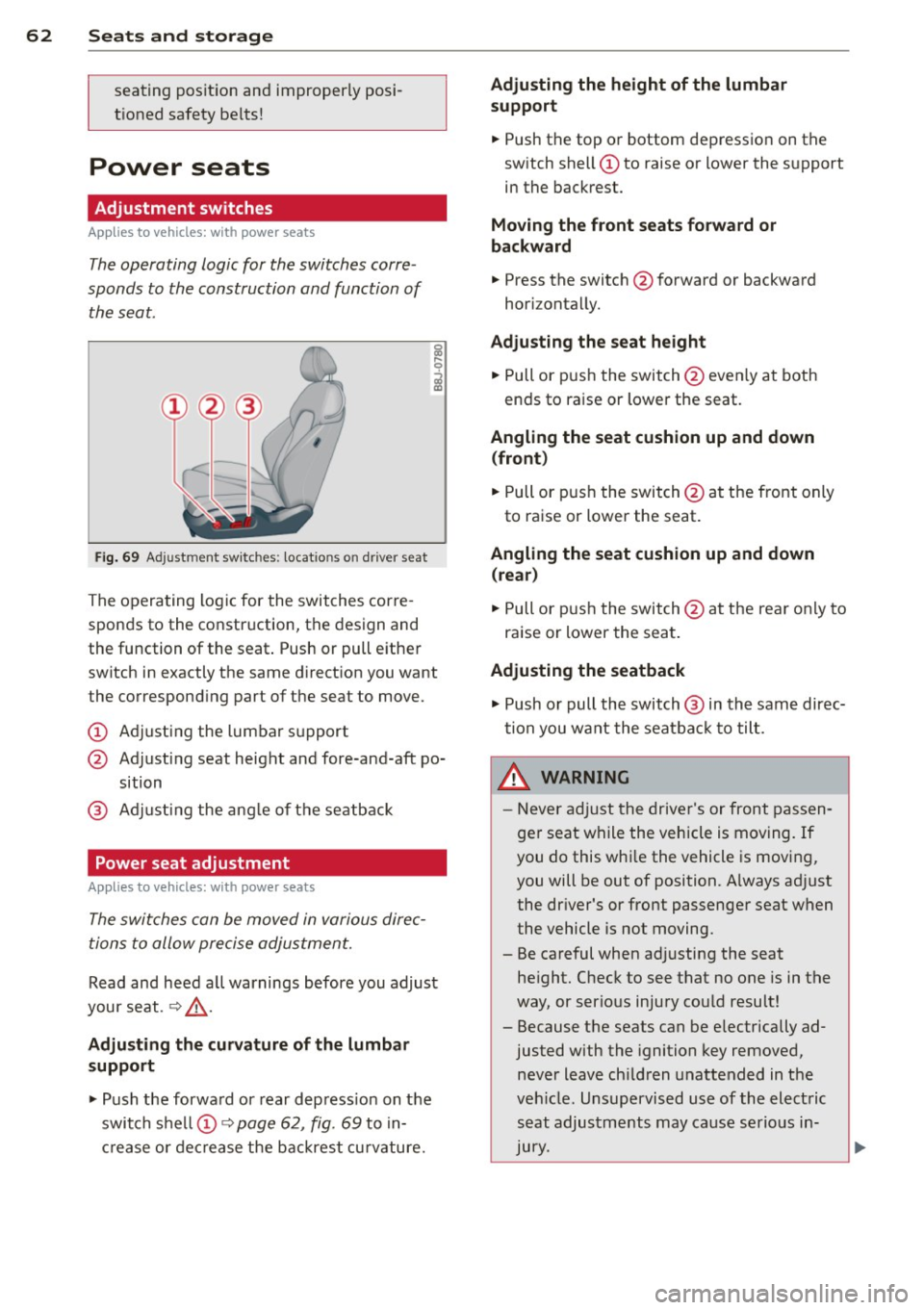
Fig. 69 Adjustment switches: locations on driver seat
The operating logic for the switches corre
sponds to the construction, the design and
the function of the seat. Push or pull either
switch in exactly the same direction you want
the corresponding part of the seat to move.
CD Adjusting the lumbar support
@ Adjusting seat height and fore-and-aft po
sition
@ Adjusting the angle of the seatback
Power seat adjustment
Applies to vehicles: with power seats
The switches can be moved in various direc
tions to allow precise adjustment.
Read and heed all warnings before you adjust
your seat. ¢&_ .
Adjusting the curvature of the lumbar
support
.,. Push the forward or rear depress ion on the
switch shell CD¢
page 62, fig. 69 to in
crease or decrease the backrest curvature.
Adjusting the height of the lumbar
support
.,. Push the top or bottom depression on the
switch shell CD to raise or lower the support
in the backrest.
Moving the front seats forward or
backward
.,. Press the switch @forward or backward
horizontally.
Adjusting the seat height
.,. Pull or push the switch @even ly at both
ends to raise or lower the seat.
Angling the seat cushion up and down (front )
.,. Pull or push the switch @at the front only
to raise or lower the seat.
Angling the seat cushion up and down (rear)
.,. Pull or push the switch@at the rear only to
raise or lower the seat .
Adjusting the seatback
.,. Push or pull the switch @ in the same direc
tion you want the seatback to tilt.
,&. WARNING
-Never adjust the driver's or front passen
ger seat while the vehicle is moving.
If
you do this while the vehicle is moving,
you will be out of position. A lways ad just
the dr iver's or front passenger seat when
the vehicle is not moving.
- Be careful when adj usting the seat
height. Check to see that no one is in the
way, or serious injury could result!
- Because the seats can be e lectrically ad
justed with the ignition key removed,
never leave ch ildren unattended in the
vehicle. Unsupervised use of the electric
seat adjustments may cause serious in
Jury.
Page 78 of 244

76 On the road
On ly afte r th e ve hic le has come to com
plete stop, shou ld you f irm ly set t he park
ing b rake and either move the selector lev
er i nto "P".
Parking
P a rkin g
"' Stop the vehicle using the brake pedal.
"' Set the parki ng brake firmly .
"' Swi tc h off the engine.
"' Mov e the selector lever into the P pos ition
~ A -
.. When on incl ines or decli nes, turn the steer
ing wheel so that the vehicle will roll into
the curb if it begins to move .
A WARNING
This is how you can reduce the risk of in
jury when leaving your veh icle.
- Never park the vehicle where it can come
in contact with dry grass, spilled fuel or
any other flammable mater ials.
- Never allow anyone -especia lly small
children -to remain in the vehicle when
it is locked. Locked doors make it more
difficult for rescuers to access the pas
senger compartment in the event of an
eme rgency. Danger to life!
- Never leave children unsupervised in the
vehicle . Children could re lease the park
ing brake o r move the gea rshift lever out
of gear. The vehicle could start to roll
away and ca use an accident.
- N o matter wha t the season is, the tem
perature in a par ked vehicle can rea ch
dangero us levels .
Starting on hills
Applies to vehicles: wit h hill h old ass ist
H ill hold assist ma kes it easie r to sta rt on
h ill s.
The system is act ivated when the brake pedal
i s depressed
for a few s econds .
After releasing the brake pedal, the brake
power is held for a brief moment to prevent
the vehicle from rolling back when start ing . At
th is time, you can easi ly beg in to move your
vehicle.
A WARNING
-- If you did not begin moving immed iate ly
after releasing the brake pedal, under
c e rtain ci rcumstances, the vehicle would
begin to ro ll backwa rd. Depr ess the
b rake ped al immedi ately o r engage the
hand brake .
- Should t he e ngine sta ll, dep ress the
b ra ke ped al immediate ly or eng age the
hand b rake .
- I n or der to prevent the vehicle from roll
ing back unintentionally when s tarti ng in
s top -and-go traffic, keep the brake pedal
depressed for a few seconds before driv
ing off.
(J} Tips
You can find o ut if yo ur vehicle is eq uipped
with "Hill hold ass ist" at an autho rized
A udi dealersh ip.
Speed warning system
Overview
The speed warning system helps you to keep
your driving speed below a set speed limit.
The speed warn ing system warns the driver if
he exceeds a previous ly stored max imum
speed . A warning tone will sound as soon as
the ve hicle speed exceeds the set speed by
about 3 mph (3 km/h). At the same time, a
warning symbo l appea rs in the display.
The speed warn ing system has
two warning
thr esho lds
that f unction independently of
each other and that have somewhat different
purposes:
Speed warning 1
You can use speed warning 1 to set the maxi mum speed while you are driving . This setting
will remain in effect unti l yo u tur n off the ..,.
Page 80 of 244

78 On the road
Speed warning 2: setting a speed limit
Switches in the wiper arm are used to operate
warning threshold
2 .
'----I ®
Fig. 85 Wiper lever: Tr ip computer con trols
To store maximum speed
>Turnoff the ignition.
> Briefly press the button in the instrument
cl uster ¢
page 77, fig. 84. The odometer
and the digital clock are now illuminated .
> Press the button for at least 2 seconds . The
currently stored maximum speed appears in
the display
or the crossed out symbol for
warning threshold 2, if no max imum speed
was set previously.
> Press the function selector sw itch in the
wipe r lever @¢
fig. 85 up or down to
change the set value. Values run up or dow n
i n steps of 6.2 mph (10 km/h).
To delete maximum speed
>Turnoff the ignit ion.
> Briefly press the button in the instrument
cluster <:::>
page 77, fig . 84 . The odometer
and the digital clock are now illumi nated.
> Press the button fo r at least 2 seconds . The
cu rrently stored maxim um speed appears in
the display.
> Press the reset button in the wiper lever ®
<:::>
fig . 85 until the crossed out speed warn
ing symbol for warning threshold 2 appears
i n the display.
A few seconds after the adjustment is com
pleted, the illumination for the odometer and
the dig ital clock will go out.
(D Tips
This warning threshold can a lso be con
trolled thro ugh the tr ip computer
¢ page 25, Navigating the menu.
Cruise control
Switching the system on
The cruise control system makes it possible to
drive at a constant speed starting at 20 mph (30 km/h) .
®-
Fig. 86 Contro l leve r with set b utton
Fig. 87 Display : Se lecte d speed
> Pull the lever to position (D <:::> fig. 86 to
switch the system on.
> Dr ive at the speed you w ish to set.
> Press button @ to set that speed.
.., ....
i
The display <:::> fig. 87 will show the set speed .
The display may vary depending on the type of
display in your vehicle. The indicator light
M;ll)~14 (US model)/ . (Canadian model) will
also light up in the instrument cluster .
A WARNING
- Always pay attention to traffic even when
the cruise control is switched on. You are
always responsib le for your speed and
Page 82 of 244

80 On the road
Audi magnetic ride
Applies to vehicles: with magnetic ride
Damping can be adjusted to the driver's pref
erence and it adapts automatically to the cur
rent driving situation.
Fig. 88 Center console: Switch for Audi magnetic r ide
.,. Press the sw itch ~ fig. 88 to turn sport set-
ting on or off.
Aud i magnetic ride is an electronically con
trolled damping system. This chassis system
assists the driver by adapting to the particular
situation through imperceptible control proc
esses. The
damping provides individual modu
lation of damping forces. For example, with
damping characteristics set to provide greater
comfort, damping is set somewhat harder for
a brief period only as required, when rounding
a curve and when braking.
Standard setting
Select the standard setting if you prefer a sus
pension setting emphasizing comfort.
Sport setting
Select the sport setting if you prefer a sporty
suspe nsion setting . The LED in the switch
8
comes on to indicate sport setting.
@ Tips
The warning/indicator light 8 in the instru
ment cluster comes on in the event of a
malfunction .
Drive to the closest author
ized Audi dealer as soon as possible and
have the malfunction repaired.
Sport mode
Applies to vehicles: with Sport button
Fig. 89 Button in the center console
.,. To switch sport mode on, press the button
in the center console. The indicator light
turns on .
.,. To switch sport mode off, press the button
in the center console again. The indicator
light turns on .
A more agile and sporty driving style is possi
ble when driving the vehicle in "sport mode".
T his mode affects throttle response and the
sound of the engine and the damping charac
teristics of the Audi magnetic ride for dynamic
suspension tuning .
@ Tips
If there is a malfunction in the retractable
rear spoiler* or the Audi magnetic ride*, it
may not be poss ible to activate sport
mode.
Acoustic parking system
Rear acoustic park assist
Applies to vehicles: with 4-channel acoustic park assist
Acoustic park assist gives a warning about
obstacles behind the vehicle.
Description
T he rear acoustic park ass ist (4-channel
acoustic park assist) determines the distance
of the vehicle from an obstacle using ultra
son ic sensors. The sensors are in the rear
bumper. The volume and the pitch of the
Page 95 of 244
.. Fasten your safety belt and wear it properly.
Also instruct your passengers to fasten their
safety belts properly ¢
page 101.
What impairs driving safety?
Safe driving is directly related to the condi
tion of the vehicle, the driver as well as the
driver's ability to concentrate on the road
without being distracted.
The driver is responsible for the safety of the
veh icle and a ll of its occupants . If your ability
to drive is impaired, safety risks for everybody
in the vehicle increase and you also become a
hazard to everyone else on the road ¢
,&..
Therefore:
.,. Do not let yourself be distracted by passen
gers or by us ing a cellular telephone.
.. NEVER drive when your driv ing ability is im
paired (by medicat ions, alcohol, drugs, etc.) .
.. Observe all traffic laws, ru les of the road
and speed limits and plain common sense.
.. ALWAYS adjust your speed to road, traffic
and weather conditions.
.. Take frequent breaks on long trips. Do not
drive for more than two hours at a stretch .
.. Do NOT drive when you are tired, under
pressure or when you are stressed.
A WARNING
Impaired driving safety increases the risk
of serious personal injury and death when
ever a vehicle is being used.
Drivin g Sa fely 93
Proper occupant
seating positions
Proper seating position for the driver
The proper driver seating position is impor
tant for safe, relaxed driving.
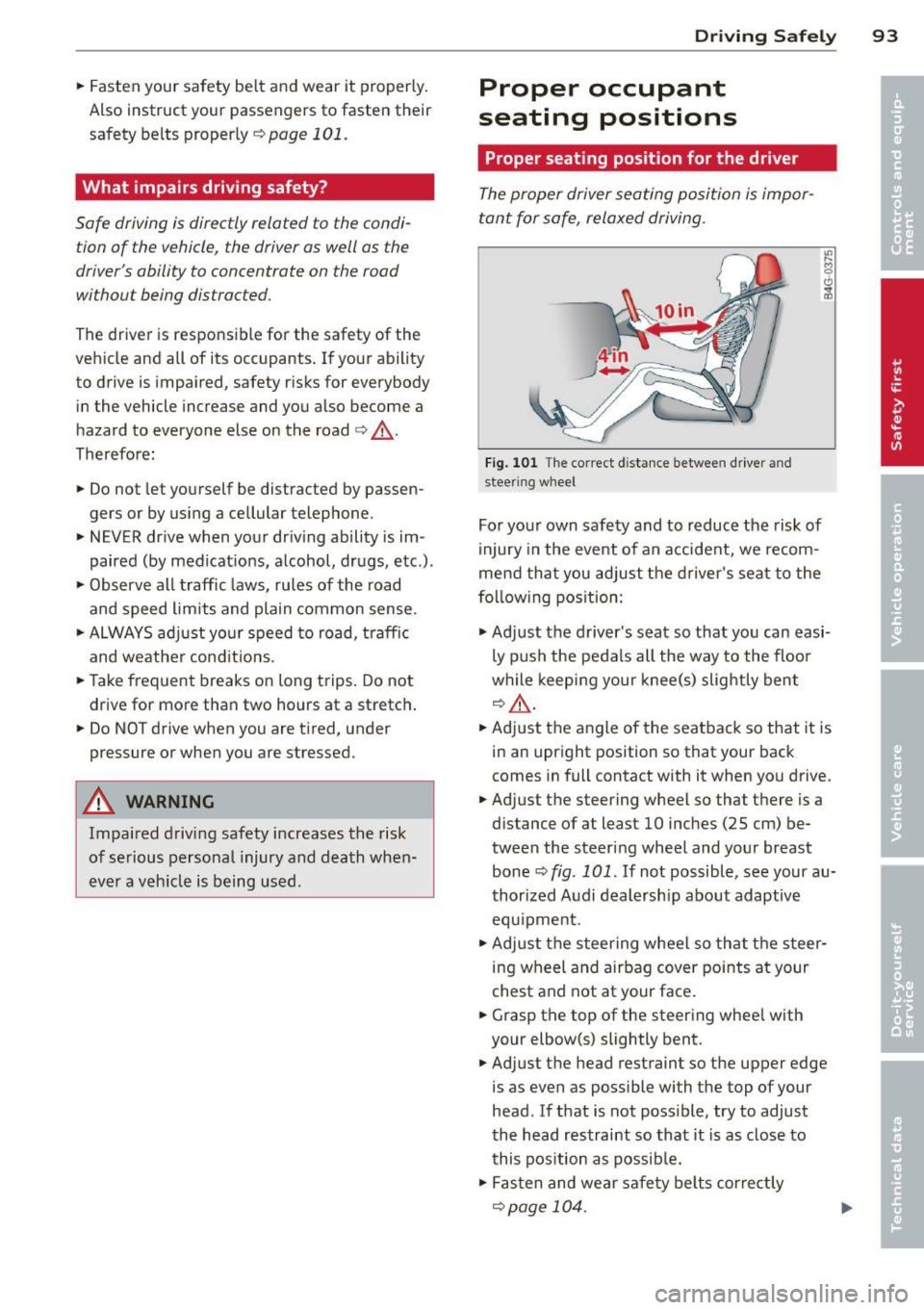
Fig. 101 The correct d istance between driver an d
steer ing wheel
For your own safety and to reduce the risk of
injury in the event of an accident, we recom
mend that you adjust the driver's seat to the
f o ll ow ing pos ition:
.,. Adjust the driver's seat so that you can easi
ly push the pedals all the way to the floo r
while keeping your knee(s) slightly bent
q&_ ,
.. Adjust the angle of the seatback so that it is
in an upright position so that your back
comes in full contact with it when you drive.
.. Adjust the steering wheel so that there is a
distance of at least 10 inches (25 cm) be
tween the steering wheel and your breast
bone¢
fig. 101. If not possible, see your au
thorized Audi dealership about adaptive
equ ipment .
.. Adjust the steering wheel so that the steer
ing wheel and airbag cover points at your
chest and not at your face .
.. Grasp the top of the steering whee l with
your elbow(s) slightly bent .
.. Adjust the head restraint so the upper edge
is as even as possible with the top of your
head . If that is not poss ible, try to adjust
the head restraint so that it is as close to
this pos ition as possib le .
.. Fasten and wear safety belts correctly
qpage 104.
Page 98 of 244

96 Driving Safely
-Never attempt to adjust head restraint
while driving. If you have driven off and
must adjust the driver headrest for any
reason, first stop the vehicle safely be
fore attempting to adjust the head re straint.
- Children must always be properly re
strained in a child restraint that is appro
priate for their age and size
Q page 130.
Examples of improper seating positions
The occupant restraint system can only re
duce the risk of injury if vehicle occupants are
properly seated.
Improper seating positions can cause serious
injury or death. Safety belts can only work
when they are properly positioned on the body. Improper seating positions reduce the
effectiveness of safety belts and will even in
crease the risk of injury and death by moving
the safety belt to critical areas of the body.
Improper seating positions also increase the
risk of serious injury and death when an air
bag deploys and strikes an occupant who is
not in the proper seat ing position. A driver is
responsible for the safety of all vehicle occu
pants and especially for children . Therefore:
.. Never allow anyone to ass ume an incorrect
seat ing position when the vehicle is being
used
Q A .
The following bullets list only some sample
positions that will increase the risk of serious
injury and death. Our hope is that these exam
ples will make you more aware of seating po
sitions that are dangerous .
Therefore, whenever the vehicle is
moving :
-never stand up in the vehicle
- never stand on the seats
- never kneel on the seats
- never ride with the seatback reclined
- never lie down on the rear seat
- never lean up against the instrument panel
- never sit on the edge of the seat
- never sit sideways -
never lean out the window
- never put your feet out the window
- never put your feet on the instrument panel
- never rest your feet on the seat cushion or
back of the seat
- never ride in the footwell
- never ride in the cargo area
A WARNING ..___
Improper seating positions increase the
risk of serious personal injury and death
whenever a vehicle is being used.
- Always make sure that all vehicle occu
pants stay in a proper seating position
and are properly restrained whenever the
vehicle is being used.
Driver and passenger
side footwell
Important safety instructions
A WARNING
-
~ -
Always make sure that the knee airbag can
inflate without interference. Objects be
tween yourself and the airbag can increase
the risk of injury in an accident by interfer
ing with the way the airbag deploys or by
being pushed into you as the airbag de
ploys.
- No persons (children) or animals should
ride in the footwell in front of the pas
senger seat. If the airbag deploys, this
can result in ser ious or fatal injuries.
- No objects of any kind should be carried
in the footwell area in front of the driv
er's or passenger's seat. Bulky objects
(shopping bags, for example) can ham
per or prevent proper deployment of the
airbag. Small objects can be thrown
through the vehicle if the airbag deploys
and injure you or your passengers.
Page 100 of 244
98 Driving Safely
• Distribute the load evenly in the luggage
compartment.
• Always place and properly secure heavy
items in the luggage compartment as far
forward as possible.
A WARNING
Improperly stored luggage or other items
can fly through the vehicle causing serious
personal injury in the event of hard brak
ing or an accident. To help reduce the risk
of serious personal injury:
- Always put objects, for example, luggage
or other heavy items in the luggage com
partment.
- Always secure objects in the luggage
compartment using the tie-down eyelets
and suitable straps.
A WARNING
Heavy loads will influence the way your ve
hicle handles. To help reduce the risk of a
loss of control leading to serious personal
injury:
-Always keep in mind when transporting
heavy objects, that a change in the cen
ter of gravity can also cause changes in
vehicle handling:
- Always distribute the load as evenly as
possible.
- Place heavy objects as far forward in
the luggage compartment as possible.
- Never exceed the Gross Axle Weight Rat
ing or the Gross Vehicle Weight Rating
specified on the safety compliance stick
er on the left door jamb. Exceeding per
missible weight standards can cause the
vehicle to slide and handle differently.
- Please observe information on safe driv
ing
!:? page 92 .
A WARNING
To help prevent poisonous exhaust gas
from being drawn into the vehicle, always
keep the rear lid closed while driving.
- Never transport objects larger than
-
those fitting completely into the luggage area because the rear lid cannot be fully
closed.
- If you absolutely must drive with the rear
lid open, observe the following notes to
reduce the risk of poisoning:
- Close all windows,
- Close the convertible top,
- Open all air outlets in the instrument
panel,
- Switch off the air recirculation,
- Set the fresh air fan to the highest
speed.
A WARNING
-Always make sure that the doors, all win-
dows, the convertible top and the rear lid
are securely closed and locked to reduce
the risk of injury when the vehicle is not
being used.
- After closing the rear lid, always make
sure that it is properly closed and locked.
- Never leave your vehicle unattended es pecially with the rear lid left open . A
child could crawl into the vehicle through
the luggage compartment and close the
rear lid becoming trapped and unable to
get out. Being trapped in a vehicle can
lead to serious personal injury.
- Never let children play in or around the
vehicle.
- Never let passengers ride in the luggage
compartment. Vehicle occupants must
always be properly restrained in one of
the vehicle's seating positions.
@ Tips
- Air circulation helps to reduce window
fogging. Stale air escapes to the outside
through vents in the trim panel , on the
left side of the luggage compartment.
Be sure to keep these slots free and
open.
- The tire pressure must correspond to the
load. The tire pressure is shown on the
tire pressure label. The tire pressure la bel is located on the driver's side B-pillar .
The tire pressure label lists the ..,