2014 AUDI S4 automatic transmission
[x] Cancel search: automatic transmissionPage 98 of 296

96 Transmission
Manual shift program
Appl ies to vehicles: with multitronic/S tronic/t iptronic
Using the manual shift program you can
manually select gears .
Fig . 10 6 Center co nsole: s hifting the gears manu ally
Fig . 10 7 Steer ing w heel: Shift buttons•
Gear selection with selector lever
"' N
N
~
" a> CD
The tiptron ic mode can be selected e ither with
the vehicle stationa ry or on the move.
• Push the selector lever to the right from 0/
S. An M appears in the instrument cl uster
display as soon as the transmission has
shifted.
• To u pshi ft, p ush the selec tor leve r forward
to the pl us posi tion
0 r:::,fig . 106.
• To downshift, push the leve r to the minus
p osition
0 -
Gear selection with paddle levers*
The s hift bu ttons are a ct ivated when the se
l ec to r lever is in D/S or the t ip tr on ic manu al
shift p rogram .
• To ups hift, touch the button on the right
0
C:, fig . 107.
• To downshift, touc h t he bu tton on the left
0 -
• If you do not press a shift but ton within a
s h ort time whi le in the D/S position, th e transmission will return to a
utomatic mode .
To keep shifting using t he sh ift bu ttons,
move the selector lever to the r ight out of
the D/S pos ition.
T he t ransm iss io n automatically sh ifts up or
down before critical engine speed is reached .
T he transm iss io n only a llows manual sh ifting
when the engine speed is w it hi n the pe rmit
ted range .
@ Tips
-Whe n you s hift into the ne xt l ower ge ar,
the transmission will downshift only
w hen the re is no poss ib ility of ove r-rev
ving the engine .
- W hen the kic k-down comes on, the
transm ission w ill shift d ow n to a lower
gear, depending on vehicle and engine
speeds.
- Tip tro nic is inoperative when the trans
m ission is in the fai l-safe mode .
Kick-down
Applies to vehicles : wit h mult itronic/S t ro ni c/tip tro nic
Kick-down enables maximum acceleration.
Applies to vehicles with a multitronic
transmission
W hen you depress the accelerator peda l be
yond the resistance point, the transm ission
downsh ifts into a lower gear ratio depend ing
on the vehicle speed and engine speed. As
lo ng as the accelerator pedal is depressed, the
engine speed is automatically regulated for
maximum acceleration .
Applies to vehicles with a S tronic-/
tiptronic transmission
When you depress the accelerator peda l be
yond the resistance point, the automatic transmission downsh ifts into a lowe r gear, de
pend ing on veh icle s peed an d eng ine speed .
T he upsh ift into t he nex t higher gea r takes
place once the max imum speci fied engine
s p eed is reached .
Page 115 of 296

Audi drive select Driving settings
Introduction
App lies to vehicles: with Audi drive select
Drive select provides the possibility to experi
ence diffe rent types of vehicle sett ings in one
vehicle. For instance, using the three
Com
fort, Auto and Dynamic modes, the driver can
switch from a sporty to a comfortab le driving
mode with the press of a button.
Addit ionally, in vehicles with
MM I*, the vehi
cle setup for
Individual* mode can be cus
tomized by you. This makes it possib le to
combine settings such as a sporty engine tun
ing with comfortable steering.
A WARNING
Improper use of the Audi drive select can
cause collisions, other acc idents and seri
ous personal injury.
Description
Applies to vehicles: with Audi drive select
The vehicle setup in each mode depends on
the vehicle's features . However, the engine,
automatic t ransmission* and steering are al
ways involved.
-
Engine and automatic transmission*
Depending on the mode, the engine and the
automatic transmission respond quicker or in
a more ba lanced manner to acce lerator pedal
movements. In the sporty dynamic mode, the
automatic transmission shifts at higher RPMs .
Steering
The steering adapts in terms of steering effort
and steering ratios . Indirect steer ing that
moves easily, like the steering in comfort
mode , is best su ited to long dr ives on a high
way. In contrast, dynamic mode prov ides
sporty, di rect steering.
The follow ing applies to vehicles with dynam ic
steer ing*: the steering ratio changes based on
vehicle speed in order to maintain optimum
Audi drive select 113
steering effort for the driver at all times. This
sets the steering to be less sensitive at higher
speeds in order to provide improved vehicle
control. At reduced speeds, however, steering
is more direct in order to keep the steering ef
fort as minimal as possible when the driver is
maneuveri ng the veh icle . At low and average
speeds, dynamic steering addit iona lly pro
vides more responsive steering performance.
Adaptive dampers*
The adaptive dampers* use sensors to record
information regarding steering movements,
braking and acceleration operations by the
driver , road surface, driving speed, and load.
T his makes it possible to adapt damp ing to
the d riving situation v irtually i n rea l time.
Drive select also makes it possible to satisfy
the desire for sporty suspension (Dynamic)
and comfortab le suspension (Comfort) with
out giving up balanced tuning (Auto) .
Sport differential*
As a component of the all whee l dr ive system
(quattro)
~ page 192, the sport differential*
distributes the driving power to the rear axle
depending on the situation . The distribution
of power varies depending on the mode se lected. The goal is a high level of agility and
ability to accelerate on curves . The vehicle is
very respons ive to steering .
Audi adaptive cruise control*
The behavior when accelerating can be adjust
ed from comfortab le to sporty, depending on
the drive select mode. Adaptive cruise control
also responds to the driving behavior of the
vehicle ahead in a more conservative or sporty
manner .
Engine sound*
The sound of the engine is adapted to the se
lected mode and ranges from subtle to sporty.
0) Tips
-In some models, the maximum vehicle
speed can only be reached in the
Auto
and Dynamic modes.
Page 116 of 296

114 Audi drive select
-For vehicles with an automatic transmis
sion, selecting the
Dynamic mode re
su lts in sporty shifting characteristics .
The S gear position engages automati
cally.
- In vehicles that have dynamic steering*,
operating noise is heard when starting or
stopping the eng ine . This does not ind i
cate a problem .
Selecting the driving mode
Applies to vehicles: with Audi drive select
You can choose between Comfort, Auto, Dy
namic
and Individual * modes.
Fig. 126 Cen ter console: Control for Au di dri ve select
Fig. 127 MMI•: Aud i drive select
Adjusting the Individual mode
Applies to vehicles: with MMI and Aud i drive select
.,. To set the mode, press the r.:i:.~ button
~ fig. 126 multiple times until the desired
mode is displayed in the instrument cluster .
Or
.,. In the MMI", select:
ICARI function button>
Comfort, Auto, Dynamic or Individual *.
In vehicles without the MMI*, the~:/;,~ button
is found underneath the shift/selector lever .
You can change the driving mode when the ve hicle is stationary or wh ile driving . If traffic
permits, after changing modes, br iefly take
your foot off the acce lerator pedal so that the
recently selected mode is also activated for
the engine and transm ission .
Comfort -provides a comfort-oriented vehicle
setup and is suited for long drives on h igh
ways.
Auto -provides an overall comfortable yet dy
namic driving feel and is suited for every day
use.
Dynamic -gives the driver a sporty driving
feel and is suited to a sporty driving style.
Individual * -¢ page 114.
& WARNING
Pay atte ntion to traffic when operating
drive select to prevent potential risk of an
accident .
You can personally specify the vehicle setup in the MMI* .
.,. Se lect the ICAR I function button > Set indi·
vidual
control but ton. Once you select the
menu, you will automatically drive in the
in·
dividual
mode.
Systems Comfort
Engine /Transmission
balanced
Steering comfortable T
he equipment in your vehicle will determine
wh ich sett ings you can adjust. The following
table provides an overview of the characteris
tics of each driving mode .
Auto Dynamic
balanced spo
rty
balanced sporty
Page 257 of 296

~ Unscrew the va lve stem from the s pare tire .
~ Screw the tire filler hose from the compres
sor firm ly onto the valv e of the spare tire.
~ In se rt the p lug from the compress or into a
socket of the vehicle¢
page 64.
~ Switc h the compressor on .
~ Let the compressor run until the valu e speci
fied on the tire pressure label is reached ¢
page 234, fig . 190. Switch the compres
so r off afte r runn ing for 12 minutes at the
most -danger of overhea ting!
A WARNING
The compressor and the tire filler hose can
become extremely hot while they are run
ning -danger of burns!
(D Note
Switch the compressor off after running
for 12 minutes at the most -danger of
overheating! Allow the compressor to cool
down for a few minutes before you use it
again.
Changing a wheel
Before changing a wheel
Observe the following precautions for your
own and your passenger' s safety when chang
ing a wheel .
~ After you experience a tire fa ilure, pu ll the
ca r well away from moving traffic and try to
r e ach
level gro und before yo u stop ¢ LI)..
~ All p assengers sho uld leave the car and
move to a safe loca tion (for instance, beh ind
the guardrai l) ¢
A .
~ Engage the parking brake to prevent your
vehicle from ro lling un intentionally ¢
A.
~ Shift into 1st gear on vehicles with manua l
transmission, o r move the
selector lever to
the P po sition
on veh icles with au toma tic
t ransmission .
~ If you are tow ing a tra ile r: u nhi tch the trail
er from your veh icle.
~ T ake the jack ¢ page 252 and the spare tire
¢ page 253 out of the luggage compart
ment.
What do I do now? 255
A WARNING
You or your passengers could be injured
while c hanging a wheel if you do not fo l
low these safety precaut ions:
- If you have a flat tire, move a safe d is
tance off the road . T urn off the engine,
tur n the eme rg ency flashers on and use
other wa rn in g devices to a le rt othe r mo
torists.
- Ma ke sur e that passengers wait in a safe
p lace away from the vehicle and well
away from the ro ad and traffic.
- T o help prevent the vehicle from moving
suddenly and possib ly sli pping off the
j a ck, alw ay s full y se t the par king br ake
an d block the wheel d iagonally opposi te
the whee l be ing changed w ith the fol d
ing chocks or other objects. When one
front wheel is lifted off the ground, plac ing the Automatic Transmission in "P"
(Park) will
not prevent the vehicle from
moving .
- Before you change a wheel, be sure the
grou nd is level and firm. I f necessary,
use a sturdy board unde r the jack .
- Always sto re the vehicle tool kit, the
jack* and the replaced tire in the luggage compa rtment
¢page 134.
(D Note
If you are changing the whee l on a steep
i ncline, use a rock or s imilar object to
block the opposite whee l to prevent the
vehicle from moving.
(D Tips
Obey all laws.
Changing a wheel
When you change a wheel , follow these
quence described below step-by-step and in
exactly that order .
l. Remove the decorative wheel cover* or
-
the wheel bolt caps* . For more details see..,.
•
•
Page 269 of 296
@ Tips
The discharged battery must be properly
connected to the vehicle's electrical sys
tem. When jump starting or charg ing the
battery, never connect the negative
ground cable to the battery negat ive post
because the ba ttery manager system must
be ab le to detect the battery's state of
charge. Always connect the negative
g round cab le to the negative ground pos t
of t he battery manager cont ro l unit.
Use of jumper cables
Make sure to connect the jumper coble
clomps in exactly the order described b elow!
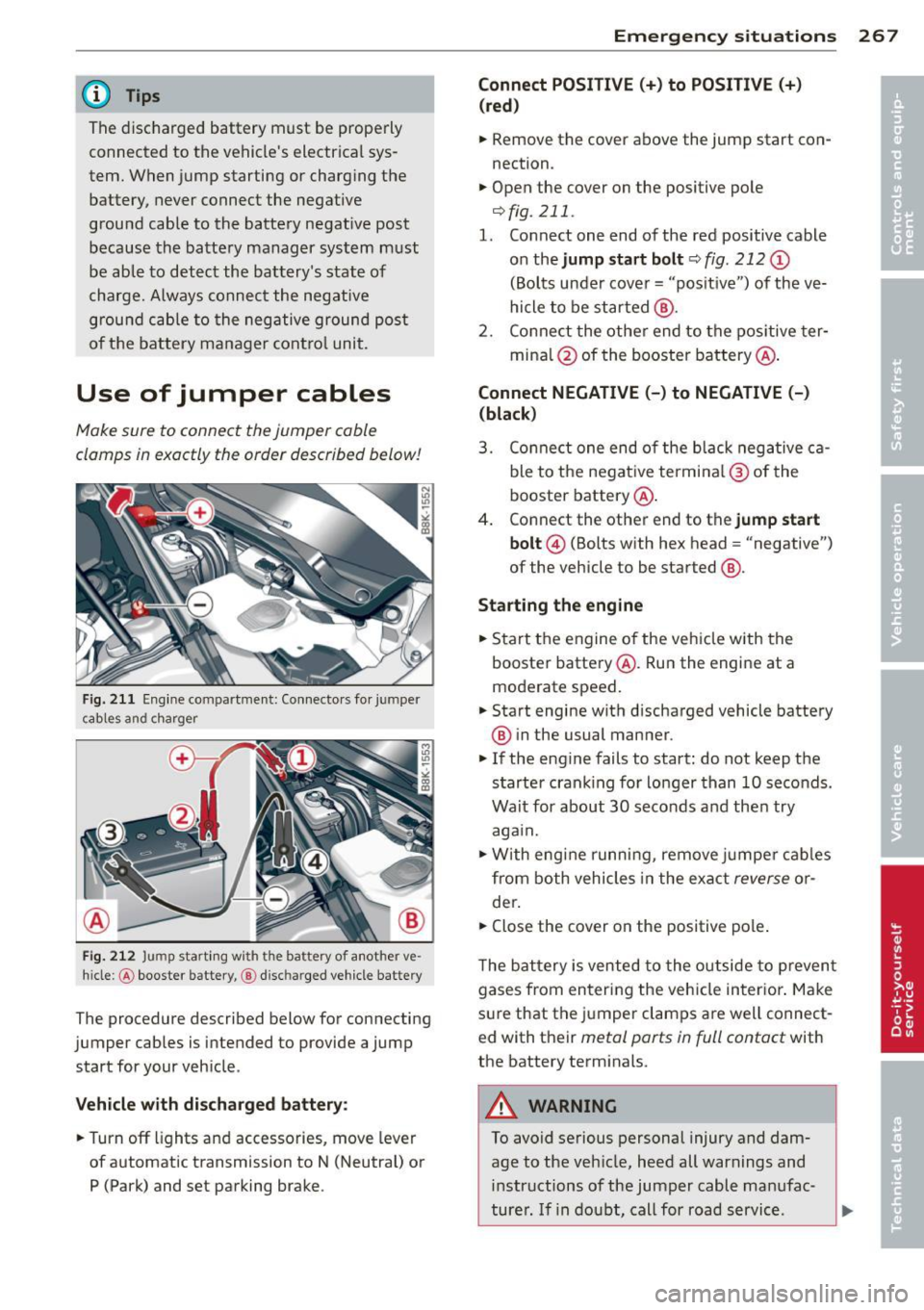
Fi g. 21 1 Eng ine co mpar tment: Co nnecto rs fo r jum per
c ab les a nd c har ge r
F ig. 212 Jump start in g w ith t he ba ttery of a not her ve ·
hi cle :@ booster battery, @ disc harged veh icle battery
The procedure described below for connecting
jumper cables is intended to provide a jump
start for your veh icle .
Vehicle with di scharged battery :
~Turnoff lights and accessories , move lever
of automatic transmission to N (Neutral) or P (Park) and set parking brake .
Emergency situ ation s 267
Connect POSITIVE(+) to POSITIVE(+ )
(red )
~ Remove the cover above the jump start con
nection .
~ Open the cover on the positive pole
¢fig . 211 .
1. Connect one end of the red positive cable
on the
jump sta rt bolt c::;, fig. 212 (D
(Bolts under cove r= "posit ive ") of the ve
hicle to be started @.
2 . Conne ct the othe r end to the pos itive ter -
mina l@ of the booster battery @.
Connect NEGATIVE (-) to NEGATIVE (-)
(black )
3. Co nnect one end o f the b lack neg ative c a
ble to the nega tive te rmi na l@ of the
booster battery @.
4 . Connect the other end to the
jump start
bolt @
(Bolts with hex head = "negative")
of the vehicle to be started @.
Starting the engine
~ Start the engine of the ve hicle with the
booste r batte ry @ . Run the engine at a
moderate speed.
~ Start engine with d ischarged vehicle battery
® in the usual manner .
~ If the engine fails to start: do not keep t he
s tarter cran king for lo nger than 10 seconds .
Wait for about 30 seco nds and the n try
aga in.
~ W ith engi ne runni ng, remove jumpe r cab les
from both vehicles in the exa ct
reverse o r
der .
~ Close the cover on the positive pole .
T he b attery is vented to the o utside to p reven t
gases from en tering the veh icle in ter ior . Ma ke
s ur e that the j umper clamps a re well connect
ed with their
metal ports in full contact with
the batte ry term inals.
A WARNING
To avoid serious personal injury and dam
age to the vehicle, heed all warnings and
in structions of the jumper cable ma nufac-
turer . If i n dou bt, call for road servic e.
Ill>
Page 279 of 296

-Always make sure the transm ission se
lector lever (automatic transmiss ion) is
in "P" (Park position) or Neutral (manual
transmission) and the park brake is firm
ly appl ied .
® For the sake of the environment
-Changing the eng ine settings w ill ad
versely affect em ission levels. This is det
rimental to the environment and increas
es fuel consumption .
- Always observe env ironmental regula
tions when d ispos ing of old engine oil,
used brake fluid, dirty engine coolant,
spent batter ies or worn out t ires.
- Undeployed airbag modules and p reten
s ioners might be classified as Perchlo
rate Material -special handling may ap
ply, see www.dtsc.ca .gov/hazardous
waste/perch lorate . When the veh icle or
parts of the restraint system including
airbag modules safety belts with preten
s ioners are scrapped, all applicable laws
and regulations must be observed. Your
authorized Audi dealer is familiar w ith
these requirements and we recommend
that you have your dealer perform this
serv ice for you .
Additional accessories,
modifications and
parts replacement
Additional accessories and parts
replacement
Always consult on authorized Audi dealer be
fore purchasing accessories.
Your veh icle incorporates the latest safety de
sign featu res ensu ring a high standard of ac
tive and passive safety.
This safety could be compromised by non-ap
proved changes to the veh icle. For this reason ,
if parts have to be replaced, p lease observe
the following points when installing addition
al accessories:
Con sumer In formation 2 77
Approved Audi accessories and genuine Audi
parts are available from authorized Audi deal
er.
T hese dea lers a lso have the necessary facili
ties, tools and trained specialists to install the
parts and accessories proper ly.
A WARNING
Using the wrong spare parts or using non
approved accessories can cause damage to
the vehicle and serious persona l injury.
- Use on ly accessories express ly approved
by Audi and genuine Audi spare parts
- These parts and accessories have been
specially designed to be used on your ve
hicle.
- Never install accessories such as tele
phone cradles or beverage holders on air
bag covers or within the airbag deploy
ment zones . Do ing so will increase the
risk of injury if a irbags are triggered in an
accident!
- Before you check anything in the engine
compartment, always read and heed all
WARNINGS ~
page 214.
(D Note
-If items other than genuine Audi spare
parts, add-on equipment and accessory
items are used or if repair work is not
performed accord ing to specified meth
ods, this can result in severe damage to
your vehicle's engine and body (such as
corrosion) and adversely affect your vehi
cle's warranty .
- If emergency repairs must be performed
elsewhere, have the vehicle examined by
an authorized Audi dealer as soon as
possible.
- The manufacturer cannot be held liable
for damage wh ich occurs due to failure
to comply with these stipulations.
•
•
Page 282 of 296

28 0 Index .:..:..:..::....::.. ...:..._ ___________________________ _
A
Accessories . . . . . . . . . . . . . . . . . . . . 64, 277
AC (automatic cl imate control) ... .. .. . . 77
adaptive cruise control Vehicles with manual transmission .. . 101
Adapt ive cruise control . . . . . . . . . . . . . . . . 99
C leaning the sensor .. ... .. .. .. .... . 205
Messages . . . . . . . . . . . . . . . . . . . . . . . . 107
Request for dr iver intervention . ..... . 105
Setting the driving program .. .. .. ... 104
Adapt ive dampers .......... .... .... . 113
Adapt ive light ................ ... .... 47
Adaptive Lig ht (defective) ... .. .. .... .. 22
Adding Eng ine coolan t .................... 222
E ng ine oil . .... .. ..... ... .. .. .... . 219
Windshield washer fluid ... .. .. .... . 228
Addit ional accessories
Addit ives 277
Eng ine oil .. ............. .. .. .. .. . 219
Ad justab le steering column . ... .. .... .. 80
Adjust ing
A ir dist ribution (automatic climate con -
trol) . . . . . . . . . . . . . . . . . . . . . . . . . . . . . . 78
I ns trumen t illum inat ion . .. .. .. .. .. . . 50
Steer ing column .. ..... ... .. .. .... .. 80
Temperature (automatic climate control) 78
A irbag
War ning/ indicato r ligh ts ... .... .... .. 20
A irbag system . . . . . . . . . . . . . . . . . 146, 162
Advanced Airbag System ........ .... 150
Advanced Airbag System components . 153
Care . .. .. .. ........ ........ ..... . 159
C hil dren . ............... .. .. .. .. . 168
Ch ild restr aints ........... .. .. .. .. . 169
Components (front airbags) .. .... .. . 153
Danger of fitting a child safety seat on
the front passenger seat . . . . . . . . . . . . 147
Disposal . .... ........... .. .. .... . 159
Front airbags . . . . . . . . . . . . . . . . 150, 151
H ow do the front airbags work? . .. .. . 155
H ow many airbags does my vehicle
have? .... ................... ... . 153
H ow the Advanced Airbag System com-
po nents work together ............. 154
I mpor tan t things to know .. .. .. .. .. . 14 6 Indicator light
... ... .. ..... .... . .. 156
Monitoring . ..... .. ... ..... ... .. .. 156
PASSENGER AIR BAG OFF light ... .. .. 157
Repairs ... .... .. ............. .... 159
Safety instructions ................. 158
S ide a irbags ..... ................ . 161
S ide cu rtain airbags ........... ... .. 164
Weight-sensing mat ............... 168
When must the sys tem be inspected? 156
Alcantara Cleaning ...... ................... 207
all-wheel drive
All wheel d rive 192
Winter tires . .. .. .. ........... .. .. 246
Alternator
refer to Generator . . . . . . . . . . . . . . . . . . 17
Anti-freeze
refer to Engine coolant system ....... 221
An ti-lock brak ing system ............. 186
W arning/ind icator lights . . . . . . . . . 18 , 19
An ti-slip regulation ................ . 186
Warning/ind icator lights ........... .. 18
Anti-theft alarm warning system ... .... . 32
An ti- theft systems
El ectronic immob ilizer .. ..... .... . .. . 38
Armrest ...... .. .. .. ... ....... ... .. . 60
Ashtray .. .. .. .. .. ............. .. .. . 63
As te ris k
Wha t does i t mean when something is
marked w it h an asterisk? . . . . . . . . . . . . . . 6
Audi braking guard
refer to b ra ki ng guard .......... .. .. . 99
Audi drive select ... ............. .... 113
Adaptive dampers ................. 113
Description ...... ................ . 113
Dynam ic steer ing ................. . 113
Setting the dr iv ing mode ........ .... 114
Spo rt differential . ............. .... 113
Audi Serv ice Repair Manuals and Litera-
ture 275
AUTO Automat ic climate control . . . . . . . . . . . . 78
Automat ic headlights .......... .. .. . 47
A ut o Lock . ..... .. .. .... .... ... .. .. . 32
Automat ic be lt retractor ............. 141
Page 283 of 296

Automatic climate control Air vents ... .... .. .... ... .. .. .. .... 78
Operation . . . . . . . . . . . . . . . . . . . . . . . . . 77
Setup ... .. ................. .. .... 79
Automatic S hift Lock (ASL) . . . . . . . . . . . . 93
Automatic transmission ......... ... ... 91
Automatic S hift Lock (ASL) . . . . . . . . . . . 93
D riving .. .. ............. .... .. .. .. 9 3
E mergency mode . . . . . . . . . . . . . . . . . . . 97
E me rgency release . . . . . . . . . . . . . . . . . . 98
Kick -down . . . . . . . . . . . . . . . . . . . . . . . . . 96
M anual shift program .. ... .. .. .. .. .. 96
Remova l lock (ignition key) ... .. .. .. .. 80
Selector lever . . . . . . . . . . . . . . . . . . . . . . 92
Automatic wipe rs . . . . . . . . . . . . . . . . . . . . 53
Auto Safety Hotline ............. .... 136
Average speed . . . . . . . . . . . . . . . . . . . . . . . 25
Avoid damag ing the vehi cle .. .. .. .. .. . 195
B
Bag hooks . . . . . . . . . . . . . . . . . . . . . . . . . . 72
Battery . . . . . . . . . . . . . . . . . . . . . . . 17,225
Battery location inside the luggage com -
partment .. .. ........... .. .. .. ... 225
Charging . ................ ... ... .. 227
Important war nings when wo rking on
the battery . ................ ... ... 225
J ump starti ng ............ .... .. .. . 266
L ow . .. .. .. .. .. ........... .. .. ... 193
Replacing the ba ttery .. ... .. .. .. .. . 228
State of charge . ....... ... .. .. .. ... 193
Winter operation . ..... ... .. .. .. .. . 225
Working on the battery .... .. .. .. .. . 225
B efore dr iving ............. .... .. .. . 128
Bio-ethanol (Fuel) ..... ..... .. .. .. .. . 210
Blended gasoline ... .... ... .. .. .. .. . 209
B lower (automatic climate cont rol) . . . . . . 78
Booster seats ............. .... .. .. . 175
B rake fl uid
C hanging the brake fl uid ... .. .. .. .. . 224
Chec king the brake fluid level ... .. .. . 224
Reservoir .. ............. .... .. ... 224
What is the correct brake flu id leve l? . . 224
What should I do if the brake fluid warn-
i ng light comes o n? .. ..... .. .. .. .. . 224
Inde x 281
Brake system . ..... ... .. .. ..... ... .. 224
Anti- lock b raking system ..... ... .. .. . 19
B rake assist system .. .. ..... ... .. .. 186
Brake fluid .. .. .. ................. 224
Brake fluid specifications for refill and re-
placement ...... .. ............... 224
B rake light defective ... .. .. ... ... .. . 21
B ra ke powe r ass ist unit ............ . 189
Br akes .. .. .. .. .. .. . .............. 189
Ce ram ic bra kes . .. .... ........... .. 189
El ec tromechanica l parking brake ... .. . 85
Warning/indicator lights ..... ... .. .. . 15
Wor n brake pads symbo l . . . . . . . . . . . . . 20
B ra kin g
E mergency b ra ki ng f unction ..... .. .. . 87
braking guard . . . . . . . . . . . . . . . . . . . . . . . 99
Messages . . . . . . . . . . . . . . . . . . . . . . . . 107
Settings ........ .. ............... 106
Break -in per iod .. .. .... ............. 195
Tires ... .. .. .. .. .. ............... 195
Bul bs . ... .. .. .... .. . .. .. ..... ... .. 2 64
C
Califor nia Proposition 65 War ning . .. .. 215
B attery spec ifi c .. ............. .. .. 226
Capacities ........ .. ............... 273
Carbon pa rts
Cleaning . . . . . . . . . . . . . . . . . . . . 206, 207
Care ..... .. .. .. .... ... .......... .. 20 4
Cargo a rea
refer to L uggage compartment . . . 68, 134
Catalytic converter ... .. ...... ... .. .. 196
Cen te r armrest . . . . . . . . . . . . . . . . . . . . . . 60
Central lock ing .. .. ................. . 32
Cen tral lock ing switch ............. .. 36
Co nvenience key . . . . . . . . . . . . . . . . . . . . 36
Remote cont ro l key . ........... .... . 35
Ceram ic brake rotors
New brake pads .. ............. .... 189
Ce rtification . ... .... . ... ...... ... .. 278
Chang ing a flat t ire . .. ... ....... .... . 255
Chang ing a wheel .. ............. .... 255
Chang ing engine oil ............. .... 220
Checking Engine coolant level .... ....... .... . 221
Checking t ire pressure ............... 237
•
•