2014 AUDI RS7 SPORTBACK check engine
[x] Cancel search: check enginePage 23 of 292

Instruments and warning/indicator lights 21
't'::1".., Engine oil sensor
II Oil level! Sensor defective
If the symbol illuminates, contact your au
thor ized Audi dealer and have the oil sensor
in spected. Until you have th is done, check the
oil level each time you refuel just to be on the
safe side
¢ page 218.
Bil Fuel level indicator
lilJ Please refuel
If the indicator light turns on for the first
time and the message appears, there are
about 2.6 gallons (10 liters) of fuel left in the
tank. Time to refue l
r=;,page 209.
II) Tank system malfunction! Contact dealer
If the indicator light turns on and th is mes
sage appears, there is a malfunction in the
tank system .
Drive to your authori zed Aud i dea ler immedi
ately to have the malfunction corrected.
<;;> Windshield washer flu id level
II Please refill washer fluid
If the symbol illuminates, add windshield
washer fluid to the washer system/headlight
washer system*
r=;, page 22 7 .
'1:> Windshield wipers
E•$ vVindshield wiper defective
There is a malfunct ion with the w indshield
wipers .
Drive to your authorized Audi dea ler immedi
ately to have the malfunction corrected.
~ /0$ Defective light bulb warning
1;1 -If the indicator light turns on, a bulb has
fa iled . The message indicates the location of
the bulb.
an-if a rear fog lamp has failed, the indicator
light turns on to indicate the location on the
vehicle.
Vehicle lights : malfunction
If the message appears, there is a malfunc
tion in the headlights or li ght sw itch.
Drive to your authorized Audi dealer immedi
ately to have the malfunction corrected .
A WARNING
-Light bulbs are press urized and could ex
p lo de while they are being changed caus
ing serious personal injury.
- Work with due care when handling the
high-voltage section of gas discharge
(xenon) lights. Failure to do so could re
sult in death or serious injury.
(D Tips
Have the bu lb replaced or the connection
repaired by your authorized Audi Service
department .
~(D Headlight range control
IS Headlight range control: defective!
If the symbol illum inates, the headlig ht range
control is no long er work ing properly. Have
the system checked and repaired at your Audi
dealer.
:gD Adaptive Light
Applies to vehicles: with Adaptive Light
mil Audi adaptive light: system fault
If the indicator light turns on and this mes
sage appears, there is a malfunction in the
adaptive light system . The headlights sti ll
function .
Go to an authorized dealership to have the
headlights or the control unit for the Adaptive
Light repaired.
Page 29 of 292

Instrument s and warning /indicator lights 2 7
You can set the time and the date display in
the MMI. Refer to the MMI owner's manua l
for instructions.
When you open the drive r's door, the date and
time appear in the inst rument cluste r display
for 30 seconds .
Service interval display
Th e service int erval display r eminds you when
your next service is due.
F ig . 13 Inst ru m en t cl uste r: Service inte rva l d is pl ay
The schedule for the next oil change or inspec
tion is calculated automatically and displayed
according ly . The display works in two stages :
Serv ice reminder
30 days before the next service is due, a serv ice reminder appears in the display when yo u
switch the ignition on
c::;, fig. 13 .
Afte r abo ut 5 seconds the display sw itches
back to normal. The d istance and time re
maining are updated each time the ignition is
switched on un til the date due for service is
reac hed .
Service due
W hen the due date for service is reached, the
message
Service due! appears in the instru
ment cluster immediately after you switch the
ignit io n on . Additionally, a warn ing tone
sounds. After about 5 seconds the display
switches back to normal.
Calli ng up the service schedules
If or when an oil change or inspection is due,
can be shown in the MMI d isplay by select ing
the service interva l disp lay in the car menu . Se
lect the
ICAR I function button > (Car )* sys
tems
control button > Ser vicing & checks >
Service interval d isp lays. In new ve hicles, the
schedule can only be called up after approxi
mately 500 km.
Resetting the service interval display
Your a uthorized Audi dea le r will reset the cor
responding service sc hedule after pe rforming
the appropriate service on your veh icle . You
also have the possib ility to reset the oil
c h ange schedule after hav ing performed an
o il change according to Aud i specifications.
Se lect the
ICA RI function button> (Car )* sys
tems
control button > S ervicing & checks >
Servi ce Interval s > Reset oil change interval.
(D Note
If you discon nect t he batt ery te rminals, no
ca lculatio ns can b e ma de fo r the s ervic e
i nte rva l di sp lay dur ing th is time and n o
se rv ice re minder will ap pea r. R emem ber
that o bserving t he prop er servi ce inte rva ls
i s vitally important to extending the life of
your vehicle, pa rtic ularly the engine, and
maintain ing its val ue. Eve n if the mileage
driven is low, the max imum per iod of one
year from one service t o the next must not
b e exceeded .
(D Tips
- Do not reset the display betwee n oil
changes, otherwise the disp lay will be in
co rrect.
- The info rmation in t he Service Reminder
remains st ored eve n w hen t he ve hicle
bat tery is disco nnec ted .
Page 35 of 292

Removing the mechanical key
Fig. 21 Remote control maste r key : re mov ing the me
c han ical key
• Press the release button @ c:> fig. 21.
• Pull the mechanica l key @ out of the master
key.
Using the mechan ica l key, you can:
- lock and unlock the storage compartment
on the passenger's side
c::> page 61.
- lock and unlock the vehicle manually
c::>page 37 .
-lock the front and rear passenger doors me
chanically
c:> page 38.
Master key battery replacement
Fig . 22 Remote master key : Re mov ing the ba ttery
holde r
Check light in the master key
The check light @ in the master key provides
information about different cond itions .
• The check light comes on briefly once when
a button is pressed, and during an "inquiry"
by the conven ience key system .
• If the check light does not come on, the bat
tery is dead and has to be replaced . In add i
t ion, when the battery is dead the
I!! sym
bol appears in the instrument cluster dis-
Opening and closing 33
play as well as the message : Please change
key battery .
Master key battery replacement
• Pull the mechanical key out of the master
key
c::> page 33.
• Press the release button @ on the battery
holder and at the same time pull the battery
holder out of the master key in the direction
of the arrow.
• Install the new battery CR 2032 with the
"+ " sign facing down.
• Push the battery holder carefully into the
maste r key .
• Install the mechanical key.
@ For the sake of the environment
Dispose of dead batteries properly so as
not to poll ute the environment .
(D Tips
The replacement battery must be the
same specification as the original.
, Electronic immobilizer
The immobilizer helps to prevent unauthor
ized use of your vehicle .
A computer chip inside your key automatically
deactivates the electronic immobilizer when
the key is inside the vehicle. When you remove
the key from the vehicle, the electronic immo
bilizer is automatically activated once again .
A WARNING
-
Always take the key with you when you
leave the vehicle. The key can disarm the
e lectronic engine immobilizer and permit
an unauthorized person to start the engine
and enable operation of the vehicle sys
tems such as power window or power sun
roof leading to serious personal injury.
(D Tips
- Th e veh icle cannot be started if an unau
thorized key is used. The vehicle may not
start if another radio device such as a key .,.
Page 43 of 292
![AUDI RS7 SPORTBACK 2014 Owners Manual .. To activate the child safety lock for the left/
right rear door, press the left/right button
Ii]
in the drivers door ¢ fig. 33. The light in the
button w ill turn on.
.. To](/manual-img/6/57649/w960_57649-42.png "AUDI RS7 SPORTBACK 2014 Owners Manual .. To activate the child safety lock for the left/
right rear door, press the left/right button
Ii]
in the drivers door ¢ fig. 33. The light in the
button w ill turn on.
.. To")
.. To activate the child safety lock for the left/
right rear door, press the left/right button
Ii]
in the driver's door ¢ fig. 33. The light in the
button w ill turn on.
.. To deactivate the child safety lock for the
left/right rear door, press the left/r ight but
ton
1±1 in the driver's door. The light in the
button turns off.
The follow ing features are switched off:
- The interior door handles in the rear doors,
- The power windows in the rear doors.
I n order to activate the child safety lock on
the left and the right s ide, press the two safe
ty buttons
Ii] in succession.
Power windows
Controls
The driver can control all power windows.
Fig. 34 Section of the driver 's doo r: Cont rols
l(l 0 0 0
"' m
All power window switches are provided with
a two-position function :
Opening the windows
.. Press the switch to the first stop and hold it
until the window reaches the desired posi
tion.
.,. Press the switch br iefly to the
second stop
to automatically open the window.
Closing the windows
.. Pull the switch to the first stop and hold it
until the window reaches the desired posi
t ion.
.. Pull the switch briefly to the
second stop to
automatically close the window .
Opening and closing 41
Power window switches
@ Driver's door
® Passenger's door
© Left rear door
@ Right rear door
.,&_ WARNING
-When you leave your vehicle - even if on
ly briefly - always take the ignit ion key
with you. This applies particularly when children remain in the vehicle. Otherwise
the children could start the engine or op
erate electrical equipment (e.g. power
windows). The power windows are func
tional until the driver's door or passeng
er's doo r has been opened.
- Be careful when closing the w indows.
Check to see that no one is in the way, or
serio us injury could result!
- When locking the vehicle from outside,
the vehicle must be unoccupied since the
windows can no longer be opened in an
emergency .
{D Tips
-When you open the doors, the windows
automatically lower abo ut 10 mm.
- When the window in the driver's or pas
senger's door is complete ly open, it will
raise approximately 25 mm when the
door is opened. The window will lower
again when you close the door.
- After the ignition has been switched off,
the windows can sti ll be opened or
closed for about 10 minutes. The power
windows are not switched off until the
dr iver's door or passenger's door has
been opened .
What to do after a malfunction
The one-touch open and close function must
be reactivated if the battery has been discon
nected.
.. Pull and ho ld the power window switch until
the window is fully closed. .-
Page 76 of 292
7 4 On the road
column will continue moving as long as you
are pressing the switch.
There must be at least 10 inc hes (25 cm) be
tween you r chest and the center of the steer
ing whee l.
If you cannot sit more than 10 in
ches (25 cm) from the steering whee l, see if
adaptive equipment is available to help you reach the pedals and increase the distance
from the steer ing wheel.
F or detai led information on how to adjust the
driver's seat, see
<::> page 54 .
In vehicles with the memory f unction* , the
steering column settings are stored together
with the seat position.
A WARNING
Improper use of steering wheel adjust
ment and improper seating position can
cause se rious personal injury.
- Adjust the steer ing whee l column on ly
when the vehicle is not moving to pre
vent loss of veh icle control.
-
- Adjust the driver's seat or steering wheel
so that the re is a min imum of 10 inches
(25 cm) between your chest and the
steering wheel ¢
page 124, fig. 146. If
you can not maintain this min imum dis
tan ce, the airbag system cannot protect
yo u properly.
- If phys ica l limi tations prevent you from
sitting 10 in ches (25 cm) o r more from
the steering wheel, check with yo ur au
tho rized Aud i dealer to see if adaptive
equipment is availab le .
- If the steering wheel is aligned with you r
face, the supp lemental drive r's airbag
cannot provide as much protect ion in an
acc ident. A lways make sure that the
steering wheel is aligned with your
chest.
- Always hold the steering wheel with your
hands at the 9 o'clock and 3 o'clock posi
t ions to reduce the risk of pe rsonal injury
if the d river 's airbag deploys.
- Never hold the steering whee l at the 12
o'clock posit ion or w ith your hands i nside the steering wheel rim or on the steering
wheel hub. Hold
ing the steer ing wheel
the wrong way can cause serious injuries
to the hands, arms and head if the driv
er 's airbag deploys.
Easy entry feature
Applies to vehicles: with electrically adjustable steering
wheel
The easy entry feature makes it easier to en
ter and exit the vehicle by automatically ad
justing the steering wheel.
.. Select in the MM I: ICARI function button>
(Car )* sys tem s control b utton > V ehicle set
ting s
> Seats > D rive r's seat > Easy entry >
On .
When the easy ent ry feature is turned on, the
steering wheel moves up to the park position
when you switch
off the ignition. After you en
ter the veh icle, the steering wheel moves to
the stored position as soon as you sw itch on
the ignit ion.
Starting and stopping
the engine
Starting the engine
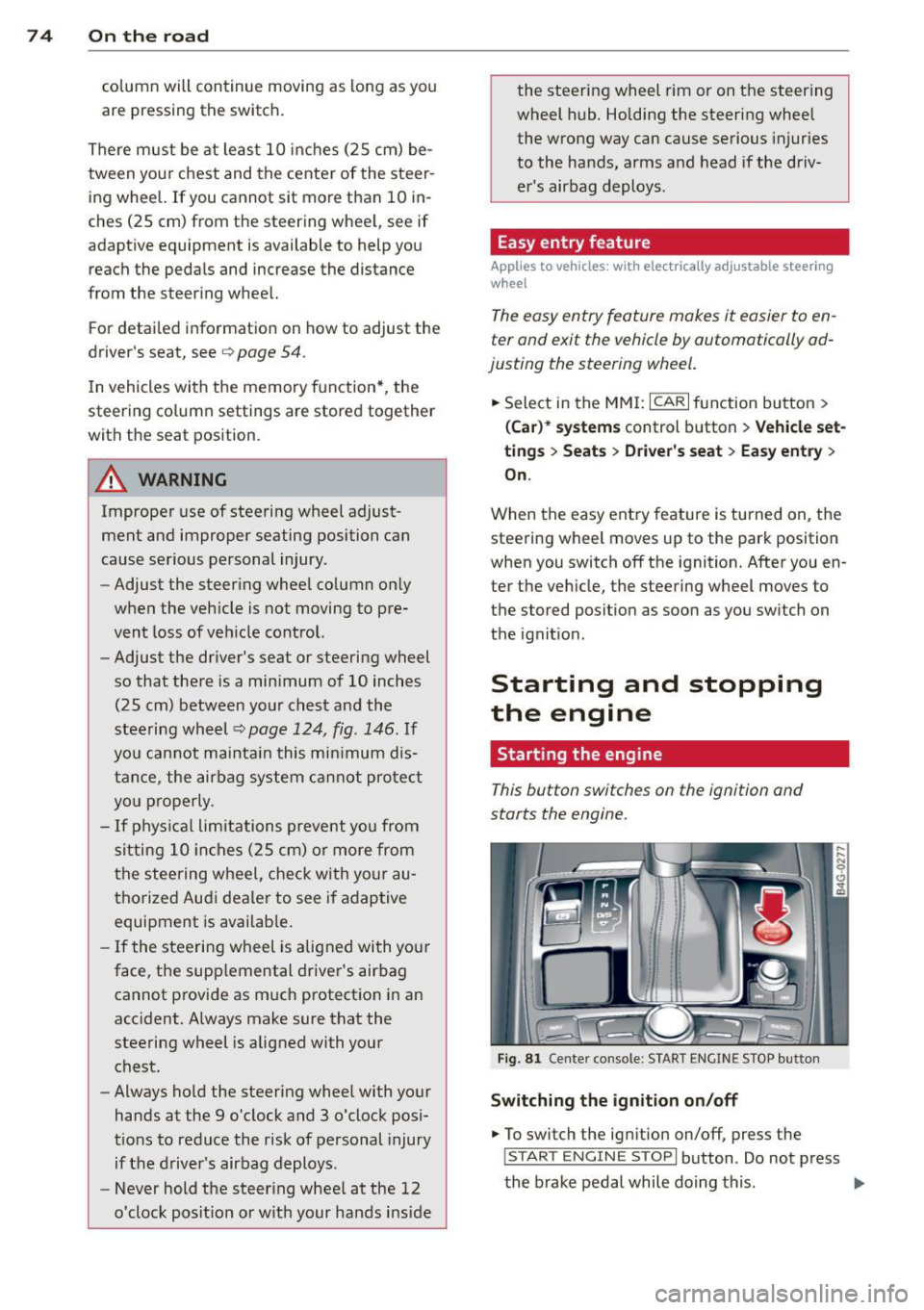
This button switches on the ignition and
starts the engine.
Fig . 81 Center console: S TART ENGINE S TOP butto n
Switching the ign ition on /off
.. To switch the ign ition on/off, press the
I STAR T ENGINE ST OPI button . Do not press
the brake pedal while doing this . .,.
Page 109 of 292
activate the parking brake and move the
selector lever to P.
- Power is sti ll transmitted to the wheels
when the engine is running at idle. To
prevent the vehicle from "creeping", you
must keep your foot on the brake when
the engine is running and the selector
lever is in D/S or R or "tiptronic" mode is
selected.
- Do not press the accelerator pedal when changing the selector lever pos ition
wh ile the vehicle is stat ionary and the
engine is running .
- Never shift into
R or P wh ile driving .
- Before driv ing down a steep slope, re -
duce your speed and shift into a lower
gear with "tiptronic".
- Do not ride the brakes or press the brake
peda l too often or too long when dr iv ing
down a hill. Constant braking causes the brakes to ove rheat and substant ially re
duces braking performance, increases
braking distance or ca uses comp lete fail
vre of the brake system .
- To prevent the vehicle from rolling back
when stopping on inclines, always hold it in place with the brake pedal or parking
brake.
- Never hold the vehic le on an incline with
a slipping clutch . The clutch opens auto
matically when it becomes too hot from
the overload. An indicator lamp
[O] illu
minates and a dr iver message appears
~ page 108 when the clutch is overload
ed .
- If the engine must remain running, never have any driv ing position engaged when
check ing under the hood.
M ake sure the
selector lever has secure ly engaged and
is locked in P with the parking bra ke set
¢ page 213 . Otherwise, any increase in
engine speed may set the vehicle in mo
t ion, even with the park ing brake ap
plied.
(D Note
- When stopping on an incline, do not try to hold the vehicle in place by pressing
Aut omat ic Tr ans missio n 107
the acce lerator pedal while a d riving gea r
is se lected. This can cause the transmis
sion to ove rheat and can damage it. Acti
vate the parking brake or press the brake peda l to prevent the vehicle from rolling .
- Allowing the vehicle to roll when the en gine is stopped and the selector lever is
in N will damage the transmission be
cause
i t is not lubricated under those cir
cumstances.
(D Tips
For safety reasons, the parking brake is re
leased automatically o nly when the driv
e r's safety belt is engaged in the buckle .
, Hill descent control
The hill descent control system assists the
driver when driving down declines .
Hill descent contro l is activa ted when these
lector lever is in D/S and you press the brake
pedal. The transmission automatically selects
a gear that is suitable for the incline . H ill de
scent cont ro l t ries to ma inta in the speed ach
ieved a t the t ime of braking, with in phys ica l
and tec hni cal lim itations. If may st ill be nec
essary to adj ust the speed with the brakes .
Hill descent contro l sw itches off once the de
cl in e leve ls out or yo u press the acce le rato r
pedal.
On vehicles with the cruise cont ro l system*
¢ page 79 , hill descent control is also activat
ed whe n the speed is set.
&_ WARNING
-
Hill descent co nt rol cannot overcome
physical lim itations, so it may not be ab le
to maintain a constant speed under a ll
conditions. A lways be ready to apply the
brakes .
Page 195 of 292

Braking
General information
What affects braking efficiency?
Operating condit ions and d riv ing hab it s
The brakes on today's automobi les are sti ll
subject to wear, depending largely on operat
ing conditions and dr iving habits
c:> A . On
vehicles that are either driven mostly in stop
and-go city traffic or are driven hard, the brake pads should be checked by your author
i zed Audi dealer more often than specified in
the
Warr ant y & Maint enan ce bookle t. Failure
to have your b rake pads inspected can res ult
i n red uced brake performance.
On steep slopes, you should use the brak ing
effect of the engine. This way, you p revent un
necessa ry wea r on the brake system.
If you
must use yo ur brakes, do not ho ld the brakes
down continuously. Pump the brakes at in ter
va ls.
Moistu re or road salt
Unde r ce rtain conditions, for example, when
driving through wate r or very heavy rain, or
even after washing your vehicle, the braking
effect can be reduced d ue to moisture (or in
freezing conditions ice) on the brake pads . A
few careful brake app lications should dry
off
the brake pads or remove any ice coatings.
When you are driving at higher speeds with
the windshield wipers on, the brake pads will
briefly touch the brake discs in regular inter
vals so as to improve reaction t ime when brak
ing on wet surfaces . You the driver w ill not no
tice anything .
The effectiveness of the brakes can be reduced
when the vehicle is dr iven on a salt-covered
road and the brakes are not used . Here too,
you should clean
off accumulated salt coat ing
from b rake discs and pads with a few careful
applications of the brake
c:> ,&. .
Cor ro sion
There may be a tendency for dirt to build up
on the brake pads and corrosion to form on
Int ellig ent technolog y 193
the d iscs if the car is not driven regu larly or
only for short trips with litt le use of the
brakes.
If the brakes a re not used frequently, o r if cor
rosion has formed on the discs, it is adv isable
to clean
off the pads and discs by braking
firmly a few times from a moderately high
speed
c:> ,&. .
Fault s in the brak e syste m
If you shou ld notice a sudden increase in
brake pedal trave l, then one of the two brake
circuits may have fai led ¢
A.
Low brake fluid lev el
Malfunctions can occu r in the bra ke system if
the b rake fluid level is too low. The brake flu id
level is monitored elec tronica lly.
Brake booster
The brake booster works with vacuum pres
su re which is created only whe n the engine is
runn ing ¢,&. .
Brake lining we ar s tatus
Brake lining wear may be checked by visual in
spection of the condition of the brake pads
through the open ings in the w heel. If neces
sary, the wheel may be removed fo r thi s in
spe ction ¢
page 2 54, Changing a wheel.
_& WARNING
-You should perform braking maneuvers
for the purpose of cleaning the brake system only if road conditions permit .
Other road users must not be put at risk -
you may ca use an accident!
- Before descend ing a steep grade, reduce
speed and sh ift transmission into a lower
gear or lower dr iving range. Do not ride
the brakes or hold the pedal down too long or too often . Th is could cause the
brakes to get hot and diminish braking
efficiency.
- Do not " ride the brakes" by rest ing your
foot on the pedal when you do not intend
to b rake. This may cause the brakes to
•
•
Page 201 of 292
Avoid damaging the
vehicle
When you are driving on poor roads, or over
curbs, steep ramps, etc., make certain that
low-lying parts such as spoilers and exhaust
system parts do not bottom out and get dam
aged.
T his is especially true for vehicles with low
slung chassis (sports chassis) * and fully load
ed veh icles .
Driving through water
on roads
Note the following to avoid vehicle damage
when driving through water, for example on
flooded roads:
- T he water must not be any h igher than the
bottom of the veh icle body.
- Do not d rive faster than wa lking speed.
..&, WARNING
After driving through wate r, m ud, slush,
etc., the brakes may be slow to take effect
because o f wet brake rotors and pads . Dry
the brakes first by braking carefully to re
store the full braking effect.
(D Note
- Vehicle components such as the eng ine,
transmission, suspension or e lectrical
system can be severely damaged by driv ing through water.
- Check the depth o f the water before driv
ing through it.
- Do not s top the veh icle, drive in reverse
or switc h the engine off when driving
through water.
- Keep in mind that oncoming vehicles may create waves that raise the water
level and make it too deep for your vehi
cle to drive through safely.
- Avoid driving thro ugh sa lt water because
it can ca use corrosion.
-
Dri vin g and en vironm ent 199
Warming up and
cooling down
By carefully warming up and cooling down
your vehicle, you can help ensure that it is not
overstressed unnecessar ily during sporty dr iv
ing.
When warming up, the vehicle is dr iven at a
maximum engine speed of 6000 RPM in order
to raise the engine o il temperature to a mini
mum of 140
°F (60 °() . The t ires a lso on ly
reach the ir full road holdi ng capabi lity once
they have warmed up.
The cooli ng fan can cont inue to run in your ve
hicle after the engine is switched off . Howev
er, driving the veh icle to coo l it down is pa rti c
ul arly important. Dur ing spo rty driving , the
engine and b rakes, the exhaust system, and
the transmission a ll become extremely hot.
Before you park the vehicle, you should drive
it for a few miles/kilometers at light load in
the low rpm range to allow it to cool down .
Catalytic converter
App lies to vehicles: wi th gaso line e ngi ne
It is very important that your emission con
trol system (catalytic converter) is function
ing properly to ensure that your vehicle is run
ning in an environmentally sound manner.
"' Always use lead-free gasoline c:> page 208,
Fuel supply .
"' Never run the tank down all the way to emp
ty.
"' Never put too much mo to r o il in yo ur eng ine
c:> page 218, Adding engine oil "t:::r..
"' Never try to push -or tow -start you r vehicle .
T he catalytic co nve rter is an efficient "clean
u p" dev ice bui lt into t he exhaus t system of
the ve hicle . The cata lytic converter bu rns
many of the pollutants in the exha ust gas be
fore they are re leased into the atmosphere.
T he exclus ive use of unleaded fuel is c ritical ly
i mportant for the life of the catalyt ic convert -
er and proper functioning of the engine .
Iii>
•
•